EmailVerify.io vs Findymail: Which Email Tool Wins in 2026?
One verifies lists, the other finds and verifies leads. Here's how EmailVerify.io and Findymail actually compare on accuracy, pricing, workflow fit — and which one belongs in your outbound stack.
EmailVerify.io vs Findymail is a choice between two different jobs. One tool cleans a list you already own. The other builds the list in the first place.
TL;DR
They are not the same product. EmailVerify.io is a bulk email verification service. Findymail is a finder-first tool that pulls leads from LinkedIn and Sales Navigator, then verifies them.
If you already have a list, a dedicated verifier is cheaper per record. If you have zero contacts, a verifier gives you nothing to send to.
Findymail's edge is LinkedIn and Sales Nav list exports, plus a "verified or you don't get charged" credit model. Its weakness is cost per lead once you pass a few thousand contacts a month.
EmailVerify.io's edge is throughput on cheap pay-as-you-go credits. Its weakness is that it is one step in a pipeline, not the pipeline.
The practical answer for most teams: use one platform that finds and verifies. You stop paying two vendors. You stop merging two CSVs. That is where a combined email finder plus email verifier stack wins on both cost and cycle time.
Most "EmailVerify.io vs Findymail" comparisons treat these as two flavours of the same thing. They aren't. Miss that, and you buy a verifier when the real problem is an empty CRM. Or you buy a finder when the real problem is a 22% bounce rate on a list you bought last year.
This EmailVerify.io vs Findymail breakdown covers what each tool does, where each one breaks, and what a usable contact really costs. You should be able to decide in about five minutes.
What is EmailVerify.io and what does it actually do?#
EmailVerify.io (emailverify.io) is an email validation service. You give it a list by CSV upload, API call, or integration. It returns a status for each address: valid, invalid, catch-all, disposable, role-based, or unknown.
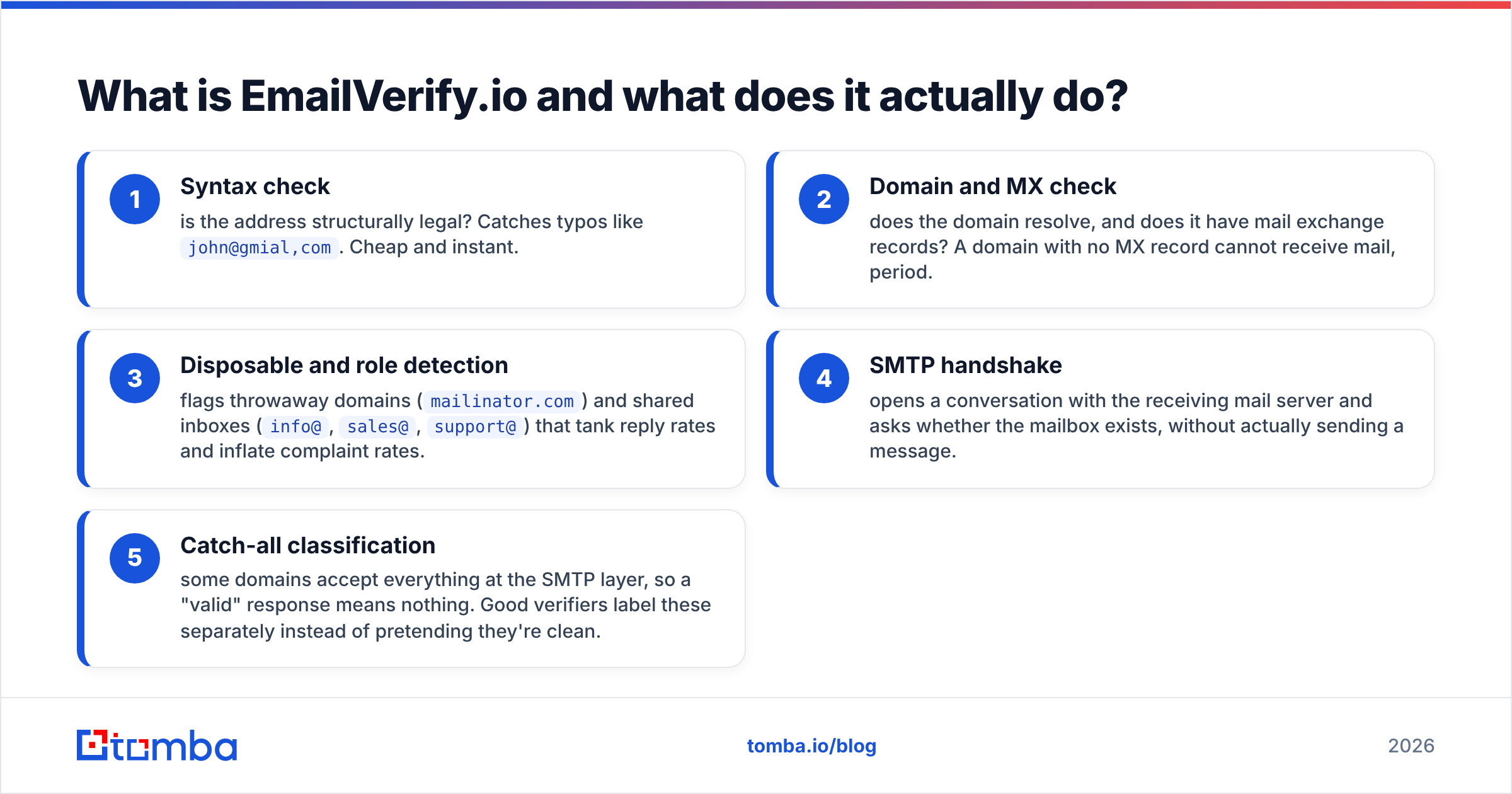
Under the hood, a verifier runs a chain of checks:
- Syntax check — is the address structurally legal? This catches typos like
john@gmial,com. It is cheap and instant. - Domain and MX check — does the domain resolve, and does it have mail exchange records? A domain with no MX record cannot receive mail at all.
- Disposable and role detection — flags throwaway domains (
mailinator.com) and shared inboxes (info@,sales@,support@). Both tank reply rates and raise complaint rates. - SMTP handshake — opens a conversation with the receiving mail server and asks whether the mailbox exists. No message is sent.
- Catch-all classification — some domains accept every address at the SMTP layer, so a "valid" response means nothing. Good verifiers label these separately.
Step five is where verification providers separate. A vendor that marks every catch-all as "valid" looks great on paper and burns your domain in production. That is why a dedicated catch-all verifier matters. Catch-all domains are common in mid-market and enterprise, which is where your best-fit accounts live.
What EmailVerify.io does not do: give you addresses you didn't already have. It is a filter, not a source.

What is Findymail and who is it built for?#
Findymail (findymail.com) sits on the other end of the pipeline. It is a B2B email finder built for cold outbound teams. The workflow centres on LinkedIn and Sales Navigator: export a saved search, and Findymail enriches those profiles with work emails.
Three things define its positioning:
- List export from LinkedIn and Sales Navigator. This is the headline feature. You go from a saved search to an enriched CSV without a separate scraper.
- Verification bundled into the find. Findymail only returns emails it believes are deliverable, and it does not charge credits for addresses it cannot verify.
- Outbound-tool integrations. It pushes cleanly into sequencers like Instantly, Lemlist, and Smartlead, so the lead lands where the sending happens.
The tradeoff is that you buy a bundled outcome. You pay per found contact, not per checked contact. Those two prices are an order of magnitude apart.

EmailVerify.io vs Findymail: which one is better?#
Wrong question, but here is the answer anyway. It depends on one thing: is your bottleneck list quality or list existence?
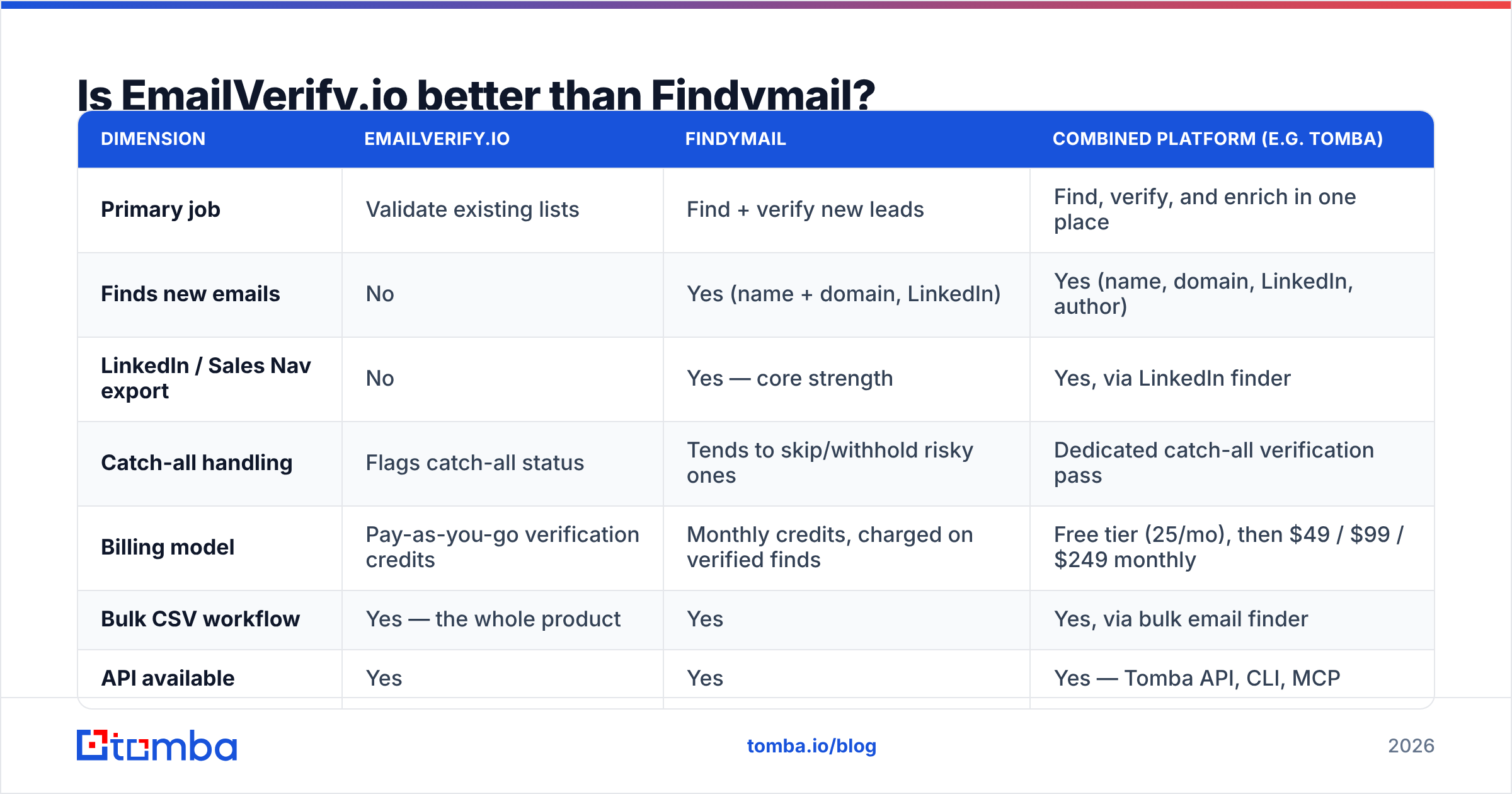
| Dimension | EmailVerify.io | Findymail | Combined platform (e.g. Tomba) |
|---|---|---|---|
| Primary job | Validate existing lists | Find + verify new leads | Find, verify, and enrich in one place |
| Finds new emails | No | Yes (name + domain, LinkedIn) | Yes (name, domain, LinkedIn, author) |
| LinkedIn / Sales Nav export | No | Yes — core strength | Yes, via LinkedIn finder |
| Catch-all handling | Flags catch-all status | Tends to skip/withhold risky ones | Dedicated catch-all verification pass |
| Billing model | Pay-as-you-go verification credits | Monthly credits, charged on verified finds | Free tier (25/mo), then $49 / $99 / $249 monthly |
| Bulk CSV workflow | Yes — the whole product | Yes | Yes, via bulk email finder |
| API available | Yes | Yes | Yes — Tomba API, CLI, MCP |
| Best for | Cleaning inherited or purchased lists | LinkedIn-sourced cold outbound | Teams that want one vendor for both |
| Weak spot | Zero sourcing capability | Cost per lead at volume | Fewer native sequencer features than a sender |
Read that table as a decision tree, not a scoreboard. Say you inherited a 60,000-row list from a departed SDR and your bounce rate is scary. A verifier solves that for a few dollars. If your CRM is empty, no verifier on earth will fill it.
EmailVerify.io vs Findymail pricing: how do the models compare?#
This is where most buyers get surprised, so be precise about units.
Verification credits and finder credits are not comparable line items. Verification costs fractions of a cent per record at volume. You are paying for a DNS lookup and an SMTP handshake. Finding costs cents to dimes per record, because you are paying for a data graph, pattern inference, and a verification pass on top.
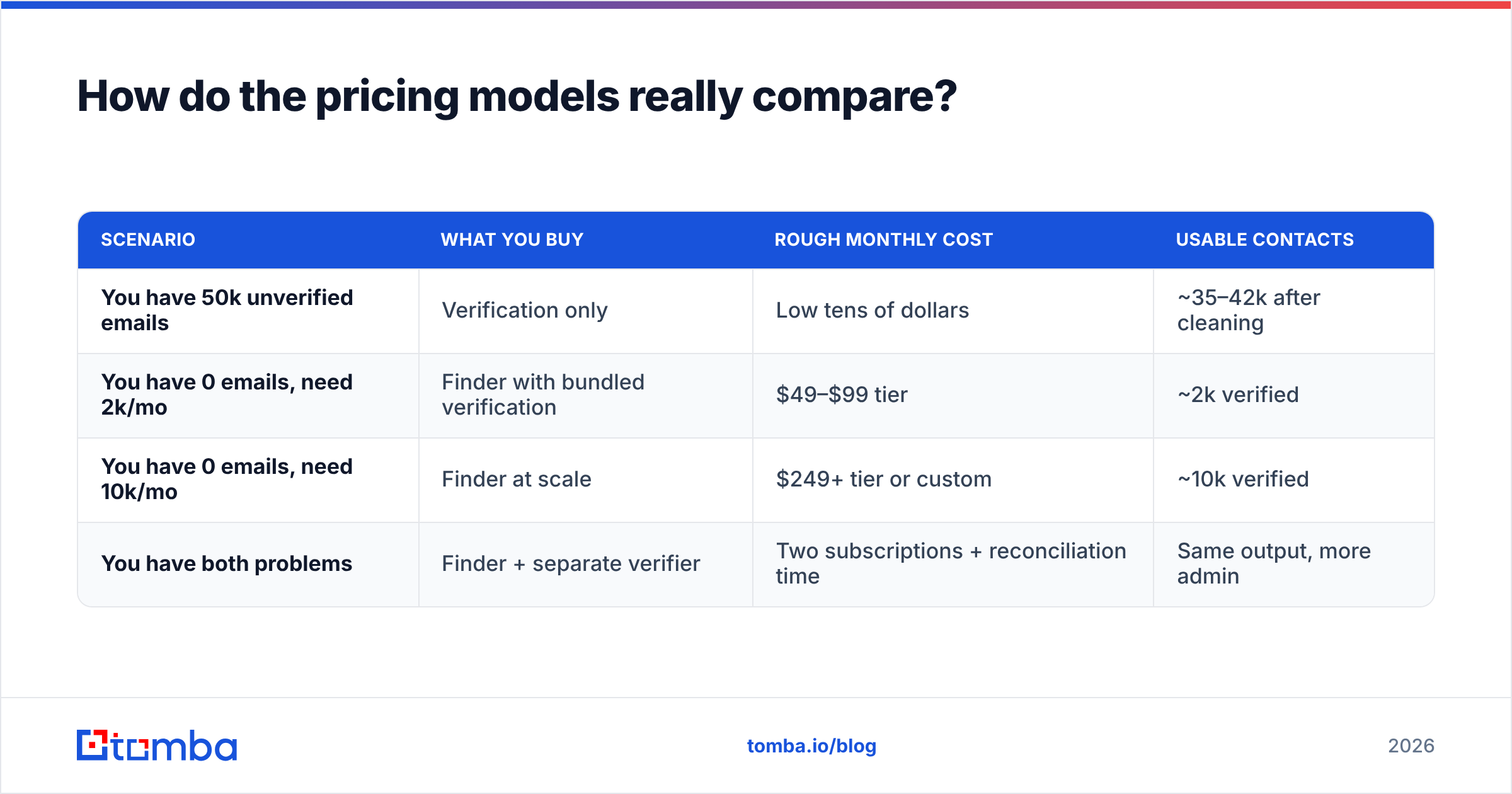
Here is the shape of the math, in round numbers:
| Scenario | What you buy | Rough monthly cost | Usable contacts |
|---|---|---|---|
| You have 50k unverified emails | Verification only | Low tens of dollars | ~35–42k after cleaning |
| You have 0 emails, need 2k/mo | Finder with bundled verification | $49–$99 tier | ~2k verified |
| You have 0 emails, need 10k/mo | Finder at scale | $249+ tier or custom | ~10k verified |
| You have both problems | Finder + separate verifier | Two subscriptions + reconciliation time | Same output, more admin |
Pricing on both vendors moves, so treat those bands as shape rather than quotes. Check the vendor pages before you buy. The structural point does not move: paying two vendors for two halves of one job is the most expensive setup on the list. It is also the one most teams drift into by accident.
For reference, Tomba pricing runs a free tier at 25 searches a month, Starter at $49, Growth at $99, and Pro at $249, plus custom Enterprise. Finding, verification, catch-all checks, and enrichment all draw from the same account, so you get one invoice instead of two.

What about accuracy — whose numbers should you trust?#
Nobody's marketing number. Not Findymail's, not EmailVerify.io's, not Tomba's.
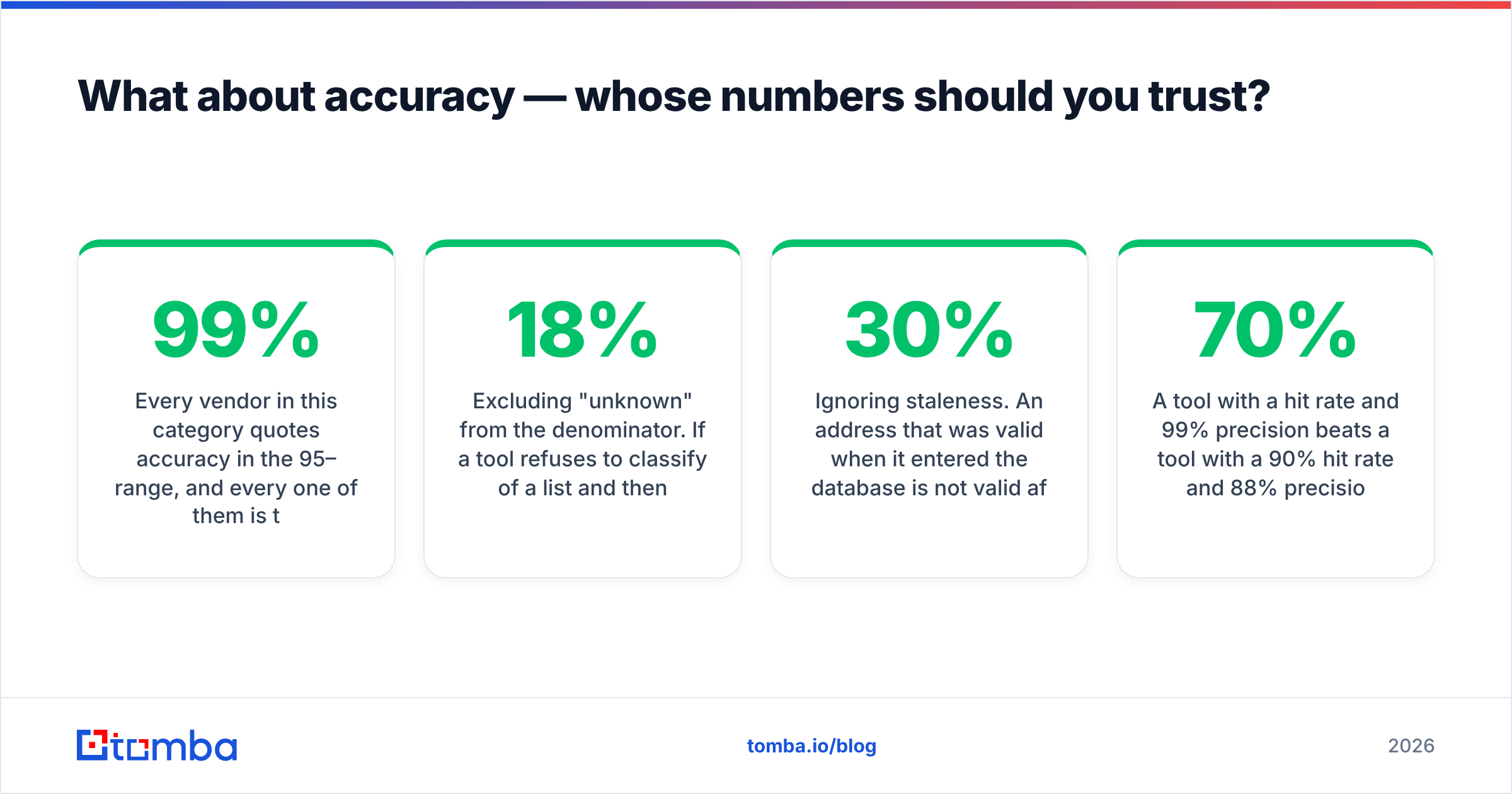
Every vendor here quotes accuracy in the 95–99% range. Every one of them is technically telling the truth about the subset of records they chose to report on. The reporting games are easy to spot once you know them:
Excluding "unknown" from the denominator. A tool refuses to classify 18% of a list, then reports 98% accuracy on the rest. Real coverage is much worse than the headline.
Counting catch-all as valid. This inflates any accuracy claim on day one. It shows up as bounces four days into a campaign.
Testing on easy domains. SMB Google Workspace domains are trivial to verify. Enterprise domains behind Proofpoint, Mimecast, or aggressive greylisting are not. A benchmark on the first tells you nothing about the second.
Ignoring staleness. An address that was valid on entry is not valid after the contact changes jobs. B2B contact data decays roughly 25–30% a year, depending on the segment. Gartner research on data quality has made this point to revenue teams for years.
The only benchmark that matters is your own. Take 300 contacts you can confirm yourself: customers, partners, or people already in your CRM with reply history. Strip them to name and domain. Run them through each tool blind. Then measure three things: hit rate, precision, and honest-unknown rate.
Here is why precision wins an EmailVerify.io vs Findymail test. A tool with a 70% hit rate and 99% precision beats a tool with a 90% hit rate and 88% precision. The second one just handed you 108 bounces per thousand sends. That is sender reputation damage you will spend a month repairing.
When should you pick each one?#
Pick a dedicated verifier like EmailVerify.io when:
- You have a large existing list of unknown quality: an acquisition, a trade-show scrape, a dormant CRM segment.
- You already source leads elsewhere, such as in-house scrapers, a data partner, or a B2B database, and you just need a deliverability gate before the sequencer.
- Cost per checked record is your target and volume is high.
Pick Findymail when:
- LinkedIn Sales Navigator is your main prospecting surface and you want the shortest path from saved search to enriched CSV.
- You want one credit charged only when a usable email comes back, and you value that over raw unit cost.
- Your volumes sit in the low thousands per month, where the premium per lead is affordable.
Pick a combined find-and-verify platform when:
- You need sourcing and validation, and you don't want two contracts, two credit balances, and a manual CSV merge in between.
- Your inputs are mixed: some domains, some names, some LinkedIn URLs, some article bylines.
- You want the same data in the API, a spreadsheet, and the CRM, so RevOps isn't the bottleneck for every list request.
That last case is more common than most teams admit. Sales wants LinkedIn lists. Marketing wants domain-level sweeps for ABM. RevOps wants a nightly enrichment job against the CRM. One vendor covering domain search, data enrichment, and verification handles all three, with no Zapier chain holding it together.
What does a sane workflow look like end to end?#
Whichever tools you land on, the sequence should look like this:
Define the account list first. Firmographics, tech stack, headcount band, trigger events. Sourcing emails before you define fit is how you verify 40,000 addresses you should never have mailed. Filter accounts, then find people.
Find contacts at those accounts. By domain for account-based sweeps, by name for named targets, by LinkedIn URL when the profile is your starting point. Save the source and the confidence score on every record.
Verify before the first send, always. Do it even when a finder claims the addresses are pre-verified. Verification is cheap. Bounces are not. The record may also have aged in your CRM since it was found.
Route catch-all domains separately. Don't discard them and don't blast them. Send from a secondary domain, in smaller batches, and watch the bounce rate. Many of your best accounts live here.
Re-verify on a schedule. Quarterly for active segments, and before every major campaign for dormant ones. Decay is continuous, so your hygiene should be too.
Watch bounce rate as a leading indicator. If it crosses 2–3% on a send, stop the campaign and re-verify. Mailbox providers act on trend lines faster than most senders react. Peer reviews on G2 flag this as the line between teams that scale outbound and teams that keep rebuilding domains.
Step 3 is the one teams skip when they pay a finder that promises verified output. Don't skip it. That fraction of a cent per record is the cheapest insurance in the stack.
The honest EmailVerify.io vs Findymail verdict#
Both tools are competent at the job they were built for, and neither one is the whole job.
EmailVerify.io is a good pick if list hygiene is your only gap and your sourcing motion already works. Findymail is a good pick if LinkedIn is your funnel and you are happy paying a premium per lead for a clean export-to-sequencer path. It is a genuinely well-built tool for that specific motion.
But if you are running an EmailVerify.io vs Findymail comparison at all, that usually means you need both halves. Buying two subscriptions is the expensive way to get there. Check whether one platform can cover sourcing, verification, catch-all handling, and enrichment on a single credit pool first.
Whatever you choose, run the 300-contact blind test on your own ICP before you sign anything annual. Vendor accuracy claims are marketing. Your bounce rate is data.
Ready to stop paying two vendors for one workflow? The Tomba Email Finder finds work emails by name, domain, LinkedIn profile, or bulk upload. It runs verification and catch-all checks on the same credits, so the address that reaches your sequencer is one you can actually send to. Start on the free tier with 25 searches a month. Test it against your own known-good list, and upgrade only if the numbers hold up.
Related guides#
Ready to find emails that actually work?
Join 150,000+ professionals who stopped guessing and started sending. Free credits on signup — no credit card required.
Get the Tomba newsletter
Practical outbound tactics and product updates — once every two weeks.
About the author