EmailVerify.io vs Salesbot: Which Tool Fits Your 2026 Stack
EmailVerify.io scrubs bad addresses. Salesbot automates the conversation. They solve different halves of the same pipeline problem — here's which one you actually need first, and what happens if you skip either.
TL;DR — EmailVerify.io vs Salesbot in 30 seconds
- EmailVerify.io vs Salesbot is not a real head-to-head. One checks whether an address is safe to mail. The other works leads that are already in your CRM.
- Bounce rate above 3%? A verifier fixes that. Replies dying in the inbox? A sales bot fixes that. Buy the wrong one and you lose a quarter.
- "Salesbot" is not one product. The best-known one is Kommo's Salesbot, a no-code chatbot builder inside its CRM. Other vendors reuse the name, so check which tool a comparison page means.
- Verification is cheap and non-negotiable. Conversation automation is costly and optional. Spend in that order.
- Neither tool finds contacts. If your list is too small, you need an email finder plus verification in one pass — not a chatbot.
What are you actually comparing when you search "EmailVerify.io vs Salesbot"?#
Two tools that touch the same funnel at opposite ends. This comparison exists because both names show up in "cold email tools" lists. No buyer ever picks between them on features.
Here's the split, mapped to the stage each one owns:
- Data acquisition — sourcing the address in the first place. Neither tool does this. A finder, a scraper, or a bought list does.
- Data hygiene — is that address real, deliverable, a role account, a spam trap, or a catch-all coin flip? This is EmailVerify.io's whole job.
- Delivery — the actual send: warmed domains, SPF/DKIM/DMARC in place, sane volume ramps. Your sending platform owns this, not either tool.
- Conversation — replying, qualifying, routing, booking. This is where Salesbot-style automation lives. Trigger-based flows answer inbound messages, ask qualifying questions, and move a deal card.
- Pipeline hygiene — stale deals, no-shows, follow-up nudges. Salesbot territory again, if it's the CRM-embedded kind.
Confuse stage 2 with stage 4 and you get the classic failure. A well-scripted bot fires at addresses that were never valid. It burns your sender reputation while the dashboard still reports "automation active."

What is EmailVerify.io and what does it actually check?#
EmailVerify.io sits in the email verification category, next to ZeroBounce, NeverBounce, Bouncer, and Debounce. You can cross-shop all of them on the G2 email verification category page. The product shape is the same across the category, so it's easy to judge. You upload a list or call an API, and each address comes back with a status.
A competent verifier runs a stack of checks in sequence:
- Syntax and RFC validation — malformed addresses die here, for free.
- Domain and MX record checks — does the domain exist, and does it accept mail at all? Parked domains and dead startups get caught.
- Disposable domain detection — mailinator-style throwaways get flagged.
- Role account detection —
info@,sales@,support@. They deliver, but they rarely help one-to-one outbound, and they often trigger complaints. - SMTP handshake — a quiet chat with the receiving mail server that asks "does this mailbox exist?" No message is sent.
- Catch-all identification — some domains accept everything, so SMTP can't give a straight answer.
That last one is where verifiers split apart. A domain that accepts all mail comes back as "unknown" or "accept-all." Most tools stop there and hand you the risk. About a fifth of B2B domains in a typical enterprise list behave this way. So a fifth of your list lands in a bucket labeled "your problem now." Tools with a dedicated catch-all verifier go further. They use pattern confidence and secondary signals instead of shrugging.
Pricing here is credit-based and cheap. Pay-as-you-go packs and monthly plans work out to single-digit dollars per thousand verifications at volume. Check the vendor's current page before you budget, because verification pricing moves often.
What is Salesbot, and why is the name confusing?#
Be careful here. "Salesbot" is a generic name attached to several unrelated products. The most established one is Kommo's Salesbot. It's a visual, no-code bot builder inside the Kommo CRM. It triggers on events — a new inbound WhatsApp message, an unanswered chat, a stage change — and runs a branching flow of messages, questions, and CRM actions.
What that class of tool does well:
- Instant first response on inbound channels. Speed matters more than almost any other outbound variable. A bot that replies in nine seconds beats a rep who replies in nine hours.
- Qualification by script — budget, timeline, headcount — with answers written back to custom fields.
- Routing and assignment so the right rep gets the right conversation.
- Follow-up nudges on deals that have gone quiet, with no human needed to remember.
- Multi-channel handling across chat, WhatsApp, Instagram DMs, and email, depending on the vendor.
What it does not do: tell you whether the 40,000 addresses in your CSV are real. A bot has no opinion on deliverability. Point automation at unverified data and you have simply automated the bounce.
Pricing for CRM-embedded bots is per seat, and much pricier than verification credits. Kommo's published tiers run from the mid-teens to the mid-forties in dollars per user per month, and bot building sits on the higher plans. A five-person team lands in the low hundreds a month. That is ten times what you would spend cleaning the same team's lists. Confirm current numbers on the vendor's pricing page, since per-seat tools reprice often.
How do EmailVerify.io and Salesbot compare side by side?#
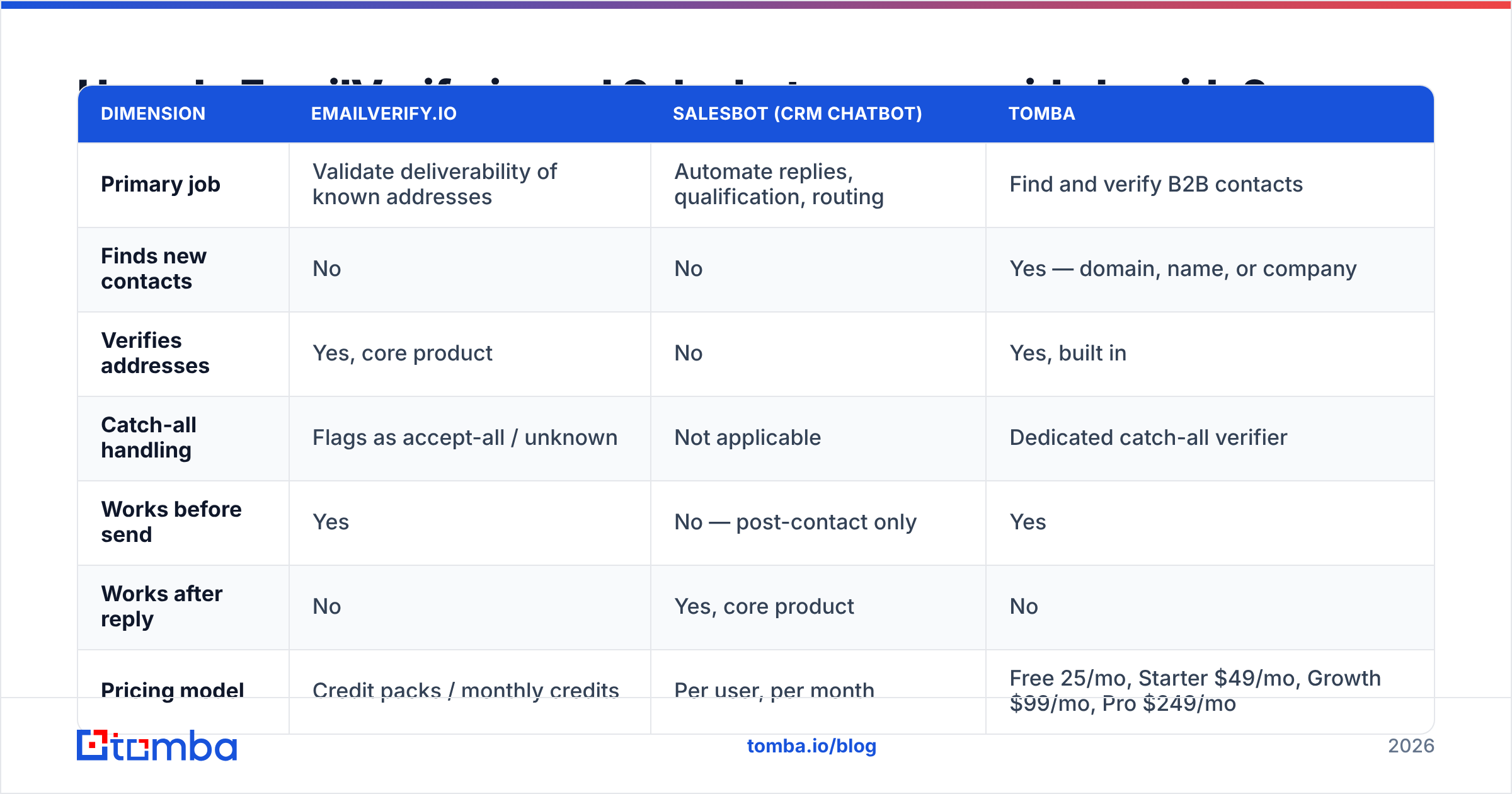
| Dimension | EmailVerify.io | Salesbot (CRM chatbot) | Tomba |
|---|---|---|---|
| Primary job | Validate deliverability of known addresses | Automate replies, qualification, routing | Find and verify B2B contacts |
| Finds new contacts | No | No | Yes — domain, name, or company |
| Verifies addresses | Yes, core product | No | Yes, built in |
| Catch-all handling | Flags as accept-all / unknown | Not applicable | Dedicated catch-all verifier |
| Works before send | Yes | No — post-contact only | Yes |
| Works after reply | No | Yes, core product | No |
| Pricing model | Credit packs / monthly credits | Per user, per month | Free 25/mo, Starter $49/mo, Growth $99/mo, Pro $249/mo |
| API access | Yes | Varies by plan | Yes — REST, CLI, MCP, Sheets, Excel |
| Best for | Cleaning bought or aging lists | Inbound-heavy teams with chat volume | Building outbound lists from scratch |
| Fixes a 12% bounce rate | Yes | No | Yes |
Read the last row twice. It is the whole comparison. These tools answer different questions. The one you need depends on which symptom you have.
Which one actually protects your deliverability?#
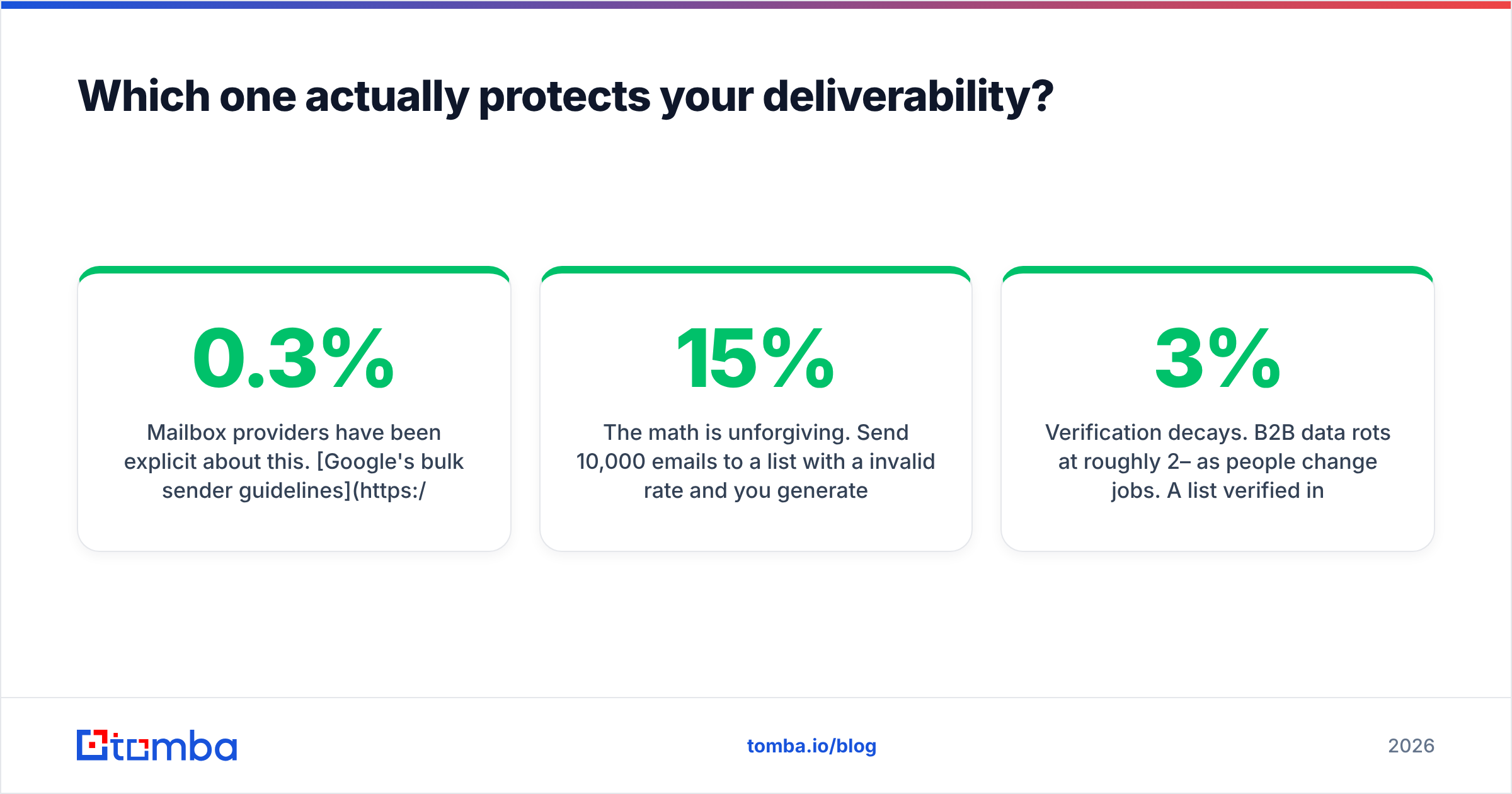
The verifier, and only the verifier. Salesbot-class tools work downstream of the mailbox provider's judgment, so they cannot shift it.
Mailbox providers have been clear about this. Google's bulk sender guidelines tell senders to keep spam complaint rates below 0.3% and to authenticate with SPF, DKIM, and DMARC. Hard bounces are the unwritten companion metric. Bounce rates above 2–3% read as a sign that you do not know who you are mailing, and the throttling that follows hits your good sends too.
The math is harsh. Send 10,000 emails to a list with a 15% invalid rate and you rack up 1,500 hard bounces in a day or two. One campaign like that can take weeks to recover from. No amount of clever bot scripting on the replies you did not get will help. Verification is the cheapest insurance in the outbound stack — a fraction of a cent per address, against a domain reputation that takes months to rebuild.
Two more deliverability truths worth internalizing:
- Verification decays. B2B data rots by roughly 2–3% a month as people change jobs. A list verified in January is clearly worse by June. Re-verify before every big send, not once at import.
- Role accounts are a complaint machine. They deliver, so a naive verifier passes them. They are also read by people who never opted in, so they complain far more often than personal addresses. Filter them out separately.
Do you still need a verifier if you already run a sales bot?#
Yes, and the dependency runs one way. A verifier makes a bot more effective. A bot does nothing for verification.
Think of it like a restaurant. Verification is checking that the ingredients have not spoiled. The bot is the host who greets guests and takes orders. Great service does not rescue spoiled food. It just serves it faster, to more people, with a smile.
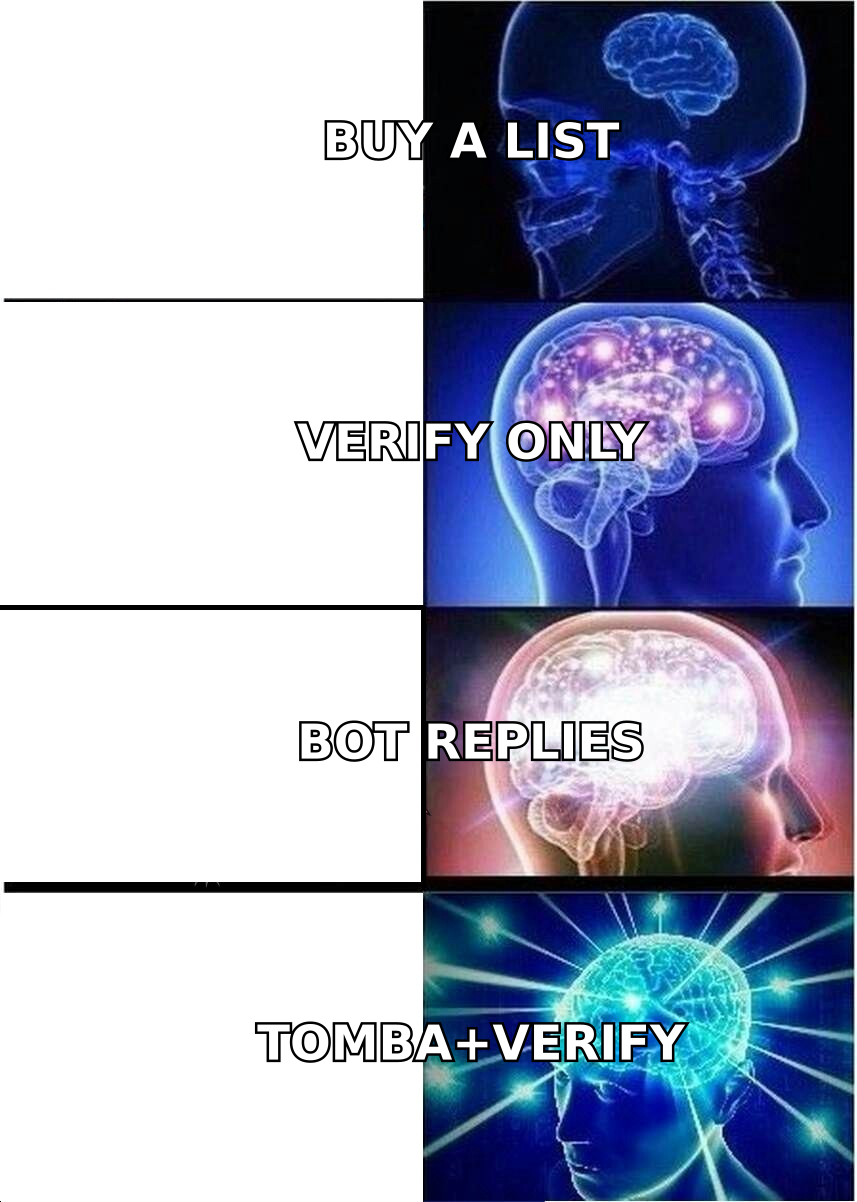
In practice, running both in the right order looks like this:
- Source contacts with an email finder or domain search instead of buying a static list.
- Run every address through an email verifier before it enters your sending tool, and resolve catch-alls separately rather than cutting them all.
- Suppress role accounts, disposables, and anything the verifier flags as risky.
- Send from a warmed domain with authentication in place, at a volume your reputation can carry.
- Let the bot handle the replies — instant reply, qualifying questions, calendar link, CRM write-back.
Skip step 2 and steps 3 through 5 inherit the damage.
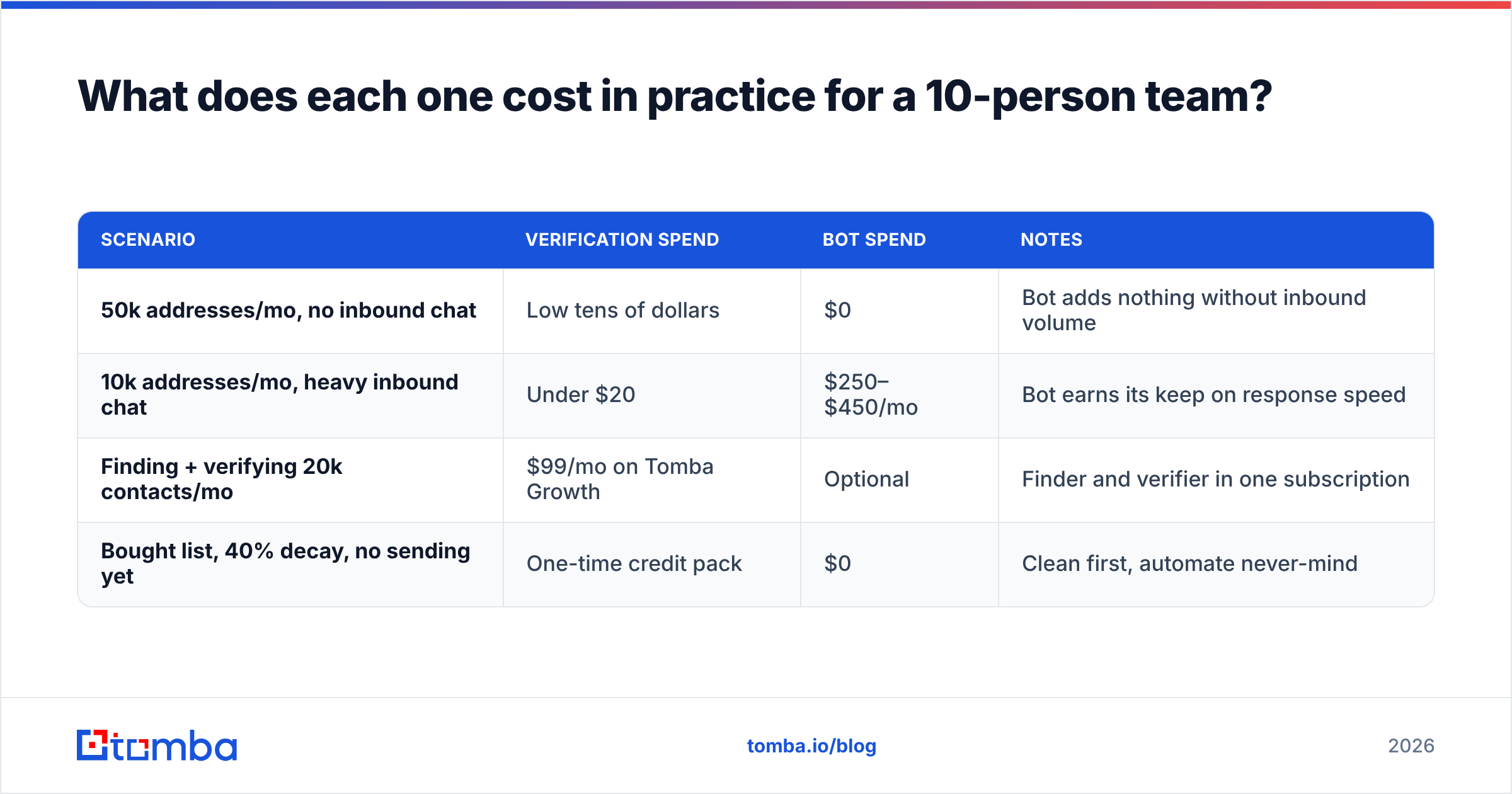
What does each one cost in practice for a 10-person team?#
| Scenario | Verification spend | Bot spend | Notes |
|---|---|---|---|
| 50k addresses/mo, no inbound chat | Low tens of dollars | $0 | Bot adds nothing without inbound volume |
| 10k addresses/mo, heavy inbound chat | Under $20 | $250–$450/mo | Bot earns its keep on response speed |
| Finding + verifying 20k contacts/mo | $99/mo on Tomba Growth | Optional | Finder and verifier in one subscription |
| Bought list, 40% decay, no sending yet | One-time credit pack | $0 | Clean first, automate never-mind |
The pattern is simple. Verification is a rounding error. Conversation automation is a real line item, and it only pays off when there is conversation to automate. If your inbound channels are quiet, a Salesbot license bets on demand you have not created yet.
Note what a bundled provider changes. A finder that verifies inline collapses two vendors, two credit systems, and two integrations into one. That is why Tomba pricing includes verification instead of metering it separately. Standalone verifiers are excellent at their one job. The question is whether you want that job on a separate invoice.
Which should you buy first?#
Buy verification first if: your bounce rate is above 3%, you bought or inherited a list, your CRM holds data older than six months, you are about to warm a new domain, or a sending account has been throttled.
Buy a sales bot first if: you get real inbound message volume on chat or social, your median first-response time runs into hours, reps type the same three qualifying questions all day, and your bounce rate is already under 2%.
Buy neither, and buy a finder, if: your problem is list size, not list quality. No verifier can validate contacts you do not have. No bot can qualify prospects who never got an email. Tools that pair discovery with validation — plus a catch-all finder and enrichment for the fields your sequences personalize on — fix the upstream problem the other two categories assume away.
Here is the uncomfortable version of the answer. Most teams searching "EmailVerify.io vs Salesbot" have a data problem dressed up as a tooling problem. They compare a scrubber to a chatbot because both showed up in the same blog post. The real constraint is that nobody knows where the next 5,000 qualified contacts come from.
What's the fastest way to fix a bad list this week?#
Work backwards from the symptom, and automate nothing until the data is clean.
- Day 1 — Export your active sending list and run it through verification. Segment into valid, invalid, role, and catch-all. Delete invalid. Quarantine role.
- Day 2 — Resolve the catch-all bucket properly instead of writing off 20% of your market. Pattern-confidence scoring recovers a good share of it.
- Day 3 — Check your authentication with an SPF checker and confirm DKIM and DMARC are aligned. Verification without authentication is half a fix.
- Day 4 — Rebuild the gaps. For every account you care about but have no contact for, run a domain search to pull the right role holders and their verified addresses.
- Day 5 — Wire it up. Push clean, enriched contacts into your CRM with the Tomba API or a native integration, so the pipeline stays clean instead of decaying again.
Then, and only then, decide whether a bot should handle the replies.
Where does Tomba fit between these two?#
Upstream of both. EmailVerify.io answers "is this address real?" Salesbot answers "what do I say when they reply?" Tomba answers the question that comes first: "who should I email, and what is their address?"
The Tomba Email Finder finds work email addresses by domain, name, or company. It verifies them in the same pass. Then it pushes them wherever your outbound lives — Sheets, Excel, HubSpot, Salesforce, or straight through the API. The free tier gives you 25 searches a month, so test accuracy against a list you already know. That is the only benchmark worth trusting. Starter is $49/mo, Growth $99/mo, and Pro $249/mo when volume justifies it.
Run that test before you buy either tool in this comparison. If the finder returns verified contacts you did not have, you will see much more clearly which of the other two you need — and in what order.
Related guides#
Ready to find emails that actually work?
Join 150,000+ professionals who stopped guessing and started sending. Free credits on signup — no credit card required.
Get the Tomba newsletter
Practical outbound tactics and product updates — once every two weeks.
About the author