Emailverifyio vs Wiza: Verification vs Lead Data in 2026
One tool cleans lists, the other builds them from LinkedIn. Here is how Emailverify.io and Wiza actually compare on accuracy, pricing, coverage, and workflow fit in 2026.
Emailverifyio vs Wiza comes up in every outbound tooling thread. The framing is usually off. One tool cleans the lists you already have. The other builds new ones from LinkedIn. Here is how they compare on accuracy, price, and workflow fit in 2026.
TL;DR
- Emailverifyio vs Wiza is not a like-for-like fight. Emailverify.io cleans email lists you already have. Wiza builds lists out of LinkedIn and Sales Navigator searches.
- If your bounce rate is the problem, Emailverify.io is the cheaper fix. If your pipeline is empty, Wiza is the one that fills it.
- Wiza costs more per contact. You pay for discovery plus verification. Emailverify.io is priced per check and scales down to almost nothing on small lists.
- Neither tool covers the full loop alone. Wiza is LinkedIn-shaped. Emailverify.io has no sourcing at all. Most teams end up paying two invoices.
- A consolidated platform like Tomba runs discovery, verification, and enrichment on one credit pool from $49/mo. That is usually cheaper than stacking a scraper and a verifier.
Emailverifyio vs Wiza: what does each tool actually do?#
They get compared constantly in "email tool" roundups, which is misleading. They sit at opposite ends of the same pipeline.
Emailverify.io is a bulk email verification service. You upload a CSV, or hit the API, and it returns a deliverability verdict per address: valid, invalid, catch-all, disposable, role-based, unknown. Under the hood it runs syntax checks, MX record lookups, SMTP handshakes, and disposable-domain matching. It does not find you a single new contact. Its job starts the moment you already have addresses.
Wiza is a LinkedIn-native prospecting tool. You run a search in LinkedIn or Sales Navigator, hit the Wiza extension, and it exports the result set as a contact list with work emails, personal emails, and phone numbers on higher tiers. Wiza verifies the emails it finds in real time before charging you a credit. That is where the confusion comes from: Wiza does verify, but only the addresses it discovered itself.
So the honest framing of emailverifyio vs wiza is not "which is better." It is "which half of the problem do you have right now?"
Here is the split in one line. Wiza answers who do I email? Emailverify.io answers will this email land?
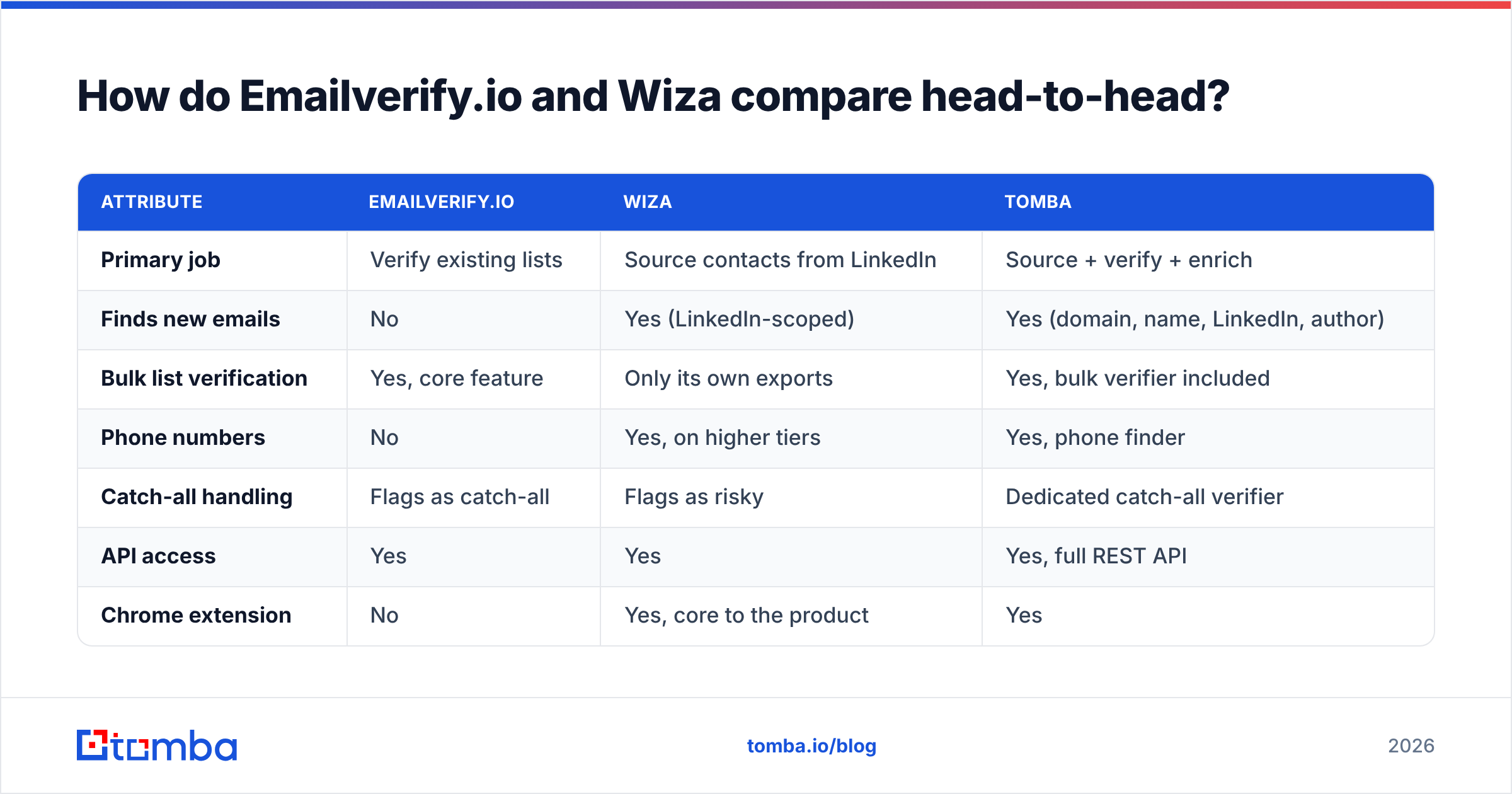
Emailverifyio vs Wiza: the head-to-head table#
| Attribute | Emailverify.io | Wiza | Tomba |
|---|---|---|---|
| Primary job | Verify existing lists | Source contacts from LinkedIn | Source + verify + enrich |
| Finds new emails | No | Yes (LinkedIn-scoped) | Yes (domain, name, LinkedIn, author) |
| Bulk list verification | Yes, core feature | Only its own exports | Yes, bulk verifier included |
| Phone numbers | No | Yes, on higher tiers | Yes, phone finder |
| Catch-all handling | Flags as catch-all | Flags as risky | Dedicated catch-all verifier |
| API access | Yes | Yes | Yes, full REST API |
| Chrome extension | No | Yes, core to the product | Yes |
| Free tier | Limited trial credits | Small monthly credit grant | 25 searches/mo |
| Entry paid price | Pay-as-you-go, low | Roughly $83–$99/mo | $49/mo Starter |
| Best for | Cleaning purchased or aged lists | LinkedIn-first SDR teams | Teams who need both halves |
Read the table as a workflow diagram, not a scoreboard. The row that matters most is "finds new emails." That single capability is why Wiza costs several times more per contact than a verifier does.

Which tool is more accurate in an emailverifyio vs wiza test?#
Accuracy means two different things for these two tools, and vendors exploit that ambiguity.
For Emailverify.io, accuracy is classification accuracy. When it says an address is valid, does the server actually accept mail? Verifiers are judged on two errors. False positives are bad addresses marked good, and they cause bounces. False negatives are good addresses marked bad, and they quietly delete real prospects from your list.
Most reputable verifiers land in the 95–98% range on clean test sets, and Emailverify.io performs in that band on standard corporate domains. Every SMTP-based verifier struggles with catch-all domains, which accept mail for any local part and therefore reveal nothing.
For Wiza, accuracy is discovery accuracy. Of the profiles you asked it to enrich, how many returned a real, working email? Wiza publishes a strong hit rate on Sales Navigator exports and only bills credits for contacts it considers verified. That is a genuinely fair pricing model.
But hit rate varies hard by segment. Enterprise North American SaaS profiles resolve well. European SMBs, agencies with generic inboxes, and anyone using a privacy-forward provider resolve much worse.

The trap: a high Wiza hit rate does not mean your final send list is clean. Contacts age. A verified email from a March export can be dead by August because the person changed jobs.
That is why teams running Wiza still run a separate email verifier pass right before a campaign launches. It is also why the two tools coexist in so many stacks.
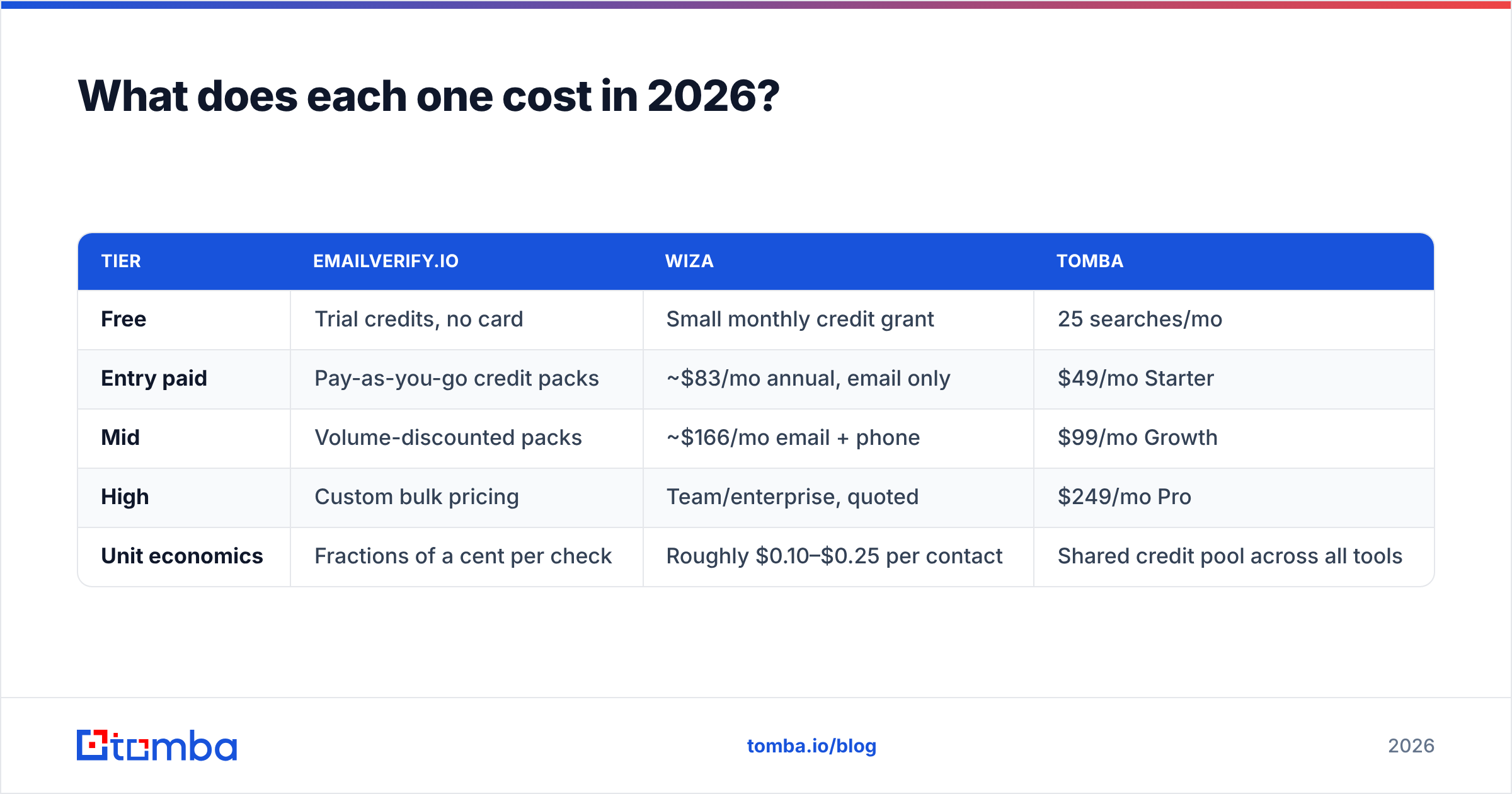
Emailverifyio vs Wiza pricing in 2026#
Pricing changes. Treat these as published list prices at the time of writing, and confirm on each vendor's own page before you buy.
| Tier | Emailverify.io | Wiza | Tomba |
|---|---|---|---|
| Free | Trial credits, no card | Small monthly credit grant | 25 searches/mo |
| Entry paid | Pay-as-you-go credit packs | ~$83/mo annual, email only | $49/mo Starter |
| Mid | Volume-discounted packs | ~$166/mo email + phone | $99/mo Growth |
| High | Custom bulk pricing | Team/enterprise, quoted | $249/mo Pro |
| Unit economics | Fractions of a cent per check | Roughly $0.10–$0.25 per contact | Shared credit pool across all tools |
The cost gap is the whole story. Verification is a commodity. The underlying SMTP work is cheap and every vendor competes on price. Discovery is not a commodity, because someone has to maintain the crawl, the pattern database, and the LinkedIn plumbing. That is why Wiza's per-contact price sits an order of magnitude above a verification check.
The practical consequence: run Wiza for sourcing and a verifier for hygiene, and you manage two credit pools with two renewal dates. Neither vendor gives you credit for the overlap. Wiza already verified that address, and you pay to verify it again.
Compare that with Tomba pricing, where finding, verifying, and enriching all draw on one pool. A re-verification before launch does not require a second contract.
Who should actually use Emailverify.io?#
Pick Emailverify.io when all of these are true:
- You already have the list. It came from a conference, a webinar registration, a CRM export, a partner swap, or a data purchase. Sourcing is not your bottleneck.
- Your bounce rate is above 3%. That is the threshold where mailbox providers start throttling. A single cleaning pass is the fastest, cheapest intervention available.
- You need volume economics. Cleaning 100,000 records with a per-check verifier costs a fraction of what a per-contact sourcing tool charges for the same rows.
- You want API-level hygiene. Verify at form submission, before a record ever enters your CRM. That stops the garbage from piling up in the first place.
- You do not need phone numbers, job titles, or company firmographics. A verifier returns a verdict, not a profile.
If you are cleaning old lists specifically, budget for shrinkage. A two-year-old B2B list routinely loses 25–35% of its addresses to job changes and domain retirement. That is not a failure of the verifier. That is the verifier doing its job.
Who should actually use Wiza?#
Pick Wiza when your motion is LinkedIn-first and your ICP lives in Sales Navigator.
Wiza's real advantage is not the email data. Plenty of vendors have comparable coverage. The advantage is the workflow.
You build a Sales Navigator search with the filters you already trust — headcount, funding, technology, posted-jobs signals. Then you export the whole result set with contact data attached in a couple of clicks. For an SDR who lives in Sales Navigator eight hours a day, that removes the most annoying step in the day.
Wiza suits you if:
- Your targeting logic is LinkedIn-shaped. Filters like "changed jobs in the last 90 days" only exist there.
- You need mobile numbers alongside email. Wiza's higher tiers bundle phone data, which a pure verifier will never give you.
- Your list sizes are modest. A few hundred to a few thousand contacts a month, where per-contact pricing still makes sense.
- You don't want to manage a scraping setup. Wiza handles the LinkedIn side without you touching a proxy config.
Wiza gets expensive at scale and scope. Once you need 10,000+ contacts a month, the per-contact model stops being kind. The same applies if your ICP includes companies whose decision-makers barely use LinkedIn: manufacturing, local services, much of APAC. That is the point where teams start evaluating a LinkedIn finder or a domain-first approach as a supplement.
What happens when you skip the verification step?#

Predictable, and still surprisingly common. Here is the chain of events.
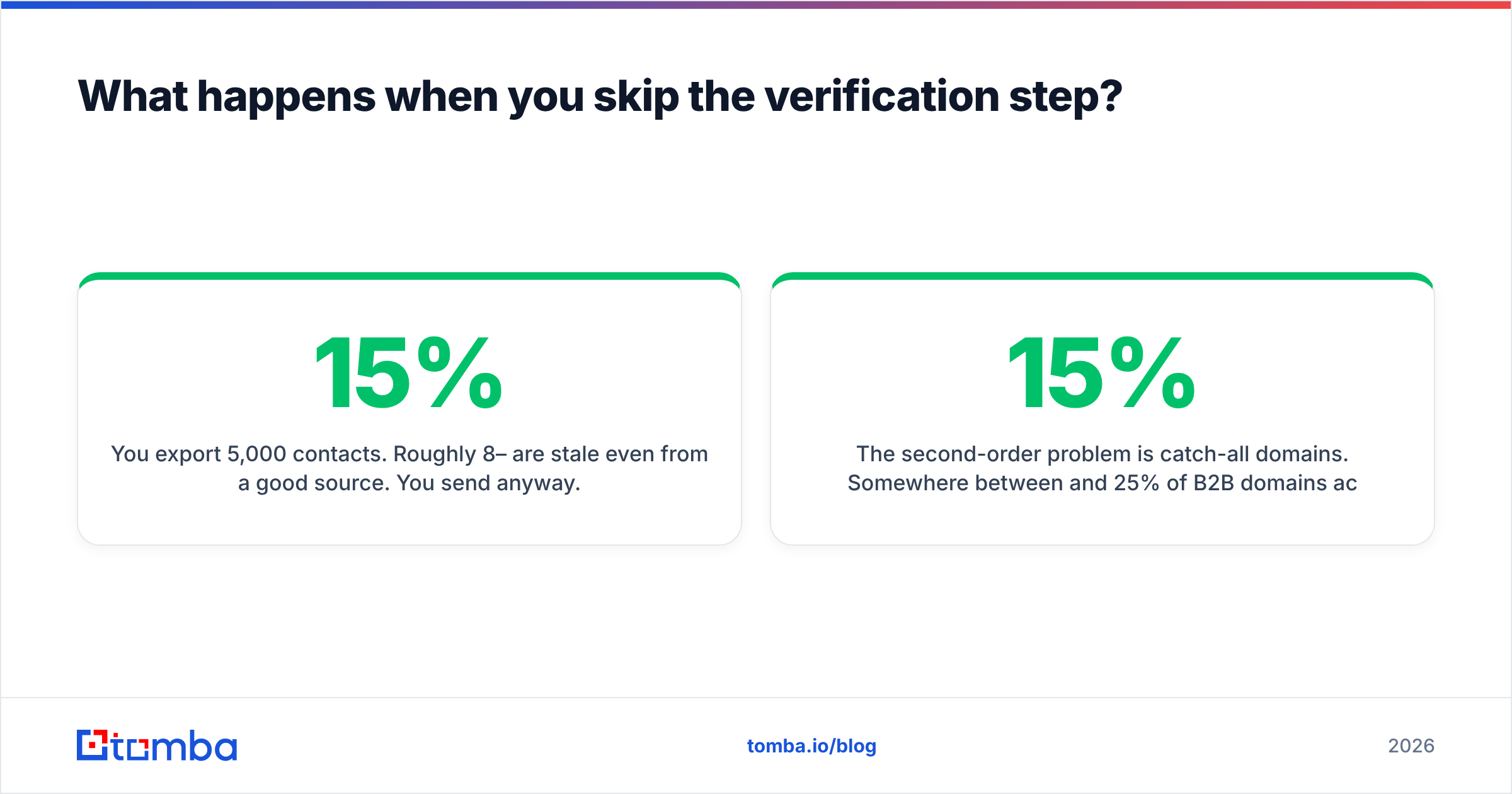
You export 5,000 contacts. Roughly 8–15% are stale even from a good source. You send anyway. Your bounce rate crosses 10%.
Google and Microsoft both treat sustained high bounce rates as a spam signal under the bulk-sender rules enforced since 2024. Your email deliverability drops for the whole domain, including the sequences that were working fine. Now you are not just fixing a list. You are rebuilding sender reputation across weeks.
The second-order problem is catch-all domains. Somewhere between 15% and 25% of B2B domains accept mail for every address, so a standard verifier returns "unknown" and you are left guessing. Guessing wrong at volume is exactly what triggers the reputation damage above.
This is why a dedicated catch-all verifier matters more than the headline accuracy number vendors put on their homepage. The headline number is measured on the easy domains.
How do you run your own emailverifyio vs wiza test in one week?#
Do not trust anyone's published accuracy figure, including the ones in this post. Run your own bake-off. It takes about four hours of actual work.
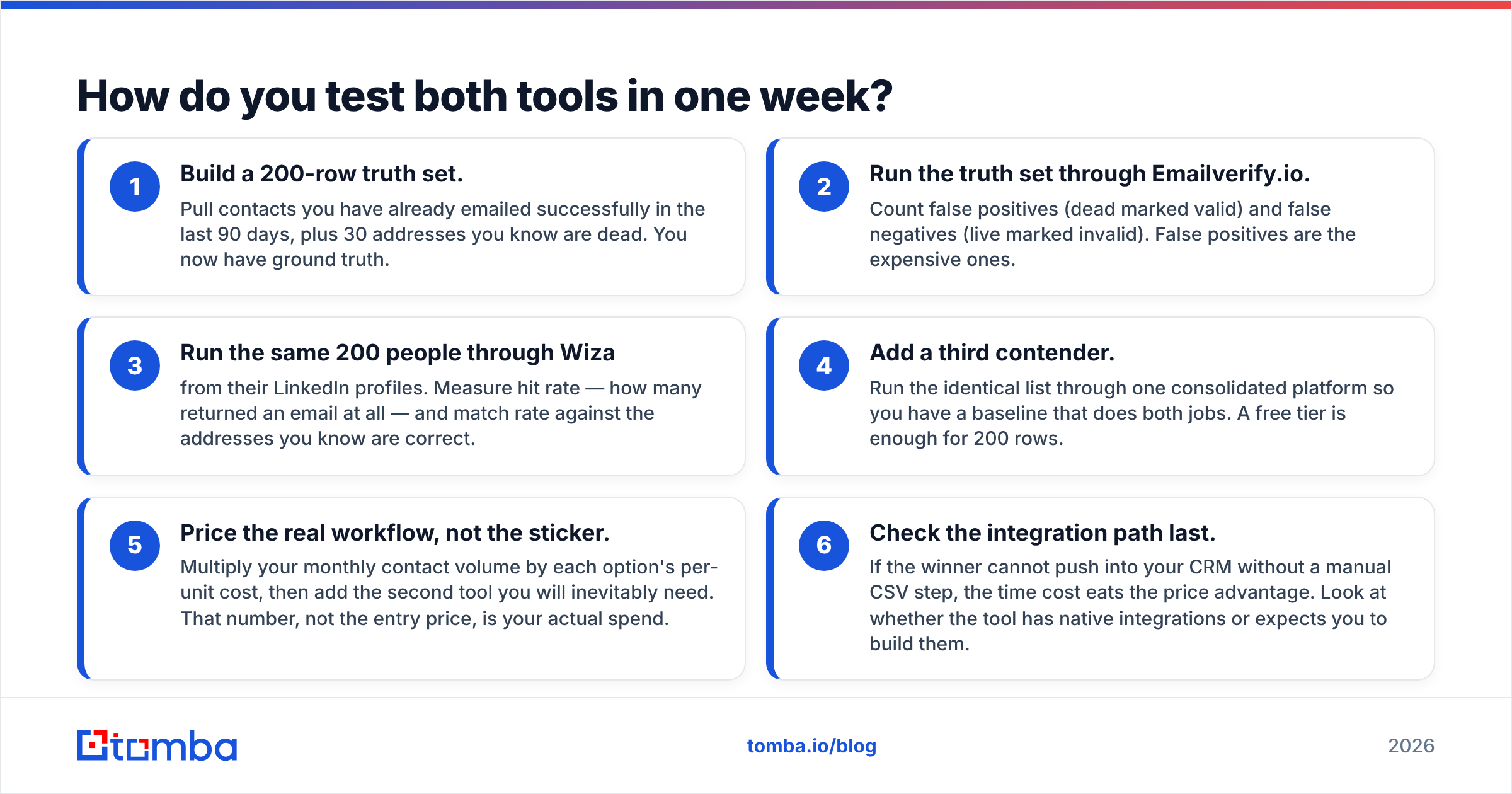
- Build a 200-row truth set. Pull contacts you have already emailed successfully in the last 90 days. Add 30 addresses you know are dead. You now have ground truth.
- Run the truth set through Emailverify.io. Count false positives (dead marked valid) and false negatives (live marked invalid). False positives are the expensive ones.
- Run the same 200 people through Wiza from their LinkedIn profiles. Measure hit rate, then match it against the addresses you know are correct.
- Add a third contender. Run the identical list through one consolidated platform, so you have a baseline that does both jobs. A free tier is enough for 200 rows.
- Price the real workflow, not the sticker. Multiply your monthly contact volume by each option's per-unit cost. Then add the second tool you will inevitably need. That number is your actual spend.
- Check the integration path last. If the winner cannot push into your CRM without a manual CSV step, the time cost eats the price advantage. Look at whether the tool has native integrations or expects you to build them.
Score honestly. If one tool wins on discovery and the other on hygiene, that is a real result. It just means the two-vendor stack is the correct answer for you, and you should budget accordingly.
Is there a single tool that covers both jobs?#
Yes, and it is worth pricing out before you sign two contracts.
The structural argument for consolidation is simple. Discovery and verification share the same underlying data. A platform that already knows a company's email pattern, its MX configuration, and whether the domain is catch-all can verify a discovered address far more cheaply than two independent vendors doing the work twice.
Tomba runs that model. The email finder handles discovery by domain, by name, or from a LinkedIn profile. The verifier, catch-all checker, phone finder, and enrichment endpoints run against the same credit pool, so cleaning a list before launch does not mean opening a second invoice. Starter is $49/mo, Growth is $99/mo, and the free tier gives you 25 searches a month.
That is not a claim that Tomba beats Wiza at LinkedIn-native exports. Wiza's Sales Navigator workflow is genuinely tight and hard to replicate. The claim is narrower: most teams are paying twice for overlapping capability, and consolidation is usually the cheaper path. Check independent reviews on G2 and each vendor's own documentation at wiza.co and emailverify.io before you decide.
The verdict on emailverifyio vs wiza#
Choose Emailverify.io if you have lists and a bounce problem. It is cheap, focused, and does one job competently.
Choose Wiza if you have a LinkedIn-first motion, need phone numbers, and your volumes are moderate enough that per-contact pricing does not compound against you.
Choose neither, individually, if you are about to buy both. Two subscriptions to cover one pipeline is the most common avoidable line item in an outbound budget.
Start with the free tier of the Tomba Email Finder and run your 200-row truth set through all three. You will have a defensible answer by the end of the day, and the data will be yours rather than a vendor's marketing page.
Related guides#
Ready to find emails that actually work?
Join 150,000+ professionals who stopped guessing and started sending. Free credits on signup — no credit card required.
Get the Tomba newsletter
Practical outbound tactics and product updates — once every two weeks.
About the author