End of the Month Sales Email Templates That Actually Close
Most end-of-month emails are just "bumping this up" with a discount attached. Here are seven end of the month sales email templates, the timing rules behind them, and what to send when the deal genuinely is not ready.
TL;DR
- An end of the month sales email template only works when the deadline is yours to explain — a signature window, an onboarding cohort, a price change on a published date. "Our quarter ends Friday" is your problem, not the buyer's.
- Discounting to close by the 31st trains every future buyer to wait until the 29th. Use scarcity of time and resources (implementation slots, onboarding capacity) instead of scarcity of price.
- Send the sequence on days 22–24, 27–28, and the last business day. Three touches, three different jobs: reframe, decide, close-the-loop.
- The highest-replying end-of-month email is often the breakup — it gives the buyer permission to say no, which is why it gets answered.
- Templates fail on bad data long before they fail on bad copy. A bounced "final week" email is a wasted deadline you cannot re-use next month.
What is an end of the month sales email?#
An end of the month sales email is a short, time-anchored message sent in the final 7–10 days of a billing or reporting period to move a stalled opportunity to a decision — yes, no, or a dated next step.
Think of it like the last call at a restaurant. The kitchen isn't closing to punish you; it closes because the staff has a shift. When the reason is real and clearly stated, nobody resents the prompt. When a server invents "last call" every twenty minutes to flip the table, you stop believing them and you stop coming back. That's the whole difference between an end-of-month email that closes and one that gets muted.
Three things separate this from a generic follow-up:
- It carries a dated anchor. Not "soon" or "this quarter" — an actual calendar date the buyer can put in their own planning.
- It asks for a decision, not attention. The ask is a yes/no or a booked slot, never "just checking in."
- It has a defined end. After the last business day, the sequence stops. A deadline you keep extending is not a deadline.
Most reps get the first part and skip the other two. That's why the average end-of-month inbox looks like six variations of "circling back before month end."
Why do most end of the month sales emails fail?#
Because they leak your internal pressure onto someone who doesn't share it.
Buyers do not care that your quota resets. They care about their own fiscal calendar, their budget-use-it-or-lose-it dynamics, their project start dates, and how badly they'll look if a rollout slips. HubSpot's sales research has been making this point for years and it hasn't changed: urgency has to be indexed to the buyer's timeline, not the seller's.
The four failure modes I see most often in real sequences:
- Manufactured scarcity. "My manager approved a one-time discount that expires Friday." Every buyer over 30 has seen this movie. It signals your list price is fiction.
- The bump. "Just bumping this to the top of your inbox." Zero new information, so it earns zero new attention.
- The passive close. "Let me know if you'd like to move forward." Nobody ever let you know. Ask for a specific action on a specific date.
- The wrong contact entirely. You spent four weeks nurturing a champion who cannot sign. End of month is when the missing economic buyer becomes fatal.

What makes an end of the month sales email template work?#
Five components. If a template you're about to copy is missing more than one of these, rewrite it.
- A verifiable anchor. Onboarding cohort starts the 5th. Legal review takes 9 business days. Price list updates on the 1st. If you can't produce evidence for the anchor when asked, don't use it.
- One line of new value. A benchmark, a customer result from their industry, a rough implementation timeline. The email must be worth opening even if the buyer ignores the deadline.
- A binary ask. "Can you sign by Thursday, or should I move the slot to the March cohort?" Both options are easy to answer, which is exactly the point.
- Effort transparency. Tell them precisely what's left: two signatures, one security form, a 15-minute call. Deals stall because the remaining work feels unbounded.
- A clean exit. Give them a graceful no. Buyers reply to emails that don't corner them, and a fast no is worth more than a slow maybe on the last day of the month.
Which end of the month sales email template should you send?#
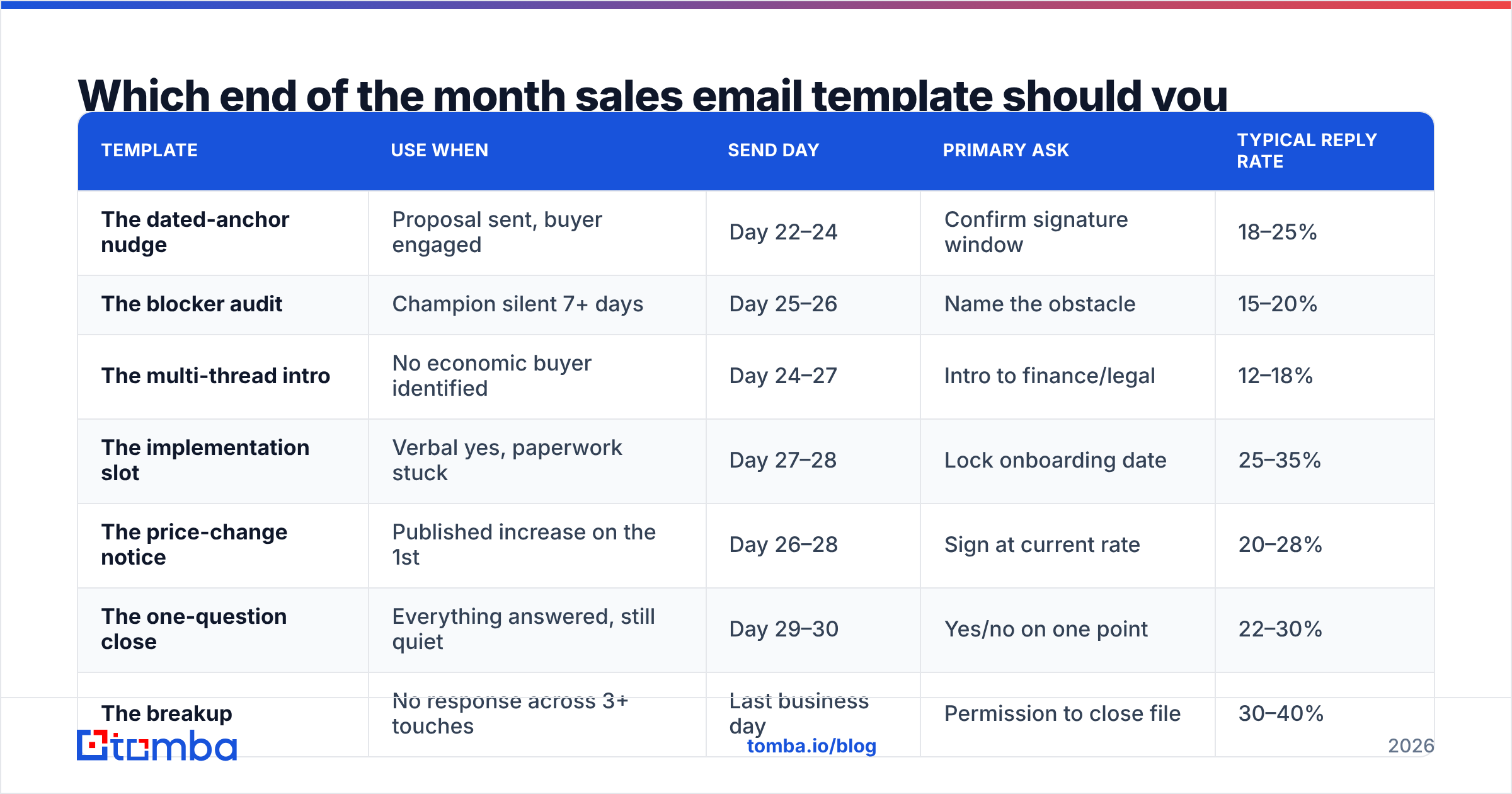
Pick by deal state, not by day of the month. Here's the selection matrix, then the copy.
| Template | Use when | Send day | Primary ask | Typical reply rate |
|---|---|---|---|---|
| The dated-anchor nudge | Proposal sent, buyer engaged | Day 22–24 | Confirm signature window | 18–25% |
| The blocker audit | Champion silent 7+ days | Day 25–26 | Name the obstacle | 15–20% |
| The multi-thread intro | No economic buyer identified | Day 24–27 | Intro to finance/legal | 12–18% |
| The implementation slot | Verbal yes, paperwork stuck | Day 27–28 | Lock onboarding date | 25–35% |
| The price-change notice | Published increase on the 1st | Day 26–28 | Sign at current rate | 20–28% |
| The one-question close | Everything answered, still quiet | Day 29–30 | Yes/no on one point | 22–30% |
| The breakup | No response across 3+ touches | Last business day | Permission to close file | 30–40% |
Reply rates are directional ranges from mid-market B2B outbound sequences — your ACV, list quality, and category maturity move them more than the copy does. Treat them as relative rankings, not promises.
Template 1 — The dated-anchor nudge#
Subject: March cohort — hold your seat?
Hi {{FirstName}},
Quick logistics rather than a nudge: our March onboarding cohort starts the 5th and we cap it at eight accounts. You're currently unassigned.
If the {{use case}} rollout is still targeting Q2, holding a March seat keeps you ahead of it. If Q3 is more realistic, I'll release the seat and we can revisit in May — no hard feelings either way.
Which one should I do?
{{Signature}}
Template 2 — The blocker audit#
Subject: Which one is it?
Hi {{FirstName}},
When a proposal goes quiet at this stage it's usually one of four things:
- Budget moved to another line item
- Security or legal review is longer than expected
- Someone senior isn't sold yet
- Priorities shifted and this is now a next-quarter problem
Reply with the number. I'll either fix it this week or get out of your way.
{{Signature}}
The numbered-reply trick works because it drops the cost of responding to two keystrokes. It also gives you real pipeline intelligence — four weeks of these replies will tell you more about your loss reasons than any CRM field.
Template 3 — The multi-thread intro#
Subject: Who owns the signature on your side?
Hi {{FirstName}},
You've got everything you need from me on the {{product}} side. The piece I can't see is who signs and how long their review usually takes.
If it's finance, I can send them a one-page cost summary with the {{metric}} math already done — most CFOs I work with want that before they'll open the contract. Happy to copy them directly or send it to you to forward, whichever is less awkward.
{{Signature}}
Template 4 — The implementation slot#
Subject: Holding {{date}} for kickoff
Hi {{FirstName}},
I've pencilled in {{date}} for your kickoff with {{CSM name}} — that's the last slot before our team is booked into {{next month}}.
To hold it I need the countersigned MSA by {{deadline}}. Two signatures, no redlines outstanding. If your legal team needs more runway, say so today and I'll move you to the {{next month}} slot instead of losing the date entirely.
{{Signature}}
Template 5 — The price-change notice#
Only send this if the increase is real and published. Fake price changes are the fastest way to burn a territory.
Subject: Rate change on the 1st — heads up
Hi {{FirstName}},
Our list pricing updates on {{date}} (published here: {{link}}). Your quote of {{amount}} is locked until {{deadline}}.
This isn't a pressure tactic — if the timing is wrong, the timing is wrong. But I'd rather you hear it from me now than see a different number in April.
{{Signature}}
Template 6 — The one-question close#
Subject: One question
Hi {{FirstName}},
Is {{specific objection}} still the thing standing between us and a signature?
If yes, I'll get you the answer today. If no, tell me what replaced it.
{{Signature}}
Template 7 — The breakup#
Subject: Closing your file
Hi {{FirstName}},
I'm closing this out for the quarter so it stops cluttering both our pipelines. No hard feelings — timing beats interest most of the time.
If {{trigger event}} changes before {{date}}, reply with one word and I'll reopen it. Otherwise I'll check back in {{month}}.
Genuinely enjoyed the {{specific detail from a call}} conversation.
{{Signature}}
The breakup consistently outperforms every other end-of-month template on raw reply rate, and it's the one reps are most reluctant to send. Loss aversion works in both directions. If you want to A/B the subject line before you commit, run it through a subject line tester rather than guessing.
How should you time the end-of-month sequence?#
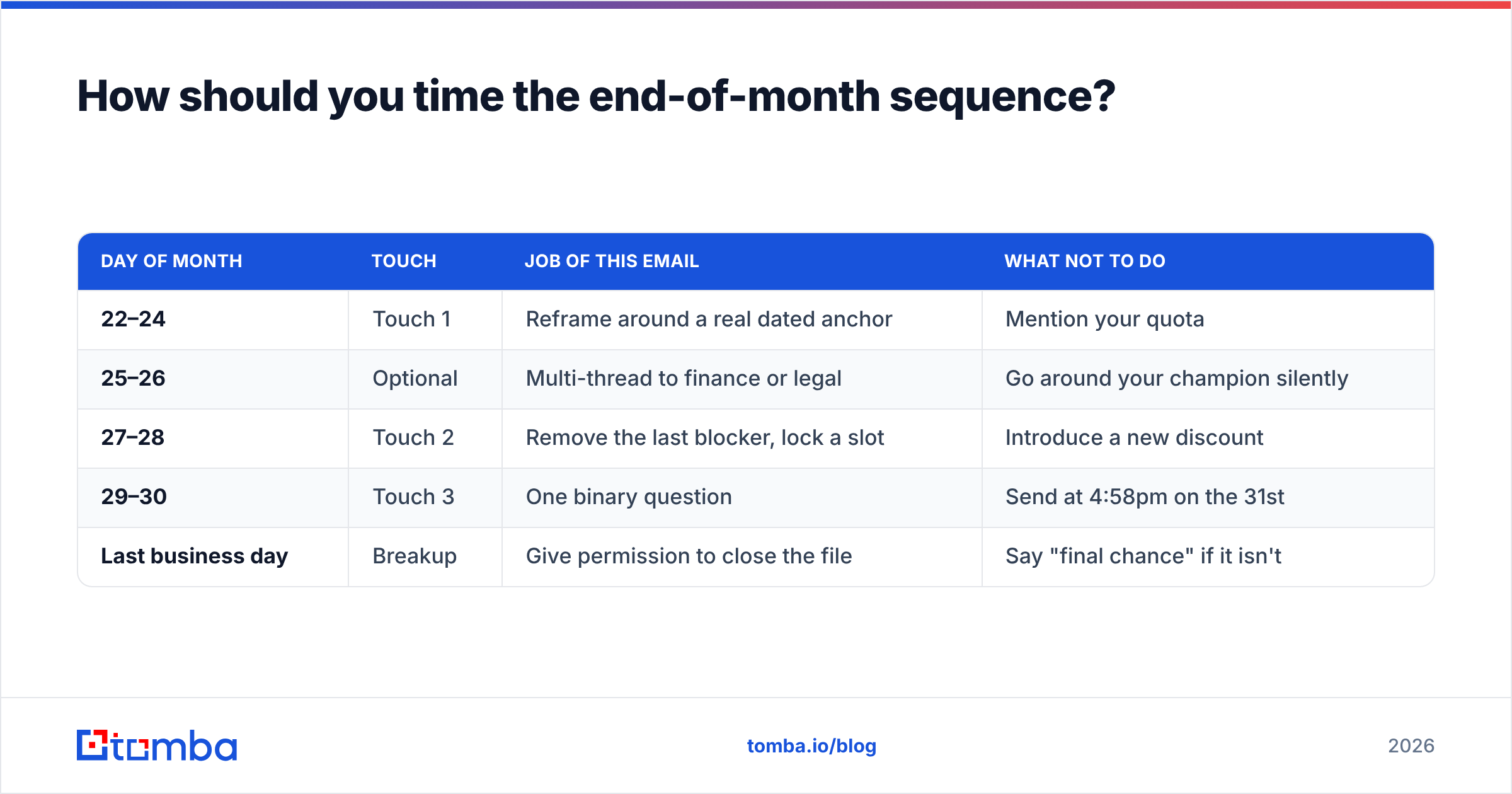
Three touches over nine days beats seven touches over four. Compression reads as panic.
| Day of month | Touch | Job of this email | What NOT to do |
|---|---|---|---|
| 22–24 | Touch 1 | Reframe around a real dated anchor | Mention your quota |
| 25–26 | Optional | Multi-thread to finance or legal | Go around your champion silently |
| 27–28 | Touch 2 | Remove the last blocker, lock a slot | Introduce a new discount |
| 29–30 | Touch 3 | One binary question | Send at 4:58pm on the 31st |
| Last business day | Breakup | Give permission to close the file | Say "final chance" if it isn't |
Two timing rules that matter more than the copy:
- Never send the hardest ask on the actual last day. By then the buyer's calendar is a wall of internal close activity. Day 27–28 is when procurement still has bandwidth.
- Respect the buyer's fiscal calendar, not yours. Retail, education, and government all run on different year-ends. A January push into a September-fiscal-year buyer is noise. Gartner's sales research has been blunt on this: buyer-side timing constraints drive far more deal movement than seller-side urgency does.
Should you discount to close by month end?#
No — not as a first move, and not as a recurring one.
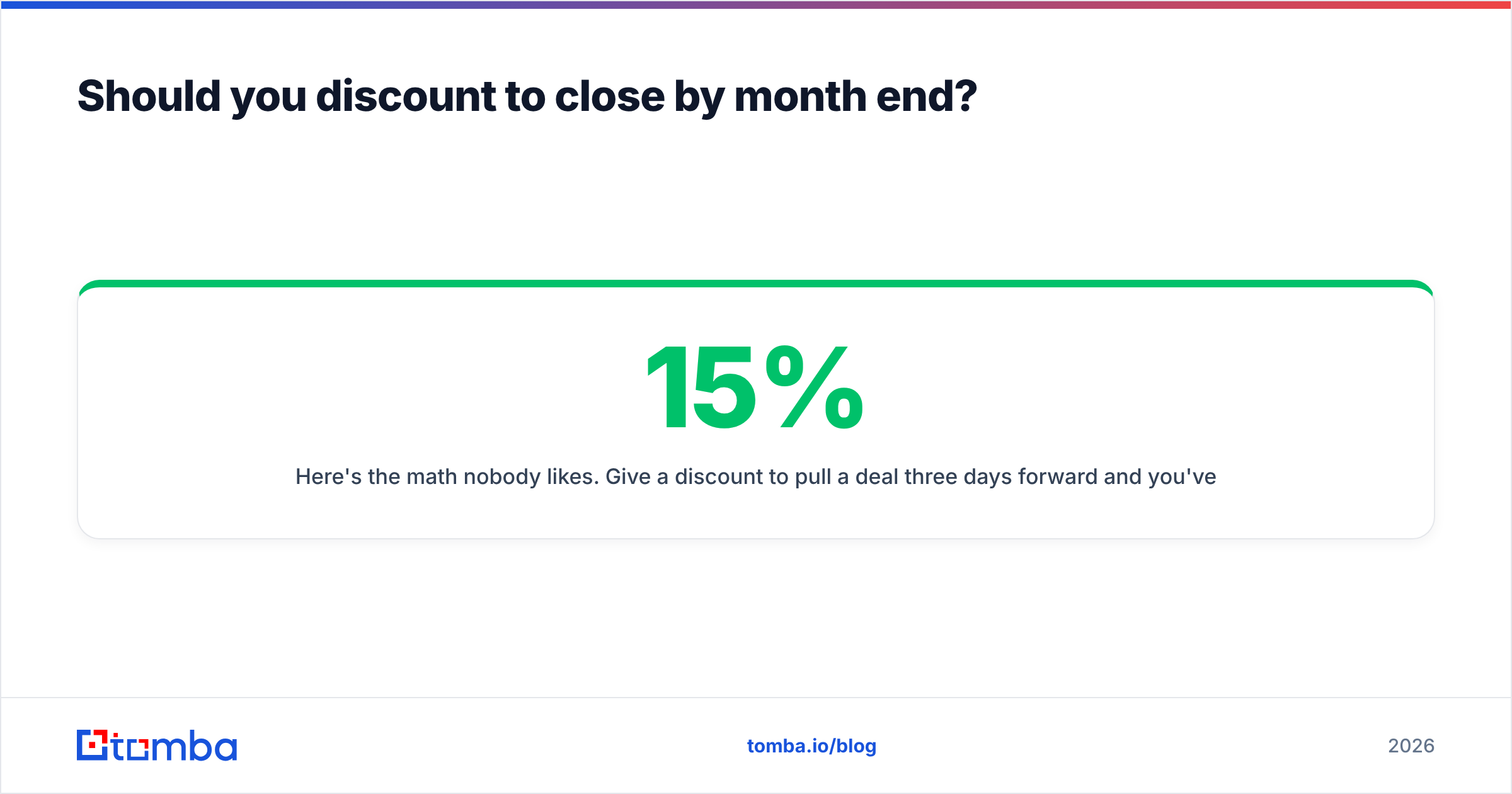
Here's the math nobody likes. Give a 15% discount to pull a deal three days forward and you've paid 15% of annual contract value for 0.8% of a year. Do it twice in a territory and your buyers talk. Now every deal in that segment stalls until the 28th on purpose, and your discount becomes list price with extra steps.

What to trade instead, ranked by how little it costs you:
- Implementation timing — a guaranteed kickoff date is worth real money to a buyer with a Q2 deadline.
- Onboarding depth — extra training hours, a dedicated migration session.
- Contract flexibility — quarterly billing instead of annual up front, a 30-day out clause, a shorter initial term.
- Scope expansion — extra seats at the same rate rather than fewer dollars for the same seats.
- Payment terms — net-60 costs you cash flow, not margin, and finance teams love it.
If you must discount, tie it to something the buyer gives back: a case study, a reference call, a two-year term. A concession without an exchange isn't a negotiation, it's a markdown.
How do you keep the whole sequence from bouncing?#
This is where most end-of-month pushes quietly die. You write seven good templates, load 400 contacts, and 12% of them hard bounce on the 27th — right as your sending domain is under peak load. Now your genuinely warm deals land in spam during the one week that matters.
Three things to do before the sequence goes out:
- Verify the list within 7 days of send. B2B contact data decays roughly 2–3% per month through job changes alone. A record you verified in November is not a record you can trust in February. Run it through an email verifier as a pre-flight step, not an afterthought.
- Fill the gaps in the buying committee. If your only contact is a champion without signature authority, month-end is when that costs you the deal. Use domain search to pull the finance and ops contacts at the same company so you can multi-thread without guessing at an email format.
- Segment the send. Never blast all seven templates at once. Sort by deal state using the matrix above, then send each cohort separately. Your response rate reporting becomes readable, and one bad template can't poison the whole month.
For the copy layer itself, a starting library of cold email templates will save you the blank-page tax — just make sure you rewrite the anchor line for every account. The anchor is the only part that can't be templated.
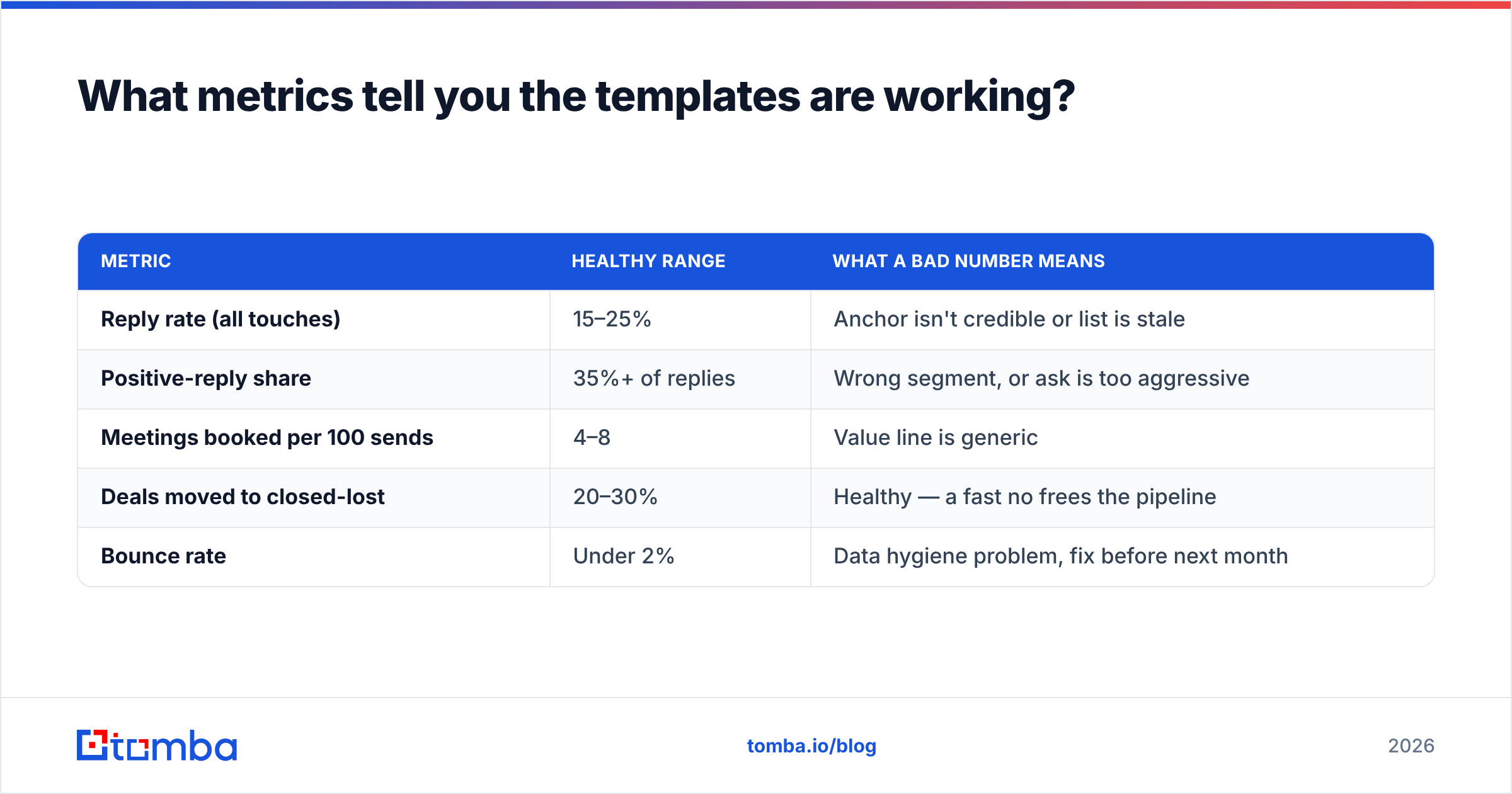
What metrics tell you the templates are working?#
Not open rate. Since Apple Mail Privacy Protection, opens are inflated by machine-fetched pixels and tell you close to nothing about a small end-of-month list.
Track these instead:
| Metric | Healthy range | What a bad number means |
|---|---|---|
| Reply rate (all touches) | 15–25% | Anchor isn't credible or list is stale |
| Positive-reply share | 35%+ of replies | Wrong segment, or ask is too aggressive |
| Meetings booked per 100 sends | 4–8 | Value line is generic |
| Deals moved to closed-lost | 20–30% | Healthy — a fast no frees the pipeline |
| Bounce rate | Under 2% | Data hygiene problem, fix before next month |
That fourth row surprises people. A month-end sequence that produces zero closed-lost outcomes isn't working — it's just deferring the same rotting deals into next month's forecast. Cleaning out dead pipeline is one of the two jobs these emails do. Salesforce calls this pipeline hygiene; reps call it finally being able to see their real number.
Where should you start this month?#
Pull your open opportunities, sort them by the deal-state column in the selection matrix, and assign exactly one template per deal. Ten well-anchored emails will beat 200 bumps every single time.
Then fix the layer underneath the copy. If your champion went quiet and you don't have a second thread into the account, no template rescues that in the final week. Use the Tomba Email Finder to get verified addresses for the finance, ops, and security contacts you're missing, so your day-25 multi-thread lands on a real inbox instead of a guess. Start on the free tier (25 searches per month) to test the workflow on a handful of stalled deals, and check Tomba pricing — Starter runs $49/mo — once you're ready to run it across the whole pipeline.
Good templates convert deals that already exist. Good data determines how many deals exist at all.
Related guides#
Ready to find emails that actually work?
Join 150,000+ professionals who stopped guessing and started sending. Free credits on signup — no credit card required.
Get the Tomba newsletter
Practical outbound tactics and product updates — once every two weeks.
About the author