How to Enrich Leads in 2026: Data, Tools, and Workflows
Lead enrichment is where most B2B pipelines quietly break. Here's how enrichment actually works in 2026, what waterfall providers cost, and how to build a stack that hits 90%+ coverage without paying twice for the same record.
TL;DR — here is how to enrich leads in 2026 without paying for the same record twice.
- To enrich leads means turning a thin record into a full profile. You start with an email, a domain, or a LinkedIn URL. You end up with job title, seniority, company size, tech stack, phone, and a verified email.
- One provider on its own fills 55-70% of a real B2B list. A waterfall — asking each source in turn, paying only for hits — is what gets you past 90%.
- B2B contact data goes stale 25-30% each year. So plan a refresh cycle, not a one-time import.
- Cost runs from about $0.01 per record to $0.30 or more. Most teams overpay for fields nobody reads.
- Start with the fields that drive routing and copy. Enrich on a trigger, verify before you send, and track fill rate per field, not per vendor.
What does it mean to enrich leads?#
To enrich leads is to add missing facts to a record you already hold. You may start with one form field: name@company.com. You want a record complete enough to route, score, and write to.
Think of a torn library slip with half a title on it. Enrichment walks that scrap through the catalog. By the end you know the author, the edition, and the shelf. The scrap is worth nothing on its own. The full card is what lets you act.
In practice, two kinds of data get mixed up all the time.
- Person-level data — job title, seniority, team, direct email, mobile, LinkedIn URL, city. Keyed off an email, a name plus company, or a social profile.
- Company-level data — headcount, revenue band, industry, funding stage, tech stack, HQ, subsidiaries. Keyed off a domain.
Most teams need both. They just need them at different moments. Company data drives routing and ICP scores early on. Person data drives the outreach itself.
One bundled plan that bills for both on every record is the classic way to burn a budget.
Why is it harder to enrich leads in 2026?#
Three things changed.
Forms got shorter. Short forms convert better, so many teams now ask for an email and nothing else. That is the right call for signup rate. But it moves the whole data job onto enrichment. A two-field form with good data beats an eleven-field form with none.
Signals now drive outbound. To route a lead well, you need headcount, funding, and tech stack the moment it lands. A weekly batch job is too late. So the work to enrich leads is now a live part of the revenue operations stack.
Inbox rules got strict. Google and Yahoo cap spam complaints under 0.3% for bulk senders. List hygiene is a hard gate now. Send to an unverified address and you pay with domain trust, not just a bounce. Enrich without verifying and you have built a machine that wrecks your own email deliverability.

How does a waterfall enrich leads?#
A waterfall asks your data sources in a set order and stops at the first hit. You never pay two vendors for one record.
The logic is simple:
- Check your own data first. Your CRM, your product tables, your past lookups. This is free, and it is the best data you own. Teams skip it and buy records they already have.
- Ask your cheapest broad source next. For work email, a pattern-based email finder reads verified domain patterns. It is fast and cheap per lookup.
- Fall through to niche sources. Mobile numbers, EU contacts, and small verticals each have experts. They beat the generalists, but cost 5-20x more. Use them only on what the earlier steps missed.
- Verify what comes back. Run every hit through an email verifier before it reaches a sending tool. Enriched is not the same as valid.
- Write back with a source tag. Store which vendor gave you each field, and when. Without that, you cannot audit accuracy or tell a stale field from a fresh one.
The math is the whole point. Say source A covers 60% of your list at $0.02 a record. Source B covers another 25% at $0.20. On a 10,000-row list the waterfall costs about $620. Source B alone would cost $2,000.
That gap is the difference between a budget that scales and one that does not.
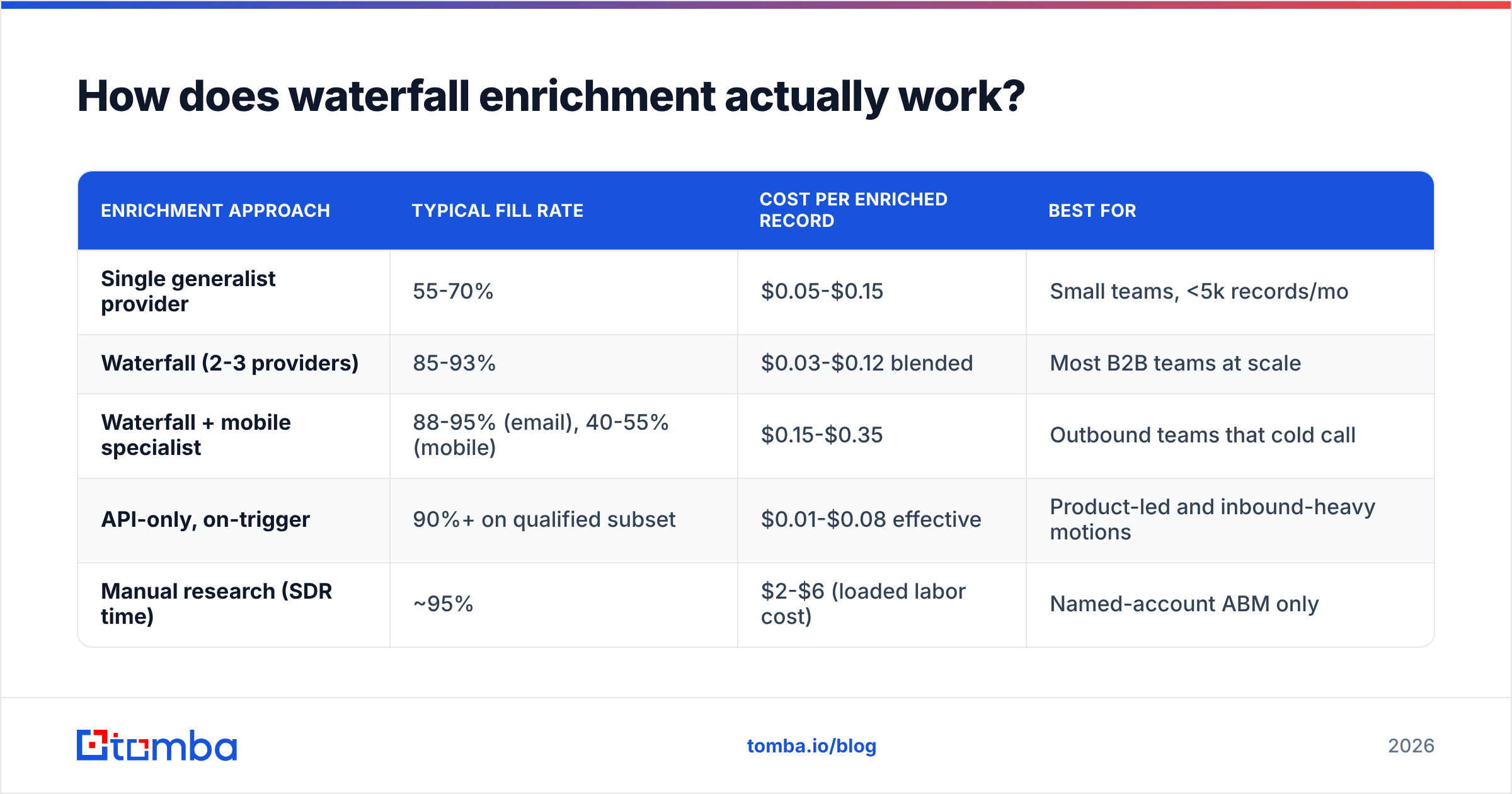
| Enrichment approach | Typical fill rate | Cost per enriched record | Best for |
|---|---|---|---|
| Single generalist provider | 55-70% | $0.05-$0.15 | Small teams, <5k records/mo |
| Waterfall (2-3 providers) | 85-93% | $0.03-$0.12 blended | Most B2B teams at scale |
| Waterfall + mobile specialist | 88-95% (email), 40-55% (mobile) | $0.15-$0.35 | Outbound teams that cold call |
| API-only, on-trigger | 90%+ on qualified subset | $0.01-$0.08 effective | Product-led and inbound-heavy motions |
| Manual research (SDR time) | ~95% | $2-$6 (loaded labor cost) | Named-account ABM only |
Which fields should you actually enrich?#
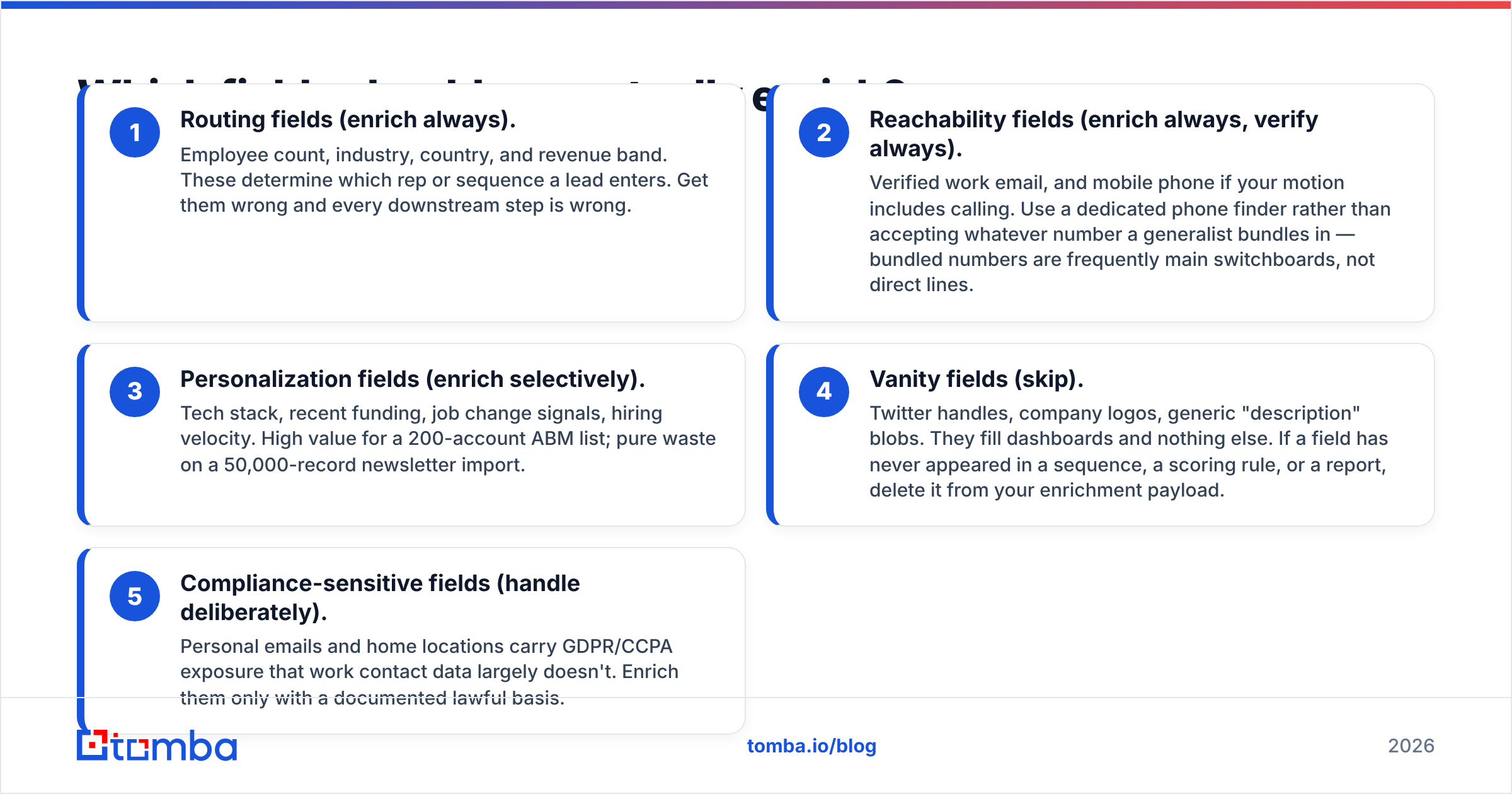
Enrich a field only if it changes a decision. The rest is storage cost and audit risk.
Sort your fields into tiers:
- Routing fields (always). Headcount, industry, country, revenue band. These pick the rep and the sequence. Get them wrong and every later step is wrong.
- Reach fields (always, and verify). A verified work email, plus a mobile if you call. Use a real phone finder instead of the number a generalist throws in. Bundled numbers are often the front desk, not a direct line.
- Personal touches (sometimes). Tech stack, new funding, job change signals, hiring pace. Gold on a 200-account ABM list. Waste on a 50,000-row newsletter import.
- Vanity fields (skip). Twitter handles, logos, filler description text. They fill a dashboard and nothing else. If a field never shows up in a sequence, a score, or a report, cut it from the payload.
- Risky fields (handle with care). Personal emails and home cities carry GDPR and CCPA risk that work data does not. Only enrich them with a clear lawful basis.
Here is a quick test. For each field, name the automation that reads it. If you cannot name one, you are paying to fill a column.
How do the major enrichment tools compare?#
Vendor coverage claims mean little. Each one tests against a list that flatters its own data. It helps far more to know what each type of tool is built for.
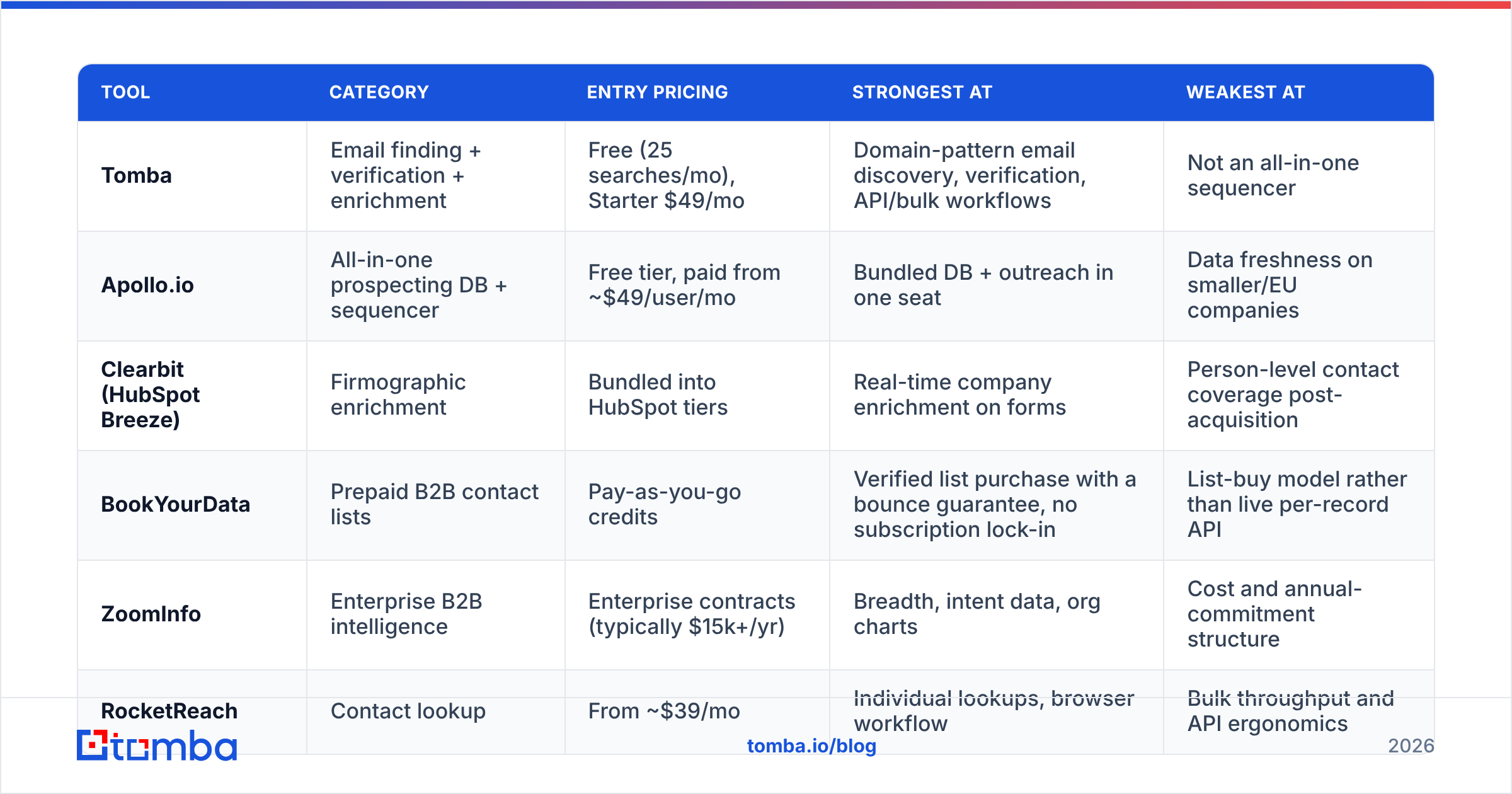
| Tool | Category | Entry pricing | Strongest at | Weakest at |
|---|---|---|---|---|
| Tomba | Email finding + verification + enrichment | Free (25 searches/mo), Starter $49/mo | Domain-pattern email discovery, verification, API/bulk workflows | Not an all-in-one sequencer |
| Apollo.io | All-in-one prospecting DB + sequencer | Free tier, paid from ~$49/user/mo | Bundled DB + outreach in one seat | Data freshness on smaller/EU companies |
| Clearbit (HubSpot Breeze) | Firmographic enrichment | Bundled into HubSpot tiers | Real-time company enrichment on forms | Person-level contact coverage post-acquisition |
| BookYourData | Prepaid B2B contact lists | Pay-as-you-go credits | Verified list purchase with a bounce guarantee, no subscription lock-in | List-buy model rather than live per-record API |
| ZoomInfo | Enterprise B2B intelligence | Enterprise contracts (typically $15k+/yr) | Breadth, intent data, org charts | Cost and annual-commitment structure |
| RocketReach | Contact lookup | From ~$39/mo | Individual lookups, browser workflow | Bulk throughput and API ergonomics |
Two honest notes on this table. First, entry pricing is not what you will pay. Seat minimums and yearly terms rule the top end. Second, for how buyers really rate these tools, read G2's marketing account intelligence grid. It beats any vendor's own compare page, this one included.
Already on HubSpot? Price the native path first. HubSpot's data enrichment docs list what each tier covers. A HubSpot integration can then fill the gaps instead of replacing the lot.
What does a workflow to enrich leads look like?#
Here is the order that holds up in production, from raw row to sendable contact.
Step 1 — Clean the input. Strip tracking tags from domains. Lowercase every email. Fold www. and country domains into one canonical form. Sloppy cleanup causes more double charges than anything else.
Step 2 — Dedupe before you spend. Match on the clean email and the clean domain. A 10,000-row CRM export holds 8-15% dupes. That is 8-15% of your budget, gone before you enrich a thing.
Step 3 — Do company data first. It is cheaper, and it rules records out. Say a domain maps to a 3-person shop and your ICP starts at 200 staff. You just skipped a person-level lookup you would never use. Filter, then go deeper.
Step 4 — Run the waterfall for contact data. Cheapest source first, experts only on the misses. Use bulk enrichment for list work and the API for live triggers. The two have different cost profiles, and mixing them up gets pricey.
Step 5 — Verify, then split by confidence. Sort results into valid, catch-all, and risky. Catch-all domains accept any address at the SMTP layer. A valid flag there means little without a catch-all verifier. Send to valid now. Route catch-all to a low-volume warm domain. Drop the risky ones.
Step 6 — Write back with a date. Every field gets a source and an enriched_at. That is what makes step 7 possible.
Step 7 — Set a refresh cycle. Titles and headcounts drift. Re-enrich live pipeline each quarter and the dormant database each year. Treat any record over 24 months old as unverified, whatever your CRM says.

How much data decay should you plan for?#
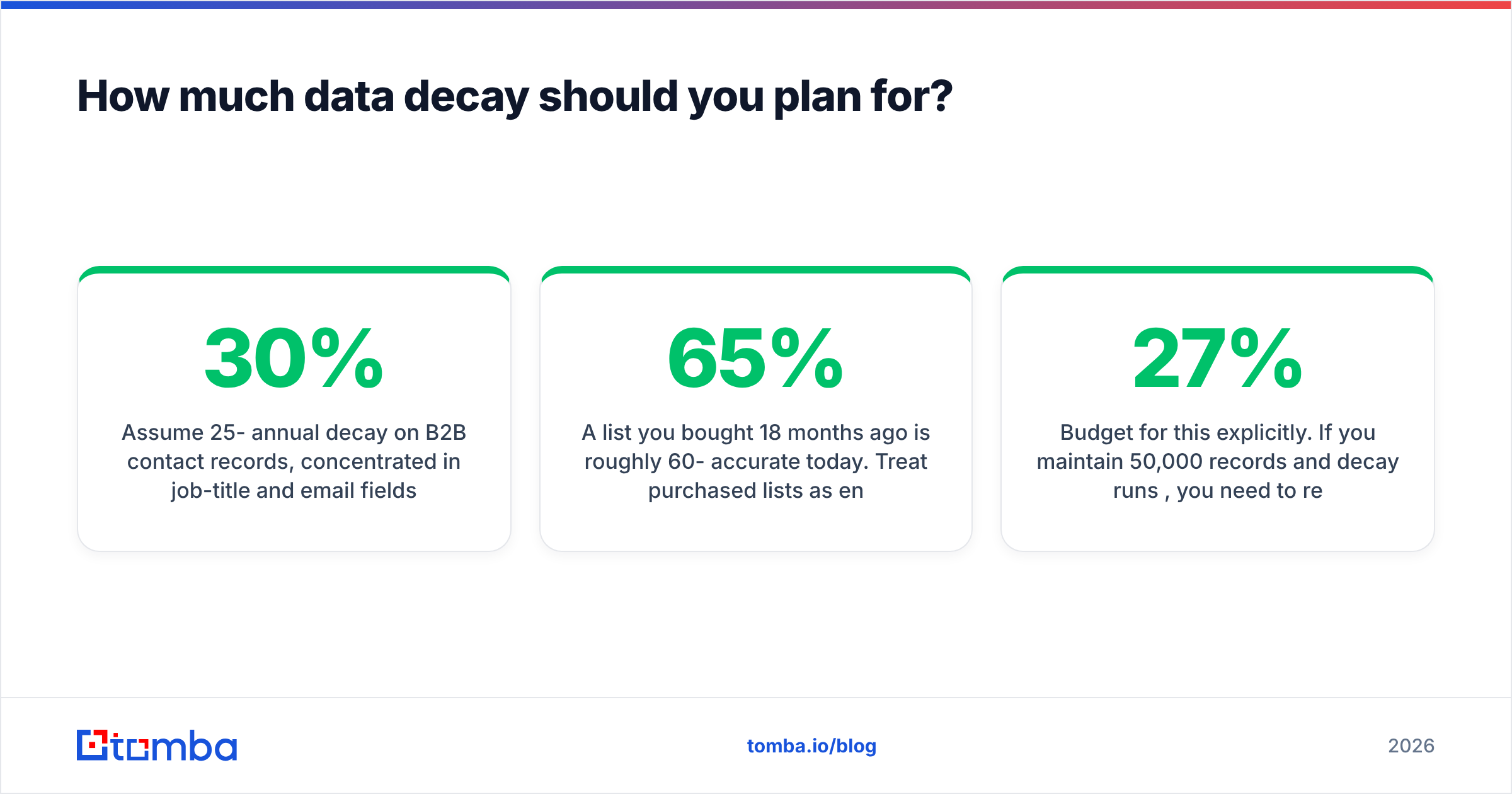
Plan for 25-30% decay a year on B2B contacts. Job titles and emails go first. The cause is plain: people change jobs. Median tenure in tech and SaaS sits under three years. Each move kills the work email, the title, and often the phone at once.
What that means day to day:
- A list you bought 18 months ago is about 60-65% right today. Treat bought lists as raw input, not as send-ready contacts.
- Bounce rate tells you too late. Once it climbs, your sender reputation has already taken the hit. Verify before you send, always.
- A job change is the best trigger to enrich leads. A contact who just moved is both a warm tie and a fresh record. One trigger, two wins.
- Decay is uneven. Startups and fast-growing firms churn far quicker than steady mid-market ones. Set the refresh cycle by segment, not by one blanket rule.
Budget for this on purpose. Hold 50,000 records at 27% decay and you must refresh about 13,500 a year just to stand still. At a blended $0.06 a record, that is $810 a year. It is cheap next to an SDR working a list where one name in three is gone.
What are the most common enrichment mistakes?#
Enriching everything at import. Enrich leads on a trigger, not on arrival. Most imported rows never get contacted. Enrich them upfront and a variable cost becomes a sunk one.
Trusting confidence scores as given. Vendors grade their own work. Pull 100 records per confidence band, check them yourself, then set your own bar. A vendor's 95% and your bounce rate are unrelated until you measure the link.
Ignoring catch-all domains. About 15-20% of B2B domains are catch-all. They return valid for any address you test. So an unfiltered pipeline hands you plausible guesses. Screen them out, or accept the bounces.
Treating this as a CRM feature. Your CRM stores data. It does not source it. Native tools cover firmographics well and person-level contacts poorly. Plan for a layer of your own.
Skipping the source tag. Without it you cannot fire a weak vendor, argue price on measured coverage, or debug a bad segment. It is dull plumbing that pays off the first time a campaign flops.
Where should you start if you enrich leads from scratch?#
Start small and measure. Pick your top 500 target accounts. Enrich company data, filter to ICP fit, then enrich the people who survive the filter. Verify all of it. Track fill rate per field and bounce rate per source.
That one cycle teaches you more than any demo. You learn which fields you use, what a record really costs, and where your gaps sit. Then scale the waterfall around those facts, not around a bundled package.
Need verified work emails at a price a real budget survives? Solve that layer first. Tomba's Email Finder covers domain-pattern discovery, verification, and bulk or API runs on one credit pool. It is free at 25 searches a month, and $49 a month on Starter. Check the Tomba pricing against your monthly volume before you sign any yearly minimum.
Related guides#
Ready to find emails that actually work?
Join 150,000+ professionals who stopped guessing and started sending. Free credits on signup — no credit card required.
Get the Tomba newsletter
Practical outbound tactics and product updates — once every two weeks.
About the author