Enrichley Pricing, Reviews, Pros and Cons (2026 Guide)
An unvarnished breakdown of Enrichley pricing, what reviewers praise and complain about, where credits quietly disappear, and which alternative fits your budget better.
TL;DR
- Enrichley sells contact enrichment on a credit model, and the sticker price is rarely the price you pay — seat fees, annual-only discounts, and credit expiry do most of the damage to the effective cost per usable contact.
- Reviewers consistently like the UI and the CRM sync. They consistently complain about coverage gaps outside North America and about credits burned on records that come back empty.
- The number that matters is not $/credit. It is $/verified, deliverable contact. Once you divide by a realistic 60-80% match rate, mid-tier plans across this category land in a much narrower band than the pricing pages suggest.
- Enrichley makes sense for RevOps teams that want CRM-native enrichment on autopilot. It is overkill if you mostly need to find and verify B2B emails at volume.
- If your job is "get me correct email addresses, cheaply, via API or bulk upload," a dedicated finder like Tomba at $49/mo covers that use case for a fraction of a full enrichment suite.
Pricing pages in the B2B data category are written to be hard to compare. Vendors change the unit (credits, records, contacts, exports), bundle seats, and hide the annual-vs-monthly gap behind a toggle. This is a working breakdown of Enrichley pricing, what real reviews say, the honest pros and cons, and how the numbers look next to the alternatives you are probably also evaluating.
One caveat before the numbers: vendor pricing in this space changes every few quarters, and enterprise deals are negotiated. Treat the figures below as a snapshot of publicly listed tiers and the shape of the model — always confirm current numbers on the vendor's own page before you sign anything.
What is Enrichley and who is it actually for?#
Enrichley sits in the lead-enrichment slice of the B2B data stack. You feed it a partial record — a domain, a name, a LinkedIn URL, a form fill with nothing but a work email — and it returns a fuller profile: job title, company size, industry, technologies, sometimes a direct dial.
That is a different job from an email finder, and the distinction drives everything about the pricing.
- Enrichment tools are priced per record enriched, sold to RevOps, and judged on field coverage and CRM sync reliability.
- Email finders are priced per lookup, sold to SDRs and growth teams, and judged on match rate plus bounce rate.
- Verification tools are priced per email checked, and judged on how well they handle catch-all domains.
- Sales-intelligence suites bundle all three plus sequencing, and charge per seat because that is where the margin is.
Enrichley is squarely in bucket one, with some bucket-two functionality layered on. If you are buying it hoping to replace a dedicated finder, read the match-rate section carefully. If you are buying it to stop your inbound form fills arriving as name@gmail.com with no company attached, it is aimed at you.
The buyers who get the most out of it look like this: a marketing ops or RevOps owner, a HubSpot or Salesforce instance with real routing and scoring logic, and a lead volume high enough that manual research is not an option. Teams below roughly 500 new records a month usually cannot justify a dedicated enrichment line item — they are better served by a cheap data enrichment API call inside their existing workflow.

How does Enrichley pricing actually work in 2026?#
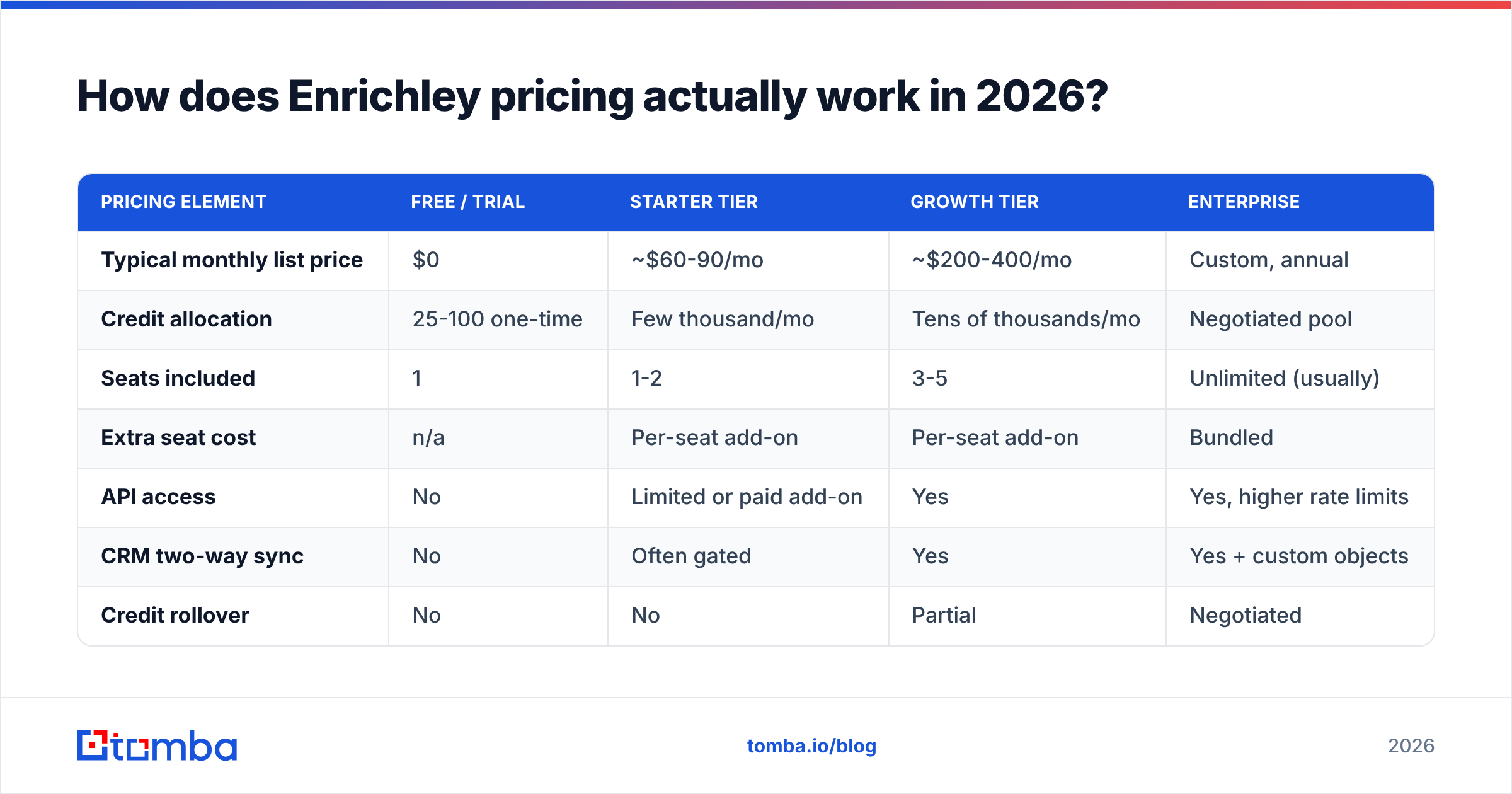
Enrichley uses the standard credit model that dominates this category. You buy a monthly or annual credit allocation, and each action spends credits at a published rate. The structure looks roughly like this across the tier ladder:
| Pricing element | Free / trial | Starter tier | Growth tier | Enterprise |
|---|---|---|---|---|
| Typical monthly list price | $0 | ~$60-90/mo | ~$200-400/mo | Custom, annual |
| Credit allocation | 25-100 one-time | Few thousand/mo | Tens of thousands/mo | Negotiated pool |
| Seats included | 1 | 1-2 | 3-5 | Unlimited (usually) |
| Extra seat cost | n/a | Per-seat add-on | Per-seat add-on | Bundled |
| API access | No | Limited or paid add-on | Yes | Yes, higher rate limits |
| CRM two-way sync | No | Often gated | Yes | Yes + custom objects |
| Credit rollover | No | No | Partial | Negotiated |
| Annual discount | n/a | ~15-20% | ~20% | Deal-dependent |
| Data export rights | Restricted | Restricted | Standard | Contractual |
Four structural details cost people money, and none of them are obvious from the pricing page.
- Credits expire monthly on lower tiers. A slow month does not bank capacity for a busy one. If your outbound is campaign-driven rather than steady-state, you overbuy to cover peaks and burn the surplus.
- Seats are priced separately from credits. Two SDRs and one ops person on a "Growth" plan can quietly add 40-60% to the invoice. Seat-based pricing punishes teams that want read-only access for a manager or a contractor.
- A failed lookup can still cost you. Policies vary and change; some vendors charge for any query that hits the database, others only for a returned match. This single line in the terms can swing your effective cost by 30%.
- The API is frequently a tier gate, not a feature. If your plan is to run enrichment inside a workflow rather than clicking around a dashboard, you may need to jump a tier purely for programmatic access.
For reference, Tomba's model deliberately avoids most of that: Tomba pricing runs a free tier at 25 searches per month, Starter at $49/mo, Growth at $99/mo, Pro at $249/mo, and Enterprise on custom terms — with API access rather than a separate API SKU.
What do Enrichley reviews say — and what should you discount?#
Read enough B2B software reviews and the pattern becomes predictable. Praise clusters around onboarding and UI. Criticism clusters around data and billing. Enrichley is no exception.
What reviewers repeatedly praise:
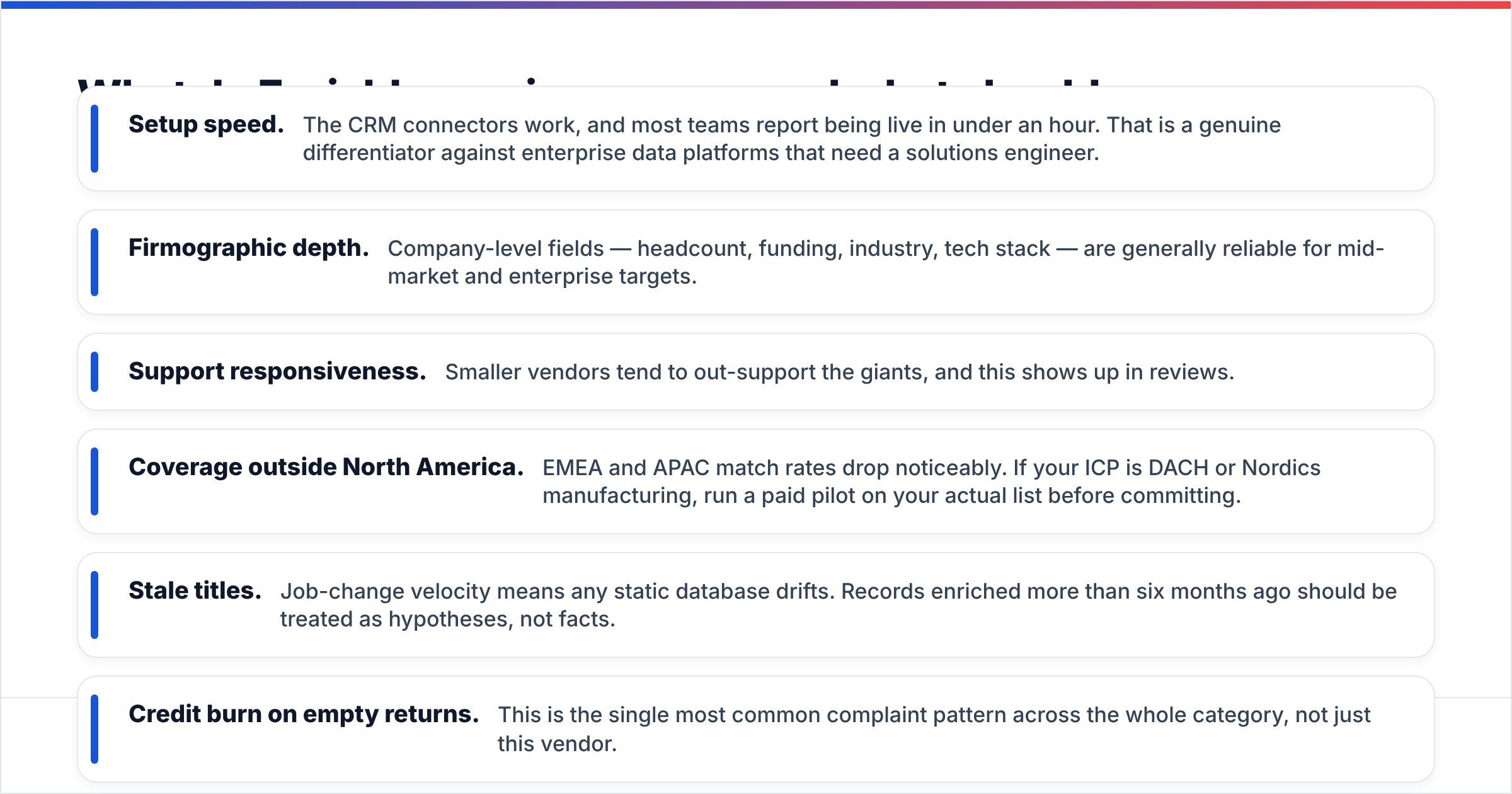
- Setup speed. The CRM connectors work, and most teams report being live in under an hour. That is a genuine differentiator against enterprise data platforms that need a solutions engineer.
- Firmographic depth. Company-level fields — headcount, funding, industry, tech stack — are generally reliable for mid-market and enterprise targets.
- Support responsiveness. Smaller vendors tend to out-support the giants, and this shows up in reviews.
What reviewers repeatedly complain about:
- Coverage outside North America. EMEA and APAC match rates drop noticeably. If your ICP is DACH or Nordics manufacturing, run a paid pilot on your actual list before committing.
- Stale titles. Job-change velocity means any static database drifts. Records enriched more than six months ago should be treated as hypotheses, not facts.
- Credit burn on empty returns. This is the single most common complaint pattern across the whole category, not just this vendor.
- Contract friction. Annual commitments with mid-term upgrade paths but no downgrade path.
When you read reviews on G2's sales intelligence category or Capterra, weight them by reviewer profile. A 5-star review from a 10-person startup enriching 200 US SaaS contacts a month tells you nothing about whether the tool works for 20,000 European industrial records. Filter by company size and region that match yours, then read only those.

Accuracy is where pricing arguments are actually won or lost. A tool at half the price with a 40% match rate is not cheap — it is expensive per usable contact and it damages your sender reputation when the unverified surplus bounces.
What are the real pros and cons of Enrichley?#
Stripping the marketing out, here is the honest ledger.
Pros
- CRM-native workflow. Enrichment that runs automatically on record creation beats enrichment you have to remember to trigger. This is the core value and it delivers.
- Strong firmographics. Company-level data is generally accurate enough to drive routing and scoring rules without manual QA.
- Fast time-to-value. No implementation project, no professional services line item.
- Reasonable entry price. The starter tier is accessible to teams that cannot justify an enterprise data contract.
- Clean, learnable UI. Non-technical marketers can operate it without training.
Cons
- Cost per usable record is higher than advertised. Divide list price by your real match rate, not the marketed one.
- Geographic coverage is uneven. North America is strong; everywhere else is a pilot-before-you-buy situation.
- Seat-based pricing scales badly. Costs grow with headcount, not with value delivered.
- Email deliverability is not its core competency. Enrichment tools return an address; they generally do not guarantee it is currently deliverable. That gap is why teams end up buying a separate email verifier anyway.
- Limited credit flexibility. Monthly expiry punishes campaign-driven usage patterns.
- Export and portability terms deserve a lawyer's eye. Read what you are allowed to keep if you churn.

That fifth con deserves emphasis because it is the one that costs money after the invoice. An enriched record with a plausible-looking email that has not been SMTP-validated is a bounce waiting to happen. Two percent bounce rate is the line where inbox providers start throttling you. If you send 5,000 emails against unverified enriched data, a 6% bounce rate does not just waste 300 sends — it degrades delivery for the other 4,700.
How does Enrichley compare to the alternatives on price?#
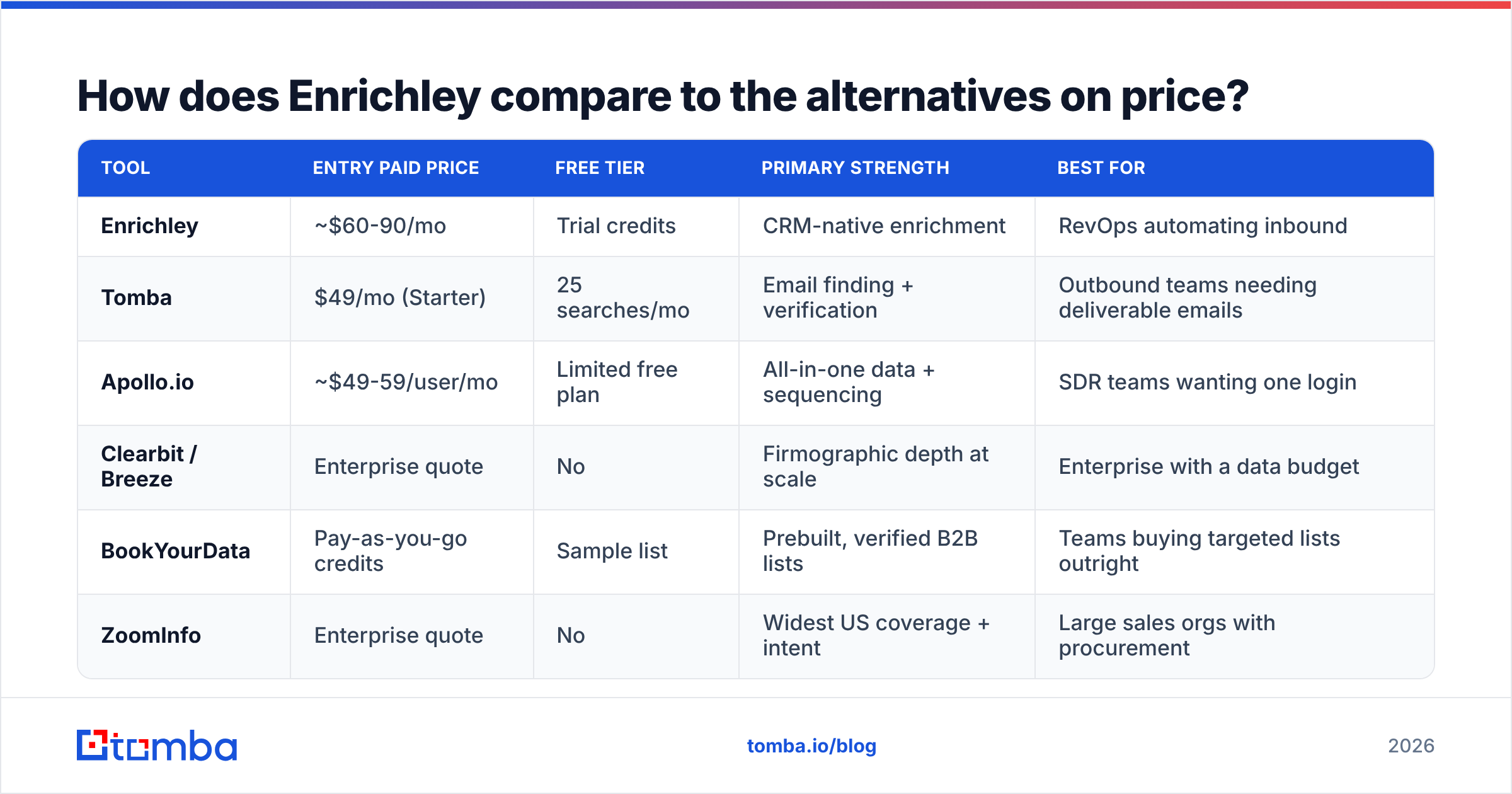
This is the table most buyers actually want. All figures are list prices for the entry paid tier, normalized to monthly billing where the vendor publishes both.
| Tool | Entry paid price | Free tier | Primary strength | Best for |
|---|---|---|---|---|
| Enrichley | ~$60-90/mo | Trial credits | CRM-native enrichment | RevOps automating inbound |
| Tomba | $49/mo (Starter) | 25 searches/mo | Email finding + verification | Outbound teams needing deliverable emails |
| Apollo.io | ~$49-59/user/mo | Limited free plan | All-in-one data + sequencing | SDR teams wanting one login |
| Clearbit / Breeze | Enterprise quote | No | Firmographic depth at scale | Enterprise with a data budget |
| BookYourData | Pay-as-you-go credits | Sample list | Prebuilt, verified B2B lists | Teams buying targeted lists outright |
| ZoomInfo | Enterprise quote | No | Widest US coverage + intent | Large sales orgs with procurement |
Two honest observations about that table.
The first: BookYourData solves a genuinely different problem well. If what you need is a filtered, pre-verified list you can buy once and own — rather than a subscription that meters every lookup — pay-as-you-go list purchase is often the cheaper and simpler path. Not every data problem is a SaaS problem.
The second: per-seat tools like Apollo and ZoomInfo look competitive at one seat and stop looking competitive at five. Run the math at your actual headcount, including the manager who wants dashboard access, before you compare anything.

For the specific job of turning a name plus a domain into a deliverable address, a focused email finder usually wins on cost per verified contact because it is not amortizing a sequencer, an intent engine, and a dialer across your bill. Add bulk email finder processing for list work and you cover most of what an enrichment suite is used for day to day.
How do you calculate the real cost per contact?#
Use this instead of the pricing page. It takes five minutes and it has settled more vendor decisions than any demo.
- Take the monthly list price at the tier you would actually buy, at the billing term you would actually accept.
- Add every per-seat fee for every human who needs access, including read-only.
- Divide by the credit allocation to get nominal cost per credit.
- Divide by your measured match rate from a paid pilot on your own list — never the vendor's published figure, which is measured on their most favorable segment.
- Divide again by the verified-deliverable rate. Run the returned emails through independent verification. Whatever survives is your real denominator.
- Add the cost of the gap tool. If you need a separate verifier or finder to close the loop, that is part of the total cost of this decision.
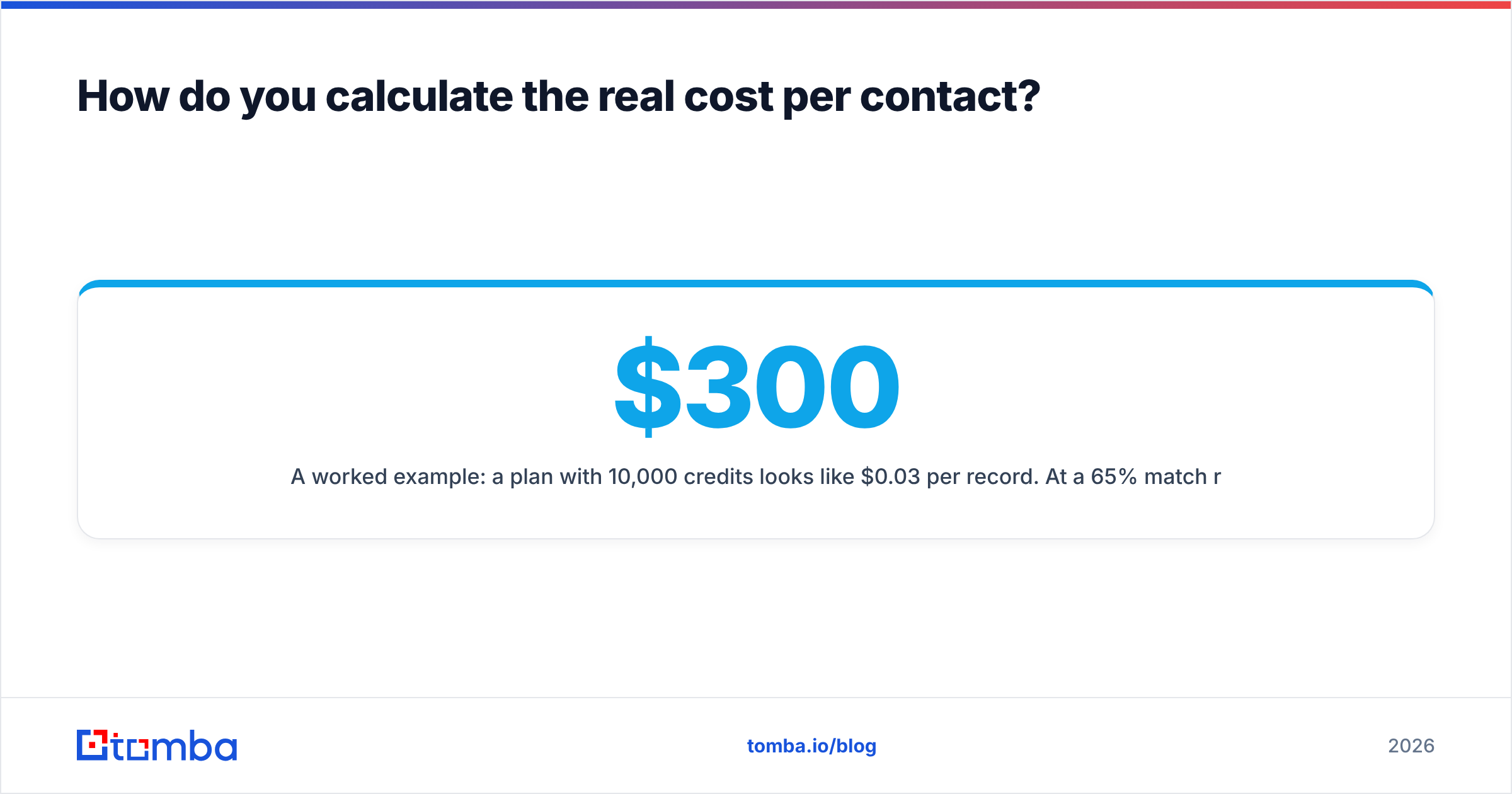
A worked example: a $300/mo plan with 10,000 credits looks like $0.03 per record. At a 65% match rate that is $0.046. At 85% of those matches being verifiably deliverable, it is $0.054 — nearly double the headline. Now add a $49/mo verification tool and three seats at $30 each, and the honest number is closer to $0.09 per usable contact. That is still fine if the contacts convert. It is just not $0.03.
Run this calculation on every vendor on your shortlist and the ranking usually changes. Tools that look expensive on the pricing page often win on match rate, and vice versa.
Is Enrichley worth it for your team?#
Buy it if: your inbound volume is meaningful, your CRM is the system of record, your ICP is North America–heavy, and you have a RevOps owner who will maintain the field mappings. Automatic enrichment on record creation is real leverage, and the entry price is defensible against the hours it replaces.
Skip it if: your primary need is finding and verifying outbound email addresses, your target market is mostly outside North America, your team is small enough that per-seat costs bite, or your usage is spiky rather than steady. In those cases you are paying an enrichment-suite premium for finder-and-verifier functionality.
Pilot before you commit, always. Take 500 records from your actual target segment, run them through a paid trial, verify the output independently, and count what survives. That test costs a few hundred dollars and routinely saves five figures on an annual contract.
One last piece of advice on negotiation: enrichment vendors have far more flexibility on credits than on price per seat. If you need a discount, ask for a larger credit pool at the same price rather than a lower price at the same pool. Vendors protect their headline pricing and treat credit allocation as the softer lever.
Where should you start instead?#
If the honest audit above pointed you toward "I mostly need correct, deliverable email addresses at a predictable price," start with the Tomba Email Finder. The free tier gives you 25 searches a month to test match quality on your own list before spending anything, Starter is $49/mo, and verification is built alongside the finder rather than sold as a separate subscription — so the address you get back has already been checked before it hits your sequencer. Run your next 100 target accounts through it, compare the deliverable count against whatever your current tool returns, and let that number pick the winner.
Related guides#
Ready to find emails that actually work?
Join 150,000+ professionals who stopped guessing and started sending. Free credits on signup — no credit card required.
Get the Tomba newsletter
Practical outbound tactics and product updates — once every two weeks.
About the author