Enrichley vs Kaspr 2026: Which B2B Contact Data Tool Wins?
Kaspr pulls phone numbers off LinkedIn profiles. Enrichley runs enrichment across multiple data sources. They solve different halves of the same problem — and picking the wrong one costs you a quarter of pipeline.
Enrichley vs Kaspr comes down to one question. Do you need to find new contacts, or fill in the ones you already have? Kaspr finds. Enrichley fills. Here is how the two compare on data, price, and compliance risk.
TL;DR
- Kaspr is a LinkedIn-first extension. Its best asset is mobile phone numbers, pulled while you browse profiles. It suits SDRs who work one profile at a time.
- Enrichley is an enrichment-first platform. It takes a list you already own — CRM records, form fills, exports — and fills the missing fields in bulk.
- They are not really substitutes. Pick based on your bottleneck: finding contacts, or completing records you already have.
- Both get expensive at volume. Per-seat models punish teams that want data in a workflow, not in a browser tab.
- Need verified work emails at API scale? A dedicated email finder is cheaper than either. Tomba starts at $49/mo with a free tier, and the same credits work in the app, the API, Sheets, and a Chrome extension.
What are Enrichley and Kaspr?#
Kaspr is a contact-data tool built around a Chrome extension that overlays LinkedIn. You open a profile, click the widget, and it returns the person's email addresses and — its main selling point — direct mobile numbers. Cognism acquired Kaspr in 2022. So it now sits inside a larger sales-intelligence stack, and it inherits that company's European data-compliance posture. Its natural user is an SDR who lives inside LinkedIn Sales Navigator all day.
Enrichley comes at the same problem from the opposite direction. It is an enrichment layer, not a browsing overlay. You feed it partial records — a domain, a name, a LinkedIn URL, an email — and it returns completed contact and company fields. Most of the time it uses multi-source fallback logic: if one provider misses, it queries another. Its natural user is a RevOps or growth engineer who owns a CRM full of half-empty rows.
In the Enrichley vs Kaspr choice, that distinction matters more than any feature checklist. Kaspr is a discovery tool. Enrichley is a completion tool. Teams that buy one expecting the other end up disappointed and blame the vendor.
One caveat before the tables: contact-data vendors change pricing, credit definitions, and coverage claims often. Treat every number below as directional, and confirm it on the vendor's own page before you sign anything. Kaspr publishes its plans at kaspr.io. Enrichley's pricing has historically been quote-and-tier based, which is itself a data point.
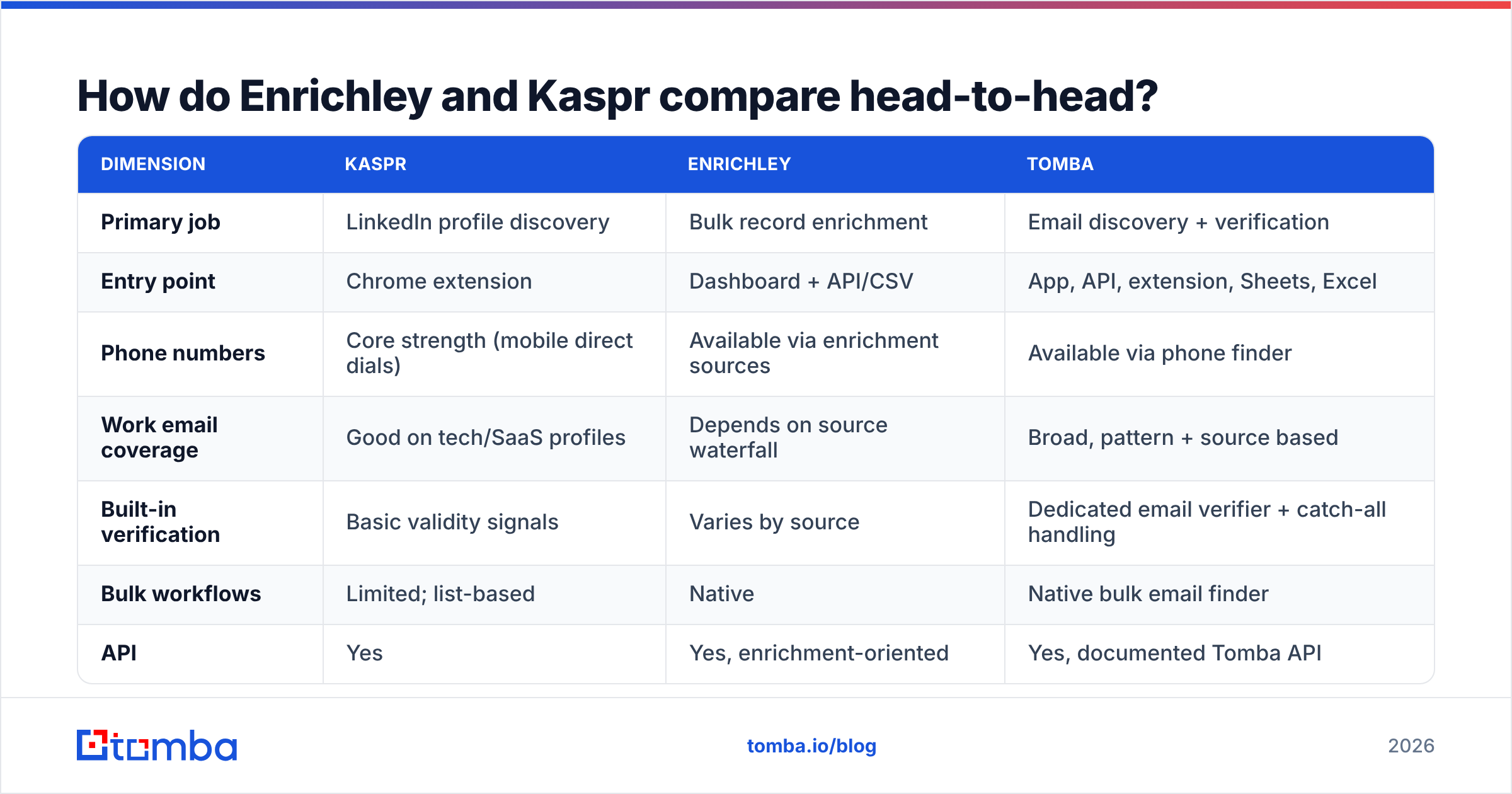
Enrichley vs Kaspr: how do they compare head-to-head?#
| Dimension | Kaspr | Enrichley | Tomba |
|---|---|---|---|
| Primary job | LinkedIn profile discovery | Bulk record enrichment | Email discovery + verification |
| Entry point | Chrome extension | Dashboard + API/CSV | App, API, extension, Sheets, Excel |
| Phone numbers | Core strength (mobile direct dials) | Available via enrichment sources | Available via phone finder |
| Work email coverage | Good on tech/SaaS profiles | Depends on source waterfall | Broad, pattern + source based |
| Built-in verification | Basic validity signals | Varies by source | Dedicated email verifier + catch-all handling |
| Bulk workflows | Limited; list-based | Native | Native bulk email finder |
| API | Yes | Yes, enrichment-oriented | Yes, documented Tomba API |
| Pricing model | Per user, per month | Tiered / credit-based | Flat plans from $49/mo, free tier |
| Best for | Individual SDRs on LinkedIn | RevOps filling CRM gaps | Teams needing verified emails at scale |
The honest read: hand the same 500-company target list to all three, and each wins a different race. Kaspr wins on phone reachability, for the profiles you manually opened. Enrichley wins on how many CRM fields come back filled. A dedicated email finder wins on how many of those emails actually land in an inbox.
Which one has better data accuracy?#
Accuracy is the wrong single question. There are three separate numbers, and vendors quote whichever one flatters them:
- Coverage / hit rate — what percentage of your input list returns any contact. Enrichment platforms score well here because they query multiple sources and can always return something.
- Precision — what percentage of returned contacts are correct and current. This is where multi-source waterfalls degrade: a low-confidence guess still counts as a hit.
- Deliverability — what percentage of returned emails actually accept mail. This is the only number your email deliverability depends on, and it is the one most rarely published.

Kaspr's accuracy skews toward phone numbers on European and North American tech profiles. Its email data is competent, but it is not the differentiator. Extraction happens one profile at a time, so you rarely spot a 10% precision problem in a spreadsheet. You notice it as "that number was disconnected."
Enrichley's profile is the classic waterfall trade-off. You get a high raw fill rate, wider variance in quality, and a real risk that "enriched" fields quietly carry stale data. A source that last refreshed 18 months ago still counts as a hit. If you use it, insist on a confidence score per field, and drop anything below your threshold before it hits the CRM.
Whichever tool you pick, run outputs through a separate verification step. Enrichment and verification are different disciplines, and a vendor that grades its own homework tends to grade generously. A standalone email verification pass, including a real catch-all verifier check, is the cheapest insurance in the stack.
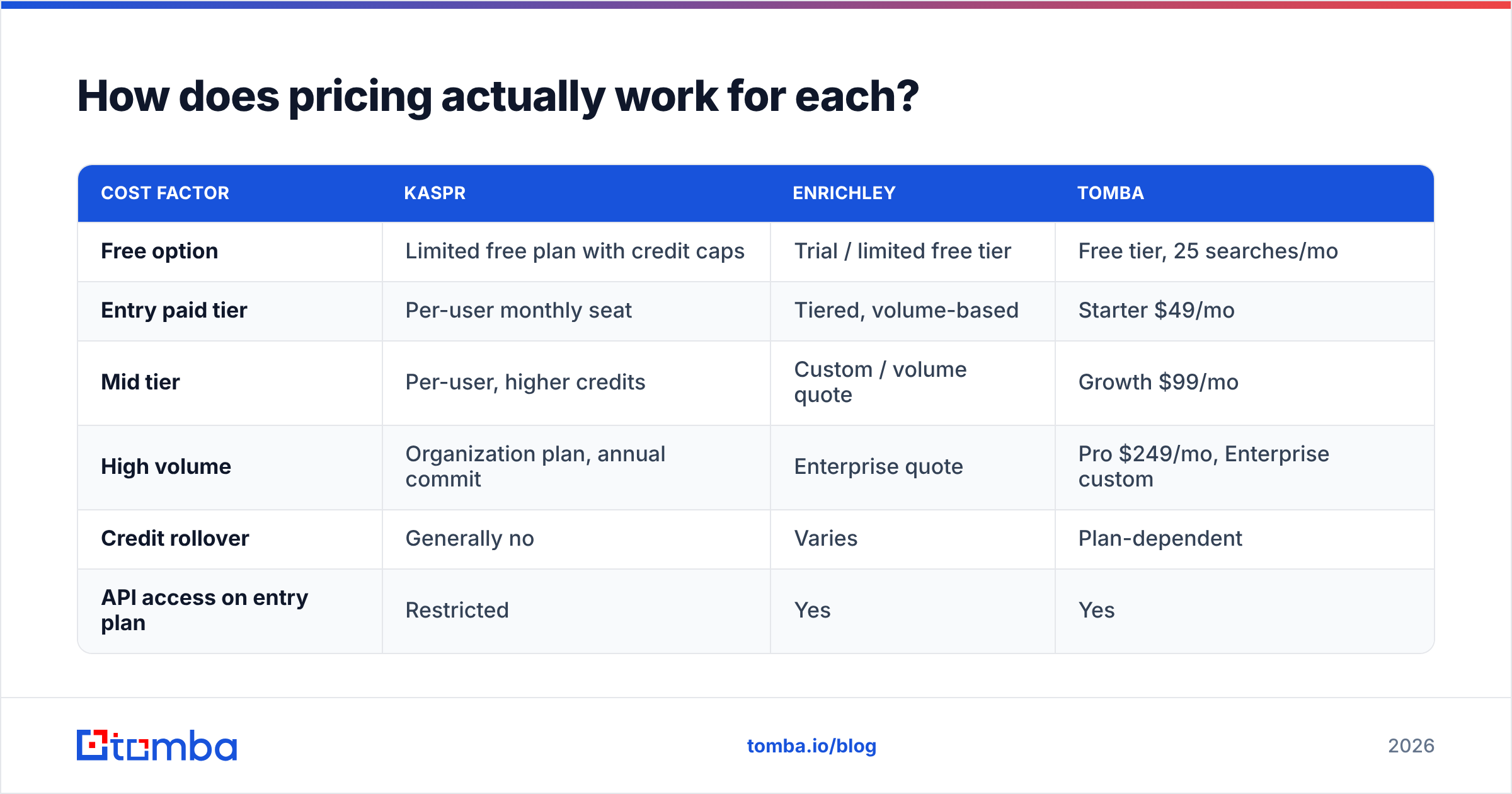
How does pricing actually work for each?#
| Cost factor | Kaspr | Enrichley | Tomba |
|---|---|---|---|
| Free option | Limited free plan with credit caps | Trial / limited free tier | Free tier, 25 searches/mo |
| Entry paid tier | Per-user monthly seat | Tiered, volume-based | Starter $49/mo |
| Mid tier | Per-user, higher credits | Custom / volume quote | Growth $99/mo |
| High volume | Organization plan, annual commit | Enterprise quote | Pro $249/mo, Enterprise custom |
| Credit rollover | Generally no | Varies | Plan-dependent |
| API access on entry plan | Restricted | Yes | Yes |
The structural difference is seats. Kaspr's per-user model is fine when five SDRs each need a browser widget. It turns irrational the moment you want data flowing into a workflow. You end up paying for humans who never open the extension. Or you buy one seat and share credentials, which breaks most terms of service.
Credit-based enrichment pricing has its own trap: a "credit" often means an attempt, not a successful return. Ask three questions before you sign:
- Do failed lookups consume credits? If yes, your effective cost per usable record can be double the sticker price.
- Does one record consume one credit or one credit per field? Email + phone + company data can be three charges on the same person.
- Do unused credits roll over? Seasonal outbound teams burn a lot of money on months they didn't send.
For comparison, Tomba pricing is flat per plan. The same credit pool covers the finder, verifier, domain search, and API. That is what you want when usage moves between manual research and automated pipelines month to month.
Who should choose Kaspr?#
Pick Kaspr if all three of these are true:
- Your reps prospect inside LinkedIn manually. The extension is genuinely fast, and speed-per-profile is a real productivity metric.
- Phone is a primary channel. If your team runs cold calls or a call-plus-email cadence, mobile direct dials are worth a premium. Few tools match Kaspr here on European data.
- Your team is small and stable. Per-seat pricing is predictable at 3–10 reps and painful past that.
Kaspr's compliance posture is a genuine advantage if you sell into the EU. Under GDPR, you need a defensible legitimate-interest basis and a working notification process for contacted individuals. Kaspr documents this. Not every scraper-adjacent tool does.
Who should choose Enrichley?#
Pick Enrichley if your problem is shaped like a database rather than a browser:
- You already have the accounts. Inbound signups, event lists, partner data, an old CRM — you know who you want, you just lack the contact fields.
- You need fields beyond email. Firmographics, headcount, tech stack, and job-change signals are enrichment territory, not extension territory.
- You have someone to own the pipeline. Enrichment is only as good as the dedupe, confidence thresholds, and refresh cadence around it. Without a RevOps owner, you are automating the creation of bad data.
If you are mainly enriching to build ICP lists from scratch, be aware you are using an expensive tool for a job a B2B database plus a finder does more cheaply.

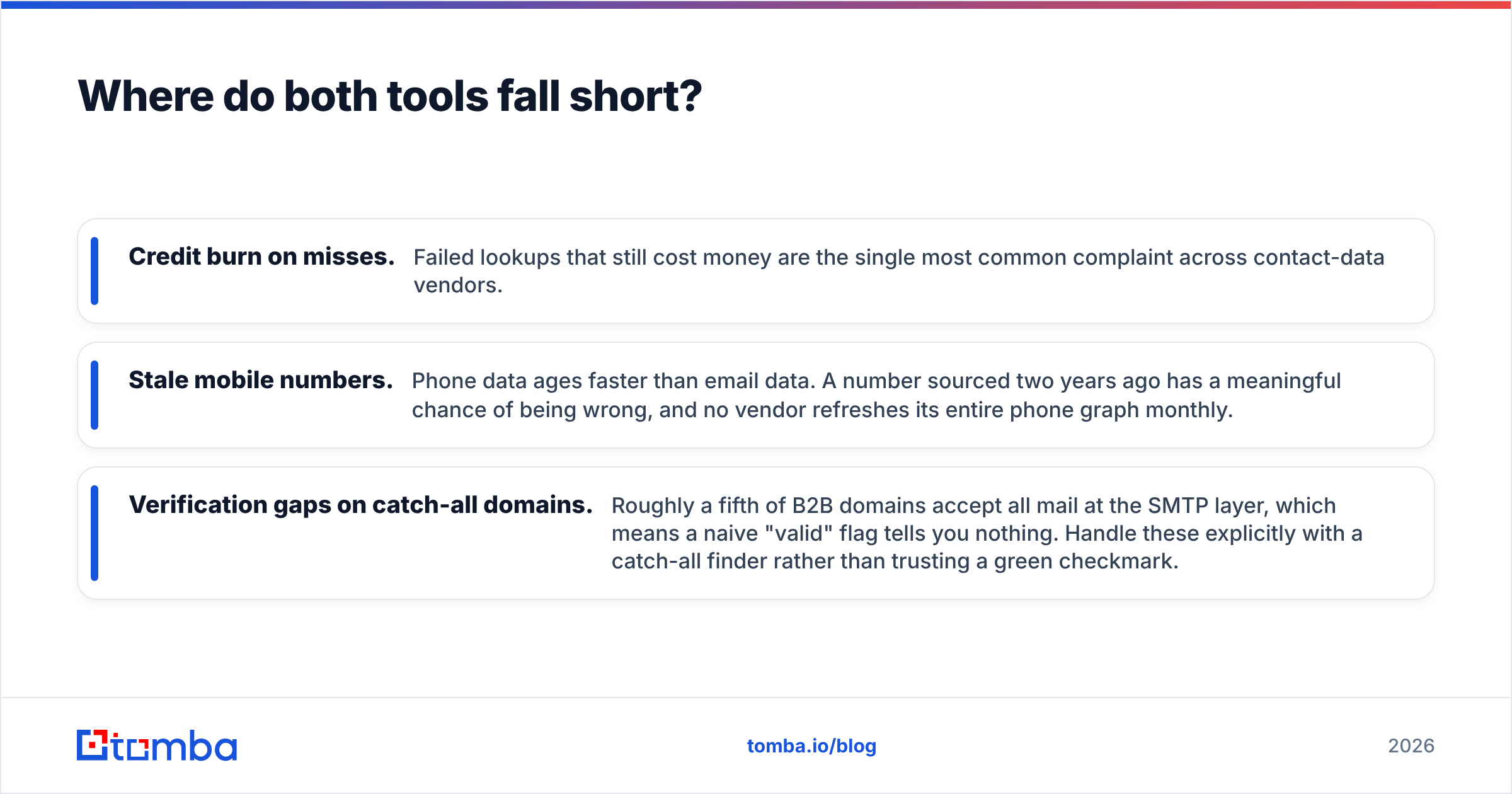
Where do both tools fall short?#
Three failure modes show up in reviews of nearly every tool in this category, including these two — check G2 for current sentiment before you commit:
- Credit burn on misses. Failed lookups that still cost money are the single most common complaint across contact-data vendors.
- Stale mobile numbers. Phone data ages faster than email data. A number sourced two years ago has a good chance of being wrong, and no vendor refreshes its whole phone graph monthly.
- Verification gaps on catch-all domains. Roughly a fifth of B2B domains accept all mail at the SMTP layer, so a naive "valid" flag tells you nothing. Handle these with a catch-all finder rather than a green checkmark.
There is also a workflow cost nobody prices in. If discovery lives in an extension and enrichment lives in a dashboard, someone is exporting CSVs between them every week. That person is your most expensive data pipeline.
What does the full comparison look like?#

Use this decision sequence rather than a feature scorecard:
- Name the bottleneck in one sentence. "We can't find phone numbers" and "our CRM is 60% empty" lead to different purchases.
- Count the humans who need a UI. If it's fewer than three, per-seat pricing is fine. If data needs to reach a workflow, buy API-first.
- Test on 100 real records, not the vendor's demo list. Use accounts you already know the answers for. Measure precision, not fill rate.
- Send to 50 of the results and measure bounces. This is the only accuracy test that maps to revenue.
- Price the annual cost at your real volume, including failed-lookup credits and the seats you'll add in six months.
- Check the compliance paperwork if you touch EU contacts — DPA, opt-out handling, and source disclosure.
Most teams that run the Enrichley vs Kaspr exercise find their real need is narrower than the platforms they were weighing. What they want is verified work emails, at volume, inside an existing workflow. That is a $49–$99/month problem, not a per-seat platform problem.
Frequently asked questions#
Can I use Kaspr and Enrichley together? Yes, and some teams do — Kaspr for live LinkedIn prospecting, an enrichment layer for the CRM backfill. Just budget for the integration work and the duplicate spend on overlapping records.
Which is better for cold calling? Kaspr, clearly. Mobile direct dials are its reason to exist. Pair it with a phone validator so your dialer isn't burning connect rate on dead lines.
Which is better for cold email? Neither, on its own. Both return emails; neither is primarily a verification engine. Route outputs through a dedicated verifier before your sequencer touches them, or your sender reputation pays for it.
Is there a cheaper alternative? For email-centric outbound, yes. Dedicated finders skip the platform overhead and price per lookup rather than per human.
Start with verified emails, then add the extras#
If your outbound lives or dies on whether the email lands, start there. Add phone or firmographic layers later. The Tomba Email Finder gives you domain-level discovery, per-contact lookup, catch-all handling, and a documented API on the same credit pool. The free tier covers 25 searches a month, Starter is $49/mo, and there is no per-seat tax when your team grows. Run your next 100 target accounts through it alongside whatever you're evaluating, compare bounce rates, and let the data decide.
Related guides#
Ready to find emails that actually work?
Join 150,000+ professionals who stopped guessing and started sending. Free credits on signup — no credit card required.
Get the Tomba newsletter
Practical outbound tactics and product updates — once every two weeks.
About the author