Enrichley vs Leadzenai (2026): Which Lead Data Tool Wins?
Enrichley and Leadzenai both promise clean B2B contact data, but they solve different problems. Here is an honest breakdown of coverage, verification, pricing models and API depth — plus who each one actually suits.
TL;DR
- Enrichley and Leadzenai are both B2B contact-data tools, but they attack different halves of the problem: Enrichley leans toward enrichment of records you already have, Leadzenai leans toward discovery and prospect search.
- Neither publishes the kind of independent, audited accuracy numbers you should demand — so run your own 200-row bounce test before you commit to an annual plan.
- Credit models differ more than headline prices do. A "cheap" plan that burns a credit on every failed lookup is usually more expensive than a plan that only charges for verified hits.
- If your workflow is domain-first (find everyone at these 500 companies) rather than list-first, a dedicated email finder with a real verification layer will beat both on cost per usable contact.
- Whichever you pick, verify before you send. Unverified enrichment output is the single biggest source of hard bounces in outbound.
What are Enrichley and Leadzenai?#
Both tools sit in the same broad category — B2B contact data and lead enrichment — but they were built around different starting assumptions.
Enrichley positions itself as an enrichment layer. You bring records (a company name, a domain, a partial contact row, a CRM export) and it fills in the gaps: work email, company metadata, firmographics. The mental model is a plumbing fixture. You already have water; Enrichley is the filter that makes it drinkable.
Leadzenai positions itself closer to a prospecting database with search on top. You describe who you want — industry, geography, seniority, company size — and it returns matching people and companies with contact details attached. The mental model is a phone book with filters, not a filter for your existing phone book.
That distinction matters more than any feature checklist, because it determines which tool is even relevant to your workflow. If you already have 40,000 accounts in Salesforce and need the missing emails, a search-first tool wastes most of its value. If you have nothing and need to build a list from scratch, an enrichment-first tool has nothing to chew on.
A useful third framing comes from how the wider market segments these products. Review platforms like G2 and Capterra file both under "lead intelligence," which flattens a real distinction: data discovery (who exists) versus data completion (what's missing about the people I already know) versus data validation (is this deliverable right now). Most teams need all three, and most single vendors do one well and two adequately.
How do Enrichley and Leadzenai actually differ?#
Here is the practical comparison. Treat vendor-published figures as a starting point, not gospel — pricing pages in this category change quarterly, and both vendors quote plans that vary by region and contract length.
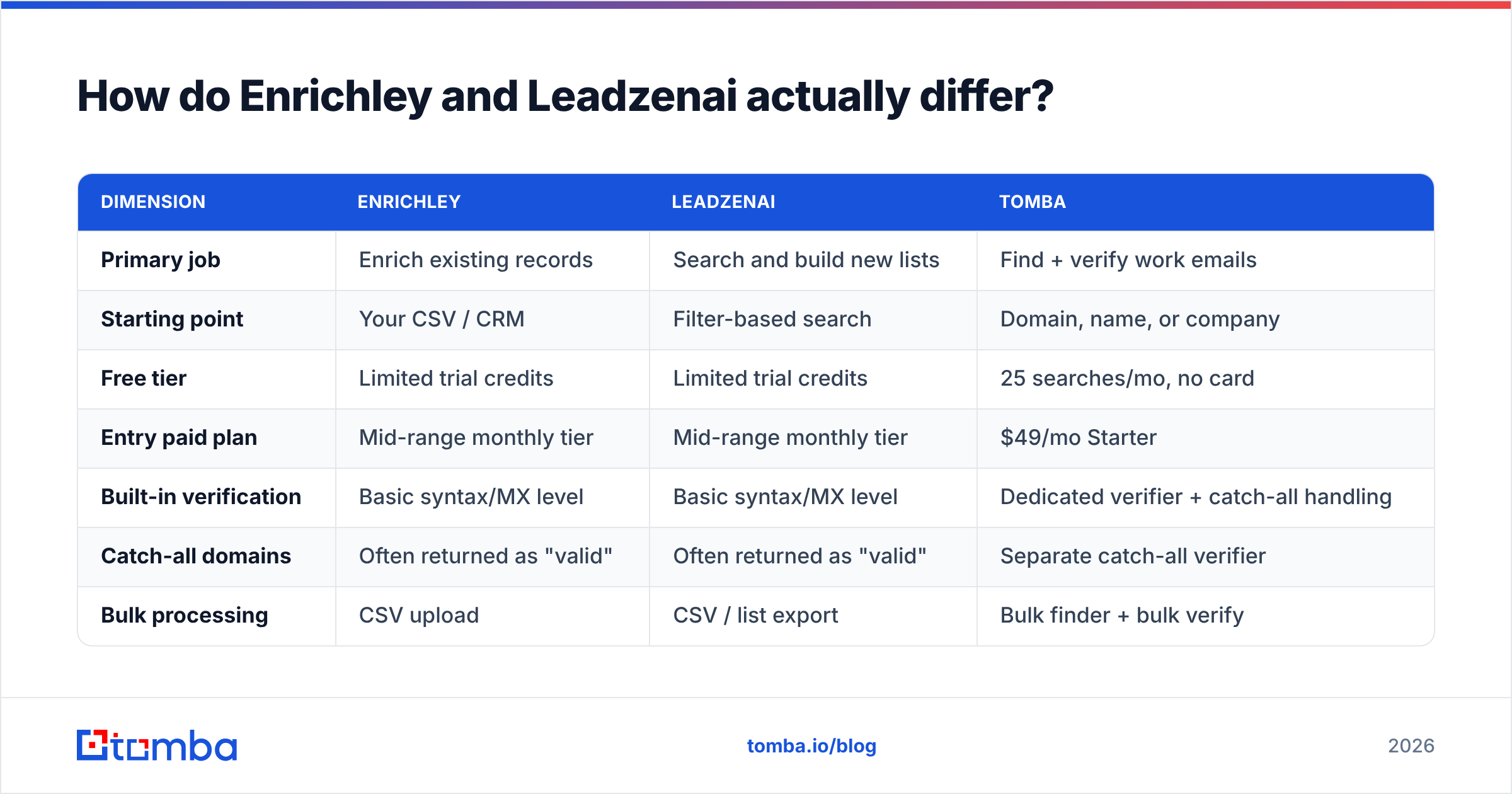
| Dimension | Enrichley | Leadzenai | Tomba |
|---|---|---|---|
| Primary job | Enrich existing records | Search and build new lists | Find + verify work emails |
| Starting point | Your CSV / CRM | Filter-based search | Domain, name, or company |
| Free tier | Limited trial credits | Limited trial credits | 25 searches/mo, no card |
| Entry paid plan | Mid-range monthly tier | Mid-range monthly tier | $49/mo Starter |
| Built-in verification | Basic syntax/MX level | Basic syntax/MX level | Dedicated verifier + catch-all handling |
| Catch-all domains | Often returned as "valid" | Often returned as "valid" | Separate catch-all verifier |
| Bulk processing | CSV upload | CSV / list export | Bulk finder + bulk verify |
| Public API | Yes | Yes | Yes, documented REST API |
| Spreadsheet add-ons | Limited | Limited | Google Sheets, Excel, Airtable |
| Best fit | RevOps cleaning a CRM | SDR building a fresh TAM list | Teams needing accuracy per contact |
Two things jump out of that table.
First, verification depth is the real differentiator, not record count. Every vendor in this space claims hundreds of millions of contacts. Almost none of them tell you what percentage of those records were validated in the last 90 days. A contact found in 2023 and never re-checked is a bounce waiting to happen — B2B job-change churn runs somewhere between 20% and 35% annually depending on segment and seniority.
Second, the entry point determines your true cost. If your motion is "find everyone with a given title at these 800 target accounts," you're running a domain search pattern, and tools optimized for filter-based browsing will make you pay for records you didn't ask for.

Which one finds more valid emails?#
Nobody can answer that for you from a blog post, and any post that gives you a confident number for two tools this size is guessing. What you can do is run a controlled test in an afternoon.
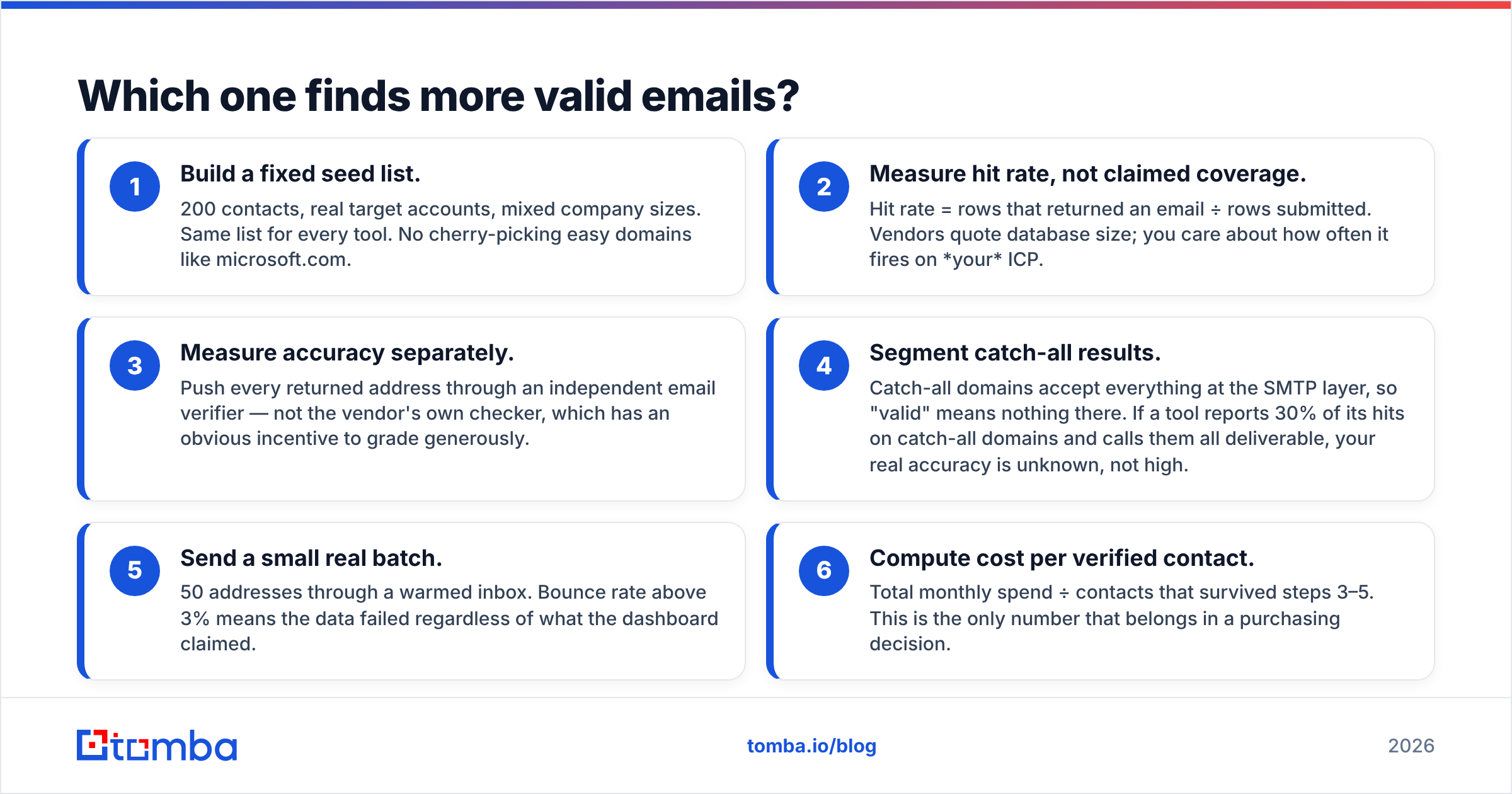
Here's the protocol that actually produces a defensible answer:
- Build a fixed seed list. 200 contacts, real target accounts, mixed company sizes. Same list for every tool. No cherry-picking easy domains like microsoft.com.
- Measure hit rate, not claimed coverage. Hit rate = rows that returned an email ÷ rows submitted. Vendors quote database size; you care about how often it fires on your ICP.
- Measure accuracy separately. Push every returned address through an independent email verifier — not the vendor's own checker, which has an obvious incentive to grade generously.
- Segment catch-all results. Catch-all domains accept everything at the SMTP layer, so "valid" means nothing there. If a tool reports 30% of its hits on catch-all domains and calls them all deliverable, your real accuracy is unknown, not high.
- Send a small real batch. 50 addresses through a warmed inbox. Bounce rate above 3% means the data failed regardless of what the dashboard claimed.
- Compute cost per verified contact. Total monthly spend ÷ contacts that survived steps 3–5. This is the only number that belongs in a purchasing decision.

The reason step 4 matters so much: catch-all handling is where most contact-data tools quietly inflate their accuracy. A domain configured to accept mail at any address will happily accept asdfgh@company.com. Tools that stop at SMTP acceptance mark those as valid. Tools that run pattern confidence, historical sighting data, and secondary signals will flag them honestly — which is why a dedicated catch-all verifier exists as a separate product rather than a checkbox.
How do pricing and credit models compare?#
Headline price is the least interesting part of the comparison. What determines your bill is the credit policy.
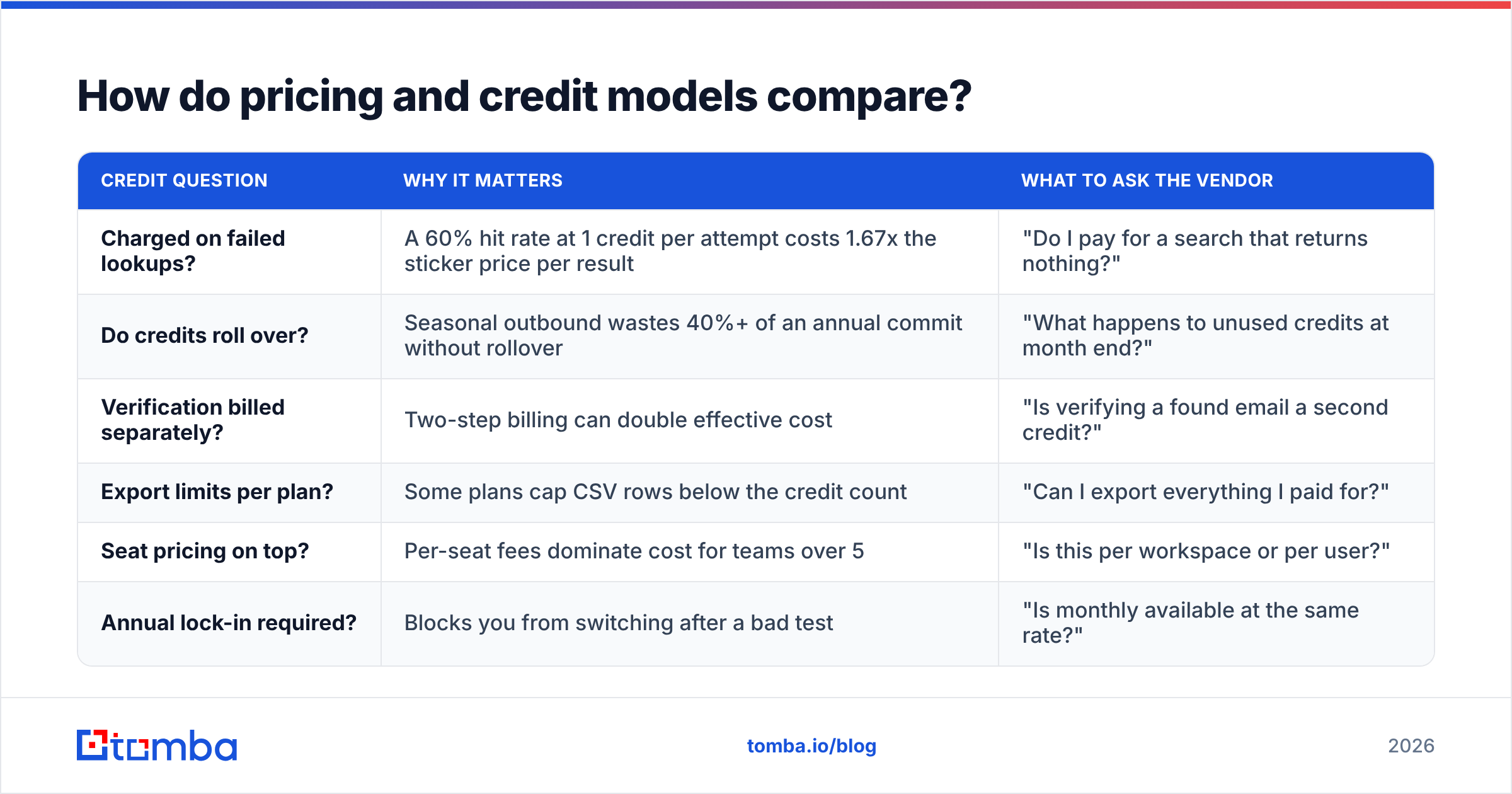
| Credit question | Why it matters | What to ask the vendor |
|---|---|---|
| Charged on failed lookups? | A 60% hit rate at 1 credit per attempt costs 1.67x the sticker price per result | "Do I pay for a search that returns nothing?" |
| Do credits roll over? | Seasonal outbound wastes 40%+ of an annual commit without rollover | "What happens to unused credits at month end?" |
| Verification billed separately? | Two-step billing can double effective cost | "Is verifying a found email a second credit?" |
| Export limits per plan? | Some plans cap CSV rows below the credit count | "Can I export everything I paid for?" |
| Seat pricing on top? | Per-seat fees dominate cost for teams over 5 | "Is this per workspace or per user?" |
| Annual lock-in required? | Blocks you from switching after a bad test | "Is monthly available at the same rate?" |
Against that grid, transparent published tiers are worth real money. Tomba pricing runs Free (25 searches/mo), Starter at $49/mo, Growth at $99/mo, Pro at $249/mo, and custom Enterprise — no seat multiplier games, and verification sits inside the same account rather than as a bolt-on subscription. Enrichley and Leadzenai both publish tiers too, but read their credit definitions closely before you compare monthly numbers: "credit" means different units of work at different vendors.
The trap to avoid is optimizing for cost per credit. A tool at half the price with a 45% hit rate and no verification is more expensive per usable contact than a tool at full price with a 70% hit rate and built-in validation. Run the arithmetic on verified outputs.

What about API access and workflow integration?#
If more than two people touch your lead data, the API and integration story decides whether the tool survives past month three.
Ask these four questions of both vendors:
- Is the API documented publicly, or gated behind sales? Public docs mean you can scope the integration before you buy. Gated docs mean surprises after the contract.
- Are there rate limits that break bulk work? A 60-requests-per-minute cap makes a 50,000-row enrichment job a multi-day process.
- Does it push into your CRM natively? Manual CSV round-trips between a data tool and HubSpot or Salesforce are where data hygiene dies. Native HubSpot integration or a Salesforce connector removes an entire class of stale-record problems.
- Can non-engineers use it? A Google Sheets add-on or Chrome extension means your SDRs stop filing tickets to get data.
This is where the two tools diverge from more infrastructure-oriented providers. Enrichley and Leadzenai both expose APIs, and both are usable for standard enrichment jobs. Neither is primarily positioned as a developer platform — so if your plan is to embed contact lookup inside your own product, evaluate the email finder API route on documentation quality, uptime history, and response schema stability rather than on UI polish.
Worth naming honestly: for pure database breadth in specific verticals, list vendors like BookYourData occupy a different and legitimate niche — pre-built, filterable B2B lists sold by the record. That's a valid model for teams that want data as a purchase rather than as a subscription workflow, and it competes with both Enrichley and Leadzenai on different terms.
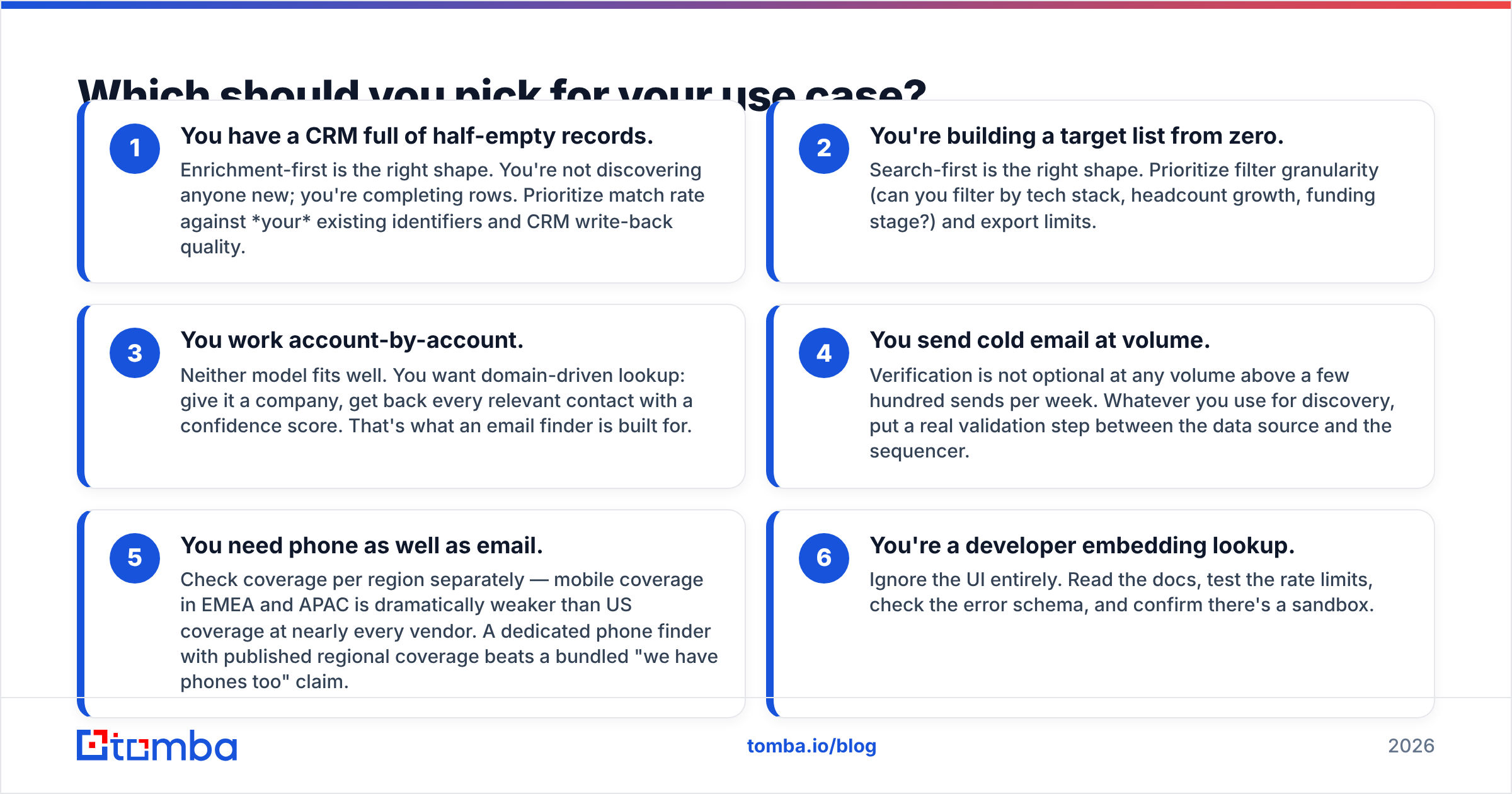
Which should you pick for your use case?#
Match the tool to the motion, not to the feature list.
- You have a CRM full of half-empty records. Enrichment-first is the right shape. You're not discovering anyone new; you're completing rows. Prioritize match rate against your existing identifiers and CRM write-back quality.
- You're building a target list from zero. Search-first is the right shape. Prioritize filter granularity (can you filter by tech stack, headcount growth, funding stage?) and export limits.
- You work account-by-account. Neither model fits well. You want domain-driven lookup: give it a company, get back every relevant contact with a confidence score. That's what an email finder is built for.
- You send cold email at volume. Verification is not optional at any volume above a few hundred sends per week. Whatever you use for discovery, put a real validation step between the data source and the sequencer.
- You need phone as well as email. Check coverage per region separately — mobile coverage in EMEA and APAC is dramatically weaker than US coverage at nearly every vendor. A dedicated phone finder with published regional coverage beats a bundled "we have phones too" claim.
- You're a developer embedding lookup. Ignore the UI entirely. Read the docs, test the rate limits, check the error schema, and confirm there's a sandbox.

Why does verification matter more than the tool you pick?#
Because inbox providers grade you on outcomes, not intentions.
Hard bounces are the fastest way to damage sender reputation. Gmail and Microsoft treat elevated bounce rates as a signal that you're sending to a purchased or stale list, and the penalty lands on the whole domain, not just the campaign. A 2% bounce rate is tolerable. A 6% bounce rate on a cold domain can push you into spam placement for months — and no amount of copy improvement fixes a reputation problem.
This is the failure mode that makes the Enrichley vs Leadzenai question secondary. Both tools will return addresses. Neither will save you if you pipe raw output straight into a sequencer without validation. The sequence that actually works:
- Discover or enrich (either tool, or a domain-first finder)
- Deduplicate the list before spending verification credits
- Verify every address, and treat catch-all results as a separate risk bucket
- Segment: send to confirmed-valid first, test catch-all separately at low volume
- Monitor bounces per domain, not just per campaign
If you want the mechanics of that pipeline in more depth, the concept page on email deliverability covers the authentication and reputation side. And for the underlying anatomy of what you're actually validating, Wikipedia's email address entry is a surprisingly good primer on why syntax checks alone prove almost nothing.
What's the honest verdict?#
Neither Enrichley nor Leadzenai is a bad tool, and neither is a category winner. They're solving adjacent problems with similar-sounding marketing, and the right answer depends entirely on whether you're completing records or discovering them.
Where both leave a gap is the same place most of this category does: verification treated as a feature rather than as a first-class product. Coverage claims are easy to make and hard to audit. Deliverability is measurable within 48 hours of your first send, which is why the 200-row test above beats any comparison table — including this one.
Run the test. Use the same seed list. Compare cost per verified contact, not cost per credit. If a vendor won't give you enough trial volume to run that test, that itself is the answer.
Ready to benchmark against a third option? Run your seed list through the Tomba Email Finder on the free tier — 25 searches a month, no card required — with verification and catch-all detection built into the same account rather than sold separately. If it beats your current cost per verified contact, the Starter plan is $49/mo; if it doesn't, you've lost an afternoon and gained a real number to negotiate with.
Related guides#
Ready to find emails that actually work?
Join 150,000+ professionals who stopped guessing and started sending. Free credits on signup — no credit card required.
Get the Tomba newsletter
Practical outbound tactics and product updates — once every two weeks.
About the author