Enrichley vs OneMoreLead: Which B2B Data Tool Wins in 2026?
Enrichley sells real-time enrichment. OneMoreLead sells a static B2B list. They solve different problems — and only one of them fits your outbound motion. Here's the honest breakdown, plus where a dedicated email finder beats both.
Enrichley vs OneMoreLead is the wrong fight for most teams. One tool fills in records you already own. The other sells you records you don't have. Pick the wrong type and price hardly matters.
TL;DR
- Enrichley is a real-time data layer. You feed it a domain, a name, or a half-filled record. It sends back company and contact fields on demand. Best for CRM cleanup and form lookups.
- OneMoreLead is a static B2B list. You filter a pre-built set of US-heavy business records, then export a CSV. Best for high volume on a small budget.
- They are not swaps for each other. Enrichley answers "tell me more about this record." OneMoreLead answers "give me records I don't have."
- Both break the same way: unverified emails. Exported lists go stale by 2-3% a month. Lookup APIs will hand back a guessed address with no SMTP proof.
- If your real job is finding and checking work emails at scale, the Tomba Email Finder covers the same ground at $49/mo. Checks run inside the same call.
What do Enrichley vs OneMoreLead actually do?#
Start with the category mix-up. Most Enrichley vs OneMoreLead posts skip it. They end up comparing a wrench to a hammer.
Enrichley sits in the enrichment camp. You bring a partial record. Maybe an email from a signup form. Maybe a domain from a site visitor. Maybe a name off a badge scan.
The tool fills in the blanks: company size, industry, tech stack, job title, LinkedIn URL, sometimes a work email. You pay per lookup or per credit. There is an API. It pays off when you wire it into a workflow that fires on its own.
OneMoreLead sits in the static list camp. You open a search screen. You set filters for industry, headcount, location, and seniority. You see a count. You export the file.
The pitch is volume and price. Large record counts, one flat fee, heavy on US small business data. There is no real API story. The file is the product.
That split drives everything below. A team sending 400 outbound touches a week needs new lists. A team with 60,000 CRM records and 40% blank fields needs enrichment. Buying the wrong type costs far more than the price gap between the two.

Enrichley vs OneMoreLead: how do they compare head to head?#
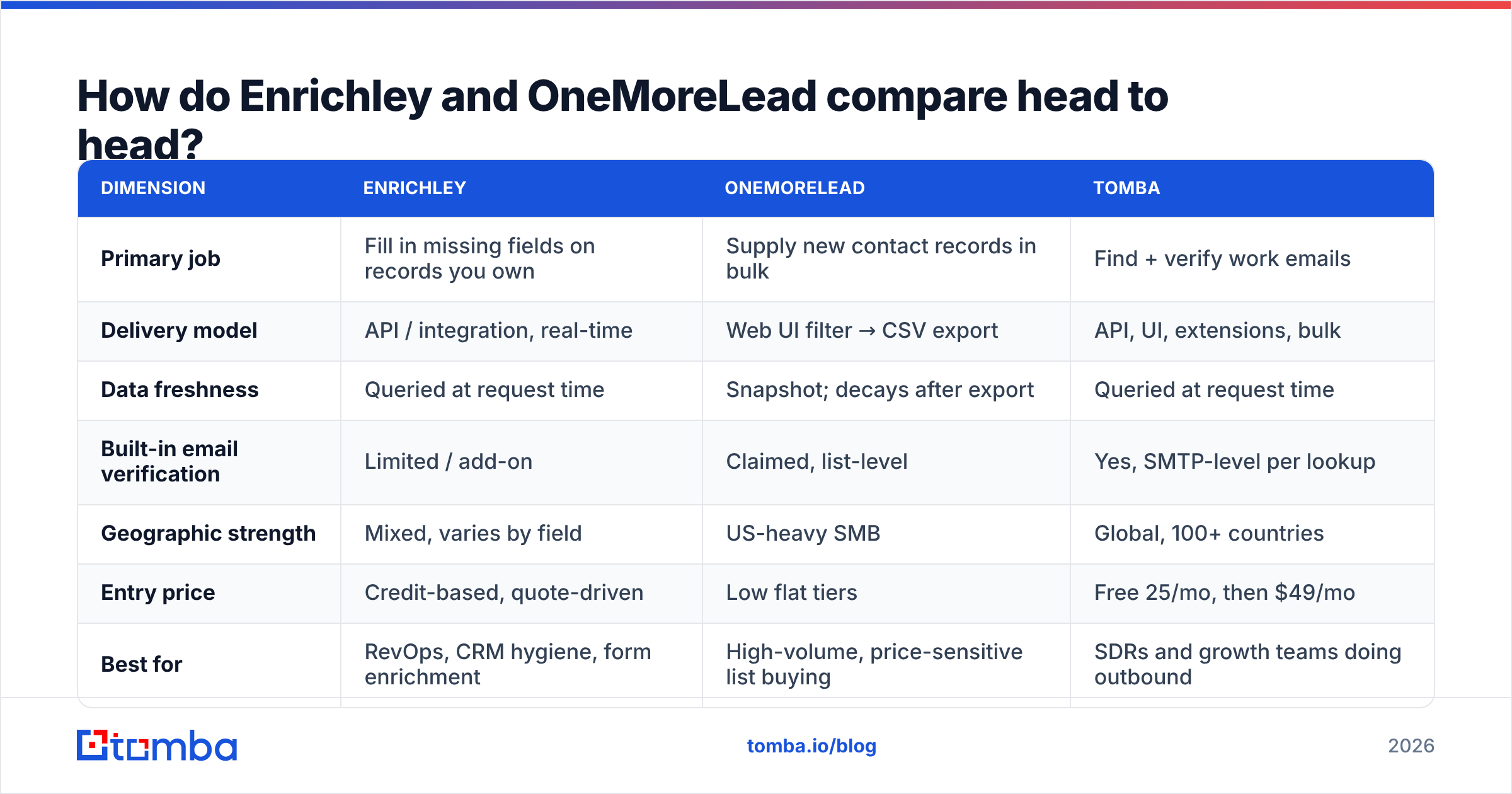
Here is the practical breakdown. Treat vendor coverage numbers as marketing until you test a sample. Both firms count records, not verified, still-employed contacts. Almost everyone in this space does.
| Dimension | Enrichley | OneMoreLead | Tomba |
|---|---|---|---|
| Primary job | Fill in missing fields on records you own | Supply new contact records in bulk | Find + verify work emails |
| Delivery model | API / integration, real-time | Web UI filter → CSV export | API, UI, extensions, bulk |
| Data freshness | Queried at request time | Snapshot; decays after export | Queried at request time |
| Built-in email verification | Limited / add-on | Claimed, list-level | Yes, SMTP-level per lookup |
| Geographic strength | Mixed, varies by field | US-heavy SMB | Global, 100+ countries |
| Entry price | Credit-based, quote-driven | Low flat tiers | Free 25/mo, then $49/mo |
| Best for | RevOps, CRM hygiene, form enrichment | High-volume, price-sensitive list buying | SDRs and growth teams doing outbound |
| Weakness | Costly per-record at prospecting volume | Export decay, thin non-US coverage | Not a full firmographic enrichment suite |
Four things stand out.
- Freshness is built in, not a feature gap. Enrichley looks up data when you ask. OneMoreLead hands you a file. That file starts aging the day it lands. Job changes alone eat 2-3% a month, or 25-30% a year.
- Verification is the shared weak spot. "We verify our data" means one thing at list-build time and another at send time. A record checked nine months ago is not a checked record today.
- Prices do not line up. Credit-based lookups get costly when you use them to prospect. Flat-fee lists look cheap until you divide by usable records after dedupe and bounce filtering.
- API depth sets your build cost. Say your flow is "form submit → enrich → route to a rep." An export-only tool cannot do that at any price.
Which one fits your outbound motion?#
The Enrichley vs OneMoreLead call comes down to four questions. Answer them before you open a pricing page.
1. Do you already have the records? Yes → you need enrichment (Enrichley). No → you need lists (OneMoreLead). If it is some of both, you likely need a finder plus a verifier instead.
2. Is the workflow automatic or batch? Automatic triggers (form submit, CRM update, site visit) need an API. That points to Enrichley or a finder API. Batch work is fine with an export.
3. Where do you sell? US small business → OneMoreLead is competitive for the money. EMEA, APAC, or LATAM → check a sample first. US-first databases thin out fast outside North America. A global email finder usually wins there.
4. What does a bounce cost you? A 12% bounce rate on a 3,000-contact blast is not a data problem. It is a deliverability incident. Run every list through an email verifier before it reaches your sequencer. It does not matter who sold you the data.
Why does data freshness break static lists?#
Business contact data rots. You cannot see the rot until you press send.
Do the math. You export 20,000 US contacts. Assume the data was right on export day. That is generous. Six months later:
- Roughly 15% have changed roles or companies
- Some domains have merged, rebranded, or gone dark
- Catch-all domains that once took mail now reject it, or the reverse
- Role addresses like info@ and sales@ still sit in the file
Now about one in five addresses is wrong. Mailbox providers read that as spam. Google's bulk sender guidelines are blunt about it. Senders must keep complaint rates low and keep lists valid. High unknown-user rates are exactly what filters punish.
Real-time lookups dodge the decay problem. They bring a new one. An API under pressure to return something will guess. first.last@domain.com is right for maybe 35-45% of companies. No confidence score and no SMTP status means you have a guess, not a fact. Tomba publishes where its data comes from for that reason.
Enrichley vs OneMoreLead pricing: what does each really cost?#
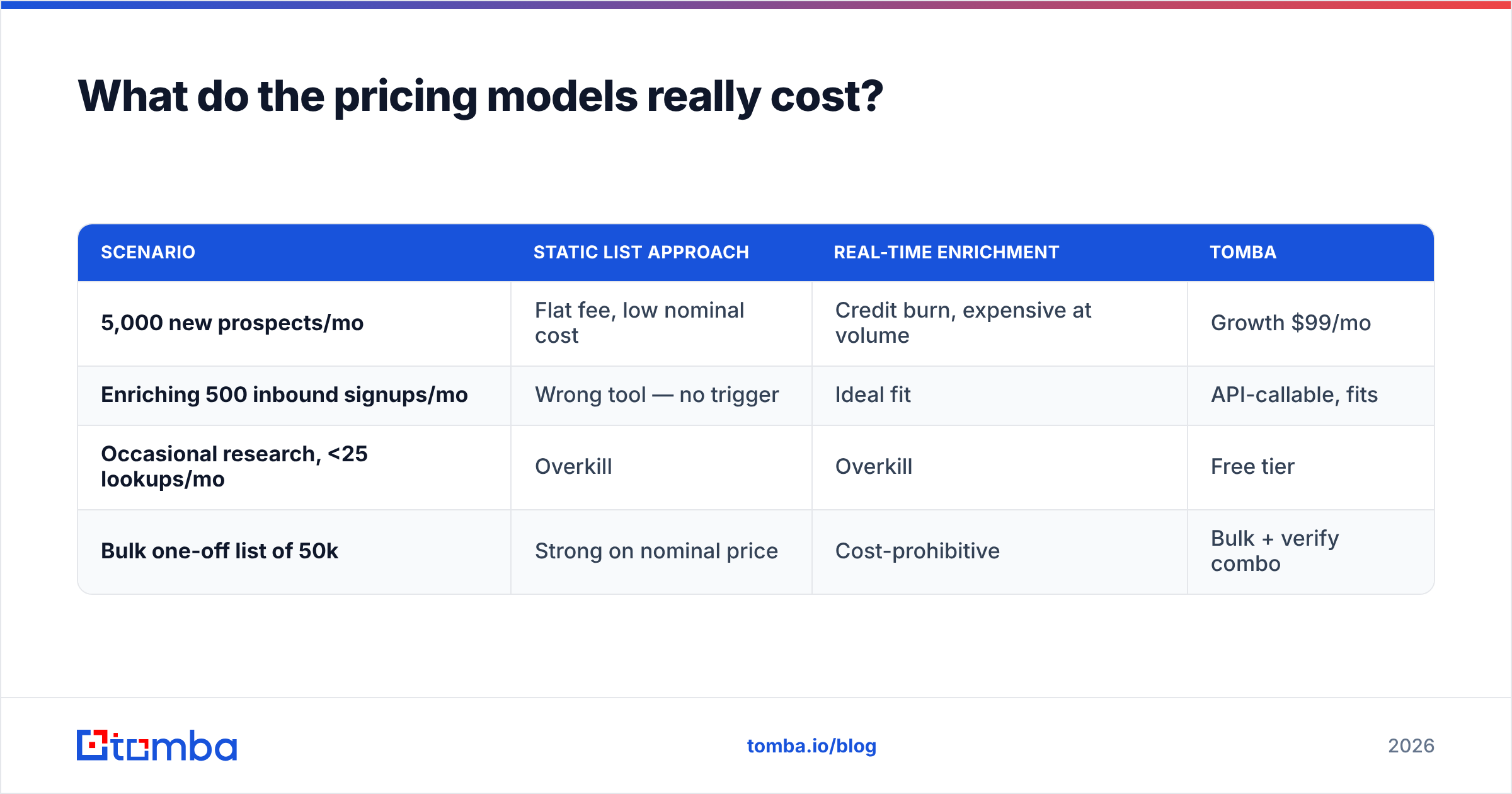
Neither vendor makes this simple. So use one number: cost per usable contact.
| Scenario | Static list approach | Real-time enrichment | Tomba |
|---|---|---|---|
| 5,000 new prospects/mo | Flat fee, low nominal cost | Credit burn, expensive at volume | Growth $99/mo |
| Enriching 500 inbound signups/mo | Wrong tool — no trigger | Ideal fit | API-callable, fits |
| Occasional research, <25 lookups/mo | Overkill | Overkill | Free tier |
| Bulk one-off list of 50k | Strong on nominal price | Cost-prohibitive | Bulk + verify combo |
People forget two adjustments.
- Dedupe against your CRM first. If 30% of an export is already in your CRM, your real price per new contact is 43% higher than the sticker.
- Subtract the bounces. A list at $0.02 per record with an 18% bounce rate really costs $0.024 per usable record. That is before the damage to your sender reputation, which is the pricey part.
For reference, Tomba pricing starts free at 25 searches a month. Starter is $49/mo, Growth is $99/mo, Pro is $249/mo. Verification runs inside the same flow, not as a separate line item.

How do the alternatives stack up?#
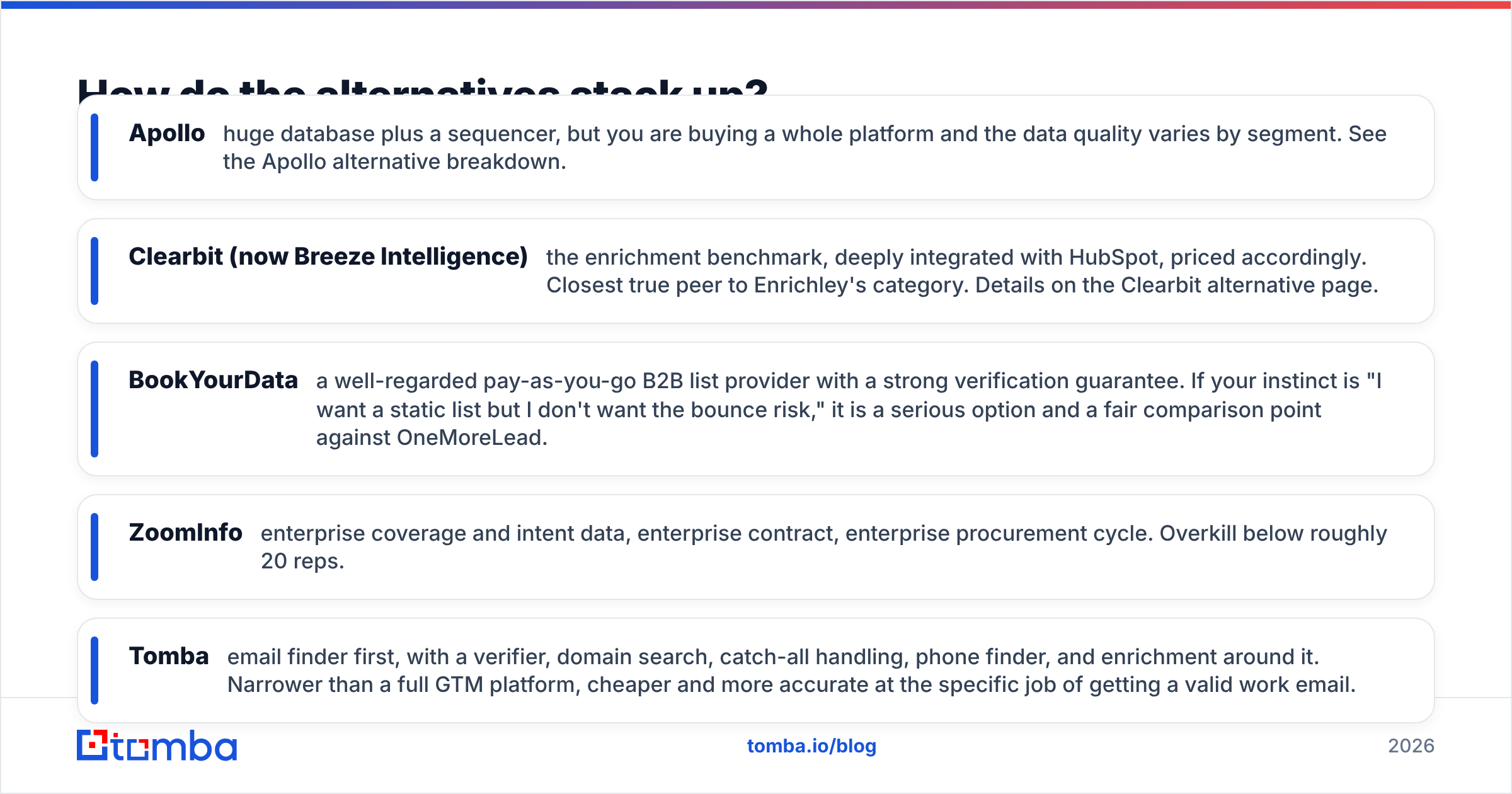
Neither side of the Enrichley vs OneMoreLead matchup is the default pick. Most outbound teams need find and verify, not enrich or bulk export. The wider field:
- Apollo — a huge database plus a sequencer. You buy a whole platform, and data quality swings by segment. See the Apollo alternative breakdown.
- Clearbit (now Breeze Intelligence) — the enrichment benchmark, tied deep into HubSpot, priced to match. Closest true peer to Enrichley. Details on the Clearbit alternative page.
- BookYourData — pay-as-you-go B2B lists with a strong accuracy guarantee. Want a static list without the bounce risk? It is a fair rival to OneMoreLead.
- ZoomInfo — enterprise coverage and intent data. Also an enterprise contract and an enterprise buying cycle. Overkill below about 20 reps.
- Tomba — an email finder first, wrapped with a verifier, domain search, catch-all handling, phone finder, and enrichment. Narrower than a full platform. Cheaper and more accurate at the one job of getting a valid work email.
Here is the honest framing. Need depth on accounts you already track? Look at Clearbit or Enrichley. Need cheap volume, and willing to do the checking yourself? Look at OneMoreLead or BookYourData. Need work emails that land? A purpose-built finder beats both camps on cost per real conversation.
Check independent reviews before you commit. G2's sales intelligence category shows how buyers rate data accuracy for each tool. That beats any vendor's own coverage claim.
What should you actually do next?#
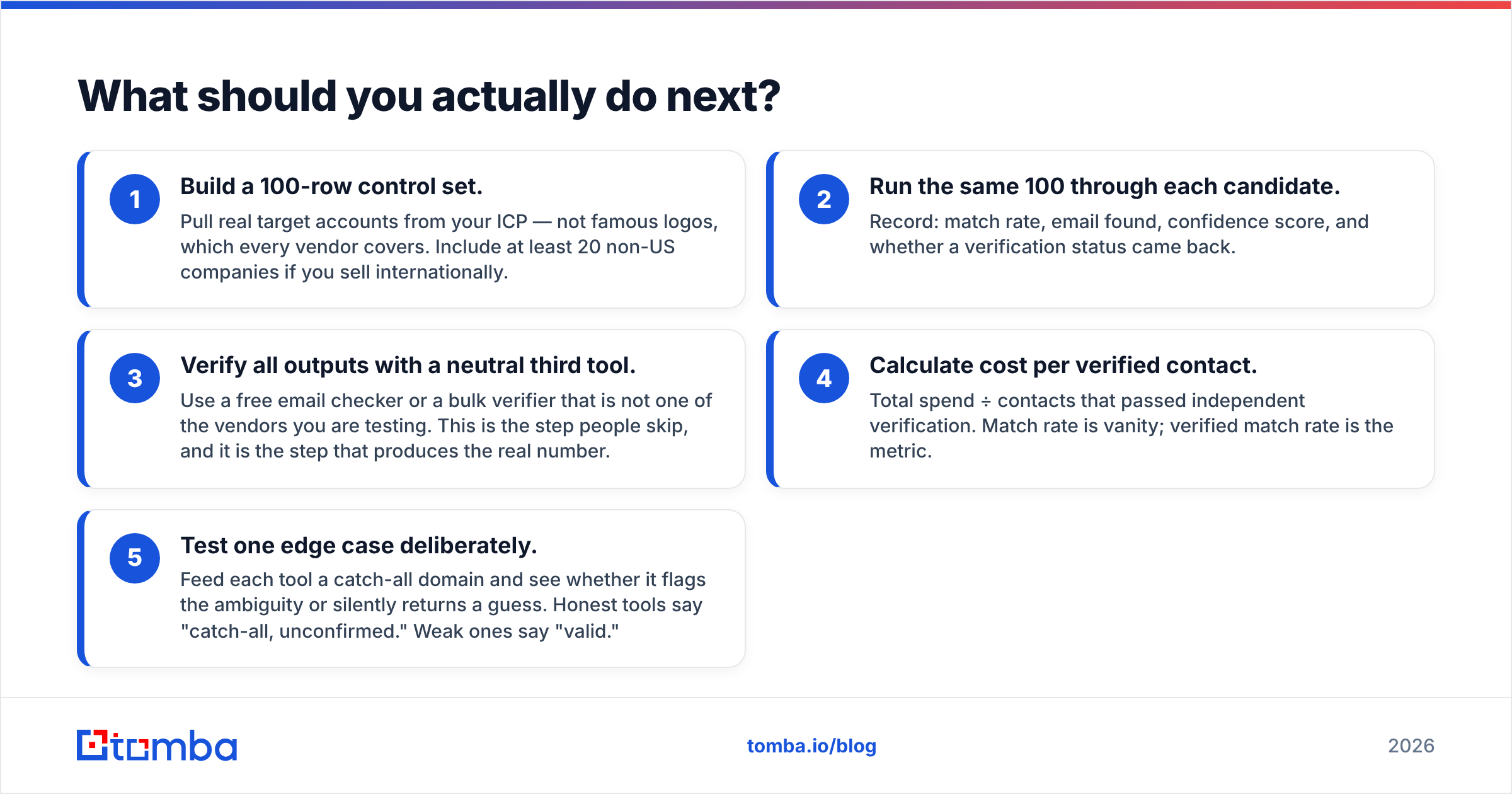
Run a bake-off. It takes an afternoon. It settles Enrichley vs OneMoreLead better than any article, this one included.
- Build a 100-row control set. Pull real target accounts from your ICP. Skip famous logos, since every vendor covers those. Add at least 20 non-US companies if you sell abroad.
- Run the same 100 through each tool. Record match rate, email found, confidence score, and whether a verify status came back.
- Check all outputs with a neutral third tool. Use a free email checker or a bulk verifier from outside the test. People skip this step. It is the step that gives you the real number.
- Work out cost per verified contact. Total spend ÷ contacts that passed the outside check. Match rate is vanity. Verified match rate is the metric.
- Test one edge case on purpose. Feed each tool a catch-all domain. Watch whether it flags the doubt or quietly guesses. Honest tools say "catch-all, unconfirmed." Weak ones say "valid."
However that test lands, the process is what protects your sender reputation. The logo on the invoice does not.
Ready to test it on your own list?#
Start with the job most outbound teams actually have. Get a valid work email for a named person at a named company. Know before you send whether it will bounce.
Tomba Email Finder does that in one call. SMTP-level checking comes attached to the result, not sold on the side. The free tier gives you 25 searches a month. That is enough to run the 100-row bake-off across a couple of sessions. Or take Starter at $49/mo and run the whole set in one sitting. Bring your own control list. Compare the verified match rate against what Enrichley and OneMoreLead return, and let the numbers pick the winner.
Related guides#
Ready to find emails that actually work?
Join 150,000+ professionals who stopped guessing and started sending. Free credits on signup — no credit card required.
Get the Tomba newsletter
Practical outbound tactics and product updates — once every two weeks.
About the author