Enrichley vs Tomba: Which Email Data Tool Wins in 2026?
Enrichley bundles multi-source enrichment. Tomba runs a first-party email finder and verifier. Here is how the two stack up on coverage, verification, API depth and real cost per usable contact in 2026.
TL;DR
- Enrichley sits in the aggregator/waterfall camp: it routes a lookup through multiple upstream data providers and returns whatever comes back first. Broad coverage, less control over where the data came from.
- Tomba is a first-party email finder and verifier: it crawls and indexes public sources itself, then verifies at the SMTP layer before returning a result. Narrower surface, tighter feedback loop between finding and verifying.
- Cost math differs more than sticker price. Waterfall tools charge per successful enrichment across many vendors; Tomba charges per search on published tiers (Free 25/mo, Starter $49/mo, Growth $99/mo, Pro $249/mo).
- Pick Enrichley-style waterfall when you enrich messy CRM records across many geographies and want one contract instead of five.
- Pick Tomba when your bottleneck is bounce rate on cold outbound, you want the finder and verifier to share the same data, and you need a clean API/CLI/MCP surface.
Nobody buys two email data tools for fun. You buy one because the last one bounced 12% of your list and your domain reputation took the hit. So the real question behind "Enrichley vs Tomba" is not which has more logos on the homepage — it is which one puts more deliverable addresses into your sequencer per dollar.
Let's break it down honestly, including where each approach loses.
What is Enrichley and who is it for?#
Enrichley positions itself in the lead-enrichment category: you push in a partial record (a name, a company domain, a LinkedIn URL) and it returns a fuller contact profile. The defining architectural choice for tools in this class is the waterfall. Instead of owning a dataset, the platform queries provider A, and if A returns nothing, it falls through to B, then C, then D, and bills you once for the hit.
That model has genuine advantages. Coverage is the union of every upstream source rather than the intersection. If one provider is strong in DACH and another in LATAM, you get both without negotiating two contracts. For RevOps teams cleaning up a 200,000-row Salesforce instance, that breadth is exactly the point.
The trade-offs are also structural, not fixable with a better UI:
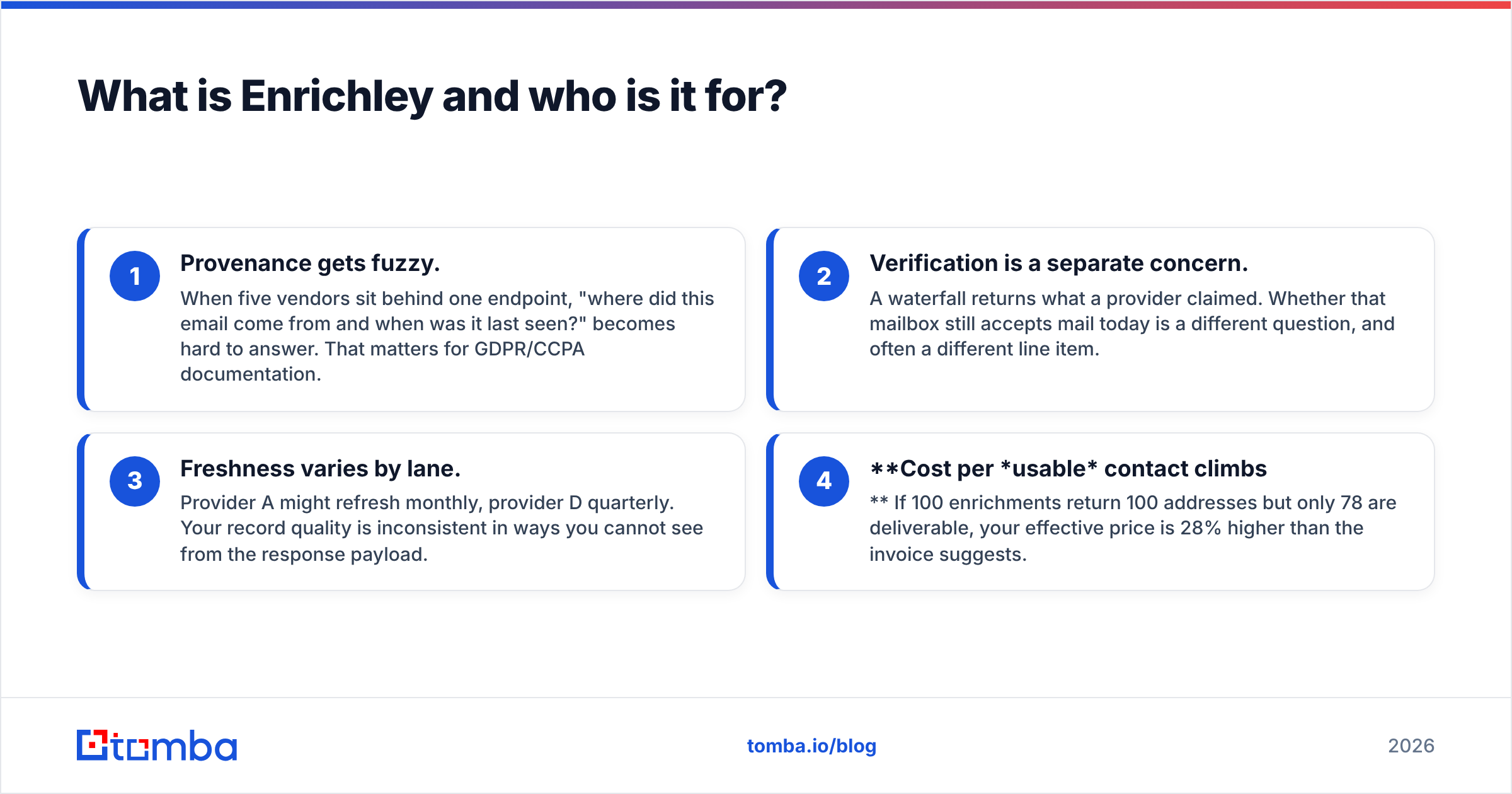
- Provenance gets fuzzy. When five vendors sit behind one endpoint, "where did this email come from and when was it last seen?" becomes hard to answer. That matters for GDPR/CCPA documentation.
- Verification is a separate concern. A waterfall returns what a provider claimed. Whether that mailbox still accepts mail today is a different question, and often a different line item.
- Freshness varies by lane. Provider A might refresh monthly, provider D quarterly. Your record quality is inconsistent in ways you cannot see from the response payload.
- Cost per usable contact climbs. If 100 enrichments return 100 addresses but only 78 are deliverable, your effective price is 28% higher than the invoice suggests.
None of this makes waterfall enrichment bad. It makes it a different tool for a different job.
What is Tomba and how does it differ?#
Tomba is built the other way around. The email finder works from a first-party index: public web sources, company sites, published bylines, and structured domain patterns are crawled and indexed by Tomba, and the same system that finds an address runs the verification pass on it.
The practical consequence is a tighter loop. When the email verifier flags an address as undeliverable, that signal feeds back into the pattern confidence for that domain. A waterfall tool cannot do this cleanly, because it does not own the upstream index it is reselling.
Around that core sit the pieces most outbound teams end up needing anyway:
- Domain search — pull every known address at a company plus the dominant format (
first.last@,finitial+last@, and so on). - Catch-all handling — a dedicated catch-all verifier for domains that accept everything at the SMTP layer, which is where most verification tools quietly give up and return "unknown".
- Enrichment, phone, and reverse lookup — data enrichment and phone data sit alongside the finder rather than replacing it.
- Developer surface — REST API, CLI, Chrome extension, Google Sheets, Excel, Airtable, and an MCP server for agent workflows.
The honest limitation: a first-party index will not match a five-provider waterfall on raw coverage for every obscure segment. If you are enriching 50,000 SMB records across fifteen countries, expect some misses that a waterfall would have caught.
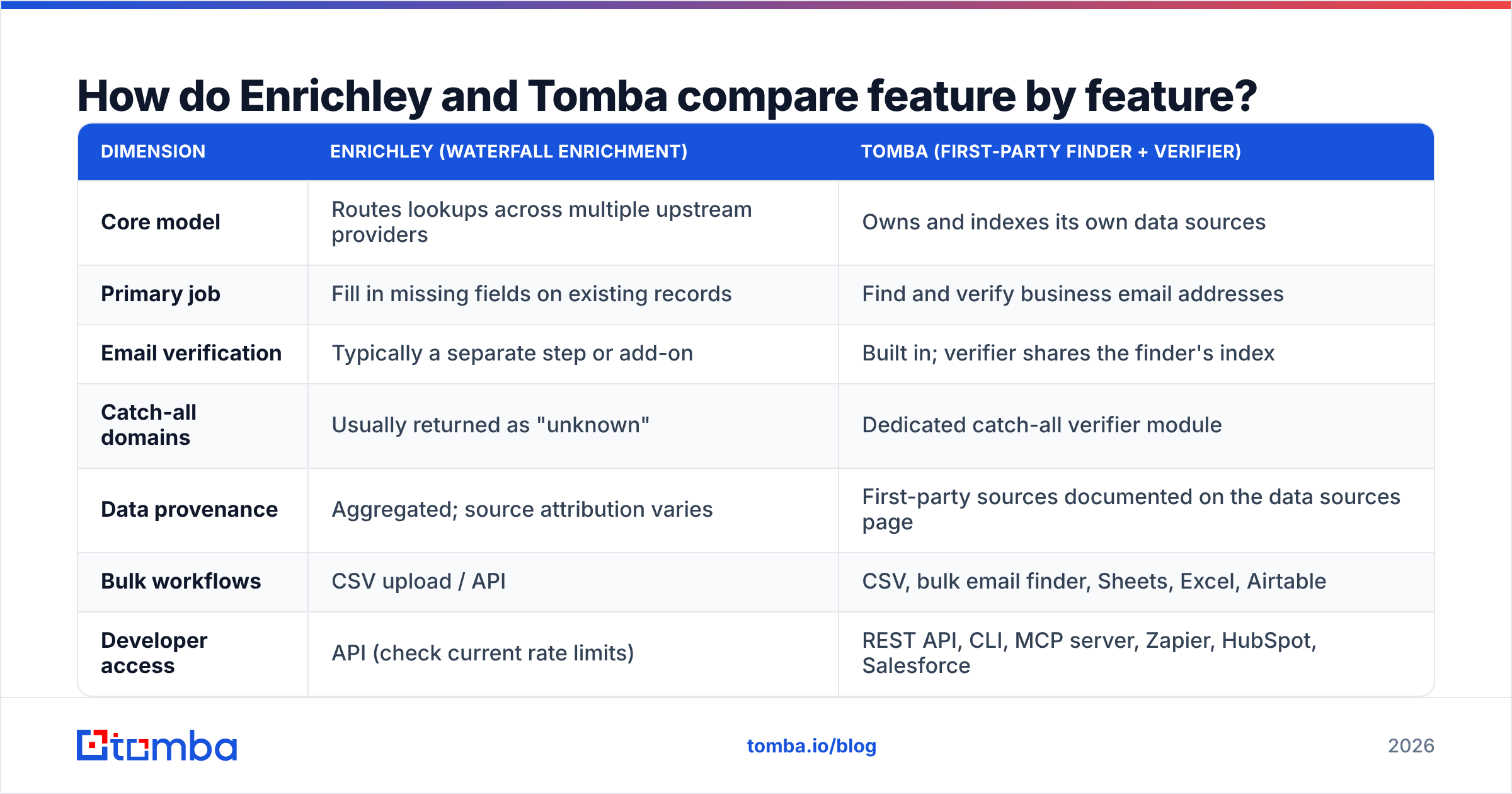
How do Enrichley and Tomba compare feature by feature?#
| Dimension | Enrichley (waterfall enrichment) | Tomba (first-party finder + verifier) |
|---|---|---|
| Core model | Routes lookups across multiple upstream providers | Owns and indexes its own data sources |
| Primary job | Fill in missing fields on existing records | Find and verify business email addresses |
| Email verification | Typically a separate step or add-on | Built in; verifier shares the finder's index |
| Catch-all domains | Usually returned as "unknown" | Dedicated catch-all verifier module |
| Data provenance | Aggregated; source attribution varies | First-party sources documented on the data sources page |
| Bulk workflows | CSV upload / API | CSV, bulk email finder, Sheets, Excel, Airtable |
| Developer access | API (check current rate limits) | REST API, CLI, MCP server, Zapier, HubSpot, Salesforce |
| Free tier | Trial credits, varies by plan | 25 searches/month, no card |
| Entry paid tier | Credit-based; confirm the current rate card | $49/mo Starter (see Tomba pricing) |
| Best fit | CRM hygiene across broad, messy datasets | Cold outbound where bounce rate is the constraint |
One caveat worth stating plainly: vendor pricing and packaging in this category change often, and Enrichley's published rate card should be checked directly before you commit. The Tomba numbers above are current and stable. Where I could not verify an Enrichley specific with confidence, I have said so rather than invented a figure.
Which one actually finds more valid emails?#
This is where most comparison posts go vague. Here is the framework that survives contact with reality.
Coverage rate (what percentage of your input rows return any address) usually favors the waterfall. More providers, more hits. If a tool queries six sources and you query one, six wins on raw hit rate most of the time.
Accuracy rate (what percentage of returned addresses actually accept mail) usually favors the tool that verifies with its own infrastructure. A returned address is a claim; verification is the test of that claim. When the same vendor does both, the failure signal loops back into the index.

The metric that actually matters is neither of those in isolation:
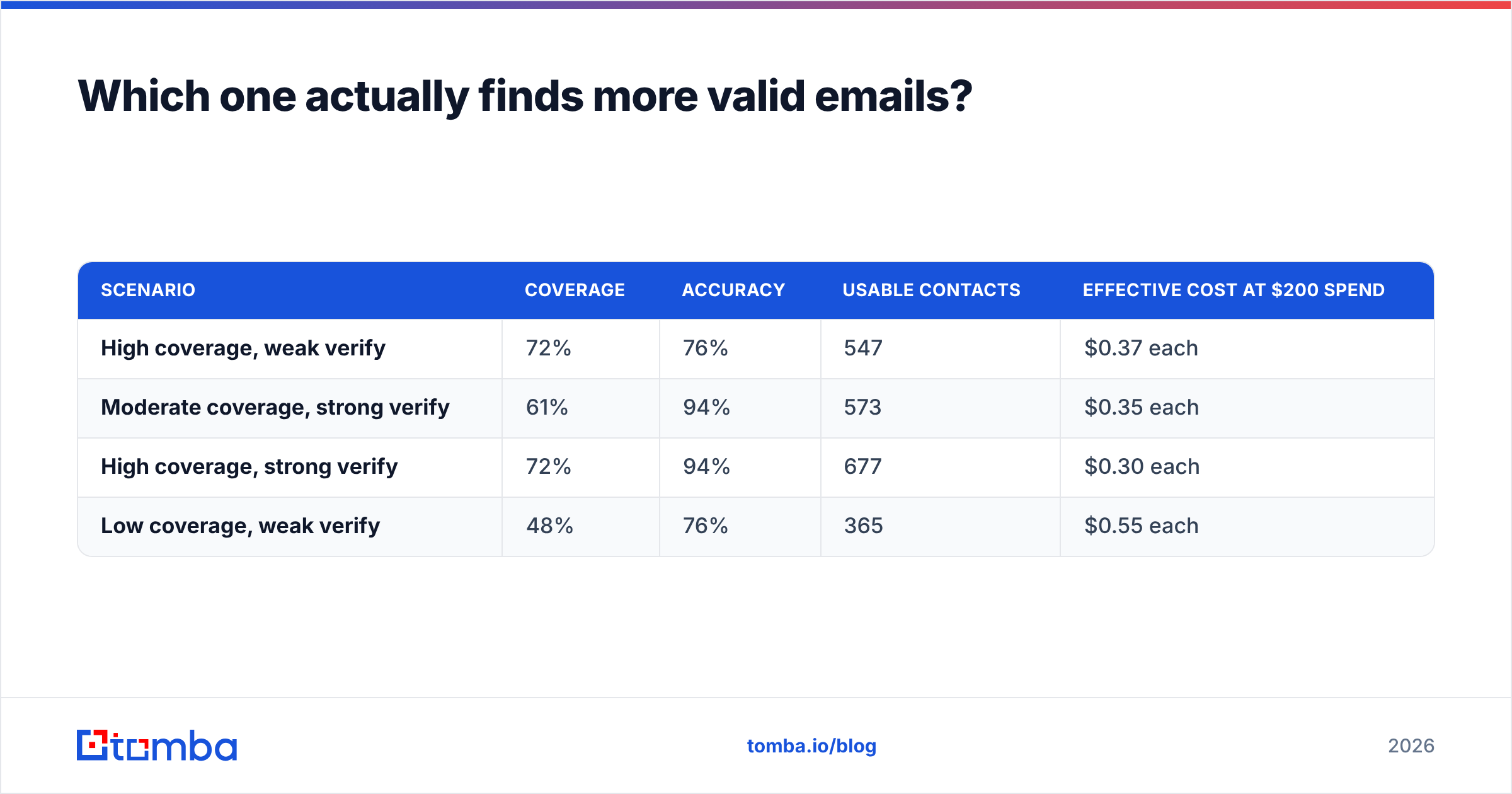
Usable contacts = input rows × coverage rate × accuracy rate
Run the arithmetic on a 1,000-row list:
| Scenario | Coverage | Accuracy | Usable contacts | Effective cost at $200 spend |
|---|---|---|---|---|
| High coverage, weak verify | 72% | 76% | 547 | $0.37 each |
| Moderate coverage, strong verify | 61% | 94% | 573 | $0.35 each |
| High coverage, strong verify | 72% | 94% | 677 | $0.30 each |
| Low coverage, weak verify | 48% | 76% | 365 | $0.55 each |
The tool with lower raw coverage can win outright once verification quality is priced in. That is the entire argument for a finder-plus-verifier architecture, and it is why "which tool has more data?" is the wrong opening question.
Run your own test before you sign anything. Take 200 rows you already know the answer for, run both tools, and measure all three numbers. Any vendor unwilling to let you do that on a free tier is telling you something.
How do the pricing models differ in practice?#
Waterfall platforms almost always bill per successful enrichment. That sounds generous — you do not pay for misses — but it hides two things. First, "successful" means a provider returned data, not that the data is correct. Second, credit consumption is unpredictable month to month because it depends on which upstream lane your records fall into.
Tomba's model is flatter and easier to forecast:
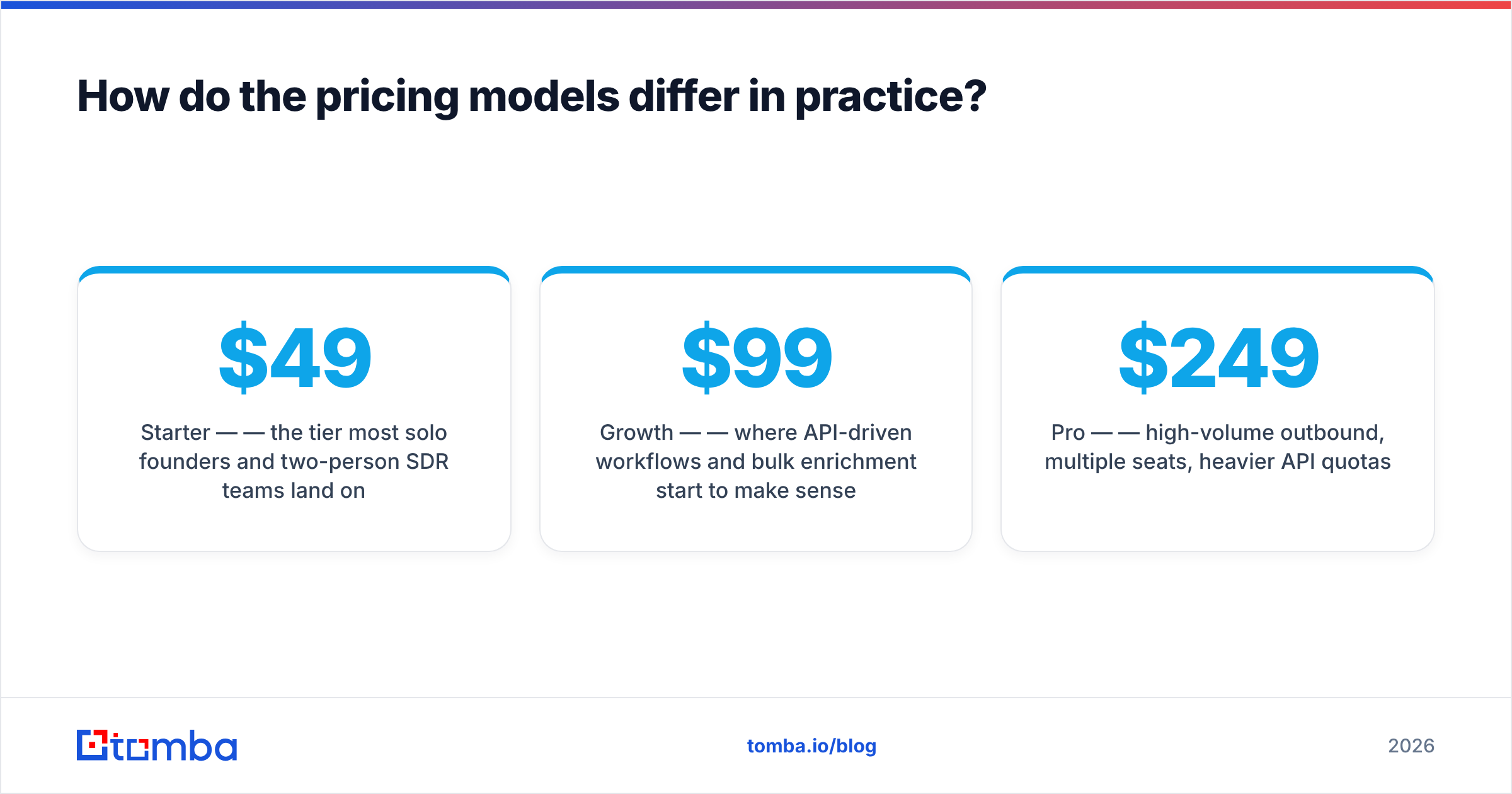
- Free — 25 searches/month, useful for a genuine pilot rather than a demo.
- Starter — $49/mo — the tier most solo founders and two-person SDR teams land on.
- Growth — $99/mo — where API-driven workflows and bulk enrichment start to make sense.
- Pro — $249/mo — high-volume outbound, multiple seats, heavier API quotas.
- Enterprise — custom, for teams that need volume commitments or specific data terms.
Full details are on the Tomba pricing page. The relevant question is not "which is cheaper per credit" but "which produces a lower cost per meeting booked", and that is downstream of deliverability.

Which integrates better into an existing stack?#
If your enrichment lives inside the CRM and a human never touches a CSV, both categories work. Waterfall tools are typically built CRM-first, with strong native HubSpot and Salesforce sync — reasonable, since CRM hygiene is their primary use case. If that describes your workflow, weight it heavily.
Tomba's integration story leans developer and workflow-automation first:
- Tomba API — REST endpoints for finder, verifier, domain search, and enrichment, with the same auth across all of them.
- Tomba MCP — an MCP server, so an AI agent can call the finder directly inside Claude or another MCP client. Genuinely useful if you are building agentic prospecting flows in 2026 rather than clicking through a UI.
- CLI — scriptable lookups for engineers who would rather pipe than click.
- Spreadsheets and no-code — Google Sheets, Excel, Airtable, Zapier, and Make.
- CRM — HubSpot and Salesforce connectors.
For a wider view of who plays in each lane, G2's lead intelligence category is the least biased public directory, and it separates enrichment platforms from finders reasonably well.
When should you choose each one?#
Rather than declaring a universal winner, match the tool to the constraint you actually have.
- Your CRM is full of half-complete records across many countries. A waterfall aggregator earns its keep here. Breadth beats depth when the job is filling blank cells at scale, and one contract beats five.
- Your cold email bounce rate is above 4%. This is a verification problem, not a coverage problem. You need a finder whose verifier shares its index, plus a catch-all verifier that does not punt on ambiguous domains. Tomba is built for this case.
- You are building an agent or automation that needs email lookup as a primitive. API depth, CLI access, and MCP support decide this, not dataset size. Tomba ships all three.
- You need auditable data provenance for compliance review. First-party sourcing with documented origins is easier to defend to legal than "we aggregate from partners".
- You are budget-constrained and testing whether outbound works at all. Start with the free tier of a finder, prove the channel converts, then decide whether you need enrichment breadth. Do not buy a full enrichment platform to validate a hypothesis.
- You need both. Perfectly legitimate: run a waterfall for CRM backfill and a dedicated finder plus verifier as the gate before anything enters your sequencer. Many mature teams do exactly this.

Note that this pairing is not redundant. Enrichment answers "who is this person"; verification answers "will this message land". Confusing the two is how teams end up with a rich CRM and a burned sending domain.
What do you actually lose with each choice?#
Fair comparisons name the downside of the recommended option.
Choosing a waterfall aggregator, you lose: verification tightness, provenance clarity, and cost predictability. You gain coverage and vendor consolidation.
Choosing Tomba, you lose: some raw coverage on long-tail international records that a six-provider waterfall would have caught. You gain a verifier that shares the finder's index, catch-all handling that returns a real answer, predictable flat pricing, and a developer surface that includes API, CLI, and MCP.
If you are unsure which constraint binds harder, measure it. Export 500 rows from your last campaign, count how many bounced versus how many were never found at all. Bounces above 3% point to a verification problem. Enrichment misses above 40% point to a coverage problem. Buy for the bigger number.
Also worth checking before you sign: how each vendor handles suppression lists, whether verification credits are billed separately from finding credits, and what happens to unused credits at renewal. Those three details move the effective price more than headline rates do. HubSpot's guide to email deliverability fundamentals is a reasonable primer if bounce management is new to your team, and the basics of SMTP verification are worth understanding before you evaluate any vendor's accuracy claims.
Ready to test the difference on your own list?#
Stop arguing about vendor-published accuracy numbers and run the test yourself. Take 200 rows from your ICP, run them through the Tomba Email Finder, and measure coverage, accuracy, and cost per usable contact against whatever you use today. The free tier gives you 25 searches per month with no card, Starter is $49/mo when you are ready to scale, and every result comes back verified through the same system that found it.
If the numbers do not beat your current stack, you have lost an afternoon. If they do, you have just fixed your bounce rate.
Related guides#
Ready to find emails that actually work?
Join 150,000+ professionals who stopped guessing and started sending. Free credits on signup — no credit card required.
Get the Tomba newsletter
Practical outbound tactics and product updates — once every two weeks.
About the author