Enrow vs FindThatLead (2026): Which Email Tool Wins?
Enrow verifies deep and finds narrow. FindThatLead finds wide and sends for you. Here is the honest breakdown of accuracy, pricing, and workflow fit — plus where each one quietly costs you money.
Enrow vs FindThatLead is a choice between two different jobs. One tool cleans your list. The other builds it and sends it.
TL;DR
- Enrow is a verification-first tool. It exists to resolve catch-all domains and keep bounce rates low. Finding emails is a side feature.
- FindThatLead is a prospecting suite. It bundles finding, a lead scraper, and a cold email sender, so it replaces two or three tools for small teams.
- If your problem is "my list bounces," pick Enrow. If your problem is "I have no list," FindThatLead covers more ground.
- Neither is cheap at scale. Both meter credits, and both can charge you for finds that return nothing usable.
- Want find + verify + catch-all handling in one API, without buying a sender? A dedicated email finder like Tomba sits between the two — 25 free searches a month, then $49/mo.
What are Enrow and FindThatLead?#
They get compared all the time because both show up on "email finder" lists. But they were built by teams chasing different pain.
Enrow is a French tool built around one obsession: telling you whether an address is really deliverable. That includes catch-all domains, where most verifiers give up and return "unknown." Catch-all resolution is the headline feature. Enrow finds emails too, but the marketing, the benchmarks, and the roadmap all point at verification quality.
FindThatLead is a Spanish platform that has been around much longer, and it went the other way — breadth. You get a domain search, a name-plus-company finder, a Chrome extension, a "Prospector" that builds lists from filters, a Lead Scrapper for social sources, and an email sender with sequences. It is closer to a light Apollo than to a pure data vendor.
That difference explains most arguments about these two tools. Reviewers who care about bounce rate rank Enrow higher. Reviewers who care about speed — nothing to 500 contacts in a sequence — rank FindThatLead higher. Both are right about their own workflow.
Enrow vs FindThatLead: how do they compare feature by feature?#
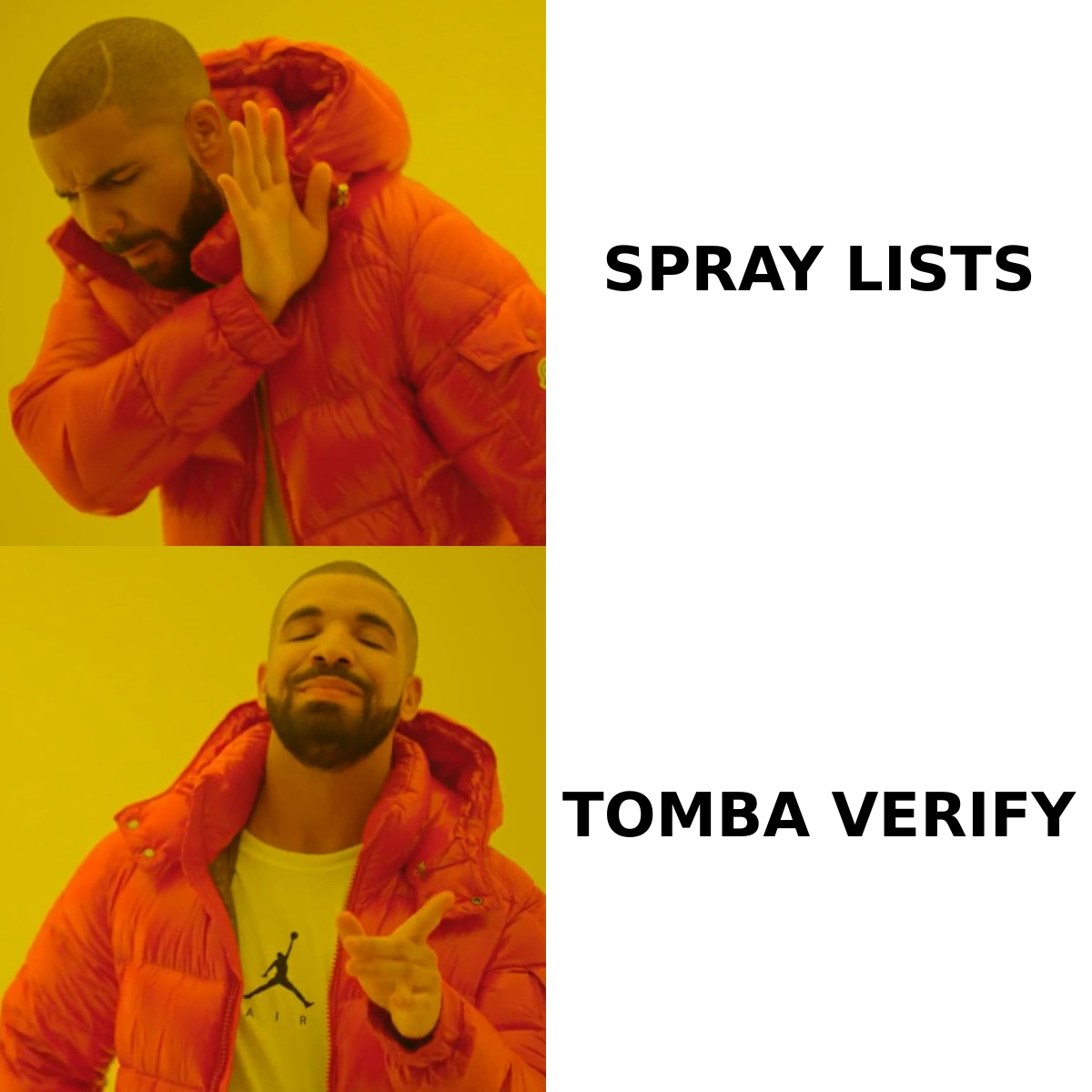
Here is the honest side-by-side. Check the current numbers on each vendor's pricing page before you buy. Both companies have repackaged credits more than once.
| Capability | Enrow | FindThatLead |
|---|---|---|
| Primary strength | Email verification, catch-all resolution | Lead sourcing + outreach in one place |
| Email finder | Yes, secondary focus | Yes, core feature |
| Domain / company search | Limited | Yes (Prospector + domain search) |
| Bulk CSV processing | Yes | Yes |
| Catch-all handling | Core differentiator, resolves rather than skips | Basic; catch-alls often flagged "risky" |
| Built-in cold email sender | No | Yes, with sequences |
| Chrome extension | Yes | Yes |
| LinkedIn sourcing | Limited | Yes, via Scrapper/Scrab.in |
| Public API | Yes | Yes |
| Entry paid plan | ~$29/mo range | ~$49/mo range (Growth) |
| Free trial credits | Small trial allotment | Limited free credits |
| Best for | Deliverability owners, agencies cleaning lists | Solo founders and SMB teams needing a full stack |
Read the bottom two rows together. Enrow is a component you drop into a stack you already have. FindThatLead wants to be the stack. If you already pay for Instantly, Smartlead, or Lemlist, half of what FindThatLead charges you for is redundant. If you don't, Enrow leaves you still needing a sender.
Enrow vs FindThatLead: which one is more accurate?#
Short answer: Enrow wins on verification confidence. FindThatLead wins on raw hit rate for common B2B domains. "Accuracy" means two different things here.
There are two numbers that matter, and vendors love to blur them:
- Hit rate (coverage). Out of 1,000 first-name + last-name + domain rows, how many addresses come back at all? FindThatLead's larger database and multi-source scraping tend to return more rows, especially for mid-market SaaS, agencies, and ecommerce.
- Precision (bounce rate). Of the addresses returned, how many actually land? This is where Enrow's catch-all work pays off. Roughly a fifth to a quarter of B2B domains run catch-all, depending on whose sample you trust. Most verifiers return "accept-all/unknown" on those domains and hand the risk back to you. Enrow tries to resolve them.
A tool that returns 800 addresses with a 9% bounce rate is worse than one that returns 650 with a 1.5% bounce rate. The first one damages your sender reputation. Mailbox providers judge you on the aggregate, and one bad campaign takes weeks to undo.

The practical takeaway: run your own 100-row benchmark before you commit. Take contacts whose addresses you already know are valid — past customers, webinar sign-ups, people who have replied to you. Strip the emails, feed name + domain to each tool, and score the output. It takes an hour, and it beats every review site, including this one, because it tests your own ICP's domains.
Also test the other direction. Feed each tool 50 addresses you know are dead, then see how many get waved through as valid. A verifier that marks dead addresses as safe is worse than useless. It manufactures false confidence.
What do Enrow and FindThatLead actually cost?#
Credits are where the marketing price and the real price separate.
| Cost factor | Enrow | FindThatLead | What to watch |
|---|---|---|---|
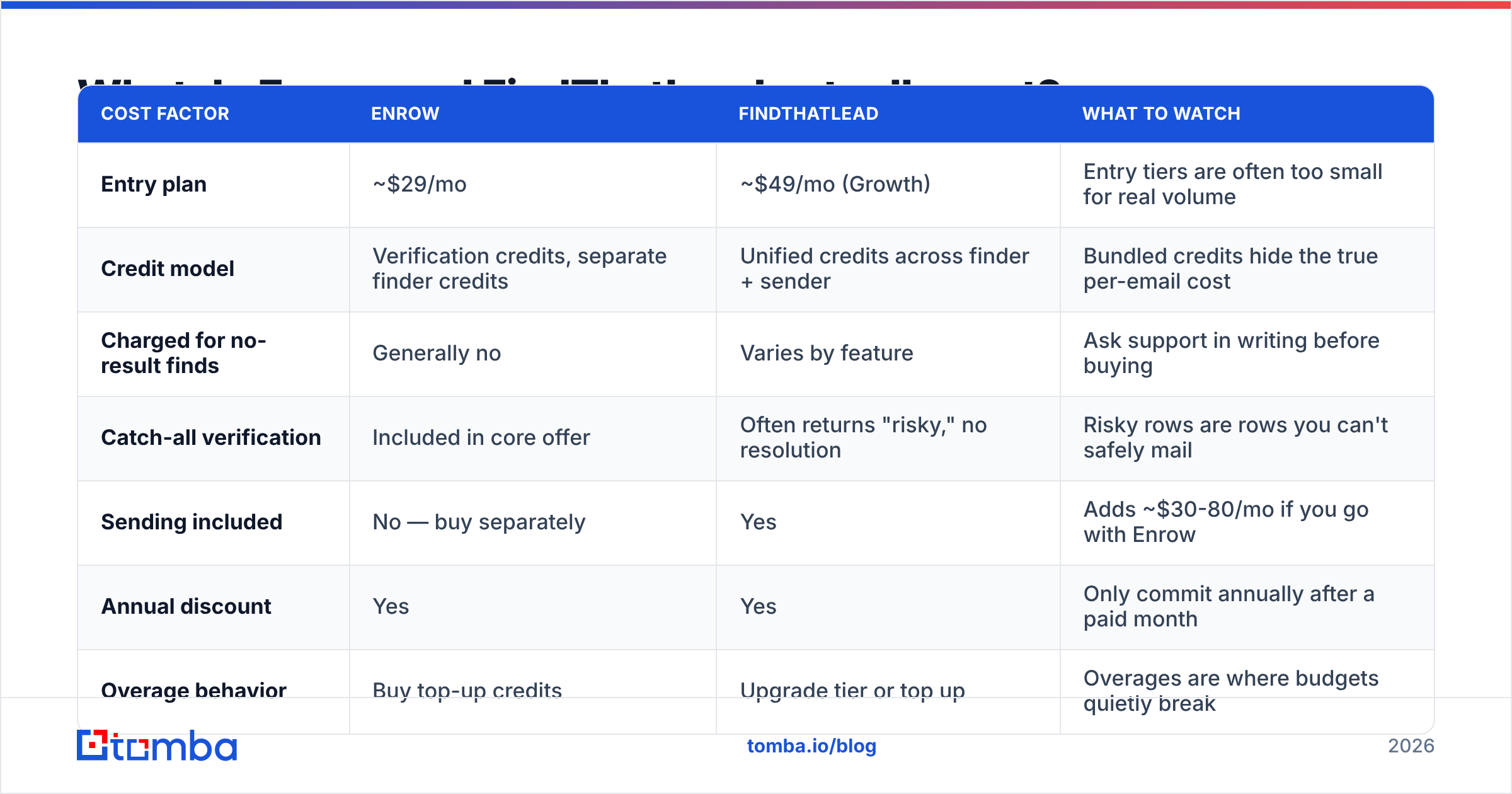
| Entry plan | ~$29/mo | ~$49/mo (Growth) | Entry tiers are often too small for real volume |
| Credit model | Verification credits, separate finder credits | Unified credits across finder + sender | Bundled credits hide the true per-email cost |
| Charged for no-result finds | Generally no | Varies by feature | Ask support in writing before buying |
| Catch-all verification | Included in core offer | Often returns "risky," no resolution | Risky rows are rows you can't safely mail |
| Sending included | No — buy separately | Yes | Adds ~$30-80/mo if you go with Enrow |
| Annual discount | Yes | Yes | Only commit annually after a paid month |
| Overage behavior | Buy top-up credits | Upgrade tier or top up | Overages are where budgets quietly break |
The mistake teams make is comparing headline monthly prices. Compare cost per usable, verified contact instead. Take the plan price and divide it by the contacts you actually mailed without a bounce. A $29 plan that produces 400 mailable contacts costs $0.073 each. A $49 plan that produces 1,100 mailable contacts costs $0.045 each. The cheaper sticker price loses.
Run the same math on your own volume against Tomba pricing — free at 25 searches a month, Starter at $49/mo, Growth at $99/mo, Pro at $249/mo. The comparison only means something at your own scale.
What are the real limitations of each tool?#
Nothing here is a deal-breaker. But you should know what you are signing up for.
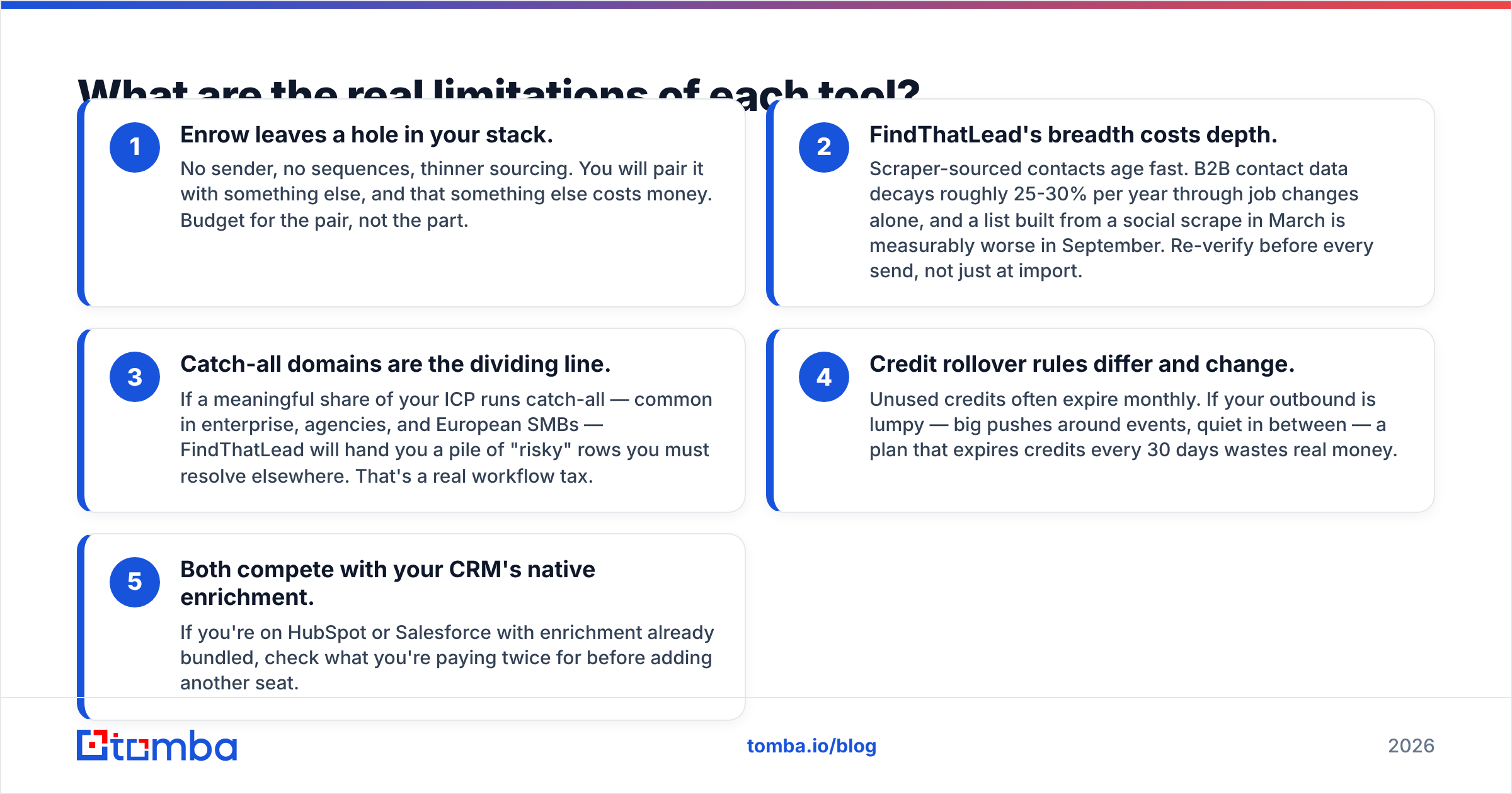
- Enrow leaves a hole in your stack. No sender, no sequences, thinner sourcing. You will pair it with something else, and that something else costs money. Budget for the pair, not the part.
- FindThatLead's breadth costs depth. Scraped contacts age fast. B2B contact data decays 25-30% a year through job changes alone. A list built from a social scrape in March is measurably worse by September. Re-verify before every send, not just at import.
- Catch-all domains are the dividing line. If much of your ICP runs catch-all — common in enterprise, agencies, and European SMBs — FindThatLead hands you a pile of "risky" rows you must resolve somewhere else. That is a real workflow tax.
Two more traps show up after you sign up:
- Credit rollover rules differ, and they change. Unused credits often expire each month. If your outbound is lumpy — big pushes around events, quiet in between — expiring credits waste real money.
- Both overlap with your CRM's enrichment. If HubSpot or Salesforce already enriches your records, check what you would be paying for twice.
Which should you choose — and where does Tomba fit?#
Pick by the bottleneck you actually have, not by the longest feature list.
- Choose Enrow if you already have a sending platform, your lists come from a CRM or a partner, and your problem is bounce rate. Deliverability owners and agencies cleaning client lists get the most out of it.
- Choose FindThatLead if you are a founder or a two-person sales team starting from zero. You want one login instead of three, and you would trade some precision for speed to first campaign.
- Choose neither if what you need is a clean data layer — find, verify, enrich — that plugs into tools you already picked, with an API you can call from your own pipeline.
That last case is where Tomba sits. The email finder and email verifier run on the same credit pool. There is a dedicated catch-all verifier for exactly the domains that break generic verifiers, and bulk processing handles CSVs without a per-row tax. No sending platform is bundled — deliberately, because you probably already chose one.

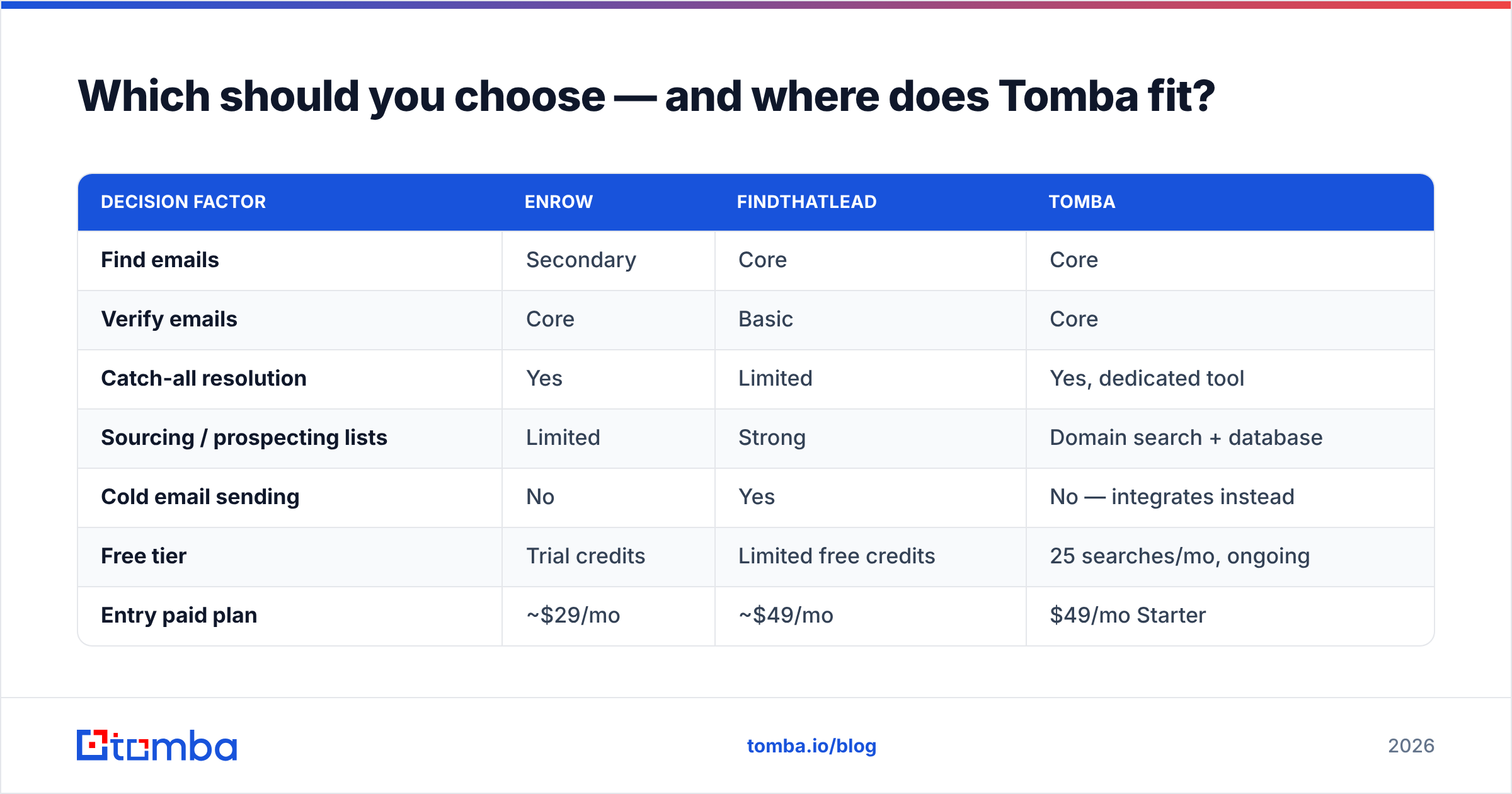
| Decision factor | Enrow | FindThatLead | Tomba |
|---|---|---|---|
| Find emails | Secondary | Core | Core |
| Verify emails | Core | Basic | Core |
| Catch-all resolution | Yes | Limited | Yes, dedicated tool |
| Sourcing / prospecting lists | Limited | Strong | Domain search + database |
| Cold email sending | No | Yes | No — integrates instead |
| Free tier | Trial credits | Limited free credits | 25 searches/mo, ongoing |
| Entry paid plan | ~$29/mo | ~$49/mo | $49/mo Starter |
| API depth | Good | Good | Full API, CLI, MCP server |
| Spreadsheet workflow | CSV | CSV | Sheets, Excel, Airtable add-ons |
| Best fit | Deliverability owners | Solo founders / SMB | Teams building a data layer |
If you are weighing more than two options, cross-check independent review volume on G2 rather than trusting any vendor's own comparison page — including this one. Look at reviews from companies your size. A 5-person agency and a 200-person sales org have almost nothing in common here.
How should you run the evaluation?#
Give yourself two weeks and follow a fixed process. Guessing costs more than testing.
- Define the sample. 100-200 contacts that look like your ICP — same company sizes, countries, and industries. Generic test lists give generic results.
- Run both tools blind. Same input file, same day. Export both outputs into one sheet with a source column.
- Score coverage and precision separately. Count the rows returned. Then send a small warmed campaign and count hard bounces. Two numbers, not one.
Once you have those numbers, three checks decide it:
- Check the catch-all subset. Filter to domains you know are catch-all. The gap between the two tools is widest here, and this is usually where the winner gets decided.
- Price the winner at your real volume. Not the plan you are testing on — the plan you will need in six months at 3x the volume. Include overage rates.
- Test the integration path. Can the tool push straight into your CRM or sequencer, or will someone export CSVs every Monday? Manual export is a recurring cost measured in hours.
Whatever you pick, run verification right before you send, not once at import. Data decays between the day you build a list and the day you mail it. Re-verification is the cheapest deliverability insurance you can buy.
The bottom line#
Enrow vs FindThatLead is not really a head-to-head match. They are two answers to two different questions. Enrow answers "will this address bounce?" with more confidence than most tools on the market, especially on catch-all domains. FindThatLead answers "where do I get 500 prospects, and how do I email them by Friday?" without making you buy three products. Both answers are legitimate. Neither tool gives you both.
If your answer is "I need reliable find-and-verify as infrastructure, and I'll keep my own sender," start with the free tier of the Tomba Email Finder — 25 searches a month, no card, and the same catch-all handling that ships on the paid plans. Run it against your own 100-row benchmark next to whichever tool you are leaning toward. Let your bounce rate pick the winner instead of a comparison table.
Related guides#
Ready to find emails that actually work?
Join 150,000+ professionals who stopped guessing and started sending. Free credits on signup — no credit card required.
Get the Tomba newsletter
Practical outbound tactics and product updates — once every two weeks.
About the author