Enrow vs Jet Leads Pro: Which Email Finder Wins in 2026?
Enrow and Jet Leads Pro both promise clean B2B emails, but they solve different problems at very different levels of transparency. Here is the honest breakdown on accuracy, catch-all handling, pricing and API depth.
Enrow vs Jet Leads Pro comes down to one question: which tool returns more verified emails on your own list? Enrow is a documented verification specialist. Jet Leads Pro is a low-transparency list source you should audit first. Here is the evidence, plus the test to run before you pay either one.
TL;DR
- Enrow is a French email finder and verifier built on waterfall enrichment and catch-all resolution. It has a public site, public pricing and G2 reviews.
- Jet Leads Pro is much smaller and thinly documented. There is no stable pricing page and little independent review volume to audit.
- Accuracy is the only metric that matters. A 40% hit rate at $0.01 per credit costs more than a 70% hit rate at $0.02 once you count the wasted sends.
- Catch-all domains decide the winner. About a quarter of B2B domains accept every address. How a tool handles them separates real vendors from list resellers.
- Our pick: Enrow if you want a specialist verifier and can live with credits. Tomba if you want finding, verification, catch-all resolution, enrichment and an API in one $49/mo plan.
What are Enrow and Jet Leads Pro?#
Enrow (enrow.io) launched as an email-verification specialist and expanded into finding. Its pitch is that most verifiers punt on hard cases — catch-all servers, greylisting, Microsoft 365 tenants that block SMTP probes — and that Enrow resolves them with a multi-provider waterfall. You send a name plus a domain, it runs several enrichment sources in sequence, and returns a verdict with a confidence label rather than a binary valid/invalid.
Jet Leads Pro is the harder half of this comparison to write honestly. It surfaces in lead-gen listicles and marketplace roundups as a bulk B2B contact provider — find emails, sometimes phones, export CSV. What it does not have, at the time of writing, is the paper trail you would expect from an established vendor: no consistently reachable pricing page, minimal independent review volume on G2, no public API documentation, no named data-sourcing or compliance statement.
That absence is itself a finding. In this market, one thing separates a data product from a data reseller: does the vendor tell you where the records came from and when they were last checked? When you cannot answer that, you are buying a CSV of unknown age at an unknown bounce risk.
So treat this comparison as two things at once: a feature-by-feature look at Enrow, and a due-diligence framework you should run on Jet Leads Pro — or any low-transparency vendor — before you wire it into your outbound.

Enrow vs Jet Leads Pro: how do the two tools compare?#
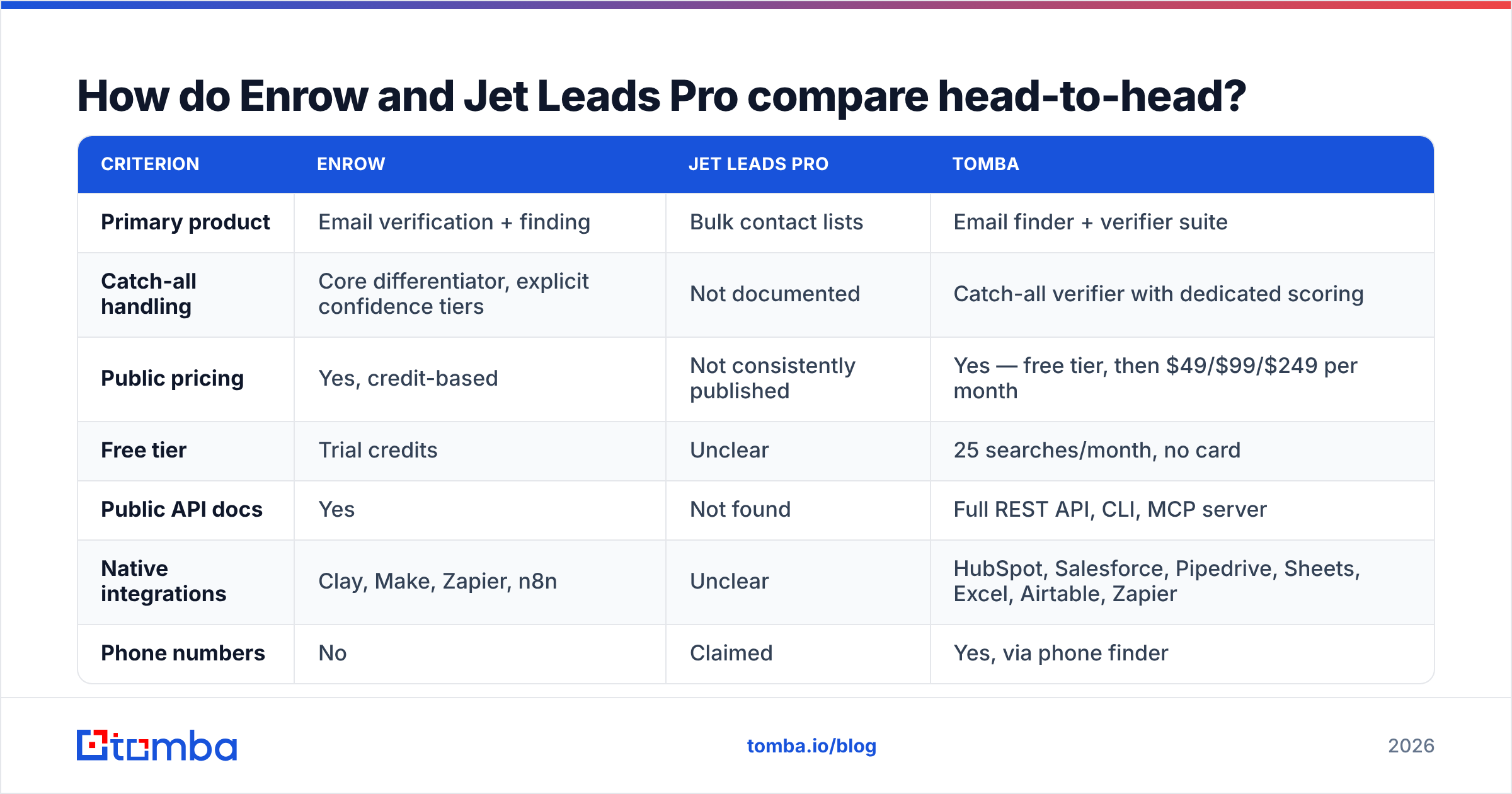
| Criterion | Enrow | Jet Leads Pro | Tomba |
|---|---|---|---|
| Primary product | Email verification + finding | Bulk contact lists | Email finder + verifier suite |
| Catch-all handling | Core differentiator, explicit confidence tiers | Not documented | Catch-all verifier with dedicated scoring |
| Public pricing | Yes, credit-based | Not consistently published | Yes — free tier, then $49/$99/$249 per month |
| Free tier | Trial credits | Unclear | 25 searches/month, no card |
| Public API docs | Yes | Not found | Full REST API, CLI, MCP server |
| Native integrations | Clay, Make, Zapier, n8n | Unclear | HubSpot, Salesforce, Pipedrive, Sheets, Excel, Airtable, Zapier |
| Phone numbers | No | Claimed | Yes, via phone finder |
| Data-source disclosure | Partial (waterfall providers named in docs) | Not found | Published data sources page |
| Best for | Cleaning lists you already have | Untested — audit first | End-to-end prospect discovery |
The table exposes the real split. Enrow is a verification-first tool that added finding. Jet Leads Pro is positioned as a volume-first list source. Those are different jobs, and the mistake teams make is buying one when they needed the other.
If your CRM is already full of 18-month-old contacts, a verifier earns its keep immediately. If you have a clean CRM but no pipeline, buying more verification does nothing — you need discovery.
Which one is more accurate on catch-all domains?#
Catch-all — sometimes called accept-all — means the receiving server acknowledges every address at the domain regardless of whether the mailbox exists. Standard SMTP probing cannot distinguish a real inbox from a typo there. Most verifiers return "unknown" and hand the risk back to you.

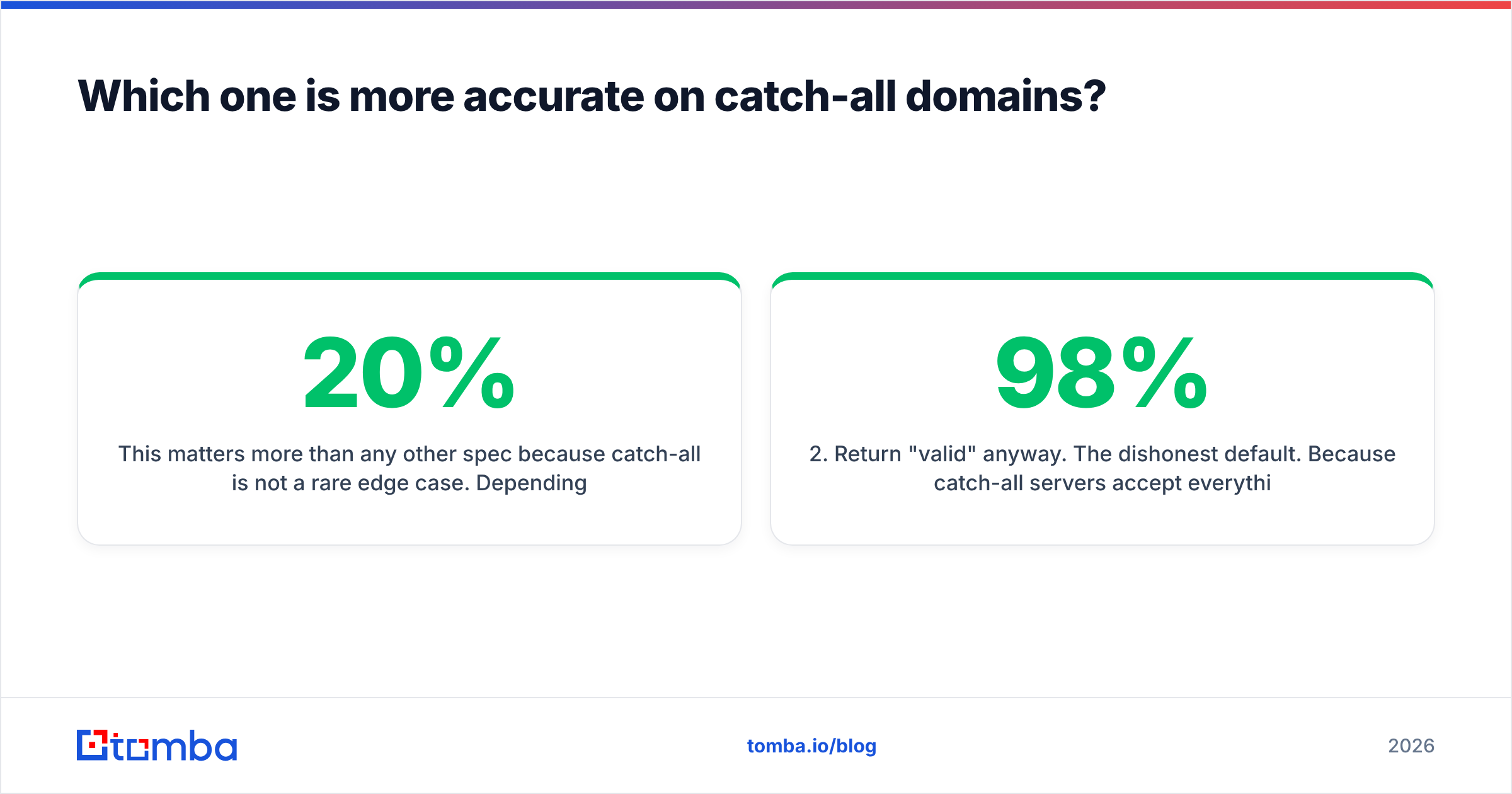
This matters more than any other spec, because catch-all is not a rare edge case. Depending on your segment, 20% to 30% of B2B domains are set up this way. The share is highest at large companies running Microsoft 365 with anti-harvesting turned on. In other words, the domains you most want to reach are the ones most likely to return an unusable verdict.
Three approaches exist:
- Return "unknown" and stop. The cheap, honest default. You get a shrug and decide yourself. Most budget verifiers do this.
- Return "valid" anyway. The dishonest default. Because catch-all servers accept everything, an SMTP-only checker technically sees a 250 OK and reports success. This is how vendors advertise "98% accuracy" while your bounce rate climbs to 8%.
- Resolve with corroborating evidence. Cross-reference the address against pattern data for that domain, public web mentions, historical engagement signals, and provider-specific behaviours. Return a graded confidence score instead of a coin flip.
Enrow builds its marketing on approach three, and by most user accounts it does deliver a meaningfully higher resolution rate on accept-all domains than generic verifiers. Tomba's catch-all finder takes the same corroborating-evidence route and exposes the score so you can set your own threshold.
For Jet Leads Pro, you cannot tell which of the three approaches is in play. That functionally means assuming approach two until proven otherwise. Run this test before spending money on any opaque vendor:
- Seed it with 50 known-good addresses from your own company and partners, including at least 10 on a catch-all domain you control.
- Seed it with 20 deliberately fake addresses at those same domains (
zxq.notreal@yourdomain.com). - Score the fakes. If the tool marks fake addresses at your catch-all domain as valid, it is guessing.
- Check the freshness. Pull 20 contacts and verify their current employer on LinkedIn. If more than three have moved on, the database is stale.
- Time the response. Sub-200ms verification of a catch-all domain is not verification. Real resolution takes seconds.
That five-step audit takes an afternoon and is worth more than any review-site star rating.
How does the pricing actually work?#
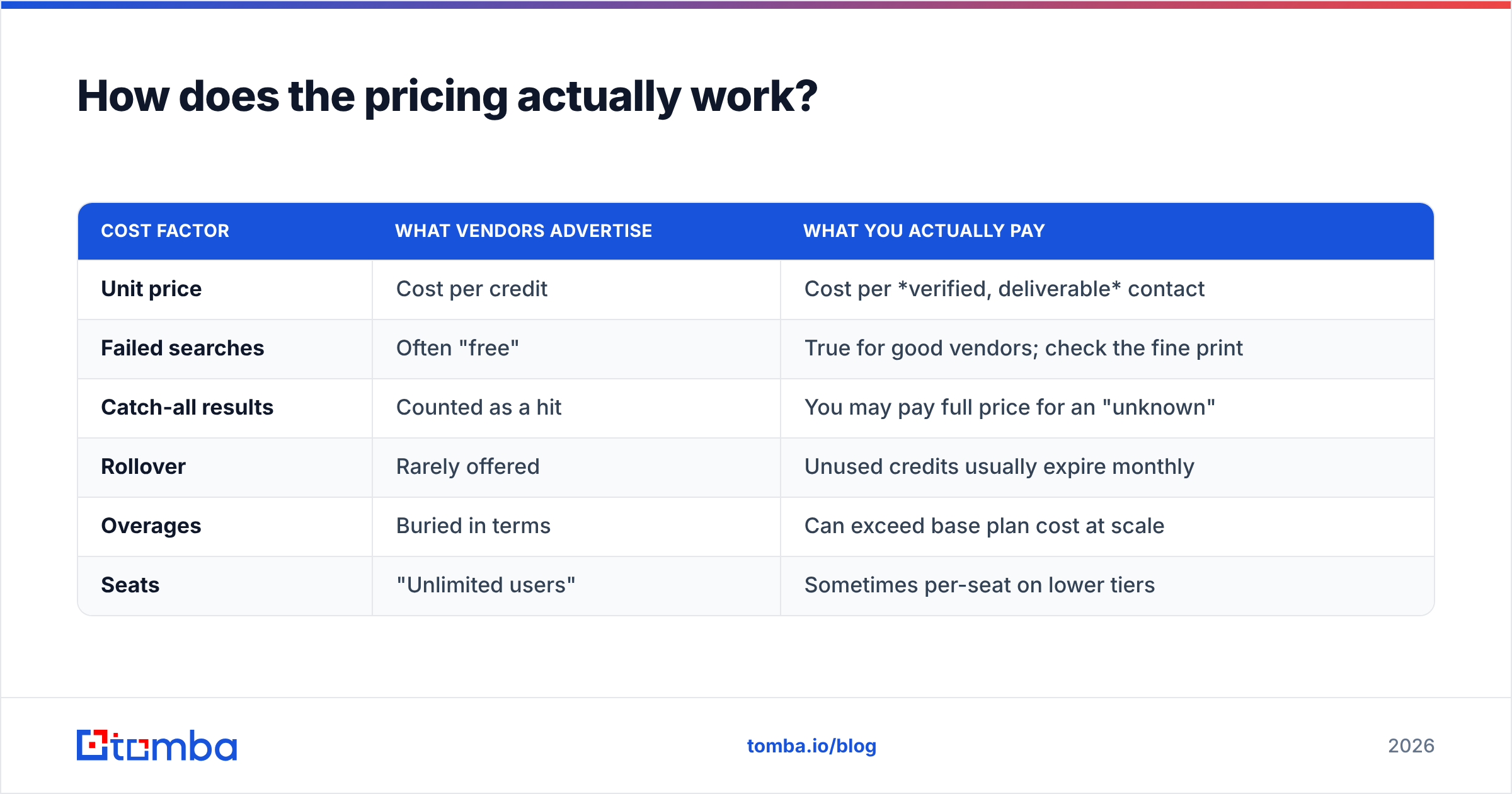
Credit pricing is where email tools get slippery. The published cost per credit is almost never the cost per usable contact.
| Cost factor | What vendors advertise | What you actually pay |
|---|---|---|
| Unit price | Cost per credit | Cost per verified, deliverable contact |
| Failed searches | Often "free" | True for good vendors; check the fine print |
| Catch-all results | Counted as a hit | You may pay full price for an "unknown" |
| Rollover | Rarely offered | Unused credits usually expire monthly |
| Overages | Buried in terms | Can exceed base plan cost at scale |
| Seats | "Unlimited users" | Sometimes per-seat on lower tiers |
Do the arithmetic in cost-per-usable-contact, not cost-per-credit:
- A tool at $0.01/credit with a 45% hit rate costs $0.022 per usable email.
- A tool at $0.02/credit with a 75% hit rate costs $0.027 per usable email — barely more.
- Now add the downstream cost. The cheap tool sends 55% of your volume into bounces and spam traps. That degrades sender reputation and drags down deliverability for every later campaign.
That last line is the one finance teams miss. A burned sending domain costs weeks of warmup to recover. Nobody puts that on the invoice.
Enrow prices per credit with volume tiers, and its trial is generous enough to run the audit above. Tomba's pricing is flat-rate: a free tier at 25 searches per month, Starter at $49/mo, Growth at $99/mo, Pro at $249/mo, and custom Enterprise — with finding, verification, domain search and enrichment inside the same plan rather than metered separately.
For Jet Leads Pro, absence of published pricing usually signals a sales-call-gated quote, a lifetime-deal marketplace listing, or a per-list transaction. All three are worth a hard look at the refund terms before you commit budget.

What should you actually look for in an email finder?#
Strip away the marketing and there are six things that determine whether a tool pays for itself. The first three are about data quality:
- Verified hit rate on your ICP, not the vendor's benchmark. A tool that excels on US tech SaaS may collapse on European manufacturing or APAC logistics. Test on 200 accounts from your own target list.
- Honest confidence scoring. You want graded output — valid, risky, catch-all-resolved, unknown — so you can route high-confidence contacts to cold email and the rest to LinkedIn or phone.
- Bounce guarantee with teeth. Some vendors credit back any address that hard-bounces. That single term aligns their incentives with yours better than any accuracy claim.
The next three decide whether the tool fits the stack you already run:
- Data-source transparency. GDPR and CCPA obligations do not transfer to your vendor. If you cannot document lawful basis, that is your exposure, not theirs.
- API and workflow depth. A great database behind a CSV-only export is a bottleneck. Look for REST endpoints, bulk jobs, and native CRM sync — see how a proper bulk email finder handles a 10,000-row job versus a manual upload queue.
- Coverage beyond email. Multichannel sequences need phone numbers, LinkedIn URLs and firmographics. Buying four point tools to assemble one contact record is how RevOps budgets balloon.

Who should pick Enrow, and who should not?#
Pick Enrow if:
- You already have volume — scraped lists, conference exports, an aging CRM — and your problem is cleaning it, not finding it.
- You run Clay or n8n workflows and want a specialist verification node inside a waterfall you already built.
- Catch-all-heavy segments (enterprise, financial services, healthcare) make up most of your target list.
- You are comfortable modelling credit spend and topping up during heavy quarters.
Look elsewhere if:
- You need discovery more than validation. Enrow's finding capability is real but it is not the product's centre of gravity.
- You want phone numbers in the same record.
- Your team wants a predictable monthly line item instead of variable credit burn.
On Jet Leads Pro: it may work perfectly well for your use case, and smaller vendors sometimes offer genuinely competitive per-contact economics. But run the five-step audit before you buy, insist on a documented refund policy, and never let an unverified list touch your primary sending domain. Route it through a separate email verifier pass first — that is cheap insurance regardless of which vendor you choose.
Where does Tomba fit in this comparison?#
Honestly: Tomba competes with both, and it is worth naming what it does not do. Tomba is not a sequencer — it will not send your campaigns, and pairing it with a dedicated sending platform is the normal setup. It is also not a full ABM intent platform.
What it does do is collapse the tool count for the data half of outbound. Finding by domain or name, verification, catch-all resolution, domain search for whole-company mapping, phone lookup, and enrichment all live behind one plan and one API key. For a team currently paying for a finder, a separate verifier, and a phone provider, that consolidation usually beats any single-point-tool comparison on total cost.
The practical workflow most teams land on:
- Discovery — domain search to map every reachable contact at a target account.
- Enrichment — fill in title, seniority, LinkedIn and phone so segmentation is possible.
- Verification — run every address, with catch-all domains scored rather than dumped.
- Routing — high-confidence to email, catch-all-resolved to a warmed secondary domain, unknown to LinkedIn or phone.
- Sync — push clean records to HubSpot, Salesforce or Pipedrive so the CRM stays the source of truth.
If you want a neutral third opinion on any of these vendors, HubSpot's sales resources and G2's category pages are reasonable starting points — just weight recent reviews over old ones, because data quality in this market shifts fast.
Frequently asked questions#
Enrow vs Jet Leads Pro: which one is better? On verifiable evidence, Enrow. It has public pricing, public documentation, and independent reviews you can audit. Jet Leads Pro may still suit a specific budget or region, but you are buying on trust rather than evidence.
Can I use both? Yes, and waterfall setups do exactly this: run a cheap bulk source first, then verify everything through a stricter tool before sending. Just make sure the verification step is the one you trust.
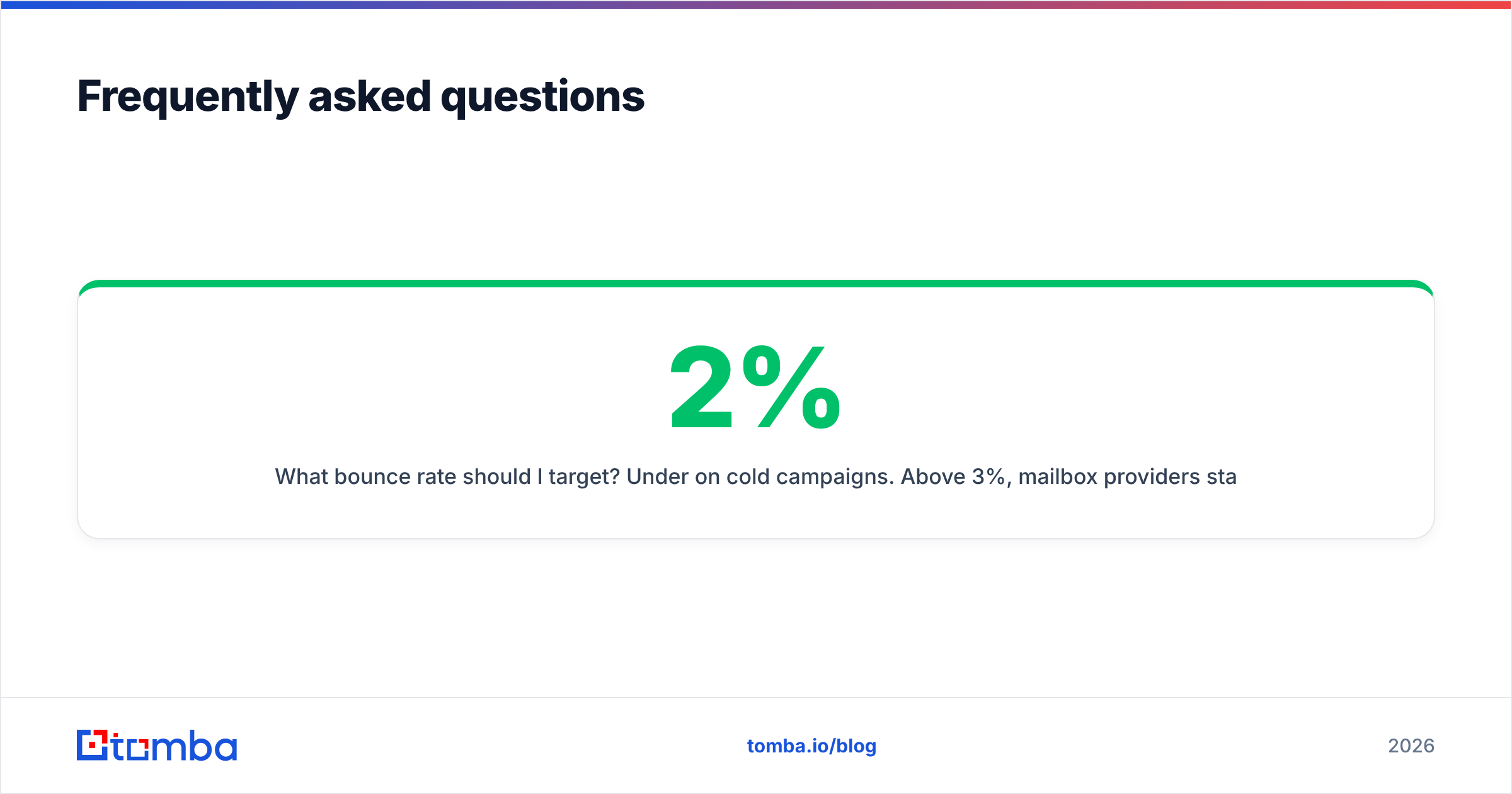
What bounce rate should I target? Under 2% on cold campaigns. Above 3%, mailbox providers start throttling. Above 5%, you are actively damaging your domain.
Do free email checkers work? For one-off checks, yes — a free email checker is fine for validating a single address before an important send. For lists, you need bulk processing and catch-all logic.
Ready to stop guessing at your lead data?#
The Enrow vs Jet Leads Pro winner for your team is the tool that returns the highest verified hit rate on your accounts. It is not the one with the loudest accuracy claim. Test that directly.
Start with the Tomba Email Finder free tier: 25 searches a month, no card required. Run 25 of your hardest target accounts — the catch-all domains, the enterprise tenants, the ones your current tool returns "unknown" on — and compare the results side by side with whatever you are paying for now. If Tomba resolves more of them, the $49/mo Starter plan pays for itself in the first campaign. If it does not, you have lost nothing but an afternoon and gained a real benchmark.
Related guides#
Ready to find emails that actually work?
Join 150,000+ professionals who stopped guessing and started sending. Free credits on signup — no credit card required.
Get the Tomba newsletter
Practical outbound tactics and product updates — once every two weeks.
About the author