Enrow vs SalesQL (2026): Verification vs LinkedIn Data
Enrow verifies catch-all inboxes. SalesQL pulls contacts off LinkedIn. They get compared constantly and they barely overlap — here is what each one actually does, what it costs, and which gap you are really trying to fill.
TL;DR
- Enrow and SalesQL are not really competitors. Enrow is an email verification engine built around catch-all domains. SalesQL is a LinkedIn-based contact extractor that scrapes emails and phone numbers off profiles.
- If your list already exists and bounces too much, Enrow is the relevant tool. If you have no list and live inside LinkedIn Sales Navigator, SalesQL is the relevant tool.
- Buy either one and you will still be missing half the pipeline — SalesQL users need verification, Enrow users need sourcing.
- Pricing shape differs sharply: Enrow charges per verified email (credits burn on results), SalesQL charges per extracted contact on monthly seats.
- A combined finder-plus-verifier stack (Tomba starts free at 25 searches/month, $49/mo Starter) usually costs less than running two single-purpose subscriptions side by side.
What are Enrow and SalesQL, exactly?#
Short answer: they sit at opposite ends of the same workflow.
Enrow is a French email verification service that made its name on one specific hard problem — catch-all domains. A catch-all server accepts every address you throw at it, so a normal SMTP ping returns "valid" for asdfgh@company.com just as happily as for the real CEO. Most verifiers shrug and label these "unknown" or "risky." Enrow's pitch is that it resolves a large share of those unknowns into a real verdict, which matters because in B2B roughly a third of domains are catch-all.
SalesQL is a Chrome extension. You open a LinkedIn profile, a Sales Navigator search, or a group member list, click the SalesQL icon, and it returns personal and work email addresses plus phone numbers for those profiles. You can bulk-extract from a search result page, push to CSV, or sync to a CRM. It is a sourcing tool with a light verification layer bolted on — not a verification engine.
So when someone types "enrow vs salesql" into Google, they usually have one of two questions hiding underneath:
- "My cold email bounce rate is embarrassing — which of these fixes it?" (Answer: Enrow, not SalesQL.)
- "I need contacts and I don't want to pay for two tools." (Answer: neither, on its own.)
How do they compare feature by feature?#
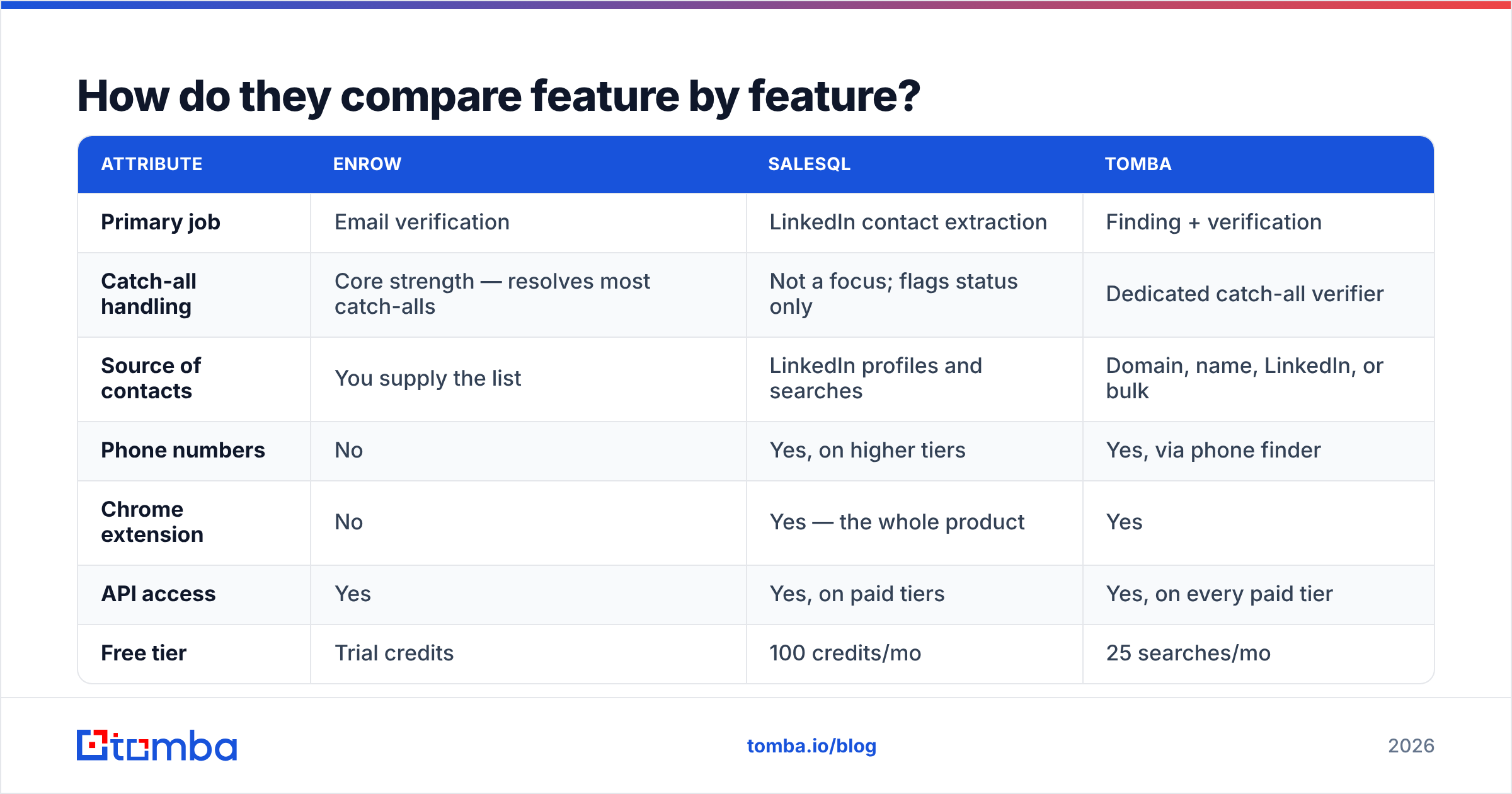
Here is the head-to-head on the attributes that actually change your day.
| Attribute | Enrow | SalesQL | Tomba |
|---|---|---|---|
| Primary job | Email verification | LinkedIn contact extraction | Finding + verification |
| Catch-all handling | Core strength — resolves most catch-alls | Not a focus; flags status only | Dedicated catch-all verifier |
| Source of contacts | You supply the list | LinkedIn profiles and searches | Domain, name, LinkedIn, or bulk |
| Phone numbers | No | Yes, on higher tiers | Yes, via phone finder |
| Chrome extension | No | Yes — the whole product | Yes |
| API access | Yes | Yes, on paid tiers | Yes, on every paid tier |
| Free tier | Trial credits | 100 credits/mo | 25 searches/mo |
| Entry paid price | Roughly $29/mo range, credit-based | Roughly $39/mo range, seat-based | $49/mo Starter |
| Bulk CSV workflow | Yes — the main interface | Export-oriented | Yes, via bulk tools |
| Best for | Cleaning existing lists | LinkedIn-first prospecting | End-to-end list building |
Pricing on all three moves; check each vendor's page before you commit. The structural difference is what matters and that does not move: Enrow bills you for verdicts on data you already have. SalesQL bills you for data you did not have. Those are different budgets.
Which one has better accuracy?#
They are measured on different axes, which is exactly why the comparison is slippery.
Enrow's accuracy claim is about verdict correctness: when it says an address is valid, does it deliver? The honest way to test this is to run a few hundred addresses you already know the outcome for — pull them from a sent campaign where you have real bounce data — and check the false-positive rate. False positives are the expensive error. A false negative costs you one prospect; a false positive costs you sender reputation, and reputation damage compounds across every future campaign.
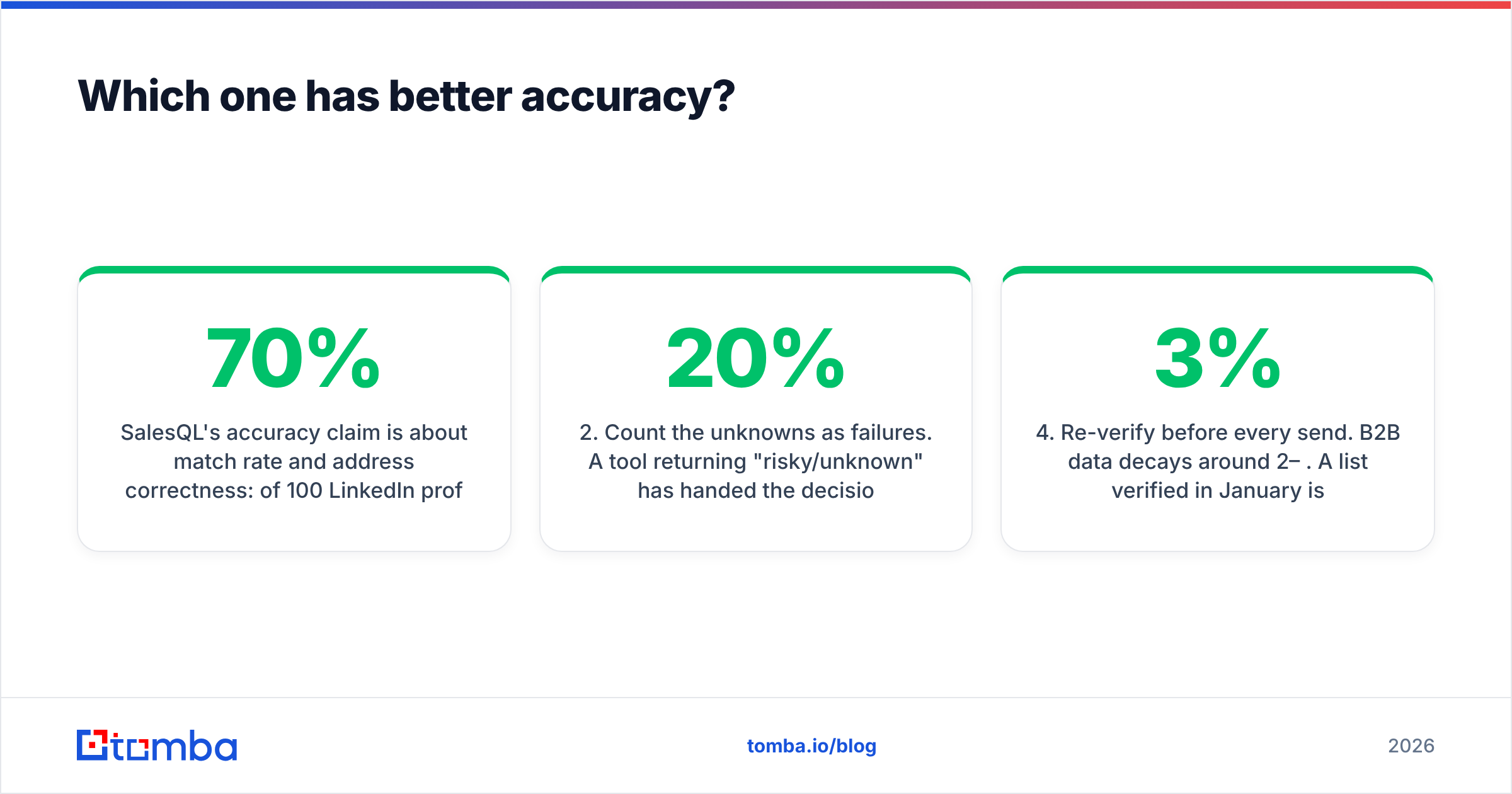
SalesQL's accuracy claim is about match rate and address correctness: of 100 LinkedIn profiles, how many return an email, and how many of those emails are the right person's? Extension-based tools typically land somewhere in the 45–70% match band depending on seniority, region, and how obscure the company is. Personal Gmail addresses inflate the match rate but are usually the wrong channel for B2B outreach — a @gmail.com hit is a match on paper and a dead end in practice.

Two rules of thumb when you benchmark either tool:
- Test on your ICP, not a sample list. A verifier that nails US SaaS domains can fall apart on European industrial companies with strict SMTP configs.
- Count the unknowns as failures. A tool returning 20% "risky/unknown" has handed the decision back to you. That is not a verdict, it is a shrug.
- Separate deliverability from correctness. An address can be deliverable and still belong to someone who left the company nine months ago. Only fresh sourcing fixes that.
- Re-verify before every send. B2B data decays around 2–3% per month. A list verified in January is meaningfully worse by April.
If you are already running an email verifier inside a broader stack, the marginal gain from adding a second specialist verifier is usually smaller than the gain from re-verifying more often.
Is Enrow better than SalesQL for cold email?#
Yes — if and only if you already have the list.
Cold email failure has two distinct causes and people conflate them constantly. Cause one: you are emailing addresses that do not exist, your bounce rate crosses 3–5%, and mailbox providers start throttling you. That is a verification problem, and Enrow addresses it directly. Cause two: you are emailing real addresses belonging to people who have no reason to care. That is a targeting problem, and no verifier on earth fixes it.
SalesQL sits upstream of both. It answers "who do I email," and the quality of that answer depends entirely on how good your LinkedIn search filters are. Garbage Sales Navigator filters produce a beautifully verified list of irrelevant people.
The practical stack most teams end up with looks like this:
- Source — LinkedIn search, a B2B database, or domain-level discovery
- Find — resolve name plus company into a work email
- Verify — kill invalids and resolve catch-alls before send
- Enrich — add title, company size, and phone for routing and personalization
- Re-verify — refresh anything older than 60–90 days
Enrow covers step three. SalesQL covers steps one, two, and part of four. Neither covers the whole line, which is the real finding of this comparison.
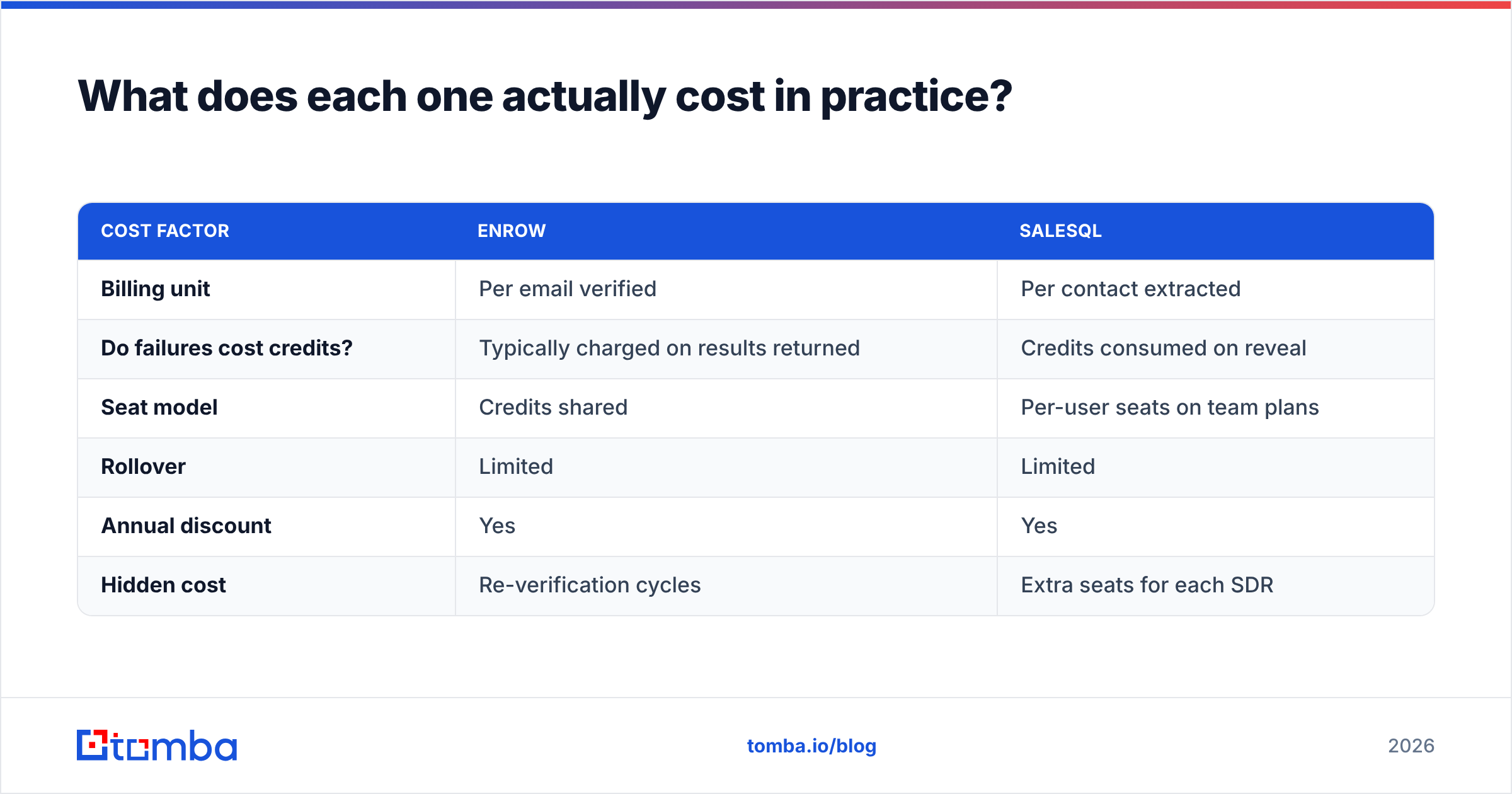
What does each one actually cost in practice?#
Sticker price is the least interesting number. What burns budget is the credit consumption model.
| Cost factor | Enrow | SalesQL |
|---|---|---|
| Billing unit | Per email verified | Per contact extracted |
| Do failures cost credits? | Typically charged on results returned | Credits consumed on reveal |
| Seat model | Credits shared | Per-user seats on team plans |
| Rollover | Limited | Limited |
| Annual discount | Yes | Yes |
| Hidden cost | Re-verification cycles | Extra seats for each SDR |
Run the arithmetic for a two-SDR team sending 2,000 emails a month. You need roughly 2,500 extracted contacts (accounting for misses), then 2,500 verifications, then a re-verify pass on anything you sat on. Two seats of SalesQL plus a mid-tier Enrow credit pack lands in the $120–180/month range before either tool has produced a single reply.

Compare that against a consolidated stack. Tomba pricing runs Free at 25 searches/month, Starter at $49/mo, Growth at $99/mo, and Pro at $249/mo — with finding, verification, catch-all verification, enrichment, and API access inside the same credit pool. The consolidation argument is not that any single component beats a specialist on its own benchmark. It is that you stop paying two vendors to hand data back and forth through CSV files.
What are the real limitations of each?#
Enrow's limits:
- No sourcing. Zero. If your list is empty, Enrow does nothing for you.
- Catch-all resolution is probabilistic, not magic. On locked-down enterprise domains, some addresses stay genuinely undecidable.
- Smaller ecosystem than the incumbent verifiers, so native integrations are thinner — expect to lean on the API or Zapier.
- Credit-based pricing means a messy imported list (duplicates, junk rows) burns budget before it produces value. Deduplicate first.
SalesQL's limits:
- Browser-dependent. If LinkedIn changes its DOM or tightens rate limits, extension tools wobble. This is an industry-wide reality, not a SalesQL-specific flaw, but it is a real operational risk.
- LinkedIn account risk. Heavy bulk extraction against Sales Navigator can attract restrictions. Pace it.
- Personal email bias. A significant share of returns are personal addresses that hurt reply rates and raise compliance questions under GDPR-style regimes.
- Verification is a checkbox, not an engine. Do not send to SalesQL output unverified.
- Seat-based pricing scales badly. Every new rep is a new subscription line.
Both tools are honest about being narrow. The mistake is the buyer's, not the vendor's — people evaluate a verifier against a scraper and conclude one of them is "bad."
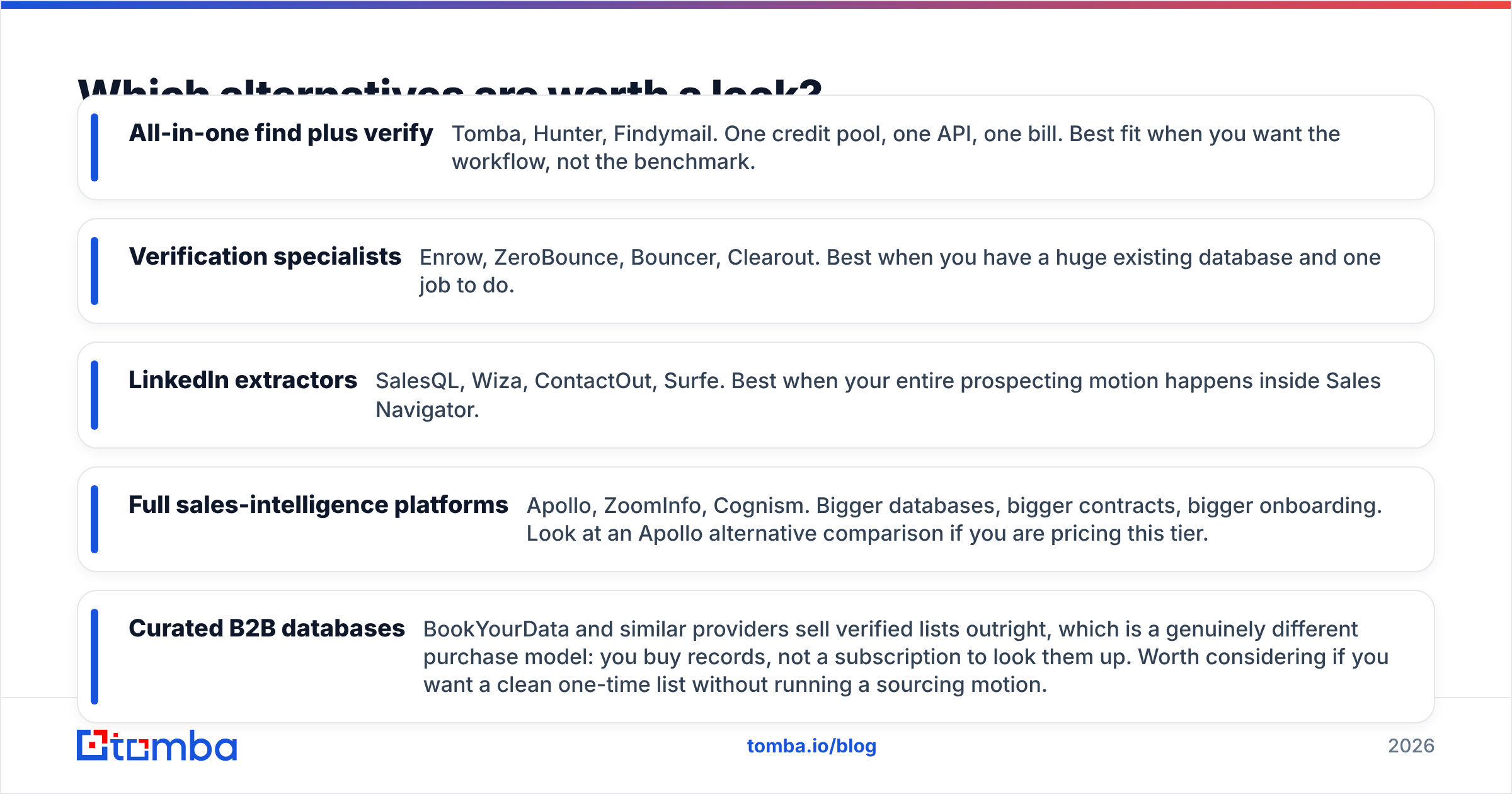
Which alternatives are worth a look?#
If neither shape fits, the field is crowded and reasonably well documented on G2 and Capterra. A few categories worth knowing:
- All-in-one find plus verify — Tomba, Hunter, Findymail. One credit pool, one API, one bill. Best fit when you want the workflow, not the benchmark.
- Verification specialists — Enrow, ZeroBounce, Bouncer, Clearout. Best when you have a huge existing database and one job to do.
- LinkedIn extractors — SalesQL, Wiza, ContactOut, Surfe. Best when your entire prospecting motion happens inside Sales Navigator.
- Full sales-intelligence platforms — Apollo, ZoomInfo, Cognism. Bigger databases, bigger contracts, bigger onboarding. Look at an Apollo alternative comparison if you are pricing this tier.
- Curated B2B databases — BookYourData and similar providers sell verified lists outright, which is a genuinely different purchase model: you buy records, not a subscription to look them up. Worth considering if you want a clean one-time list without running a sourcing motion.

If you specifically want the LinkedIn workflow without a browser extension carrying the whole product, a server-side LinkedIn finder resolves profile URLs to work emails through an API instead of a scraper, which removes the account-risk and DOM-fragility problems in one move.
So which should you pick?#
Decide by what is currently broken:
- Bounce rate above 3%, list already built → Enrow. It is a legitimately strong catch-all verifier and that is a hard problem to solve well.
- No list, and your ICP is precisely definable on LinkedIn → SalesQL, with a verification step bolted on before you send anything.
- Both problems at once, and a finite budget → Consolidate. Two single-purpose subscriptions plus the CSV shuffle between them is the most expensive way to run this workflow.
- Sending at real volume across many domains → You want API-first tooling with a shared credit pool, not two dashboards and a spreadsheet.
The uncomfortable truth in the enrow vs salesql matchup is that the correct answer for most teams is "the third option." You are not choosing between a verifier and a scraper. You are choosing whether to build a stack out of specialists or run one pipeline end to end.
Start with the sourcing half and keep the verification attached. The Tomba Email Finder resolves names and domains into work emails, runs them through catch-all-aware verification in the same call, and returns a confidence score you can actually route on — with 25 free searches a month to benchmark it against whatever you are paying for now, no card required. Import your last bounced campaign, re-run it, and compare the verdicts. That test takes ten minutes and settles the question better than any comparison table, including this one.
Related guides#
Ready to find emails that actually work?
Join 150,000+ professionals who stopped guessing and started sending. Free credits on signup — no credit card required.
Get the Tomba newsletter
Practical outbound tactics and product updates — once every two weeks.
About the author