Enterprise Client Meaning: What Counts as Enterprise in 2026
Everyone says they sell to "enterprise" — few can define it. Here's the revenue, headcount, and buying-committee thresholds that actually separate enterprise clients from mid-market, and how to prospect each.
TL;DR
- An enterprise client is generally an organization with 1,000+ employees or $1B+ in annual revenue, buying through a formal committee with procurement, security, and legal review. Headcount alone is a weak signal.
- The practical dividing line isn't size — it's buying process. If the deal requires a security questionnaire, a MSA redline, and three or more approvers, you're selling enterprise regardless of the logo's revenue.
- Enterprise deals run 3–12 months, involve 6–11 stakeholders, and carry contract values 5–20x mid-market. Your prospecting motion has to change accordingly.
- "Enterprise" in vendor pricing pages means something different from "enterprise" in segmentation: the first is a pricing tier, the second is a firmographic and behavioral profile.
- To prospect enterprise accounts you need multi-contact coverage per account — not one email. Tools like Tomba's domain search map every reachable contact at a domain rather than returning a single guess.
What Is the Enterprise Client Meaning in B2B?#
An enterprise client is a large organization that buys through a structured, multi-stakeholder process rather than a single decision-maker. That's the definition that actually predicts how the deal behaves.
Most teams reach for firmographics first, and they're not wrong to — they're just incomplete. The common thresholds:
- Employee headcount — 1,000+ employees is the most widely used cutoff in B2B SaaS. Some vendors set it at 500, a few at 5,000.
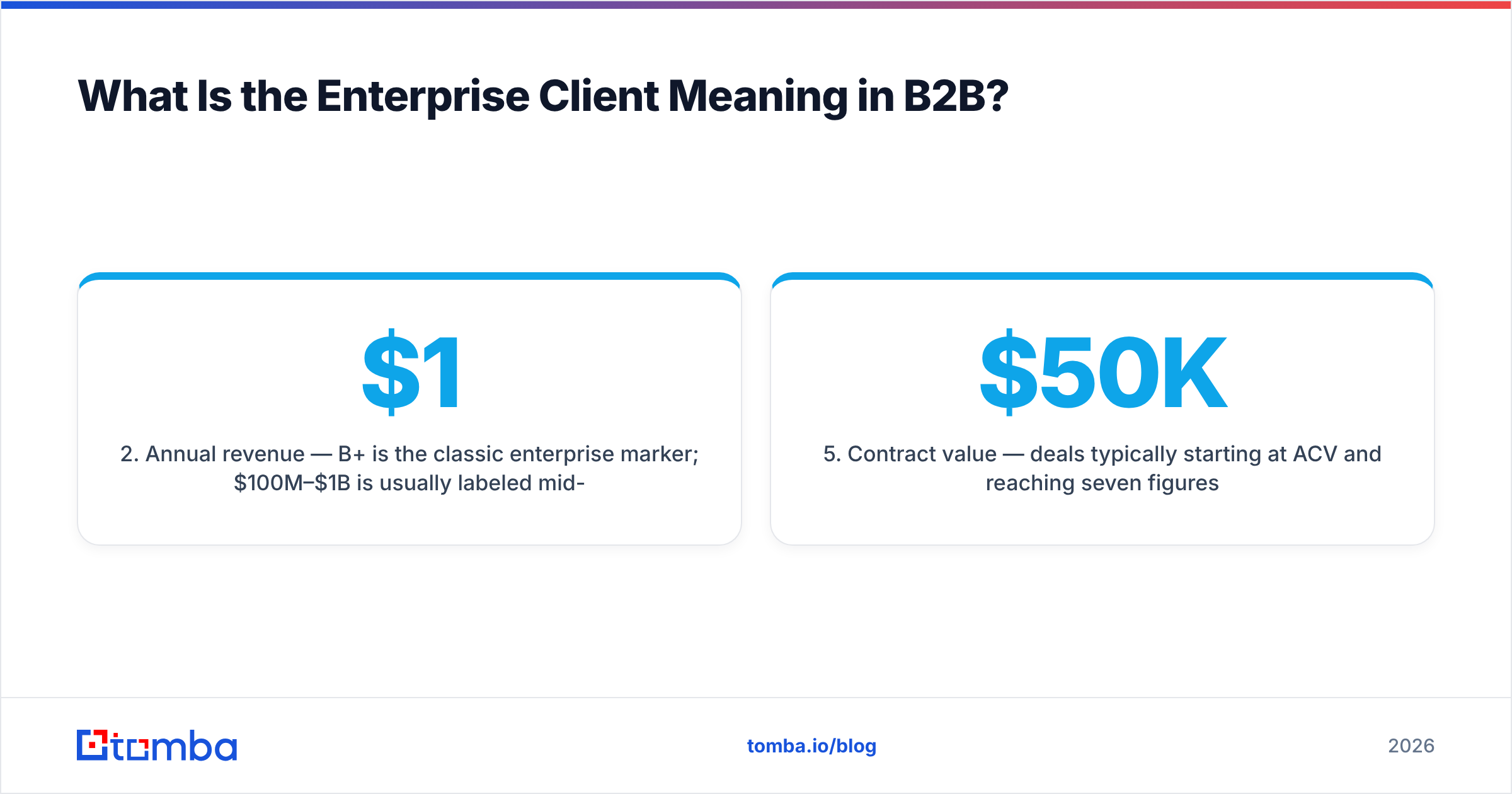
- Annual revenue — $1B+ is the classic enterprise marker; $100M–$1B is usually labeled mid-market or "commercial."
- Geographic footprint — multiple countries, multiple legal entities, and regional data-residency requirements.
- Procurement maturity — a dedicated procurement or vendor-management function that owns purchasing, separate from the team using your product.
- Contract value — deals typically starting at $50K ACV and reaching seven figures.
- Compliance surface — SOC 2, ISO 27001, HIPAA, or GDPR review before a single seat is provisioned.
Hit four or more of those and you have an enterprise client. Hit one or two and you have a large mid-market company that will behave like a mid-market company — fast, single-champion, credit-card-adjacent.
Think of it like renting an apartment versus buying a commercial building. Both are "getting space." One takes a signature and a deposit; the other takes surveyors, lawyers, financing, and a board vote. Same category, completely different process.
How Do Enterprise, Mid-Market, and SMB Actually Differ?#
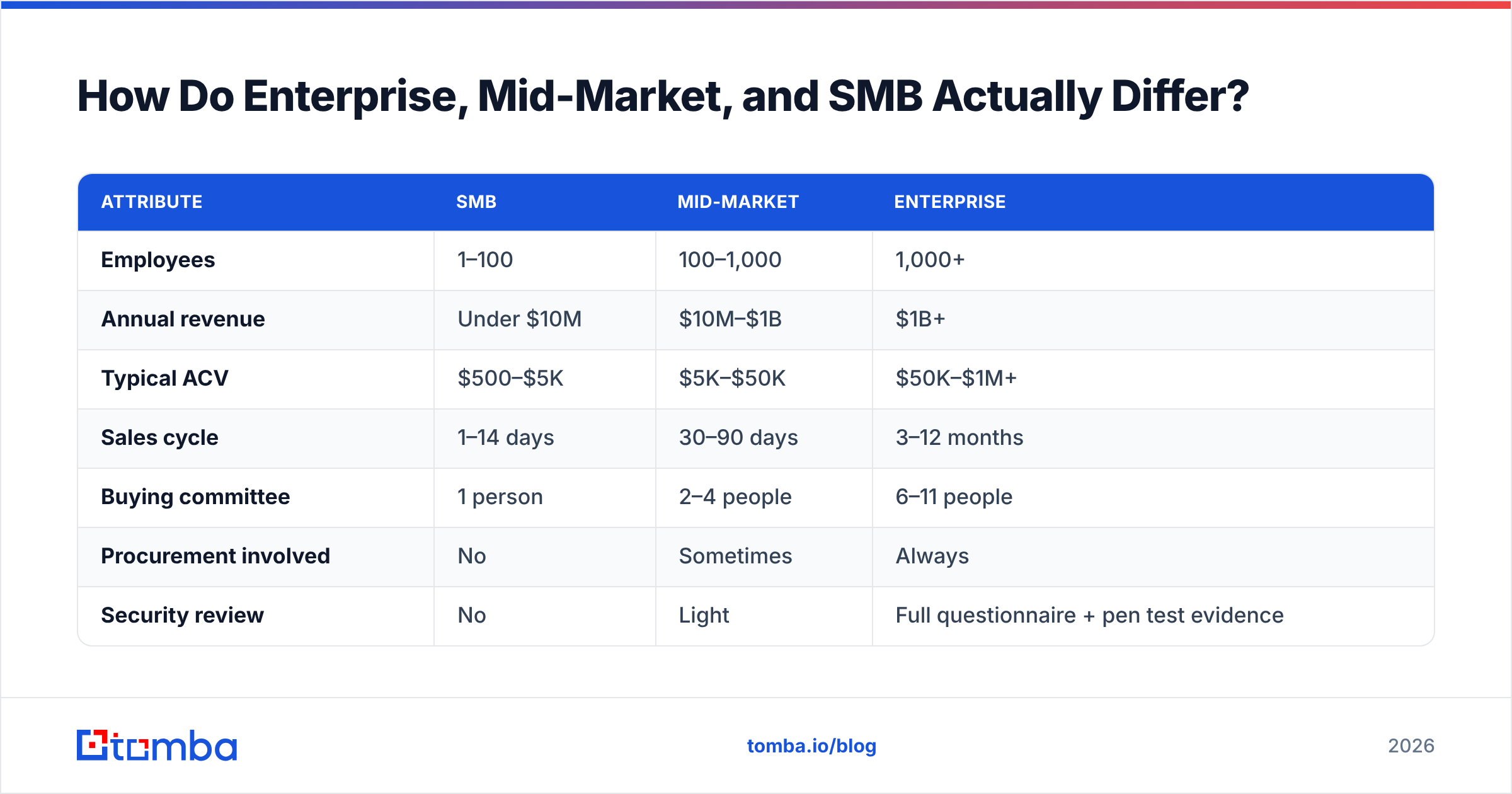
Here's the segmentation most B2B revenue teams converge on, with the operational implications rather than just the size bands.
| Attribute | SMB | Mid-Market | Enterprise |
|---|---|---|---|
| Employees | 1–100 | 100–1,000 | 1,000+ |
| Annual revenue | Under $10M | $10M–$1B | $1B+ |
| Typical ACV | $500–$5K | $5K–$50K | $50K–$1M+ |
| Sales cycle | 1–14 days | 30–90 days | 3–12 months |
| Buying committee | 1 person | 2–4 people | 6–11 people |
| Procurement involved | No | Sometimes | Always |
| Security review | No | Light | Full questionnaire + pen test evidence |
| Contract | Click-through ToS | Order form | Negotiated MSA + DPA + SLA |
| Onboarding | Self-serve | Guided | Dedicated CSM + implementation |
| Churn driver | Price | Feature gaps | Champion turnover |
| Prospecting unit | One contact | Contact + manager | Whole account map |
The row that changes your day-to-day most is the second-to-last one. In SMB, losing your contact means losing the account. In enterprise, losing your champion means falling back to the four other relationships you built — if you built them.
Why Does the Buying Committee Define Enterprise Better Than Headcount?#
Because headcount tells you how big the company is; the committee tells you how the deal will run.
Gartner's research on B2B buying has consistently found that typical complex purchases involve six to ten decision-makers, each armed with four or five independently gathered pieces of information — and that buyers spend only a small fraction of the buying journey with any one vendor (Gartner B2B buying research). At enterprise scale, that number climbs and the roles formalize:
- Economic buyer — signs, owns the budget, often a VP or C-level exec you'll meet twice.
- Champion — the person whose problem you solve; drives internal advocacy.
- Technical evaluator — IT, security, or platform engineering; can veto on architecture alone.
- Procurement — negotiates price, terms, and renewal mechanics; measured on savings.
- Legal — redlines the MSA, DPA, and liability caps.
- End users — the seats; their pilot feedback can kill or accelerate the deal.
A 400-person fintech with a CISO, a procurement lead, and a legal team will run a more "enterprise" process than a 3,000-person retailer where a regional director expenses software. Segment on behavior, then sanity-check with firmographics.
What Does "Enterprise" Mean on a Pricing Page?#
Something almost entirely different — and conflating the two costs teams real money.
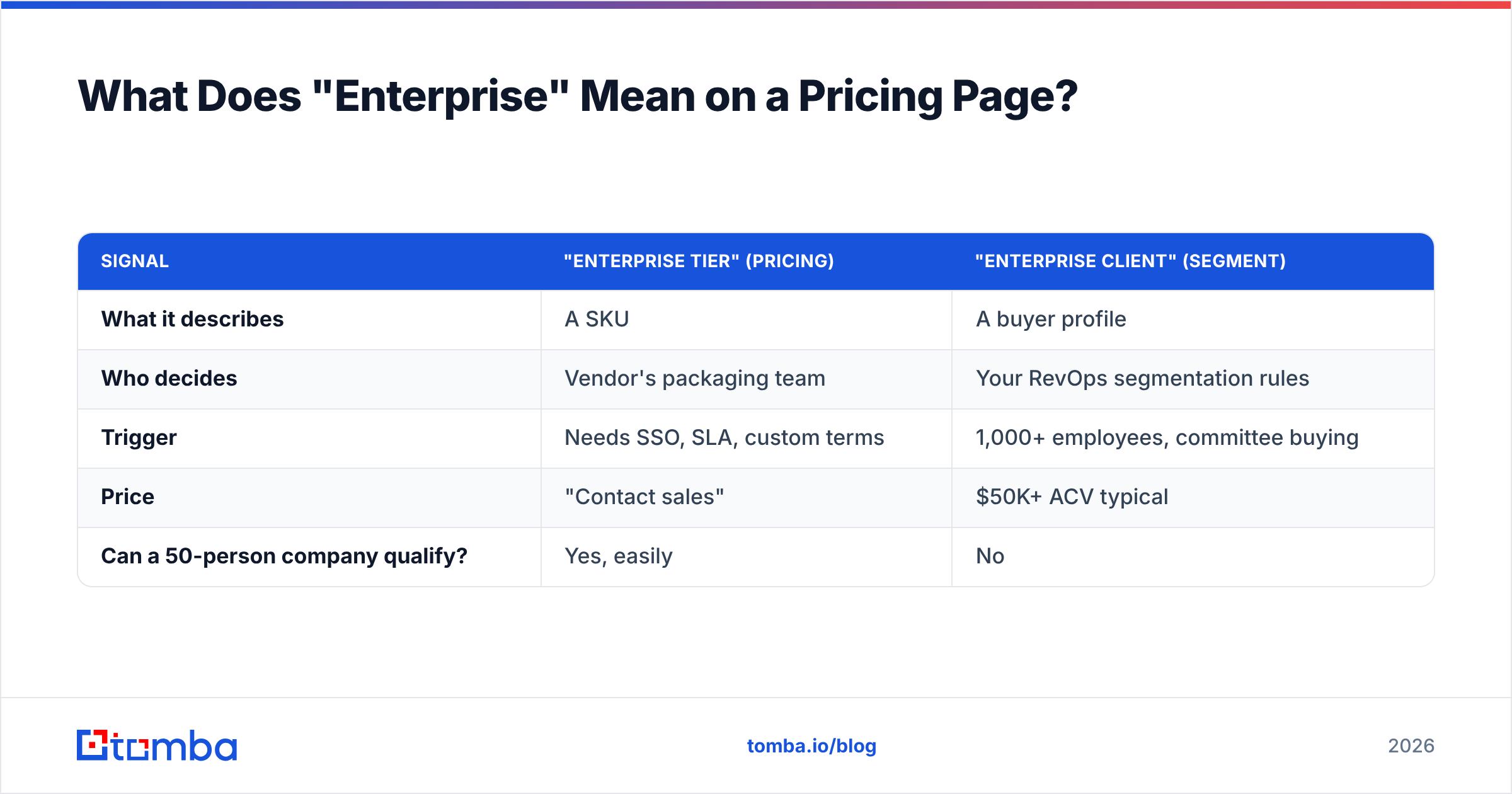
On a vendor's pricing page, "Enterprise" is a tier label meaning "call us." It signals custom pricing, SSO/SAML, audit logs, a dedicated success manager, a security review process, and usually an annual commitment. It does not mean the customer is an enterprise. Plenty of 60-person companies buy Enterprise tiers because they need SSO for a compliance audit.
| Signal | "Enterprise tier" (pricing) | "Enterprise client" (segment) |
|---|---|---|
| What it describes | A SKU | A buyer profile |
| Who decides | Vendor's packaging team | Your RevOps segmentation rules |
| Trigger | Needs SSO, SLA, custom terms | 1,000+ employees, committee buying |
| Price | "Contact sales" | $50K+ ACV typical |
| Can a 50-person company qualify? | Yes, easily | No |
Keep them in separate fields in your CRM. Tier is a product attribute; segment is an account attribute. If your revenue operations team reports "enterprise growth" using tier data, you'll misread your own market.
How Do You Prospect Enterprise Clients Differently?#
You stop selling to a person and start mapping an organization. Five changes matter most.
1. Build account maps, not lead lists. For each target account, identify 6–12 relevant contacts across the champion, technical, and economic tracks. A single contact at a 5,000-person company is statistically noise — you have maybe a 15% chance that person is even in the buying group.
2. Verify before you send, aggressively. Enterprise domains are full of catch-all configurations, role accounts, and departed employees. A bounce at an enterprise domain damages your sender reputation against a domain you'll be emailing for years. Run every list through an email verifier, and handle catch-all domains with a dedicated catch-all verifier rather than guessing.
3. Sequence by role, not by list. The message that lands with a Director of Revenue Operations ("your CRM data decays 25% a year") is the wrong message for the CISO ("here's our SOC 2 report and data-residency options"). Same account, two campaigns.
4. Expect and plan for multi-threading. Champion turnover is the top enterprise churn and stall driver. If your only relationship leaves, a 7-month cycle resets. Three live relationships is the practical minimum.
5. Time your entry to trigger events. Funding rounds, new executive hires, acquisitions, office openings, and compliance certifications all reset budget and priorities. Enterprise accounts are rarely "in market" — you're waiting for a window and being present when it opens.
What Data Do You Actually Need Per Enterprise Account?#
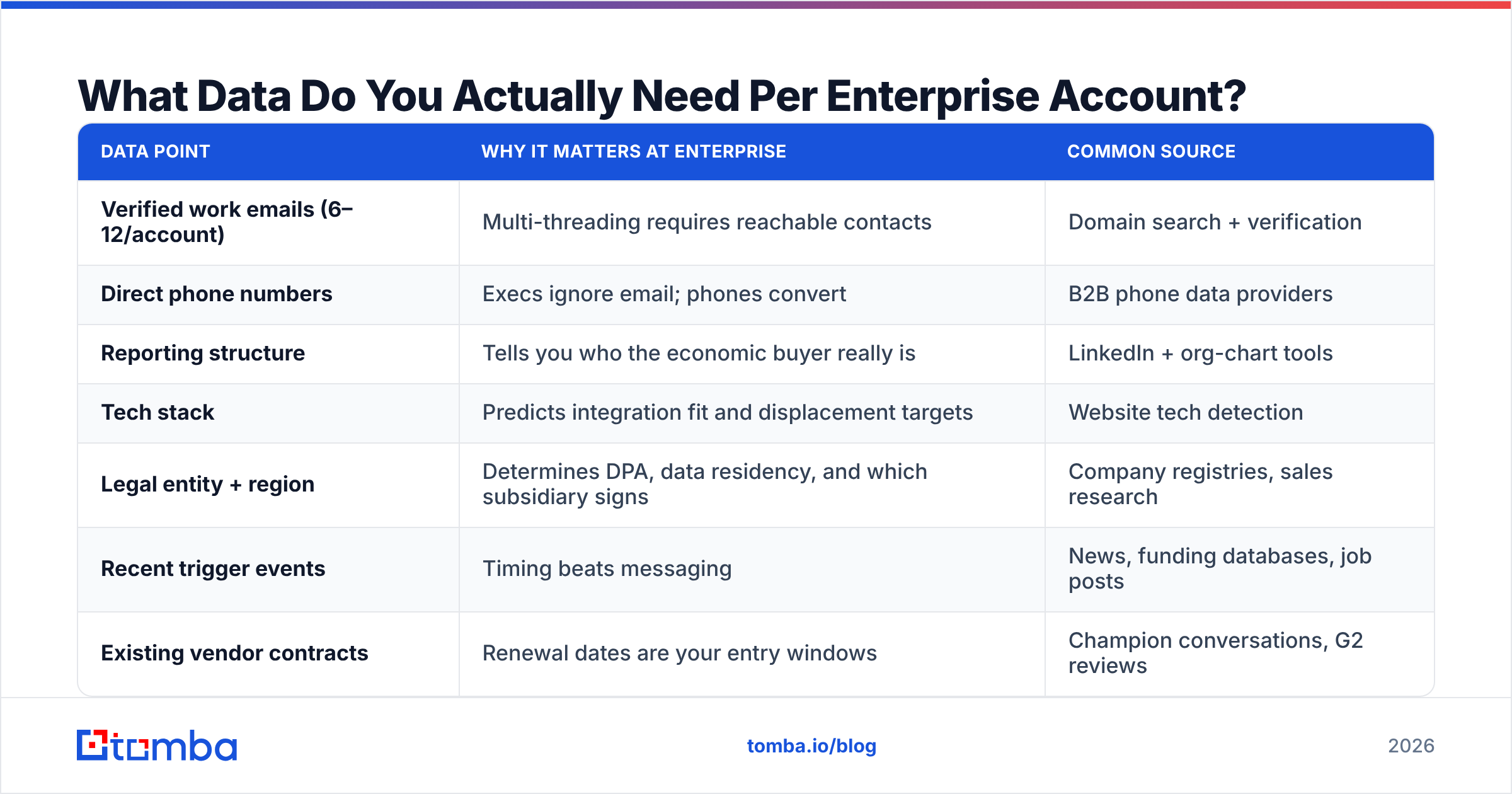
More than most teams collect. Here's the minimum working set, and where it typically comes from.
| Data point | Why it matters at enterprise | Common source |
|---|---|---|
| Verified work emails (6–12/account) | Multi-threading requires reachable contacts | Domain search + verification |
| Direct phone numbers | Execs ignore email; phones convert | B2B phone data providers |
| Reporting structure | Tells you who the economic buyer really is | LinkedIn + org-chart tools |
| Tech stack | Predicts integration fit and displacement targets | Website tech detection |
| Legal entity + region | Determines DPA, data residency, and which subsidiary signs | Company registries, sales research |
| Recent trigger events | Timing beats messaging | News, funding databases, job posts |
| Existing vendor contracts | Renewal dates are your entry windows | Champion conversations, G2 reviews |
You don't need a $60K/year data platform to assemble this. You need coverage per domain and clean verification. Tools like Tomba, BookYourData, Apollo, and Clearbit approach this from different angles — Tomba and BookYourData lean toward accuracy and verified coverage at a modest price point, while all-in-one platforms bundle sequencing at higher cost and looser data quality. Match the tool to whether your bottleneck is finding contacts or contacting them.

Is an Enterprise Client Always Worth Pursuing?#
No — and this is where a lot of mid-stage companies burn a year.
Enterprise deals carry real costs before any revenue arrives:
- Sales cycle drag. A 9-month cycle means Q1 pipeline pays out in Q4. If your runway is 14 months, you cannot fund an enterprise motion from scratch.
- Product debt. SSO, audit logs, role-based permissions, SLAs, data residency, and a security posture worth reviewing are table stakes. That's a quarter or two of engineering before your first close.
- Support load. Enterprise clients expect named contacts and response-time guarantees. Budget headcount, not just tooling.
- Concentration risk. Three enterprise clients at 60% of revenue is a fragile business. One non-renewal is an existential event.
- Discount pressure. Procurement teams are compensated on savings. Expect 20–40% off list on multi-year commitments.
The counterweight is real: enterprise clients churn less on price, expand predictably through seat and module growth, and act as references that unlock peer accounts in the same vertical. Analyst coverage from firms like Forrester has long documented that net revenue retention in enterprise segments outpaces SMB by a wide margin — the logo is worth more over five years than the first-year ACV suggests.
The honest test: do you have 12+ months of runway, a product that survives a security review, and at least two reference customers in the target vertical? If not, win mid-market first and grow into it.
What Are the Most Common Mistakes Defining Enterprise Clients?#
Using one threshold for everything. Marketing segments by revenue, sales by headcount, and CS by ACV — so three teams report three different enterprise counts. Pick one definition, write it into your CRM field rules, and make every team use it.
Confusing "big logo" with "enterprise deal." A 20,000-person company buying 5 seats on a credit card is an SMB deal wearing an enterprise jacket. Segment the deal, not just the account.
Ignoring subsidiary structure. "Acme Corp" may be 40 legal entities with separate budgets. You can land in one division and expand — or you can spend six months at HQ discovering nobody there buys anything.
Under-prospecting the account. One verified contact per enterprise account is the single most common failure. If your account map has fewer than five names, your forecast is a guess. Use a bulk email finder to build coverage across the whole target list at once instead of one lookup at a time.
Treating the CRM as the source of truth. Enterprise contact data decays fast — roughly 25–30% of B2B contact records go stale annually as people change roles. Re-enrich quarterly or your account maps become fiction.
How Should You Codify Enterprise in Your CRM?#
Write the rule down, then enforce it in fields — not in tribal knowledge.
A workable definition to adapt:
An account qualifies as Enterprise when it meets at least three of: (a) 1,000+ employees, (b) $500M+ annual revenue, (c) requires a security questionnaire, (d) requires MSA negotiation, (e) has a dedicated procurement contact, (f) expected ACV ≥ $50K.
Store the qualifying criteria as checkboxes on the account object so the segment is auditable, not asserted. Then set segment-specific SLAs: enterprise leads get a named AE within 24 hours and an account map within a week; mid-market gets speed-to-lead in minutes. Different segments deserve different clocks.
Finally, review the segmentation quarterly. Companies grow, get acquired, and downsize. An account that was mid-market in 2024 may be enterprise now — and your rep may still be treating it like a one-contact deal.
Where Do You Start?#
Start by picking 25 target accounts, applying your three-of-six enterprise test, and building a real account map for the ones that pass. That means 6–12 verified contacts per domain — champion track, technical track, economic track — not a single "best guess" email.
That's exactly the gap Tomba Email Finder closes. Run a domain and get every discoverable professional email at that company with confidence scores and verification built in, then push the results straight into HubSpot, Salesforce, or Sheets. The free tier gives you 25 searches a month to test coverage on your own target accounts before paying anything; Tomba pricing starts at $49/mo for Starter and $99/mo for Growth when you're ready to build maps at scale. Test it against five accounts you already know well — if the coverage matches what your reps found manually over weeks, you've just compressed your enterprise prospecting cycle to an afternoon.
Related guides#
Ready to find emails that actually work?
Join 150,000+ professionals who stopped guessing and started sending. Free credits on signup — no credit card required.
Get the Tomba newsletter
Practical outbound tactics and product updates — once every two weeks.
About the author