Enterprise Sales Prospecting: The 2026 Playbook That Works
Enterprise deals have 11+ stakeholders and 9-month cycles. Here is how prospecting into $50k+ accounts actually differs from SMB — account mapping, multithreading, data stacks, and the metrics that matter.
TL;DR
- Enterprise sales prospecting is not SMB prospecting with bigger logos. Median enterprise buying groups now run 6–11 stakeholders, and cycles stretch 6–12 months — a single-threaded email sequence is structurally incapable of moving them.
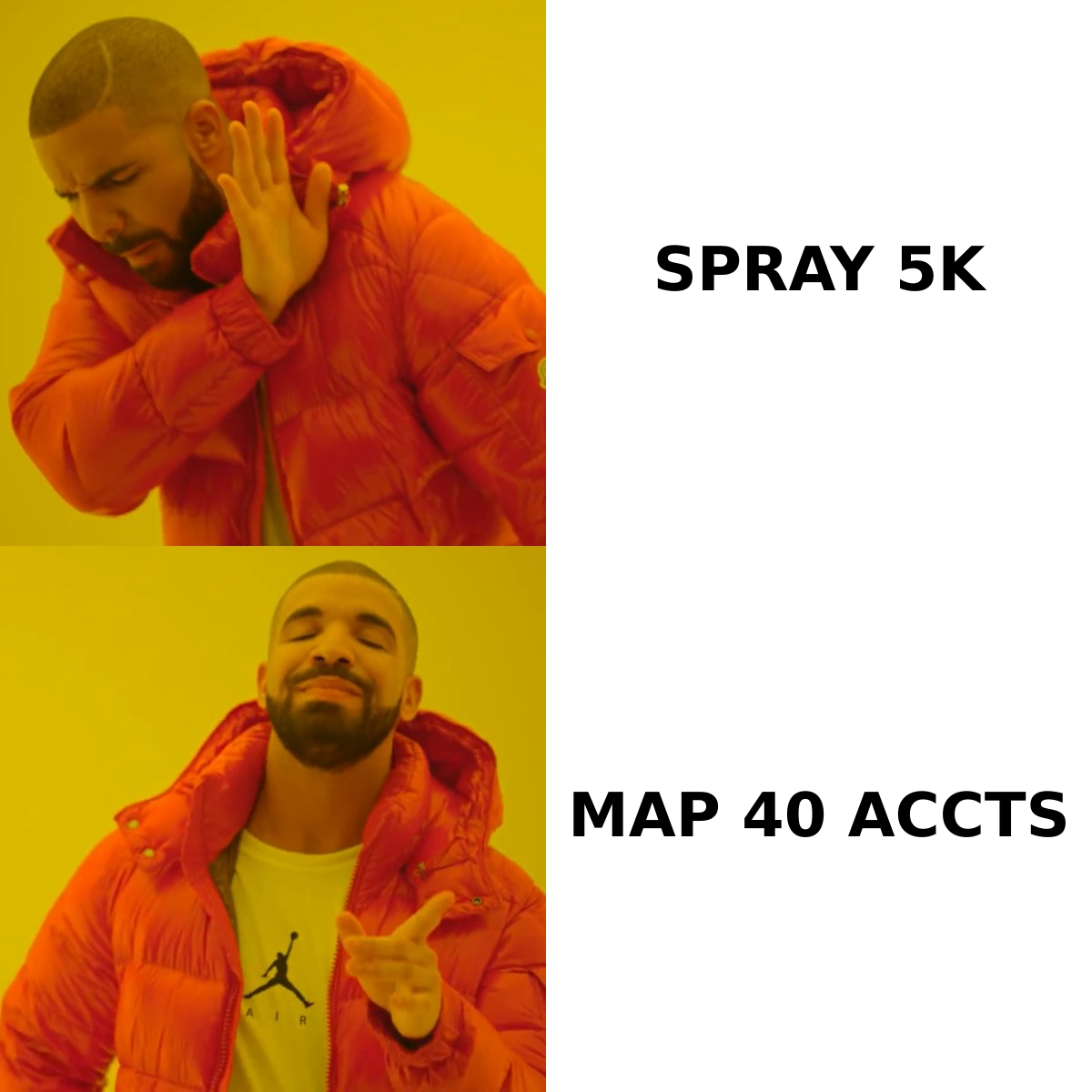
- Volume is the wrong lever. Forty deeply researched accounts beat 5,000 sprayed contacts because your win rate depends on coverage inside each account, not contact count across many.
- The prospecting stack splits into three jobs: account selection (intent + firmographics), contact discovery (email finder, phone, LinkedIn), and orchestration (sequencer + CRM). Buying one tool that claims all three usually means paying enterprise prices for mediocre data.
- Data decay is the silent killer: B2B contact data degrades roughly 25–30% per year, and enterprise org charts churn faster than SMB ones. Verify before every campaign, not once a quarter.
- Measure meetings-per-account and stakeholder coverage, not emails sent. If you can't name three contacts at a target account, you don't have an opportunity — you have a hope.
What is enterprise sales prospecting, and how is it different?#
Enterprise sales prospecting is the process of identifying, researching, and initiating contact with multiple decision-makers inside large organizations — typically 1,000+ employees, $50k+ annual contract values — with the goal of building enough internal support to open a qualified opportunity.
The difference from SMB prospecting is not degree. It's kind.
In SMB, one person can usually say yes. You find the owner or the head of ops, you get one reply, you get a demo, you close in 21 days. The prospecting function is essentially a throughput problem: more contacts, more replies, more meetings.
In enterprise, nobody can say yes alone. What one person can do is say no — quietly, in a meeting you weren't in. Gartner's research on B2B buying has consistently found that large purchases involve buying groups of six to ten people, each bringing four or five independently gathered pieces of information to the table. That means your prospecting job is not "get a reply." It's "get enough people inside this account aware, informed, and non-hostile that a deal can survive procurement."
Here's the practical consequence: an SMB rep who books 15 meetings across 15 companies had a good month. An enterprise rep who books 15 meetings across 15 companies had a scattered month and probably won't close any of them. Fifteen meetings across four accounts is a much better outcome.
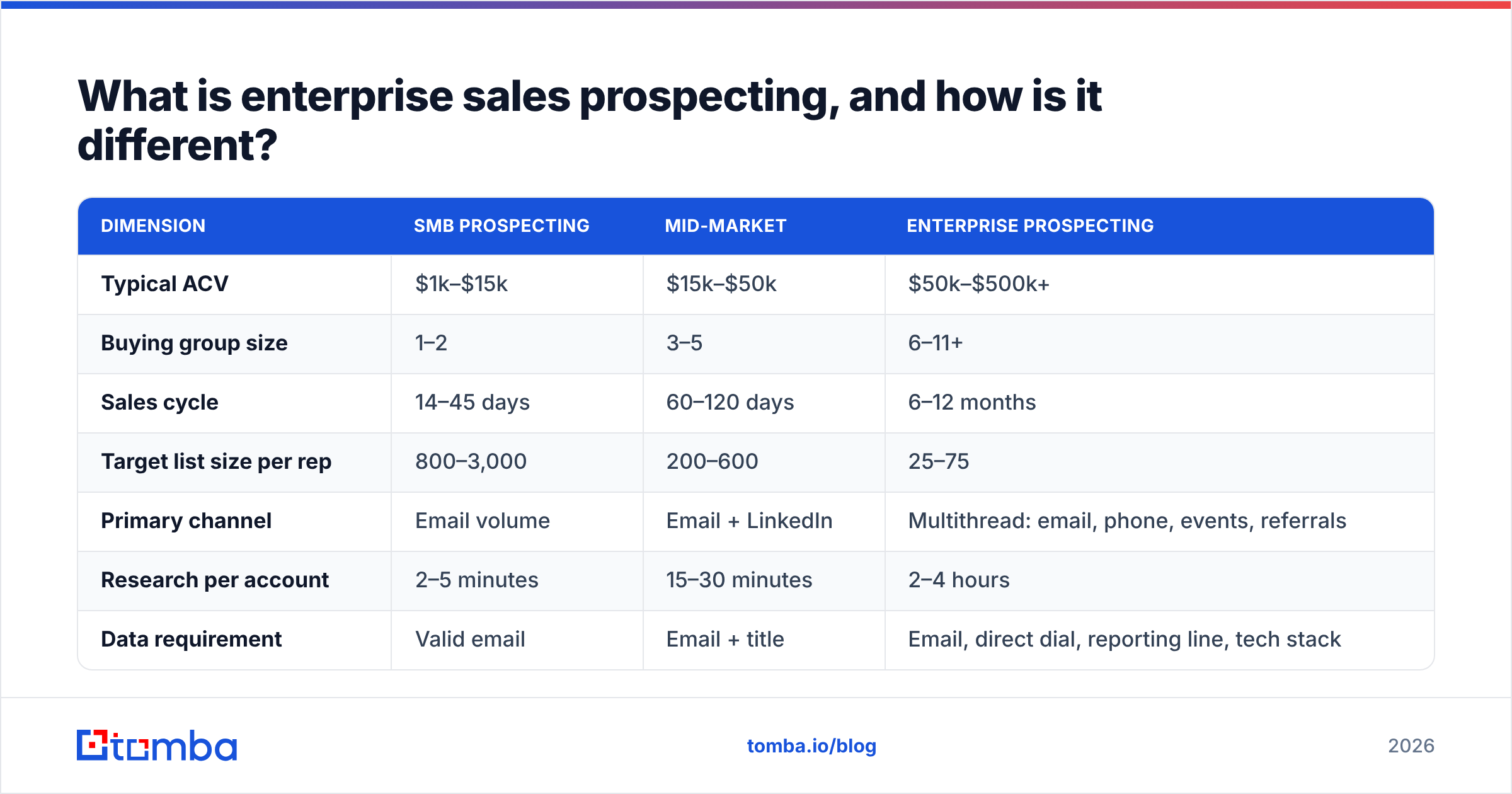
| Dimension | SMB prospecting | Mid-market | Enterprise prospecting |
|---|---|---|---|
| Typical ACV | $1k–$15k | $15k–$50k | $50k–$500k+ |
| Buying group size | 1–2 | 3–5 | 6–11+ |
| Sales cycle | 14–45 days | 60–120 days | 6–12 months |
| Target list size per rep | 800–3,000 | 200–600 | 25–75 |
| Primary channel | Email volume | Email + LinkedIn | Multithread: email, phone, events, referrals |
| Research per account | 2–5 minutes | 15–30 minutes | 2–4 hours |
| Data requirement | Valid email | Email + title | Email, direct dial, reporting line, tech stack |
| Success metric | Reply rate | Meetings booked | Stakeholder coverage per account |
If you take one thing from that table, take the last row. Reply rate is a vanity metric in enterprise. You can have a 12% reply rate and zero pipeline if every reply came from an analyst with no budget.
How do you build an enterprise target account list?#
Start with fit, not with a database export.
Most teams do this backwards. They filter a B2B database by employee count and industry, get 8,000 companies, and call it a TAL. Then they wonder why the list produces nothing. The problem is that "1,000+ employees in SaaS" describes a market, not a target list.
A usable enterprise target account list gets built in four passes:
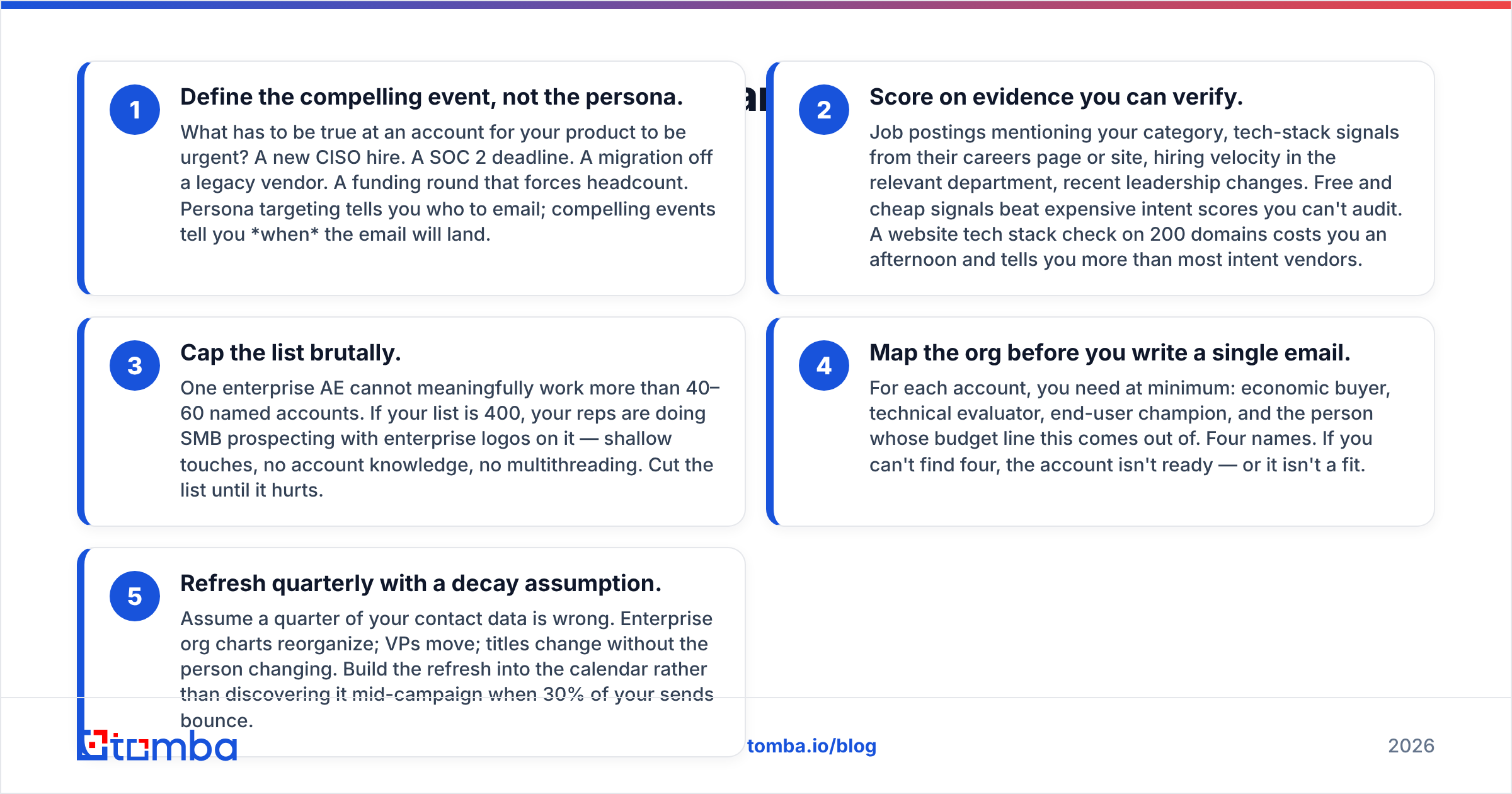
Define the compelling event, not the persona. What has to be true at an account for your product to be urgent? A new CISO hire. A SOC 2 deadline. A migration off a legacy vendor. A funding round that forces headcount. Persona targeting tells you who to email; compelling events tell you when the email will land.
Score on evidence you can verify. Job postings mentioning your category, tech-stack signals from their careers page or site, hiring velocity in the relevant department, recent leadership changes. Free and cheap signals beat expensive intent scores you can't audit. A website tech stack check on 200 domains costs you an afternoon and tells you more than most intent vendors.
Cap the list brutally. One enterprise AE cannot meaningfully work more than 40–60 named accounts. If your list is 400, your reps are doing SMB prospecting with enterprise logos on it — shallow touches, no account knowledge, no multithreading. Cut the list until it hurts.
Map the org before you write a single email. For each account, you need at minimum: economic buyer, technical evaluator, end-user champion, and the person whose budget line this comes out of. Four names. If you can't find four, the account isn't ready — or it isn't a fit.
Refresh quarterly with a decay assumption. Assume a quarter of your contact data is wrong. Enterprise org charts reorganize; VPs move; titles change without the person changing. Build the refresh into the calendar rather than discovering it mid-campaign when 30% of your sends bounce.
That fourth step is where most enterprise prospecting programs quietly fail. Reps find one contact — usually a director who responded to a webinar — and single-thread the whole account through them. When that person changes jobs, and in enterprise SaaS they change jobs roughly every 18 months, the deal evaporates with no warning.
Which data do you actually need for enterprise prospecting?#
More than SMB, and of a different type.
For an SMB play, a verified work email is often sufficient. For enterprise, you need a contact record that supports multithreading and channel-switching:
- Verified email — table stakes, but the bar is higher because enterprise domains often use catch-all configurations that defeat naive verification. You need a catch-all verifier that distinguishes "server accepts everything" from "this mailbox exists."
- Direct dial or mobile — enterprise gatekeeping is real, and a switchboard number is worthless. Direct dials remain the highest-conversion channel for VP+ contacts precisely because everyone abandoned the phone.
- Reporting relationship — who does this person report to, and who reports to them. This is what turns a contact list into an org map.
- LinkedIn profile URL — for social touches and for validating that the person still holds the role your data claims.
- Tenure in role — someone 90 days into a VP job is dramatically more receptive than someone six years in. New executives have mandates and budgets.
The practical workflow: pull the org structure from LinkedIn or a firmographic source, then resolve each name to a working email with a domain search against the company domain, then verify the whole set before a single send. Tomba's domain search returns the pattern and the known mailboxes for a company in one call, which is faster than permutating and testing guesses one at a time.
For teams doing this at scale, the bulk email finder handles list-level enrichment, and the Tomba API lets you wire discovery directly into your CRM so enrichment happens at record creation rather than as a manual pre-campaign scramble.
How do you multithread an enterprise account without being annoying?#
Sequence the account, not the person.
The failure mode everyone fears is blasting nine people at one company with the same template on the same day. That doesn't look thorough; it looks automated, and it gets forwarded around with a laughing emoji. The fix is role-differentiated messaging on a staggered calendar.
A workable pattern for a four-stakeholder account over six weeks:
Week 1 — the practitioner. Start low. The manager or senior IC who lives with the problem daily. Message is tactical and specific: "Noticed your team is running X. Most teams at your stage hit Y around 40 engineers." No pitch. You are gathering intelligence and testing whether the pain is real.
Week 2 — the technical evaluator. Reference what you learned in week 1 if you got a reply. Different angle: architecture, integration, security posture. This person's job is to find reasons to say no, so give them reasons the answer is safe.
Week 3 — the economic buyer. Short, business-outcome framed, and explicitly mentioning that you've been talking with their team. Executives don't mind being second; they mind being surprised. "Your team mentioned X — wanted to make sure you had the number that matters" is a legitimate opener.
Week 4–6 — channel switching. Whoever hasn't replied gets a different medium. Phone for the exec, LinkedIn for the practitioner, a targeted comment on something they published. Use a phone finder to get direct dials rather than working through reception.
The discipline that makes this work: log every touch in the CRM against the account, not just the contact. Your rep needs to open the account record and see, in one view, who has been touched, on what channel, with what message, and who replied. Without that, multithreading degrades into duplicate outreach.

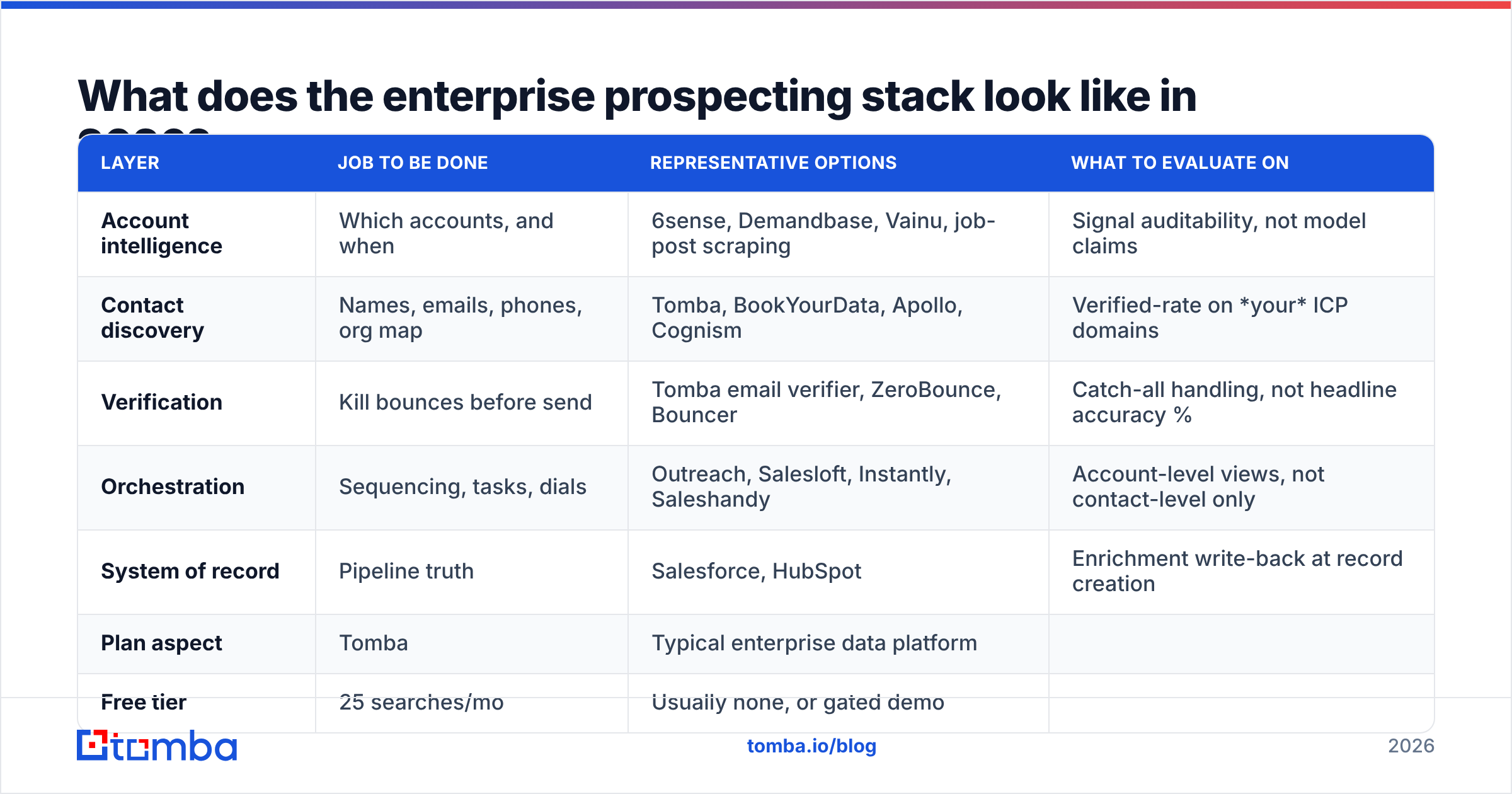
What does the enterprise prospecting stack look like in 2026?#
Three layers, and you should evaluate them separately.
Bundled "all-in-one revenue platforms" are attractive on a slide and expensive in practice. The pattern we see repeatedly: a team pays $30k+/year for a platform whose contact data is mediocre, whose sequencer is fine, and whose intent scores nobody trusts — because unbundling would mean three vendor conversations instead of one.
| Layer | Job to be done | Representative options | What to evaluate on |
|---|---|---|---|
| Account intelligence | Which accounts, and when | 6sense, Demandbase, Vainu, job-post scraping | Signal auditability, not model claims |
| Contact discovery | Names, emails, phones, org map | Tomba, BookYourData, Apollo, Cognism | Verified-rate on your ICP domains |
| Verification | Kill bounces before send | Tomba email verifier, ZeroBounce, Bouncer | Catch-all handling, not headline accuracy % |
| Orchestration | Sequencing, tasks, dials | Outreach, Salesloft, Instantly, Saleshandy | Account-level views, not contact-level only |
| System of record | Pipeline truth | Salesforce, HubSpot | Enrichment write-back at record creation |
A few honest notes on the discovery layer, since that's where budget gets wasted fastest.
Providers differ enormously by geography and company size. A tool with excellent US mid-market coverage can be near-useless for European enterprise, and vice versa. BookYourData has built a strong reputation for pre-verified B2B lists where you pay per validated record — a genuinely different commercial model that works well for teams that want to buy a clean list outright rather than run discovery continuously. Tomba sits at the other end: an API-first email finder built for continuous enrichment, with the email verifier and catch-all handling in the same account. Neither is universally "better" — they solve adjacent problems.
The only evaluation method that produces a real answer: take 100 contacts from accounts you actually target, run them through each vendor's trial, and measure hit rate and bounce rate yourself. Vendor-published accuracy numbers are measured on vendor-chosen samples. Yours won't match.
On price, the spread is wide enough to matter at enterprise volume:
| Plan aspect | Tomba | Typical enterprise data platform |
|---|---|---|
| Free tier | 25 searches/mo | Usually none, or gated demo |
| Entry paid plan | $49/mo (Starter) | $500–$1,500/mo, annual commit |
| Mid tier | $99/mo (Growth) | $2,000+/mo |
| Higher tier | $249/mo (Pro) | Custom, seat-based |
| Contract | Monthly available | Annual, often multi-year |
| API access | Included | Frequently a paid add-on |
Full Tomba pricing is public, which is itself a differentiator in a category where "contact sales" is the standard answer.
How do you write enterprise prospecting emails that get replies?#
Shorter than you want, more specific than you're comfortable with.
Enterprise buyers get more outreach than anyone, and they've developed a fast heuristic: does this person know anything about my company specifically, or did they mail-merge my name into a template? That judgment happens in about four seconds.
What survives it:
- A first line that could only be written about them. Not "I saw you're growing fast." Something like "Saw you're hiring three platform engineers in Warsaw — usually that means the EU data residency question is already on someone's desk."
- One claim, one number, one proof point. Enterprise messaging fails from overstuffing. Pick the single outcome that matters to that role and support it with one customer example at comparable scale.
- A low-commitment ask. "Worth a 20-minute call?" is a big ask for a VP who's never heard of you. "Is this something your team owns, or should I be talking to someone else?" gets replies because it's answerable in six words and gives them an easy exit that still routes you internally.
- No attachments, no calendar links, no images in the first touch. Every one of them costs deliverability and signals mass send.
- Different content per stakeholder. The practitioner gets specifics. The exec gets the business case. The security reviewer gets the compliance answer. Same account, three different emails — this is the whole point of multithreading.
Deliverability underpins all of it. If you're sending to enterprise domains with strict filtering, your sender reputation determines whether careful copy even gets seen. Verify lists before every campaign, keep bounce rates under 2%, and check your SPF record configuration before you scale volume.
For teams building repeatable messaging, G2's category reviews are a reasonable place to sanity-check which sequencers other enterprise teams actually keep past year one — filter by company size, because SMB reviews dominate the aggregate scores and skew the picture.
What metrics should you track for enterprise prospecting?#
Stop reporting activity. Report coverage and progression.
The metrics that predict enterprise pipeline:
- Stakeholder coverage per target account. Percentage of your target accounts where you have four or more mapped, verified, contacted stakeholders. This is the leading indicator. Everything else follows it.
- Multithread depth on open opportunities. Deals with one contact close at dramatically lower rates than deals with three or more engaged contacts. Track it per open deal and make it a stage-gate.
- Meetings per account, not per rep. Three conversations at one account is progress. Three conversations at three accounts is noise.
- Account penetration velocity. Days from first touch to first meeting, measured at the account level. If it's climbing, your targeting or your data is degrading.
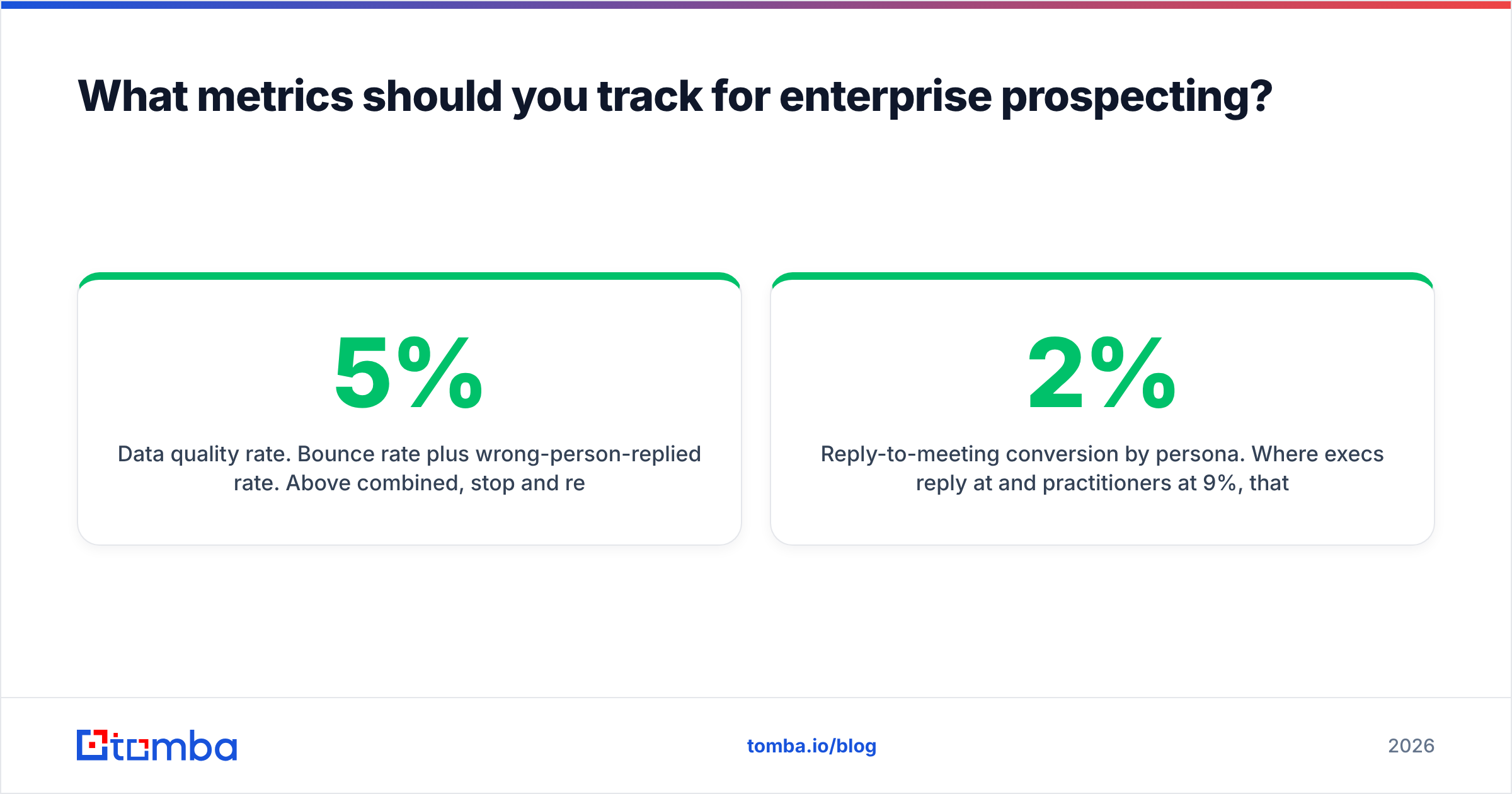
- Data quality rate. Bounce rate plus wrong-person-replied rate. Above 5% combined, stop and re-verify. Your sender reputation is being spent on bad records.
- Reply-to-meeting conversion by persona. Where execs reply at 2% and practitioners at 9%, that's not a copy problem — that's a signal about who should be your entry point.
The metric to deliberately de-emphasize: emails sent. It correlates with nothing in enterprise, and making it a target guarantees your reps optimize for the one number that can't produce revenue. Track response rate by segment instead, and put activity volume on a dashboard nobody is compensated against.
Salesforce's own research on sales productivity has repeatedly found reps spend under a third of their time actually selling, with data entry and prospect research eating much of the rest. In enterprise that ratio gets worse, because the research burden per account is genuinely higher. Automating contact discovery and enrichment is the highest-leverage fix available — it doesn't make reps better at selling, it just gives them back the hours to do it.
Where should you start if you're building this from scratch?#
Pick 25 accounts. Map four stakeholders each. Verify all 100 contacts. Run a six-week multithreaded sequence. Measure meetings per account.
That's a complete pilot, it's executable by one rep, and it will tell you more about your enterprise motion than another quarter of high-volume sending. If 25 accounts with full coverage produce nothing, the problem is your ICP or your offer — not your activity level. That's a far more useful thing to learn than "we need more leads."
Once the motion works, scale the account count, not the touch count.
Getting the contact layer right is the cheapest part of this to fix. Tomba's Email Finder resolves names to verified work emails across enterprise domains, with domain search for org-wide discovery, catch-all verification for the strict-filtering environments enterprise buyers live in, and an API that plugs enrichment straight into your CRM. Start on the free tier at 25 searches a month to test hit rate against your own target accounts, then move to Starter at $49/mo when the pilot proves out — no annual commit required to find out whether the data works for your list.
Related guides#
Ready to find emails that actually work?
Join 150,000+ professionals who stopped guessing and started sending. Free credits on signup — no credit card required.
Get the Tomba newsletter
Practical outbound tactics and product updates — once every two weeks.
About the author