Enzo Dialer Pricing, Reviews, Pros and Cons (2026 Guide)
A neutral breakdown of Enzo Dialer pricing, real user reviews, and the pros and cons that matter before you sign — plus what a dialer actually costs once data and compliance are added in.
TL;DR
- Enzo Dialer is a cloud power/predictive dialing platform aimed at outbound call centers and SDR teams; pricing is quote-based per seat, and public figures land in the typical $80–$150 per user per month band once minutes and add-ons are counted.
- The sticker price is rarely the real price. Telephony minutes, DID/number rental, local presence, compliance scrubbing, and CRM connectors are where dialer budgets actually leak.
- Reviews cluster around two themes: dial throughput and support responsiveness are the strengths; reporting depth and integration coverage are the recurring complaints.
- A dialer only multiplies the quality of your list. Bad numbers means bad connect rates no matter how fast you dial — validate numbers before they hit the queue.
- If you are evaluating Enzo, price it against your cost per connected conversation, not per seat. That single metric kills most bad dialer decisions in ten minutes.
What is Enzo Dialer?#
Enzo Dialer is an outbound calling platform built for teams that make high call volumes — collections, insurance, solar, staffing, and B2B SDR floors. Like most modern dialers, it runs in the browser, routes calls over VoIP, and layers automation on top: list loading, dial modes (preview, power, predictive), call dispositions, recordings, and agent scripting.
Think of a dialer like a conveyor belt in a factory. It does not make the product better — it just moves parts to your workers faster. If the parts (your phone numbers) are defective, a faster belt only means you discover the defects sooner and at greater expense.
That framing matters for pricing. Every dialer vendor sells you throughput. What determines ROI is throughput multiplied by list quality multiplied by rep skill. Enzo sits in the first slot only.
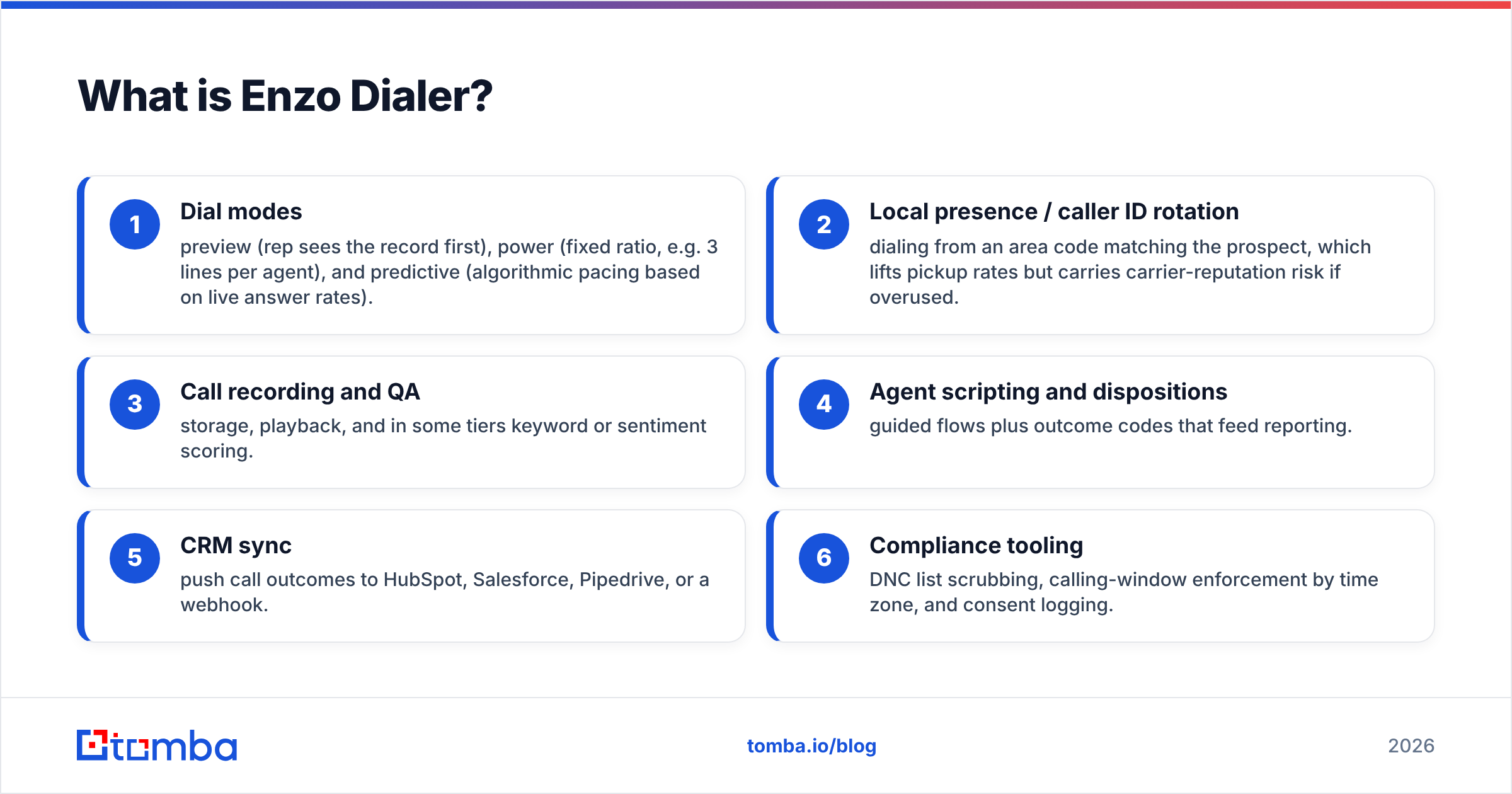
Its core feature set typically includes:
- Dial modes — preview (rep sees the record first), power (fixed ratio, e.g. 3 lines per agent), and predictive (algorithmic pacing based on live answer rates).
- Local presence / caller ID rotation — dialing from an area code matching the prospect, which lifts pickup rates but carries carrier-reputation risk if overused.
- Call recording and QA — storage, playback, and in some tiers keyword or sentiment scoring.
- Agent scripting and dispositions — guided flows plus outcome codes that feed reporting.
- CRM sync — push call outcomes to HubSpot, Salesforce, Pipedrive, or a webhook.
- Compliance tooling — DNC list scrubbing, calling-window enforcement by time zone, and consent logging.
How much does Enzo Dialer pricing actually cost?#
Enzo, like most dialer vendors, does not publish a self-serve price card — you request a quote and get a per-seat number shaped by volume, contract length, and which modules you turn on. That opacity is normal in the call-center category, but it makes budgeting harder than it looks.
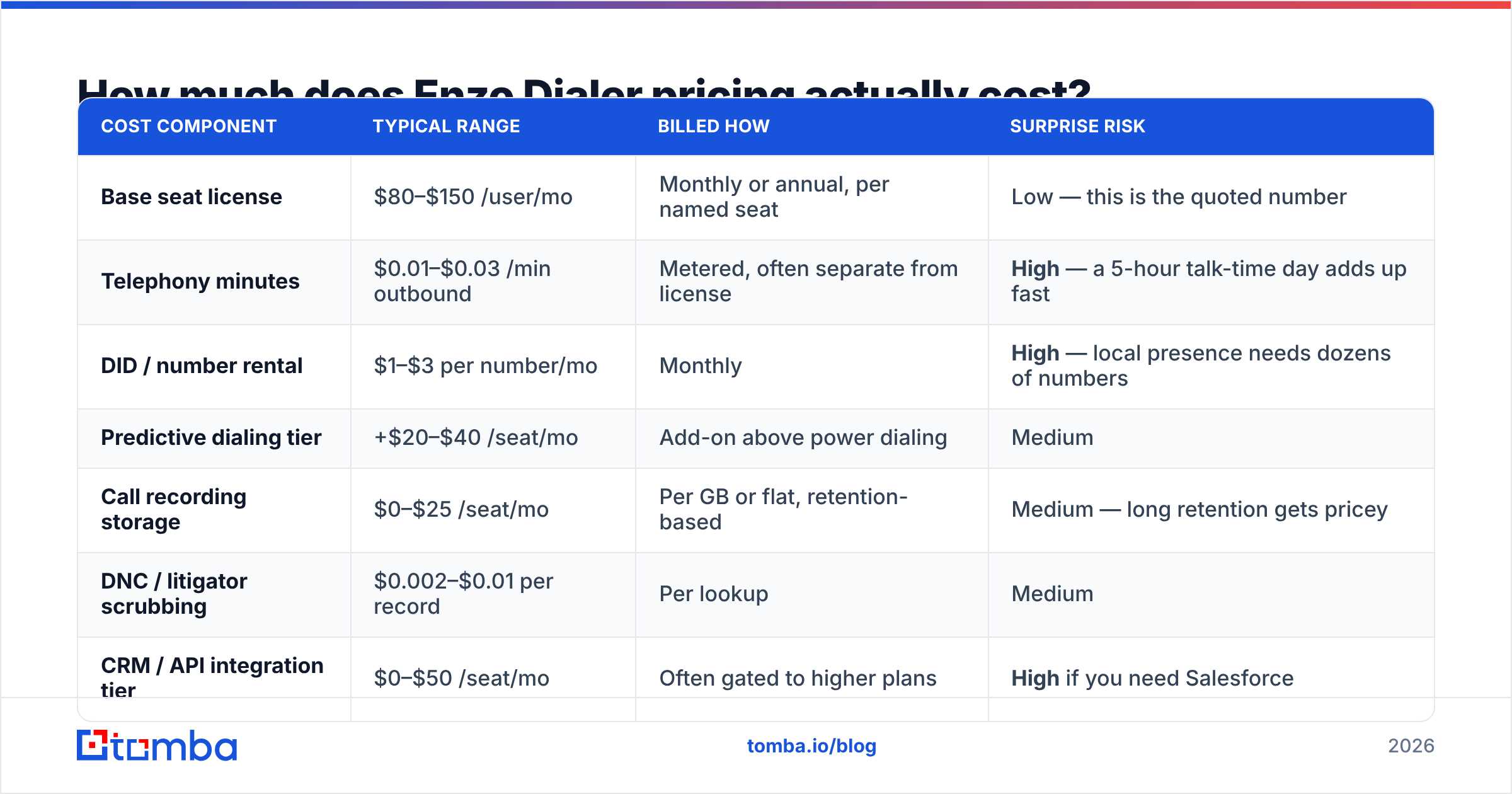
Here is how dialer pricing generally decomposes, and where the surprises live:
| Cost component | Typical range | Billed how | Surprise risk |
|---|---|---|---|
| Base seat license | $80–$150 /user/mo | Monthly or annual, per named seat | Low — this is the quoted number |
| Telephony minutes | $0.01–$0.03 /min outbound | Metered, often separate from license | High — a 5-hour talk-time day adds up fast |
| DID / number rental | $1–$3 per number/mo | Monthly | High — local presence needs dozens of numbers |
| Predictive dialing tier | +$20–$40 /seat/mo | Add-on above power dialing | Medium |
| Call recording storage | $0–$25 /seat/mo | Per GB or flat, retention-based | Medium — long retention gets pricey |
| DNC / litigator scrubbing | $0.002–$0.01 per record | Per lookup | Medium |
| CRM / API integration tier | $0–$50 /seat/mo | Often gated to higher plans | High if you need Salesforce |
| Onboarding / implementation | $500–$2,500 one-time | One-time | Medium |
| Minimum seats | 3–10 seats common | Contractual floor | High for small teams |
Run your own numbers before the sales call. A 10-rep floor at a $99 seat license is $990/month on paper. Add 40 local-presence DIDs ($80), predictive mode ($300), minutes at 3.5 talk-hours per rep per day ($0.02 × 210 min × 10 reps × 21 days ≈ $880), and recording storage ($150), and you are at roughly $2,400/month — about 2.4× the headline figure.
That multiplier is the single most useful thing to know about dialer pricing. Whatever the quoted seat price, assume the fully loaded cost is 1.8×–2.5× it unless the vendor puts minute bundling in writing.
What do Enzo Dialer reviews actually say?#
Public review volume for Enzo Dialer is thinner than for category giants, so treat aggregate star ratings with caution — a handful of reviews can swing a score by a full point. Check current listings on G2 and Capterra yourself rather than trusting any number quoted in a blog post, including this one.
Across smaller-vendor dialer reviews in this segment, the patterns are remarkably consistent:
What reviewers praise
- Speed to value. Small dialer vendors typically onboard you in days, not the six-week enterprise implementation cycle. Reviewers repeatedly cite hands-on setup help.
- Direct support access. You often get a named person rather than a ticket queue. This is the most common single reason teams choose a smaller vendor over a large one.
- Price flexibility. Quote-based pricing cuts both ways — it also means real room to negotiate on annual commitments and seat counts.
- Dial throughput. Predictive pacing works as advertised for teams with sufficient list volume to feed it.
What reviewers criticize
- Reporting depth. The most frequent complaint category. Teams that want cohort analysis, rep-level trend lines, or custom attribution usually end up exporting to a BI tool.
- Integration coverage. Native connectors are fewer than with market leaders; a webhook or Zapier bridge often fills the gap.
- Occasional call quality variance. VoIP quality depends on carrier routes and your own network. Reviewers who mention dropped audio almost always resolve it, but it costs early days.
- Contract terms. Annual commitments with seat minimums are common. Read the downgrade clause before you scale up seasonally.
Treat any dialer review older than 18 months as historical. Telephony compliance rules and carrier spam-labeling algorithms have changed materially, and a 2023 review of call connect rates tells you almost nothing about 2026 performance.
Is Enzo Dialer better than the alternatives?#
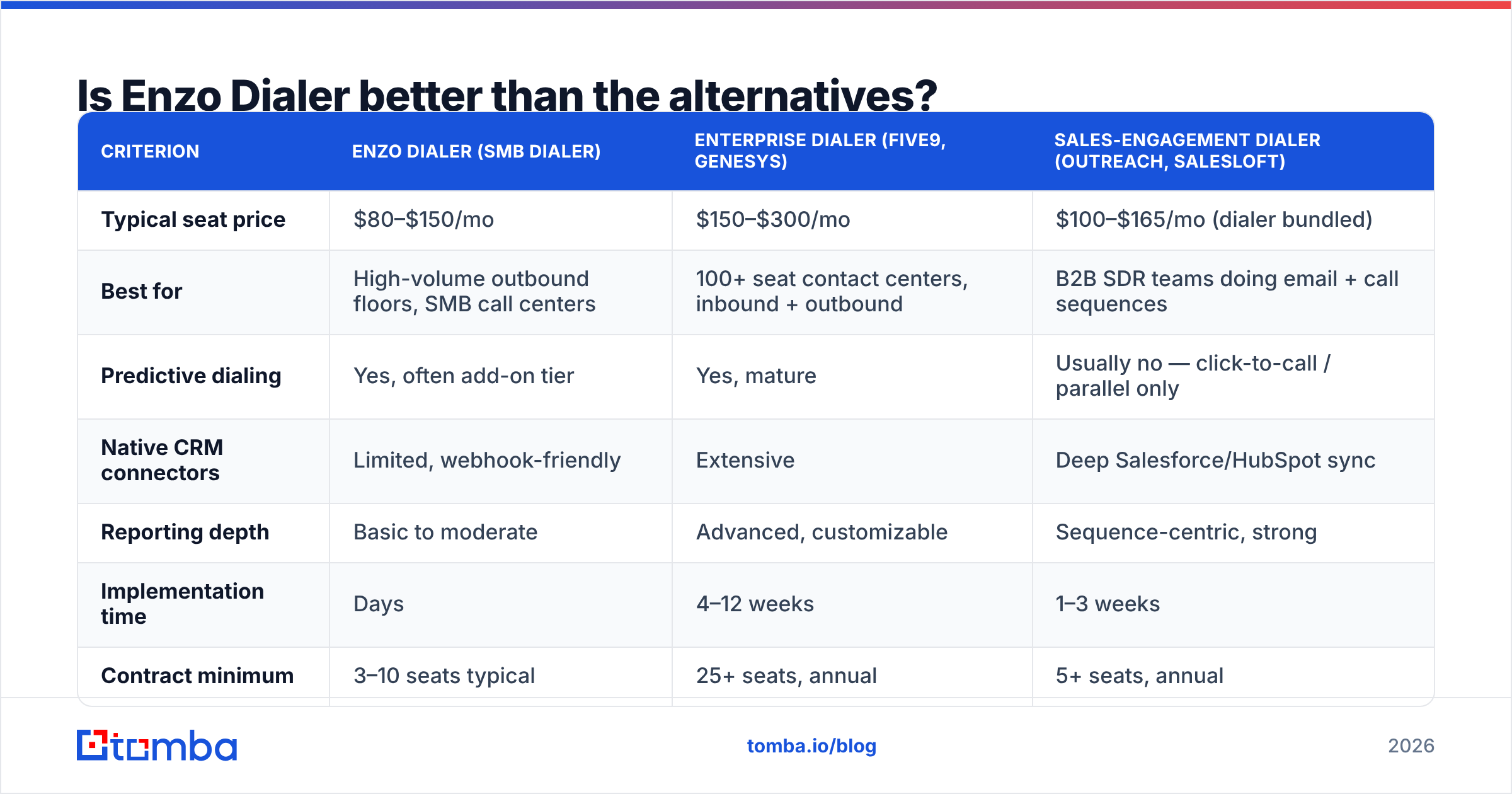
Depends entirely on your call volume and integration requirements. Here is how the category segments:
| Criterion | Enzo Dialer (SMB dialer) | Enterprise dialer (Five9, Genesys) | Sales-engagement dialer (Outreach, Salesloft) |
|---|---|---|---|
| Typical seat price | $80–$150/mo | $150–$300/mo | $100–$165/mo (dialer bundled) |
| Best for | High-volume outbound floors, SMB call centers | 100+ seat contact centers, inbound + outbound | B2B SDR teams doing email + call sequences |
| Predictive dialing | Yes, often add-on tier | Yes, mature | Usually no — click-to-call / parallel only |
| Native CRM connectors | Limited, webhook-friendly | Extensive | Deep Salesforce/HubSpot sync |
| Reporting depth | Basic to moderate | Advanced, customizable | Sequence-centric, strong |
| Implementation time | Days | 4–12 weeks | 1–3 weeks |
| Contract minimum | 3–10 seats typical | 25+ seats, annual | 5+ seats, annual |
| Compliance tooling | DNC + calling windows | Full suite, audited | Basic |
The honest read: if you are running a B2B SDR motion where calls sit inside a multi-touch sequence with email and LinkedIn, a pure dialer is the wrong shape of tool — you want sales engagement with calling built in. If you are running a dedicated outbound calling floor where reps do nothing but dial for six hours, a purpose-built dialer like Enzo will out-perform a sequencer on raw connects per hour and cost less per seat.
Also weigh the compliance surface. If your dialing touches consumers in the US, TCPA exposure dwarfs any software line item. The FCC's robocall and consent rules are the authority, not your vendor's marketing page. A dialer with weak consent logging is not cheap — it is a deferred liability.
What are the real pros and cons of Enzo Dialer?#
Pros
- Lower entry cost than enterprise contact-center platforms. For teams under 25 seats, the delta is meaningful — often 40–50% cheaper per seat.
- Fast onboarding. You can be dialing within a week rather than a quarter.
- Negotiable, quote-based pricing. Annual commitments and multi-seat deals have real room.
- Focused feature set. No paying for inbound IVR, workforce management, or omnichannel modules you will never open.
- Responsive support. Small-vendor advantage, consistently cited.
Cons
- No published pricing. You cannot self-serve or budget without a sales conversation, which slows evaluation.
- Reporting requires export for anything advanced. Budget for a BI seat or accept surface-level dashboards.
- Integration gaps. Verify your exact CRM and data stack in the demo — not the logo wall.
- Minute costs are separate. The most common source of bill shock.
- Thin public review base. Harder to validate claims independently; ask for three references in your industry.
What actually determines your cost per conversation?#
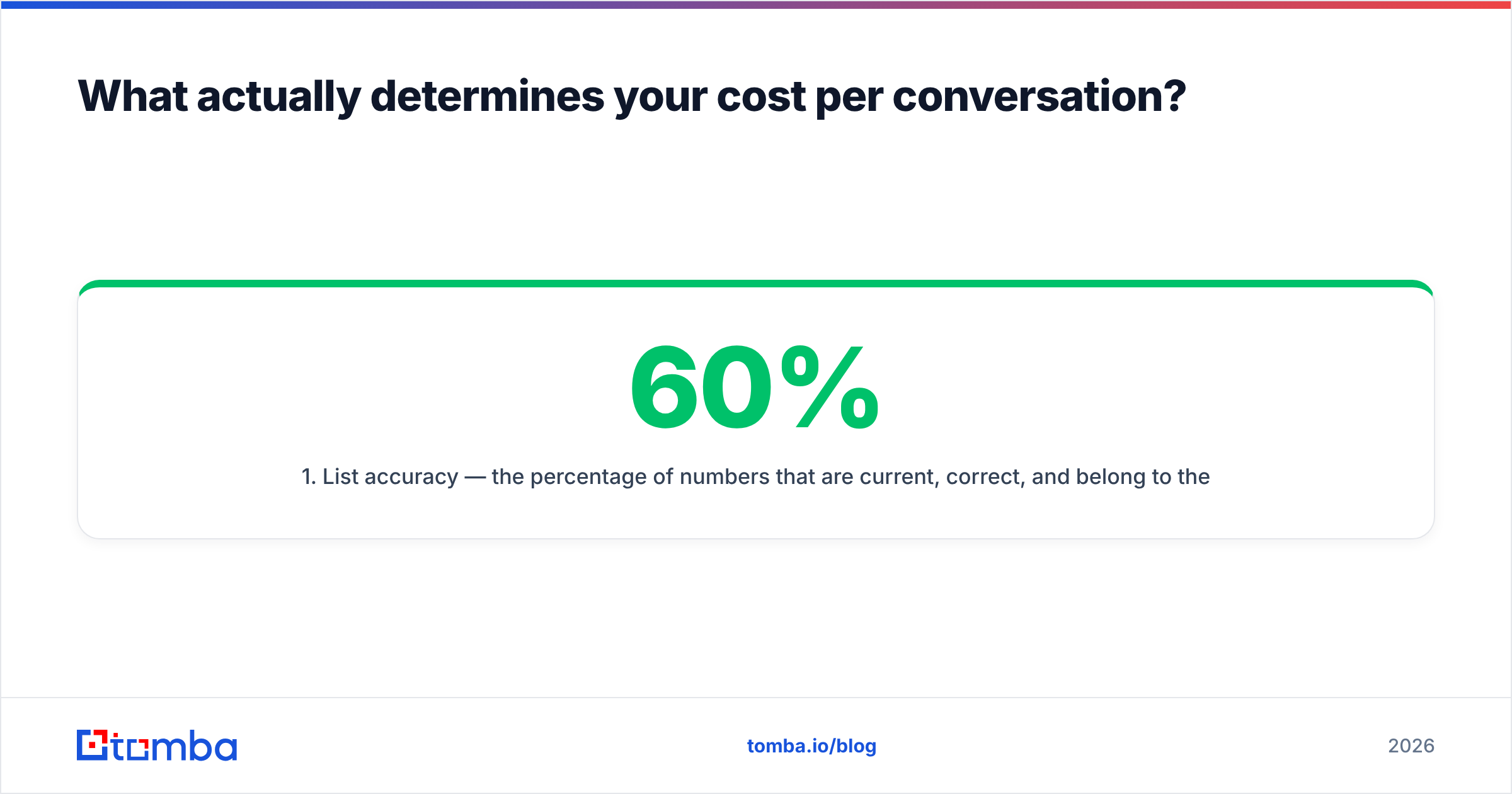
The dialer is one of four variables, and it is not the biggest one. Cost per connected conversation looks roughly like this:
- List accuracy — the percentage of numbers that are current, correct, and belong to the person on the record. This is the dominant variable. A list at 60% accuracy versus 90% accuracy changes your effective cost per conversation by 50%, and no dialer setting compensates for it.
- Dial-to-connect rate — driven by caller ID reputation, time-of-day targeting, and local presence. Carriers now label aggressively; burning a number pool is a real cost.
- Rep talk time per hour — the metric predictive dialing exists to raise. Realistically, moving from manual to predictive takes a rep from ~12 to ~35 dials per hour.
- Seat and telephony cost — the part vendors compete on, and the smallest lever of the four.
This is why "which dialer" is usually the wrong opening question. The right one is "where do my numbers come from, and how fresh are they?" If you are pulling mobile and direct-dial numbers from a stale export, upgrading your dialer is like buying a faster car for a road that ends in a wall.
Two practical moves before you sign any dialer contract:
- Validate the list. Run your numbers through a phone validator to strip disconnected, invalid, and mistyped records. Every dead number you remove is dialer minutes you do not pay for.
- Enrich before you dial. If you only have company records, use data enrichment and a phone finder to attach direct-dial numbers to real contacts, so reps stop navigating switchboards.
A cleaner list also protects your email channel, because most outbound teams run calls and email against the same account list. Keeping both clean with an email verifier means the calling and emailing motions reinforce each other rather than burning the same accounts twice.
How should you run an Enzo Dialer evaluation?#
Give yourself a two-week window and a scorecard. Vague demos produce vague decisions.
- Define your volume assumptions in writing. Seats, dials per rep per day, average talk minutes, expected annual growth. Send these to the vendor before the demo so the quote reflects reality.
- Ask for the fully loaded monthly number. Seat license plus minutes plus DIDs plus storage plus integrations, at your stated volume. If they will not put it in an email, that is data.
- Test with your real list, not their sample. Load 500 of your own records and measure connect rate over two days. This exposes both dialer pacing and your list quality.
- Verify one integration end-to-end. Pick the CRM field that matters most and confirm the disposition actually lands there without manual mapping.
- Get three references at your seat count and in your vertical. A 200-seat collections reference tells a 12-seat B2B team nothing.
- Read the exit clause. Seat downgrade rules, data export format, recording retention after cancellation, and notice period.
Run the same scorecard against two alternatives. Even if you were always going to pick Enzo, a competing quote is the cheapest negotiating leverage available.
The bottom line on Enzo Dialer pricing#
Enzo Dialer is a reasonable fit for SMB and mid-market outbound floors that want predictive dialing without an enterprise contract — provided you price it fully loaded and confirm your integrations in the demo rather than after the signature. Expect real cost to land near 2× the quoted seat price, negotiate hard on annual terms, and treat the thin public review base as a reason to demand references rather than a red flag on its own.
But the decision that moves your numbers most is upstream of the dialer entirely. Reps connect with people, not with software — and they only reach people whose contact details are current.
Before you spend another month of minutes dialing numbers that no longer ring, fix the input. Use Tomba's Email Finder to build verified contact records for the accounts your reps are calling, then layer verified direct-dial numbers on top so every dial has a real person behind it. The free tier gives you 25 searches a month to test the data quality against your own list, and paid plans start at $49/mo — see full Tomba pricing for team volumes. Clean data first, faster dialing second. That order is the whole game.
Related guides#
Ready to find emails that actually work?
Join 150,000+ professionals who stopped guessing and started sending. Free credits on signup — no credit card required.
Get the Tomba newsletter
Practical outbound tactics and product updates — once every two weeks.
About the author