Event Follow Up Email: Templates, Timing, and Reply Rates
Badge scans do not equal pipeline. Here is the timing window, message structure, and template set that turn event conversations into booked meetings — plus how to reach the people you never met.
TL;DR
- The single biggest predictor of an event follow up email working is speed: send within 24–48 hours while the conversation is still a memory, not a note.
- Reference something only the two of you would know. "Great meeting you at the booth" is indistinguishable from spam sent to 400 badge scans.
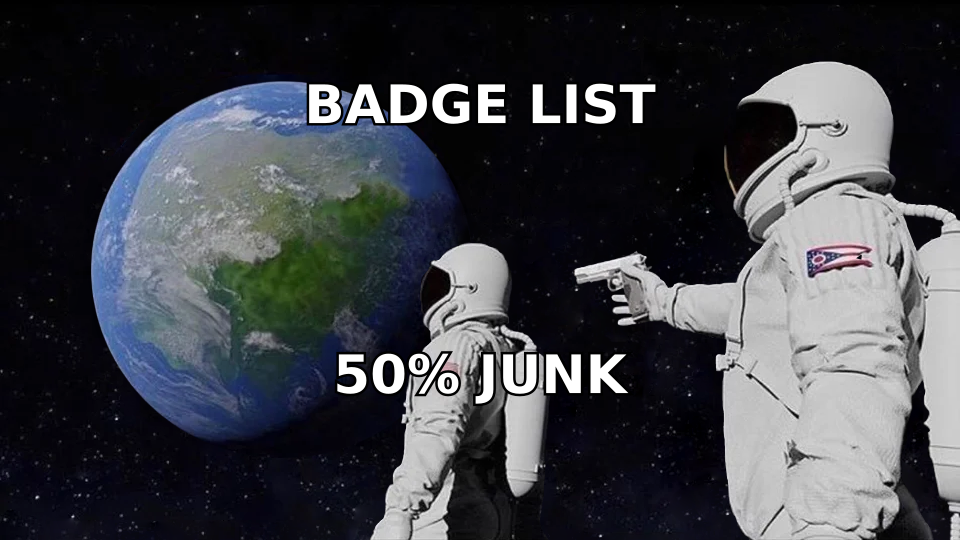
- Badge-scan and attendee lists are dirty. Expect 20–40% of the addresses to be typos, personal Gmails, or role accounts — verify before you send or you torch your domain.
- You will always have more people you wanted to meet than people you actually met. Those need a different email, not the same one.
- Measure meetings booked per 100 sends, not open rate. Post-event opens are inflated and tell you nothing.
Why do most event follow up emails get ignored?#
Because they are written from the sender's memory and read from the recipient's amnesia.
You attended one conference. They attended one conference and spoke to sixty people, collected a tote bag full of literature, and flew home. By the time your email lands, your face has merged with every other vendor at the expo hall. If your first line is "It was great connecting at SaaStr!", you have given them zero help reconstructing who you are.
The second failure is timing. There is a hard decay curve on event recall. Send on day one or two and you are still a person. Send on day ten and you are a cold email with a conference name in it — which is worse than a plain cold email, because now you have also signalled that you were slow.
The third failure is list quality. Event organizers hand you a CSV. Badge scanners produce a CSV. Neither is a clean list. People type their email into a lead-capture tablet with a stylus while balancing a coffee. Scanners OCR business cards. Sponsorship lists get sold, resold, and are frequently 18 months stale. If you blast that raw file, you will hit spam traps and dead mailboxes, and your bounce rate will do damage that outlasts the event by months.
When should you send an event follow up email?#
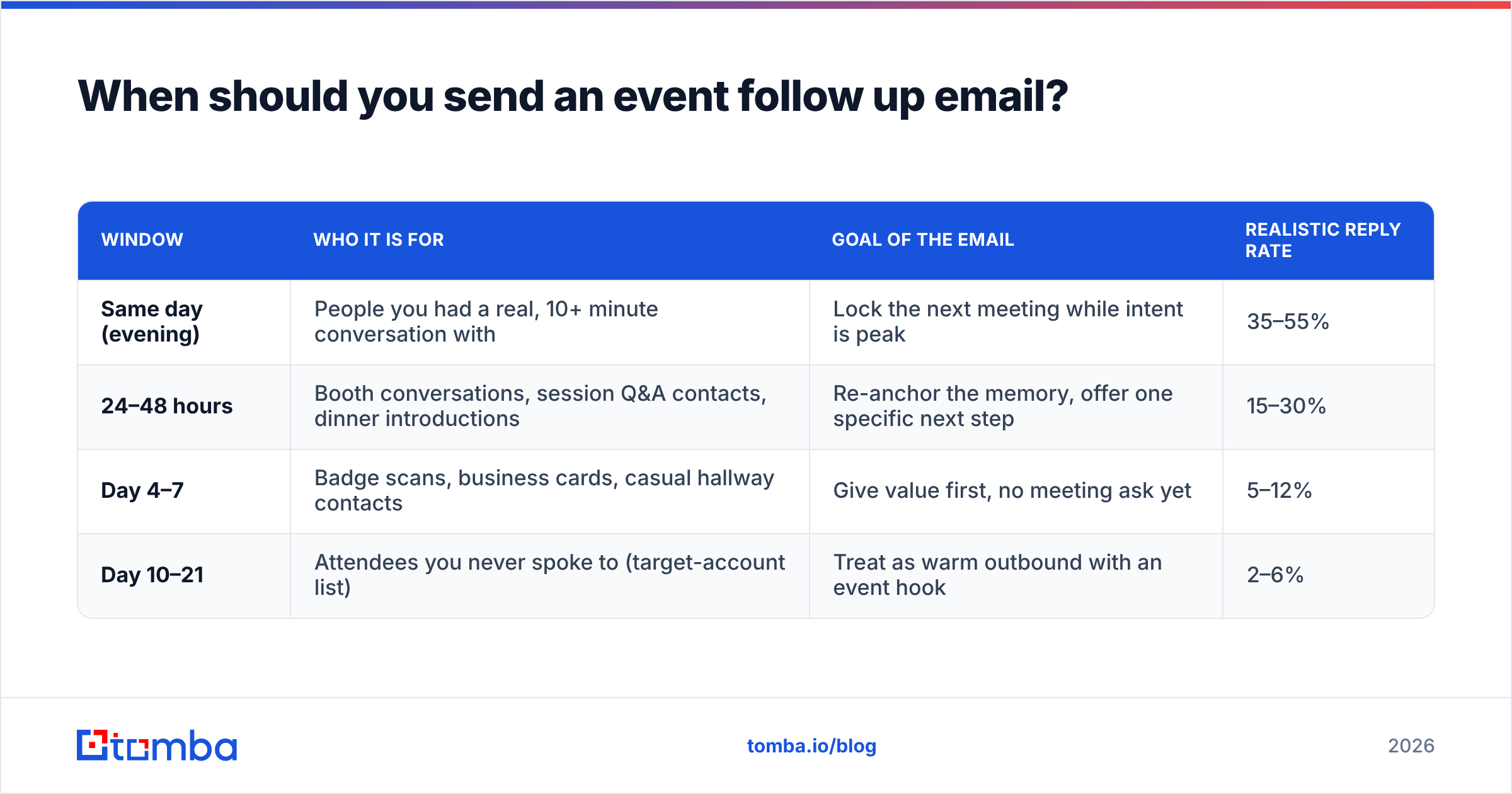
There is no single correct send time — there are four different windows, and each one serves a different relationship. Treating them all as "follow up within a week" is why sequences underperform.
| Window | Who it is for | Goal of the email | Realistic reply rate |
|---|---|---|---|
| Same day (evening) | People you had a real, 10+ minute conversation with | Lock the next meeting while intent is peak | 35–55% |
| 24–48 hours | Booth conversations, session Q&A contacts, dinner introductions | Re-anchor the memory, offer one specific next step | 15–30% |
| Day 4–7 | Badge scans, business cards, casual hallway contacts | Give value first, no meeting ask yet | 5–12% |
| Day 10–21 | Attendees you never spoke to (target-account list) | Treat as warm outbound with an event hook | 2–6% |
The pattern: the weaker the interaction, the longer you wait and the softer you ask. Sending a "does Tuesday at 2pm work?" to somebody who scanned your badge for the raffle entry is how you get marked as spam.
One caveat on the same-day email. If you had a genuinely strong conversation, send it from your phone before you leave the venue. Three sentences. No formatting, no signature block, no attachments. It reads like a human because it is one.
What should go in an event follow up email?#
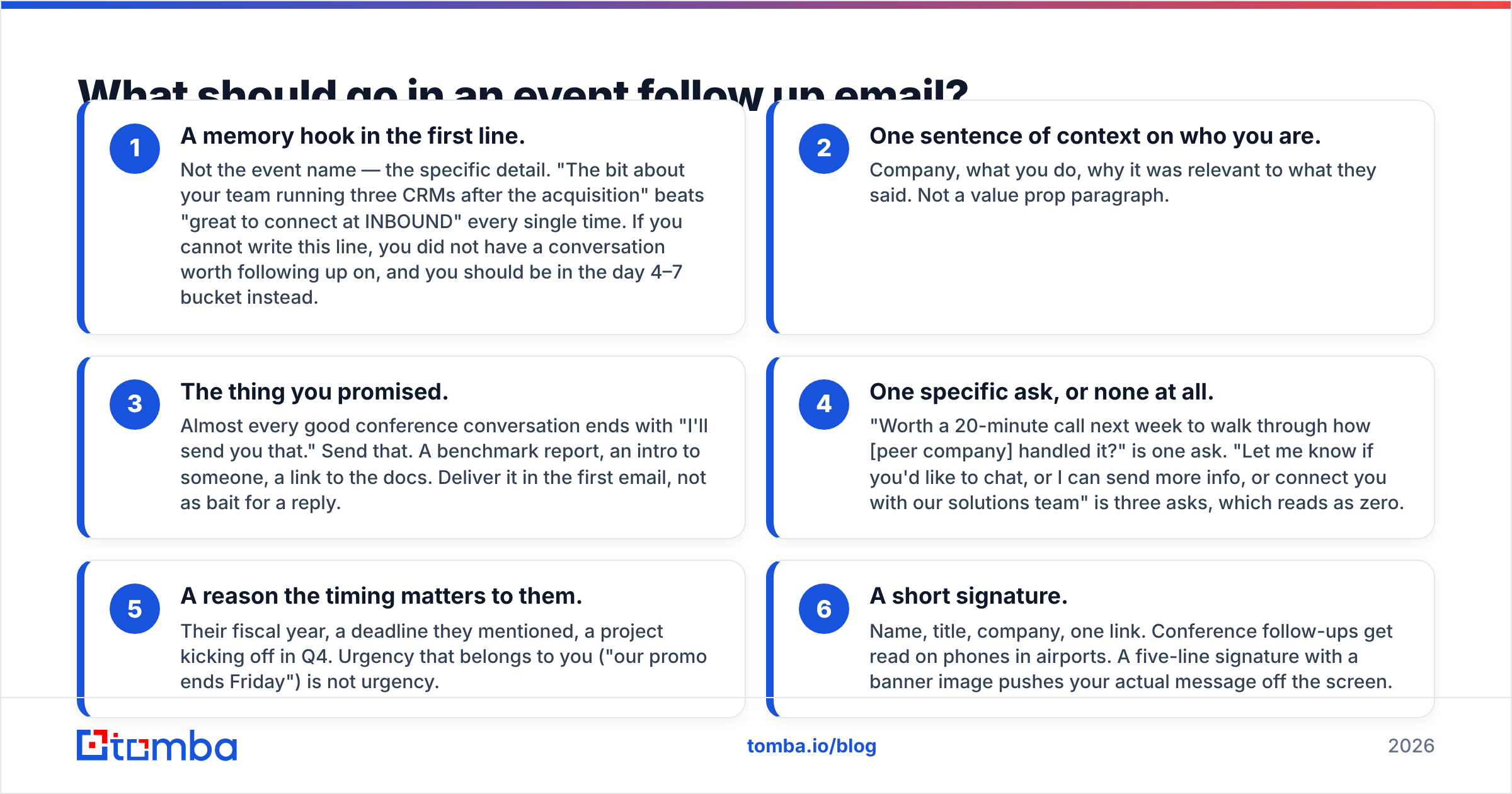
Six components, in this order. Cut anything that does not fit one of them.
- A memory hook in the first line. Not the event name — the specific detail. "The bit about your team running three CRMs after the acquisition" beats "great to connect at INBOUND" every single time. If you cannot write this line, you did not have a conversation worth following up on, and you should be in the day 4–7 bucket instead.
- One sentence of context on who you are. Company, what you do, why it was relevant to what they said. Not a value prop paragraph.
- The thing you promised. Almost every good conference conversation ends with "I'll send you that." Send that. A benchmark report, an intro to someone, a link to the docs. Deliver it in the first email, not as bait for a reply.
- One specific ask, or none at all. "Worth a 20-minute call next week to walk through how [peer company] handled it?" is one ask. "Let me know if you'd like to chat, or I can send more info, or connect you with our solutions team" is three asks, which reads as zero.
- A reason the timing matters to them. Their fiscal year, a deadline they mentioned, a project kicking off in Q4. Urgency that belongs to you ("our promo ends Friday") is not urgency.
- A short signature. Name, title, company, one link. Conference follow-ups get read on phones in airports. A five-line signature with a banner image pushes your actual message off the screen.
Length target: 90–130 words for a strong-interaction email, under 90 for the same-day note. Anything over 200 words is a document, not an email.
What do good event follow up email templates look like?#
Template 1 — Same-day, strong conversation
Subject: that CRM consolidation thing
Hi Maya — really enjoyed the conversation by the coffee stand. You mentioned you're pulling three CRMs into one Salesforce instance before January.
Sending the migration checklist I mentioned — it's the one our team used on a similar merge last year: [link]
Worth 20 minutes next week to compare notes on the data-hygiene side? I'm open Tuesday or Thursday morning.
— Sam
Template 2 — 48 hours, booth conversation
Subject: follow-up from booth 412 (the dashboard demo)
Hi Dan, you stopped by our booth on Wednesday and asked whether we could dedupe records across two regions — the answer is yes, and I recorded a 90-second clip showing exactly how: [link]
No pitch attached. If it's useful and you want to see it against your own data, I can set that up. If not, no hard feelings and enjoy the rest of Q3.
— Priya
Template 3 — Day 5, badge scan with no real conversation
Subject: the session you probably missed
Hi Alex — we crossed paths at RevOps Summit last week. The room was chaos, so I'll assume we didn't get to talk properly.
The best session of the event was Thursday's talk on pipeline forecasting, and most people missed it because it clashed with the keynote. Slides and my notes here: [link]
That's it — nothing to book. If forecasting accuracy is a live problem for your team this quarter, reply and I'll send the model we use.
— Jordan
Template 4 — Day 14, attendee you never met
Subject: were you at the Berlin event?
Hi Nina, I saw [Company] on the attendee list for B2B Rocks and I'm guessing your team was there for the same reason mine was — everyone is rebuilding their outbound motion at once.
We published the raw data from 240 post-event surveys we ran on stand: [link]. The finding that surprised me was that 61% of teams had no follow-up SLA at all.
If that's a topic on your roadmap, happy to share what we learned. If not, ignore me entirely.
— Chris
If you want more starting points, the cold email templates library is a reasonable place to steal structures from — but rewrite the memory hook yourself every time. That line cannot be templated.
How do you follow up with people you never actually met?#
This is where most of the pipeline actually lives. A 3,000-person conference means you spoke to maybe 40 people. The other 2,960 include most of your ideal customers.
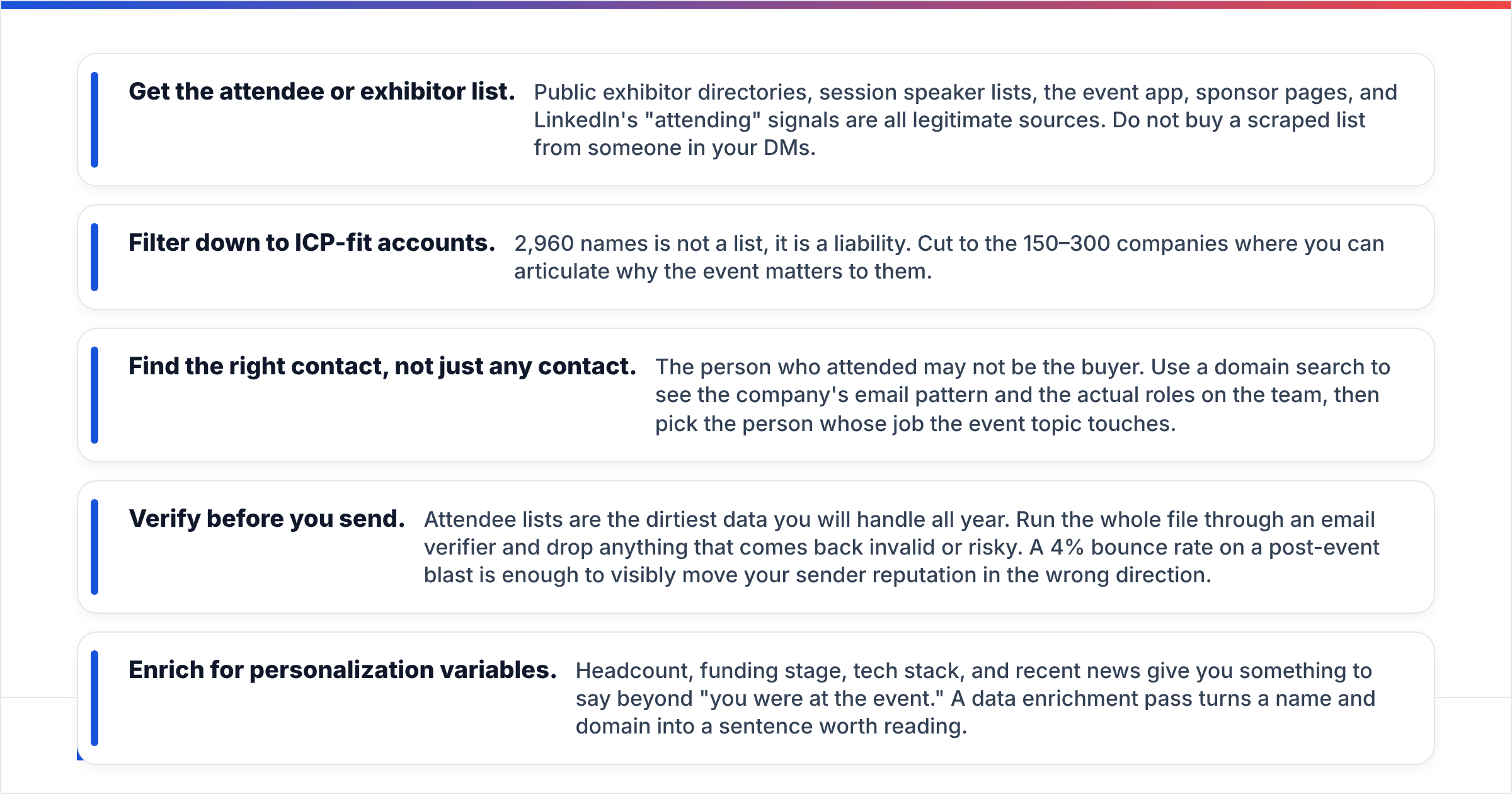
The play is straightforward but requires data work:
- Get the attendee or exhibitor list. Public exhibitor directories, session speaker lists, the event app, sponsor pages, and LinkedIn's "attending" signals are all legitimate sources. Do not buy a scraped list from someone in your DMs.
- Filter down to ICP-fit accounts. 2,960 names is not a list, it is a liability. Cut to the 150–300 companies where you can articulate why the event matters to them.
- Find the right contact, not just any contact. The person who attended may not be the buyer. Use a domain search to see the company's email pattern and the actual roles on the team, then pick the person whose job the event topic touches.
- Verify before you send. Attendee lists are the dirtiest data you will handle all year. Run the whole file through an email verifier and drop anything that comes back invalid or risky. A 4% bounce rate on a post-event blast is enough to visibly move your sender reputation in the wrong direction.
- Enrich for personalization variables. Headcount, funding stage, tech stack, and recent news give you something to say beyond "you were at the event." A data enrichment pass turns a name and domain into a sentence worth reading.
The email itself changes shape here. You cannot claim a conversation that never happened, so the event becomes a shared context, not a shared memory. "We were both at X and here is a thing from X you'd find useful" is honest. "Great meeting you at X" when you never met is a lie your prospect will catch, and it costs you the account permanently.
What tools do you need to run event follow-up at scale?#
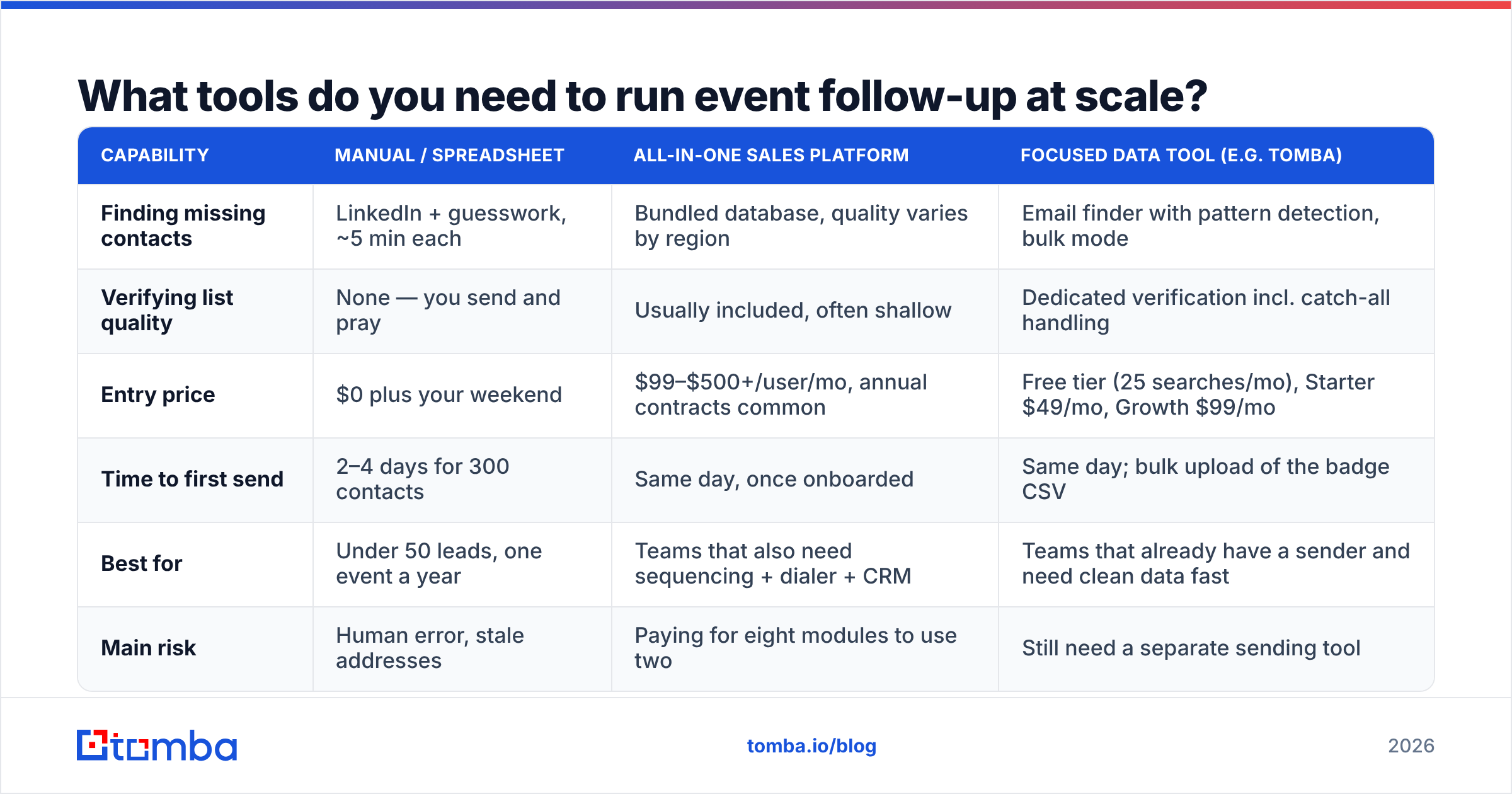
You need four capabilities, and there are very different ways to buy them. This is the comparison that actually matters when your event lead list lands on a Monday:
| Capability | Manual / spreadsheet | All-in-one sales platform | Focused data tool (e.g. Tomba) |
|---|---|---|---|
| Finding missing contacts | LinkedIn + guesswork, ~5 min each | Bundled database, quality varies by region | Email finder with pattern detection, bulk mode |
| Verifying list quality | None — you send and pray | Usually included, often shallow | Dedicated verification incl. catch-all handling |
| Entry price | $0 plus your weekend | $99–$500+/user/mo, annual contracts common | Free tier (25 searches/mo), Starter $49/mo, Growth $99/mo |
| Time to first send | 2–4 days for 300 contacts | Same day, once onboarded | Same day; bulk upload of the badge CSV |
| Best for | Under 50 leads, one event a year | Teams that also need sequencing + dialer + CRM | Teams that already have a sender and need clean data fast |
| Main risk | Human error, stale addresses | Paying for eight modules to use two | Still need a separate sending tool |
Two honest notes. First, if you attend one small event per year and come back with 30 cards, a spreadsheet and an hour of manual lookup is genuinely the right answer — do not buy software for that. Second, if your team already lives inside an all-in-one platform, adding a focused data tool only makes sense when the platform's coverage keeps failing on your specific market. Test both against 100 known-good contacts from your CRM before deciding; vendor-published accuracy numbers are marketing, and independent review sites like G2 will show you where coverage gaps cluster by region.
For pure list-hygiene work at volume, the bulk email finder route — upload CSV, get back verified contacts — is usually faster than any per-contact workflow, and it's what most teams actually use in the 72 hours after an event.
How do you measure whether your event follow-up worked?#
Stop looking at open rate. Post-event opens spike because your subject line contains a conference name, and that spike tells you nothing about whether anyone cares.
Track these instead:
- Meetings booked per 100 verified sends. The only number that survives a QBR. Anything above 4 for a real-conversation segment is healthy; 1–2 is normal for the never-met segment.
- Reply rate by segment, split across the four timing windows above. If your day 4–7 segment outperforms your 48-hour segment, your fast emails are too pushy.
- Bounce rate. Should be under 2% after verification. If it is not, your list source is the problem, not your copy.
- Time from event close to first send. Median, not average. Teams that get this under 48 hours consistently out-convert teams that do not, and it is the easiest variable to fix.
- Cost per meeting, including the event. Sponsorship plus travel plus tooling divided by meetings booked. This is the number that decides whether you sponsor again next year, and most teams never calculate it.
HubSpot's sales research consistently finds that persistence beats polish — most closed deals require multiple touches, and the majority of reps stop after two. Their follow-up guidance is a reasonable baseline for cadence design. Pair it with your own segment data rather than adopting anyone's cadence wholesale.
What are the mistakes that kill event follow-up?#
- Sending the same email to all four segments. The fastest way to make your strong leads feel like a list entry.
- Attaching a 40-slide deck. Nobody opens it, and attachments hurt deliverability from a fresh sending domain.
- Following up from a brand-new domain you set up for the event. Zero reputation plus a 300-address blast is a spam-folder guarantee. If you must use a new domain, warm it for weeks first and check your SPF record before the first send.
- Waiting for the "official" attendee list from the organizer. It often arrives 3–4 weeks late, by which point the window has closed. Build your own list during the event.
- Only following up once. Two to four touches over three weeks, each carrying something new, is the standard that works. A single email that gets buried under 400 post-conference messages is not a follow-up strategy.
- Not writing notes at the event. Ten seconds of voice memo after each conversation is the entire difference between template 1 and template 3.
Where should you start?#
Pick your next event and decide the four segments before you go. Assign a template to each. Set an internal SLA — strong conversations get emailed the same evening, everything else within 48 hours — and put someone's name on it.
Then fix the data layer, because that is the part that quietly kills good copy. Before you send anything, run your badge scans, business cards, and target-account list through the Tomba Email Finder to fill in the missing addresses and confirm the ones you have. The free tier covers 25 searches a month if you just want to test it against a handful of contacts you already know are correct; Tomba pricing starts at $49/mo on Starter when you are ready to process a full event list in one pass. Clean data will not write your memory hook for you — but it makes sure the person you remembered actually receives it.
Related guides#
Ready to find emails that actually work?
Join 150,000+ professionals who stopped guessing and started sending. Free credits on signup — no credit card required.
Get the Tomba newsletter
Practical outbound tactics and product updates — once every two weeks.
About the author