Event Lead Capture in 2026: How to Turn Booth Scans Into Pipeline
Badge scanners collect names, not pipeline. Here's how event lead capture actually works in 2026 — the tools, the data-hygiene step everyone skips, and the 48-hour follow-up that decides your event ROI.
TL;DR
- Event lead capture is the process of collecting, qualifying, and routing contact data from in-person and hybrid events — badge scans, booth conversations, session attendees, and sponsor lists — into your CRM fast enough to act on it.
- The scan is the easy part. The failure point is data quality: organizer-supplied badge data is frequently stale, partially typed, or routed to a generic registration alias that never reaches the human you met.
- A working stack has four layers: capture (scanner or app), qualify (structured notes at the booth), clean (verify and enrich), route (CRM + sequence).
- Verification and enrichment before the first send is what separates a 30% reply rate from a bounce-driven domain reputation problem.
- Speed beats polish. Leads contacted within 48 hours of an event convert at multiples of leads contacted in week three.
What is event lead capture?#
Event lead capture is everything that happens between "someone stops at your booth" and "that person exists as a routable, contactable record in your CRM with enough context to sell to."
Think of it like a restaurant taking reservations during the dinner rush. Writing a name on a napkin technically counts as capture. But if the napkin has no phone number, no party size, and no time, the reservation is worthless by Tuesday. Most event teams are running on napkins.
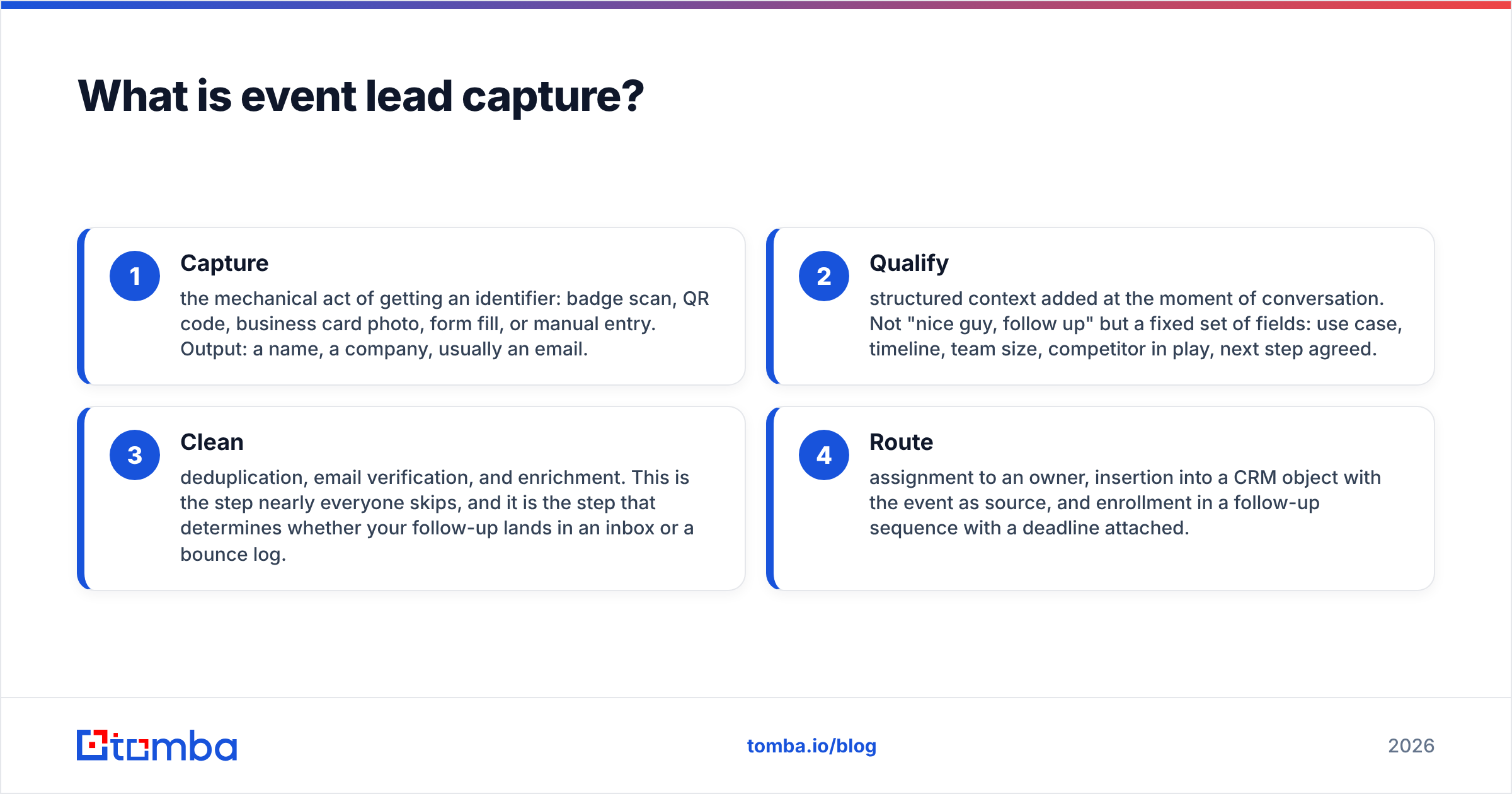
A complete event lead capture motion has four distinct layers, and skipping any one of them is where ROI leaks:
- Capture — the mechanical act of getting an identifier: badge scan, QR code, business card photo, form fill, or manual entry. Output: a name, a company, usually an email.
- Qualify — structured context added at the moment of conversation. Not "nice guy, follow up" but a fixed set of fields: use case, timeline, team size, competitor in play, next step agreed.
- Clean — deduplication, email verification, and enrichment. This is the step nearly everyone skips, and it is the step that determines whether your follow-up lands in an inbox or a bounce log.
- Route — assignment to an owner, insertion into a CRM object with the event as source, and enrollment in a follow-up sequence with a deadline attached.
Events have been a top-three pipeline source for B2B teams for decades — the trade fair format predates the internet by a few centuries — but the measurement gap has never really closed. The reason is almost always layers 3 and 4, not layer 1.
Why do most event leads never turn into pipeline?#
Because the data arrives broken and nobody checks before sending.
Here is the sequence that plays out at roughly every mid-market booth. The scanner captures 340 badges over three days. The organizer exports a CSV a week later. Marketing dumps it into the CRM. Sales sends a "great meeting you at Booth 412" blast. Twelve percent bounce. Another 40% go to a shared address like info@ or a registration alias the attendee used specifically so their real inbox stays clean. Six people reply. The event gets written up as a disappointment and the budget shrinks next year.
The specific failure modes, in order of how much damage they do:
- Registration aliases. Attendees register with
events@company.comor a personal Gmail to keep the spam off their work inbox. The badge is accurate; the routing is useless. - Stale employer data. Badge data is captured at registration, which may be three months before the show. Job changes in B2B tech run high enough that a meaningful slice of your list has moved on by the time you export.
- OCR and typo damage. Business card scans and hand-typed entries introduce transposed characters that look fine to a human and bounce at the SMTP layer.
- No conversation context. A record with no qualification note is functionally identical to a purchased list, and your reps treat it that way.
- Latency. The organizer's export lands 5–10 days post-show. By then the buyer has talked to four competitors who followed up on day one.
None of these are solved by buying a better scanner. They are solved by adding a cleaning layer between capture and send.
What are the main event lead capture methods, compared?#
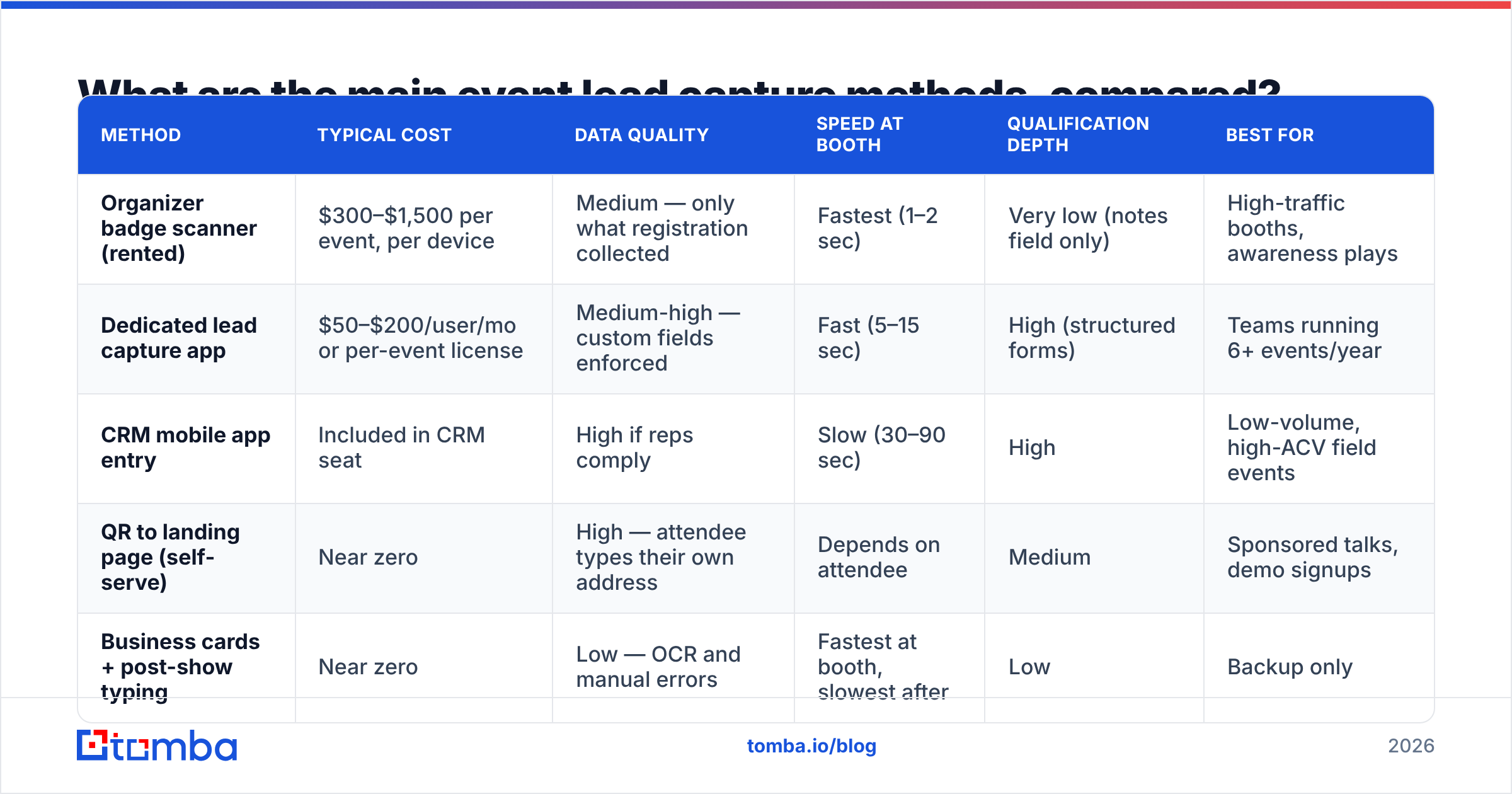
There is no universally correct choice — the right method depends on booth traffic volume, whether your reps carry devices, and how much control you need over the fields collected. Here is the honest comparison:
| Method | Typical cost | Data quality | Speed at booth | Qualification depth | Best for |
|---|---|---|---|---|---|
| Organizer badge scanner (rented) | $300–$1,500 per event, per device | Medium — only what registration collected | Fastest (1–2 sec) | Very low (notes field only) | High-traffic booths, awareness plays |
| Dedicated lead capture app | $50–$200/user/mo or per-event license | Medium-high — custom fields enforced | Fast (5–15 sec) | High (structured forms) | Teams running 6+ events/year |
| CRM mobile app entry | Included in CRM seat | High if reps comply | Slow (30–90 sec) | High | Low-volume, high-ACV field events |
| QR to landing page (self-serve) | Near zero | High — attendee types their own address | Depends on attendee | Medium | Sponsored talks, demo signups |
| Business cards + post-show typing | Near zero | Low — OCR and manual errors | Fastest at booth, slowest after | Low | Backup only |
The pattern worth noticing: methods that are fastest at the booth produce the weakest data, and methods that produce strong data slow your reps down during exactly the 90 seconds when a prospect is standing in front of them. There is no method that wins both columns.
Which is why the answer is not "pick the best capture tool." The answer is to pick the fastest capture tool your reps will actually use, then fix the data quality problem downstream in bulk, where a machine can do it instead of a human.
How do you clean event data before the first follow-up?#
Run every exported record through three gates before a single email leaves your domain.
Gate 1 — Deduplicate. Multi-day events mean the same person gets scanned by three different reps. Merge on email first, then on name plus domain. A deduplication pass that takes four minutes prevents the "you emailed me three times" complaint that kills goodwill instantly.
Gate 2 — Verify. Every address gets checked for syntax, domain validity, MX records, and mailbox existence before it enters a sequence. This is non-negotiable if you care about email deliverability. A post-event list is the single highest-risk send most teams do all year — high volume, stale data, and a cold-ish audience all at once. Running it through an email verifier first turns a 12% bounce list into a 1–2% bounce list. Catch-all domains need their own handling; a catch-all verifier distinguishes between "accepts everything" and "actually deliverable."
Gate 3 — Repair and enrich. For every record that fails verification or resolves to a generic alias, you still have a name and a company. That is enough to find the real work address. An email finder takes first name, last name, and domain and returns the deliverable corporate address with a confidence score. For a 340-record export, a bulk email finder run handles the whole file in one pass rather than one lookup at a time.
Enrichment in the same step adds the fields your routing rules need: job title, seniority, company size, and industry. Half of event follow-up failures are actually routing failures — the VP got the SDR sequence and the intern got the AE.
What does a 48-hour post-event workflow look like?#
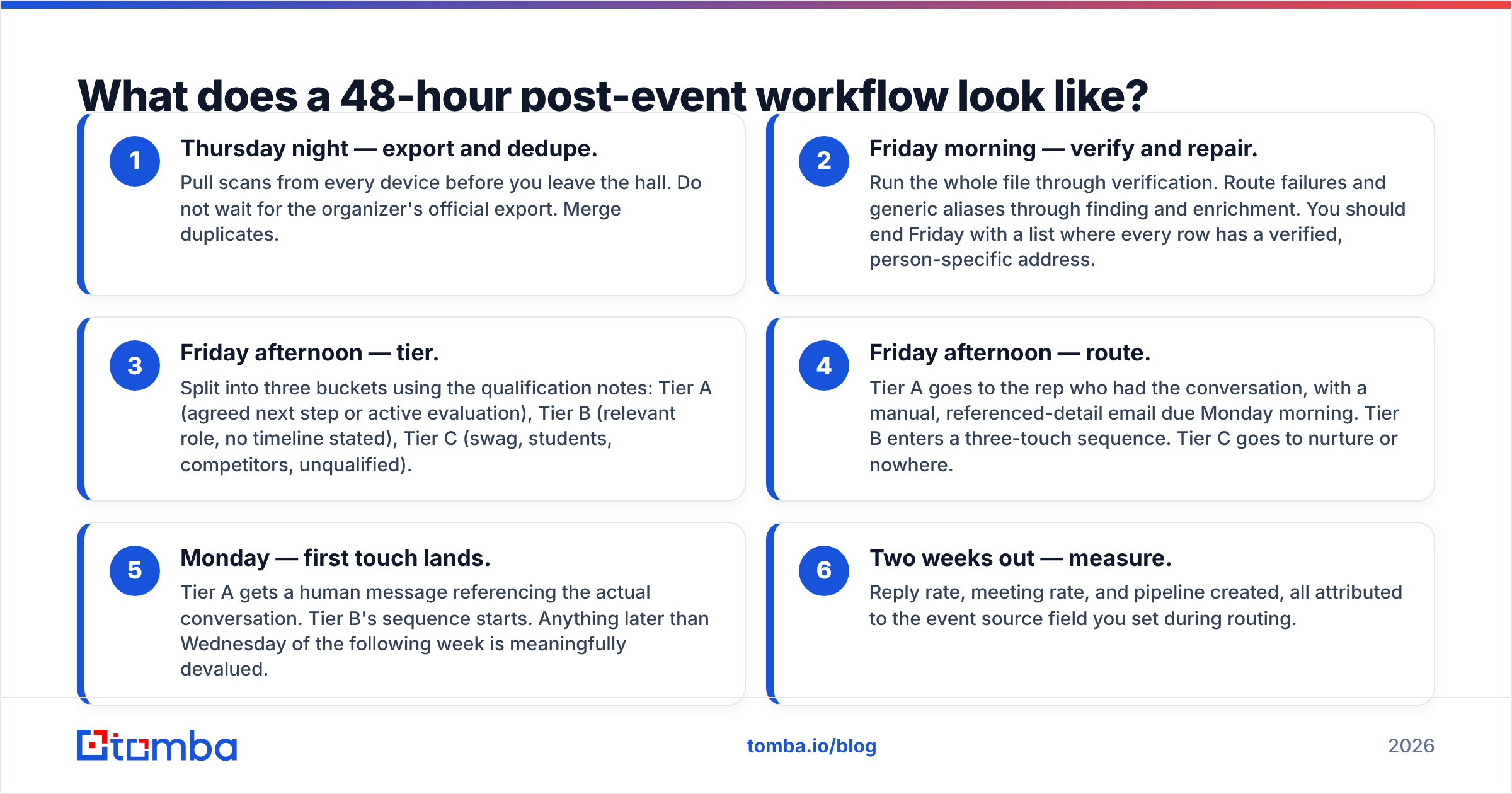
Speed is the variable you control most cheaply. The workflow below assumes the show ends Thursday afternoon.
- Thursday night — export and dedupe. Pull scans from every device before you leave the hall. Do not wait for the organizer's official export. Merge duplicates.
- Friday morning — verify and repair. Run the whole file through verification. Route failures and generic aliases through finding and enrichment. You should end Friday with a list where every row has a verified, person-specific address.
- Friday afternoon — tier. Split into three buckets using the qualification notes: Tier A (agreed next step or active evaluation), Tier B (relevant role, no timeline stated), Tier C (swag, students, competitors, unqualified).
- Friday afternoon — route. Tier A goes to the rep who had the conversation, with a manual, referenced-detail email due Monday morning. Tier B enters a three-touch sequence. Tier C goes to nurture or nowhere.
- Monday — first touch lands. Tier A gets a human message referencing the actual conversation. Tier B's sequence starts. Anything later than Wednesday of the following week is meaningfully devalued.
- Two weeks out — measure. Reply rate, meeting rate, and pipeline created, all attributed to the event source field you set during routing.
The tiering step is where most of the value is created and where most teams do nothing. Sending the same message to a CTO who asked about your API and a student who wanted a t-shirt is a guaranteed way to make the whole channel look weak in reporting.
Which fields should reps capture at the booth?#
Keep it to five or fewer. Every additional field cuts compliance roughly in half, and a half-filled form is worse than a short complete one.
- Use case in the prospect's words — one line, verbatim. This is the single most valuable field for personalizing follow-up.
- Timeline — a three-option picker: now / this quarter / exploring. Never a free-text date.
- Current tool — what they use today, if anything. Drives competitive positioning.
- Next step agreed — demo, intro call, send docs, or nothing. Sets the follow-up template automatically.
- Rep name — so the follow-up comes from the face they remember.
Notice what is not on the list: email, title, company size, and industry. You do not need reps typing those under pressure. Badge scan plus enrichment fills them more accurately than a person can at a noisy booth. Data enrichment exists precisely so your reps can spend their 90 seconds on the conversation rather than on data entry.
How do you measure event lead capture ROI?#
Set the measurement schema before the show, not after. At minimum, every record needs an event source value, a capture timestamp, a tier, and an owner. Without those four fields, any ROI number you produce later is a guess.
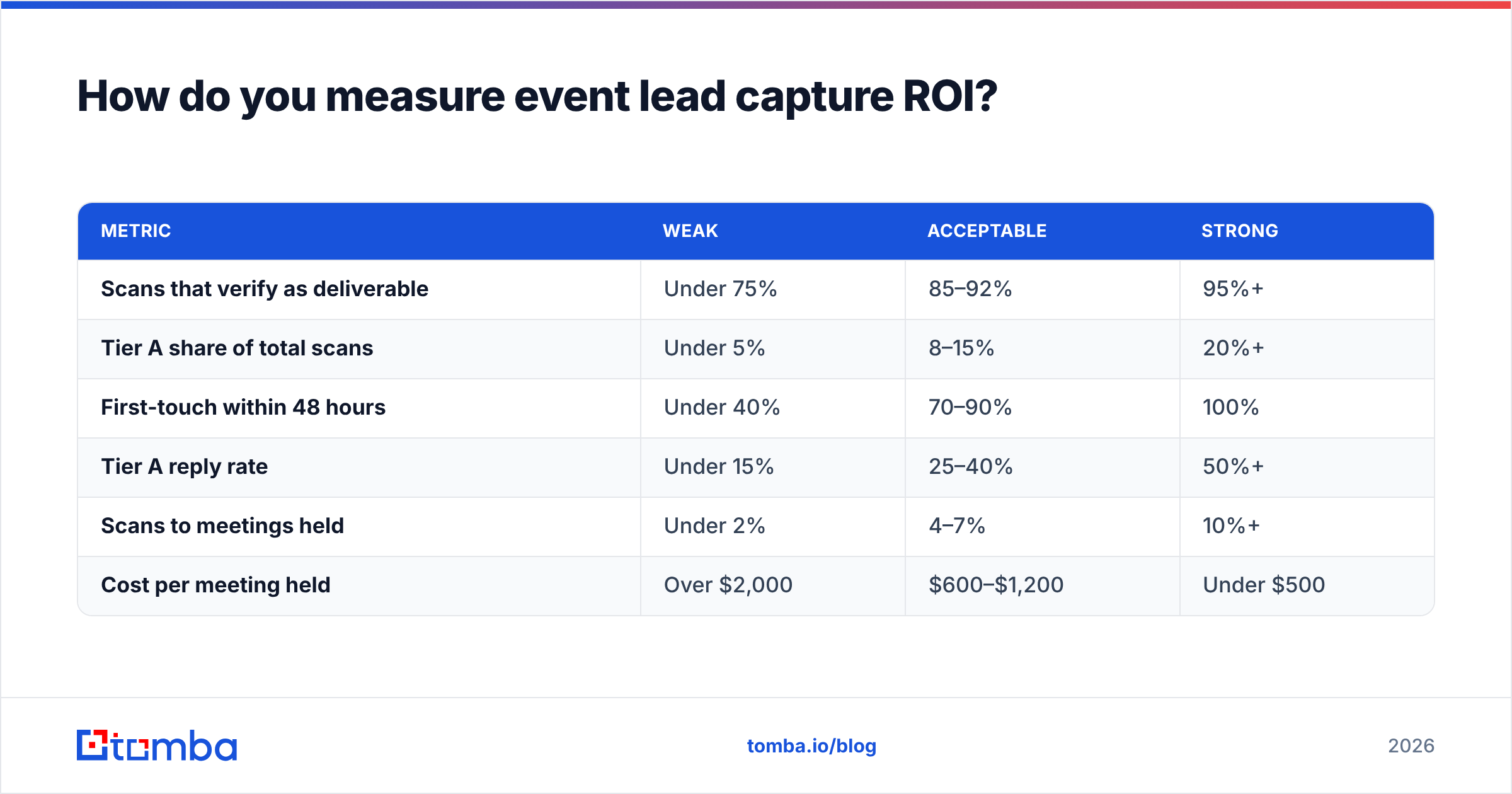
Then track the funnel with event-specific benchmarks rather than comparing to inbound:
| Metric | Weak | Acceptable | Strong |
|---|---|---|---|
| Scans that verify as deliverable | Under 75% | 85–92% | 95%+ |
| Tier A share of total scans | Under 5% | 8–15% | 20%+ |
| First-touch within 48 hours | Under 40% | 70–90% | 100% |
| Tier A reply rate | Under 15% | 25–40% | 50%+ |
| Scans to meetings held | Under 2% | 4–7% | 10%+ |
| Cost per meeting held | Over $2,000 | $600–$1,200 | Under $500 |
Cost per meeting held is the number to argue budget with. It compares directly against paid search, outbound, and content, and it survives finance scrutiny in a way that "340 leads" does not. Most CRM platforms — Salesforce and HubSpot both handle this natively — will report this if you populate the source and timestamp fields correctly at routing time. Pushing cleaned records straight into your CRM through a HubSpot integration keeps the attribution intact instead of relying on a manual CSV import that drops fields.
If you are evaluating dedicated capture apps, check current user reviews on G2 rather than vendor pages — the gap between demo-day functionality and hall-floor reliability under bad conference Wi-Fi is the thing reviews actually surface.
What should you do differently for virtual and hybrid events?#
The capture problem inverts. Virtual events give you a clean email — the one used to register for the webinar — but almost no qualification context, since there was no conversation.
So the work shifts: verification matters less (the address is self-reported and generally live), and behavioral qualification matters more. Session attendance duration, questions asked in chat, poll responses, and resource downloads become your tier signal instead of a rep's notes. Enrich for firmographics, score on behavior, and treat a 45-minute attendee who asked a technical question as Tier A even though nobody shook their hand.
Hybrid events need both pipelines running in parallel with a dedup pass across them, because your best prospects frequently register virtually and then show up in person anyway.
Where does this leave your next event?#
Buy the cheapest capture method your reps will reliably use. Spend the saved money and attention on the cleaning layer, because that is where the pipeline actually leaks. Verify before you send, find the real address when the badge gives you an alias, enrich so routing works, and get the first touch out inside 48 hours.
If you want the repair step handled in one pass, run your post-event export through Tomba Email Finder — feed it the names and company domains from your badge scans and it returns verified, person-specific work addresses with confidence scores, so your follow-up reaches the person you actually met instead of a registration alias. The free tier covers 25 searches if you want to test it against last event's list before committing; paid plans start at $49/mo, and full Tomba pricing scales with bulk volume for teams running a heavy event calendar.
Related guides#
Ready to find emails that actually work?
Join 150,000+ professionals who stopped guessing and started sending. Free credits on signup — no credit card required.
Get the Tomba newsletter
Practical outbound tactics and product updates — once every two weeks.
About the author