Evergreen Cold Email Campaigns: The 2026 Playbook That Runs Itself
Most cold email campaigns die after one send. Evergreen campaigns keep booking meetings for months because they trigger on lead behavior, not on a launch date. Here is how to build one.
TL;DR
- An evergreen cold email campaign is a sequence that triggers on a lead entering a segment, not on a calendar date. You build it once and it runs until you turn it off.
- The three things that kill evergreen campaigns are stale data, unmonitored reply handling, and copy that references a moment in time. All three are fixable at build time.
- Batch campaigns spike and die. Evergreen campaigns produce a flatter but far more predictable meeting curve — usually 3-8 meetings per week per sending domain once warmed.
- You need continuous lead intake (scraper, job-board watcher, funding feed, website visitor reveal) plus continuous verification. Without both, evergreen becomes evergreen-bounce.
- Budget realistically: 2-4 sending domains, an enrichment source, a verifier, and roughly 8 hours of build time. After that, maintenance is about 90 minutes a month.
What Are Evergreen Cold Email Campaigns?#
An evergreen cold email campaign is outbound that starts when a prospect qualifies, not when you press send.
Think of it like a motion-sensor light versus a lamp on a timer. The timer lamp turns on at 7 p.m. whether or not anyone walks past. The motion sensor waits until someone actually shows up, then fires. Batch cold email is the timer. Evergreen is the sensor.
Technically, an evergreen campaign has four moving parts:
- An intake trigger — a rule that decides when a contact enters the sequence. New job posting for "Head of RevOps," Series A funding announcement, a competitor's tech showing up on their site, or an anonymous visitor identified on your pricing page.
- A standing enrichment + verification step — every new contact gets an email address found and validated before the first send fires. This runs on every contact, forever, not once at list-build time.
- A time-agnostic sequence — three to five emails whose copy contains no dates, no "just launched," no "as we head into Q4." The message must read correctly whether it lands in March 2026 or November 2027.
- A continuous exit path — reply detection, meeting booked, unsubscribe, hard bounce, or a suppression rule that removes anyone another rep already touched.
Miss any one of those and you don't have an evergreen campaign. You have a batch campaign with an expensive scheduler bolted on.
The distinction matters because the failure modes are completely different. A batch campaign fails loudly — you send 2,000 emails, get 40 bounces, and see it in the dashboard that afternoon. An evergreen campaign fails silently. Your data source degrades over six weeks, your bounce rate climbs from 1% to 6%, and nobody notices until your sender reputation is already damaged.
How Is Evergreen Different From a Batch Cold Email Campaign?#
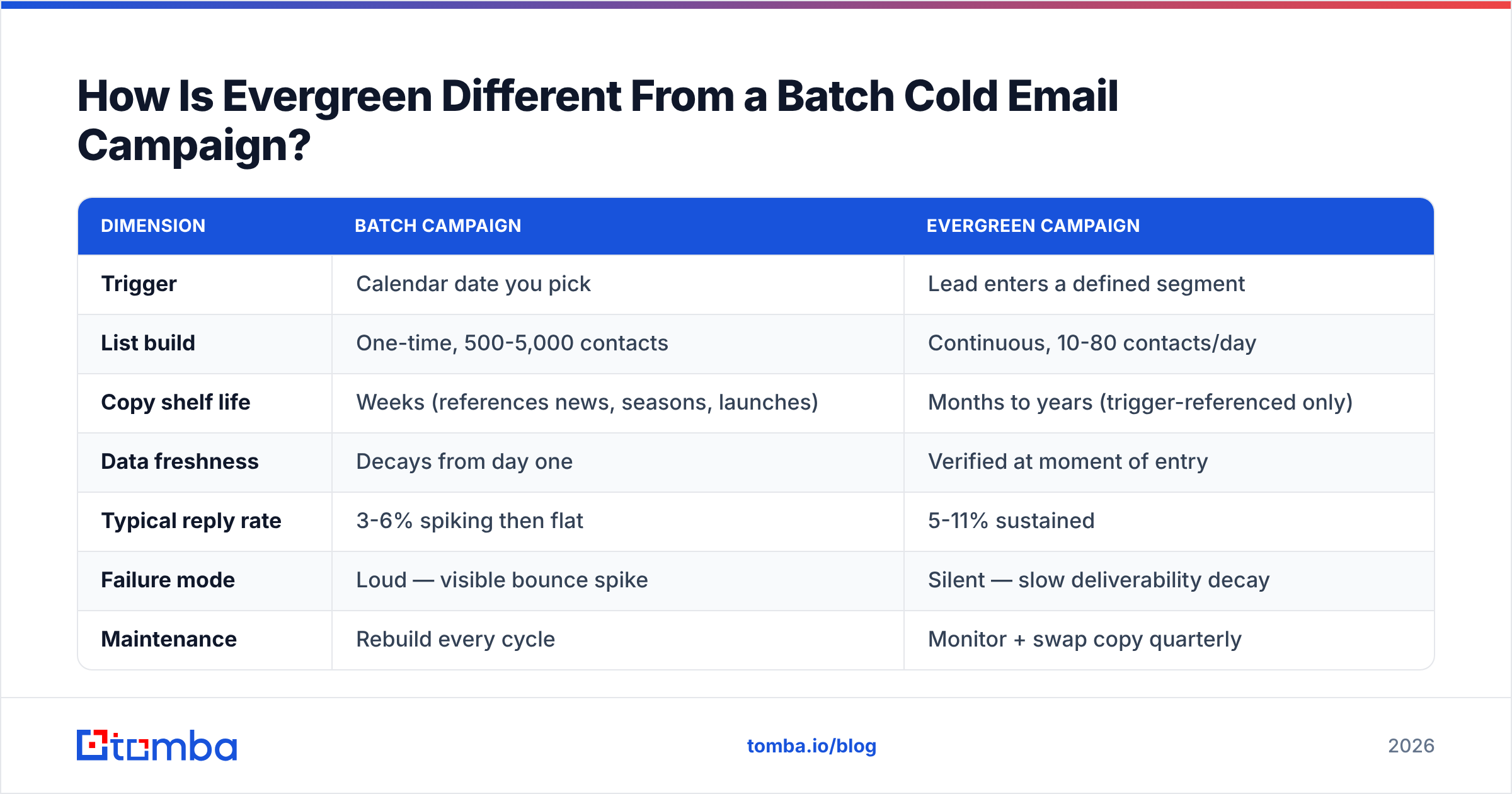
The clearest way to see it is side by side.
| Dimension | Batch campaign | Evergreen campaign |
|---|---|---|
| Trigger | Calendar date you pick | Lead enters a defined segment |
| List build | One-time, 500-5,000 contacts | Continuous, 10-80 contacts/day |
| Copy shelf life | Weeks (references news, seasons, launches) | Months to years (trigger-referenced only) |
| Data freshness | Decays from day one | Verified at moment of entry |
| Typical reply rate | 3-6% spiking then flat | 5-11% sustained |
| Failure mode | Loud — visible bounce spike | Silent — slow deliverability decay |
| Maintenance | Rebuild every cycle | Monitor + swap copy quarterly |
| Best for | Event pushes, product launches, ABM bursts | Steady pipeline, PLG motions, recruiting |
| Time to first meeting | 2-5 days | 7-14 days (ramps, then steady) |
The reply-rate gap is not magic. It comes from relevance timing. A batch send hits 2,000 people who mostly aren't in-market. An evergreen trigger hits 15 people the week they posted a job req for the exact role your product supports. Same copy, radically different context.
That said, batch is not obsolete. If you're pushing registrations for a conference three weeks out, evergreen makes no sense — the deadline is the campaign. Use batch for time-bound pushes and evergreen for the baseline pipeline underneath them.
What Triggers Actually Work for Evergreen Campaigns?#
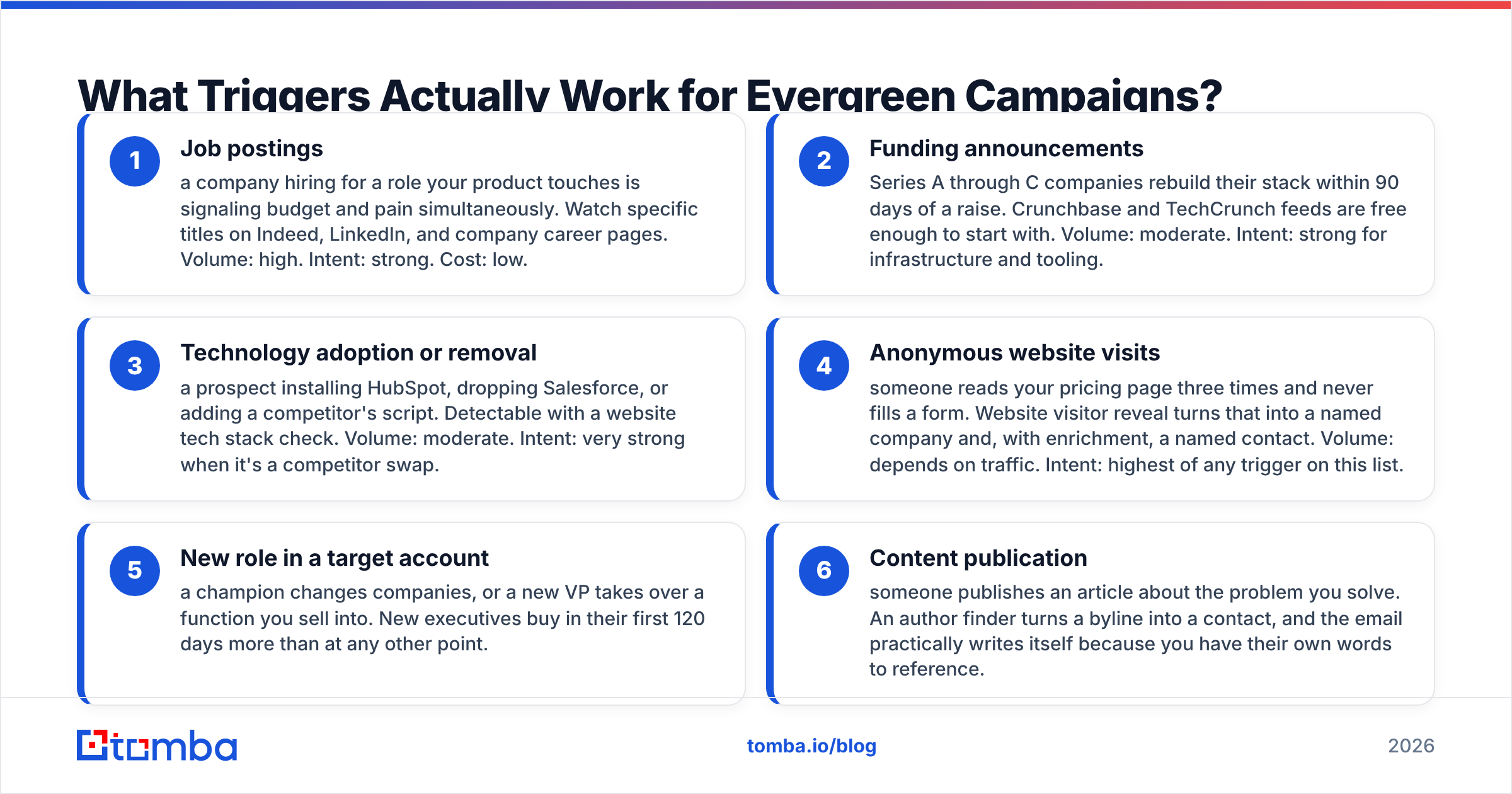
Not all triggers are equal. A good evergreen trigger has three properties: it fires often enough to sustain volume, it correlates with buying intent, and it's observable without a paid intent-data contract.
Here are the ones that hold up in practice:
- Job postings — a company hiring for a role your product touches is signaling budget and pain simultaneously. Watch specific titles on Indeed, LinkedIn, and company career pages. Volume: high. Intent: strong. Cost: low.
- Funding announcements — Series A through C companies rebuild their stack within 90 days of a raise. Crunchbase and TechCrunch feeds are free enough to start with. Volume: moderate. Intent: strong for infrastructure and tooling.
- Technology adoption or removal — a prospect installing HubSpot, dropping Salesforce, or adding a competitor's script. Detectable with a website tech stack check. Volume: moderate. Intent: very strong when it's a competitor swap.
- Anonymous website visits — someone reads your pricing page three times and never fills a form. Website visitor reveal turns that into a named company and, with enrichment, a named contact. Volume: depends on traffic. Intent: highest of any trigger on this list.
- New role in a target account — a champion changes companies, or a new VP takes over a function you sell into. New executives buy in their first 120 days more than at any other point.
- Content publication — someone publishes an article about the problem you solve. An author finder turns a byline into a contact, and the email practically writes itself because you have their own words to reference.
Avoid triggers built on "company size grew by 10%" or "industry match." Those are filters, not triggers. A filter narrows who's eligible. A trigger tells you when. Confusing the two is the single most common reason an evergreen build produces batch-quality results.
How Do You Keep the Data From Rotting?#
This is where most evergreen builds break, and it's worth being blunt about the mechanics.
B2B contact data decays at roughly 22-30% per year, and it decays faster in high-churn functions like sales and marketing. In a batch campaign you can absorb that — you built the list Tuesday and sent it Wednesday. In an evergreen campaign, a contact might sit in a delay step for 18 days before email three fires. By then the person may have left.
Three rules keep the pipe clean:
Verify at entry, not at build. Every contact should pass through an email verifier at the moment it enters the sequence. Not at list-upload time. Not weekly. At entry. This single change typically cuts evergreen bounce rates from 4-7% down to under 1.5%.
Re-verify before any step more than 14 days out. If your sequence has a 21-day breakup email, run a second verification before it fires. It costs a fraction of a credit and protects the domain that took you six weeks to warm.
Handle catch-all domains explicitly. Roughly 20-25% of B2B domains are catch-all, meaning SMTP validation returns "valid" for every address including garbage. A catch-all verifier applies pattern confidence and historical deliverability signals instead of taking the SMTP response at face value. Without that layer you'll route junk straight into your best sequence.
Google and Yahoo's bulk sender requirements, in force since 2024, cap spam complaints at 0.3% and require one-click unsubscribe and authenticated domains. Google's own sender guidelines are the reference document here — read them before you scale volume, not after. An evergreen campaign that quietly drifts past that threshold takes weeks to recover.
Set a floor: if bounce rate on any evergreen sequence exceeds 2% across a rolling 7-day window, the sequence auto-pauses. Most sending platforms support this natively. If yours doesn't, that's a reason to switch tools, not a reason to skip the rule.
What Does an Evergreen Sequence Actually Look Like?#
Five emails, 19 days, no dates anywhere in the copy.
Email 1 (Day 0) — The trigger reference. Two to three sentences. Name the trigger explicitly: "Saw you're hiring two SDRs in Austin." Then one line connecting the trigger to a problem, then a soft question. No pitch, no calendar link, no attachment.
Email 2 (Day 3) — The proof. Short, specific outcome from a comparable company. Numbers beat adjectives. "Cut their list-building time from 6 hours to 40 minutes" outperforms "dramatically improved efficiency" every time.
Email 3 (Day 8) — The angle change. Same person, different problem. If email 1 led with speed, email 3 leads with data accuracy or cost. You're testing which nerve is live.
Email 4 (Day 14) — The resource. Give something with no ask attached. A teardown, a benchmark, a template. This is the email that most often gets forwarded internally.
Email 5 (Day 19) — The clean close. "Sounds like this isn't a fit right now — I'll stop here. If that changes, just reply." Breakup emails get replies precisely because they remove pressure. Keep it two lines.
The hard constraint: every one of these must survive being read 14 months from now. Ban these phrases outright — "this quarter," "with the new year approaching," "since [current event]," "we just launched," "before the holidays." If you want a starting point that already avoids them, the library of cold email templates is a reasonable base to fork from rather than writing from a blank page.
One more constraint people skip: personalization must be derivable from the trigger. If your first line requires a human to read a LinkedIn profile, your campaign is not evergreen — it's a manual campaign with automated delivery. The trigger data itself has to carry the personalization, or the thing won't scale past 30 contacts a day.
What Does It Cost to Run One?#
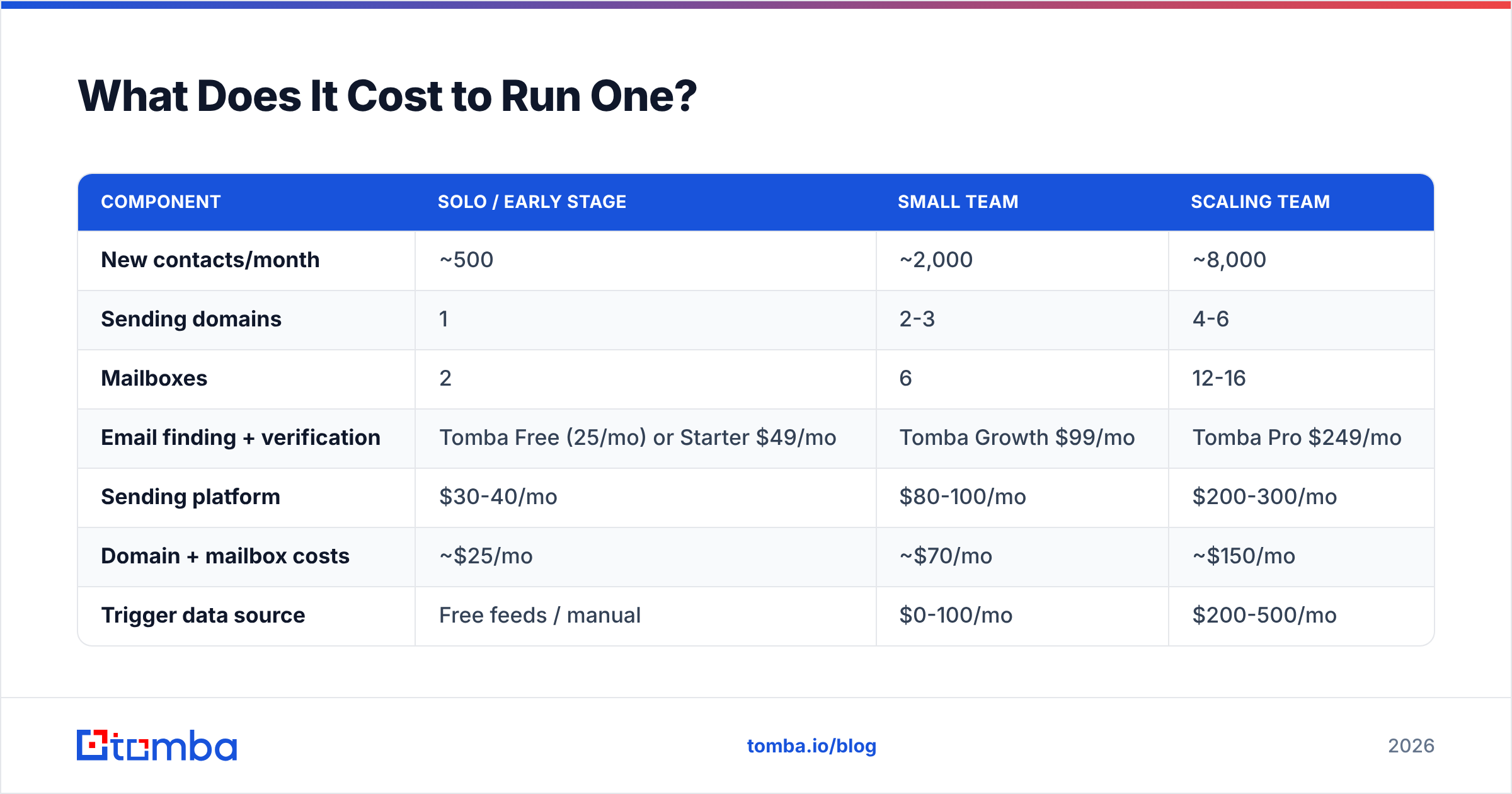
Here's what a realistic single-motion evergreen stack looks like at three volume tiers. Prices are list prices as of early 2026.
| Component | Solo / early stage | Small team | Scaling team |
|---|---|---|---|
| New contacts/month | ~500 | ~2,000 | ~8,000 |
| Sending domains | 1 | 2-3 | 4-6 |
| Mailboxes | 2 | 6 | 12-16 |
| Email finding + verification | Tomba Free (25/mo) or Starter $49/mo | Tomba Growth $99/mo | Tomba Pro $249/mo |
| Sending platform | $30-40/mo | $80-100/mo | $200-300/mo |
| Domain + mailbox costs | ~$25/mo | ~$70/mo | ~$150/mo |
| Trigger data source | Free feeds / manual | $0-100/mo | $200-500/mo |
| Realistic all-in | $105-115/mo | $250-370/mo | $800-1,200/mo |
| Expected meetings/mo | 3-6 | 12-25 | 45-90 |
Two notes on reading that table. First, meeting counts assume a warmed domain and a trigger with real intent — a pure firmographic filter will produce roughly a third of those numbers. Second, the biggest cost most teams forget is mailbox infrastructure, not software. Six mailboxes across three domains, each warming for three weeks before you send anything real, is the actual gate on how fast you can scale.
If you're evaluating where the enrichment layer fits, compare Tomba pricing against per-credit pricing from the larger platforms — the difference shows up sharply at the 2,000-8,000 contacts/month range, where credit-based models start charging for failed lookups. G2's email verification category is a reasonable neutral place to sanity-check vendor claims before committing to an annual plan.
BookYourData is worth a look if your evergreen motion needs pre-built, verified lists in specific verticals rather than continuous trigger-based discovery — it solves a genuinely different problem than a finder-plus-verifier stack, and some teams run both.
How Do You Know If It's Working?#
Batch campaign metrics mislead you on evergreen. Open rate on a 12-contact daily trickle is statistical noise. Watch these instead:
- Meetings per sending domain per week. The only number that matters. Healthy: 1-3. Below 0.5 for three consecutive weeks means your trigger is weak, not your copy.
- Trigger-to-contact conversion. Of the companies your trigger surfaces, what percentage produce a verified, deliverable contact? Under 60% means your finding or verification step is the bottleneck.
- Rolling 7-day bounce rate. Not lifetime. Lifetime bounce rate hides recent decay behind months of good history.
- Reply sentiment split. Positive / neutral / negative / unsubscribe. A rising unsubscribe rate with steady replies means your targeting is drifting wider than your message.
- Days from trigger to first send. Under 48 hours is the target. Past a week, the trigger's relevance has mostly evaporated and you're back to sending cold noise.
Review these monthly. Rewrite one email in the sequence per quarter — not the whole thing, one email — and let the change run for six weeks before you judge it. Evergreen campaigns punish impatience; the sample sizes are small in any given week and large only over months.
When Should You Not Build One?#
Three situations where evergreen is the wrong call:
You haven't validated the message manually. If you can't get replies sending 30 emails by hand, automating the same copy across 300 will just get you blocked faster. Prove the message first.
Your total addressable market is under about 400 accounts. At that size, evergreen automation is over-engineering. Research each account properly and send manually — your reply rate will be triple what any sequence produces.
Nobody owns reply handling. An evergreen campaign generates replies at unpredictable hours across an unpredictable calendar. If replies sit for four days, you've built a machine that reliably annoys your best prospects. Assign an owner before you turn it on, not after.
Getting the Data Layer Right#
Every evergreen campaign is downstream of one question: can you reliably turn a trigger into a verified, deliverable contact within 48 hours, every day, without a human in the loop?
That's the part most stacks fumble. The trigger sources are cheap and the sending tools are commoditized, but the find-and-verify layer either holds the whole system together or quietly poisons it. Tomba Email Finder handles that middle step — domain search to surface the right person at the account, pattern-confidence scoring on the address, and verification before anything enters your sequence, all callable from the Tomba API so it runs on the trigger, not on your schedule. Start on the free tier with 25 searches to test one trigger end to end. If the meetings show up, scale the trigger before you scale the spend.
Related guides#
Ready to find emails that actually work?
Join 150,000+ professionals who stopped guessing and started sending. Free credits on signup — no credit card required.
Get the Tomba newsletter
Practical outbound tactics and product updates — once every two weeks.
About the author