Everstage Pricing 2026: Reviews, Pros and Cons Explained
Everstage doesn't publish a price list, so buyers negotiate blind. Here's what teams actually pay per payee in 2026, how it stacks up against CaptivateIQ, Spiff and QuotaPath, and the pros and cons reviewers keep repeating.
TL;DR
- Everstage does not publish a public price list. Every deal is quoted, which means your cost depends on payee count, contract length, and how hard you negotiate.
- Buyer reports and review-site threads put the license somewhere in the $20–$40 per payee, per month band on annual contracts, with implementation quoted separately.
- The strongest reviewed pros: commission statement clarity for reps, fast plan changes without a spreadsheet rebuild, and responsive implementation support.
- The most repeated cons: opaque pricing, annual-only commitments, reporting depth that trails older SPM suites, and integration work that takes longer than the demo suggests.
- Everstage is a commission engine, not a pipeline source. If your problem is "not enough qualified accounts to comp anyone on," a data tool solves that far more cheaply.
What is Everstage, and who actually buys it?#
Everstage is incentive compensation management (ICM) software. Think of it as payroll for variable pay: you load the plan rules once, connect the CRM, and the system calculates what every rep earned, shows them a live statement, and hands finance a clean file at month end. Instead of a RevOps analyst rebuilding a 40-tab spreadsheet every quarter, the plan lives in a rules engine.
The typical buyer is a company with 30 to 500 commissionable people — SaaS sales orgs, insurance carriers, staffing firms, fintech teams — where comp plans have accelerators, tiers, clawbacks, splits, and quarterly kickers that Excel handles badly. Below roughly 20 payees, most teams stay on spreadsheets. Above 1,000, procurement usually forces a bake-off with the enterprise SPM incumbents.
Everstage's own positioning leans on rep-facing transparency: dashboards, "what-if" earnings simulators, and dispute workflows. That matters more than it sounds. According to Everstage's site and the review corpus on G2, a large share of the value story is "reps stop emailing you about their commission math."
How much does Everstage cost in 2026?#
Short answer: nobody outside a signed contract knows exactly, because Everstage runs a quote-only model. There is no self-serve checkout, no published tier card, and no free plan.
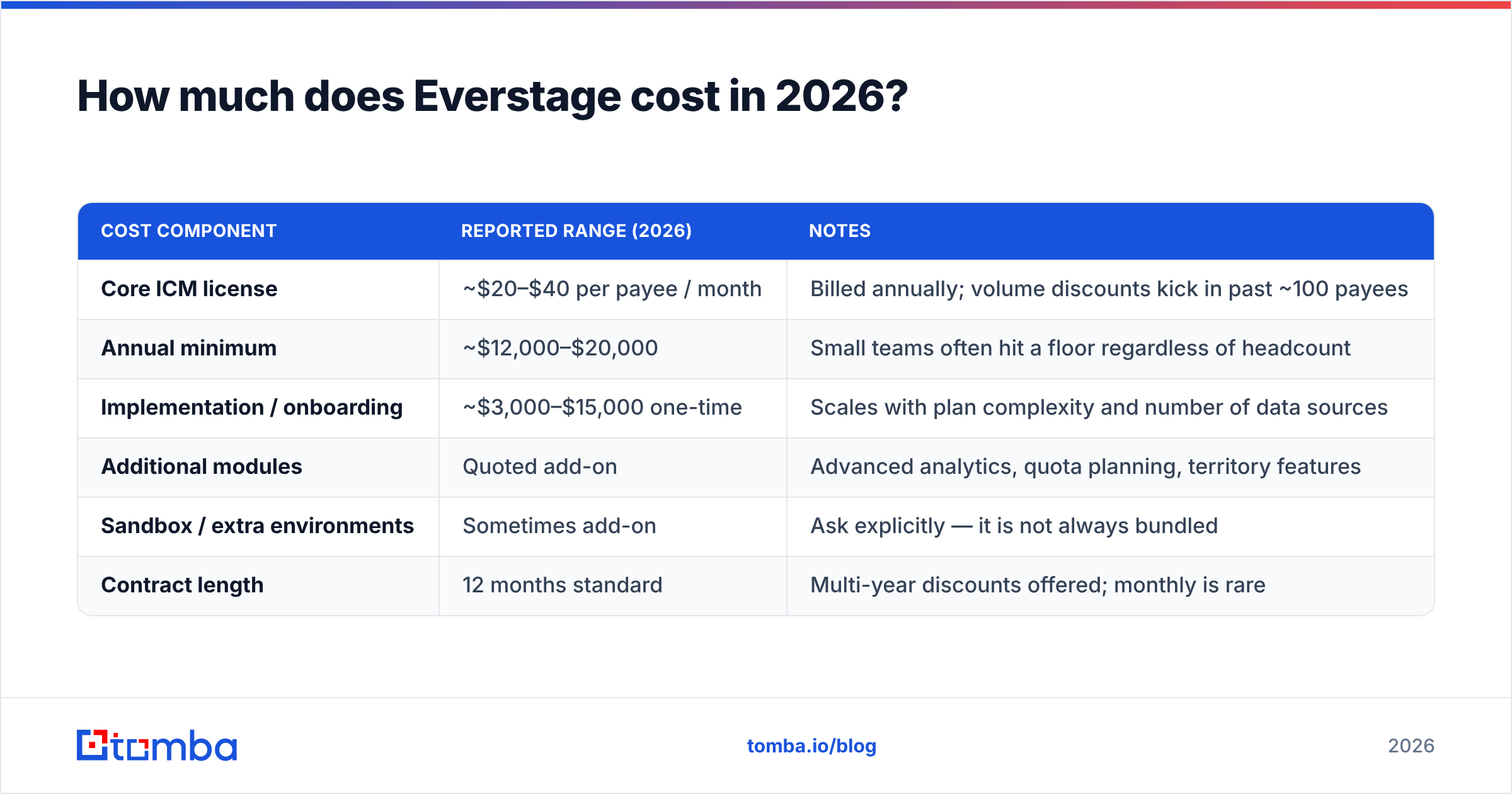
What you can do is triangulate from buyer-reported figures, procurement threads, and marketplace listings. Treat the table below as a negotiation starting point, not a quote — always confirm directly with the vendor.
| Cost component | Reported range (2026) | Notes |
|---|---|---|
| Core ICM license | ~$20–$40 per payee / month | Billed annually; volume discounts kick in past ~100 payees |
| Annual minimum | ~$12,000–$20,000 | Small teams often hit a floor regardless of headcount |
| Implementation / onboarding | ~$3,000–$15,000 one-time | Scales with plan complexity and number of data sources |
| Additional modules | Quoted add-on | Advanced analytics, quota planning, territory features |
| Sandbox / extra environments | Sometimes add-on | Ask explicitly — it is not always bundled |
| Contract length | 12 months standard | Multi-year discounts offered; monthly is rare |
Three things drive your number more than anything else:
- Payee count, not seat count. You pay for every person with a comp plan, including people who never log in. Managers on override plans usually count too.
- Plan complexity. A flat 10% commission is cheap to implement. Tiered accelerators with cross-team splits, multi-currency, and clawback windows push implementation hours up.
- Data source count. One clean Salesforce instance is the easy path. Salesforce plus a billing system plus a spreadsheet of manual adjustments plus HRIS is where onboarding timelines stretch.
- Contract term and timing. End-of-quarter and end-of-fiscal-year quotes are materially softer. Multi-year commitments buy the biggest discount, and also the biggest regret if the tool disappoints.
What's the real total cost beyond the license?#
The license line is the number your CFO sees. The total cost of ownership is the number your RevOps lead lives with. Budget for all of these:
- Internal implementation time. Expect 30–80 hours of RevOps and finance effort across data mapping, plan translation, and parallel-run validation. That is a real cost even though it never appears on an invoice.
- Parallel running. Most teams run the old spreadsheet alongside the new engine for one to two cycles to prove the math matches. Plan for it; skipping it is how comp disputes reach the CRO.
- CRM hygiene work. Commission engines are only as good as the opportunity data underneath. Broken owner fields, missing close dates, and duplicate accounts surface fast — and get fixed on your time.
- Plan-change turnaround. Ask whether mid-year plan edits are self-serve or ticketed. If the vendor has to configure it, you inherit their queue every time leadership tweaks a kicker.
- Renewal uplift. Quote-only vendors frequently price year two above year one. Get the renewal cap in writing before you sign, not after.
A useful framing: ICM software does not create revenue, it removes friction and error from paying out revenue you already earned. That makes it a revenue operations efficiency purchase, and it should be budgeted against analyst hours saved and dispute volume reduced — not against pipeline.
How does Everstage pricing compare to CaptivateIQ, Spiff, and QuotaPath?#
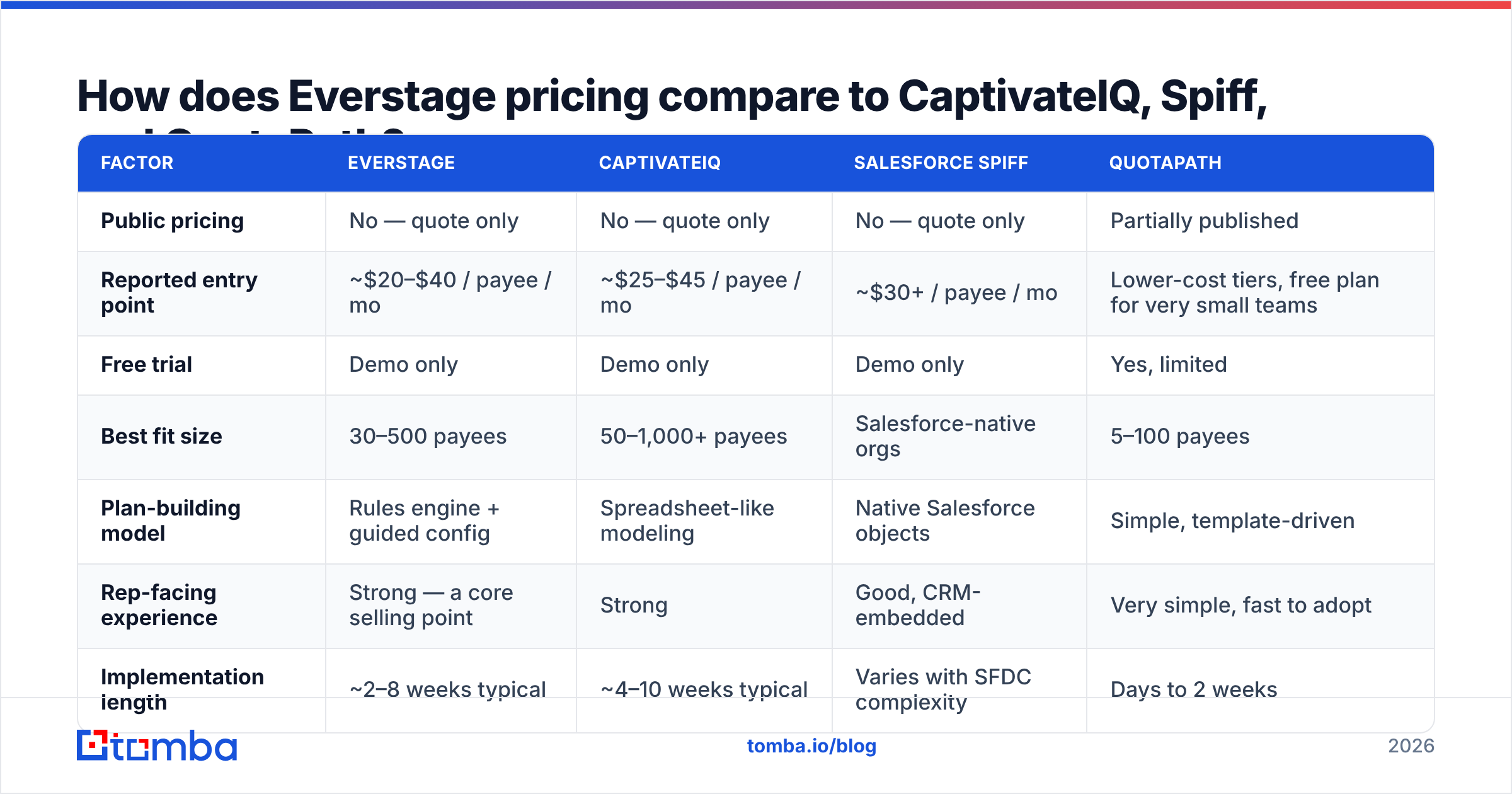
Everstage sits in a crowded mid-market lane. Here is how the main alternatives line up on the dimensions buyers actually compare.
| Factor | Everstage | CaptivateIQ | Salesforce Spiff | QuotaPath |
|---|---|---|---|---|
| Public pricing | No — quote only | No — quote only | No — quote only | Partially published |
| Reported entry point | ~$20–$40 / payee / mo | ~$25–$45 / payee / mo | ~$30+ / payee / mo | Lower-cost tiers, free plan for very small teams |
| Free trial | Demo only | Demo only | Demo only | Yes, limited |
| Best fit size | 30–500 payees | 50–1,000+ payees | Salesforce-native orgs | 5–100 payees |
| Plan-building model | Rules engine + guided config | Spreadsheet-like modeling | Native Salesforce objects | Simple, template-driven |
| Rep-facing experience | Strong — a core selling point | Strong | Good, CRM-embedded | Very simple, fast to adopt |
| Implementation length | ~2–8 weeks typical | ~4–10 weeks typical | Varies with SFDC complexity | Days to 2 weeks |
| Contract | Annual standard | Annual standard | Annual standard | Monthly options available |
Reading the table: if you are deep in the Salesforce ecosystem and want comp objects living beside opportunity records, Spiff has a structural advantage. If your comp logic is genuinely spreadsheet-shaped and analyst-owned, CaptivateIQ's modeling approach feels natural. If you have 15 reps and a straightforward plan, QuotaPath will cost you a fraction and take a week. Everstage's pitch lands hardest in the middle: complex enough plans to need a real engine, small enough team to not want a nine-month enterprise SPM rollout.
Cross-check any shortlist against live reviews on Capterra and G2 before you get emotionally committed to a demo. Filter reviews by company size — a 2,000-employee reviewer's experience with implementation says almost nothing about yours at 60 payees.
What do Everstage reviews say are the pros?#
Pulling the recurring themes out of public review data, four advantages show up over and over.
Reps stop asking "is this right?" The commission statement view is genuinely clear — deal-level breakdown, applied rate, accelerator status, payout date. Teams report commission-dispute tickets dropping sharply in the first full quarter. That is the single most-cited benefit, and it is the one that quietly buys back manager time.
Plan changes don't require a rebuild. When leadership changes an accelerator threshold mid-year, editing a rule beats re-deriving formulas across a workbook. Reviewers who came from spreadsheets describe the difference in hours saved per cycle, not percentages.
Implementation support gets consistently good marks. Customer success responsiveness is one of the strongest signals in the review corpus. For a category where onboarding is the main failure mode, that matters more than any feature checkbox.
Audit trail and approval workflow. Finance gets versioned plan history, approval chains, and exportable payout files. This is the difference between "we think the numbers are right" and being able to prove it during an audit.
What do reviewers list as the cons?#
Neutral read: the complaints cluster around commercial terms and depth, not core correctness.
Pricing opacity is the top friction. You cannot budget without booking a call, and you cannot benchmark without talking to peers. Buyers who value fast, self-serve evaluation find this genuinely annoying — and it makes internal approval slower, because your CFO wants a number before the demo, not after.
Annual commitments with limited flexibility. Headcount rarely moves in a straight line. If you sign for 120 payees and finish the year at 85, most contracts do not refund the gap. Negotiate a true-down clause or a mid-term adjustment window.
Reporting depth trails the enterprise suites. For standard attainment, payout, and quota views, it is fine. Teams wanting deep custom analytics — cohort-level plan effectiveness, multi-year comp modeling — often end up exporting to a BI tool anyway.
Integration reality gaps. The connector list looks complete in a demo. In practice, non-standard CRM fields, custom objects, and manual adjustment spreadsheets need mapping work. Ask for a written scope of what "integrated" means in your specific stack.
Learning curve for admins. Reps find it easy. The person configuring rules needs real ramp time. Budget training for at least two admins so you are not single-threaded on one analyst.
Is Everstage worth it for your team?#
Match the decision to your situation rather than to the demo.
| Your situation | Verdict |
|---|---|
| Under 20 payees, simple flat-rate plan | Skip it. A well-built spreadsheet or a low-cost tool is enough |
| 30–150 payees, tiered plans, growing | Strong fit — this is the core sweet spot |
| Heavy Salesforce customization, admin team in-house | Compare hard against the Salesforce-native option first |
| 500+ payees, multi-entity, global currencies | Run a bake-off with enterprise SPM; check scale references |
| Cash-constrained, need month-to-month | Look at vendors offering monthly terms and published pricing |
| Comp disputes eating manager time weekly | The rep-transparency layer alone can justify the spend |
The honest framing: commission software pays for itself when the cost of manual comp administration plus dispute resolution plus payout errors exceeds the license. Add up analyst hours per cycle at a loaded rate, add the cost of one material overpayment, and compare. Many teams at 50+ payees find the math obvious. Many teams at 15 payees are buying software to solve a process problem.
What should you ask before you sign?#
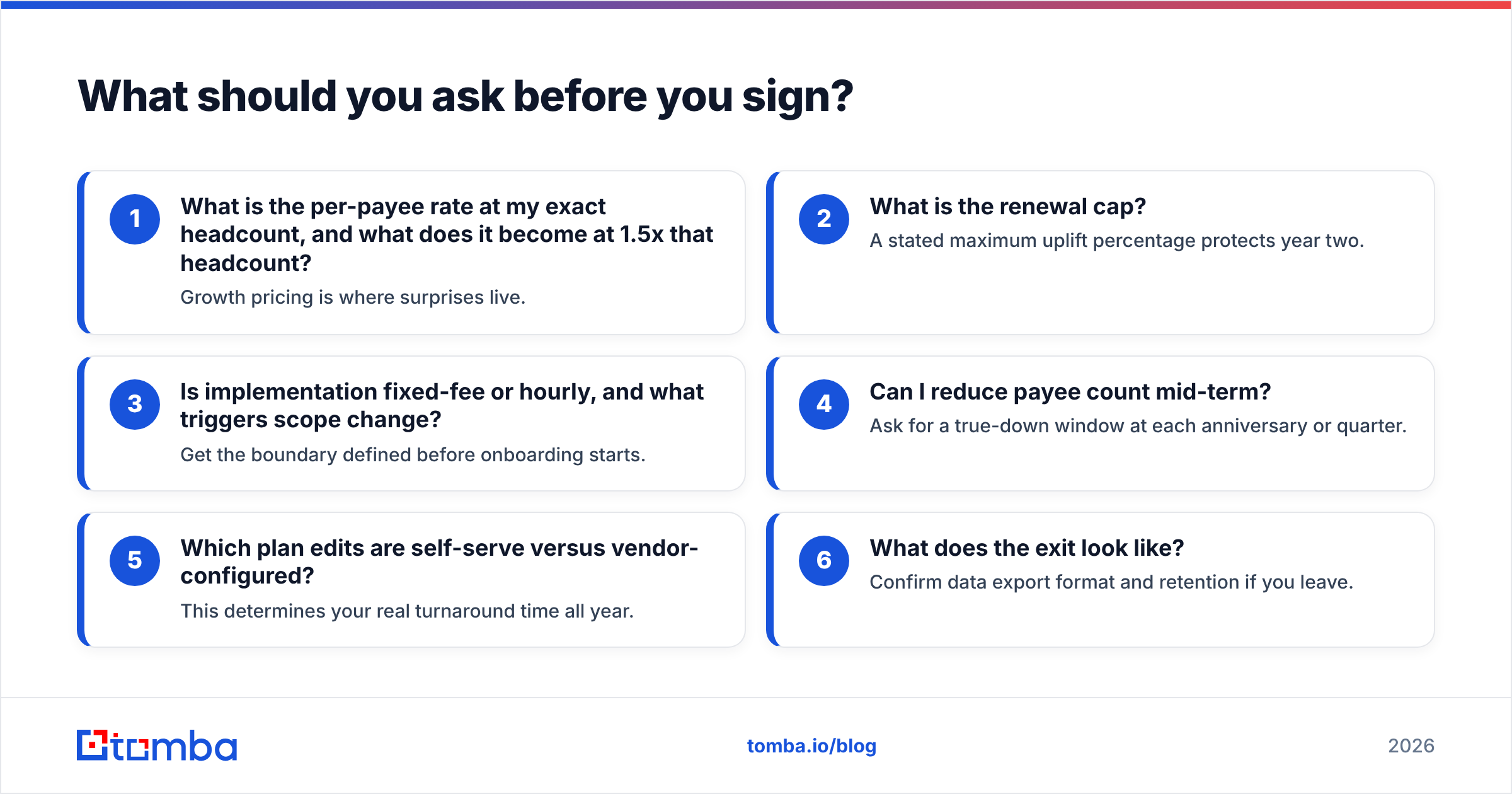
Bring this list to the pricing call and get answers in writing:
- What is the per-payee rate at my exact headcount, and what does it become at 1.5x that headcount? Growth pricing is where surprises live.
- What is the renewal cap? A stated maximum uplift percentage protects year two.
- Is implementation fixed-fee or hourly, and what triggers scope change? Get the boundary defined before onboarding starts.
- Can I reduce payee count mid-term? Ask for a true-down window at each anniversary or quarter.
- Which plan edits are self-serve versus vendor-configured? This determines your real turnaround time all year.
- What does the exit look like? Confirm data export format and retention if you leave.
Then do the reference call — not the one the vendor picks, the one you find yourself from a review profile at your size and complexity.
Where does Everstage fit in a wider RevOps stack?#
ICM is a downstream system. It pays people for revenue that already closed. That is worth remembering when budget is tight, because the upstream half of the stack — the part that creates the pipeline you eventually comp — is usually cheaper per dollar of impact.
A functional mid-market stack looks roughly like: a CRM as the system of record, an outbound data layer that supplies verified contacts, a sequencing tool, and an ICM engine on the back end. If your reps are missing quota because they cannot reach the right buyers, no commission engine fixes that. Fixing contact data does.
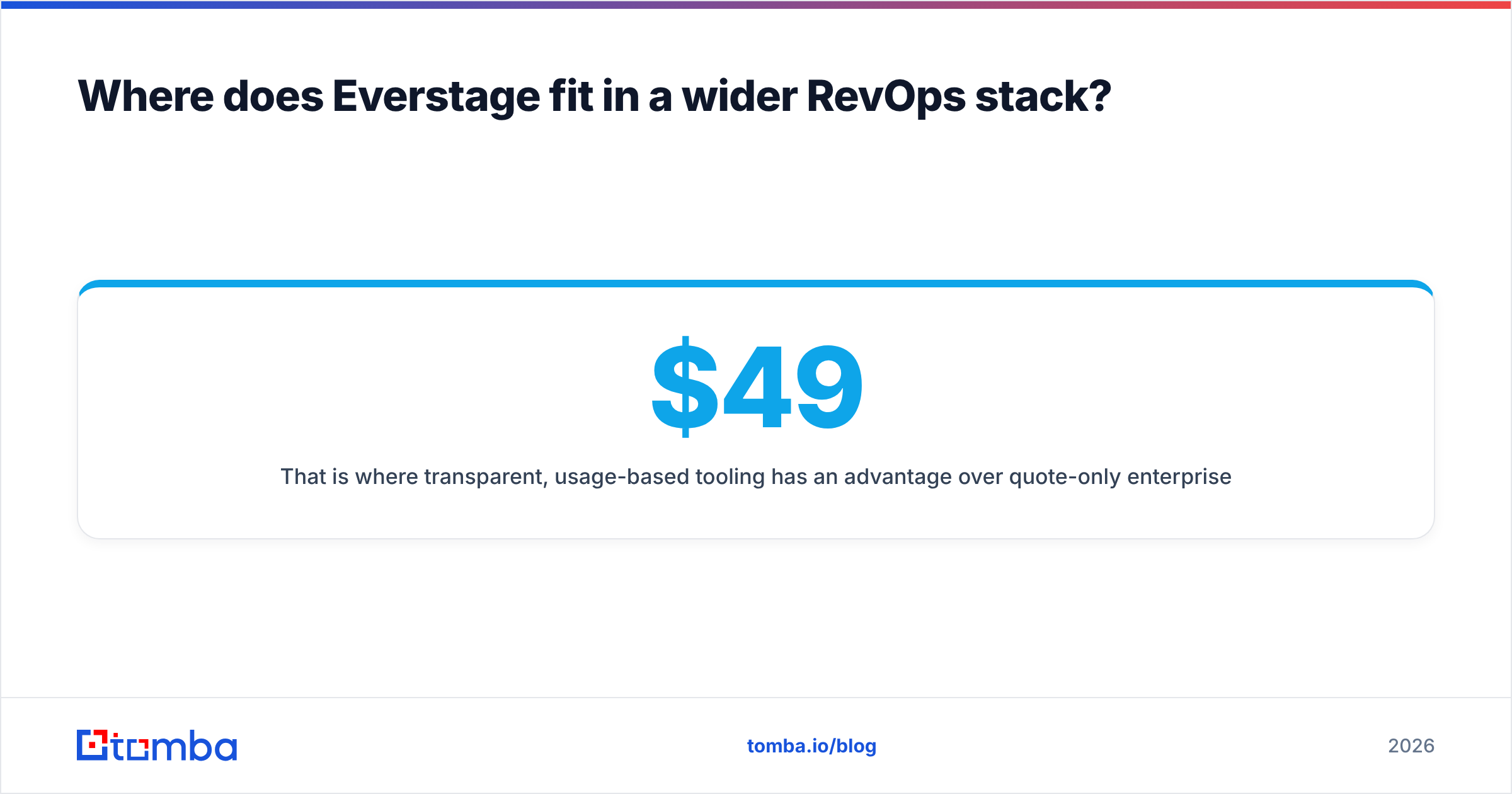
That is where transparent, usage-based tooling has an advantage over quote-only enterprise contracts. Tomba's pricing is published: a free tier with 25 searches per month, Starter at $49/mo, Growth at $99/mo, Pro at $249/mo, and custom enterprise terms — no discovery call required to build a budget. You can run domain search to map every reachable contact at a target account, verify emails before they hit a sequence, and push results through the Tomba API into the same CRM your commission engine reads from.
The point is not that one replaces the other. It is that you should know what each layer costs per unit of outcome — and one of those layers will tell you its price on a public page.
The bottom line on Everstage pricing#
Everstage is a credible mid-market commission platform with a genuinely strong rep-facing experience and good implementation support. Its main weakness is commercial, not technical: quote-only pricing plus annual commitments means you carry the negotiation burden and the flexibility risk. Go in with a payee count, a renewal cap request, a true-down clause, and two competing quotes, and you will land a fair deal. Go in cold at end of quarter with no alternatives, and you will pay list.
Before you spend five figures automating how you pay reps, make sure they have enough qualified accounts to earn on. Start with Tomba Email Finder — find verified professional email addresses by domain, name, or company, test it on the free tier, and see whether your pipeline problem is a comp problem or a data problem. Most of the time, it is a data problem.
Related guides#
// get started
Find, verify and enrich your first contacts today
Start on the free plan with 25 searches a month, then scale when your team is ready.
Free plan · No credit card required · GDPR & CCPA
// about the author