Exact Data Pricing 2026: Reviews, Pros and Cons Compared
Exact Data sells list-broker style contact files with quote-based pricing. Here is how the per-record model really works, what buyers say in reviews, and when a self-serve email finder costs you far less.
TL;DR
- Exact Data is a Chicago-based list compiler and broker. It sells consumer and B2B mailing, email, and phone files — not a self-serve prospecting tool. Pricing is quote-based and charged per record, not per seat or per month.
- Expect per-record costs in the low cents for basic consumer postal data and materially more for verified B2B email records, plus order minimums. There is no published flat-rate plan you can sign up for in two minutes.
- Reviews are polarized in a predictable way: buyers like the count-builder, the breadth of selects, and responsive account reps; complaints cluster around data freshness, bounce rates on email files, and the one-time-use licensing model.
- The hidden cost is not the invoice. It is the verification pass you have to run on any purchased file before you send, plus the fact that a one-time license expires while your bounce rate does not.
- If you need a few thousand accurate, current work emails per month rather than a 200,000-record direct-mail file, a per-search tool like Tomba pricing at $49/mo beats a per-record list order on both cost and freshness.
What is Exact Data, and who actually buys from it?#
Exact Data is a data compiler and list broker in the classic direct-marketing tradition. You go to exactdata.com, open the list builder, pick a universe (consumers, businesses, healthcare professionals, new movers, ailment sufferers, and so on), stack demographic and firmographic selects, watch the record count update, then request a quote for that count.
That is a fundamentally different product from what most sales teams now mean by "B2B data." A list broker sells you a file. A prospecting platform sells you access. The distinction drives every pricing, licensing, and quality difference below.
Typical Exact Data buyers:
- Direct-mail marketers who need postal addresses at volume and cannot get them from a sales-intelligence tool.
- Local and regional service businesses doing consumer campaigns — insurance, home services, healthcare — where demographic selects matter more than job titles.
- Agencies buying on behalf of clients, who want an invoice, a data card, and a named rep rather than a SaaS subscription.
- Event and trade-show marketers assembling one-off audiences in a specific geography or SIC range.
- Anyone needing niche consumer selects (ailment, ethnicity, donor status, lifestyle) that B2B-first vendors simply do not carry.
If you are a B2B SDR trying to email 300 VPs of Engineering at Series B SaaS companies, you are not the target buyer, and the pricing model will feel wrong to you. That is not a knock on Exact Data — it is a category mismatch.
How does Exact Data pricing actually work?#
Conclusion first: there is no price page you can act on. Every order is quoted, and the quote is a function of record count, data type, selects, and license terms.
Here is the structure to hold in your head when you read a quote:
- Base cost per record. Consumer postal records are the cheapest tier. Business records cost more. Email-appended records cost the most, and phone records sit in between.
- Select surcharges. Each additional filter — title, SIC, revenue band, ailment, home value — can add a per-record increment on top of the base.
- Order minimums. Broker orders almost always carry a floor (a minimum record count, a minimum dollar value, or both). A 400-record order often costs the same as a 2,000-record order.
- License term. This is the one people miss. A standard list license is one-time use, sometimes with a limited window. Multi-use or unlimited-use licensing costs more.
- Delivery and format extras. CSV download is usually included; NCOA processing, appends, and custom formatting may not be.
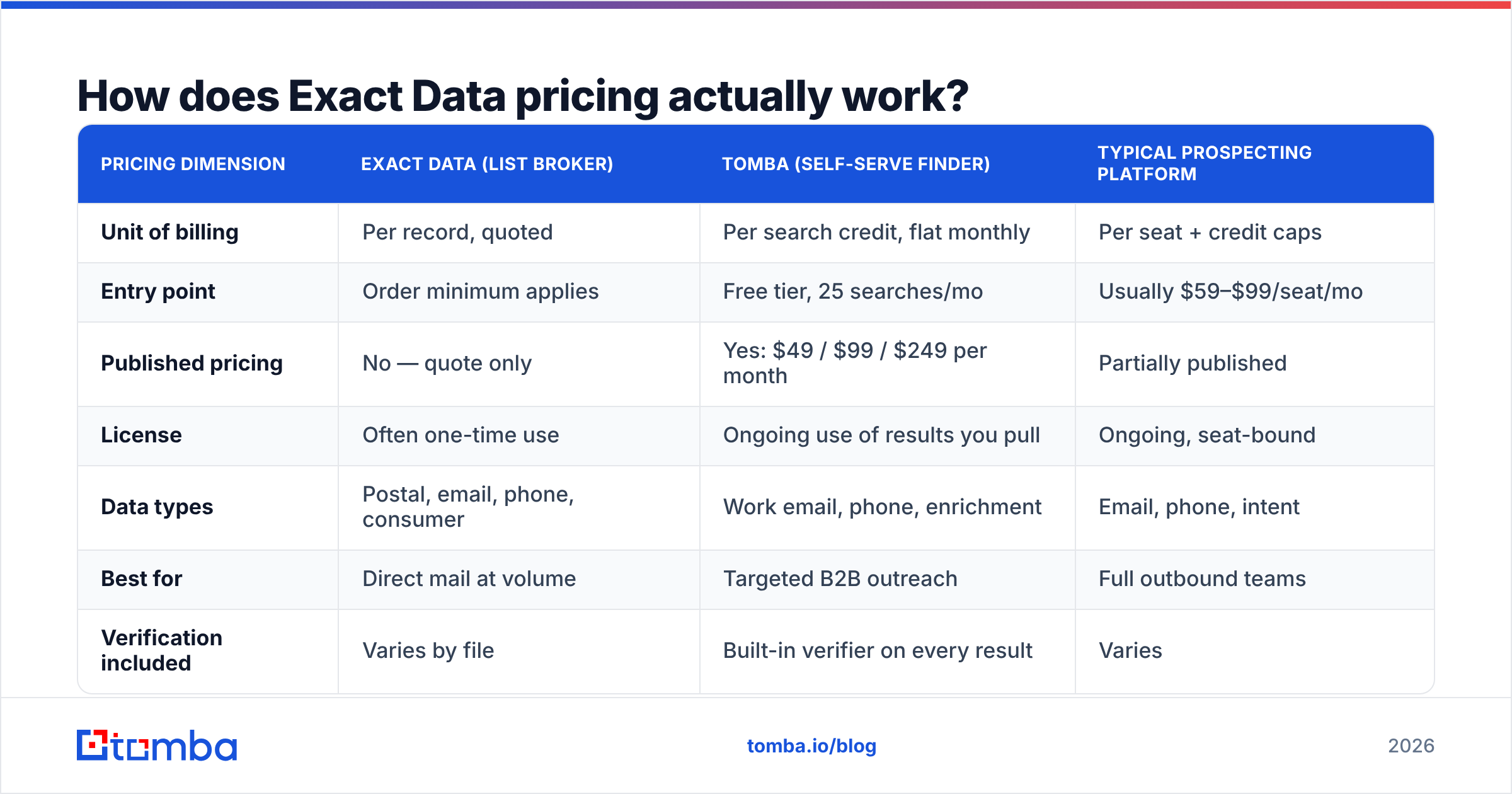
| Pricing dimension | Exact Data (list broker) | Tomba (self-serve finder) | Typical prospecting platform |
|---|---|---|---|
| Unit of billing | Per record, quoted | Per search credit, flat monthly | Per seat + credit caps |
| Entry point | Order minimum applies | Free tier, 25 searches/mo | Usually $59–$99/seat/mo |
| Published pricing | No — quote only | Yes: $49 / $99 / $249 per month | Partially published |
| License | Often one-time use | Ongoing use of results you pull | Ongoing, seat-bound |
| Data types | Postal, email, phone, consumer | Work email, phone, enrichment | Email, phone, intent |
| Best for | Direct mail at volume | Targeted B2B outreach | Full outbound teams |
| Verification included | Varies by file | Built-in verifier on every result | Varies |
The practical read: Exact Data's model is efficient when your record count is large and your per-record value is low (postal campaigns), and inefficient when your record count is small and your per-record value is high (enterprise B2B outreach). A bulk email finder run at a flat monthly rate flips that math for the second case.
What do Exact Data reviews say?#
Aggregate review volume for Exact Data is thinner than for the big SaaS platforms — you will find scattered entries on G2 and industry directories rather than thousands of verified reviews. Read what exists with that caveat in mind, then weigh the themes rather than the star average.
What reviewers consistently praise:
- The count builder. Being able to see how a select narrows your universe before you pay is genuinely useful, and many competitors hide it behind a sales call.
- Depth of consumer selects. For lifestyle, demographic, and specialty consumer targeting, the taxonomy is deeper than what B2B-native tools offer.
- Human account management. Buyers who want a person to build the file, sanity-check the selects, and handle delivery report getting one.
- Speed of turnaround. Files typically land in hours to a day or two, not weeks.
What reviewers consistently criticize:
- Email deliverability on purchased files. This is the number-one complaint across the entire list-broker category, not just this vendor. Compiled email records decay fast, and a file that was accurate at compile time may not be accurate at send time.
- Quote opacity. Not knowing the price until you have invested time in building a count frustrates buyers used to SaaS transparency.
- One-time-use licensing. Teams that assume they own the data permanently are surprised when the license says otherwise.
- Refund and credit friction. Data purchases are notoriously hard to unwind. Ask about the bad-record credit policy before you sign, not after your bounce report comes back.
None of that makes Exact Data a bad vendor. It makes it a list broker, with the structural tradeoffs list brokers have had since the 1980s. The mistake is buying one when you needed a prospecting tool.
What are the real pros and cons of Exact Data?#
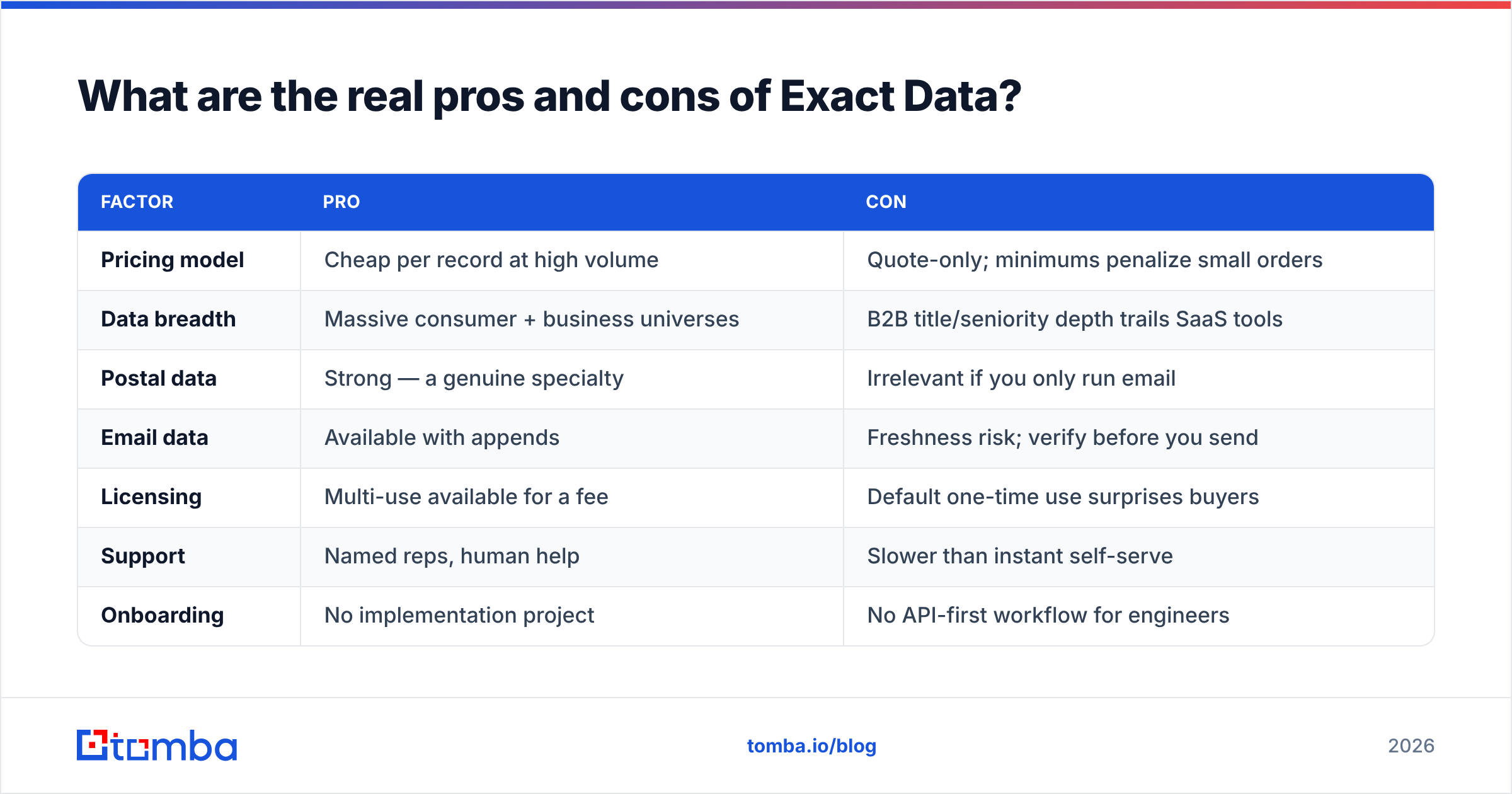
| Factor | Pro | Con |
|---|---|---|
| Pricing model | Cheap per record at high volume | Quote-only; minimums penalize small orders |
| Data breadth | Massive consumer + business universes | B2B title/seniority depth trails SaaS tools |
| Postal data | Strong — a genuine specialty | Irrelevant if you only run email |
| Email data | Available with appends | Freshness risk; verify before you send |
| Licensing | Multi-use available for a fee | Default one-time use surprises buyers |
| Support | Named reps, human help | Slower than instant self-serve |
| Onboarding | No implementation project | No API-first workflow for engineers |
| Compliance | Established compiler with opt-out handling | You still own suppression and consent checks |
If you want the honest one-line verdict: Exact Data is good at what list brokers are good at, and its weaknesses are the weaknesses of buying static files in a world where contact data changes every month.
Where do the hidden costs show up?#
The invoice is the easy part. Budget for these four:
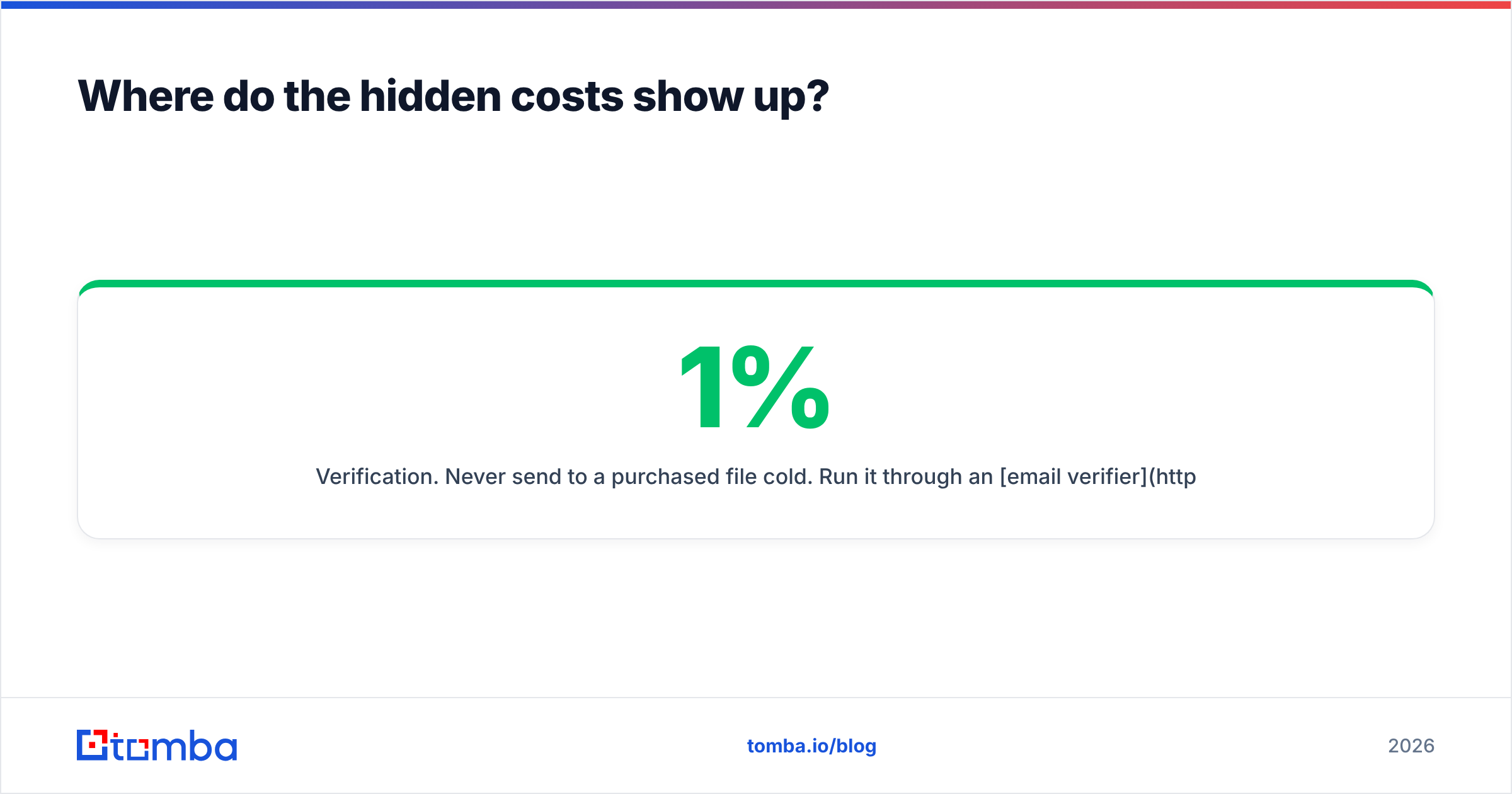
- Verification. Never send to a purchased file cold. Run it through an email verifier first and quarantine anything that fails. On a typical compiled file, removing invalids and catch-alls is the difference between a 1% bounce rate and a 12% one — and a 12% bounce rate damages your sender reputation for months.
- Suppression management. You are responsible for scrubbing your own opt-outs, existing customers, and current pipeline against the new file. Duplicate outreach to a live opportunity is more expensive than the record cost.
- Re-purchase cadence. With one-time-use licensing, a campaign you want to run quarterly is four purchases, not one.
- Enrichment gaps. Compiled files often lack the firmographics your sequencing needs (tech stack, headcount changes, funding). Filling those with data enrichment is a second line item.
Add those up and a "cheap" per-record file frequently lands at two to three times its sticker cost by the time it is safe to send.

How does Exact Data compare to the alternatives?#
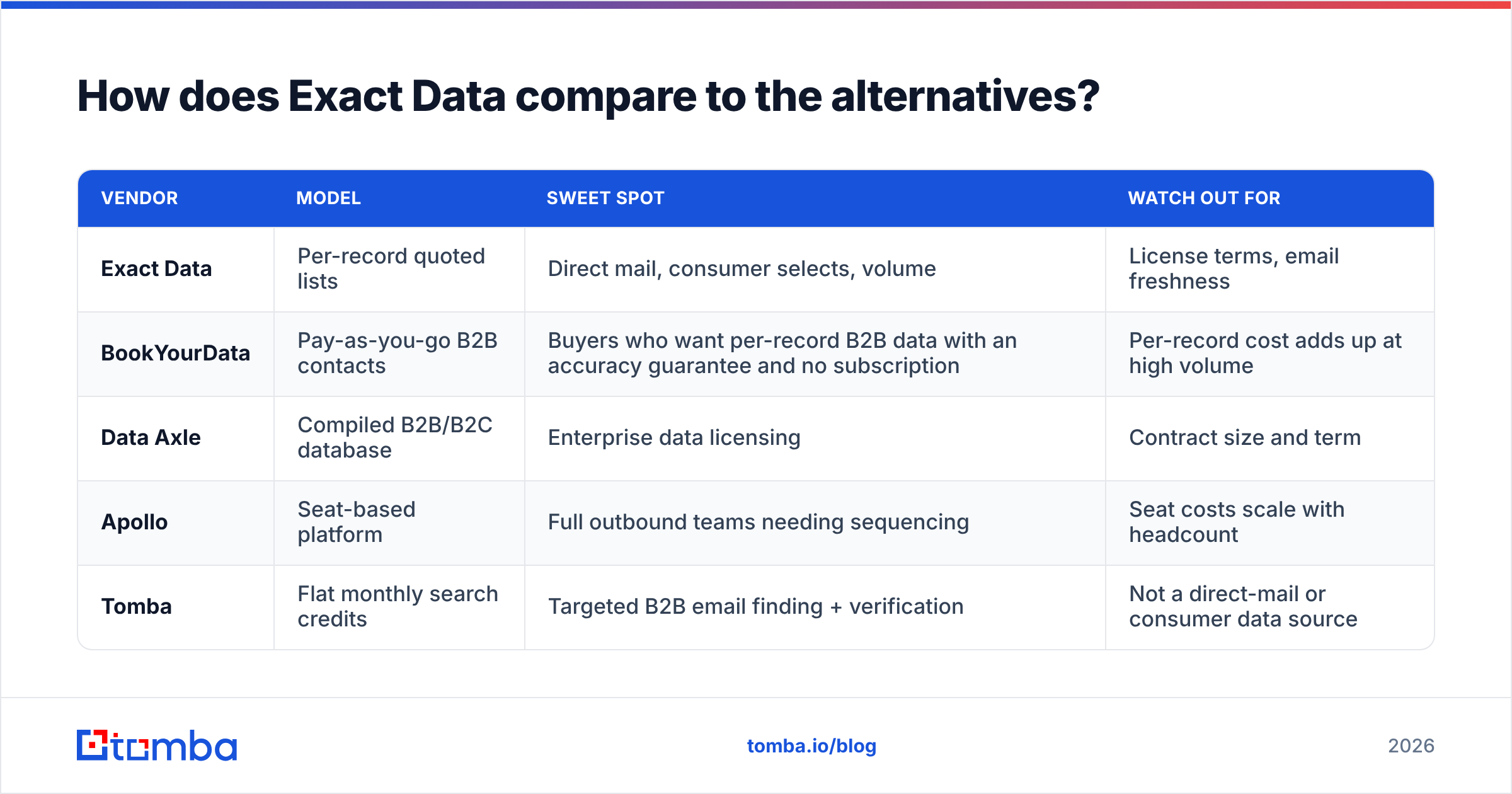
Different jobs, different tools. Here is the honest map:
| Vendor | Model | Sweet spot | Watch out for |
|---|---|---|---|
| Exact Data | Per-record quoted lists | Direct mail, consumer selects, volume | License terms, email freshness |
| BookYourData | Pay-as-you-go B2B contacts | Buyers who want per-record B2B data with an accuracy guarantee and no subscription | Per-record cost adds up at high volume |
| Data Axle | Compiled B2B/B2C database | Enterprise data licensing | Contract size and term |
| Apollo | Seat-based platform | Full outbound teams needing sequencing | Seat costs scale with headcount |
| Tomba | Flat monthly search credits | Targeted B2B email finding + verification | Not a direct-mail or consumer data source |
A few notes to keep this fair:
- BookYourData is a reasonable middle path if you like buying records outright but want B2B-grade contacts with a stated accuracy standard and no annual commitment. It solves the "I don't want a subscription" objection without the direct-mail baggage.
- Data Axle competes on the same compiled-database ground as Exact Data and is worth quoting alongside it for any large order — you should always get two broker quotes.
- Apollo is a different animal entirely: a platform, not a data purchase. If you need sequencing and dialing bundled in, look there, and if the seat pricing is the blocker, an Apollo alternative may fit better.
- Tomba is the right comparison only when your job is "find and verify current work emails for a defined set of companies or people." It is not a substitute for a 100,000-record consumer postal file, and pretending otherwise would be dishonest.
Is Exact Data worth it in 2026?#
Buy it if: your campaign is postal or consumer-focused, your record counts run into the tens of thousands, you need selects no B2B tool carries, and you have a rep-managed buying process where a quote is normal.
Skip it if: you are running B2B cold email, your target list is under a few thousand contacts, you need data that is accurate this week, or you want to pull contacts continuously rather than in one batch. In that scenario the per-record model works against you twice — once on price, once on freshness.
The strategic point underneath all of this: purchased files are a snapshot, and B2B contact data decays roughly 2–3% per month as people change jobs. A snapshot bought in January is meaningfully wrong by June. Tools that resolve a contact at the moment you need it sidestep decay entirely, which is why per-search pricing has largely displaced per-record pricing in B2B outbound while staying dominant in direct mail. For a deeper look at how live resolution differs from compiled files, see how Tomba sources its data.
One more practical tip regardless of which vendor you pick: run a paid pilot. Buy the minimum, verify it independently, measure the true valid rate, and only then negotiate the big order. Any vendor confident in its data will accept that. Sources like Capterra and G2 are useful for spotting red flags, but your own bounce report on 500 records is worth more than 50 reviews.
Which tool should you actually start with?#
If your next campaign is a mailer to 80,000 households in three ZIP codes, get an Exact Data quote and a Data Axle quote, compare per-record costs including selects, and negotiate the license term.
If your next campaign is 2,000 cold emails to decision-makers at companies you have already identified, you do not need a list broker at all. Start with the Tomba Email Finder — search by domain, name, or company, get the verified work email back with a confidence score, and pull as many as your plan allows. The free tier gives you 25 searches a month to test accuracy against contacts you can independently confirm; Starter is $49/mo, Growth is $99/mo, and Pro is $249/mo with no per-record surcharge, no order minimum, and no one-time-use license clause. Verify before you send, keep your bounce rate under 2%, and let the data stay as current as the day you pulled it.
Related guides#
Ready to find emails that actually work?
Join 150,000+ professionals who stopped guessing and started sending. Free credits on signup — no credit card required.
Get the Tomba newsletter
Practical outbound tactics and product updates — once every two weeks.
About the author