ExactVerify vs Tomba: Which Email Tool Wins in 2026?
ExactVerify verifies lists. Tomba finds and verifies contacts. We compare accuracy, pricing, API depth, and catch-all handling to show which one belongs in your stack — and when you need both.
TL;DR
- They are not the same category. ExactVerify is a bulk email verification tool. Tomba is a full contact-data platform — email finder, domain search, verifier, catch-all checks, phone finder, and enrichment under one API key.
- If you already own a list, a dedicated verifier like ExactVerify does the narrow job well and cheaply on a pay-as-you-go basis.
- If you need to build the list first, ExactVerify has nothing to offer you — you'd be paying for a second vendor to find the addresses before ExactVerify can clean them.
- Tomba pricing starts free (25 searches/mo), then $49/mo Starter, $99/mo Growth, $249/mo Pro. Verification credits come bundled rather than as a separate line item.
- Catch-all domains are the real test. Roughly a fifth of B2B domains accept everything at the SMTP layer, and how a tool labels them decides whether your bounce rate is 1% or 9%.
If you searched "ExactVerify vs Tomba," you probably assumed you were comparing two versions of the same product. You aren't. This post walks through what each tool actually does, where the overlap is real, and how to decide without buying both by accident.
What is ExactVerify and what does it actually do?#
ExactVerify is an email verification service. You upload a list — CSV, or push it through an API — and it returns a status per address: valid, invalid, risky, unknown, disposable, role-based. The pitch is straightforward: stop bounces before your sending domain absorbs the damage.
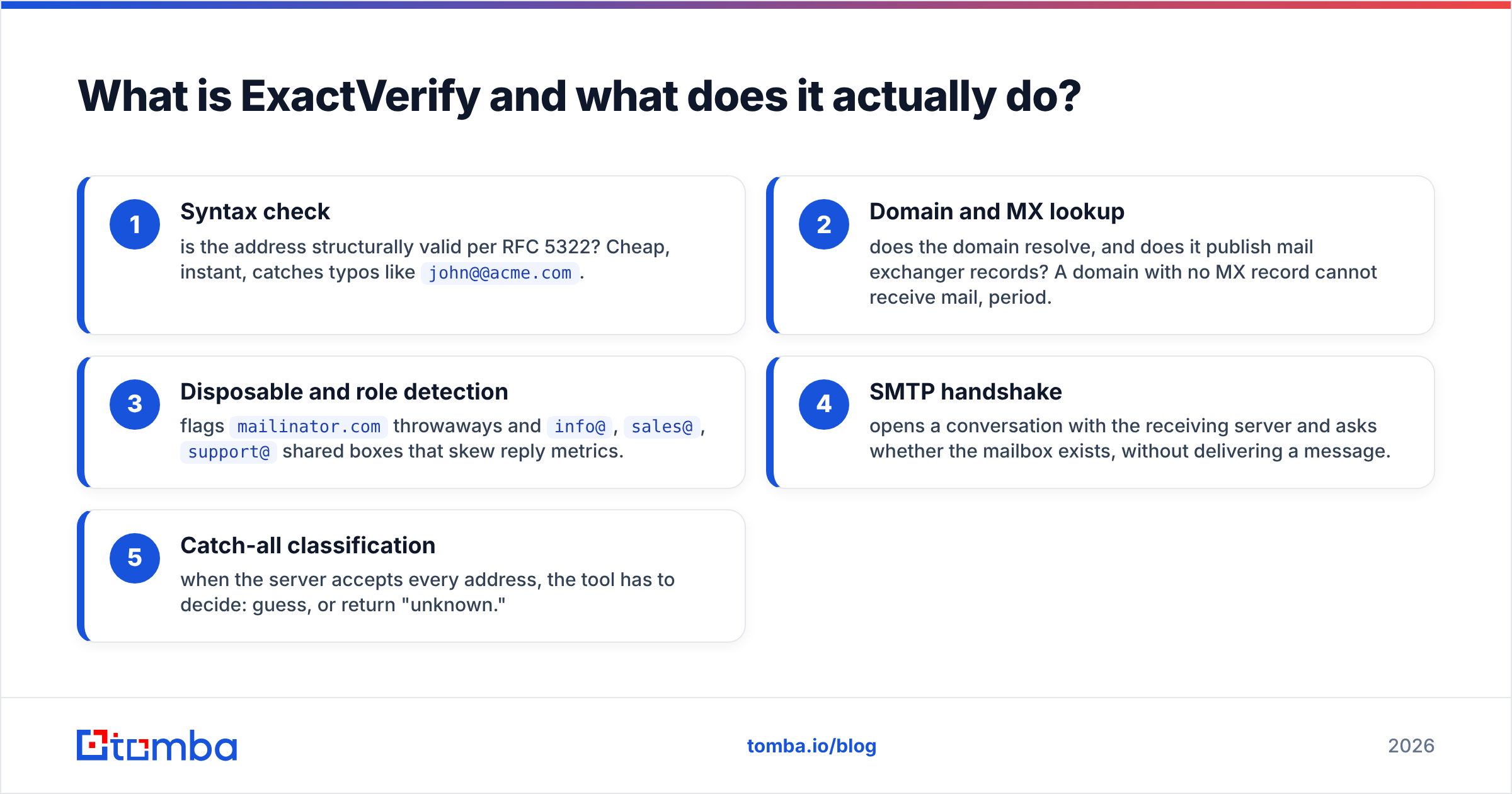
Verification tools all run roughly the same pipeline:
- Syntax check — is the address structurally valid per RFC 5322? Cheap, instant, catches typos like
john@@acme.com. - Domain and MX lookup — does the domain resolve, and does it publish mail exchanger records? A domain with no MX record cannot receive mail, period.
- Disposable and role detection — flags
mailinator.comthrowaways andinfo@,sales@,support@shared boxes that skew reply metrics. - SMTP handshake — opens a conversation with the receiving server and asks whether the mailbox exists, without delivering a message.
- Catch-all classification — when the server accepts every address, the tool has to decide: guess, or return "unknown."
Step 5 is where verifiers separate. Everything before it is commodity work that any competent vendor gets right.
ExactVerify's positioning is volume-friendly pricing with credits that don't expire, which matters if you verify in bursts — a quarterly database hygiene pass rather than a daily drip. It integrates with the usual ESP suspects and exposes a REST API for programmatic checks.
What it does not do: find you an email address. If you have a name and a company but no address, ExactVerify has no answer for you. That's not a criticism — it's a scope statement, and it's the single most important fact in this comparison.
What is Tomba and how is it different?#
Tomba starts one step earlier in the workflow. Its core product is the email finder: give it a first name, last name, and company domain, and it returns the most probable professional address along with a confidence score and the sources it used to reach that conclusion.
Around that core sit the rest of the toolkit:
- Domain search — enter
stripe.com, get back the people and their addresses, with departments and seniority. - Email verifier — the same SMTP-plus-heuristics validation ExactVerify sells, bundled into the same account.
- Catch-all verifier — a dedicated path for accept-all domains, which is the hardest part of the job.
- Phone finder and data enrichment — for multichannel sequences and CRM hygiene.
- Distribution surfaces — Tomba API, CLI, Chrome extension, Google Sheets add-on, Excel add-in, and an MCP server for LLM agents.
So the honest framing is: ExactVerify competes with one module of Tomba. Tomba competes with ExactVerify plus whatever you're using to source addresses in the first place.
How do ExactVerify and Tomba compare feature by feature?#
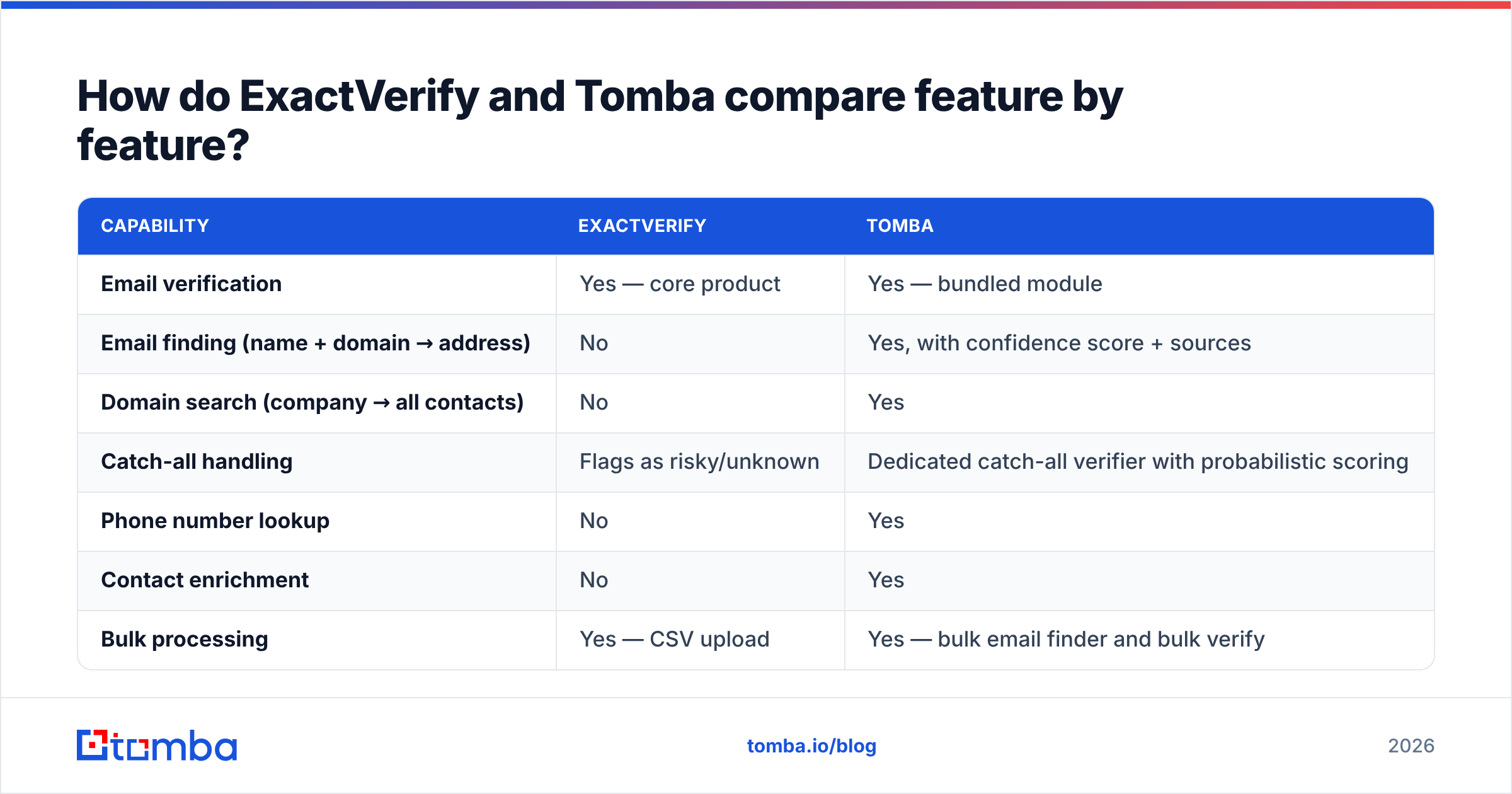
| Capability | ExactVerify | Tomba |
|---|---|---|
| Email verification | Yes — core product | Yes — bundled module |
| Email finding (name + domain → address) | No | Yes, with confidence score + sources |
| Domain search (company → all contacts) | No | Yes |
| Catch-all handling | Flags as risky/unknown | Dedicated catch-all verifier with probabilistic scoring |
| Phone number lookup | No | Yes |
| Contact enrichment | No | Yes |
| Bulk processing | Yes — CSV upload | Yes — bulk email finder and bulk verify |
| REST API | Yes | Yes — finder, verifier, enrichment, search |
| Spreadsheet add-ons | Limited | Google Sheets, Excel, Airtable |
| Browser extension | No | Yes |
| MCP / AI-agent support | No | Yes |
| Free tier | Trial credits | 25 searches/mo, permanent |
| Entry paid plan | Pay-as-you-go credits | $49/mo Starter |
Read that table as a scope map, not a scoreboard. A narrow tool that does one thing at a low unit price is a legitimate purchase — it's just a different purchase.
Which one is more accurate?#
Accuracy means two different things here, and conflating them is how teams end up disappointed.
Verification accuracy is: of the addresses you marked "valid," how many actually delivered? Every reputable verifier — ExactVerify, ZeroBounce, Bouncer, Tomba's verifier — lands in the 95–99% band on clean, non-catch-all domains. The SMTP protocol is deterministic there. Differences show up in the tail: greylisting handling, retry logic, and how aggressively a vendor calls a borderline result.
Finding accuracy is: of the addresses the tool generated, how many are real? This is a fundamentally harder problem, because you're inferring from patterns rather than reading a ledger. It's also where ExactVerify simply doesn't compete — it has no finder.

Two practical notes on evaluating any accuracy claim:
- Vendor-published numbers are marketing until you test them. Run the same 500-row sample through both tools and compare against your actual send results. Take twenty minutes; it settles the argument permanently.
- Coverage and accuracy trade off. A tool that returns fewer results with higher confidence looks "more accurate" on a spreadsheet and leaves money on the table. Judge on verified addresses returned per 100 prospects, not on hit rate alone.
The independent signal worth reading is peer reviews on G2, where you can filter by company size and see what people at your scale report rather than what a landing page claims.
How does catch-all handling differ?#
This deserves its own section because it's the biggest driver of real-world bounce rates.
A catch-all (or accept-all) domain is configured to accept mail for any address at that domain during the SMTP conversation, then sort out delivery internally. Send to nonsense@acme.com on a catch-all domain and the server says "sure, 250 OK" — then silently discards it or bounces it hours later, after you've already been credited with a successful send.
Verifiers have three options:
- Mark everything at that domain "unknown" — safe, honest, and useless. You either skip real prospects or send blind.
- Mark everything "valid" — dangerous. Inflates your valid count and torches your sender reputation when the deferred bounces land.
- Score probabilistically — cross-reference the address against pattern data, historical engagement signals, and other sources to estimate whether that specific mailbox exists.
ExactVerify, like most dedicated verifiers, sits in category one: catch-alls come back flagged as risky or unknown, and the decision is handed to you. That's defensible — a verifier with no independent data about the person can't do better honestly.
Tomba's catch-all finder works from a different starting position. Because it also holds pattern data for the domain and source evidence for the individual, it can offer a confidence score rather than a shrug. It is not magic and it is not 100%, but "72% confident this specific mailbox exists" is an actionable number in a way that "unknown" never is.
If your target market skews enterprise — where catch-all configurations are most common — this difference alone may decide the comparison.
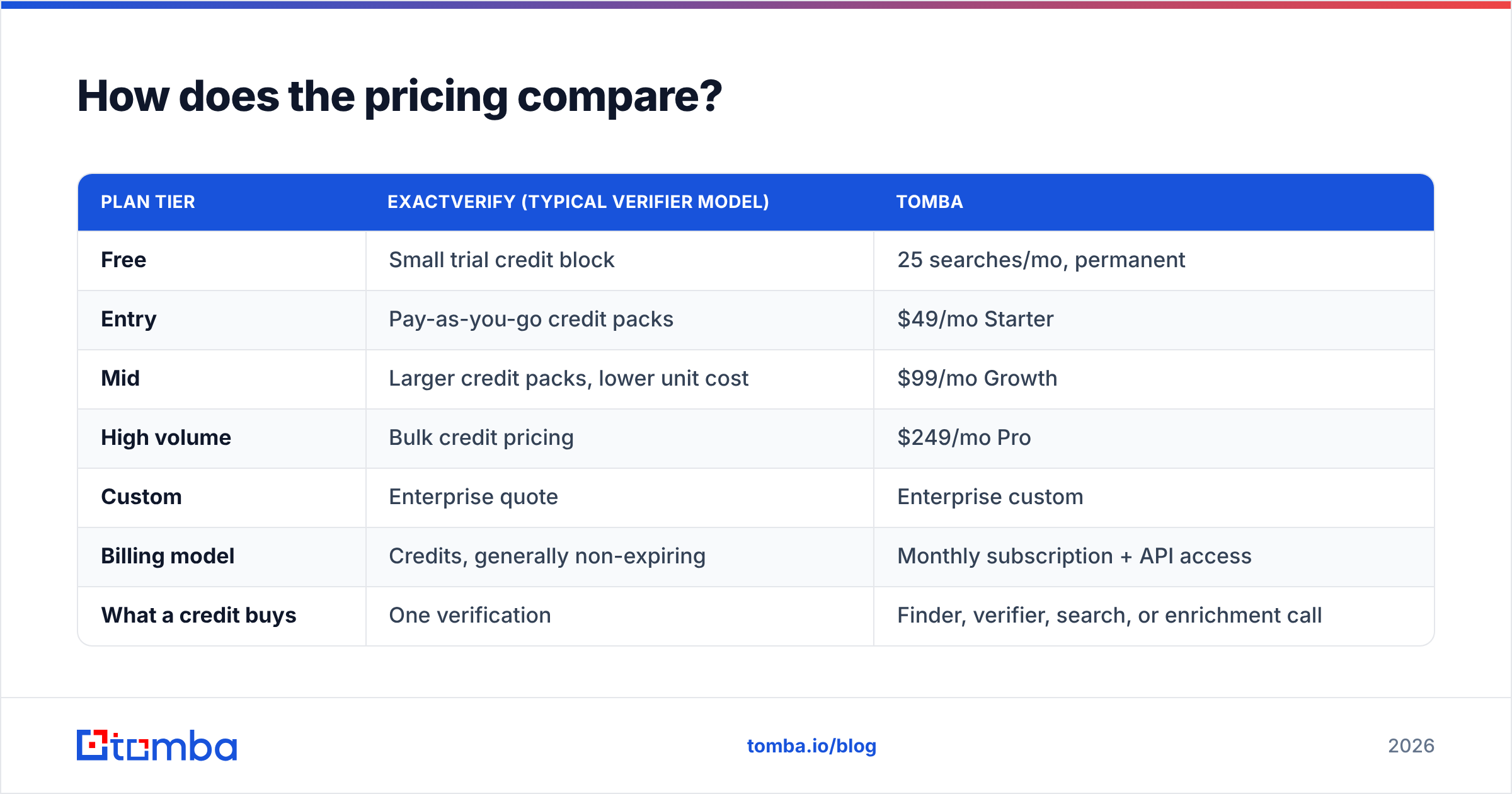
How does the pricing compare?#
| Plan tier | ExactVerify (typical verifier model) | Tomba |
|---|---|---|
| Free | Small trial credit block | 25 searches/mo, permanent |
| Entry | Pay-as-you-go credit packs | $49/mo Starter |
| Mid | Larger credit packs, lower unit cost | $99/mo Growth |
| High volume | Bulk credit pricing | $249/mo Pro |
| Custom | Enterprise quote | Enterprise custom |
| Billing model | Credits, generally non-expiring | Monthly subscription + API access |
| What a credit buys | One verification | Finder, verifier, search, or enrichment call |
Check current numbers on the official ExactVerify site and Tomba pricing before you commit — verification vendors change credit tiers frequently.
The economics question isn't unit price, it's total cost of the workflow:
- Verification only. You already have addresses and just need them cleaned. Pay-as-you-go credits at a low unit price win. A subscription you use twice a year is waste.
- Sourcing plus verification. You need a finder and a verifier. Two vendors means two contracts, two API integrations, two sets of rate limits, and a CSV shuttle between them. One platform at $49/mo often beats "cheap verifier plus whatever finds the emails."
- Programmatic pipeline. If you're building enrichment into your product or RevOps stack, the number of API surfaces you maintain matters more than the per-call price. Fewer vendors, fewer failure modes.

When should you pick ExactVerify?#
Pick ExactVerify — or another focused verifier like Bouncer, Clearout, or ZeroBounce — when all of these are true:
- You already have the addresses. From a CRM export, a webinar registration list, a newsletter database, or a partner data share.
- Your job is hygiene, not acquisition. You're scrubbing a decaying list before a campaign, not building a new one.
- Your volume is bursty. Quarterly cleans of 50k records suit non-expiring credits far better than a monthly subscription.
- You want one narrow thing done cheaply. No enrichment, no phone numbers, no browser extension — just a clean status column.
- You're already committed to a finder elsewhere. If Apollo or Clay already sources your contacts, a standalone verifier slots in without duplication.
That's a real and common set of circumstances. Don't over-buy a platform if list hygiene is genuinely your only gap.
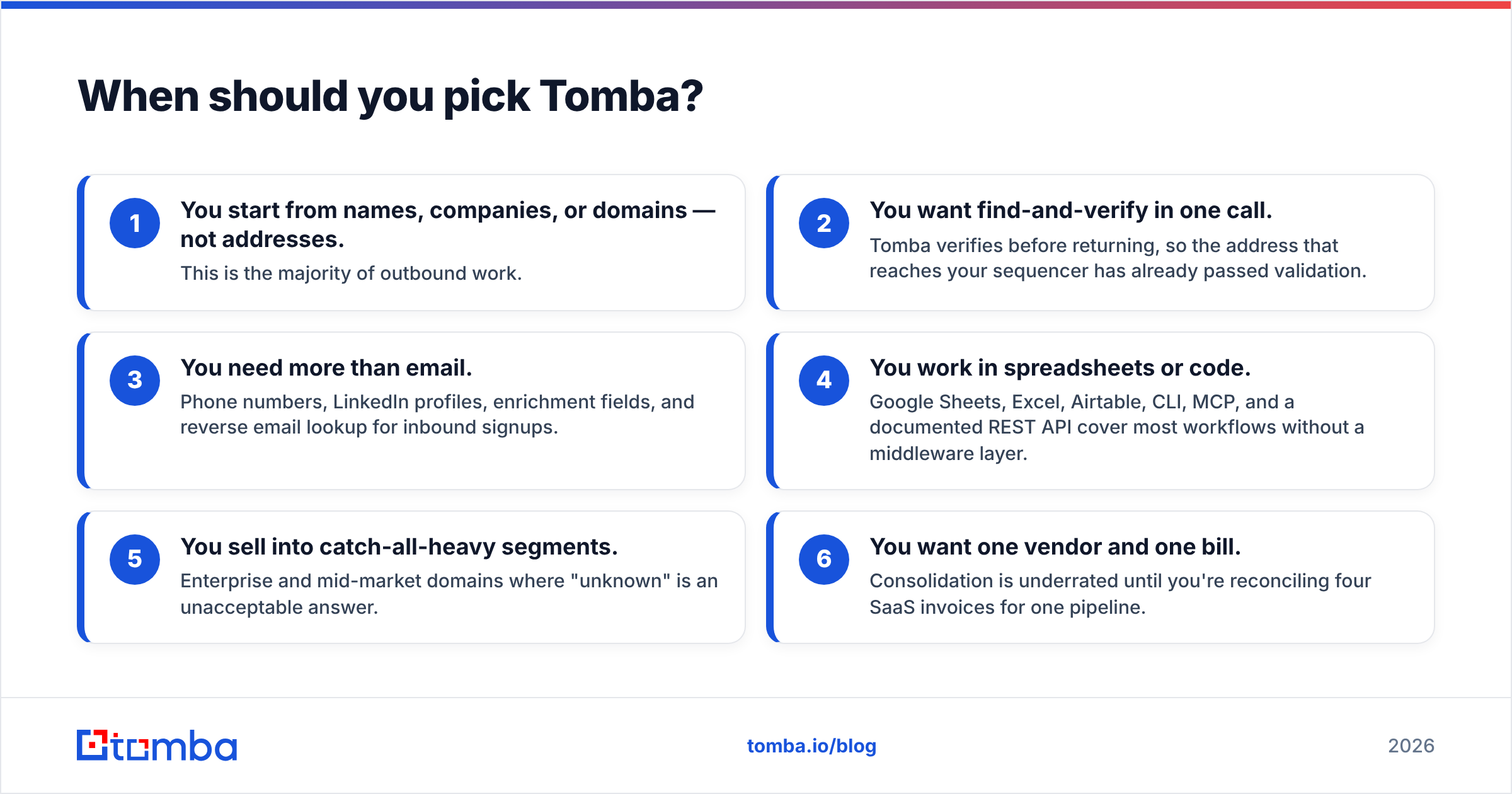
When should you pick Tomba?#
Pick Tomba when the bottleneck is upstream of verification:
- You start from names, companies, or domains — not addresses. This is the majority of outbound work.
- You want find-and-verify in one call. Tomba verifies before returning, so the address that reaches your sequencer has already passed validation.
- You need more than email. Phone numbers, LinkedIn profiles, enrichment fields, and reverse email lookup for inbound signups.
- You work in spreadsheets or code. Google Sheets, Excel, Airtable, CLI, MCP, and a documented REST API cover most workflows without a middleware layer.
- You sell into catch-all-heavy segments. Enterprise and mid-market domains where "unknown" is an unacceptable answer.
- You want one vendor and one bill. Consolidation is underrated until you're reconciling four SaaS invoices for one pipeline.
The honest caveat: if you truly only verify, you'll pay for capability you don't use. Tomba's free tier exists partly so you can find that out without spending anything.
What about running both?#
It's a legitimate architecture, and plenty of teams do it — but it's usually a transition state rather than a destination.
The pattern that makes sense: use Tomba to source and enrich at the top of the funnel, then run a second-pass verification through a dedicated verifier immediately before a high-stakes send. Double verification with two independent providers catches edge cases neither would alone, and for a 100k-contact campaign against a domain you can't afford to burn, that redundancy is cheap insurance.
The pattern that doesn't: paying for two overlapping verifiers because nobody audited the stack after the last tool purchase. Run that audit. It's usually a $200/mo saving.
Worth noting for teams evaluating the broader category: pure-play B2B database vendors like BookYourData solve a third problem again — buying pre-built, pre-verified lists by industry and title rather than finding or cleaning contacts yourself. If your constraint is "I don't know who to target," that's a better-fit purchase than either tool here.
What should you actually test before deciding?#
Skip the feature matrices — including this one — and run a controlled bake-off. It takes an afternoon.
- Build a 200-row control set from a segment you actually sell to, with names, companies, and domains. Include at least 40 rows from known catch-all domains.
- Run both tools on identical inputs. For ExactVerify, you'll need addresses first — which itself tells you something about the workflow cost.
- Send a real campaign to both output sets through the same infrastructure, on the same day, with the same copy. Anything else confounds the result.
- Measure hard bounce rate, soft bounce rate, and coverage. Coverage is contacts reachable per 100 prospects — the number that actually maps to pipeline.
- Track cost per verified, delivered contact, not cost per credit. A cheaper credit that yields fewer usable addresses is more expensive.
Under 2% hard bounce is the working threshold for protecting email deliverability. Above 5%, mailbox providers start throttling you regardless of which vendor's logo is on the invoice. Google's bulk sender guidelines spell out the thresholds they enforce, and they're worth reading before you blame a tool for a reputation problem.
The verdict#
ExactVerify is a competent verifier for teams whose only gap is list hygiene, and its pay-as-you-go model is genuinely better than a subscription for bursty, occasional cleaning.
Tomba is the better fit for anyone whose actual problem is getting contact data — which, for most outbound and demand-gen teams, is the real constraint. Verification bundled into the same platform means you're not paying twice or maintaining two integrations to solve one workflow.
The decision rule is one question: do you have the email addresses already? If yes, buy a verifier. If no, buy a platform that finds them and verifies them in the same call, then decide later whether a second-pass verifier earns its line item.
Start with the Tomba Email Finder free tier — 25 searches a month, no card — and run it against the same 200-row control set you'd use to test any verifier. You'll know within an hour whether the finder-plus-verifier model closes your gap, and if it doesn't, you've lost nothing but an afternoon.
Related guides#
Ready to find emails that actually work?
Join 150,000+ professionals who stopped guessing and started sending. Free credits on signup — no credit card required.
Get the Tomba newsletter
Practical outbound tactics and product updates — once every two weeks.
About the author