ExactVerify vs Wiza (2026): Which Email Data Tool Wins?
ExactVerify verifies addresses you already have. Wiza pulls contacts out of LinkedIn. Here is the honest breakdown of pricing, accuracy, workflow fit, and which one actually belongs in your stack in 2026.
ExactVerify vs Wiza is a comparison of two tools that do different jobs. ExactVerify cleans an email list you already own. Wiza builds a new list from LinkedIn. Pick the one that fixes your gap.
TL;DR
- ExactVerify and Wiza solve two different problems. ExactVerify cleans a list you already own. Wiza builds a list from LinkedIn Sales Navigator.
- If your bounce rate is above 3% and you already have contacts, you need verification. ExactVerify is the cheaper fix.
- If you have zero contacts and live inside Sales Navigator, Wiza is the faster path to a list. You still pay per contact, and you still need to check what it exports.
- Wiza costs more per usable contact. Credits get burned on records that come back with no email.
- Most teams end up paying for both. One platform that finds and verifies from a single credit pool usually costs less than two tools.
ExactVerify vs Wiza: what does each tool do?#
ExactVerify is an email verification service. You give it a list of addresses. It tells you which ones will bounce.
It runs syntax checks, MX record lookups, and SMTP handshakes. It also flags throwaway domains and role accounts like info@. Each address comes back as valid, invalid, catch-all, or unknown. There is a bulk uploader and a live API for signup forms. It does not find anybody. Upload an empty file and you get an empty file back.
Wiza is the opposite. It is a LinkedIn-native prospecting tool. You run a search in LinkedIn Sales Navigator and hit the Wiza extension. It exports the results as a CSV with names, titles, companies, and work emails. Higher plans add mobile numbers.
Wiza also checks the emails it produces. That is where the confusion starts. Wiza verifies, but verifying is a step inside its product, not the product itself.
So the real question in ExactVerify vs Wiza is simple. Is your bottleneck list quality or list existence?

ExactVerify vs Wiza: how does each one get its results?#
The mechanics matter more than the marketing pages. They explain every gap in price and accuracy further down the line.
ExactVerify uses SMTP-level probing. It opens a short conversation with the recipient's mail server. It asks whether a mailbox exists, without sending anything. This is fast, cheap, and quiet. The mail server sets the ceiling. Some providers accept every address, so a catch-all cannot be resolved this way. That is why every verifier returns an "accept-all" bucket it cannot judge.
Wiza guesses the pattern, then tests it. It reads the LinkedIn profile and finds the company domain. Then it builds likely patterns such as first.last@, f.last@, and first@. When a pattern resolves, you get a valid email. When nothing resolves, you get a name and no address. Depending on your plan, that empty row may still cost a credit.
Coverage changes with company size. Pattern guessing works well at companies with 200 or more staff and a steady naming rule. It falls apart at five-person startups, agencies on personal mailboxes, and anywhere the CEO uses a nickname.
Neither tool handles catch-all domains well. Roughly 15-25% of B2B domains accept all mail at the server. A standard verifier returns "unknown" and leaves the call to you. A dedicated catch-all verifier uses extra signals instead. It weighs past send data, pattern confidence, and engagement records to move some of those into a usable bucket.
Data freshness is the silent variable. Wiza's data reflects the LinkedIn profile on the day you exported it. That is often fresher than a static B2B database. ExactVerify has no view on job changes. An address can be perfectly deliverable and still belong to someone who left nine months ago.
That last point is the one most teams miss. A verified email is not the same as a correct contact.
ExactVerify vs Wiza: feature-by-feature comparison#
Here is the side-by-side. Tomba is included as the middle path, since it covers both jobs.
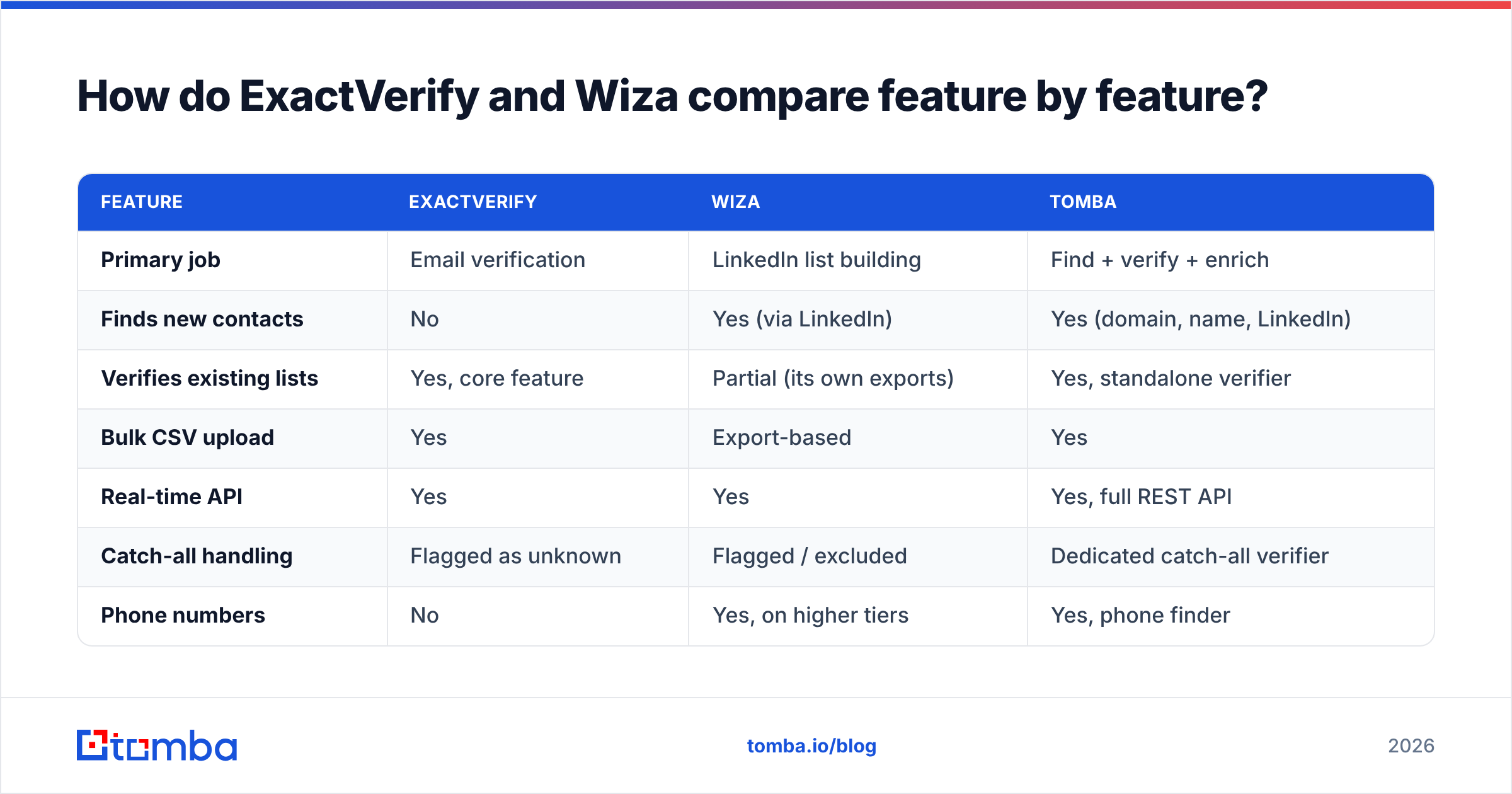
| Feature | ExactVerify | Wiza | Tomba |
|---|---|---|---|
| Primary job | Email verification | LinkedIn list building | Find + verify + enrich |
| Finds new contacts | No | Yes (via LinkedIn) | Yes (domain, name, LinkedIn) |
| Verifies existing lists | Yes, core feature | Partial (its own exports) | Yes, standalone verifier |
| Bulk CSV upload | Yes | Export-based | Yes |
| Real-time API | Yes | Yes | Yes, full REST API |
| Catch-all handling | Flagged as unknown | Flagged / excluded | Dedicated catch-all verifier |
| Phone numbers | No | Yes, on higher tiers | Yes, phone finder |
| Chrome extension | Limited | Yes, core to workflow | Yes |
| Free tier | Trial credits | Limited monthly credits | 25 searches/mo, free forever |
| Best for | Cleaning owned data | Sales Navigator power users | Teams that need both halves |

The table makes the overlap obvious: there is almost none. Verification is the only shared column. Even there, the two products behave differently. ExactVerify will check anything you throw at it. That includes a scraped list, a webinar export, or a decade-old CRM dump. Wiza only checks what Wiza produced. Hand Wiza a trade-show CSV of 40,000 addresses and it is the wrong tool.
ExactVerify vs Wiza: which one is more accurate?#
Accuracy is the wrong single number here. The two tools are measured on different axes.
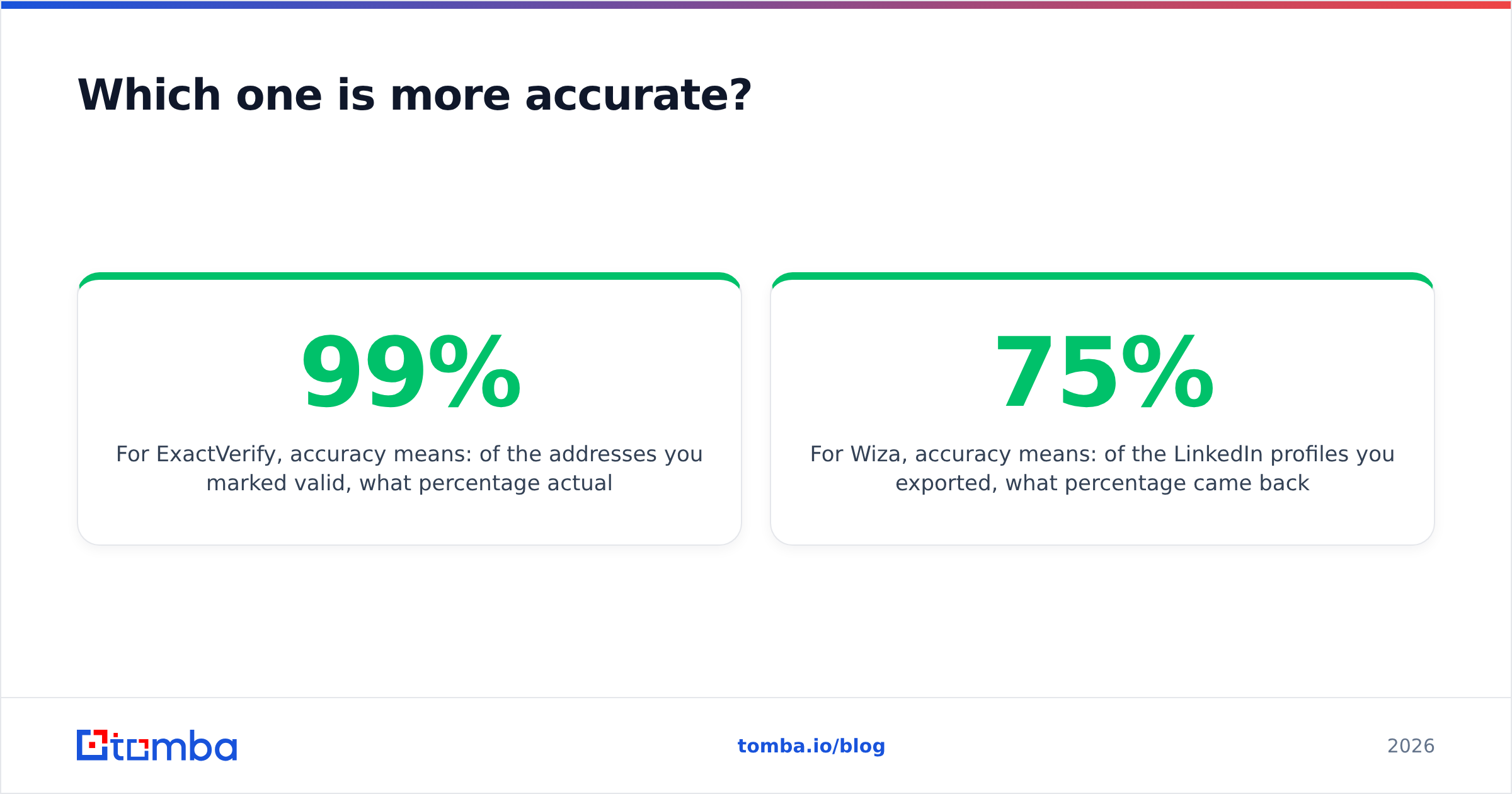
For ExactVerify, accuracy means this: of the addresses marked valid, how many actually delivered? Good verifiers land at 97-99% on non-catch-all domains. The "valid" bucket is rarely the differentiator. Everybody gets those right. What matters is the size of the "unknown" bucket, and how honest the vendor is about it. A verifier that returns 8% unknown and is right about the rest beats one that guesses quietly.
For Wiza, accuracy means something else: of the profiles you exported, how many came back with a working email? Hit rates on mid-market and enterprise lists sit near 60-75%. They drop sharply for small business, non-US, and technical roles. Wiza's verified emails bounce at low single digits, which is fine. The coverage gap is the cost you actually feel.

Here is the practical test. Run 500 contacts through each tool, send to them, and measure. Vendor accuracy figures use lists the vendor picked. Yours will differ. Any tool worth using gives you free credits to run that test first, including Tomba's email verifier.
One more thing is worth knowing. A bounce is not just a lost email. Mailbox providers read hard bounce messages as a sign that you do not know your audience. They lower your sender reputation for it. So verification is not a step to skip when you are in a hurry.
ExactVerify vs Wiza pricing in 2026#
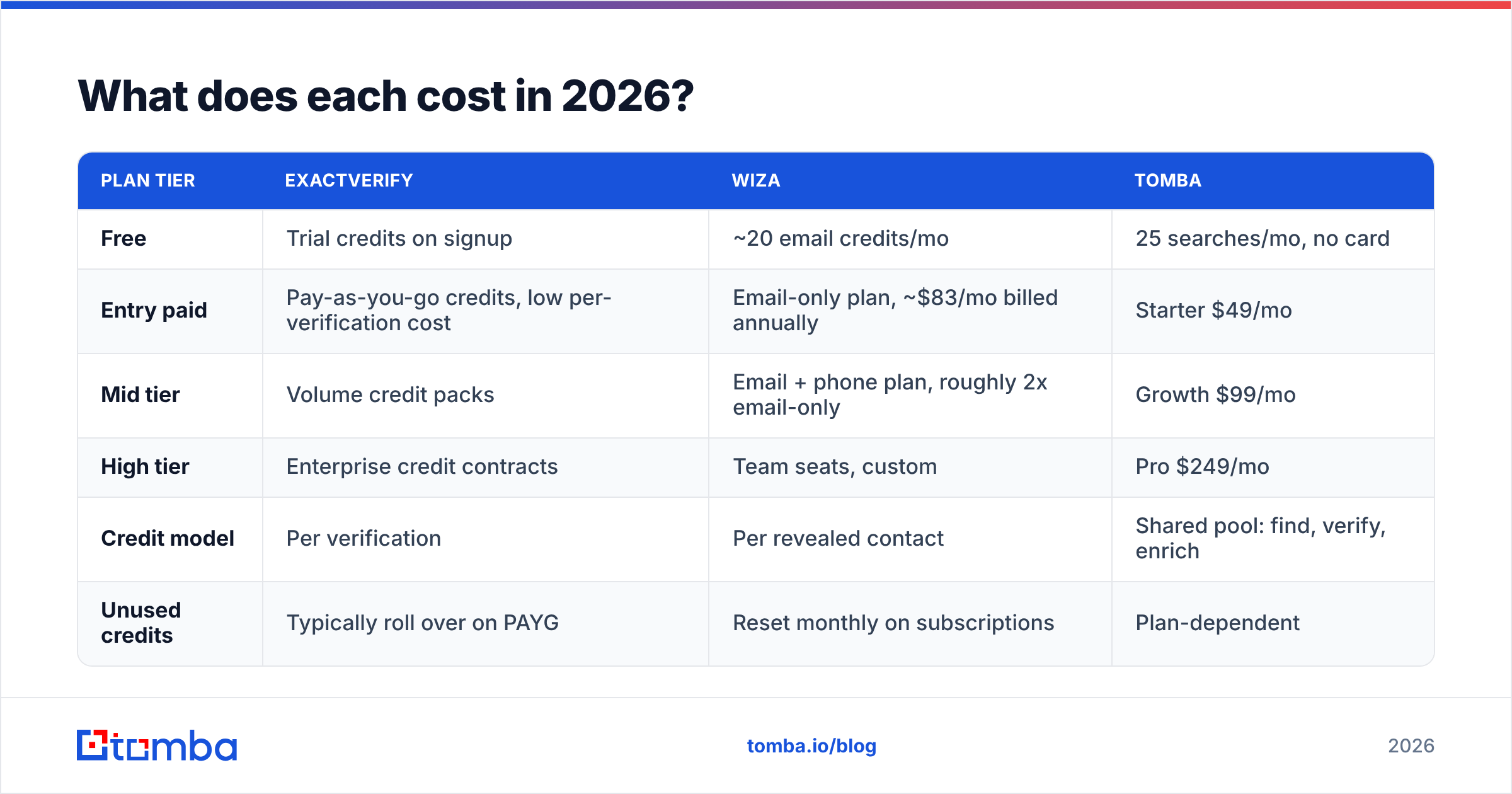
Pricing on both platforms shifts. Both publish annual-billing numbers that look lower than the monthly rate. Check the vendor pages before you budget. The shape of the pricing is stable, though, and it should drive your decision.
| Plan tier | ExactVerify | Wiza | Tomba |
|---|---|---|---|
| Free | Trial credits on signup | ~20 email credits/mo | 25 searches/mo, no card |
| Entry paid | Pay-as-you-go credits, low per-verification cost | Email-only plan, ~$83/mo billed annually | Starter $49/mo |
| Mid tier | Volume credit packs | Email + phone plan, roughly 2x email-only | Growth $99/mo |
| High tier | Enterprise credit contracts | Team seats, custom | Pro $249/mo |
| Credit model | Per verification | Per revealed contact | Shared pool: find, verify, enrich |
| Unused credits | Typically roll over on PAYG | Reset monthly on subscriptions | Plan-dependent |
Two cost traps are worth watching.
Trap one: paying twice for the same contact. Say Wiza gives you 3,000 exports and you run all of them through a separate verifier. You paid Wiza for the contact, then paid again to check it. That is fair if you do not trust the source. It is also money a single-vendor pipeline would save.
Trap two: credits burned on nothing. Some tools charge per attempted lookup instead of per result. Your true cost per usable contact then rises by the miss rate. At a 70% hit rate, a $0.10 lookup really costs $0.14 per usable email. Read the credit policy, not the headline price. Tomba's pricing and most credible vendors only charge on a result. Confirm that in writing before you scale spend.
ExactVerify vs Wiza: which fits your use case?#
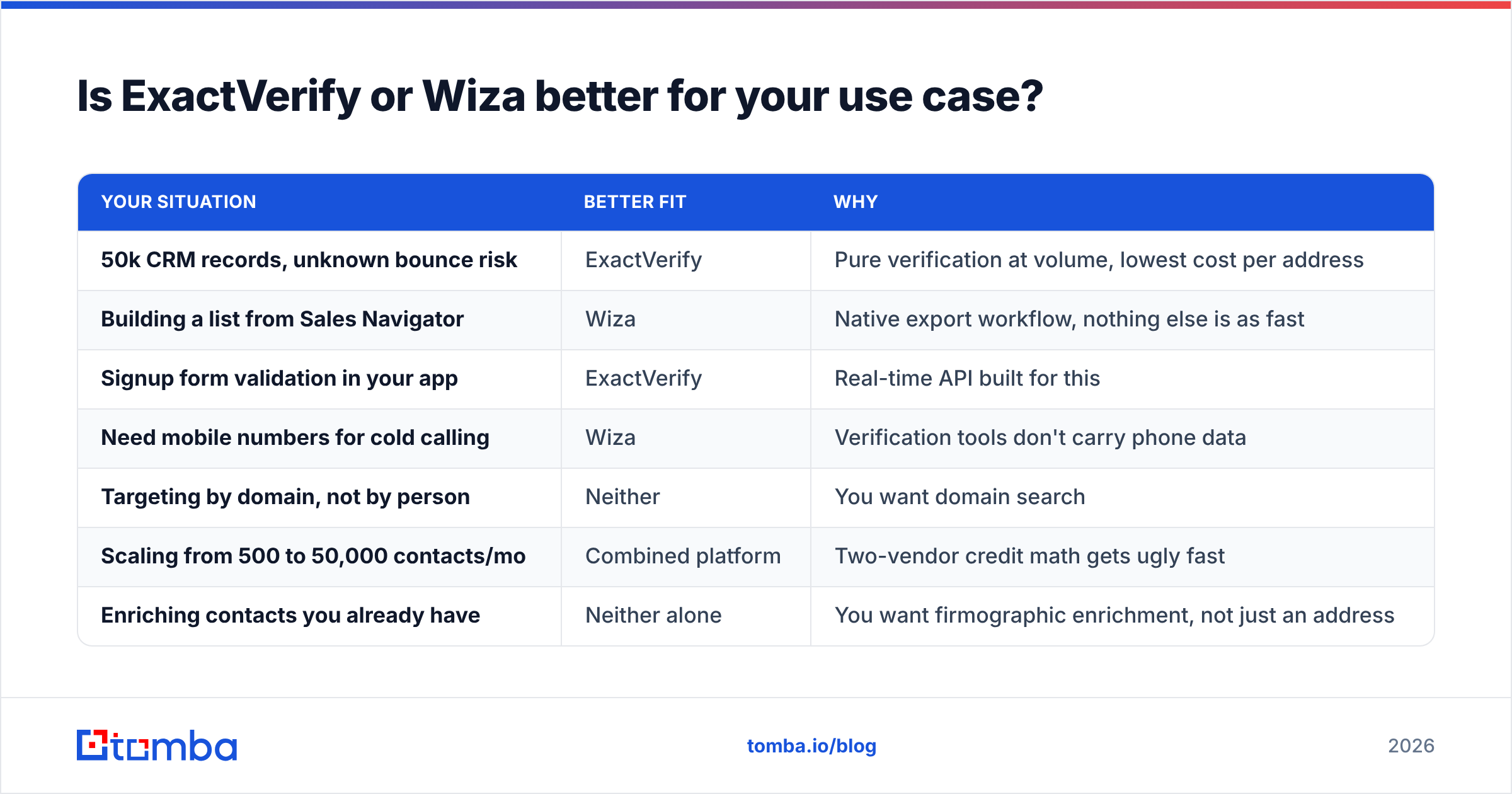
Match the tool to the situation, not to the feature list.
| Your situation | Better fit | Why |
|---|---|---|
| 50k CRM records, unknown bounce risk | ExactVerify | Pure verification at volume, lowest cost per address |
| Building a list from Sales Navigator | Wiza | Native export workflow, nothing else is as fast |
| Signup form validation in your app | ExactVerify | Real-time API built for this |
| Need mobile numbers for cold calling | Wiza | Verification tools don't carry phone data |
| Targeting by domain, not by person | Neither | You want domain search |
| Scaling from 500 to 50,000 contacts/mo | Combined platform | Two-vendor credit math gets ugly fast |
| Enriching contacts you already have | Neither alone | You want firmographic enrichment, not just an address |
Look at the last three rows. Past a few hundred contacts a month, ExactVerify vs Wiza stops being a feature question. The combined setup costs more in friction than in dollars. You get two dashboards, two credit balances, two CSV formats, and two support queues. Somebody on your team also maintains the join step in a spreadsheet.
Where do ExactVerify and Wiza both leave a gap?#
Three gaps show up again and again in real workflows.
Coverage outside LinkedIn. Wiza is only as good as LinkedIn's index. Many decision-makers in manufacturing, logistics, healthcare, and local services have no profile at all. The same is true across much of the non-US mid-market. If your buyers live outside LinkedIn, a LinkedIn-first tool quietly caps your market. Domain-based finding covers those segments better. You start from the company website and work down to people. Tomba's LinkedIn finder handles the LinkedIn side, and the domain-first path fills the rest.
Catch-all domains. Both tools hand you a bucket labeled "we don't know." On a typical B2B list, that is 15-25% of your contacts. It also holds many of the large firms you most want to reach. Leaving it unmailed is expensive. Mailing it blind is worse. This is the strongest reason to pick a vendor with a real catch-all product.
Bulk volume and automation. Exporting from an extension is fine at 200 contacts. At 20,000 a month it becomes somebody's part-time job. For a repeatable process, you want a bulk email finder and an API you can wire into your CRM. A browser tab and a downloads folder will not scale. Check for native integrations with your stack, not a Zapier workaround at every step.
Want a read from real users instead of vendor copy? The G2 email verification category is a fair sanity check. Filter by company size close to yours. Enterprise reviewers and solo founders rate these tools very differently. You can also compare the raw feature lists at exactverify.com and wiza.co.
ExactVerify vs Wiza: so which should you pick?#
Pick ExactVerify if you already have the contacts and just need them clean. It does one job at a low cost per address, and it ships a real-time API. Buying a specialist tool for a specialist problem is fine. If verification is your only gap, a dedicated verifier is the cheapest right answer.
Pick Wiza if your prospecting runs through Sales Navigator. It also wins when you need mobile numbers and your buyers sit in the LinkedIn-visible mid-market. The export workflow is genuinely good and hard to copy by hand. Budget for the coverage gap. Assume roughly 30% of your exports come back without a usable email.
Pick neither, and consolidate, if you need both jobs done. Most outbound teams do. Two vendors mean two contracts, two credit pools that never share, and a manual handoff step. One platform finds by domain, name, or LinkedIn profile, verifies the result, resolves catch-alls, and enriches the record. That usually costs less per usable contact than two specialists, and the join step disappears.
That is the case for Tomba. The Tomba Email Finder starts from a domain, a name, or a LinkedIn profile. It verifies every result before you see it. Verification, catch-all checks, and enrichment all draw on the same credit pool. The free tier gives you 25 searches a month with no card. Benchmark it against your own list, which is the only benchmark that counts. Then decide whether ExactVerify vs Wiza, or one consolidated stack, is the right line item for 2026.
Related guides#
Ready to find emails that actually work?
Join 150,000+ professionals who stopped guessing and started sending. Free credits on signup — no credit card required.
Get the Tomba newsletter
Practical outbound tactics and product updates — once every two weeks.
About the author