Example of Business Email Address: 7 Real Formats (2026)
An example of business email address is more than name@company.com. Here are the real formats companies use in 2026, which ones win replies, and how to verify a guess before it bounces.
TL;DR
- A clean example of business email address is
sarah.chen@northwind.com— an address on a domain your company owns.sarahchen92@gmail.comis not one. The domain is the whole point. - Four formats cover roughly 80% of B2B companies:
first.last@,first@,flast@, andfirstlast@. Learn to spot them and you can guess most addresses. - Role addresses (
info@,sales@,support@) do a different job than personal ones. Using one for cold outreach is why your reply rate is flat. - Guessing a format is cheap. Sending to an unverified guess is not. Bounces above 3% start to hurt your sender reputation.
- Pattern detection plus verification beats permutation-and-pray. That is the whole workflow below.
What is a business email address, exactly?#
A business email address sits on a domain the company controls. priya.nair@acme.io is one. priya.nair.acme@gmail.com is a personal address used for work. It is not the same thing, and it does not carry the same trust.
Think of it like a return address on an envelope. A letter from "42 Maple Street" tells you almost nothing. A letter from "Legal Department, Acme Tower, Floor 12" tells you who wrote it and why it matters. The domain does that job. When someone sees @stripe.com in the inbox, the domain has already answered "who is this?"
Every address follows the same two-part shape from the email address standard: a local part, an @, and a domain. The local part is where the action is. That is where companies encode a naming rule, and rules are predictable.
Here is the shape, broken down:
- Local part —
sarah.chen. The name of the person or role. It follows a company-wide pattern. - Separator — the
.between first and last name. It could also be_,-, or nothing. Companies almost never mix separators. - The
@symbol — always there, always once. It splits person from company. - Domain —
northwind.com. The company owns it, pays for it, and sets up its DNS. This is what makes the address a business address. - Optional subdomain —
@mail.northwind.comor@eu.northwind.com. Common in big enterprises with regional mail servers. Rare under 200 people. - MX records behind the domain — you cannot see them in the address. They tell you if mail runs on Google Workspace, Microsoft 365, or a self-hosted server. That matters for verification.
Example of business email address: what one really looks like#
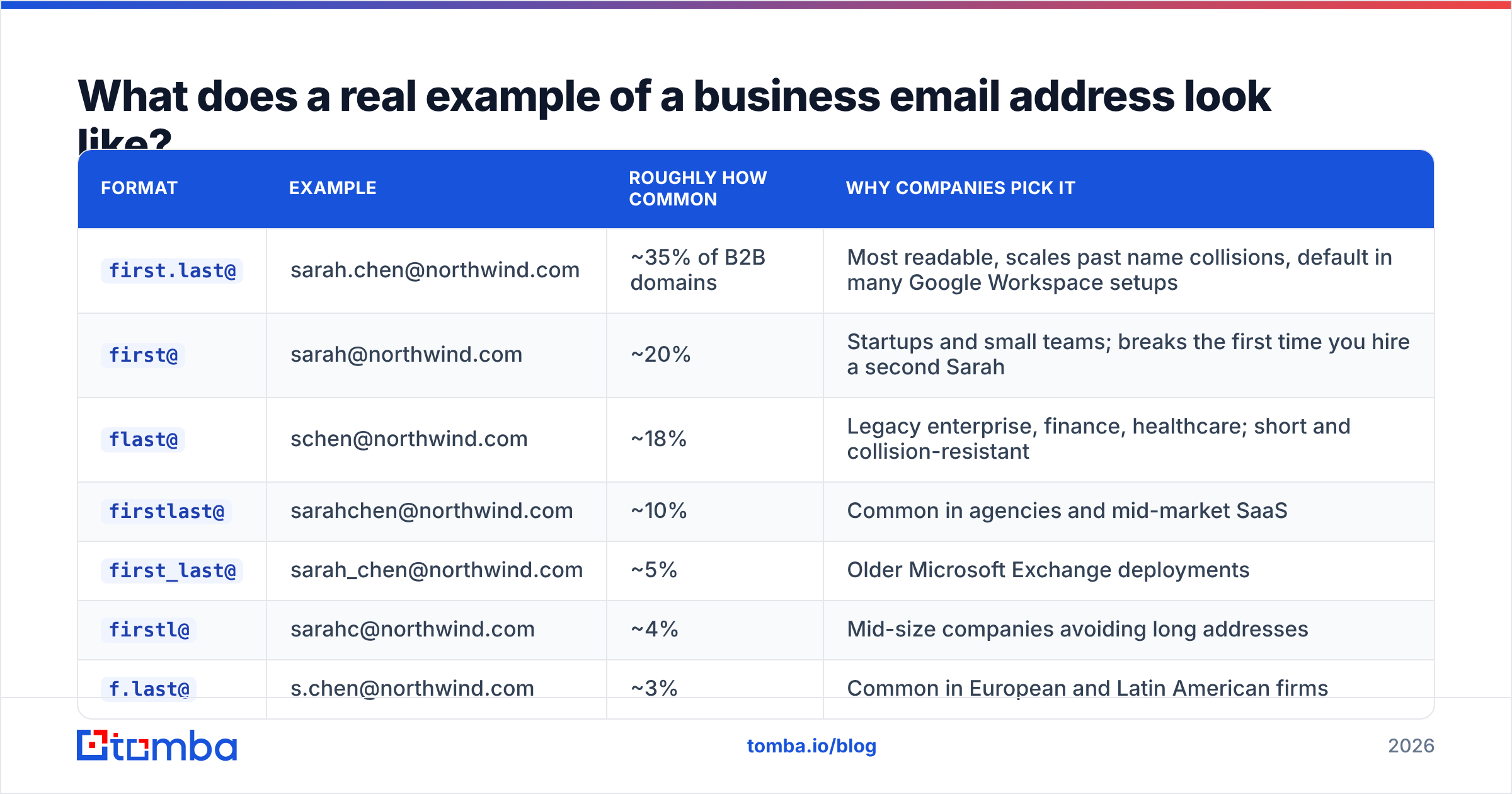
Take a made-up employee. Sarah Chen, Director of Partnerships at Northwind Traders (northwind.com). Her address depends on the rule Northwind picked when they set up mail. Below is an example of business email address for each common convention.
| Format | Example | Roughly how common | Why companies pick it |
|---|---|---|---|
first.last@ |
sarah.chen@northwind.com | ~35% of B2B domains | Most readable, survives name clashes, default in many Google Workspace setups |
first@ |
sarah@northwind.com | ~20% | Startups and small teams; breaks the day you hire a second Sarah |
flast@ |
schen@northwind.com | ~18% | Legacy enterprise, finance, healthcare; short and clash-resistant |
firstlast@ |
sarahchen@northwind.com | ~10% | Common in agencies and mid-market SaaS |
first_last@ |
sarah_chen@northwind.com | ~5% | Older Microsoft Exchange setups |
firstl@ |
sarahc@northwind.com | ~4% | Mid-size companies avoiding long addresses |
f.last@ |
s.chen@northwind.com | ~3% | Common in European and Latin American firms |
| Role/alias | partnerships@northwind.com | n/a | Shared inbox, not a person |
Two things stand out. First, the top four formats cover about 83% of domains. That is why pattern-based guessing works at all. Second, none of this is random. A company picks one rule on day one and applies it to every hire after that. Confirm one address at a company and you have the template for everyone else.
That is the leverage. If marcus.webb@northwind.com is valid, Sarah is almost certainly sarah.chen@northwind.com. Not schen@. Not sarahchen@. One data point unlocks the org chart.

Is a business email address better than Gmail for outreach?#
Yes, and the gap is not subtle.
Three things change when you send from a company domain:
Authentication. A domain you own can carry SPF, DKIM, and DMARC records. Those three DNS entries prove to receiving servers that your mail really came from you. Free consumer mailboxes give you none of that control. Your email deliverability then rides on the provider's shared reputation. Since the 2024 Google and Yahoo bulk-sender rules, sending B2B volume from a @gmail.com address is close to a filtering penalty.
Credibility. A VP of Engineering gets a partnership pitch from @outlook.com. She judges it in under a second. That is unfair, and it is real.
Control. Company domains let you create aliases, share inboxes, and route mail by department. They also let you offboard someone without losing their thread history. Providers like Google Workspace build their whole admin model on this.
One honest counterpoint. Some solo consultants and early founders do fine on a free address, because their personal brand is the company. That works until the first hire. Then you migrate everything.
What's the difference between a personal and a role-based business address?#
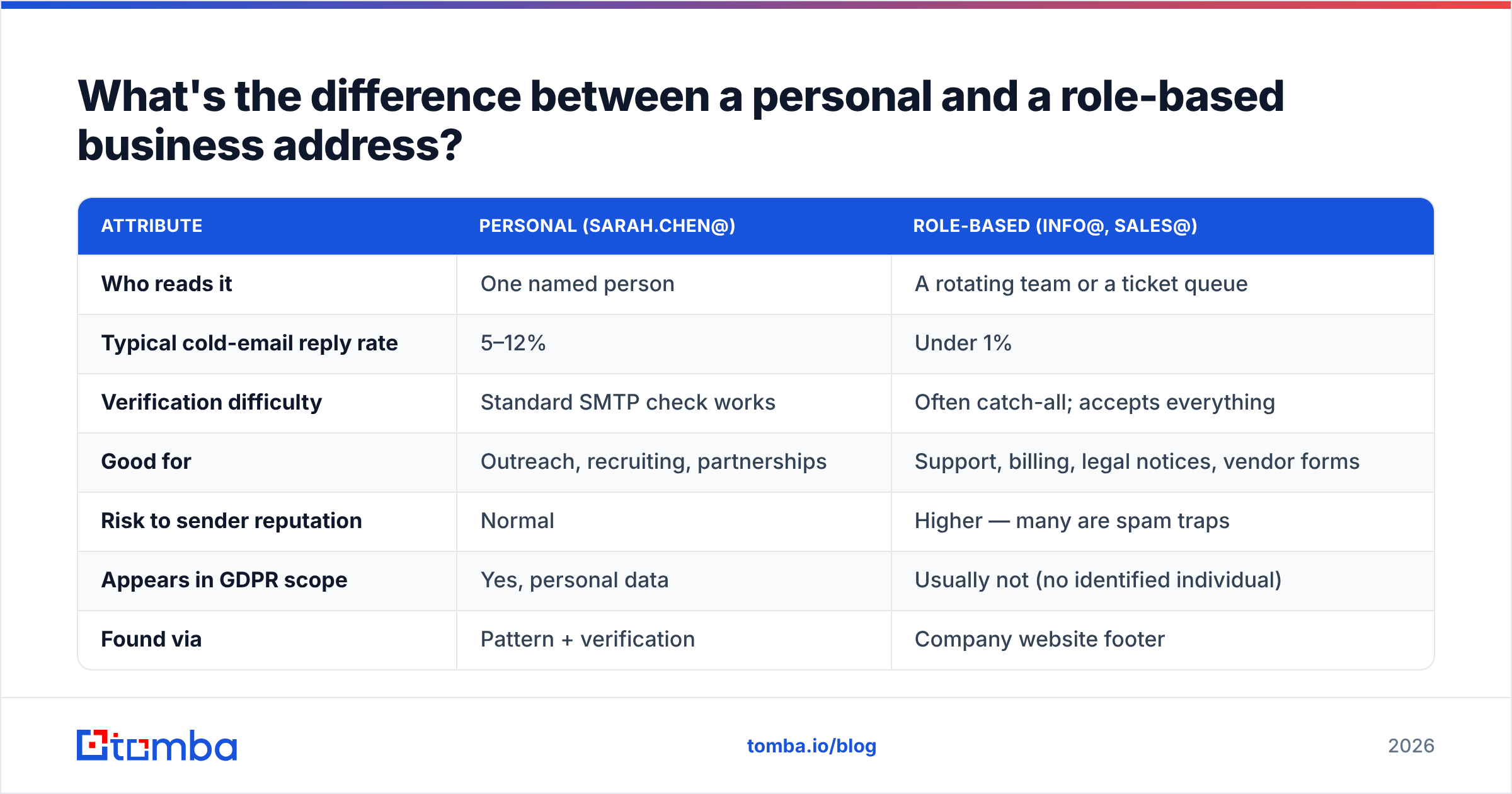
A personal address maps to one human. A role address maps to a job function, and usually to a shared inbox several people can read.
| Attribute | Personal (sarah.chen@) | Role-based (info@, sales@) |
|---|---|---|
| Who reads it | One named person | A rotating team or a ticket queue |
| Typical cold-email reply rate | 5–12% | Under 1% |
| Verification difficulty | Standard SMTP check works | Often catch-all; accepts everything |
| Good for | Outreach, recruiting, partnerships | Support, billing, legal notices, vendor forms |
| Risk to sender reputation | Normal | Higher — many are spam traps |
| Appears in GDPR scope | Yes, personal data | Usually not (no named individual) |
| Found via | Pattern + verification | Company website footer |
Most outbound teams treat these as the same thing. They are not. Blocklist operators often turn info@ and contact@ into spam traps, because no honest prospecting workflow should hit them at scale. A cold email to info@northwind.com does not just fail to convert. It can damage your sender reputation.
Role addresses still have a job. Chasing an invoice, filing a security disclosure, asking procurement a question — billing@ or security@ is exactly right. When you need a human to care, you need a human's address.
How do you find someone's business email address without guessing?#
There are four practical ways, worst to best.
Approach 1: Manual permutation. Take the name, build every plausible format, send to all of them, and see what sticks. This is how domains get blocklisted. Every wrong guess is a hard bounce. Eight guesses per prospect at a 12% hit rate means an 88% bounce rate. Don't.
Approach 2: Permutation plus verification. Build the same candidate list, but run each one through SMTP validation first. Better, but slow. It also breaks on catch-all domains, which accept every address at the server.
Approach 3: Pattern detection. Work out the company's rule first. Look at confirmed addresses in press releases, GitHub commits, or public contact pages. Then apply that one pattern to your target. One candidate instead of eight. A free company email pattern check does this in seconds.
Approach 4: Sourced lookup with verification built in. Query a service that already maps names to verified addresses across millions of domains. You get a confidence score and the source. That is what an email finder does. It blends pattern logic, crawled public sources, and live checks into one call. You get an address plus evidence, not an address plus hope.
Need everyone at a company instead of one person? Domain search flips the query. Give it northwind.com and it returns known addresses plus the detected pattern. That is usually the fastest way to confirm a convention.
How do you verify a business email address before you send?#
Verification is a stack of separate checks. Skipping the cheap ones to run the expensive one is how people burn credits.
- Syntax check — does the address parse? It catches typos like
sarah.chen@@northwind.comat zero cost. - Domain and MX check — does the domain resolve, and does it have mail records? A domain with no MX cannot receive mail at all. This kills a lot of stale list entries.
- Disposable and free-provider detection — flags
@mailinator.comand friends. It also splits consumer domains from company ones, so you score leads correctly. - Role-address detection — flags
info@,admin@, andnoreply@so they never enter a cold sequence. - SMTP handshake — connects to the mail server and asks if the mailbox exists. No message is delivered. This is the real test.
- Catch-all handling — some servers accept every address, real or not. A catch-all verifier adds extra signals to estimate deliverability there, instead of returning a useless "unknown."
Run this stack with an email verifier and your bounce rate drops from 15% to about 1%. The threshold that matters is small. Most ESPs and industry guidance — including HubSpot's deliverability documentation — put the danger line at 2–3%. Above that, filters get aggressive. It takes weeks of clean sending to recover.

What does a professional business email address look like — and what doesn't?#
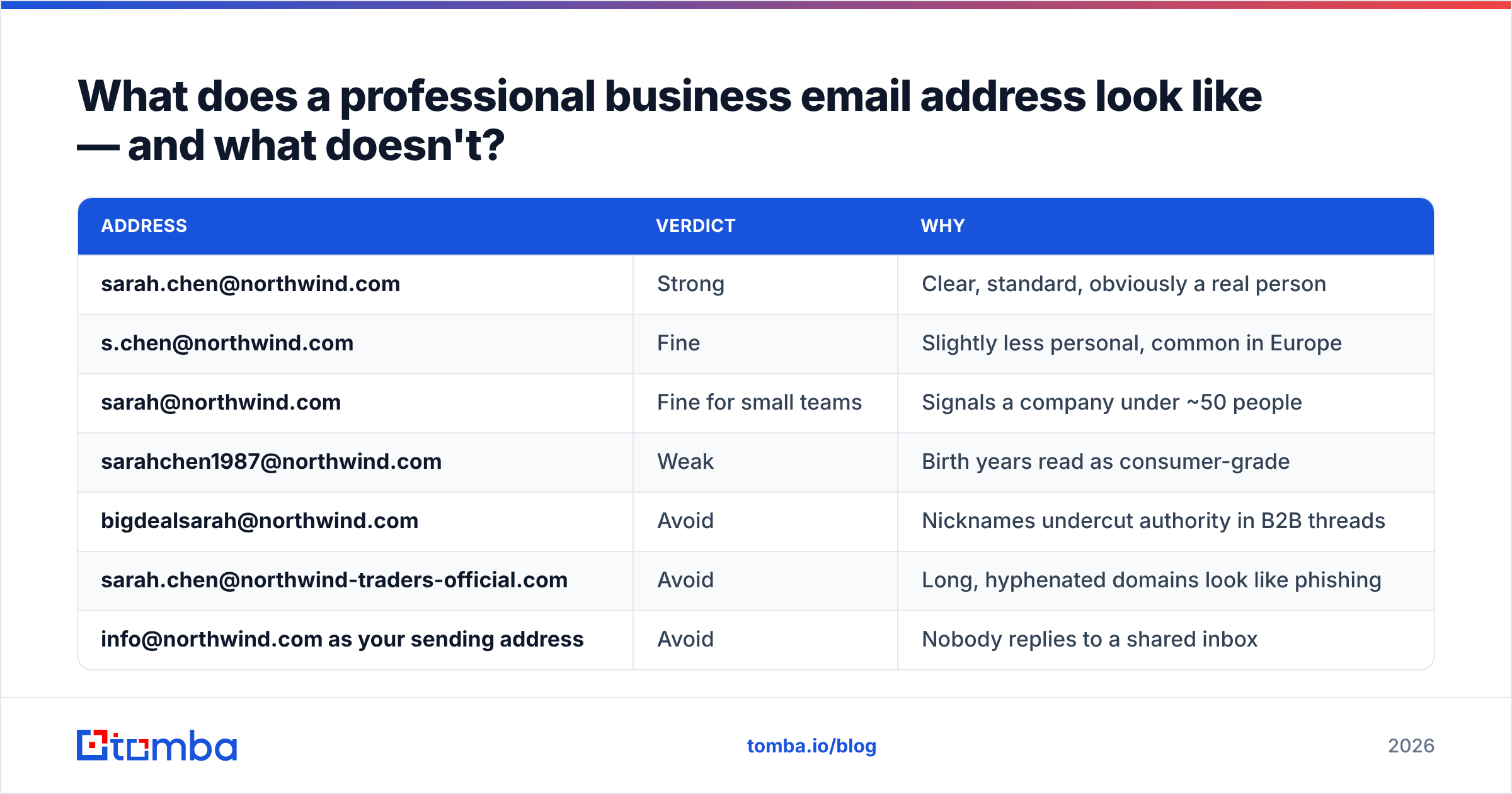
Format is one thing. Judgment is another. Some addresses are valid and still cost you deals.
| Address | Verdict | Why |
|---|---|---|
| sarah.chen@northwind.com | Strong | Clear, standard, obviously a real person |
| s.chen@northwind.com | Fine | Slightly less personal, common in Europe |
| sarah@northwind.com | Fine for small teams | Signals a company under ~50 people |
| sarahchen1987@northwind.com | Weak | Birth years read as consumer-grade |
| bigdealsarah@northwind.com | Avoid | Nicknames undercut authority in B2B threads |
| sarah.chen@northwind-traders-official.com | Avoid | Long, hyphenated domains look like phishing |
| info@northwind.com as your sending address | Avoid | Nobody replies to a shared inbox |
Two rules. First, if you are setting up addresses for a team, pick first.last@ unless you have a real reason not to. It reads well, it scales, and it is the format most guessers will try. That means people trying to reach you will get through. Second, keep the domain short and identical to your website. Sending from @getnorthwind.io while your site is northwind.com creates a mismatch. Humans notice it, and so do spam filters.
How should you build a clean list of business email addresses?#
Here is the workflow that holds up at volume.
Step 1 — Define the account list first, contacts second. Companies, then roles, then names. Working name-first gives you scattered lists that never map to a territory.
Step 2 — Detect each company's pattern once. One confirmed address per domain gives you the template for everyone else there. This one step cuts credit use sharply.
Step 3 — Resolve names to addresses in bulk. Upload the CSV. Let the bulk email finder run pattern and source matching across the whole file. You get addresses with confidence scores, not raw guesses.
Step 4 — Verify everything, even the "high confidence" rows. Confidence scores are a probability. Verification is proof. Run both.
Step 5 — Split out role addresses and catch-alls. Role addresses go on a list you never cold-email. Catch-all domains go into a slower, more careful sequence.
Step 6 — Re-verify on a schedule. B2B data decays about 22–30% per year as people change jobs. A list verified in January is noticeably worse by July. Re-run it quarterly.
Want to know where the records come from before you trust them? Tomba publishes its data sources. It is worth reading for any vendor you evaluate. "We have 500 million contacts" means nothing without provenance.
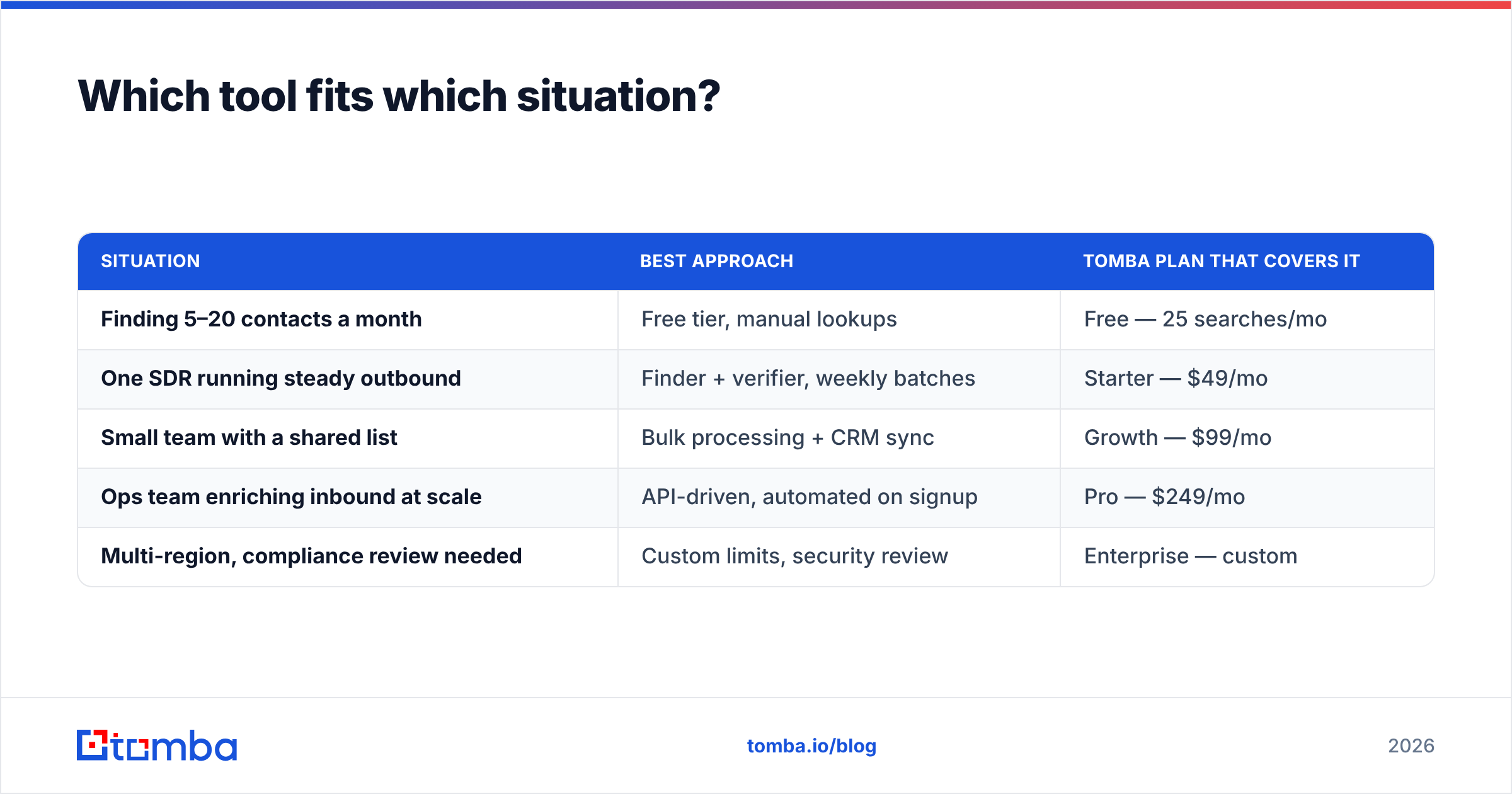
Which tool fits which situation?#
| Situation | Best approach | Tomba plan that covers it |
|---|---|---|
| Finding 5–20 contacts a month | Free tier, manual lookups | Free — 25 searches/mo |
| One SDR running steady outbound | Finder + verifier, weekly batches | Starter — $49/mo |
| Small team with a shared list | Bulk processing + CRM sync | Growth — $99/mo |
| Ops team enriching inbound at scale | API-driven, automated on signup | Pro — $249/mo |
| Multi-region, compliance review needed | Custom limits, security review | Enterprise — custom |
The honest guidance: under 25 lookups a month, no paid tool is worth it. Use the free tier or check the company's contact page. Paid tiers pay for themselves once guessing and cleaning bounces costs more time than the subscription costs money. For most SDRs, that happens around 200 contacts a month. Full Tomba pricing is public, so you can run that math against your own volume.
Where should you start?#
Pick one target company. Run its domain through a pattern check. Confirm the rule with one known address. Then apply that pattern to the three people you actually want to reach. Verify all three. Send to the two that come back valid.
That is a full cycle in under five minutes. It will teach you more about your accounts than any list purchase.
When you are ready to do that across hundreds of accounts, the Tomba Email Finder handles pattern detection, source matching, and verification in one step. The free tier gives you 25 searches a month, so you can test the accuracy on companies you already know before you pay.
Related guides#
Ready to find emails that actually work?
Join 150,000+ professionals who stopped guessing and started sending. Free credits on signup — no credit card required.
Get the Tomba newsletter
Practical outbound tactics and product updates — once every two weeks.
About the author