Excel Sales Tracking Template: Build One That Actually Works
Most sales trackers die in week three. Here's the exact column set, formula stack, and refresh routine that keeps an Excel sales tracking template useful — plus the honest point where a CRM wins.
TL;DR
- A working Excel sales tracking template needs about 14 columns — not 40. Anything you won't update weekly is dead weight.
- Three formulas do 80% of the work:
SUMIFSfor weighted pipeline,COUNTIFSfor stage counts, andTODAY()-[Last Touch]for a staleness flag that surfaces rotting deals. - Excel beats a CRM below roughly 200 open opportunities and 1–3 reps. Above that, manual entry cost overtakes the license cost.
- The failure mode is never the formulas — it's stale contact data. Bounced emails and dead phone numbers make the tracker lie about pipeline coverage.
- Refresh contacts in bulk before each quarter rather than one-off lookups, and the spreadsheet stays trustworthy far longer.
What is an Excel sales tracking template, exactly?#
An Excel sales tracking template is a structured workbook where each row is one opportunity and each column is one fact about that opportunity — company, contact, stage, value, close date, next step. On top of that flat table sits a small layer of formulas that roll rows up into pipeline value, stage counts, win rate, and an activity view.
That's it. It is not a CRM, and the moment you try to make it one — logging every email, tracking every touchpoint, building a 12-tab relational model with lookup keys between them — it collapses. Spreadsheets are excellent at math over a list and terrible at relationships over time.
The useful mental model: a sales tracker is a kitchen inventory list, not a security camera. It tells you what you have right now and what's about to expire. It does not replay how everything got there. Once you accept that scope, the template stops being a chore and starts being the thing you actually open on Monday morning.
Two rules make or break it:
- One row per opportunity, never per activity. The instant you add rows for calls and emails, your
SUMIFSdouble-counts and every dashboard number becomes fiction. - Every column must earn its update. If nobody will fill it in on a Friday afternoon at 4:45pm, delete the column. Half-populated fields poison averages worse than missing fields do.
What columns does a sales tracking template actually need?#
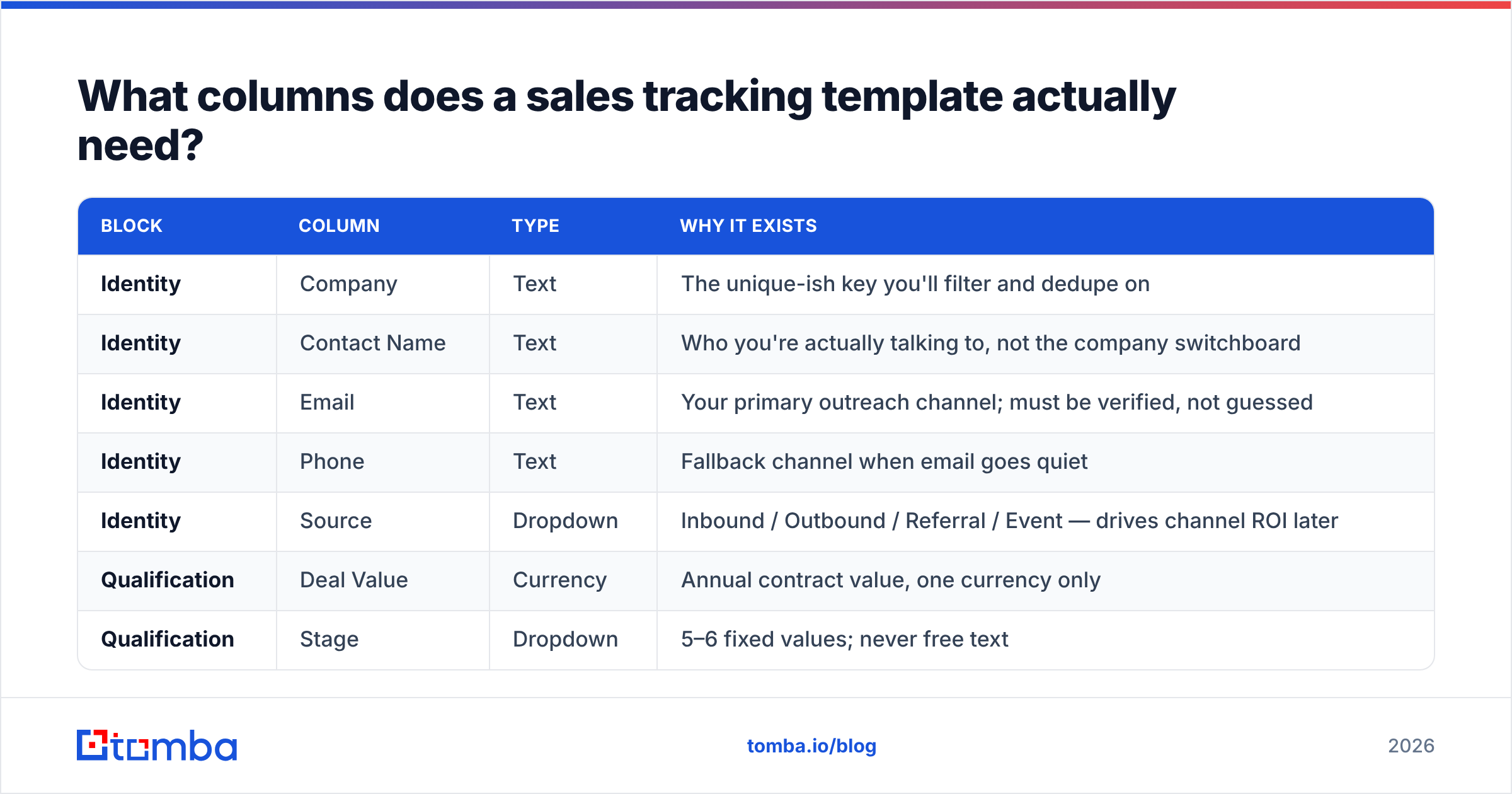
Here is the minimum viable column set. Group them into four blocks so the sheet reads left to right as a deal's lifecycle.
| Block | Column | Type | Why it exists |
|---|---|---|---|
| Identity | Company | Text | The unique-ish key you'll filter and dedupe on |
| Identity | Contact Name | Text | Who you're actually talking to, not the company switchboard |
| Identity | Text | Your primary outreach channel; must be verified, not guessed | |
| Identity | Phone | Text | Fallback channel when email goes quiet |
| Identity | Source | Dropdown | Inbound / Outbound / Referral / Event — drives channel ROI later |
| Qualification | Deal Value | Currency | Annual contract value, one currency only |
| Qualification | Stage | Dropdown | 5–6 fixed values; never free text |
| Qualification | Probability % | Number | Auto-derived from Stage via XLOOKUP, not typed by hand |
| Qualification | Expected Close | Date | Drives your forecast month buckets |
| Activity | Last Touch | Date | The single most predictive column in the whole sheet |
| Activity | Next Step | Text | A verb and a date, e.g. "Send pricing 14 Mar" |
| Activity | Owner | Dropdown | Even solo, this future-proofs the sheet |
| Outcome | Status | Dropdown | Open / Won / Lost |
| Outcome | Loss Reason | Dropdown | Price / Timing / Competitor / No decision |
Fourteen columns. Add a fifteenth only when you can name the decision it changes.
A few enforcement details that separate a template that survives from one that doesn't:
- Use Data Validation on Stage, Status, Source, Owner, and Loss Reason. Free-typed stages ("Demo", "demo", "Demo scheduled") are the number one cause of broken
COUNTIFS. - Format the range as an Excel Table (Ctrl+T). Structured references like
Deals[Deal Value]auto-expand when you add rows;A2:A500does not, and you'll silently drop deals off your forecast. - Keep one currency. Multi-currency in a spreadsheet needs a rate table and a refresh policy, which is CRM territory.
- Never merge cells. Merged cells break sorting, filtering, and every pivot table you will ever build on the sheet.

What formulas turn a flat list into a pipeline dashboard?#
You need five. Put them on a separate Dashboard sheet so the data sheet stays clean and sortable.
1. Weighted pipeline — the number your forecast actually rests on:
=SUMPRODUCT(Deals[Deal Value], Deals[Probability %], --(Deals[Status]="Open"))2. Stage counts — feeds the funnel bar chart:
=COUNTIFS(Deals[Stage], A2, Deals[Status], "Open")3. Staleness flag — put this in a helper column on the data sheet, then conditionally format it red above 14:
=IF([@Status]="Open", TODAY()-[@[Last Touch]], "")4. Rolling win rate — over closed deals only, so open pipeline doesn't dilute it:
=COUNTIFS(Deals[Status],"Won") / COUNTIFS(Deals[Status],"Won") + COUNTIFS(Deals[Status],"Lost")Wrap it in IFERROR for the first month when both counts are zero.
5. Forecast by month — bucket expected close dates:
=SUMIFS(Deals[Deal Value], Deals[Expected Close], ">="&B1, Deals[Expected Close], "<="&EOMONTH(B1,0), Deals[Status], "Open")The staleness flag is the one people skip and the one that pays. Sort descending on it every Monday and you get a ranked list of deals quietly dying of neglect. Microsoft's own Excel function reference is the fastest place to check argument order when SUMIFS starts arguing with you.
Should you use Excel or Google Sheets for sales tracking?#
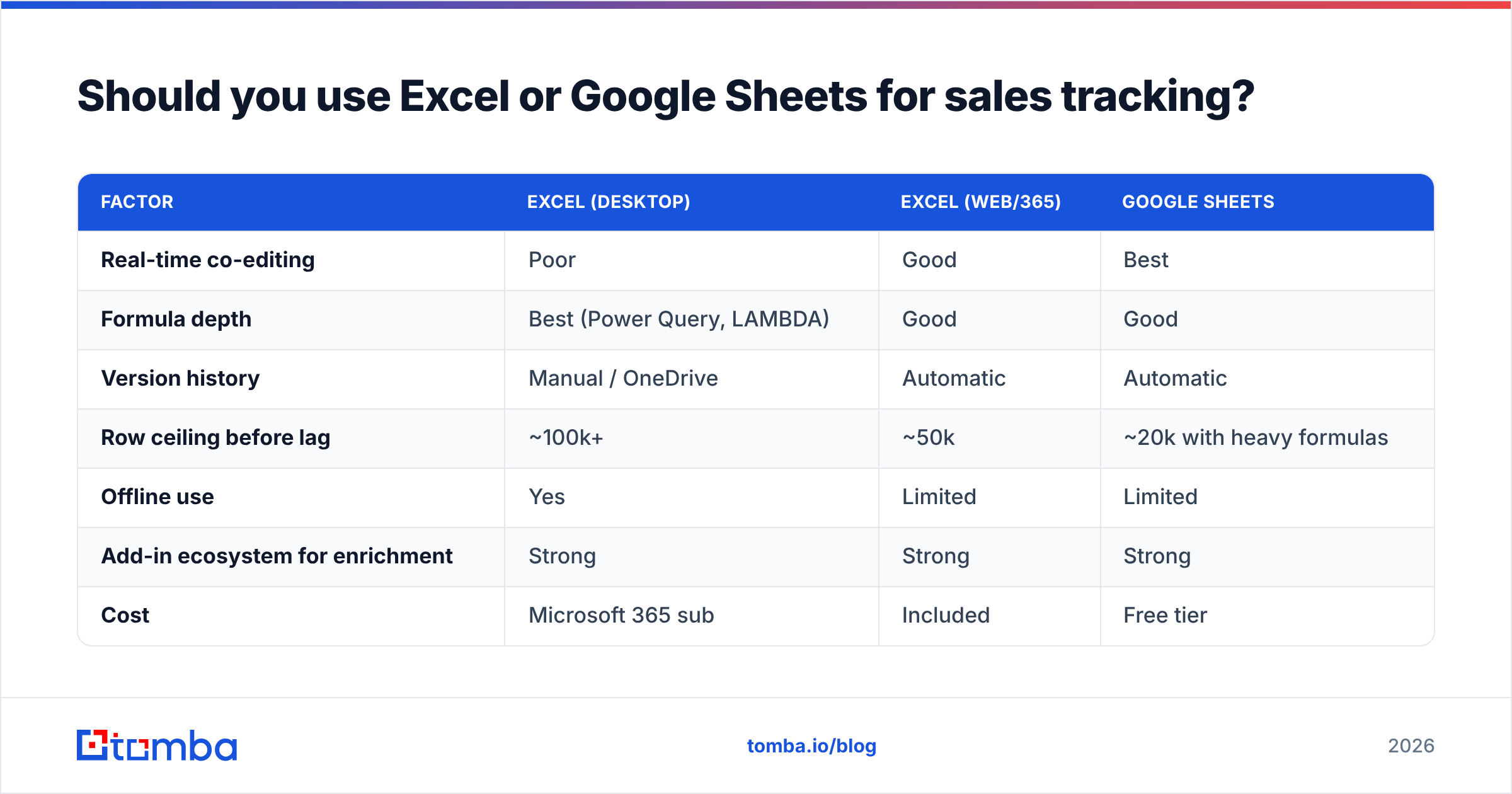
Depends almost entirely on whether more than one person touches the file.
| Factor | Excel (desktop) | Excel (web/365) | Google Sheets |
|---|---|---|---|
| Real-time co-editing | Poor | Good | Best |
| Formula depth | Best (Power Query, LAMBDA) | Good | Good |
| Version history | Manual / OneDrive | Automatic | Automatic |
| Row ceiling before lag | ~100k+ | ~50k | ~20k with heavy formulas |
| Offline use | Yes | Limited | Limited |
| Add-in ecosystem for enrichment | Strong | Strong | Strong |
| Cost | Microsoft 365 sub | Included | Free tier |
Practical read: if you're a solo founder or a one-rep team doing heavy analysis, use desktop Excel and its Power Query connections. If two or more people update the same pipeline, Google Sheets removes an entire class of "final_v3_REAL.xlsx" problems. Both handle a sales tracker fine at realistic volumes — a 400-row pipeline is nothing for either engine.
If you go the Sheets route, an email finder add-on that fills contact columns in place saves the copy-paste loop that kills most trackers. On the Excel side, an Excel add-in does the same job without leaving the workbook.
Is an Excel sales tracking template better than a CRM?#
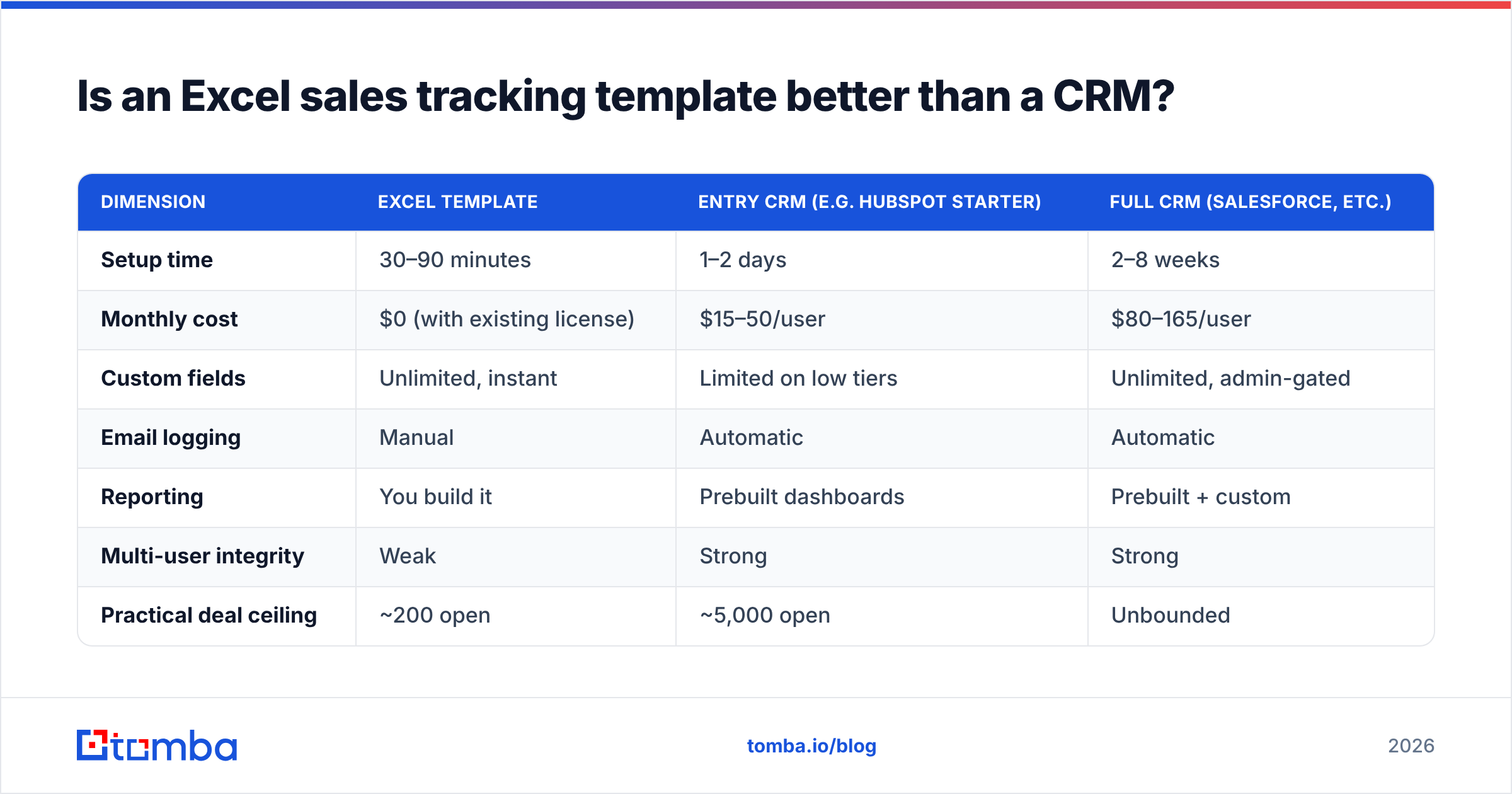
For a while, yes — and the crossover point is more concrete than vendors admit.
| Dimension | Excel template | Entry CRM (e.g. HubSpot Starter) | Full CRM (Salesforce, etc.) |
|---|---|---|---|
| Setup time | 30–90 minutes | 1–2 days | 2–8 weeks |
| Monthly cost | $0 (with existing license) | $15–50/user | $80–165/user |
| Custom fields | Unlimited, instant | Limited on low tiers | Unlimited, admin-gated |
| Email logging | Manual | Automatic | Automatic |
| Reporting | You build it | Prebuilt dashboards | Prebuilt + custom |
| Multi-user integrity | Weak | Strong | Strong |
| Practical deal ceiling | ~200 open | ~5,000 open | Unbounded |
| Audit trail | None | Full | Full + compliance |
Excel wins on speed to first value and on flexibility. It loses on three things that get worse with scale: no automatic activity capture, no referential integrity between contacts and companies, and no protection against two people editing the same row.
The switch signal isn't revenue — it's entry cost per deal. When you spend more than about 15 minutes a week keeping the sheet honest, a $20/month seat is already cheaper than your time. Comparing options on G2's CRM category or starting with HubSpot's free CRM is a reasonable next step at that point — both let you import the exact column structure above.
Until then, the spreadsheet is not a compromise. Plenty of teams doing seven figures still forecast in Excel because they trust every cell in it.
How do you keep the contact data in your tracker from rotting?#
This is where most Excel sales tracking template guides stop, and it's the part that decides whether the template survives quarter two.
B2B contact data decays fast — people change jobs, companies restructure, domains get consolidated after acquisitions. Industry estimates put annual decay in the 22–30% range. Applied to your sheet, that means roughly one in four email addresses in a year-old tracker will not reach a human. Your pipeline coverage number looks fine. Your reply rate doesn't.
Three habits fix it:
- Verify before you import, not after you bounce. Run every email through an email verifier at the point you add the row. A
Valid / Risky / Invalidcolumn next to Email is worth more than any chart on your dashboard. - Refresh in batches, not one-by-one. Once a quarter, export the Email column, run a bulk email finder pass over the companies with missing or invalid addresses, and paste the results back. Ten minutes of batch work replaces hours of scattered lookups.
- Never leave a blank Email cell. A blank cell reads as "not started" and quietly falls out of every filter. Fill it with
NEEDS_LOOKUPso it shows up in your Monday sort.
If you want the sheet to fill itself, the Tomba API returns emails and enrichment fields as JSON, and Power Query can pull that straight into your workbook on refresh. That's the version where the template stops being a chore — you add a company name and the contact columns populate themselves.

What does a weekly review workflow look like?#
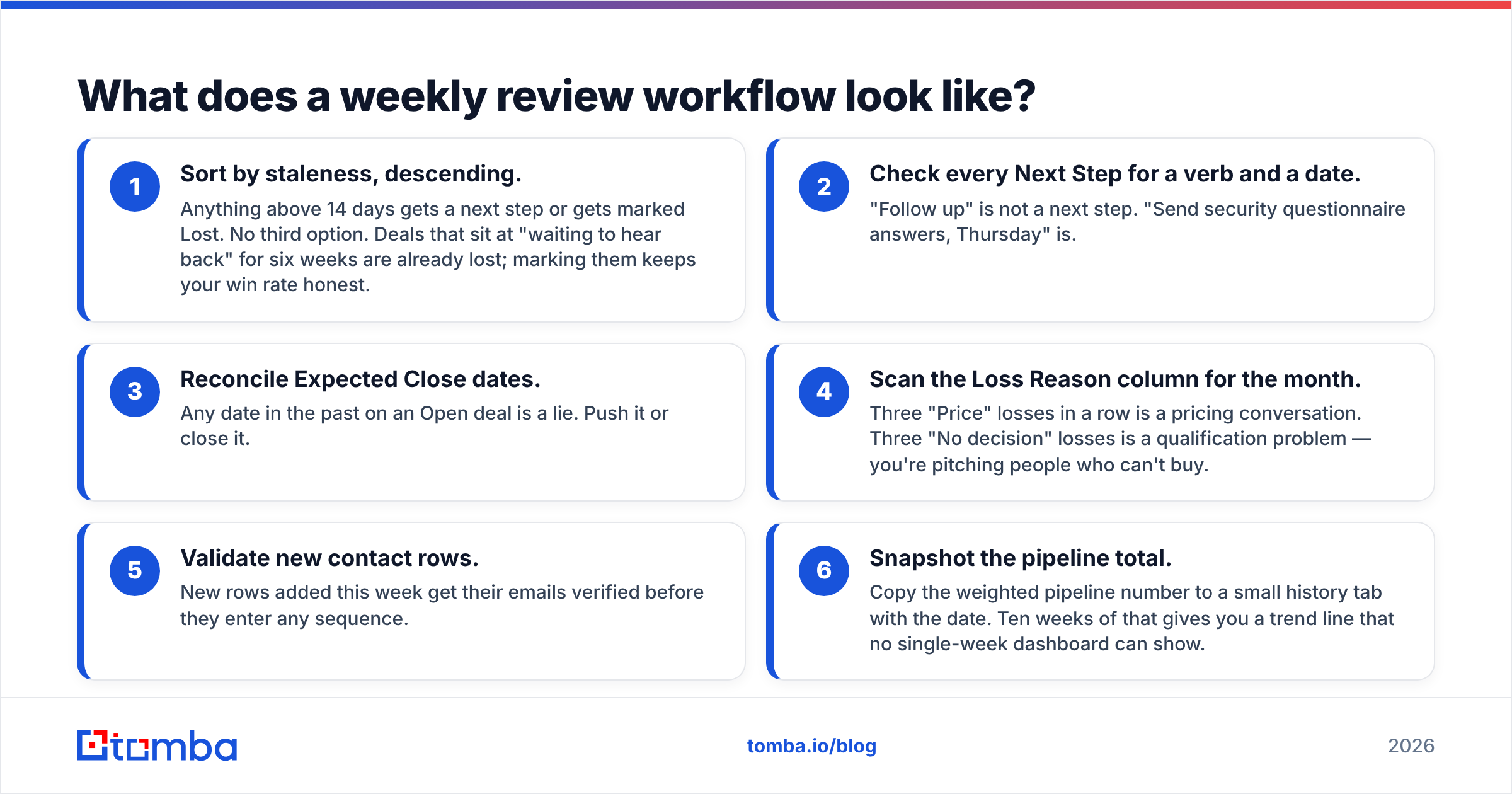
A template without a ritual is just a file. Twenty minutes, same time every week:
- Sort by staleness, descending. Anything above 14 days gets a next step or gets marked Lost. No third option. Deals that sit at "waiting to hear back" for six weeks are already lost; marking them keeps your win rate honest.
- Check every Next Step for a verb and a date. "Follow up" is not a next step. "Send security questionnaire answers, Thursday" is.
- Reconcile Expected Close dates. Any date in the past on an Open deal is a lie. Push it or close it.
- Scan the Loss Reason column for the month. Three "Price" losses in a row is a pricing conversation. Three "No decision" losses is a qualification problem — you're pitching people who can't buy.
- Validate new contact rows. New rows added this week get their emails verified before they enter any sequence.
- Snapshot the pipeline total. Copy the weighted pipeline number to a small history tab with the date. Ten weeks of that gives you a trend line that no single-week dashboard can show.
Step 6 is the sleeper. A spreadsheet shows you the present by default; the snapshot tab is what turns it into a system that shows direction. Pipeline that's flat at $400k for six weeks while you keep adding deals means you're losing them exactly as fast as you're creating them — a fact invisible from any single view.
When should you graduate from Excel to a CRM?#
Move when two or more of these are true:
- More than three people need to write to the pipeline in the same week.
- More than ~200 open opportunities, at which point sorting and filtering stops being fast enough to do casually.
- You need email activity automatically logged — because reconstructing who said what from your inbox is now a weekly task.
- Someone above you asks for a report you can't produce in under ten minutes.
- You've had a data-loss or overwrite incident. Once is a warning; twice is a decision.
Notice that none of these are about revenue. Teams with big deal sizes and low deal counts run on spreadsheets for years, quite rationally. Teams doing high-volume transactional sales outgrow Excel in month two.
When you do migrate, the 14-column structure above maps almost one-to-one onto standard CRM objects, which is the real payoff of building it properly: your migration is a CSV import, not a re-architecture.
What's the fastest way to build one from scratch?#
Thirty minutes, in this order:
- Sheet 1 —
Deals. Type the 14 headers, select the range, Ctrl+T to make it a Table, name itDeals. - Sheet 2 —
Lists. One column each for Stage, Status, Source, Owner, Loss Reason. Add a two-column Stage→Probability lookup range. - Data Validation. Point each dropdown column at its list column. Set Probability % to
XLOOKUPagainst the stage table so it can never disagree with the stage. - Sheet 3 —
Dashboard. Drop in the five formulas above, plus one bar chart of stage counts and one column chart of forecast by month. - Conditional formatting. Red fill on staleness > 14. Grey fill on Status = Lost. That's all the color you need.
- Populate contacts. Add your target companies, then fill the Email column with a domain search pass rather than hunting them one at a time on company websites.
Then stop building. The urge to add a seventh chart is the same urge that will have you abandoning the file in a month.
Where should you get the contact data that fills it?#
A tracker is only as good as the rows in it, and empty Email cells are the most common reason a well-built template goes unused — you open it, see work you don't want to do, and close it.
That's the gap Tomba Email Finder closes. Give it a company domain and a name, or just a domain, and you get verified professional emails to paste straight into your Company and Contact columns — with a confidence score so you know which rows to trust. The free tier covers 25 searches a month for testing the workflow; paid plans start at $49/month on Starter and $99/month on Growth if you're filling pipelines in bulk. Full Tomba pricing is transparent per tier, and the Excel and Sheets add-ins mean you never leave the workbook you just built.
Build the fourteen columns. Add the five formulas. Then spend your Monday twenty minutes on deals instead of on data entry.
Related guides#
Ready to find emails that actually work?
Join 150,000+ professionals who stopped guessing and started sending. Free credits on signup — no credit card required.
Get the Tomba newsletter
Practical outbound tactics and product updates — once every two weeks.
About the author