Executive Email Outreach in 2026: Find, Write, and Get Replies
C-suite inboxes are the hardest room in B2B to enter. Here is how executive email actually works in 2026 — sourcing verified addresses, structuring the pitch, and following up without burning the account.
TL;DR
- An executive email is not a shorter version of a normal cold email — it is a different genre with different rules: one decision, one metric, one paragraph.
- Sourcing is where most campaigns quietly fail. Guessed addresses to a C-suite domain generate bounces that damage your sender reputation for every other prospect on that domain.
- Verified, pattern-confirmed addresses beat volume. A 40-contact executive list with 97% deliverability outperforms a 4,000-contact scrape every time.
- Executives read on mobile, between meetings, in under 9 seconds. Anything requiring scroll or context-loading gets archived.
- The realistic benchmark for well-targeted executive email in 2026 is a 4–9% reply rate, not the 20% figures thrown around in outbound courses.
What is an executive email, and why is it different?#
An executive email is outreach addressed to a C-level or VP-level decision maker — CEO, CFO, CTO, CRO, COO, or the SVP who owns the budget line you are trying to enter. The distinction matters because everything downstream changes: the sourcing method, the length, the ask, the follow-up cadence, and the metric you are allowed to promise.
Think of it like knocking on doors in an apartment block versus a private residence with a doorman. Manager-level outreach is the apartment block — you can knock on many doors, and someone will answer out of curiosity. Executive outreach has a doorman, a screening layer, and a resident who has already decided that unsolicited visitors are a waste of time unless they arrive with something specific.
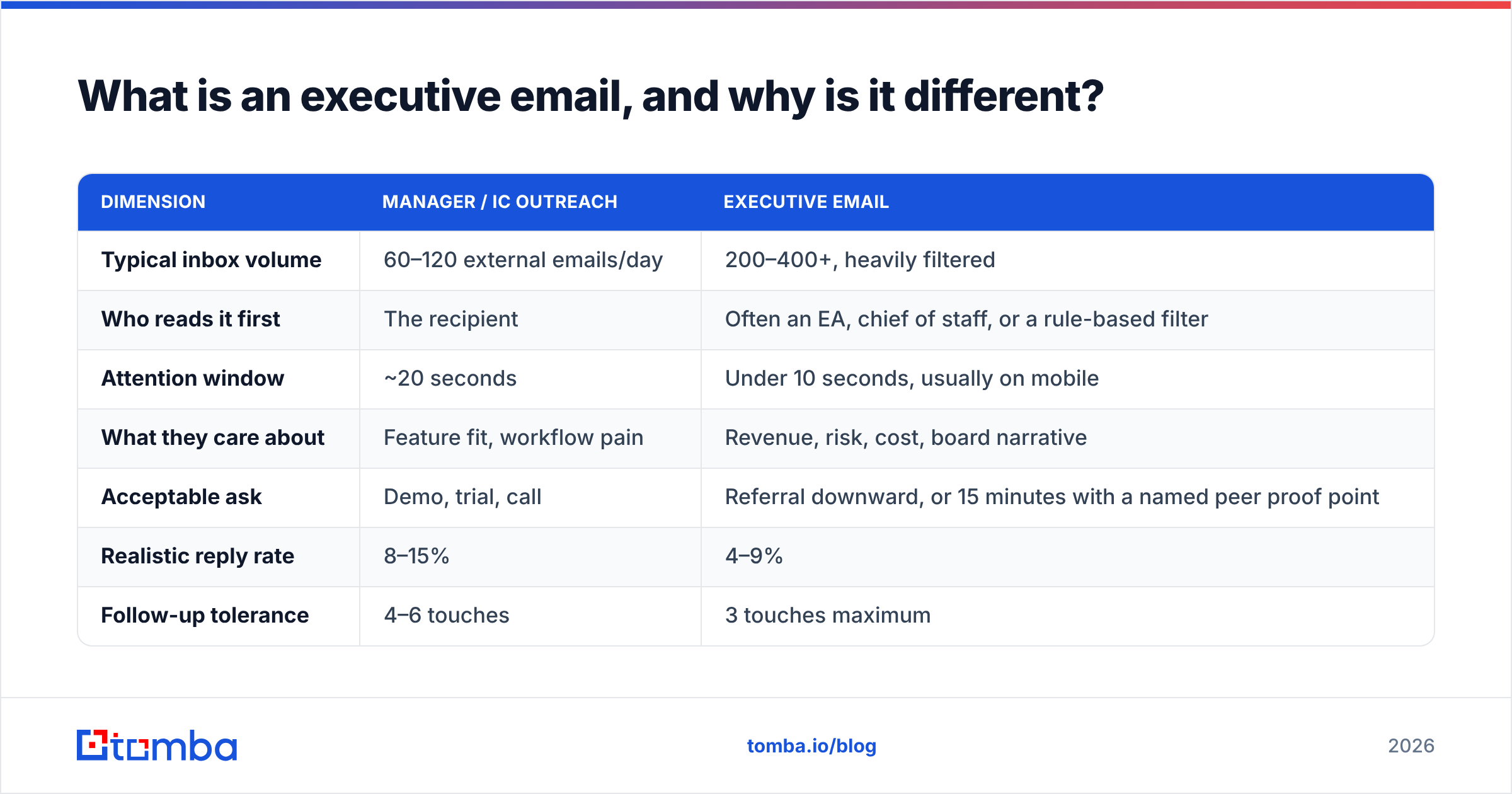
Concretely, the differences look like this:
| Dimension | Manager / IC outreach | Executive email |
|---|---|---|
| Typical inbox volume | 60–120 external emails/day | 200–400+, heavily filtered |
| Who reads it first | The recipient | Often an EA, chief of staff, or a rule-based filter |
| Attention window | ~20 seconds | Under 10 seconds, usually on mobile |
| What they care about | Feature fit, workflow pain | Revenue, risk, cost, board narrative |
| Acceptable ask | Demo, trial, call | Referral downward, or 15 minutes with a named peer proof point |
| Realistic reply rate | 8–15% | 4–9% |
| Follow-up tolerance | 4–6 touches | 3 touches maximum |
The last row is the one most teams get wrong. A seven-step sequence that works fine on a Head of Ops reads as harassment to a CFO, and it costs you the whole account — because executives forward bad outreach to the exact person you were hoping to reach next.
Why do most executive emails get ignored?#
Four failure modes account for the overwhelming majority of dead executive campaigns.
- The address was never real. Guessed permutations of
first.last@company.combounce, and hard bounces at 5%+ start dragging your domain reputation down. You lose the executive and the twelve other people you were emailing at that company. - The ask is sized for the wrong person. Asking a CFO to "hop on a quick 30-minute call to walk through our platform" is asking for a resource they price at four figures an hour. Ask for a redirect instead.
- The email is about you. Company boilerplate, funding announcements, and feature lists are the fastest route to archive. Executives filter for consequence, not capability.
- No specific trigger. Executives forgive intrusion when the timing is obviously informed — a new funding round, a stated public initiative, a hiring surge in a department, a regulatory deadline in their sector. Without a trigger, the email reads as a mail merge, because it is one.
Gartner's B2B buying research has consistently shown buying groups expanding rather than shrinking — which means the executive is rarely the person who evaluates you. They are the person who authorizes the evaluation. Write to that role, not to the imaginary lone buyer.

How do you find a verified executive email address?#
Executive addresses are harder to source than mid-level ones for a structural reason: senior people appear less often in the public web artifacts that data providers scrape. Their addresses are not in conference speaker lists, GitHub commits, or support forums. So the sourcing method matters more than it does for a Head of Growth.
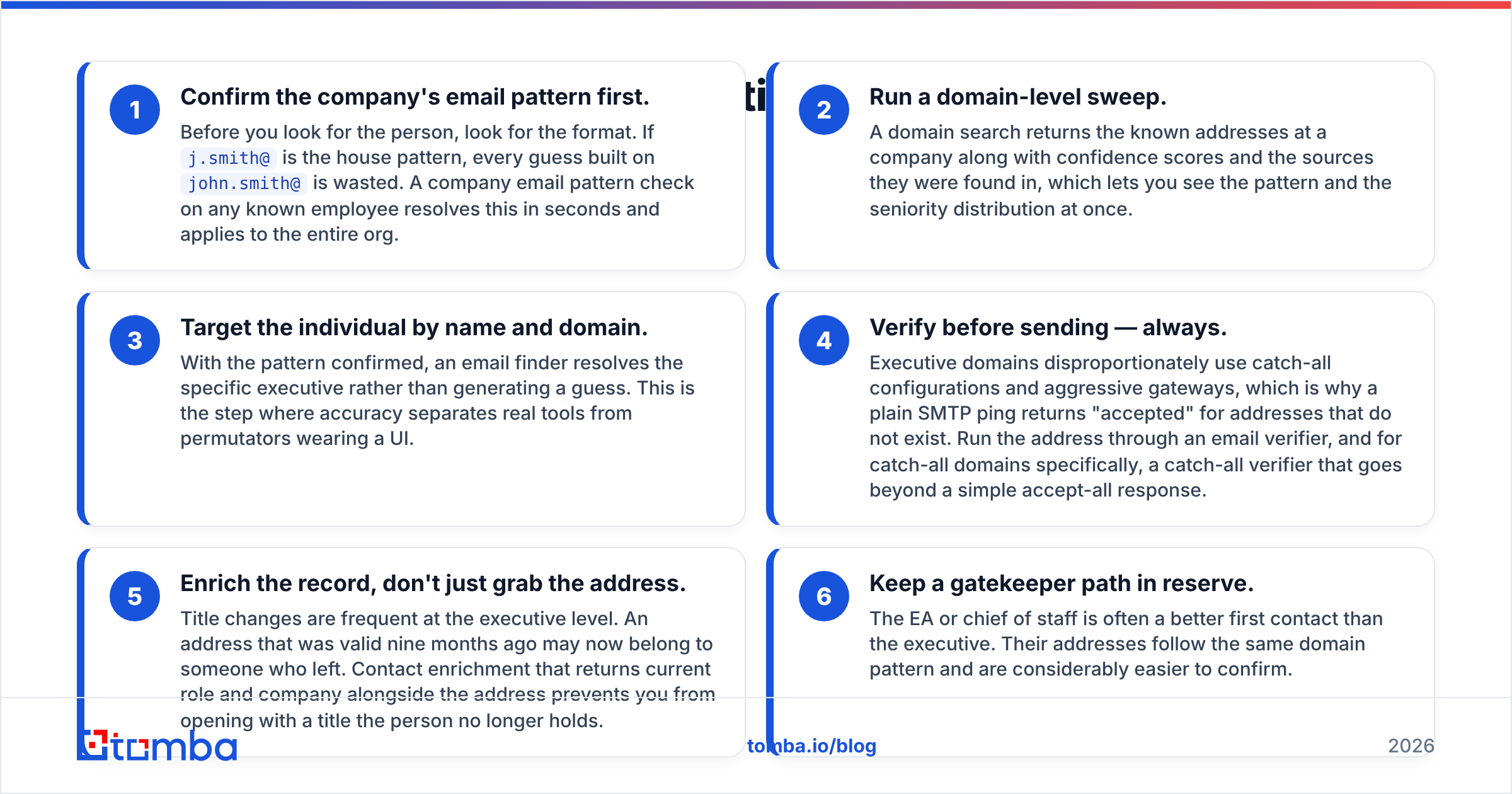
Here is the sequence that produces the highest hit rate, in order of cost and reliability:
- Confirm the company's email pattern first. Before you look for the person, look for the format. If
j.smith@is the house pattern, every guess built onjohn.smith@is wasted. A company email pattern check on any known employee resolves this in seconds and applies to the entire org. - Run a domain-level sweep. A domain search returns the known addresses at a company along with confidence scores and the sources they were found in, which lets you see the pattern and the seniority distribution at once.
- Target the individual by name and domain. With the pattern confirmed, an email finder resolves the specific executive rather than generating a guess. This is the step where accuracy separates real tools from permutators wearing a UI.
- Verify before sending — always. Executive domains disproportionately use catch-all configurations and aggressive gateways, which is why a plain SMTP ping returns "accepted" for addresses that do not exist. Run the address through an email verifier, and for catch-all domains specifically, a catch-all verifier that goes beyond a simple accept-all response.
- Enrich the record, don't just grab the address. Title changes are frequent at the executive level. An address that was valid nine months ago may now belong to someone who left. Contact enrichment that returns current role and company alongside the address prevents you from opening with a title the person no longer holds.
- Keep a gatekeeper path in reserve. The EA or chief of staff is often a better first contact than the executive. Their addresses follow the same domain pattern and are considerably easier to confirm.
Skipping step 4 is the single most expensive shortcut in outbound. A 12% bounce rate on a 200-address executive list does more long-term damage than the campaign could ever have produced in pipeline.
Which sourcing tools handle executive data best?#
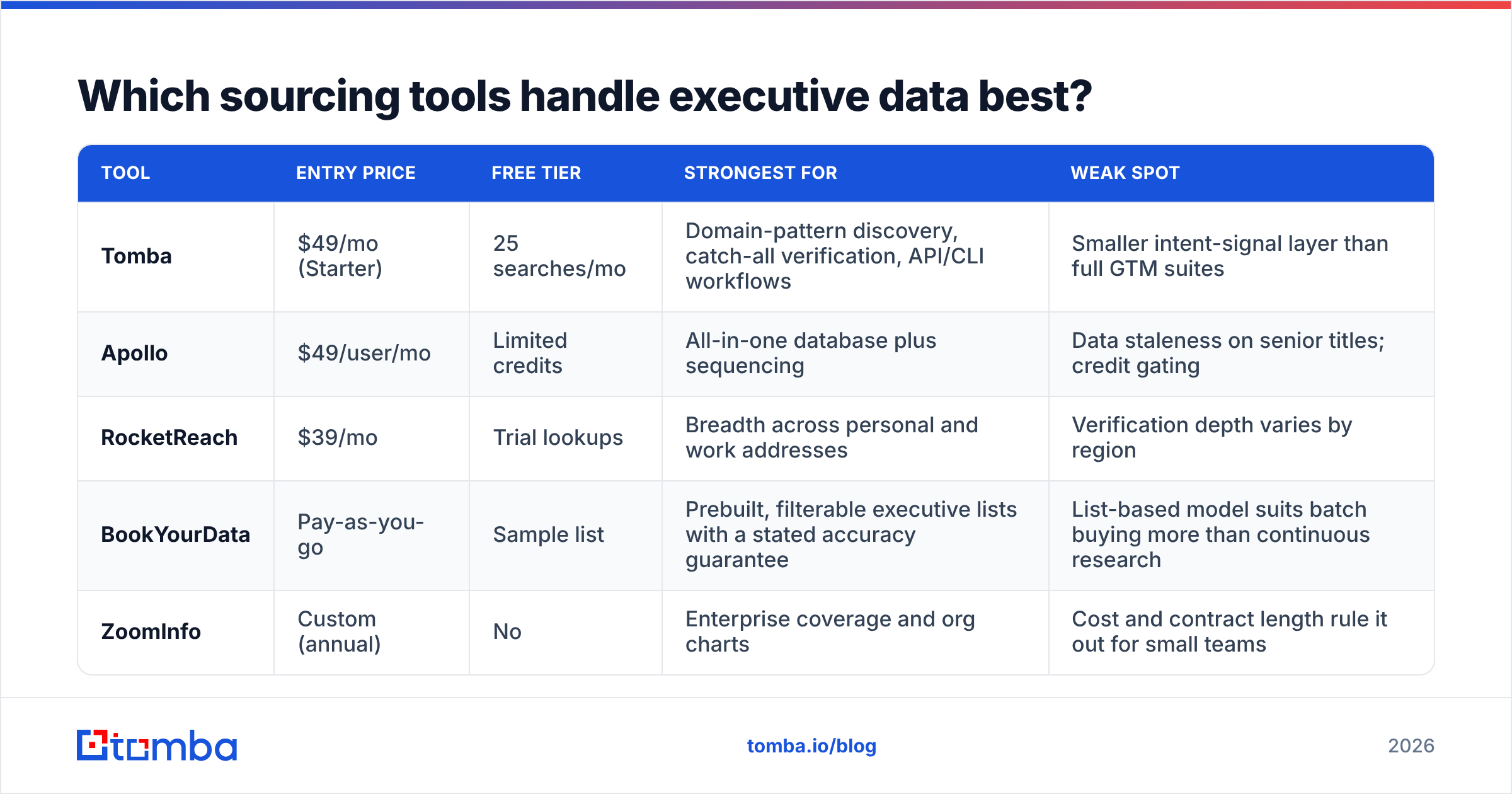
No provider wins on every axis, and honest comparison means saying where each one is genuinely strong. The table below reflects public pricing and positioning as of 2026 — verify current numbers on each vendor's own page before you commit budget.
| Tool | Entry price | Free tier | Strongest for | Weak spot |
|---|---|---|---|---|
| Tomba | $49/mo (Starter) | 25 searches/mo | Domain-pattern discovery, catch-all verification, API/CLI workflows | Smaller intent-signal layer than full GTM suites |
| Apollo | $49/user/mo | Limited credits | All-in-one database plus sequencing | Data staleness on senior titles; credit gating |
| RocketReach | $39/mo | Trial lookups | Breadth across personal and work addresses | Verification depth varies by region |
| BookYourData | Pay-as-you-go | Sample list | Prebuilt, filterable executive lists with a stated accuracy guarantee | List-based model suits batch buying more than continuous research |
| ZoomInfo | Custom (annual) | No | Enterprise coverage and org charts | Cost and contract length rule it out for small teams |
For a two-person founding team doing 50 executive touches a month, the pragmatic stack is a finder plus a verifier, not a platform. Tomba pricing starts at $49/mo for Starter, $99/mo for Growth, and $249/mo for Pro, with a free tier of 25 searches per month for testing a workflow before you pay for it. If you would rather buy a curated executive list outright than research it contact by contact, BookYourData's list model is a reasonable fit for that specific job.
Whatever you pick, evaluate it on your own domains. Vendor accuracy claims are averages across their whole database; your ICP might sit in the tail. Pull 30 known-good executive addresses you can verify independently, run them through the trial, and count.
What should an executive email actually say?#
Four sentences, one link at most, one question. That is the whole format. Here is the structural breakdown:
- Line 1 — the trigger. Why you are emailing now, specific to them. "Saw you're opening a Frankfurt office in Q3" beats any compliment.
- Line 2 — the consequence. The business outcome your product changes, stated in their unit of measure (pipeline, churn %, DSO, cost per unit, audit exposure). Not features.
- Line 3 — the proof. One named peer company and one number. Vague social proof ("teams like yours") is treated as noise.
- Line 4 — the ask. Small, cheap, and easy to delegate: "Is this worth a look, or should I talk to whoever owns onboarding?"
That last construction is the highest-leverage sentence in executive email. It gives the recipient a one-word exit that is also a win for you — a referral downward from a CEO carries more authority than any cold email you could have sent that person directly.

How long should an executive email be?#
Under 90 words, including the signature. Mobile clients show roughly 30–40 words before the fold; if your ask is not visible without scrolling, assume it is not read.
Practical constraints worth enforcing as a team rule:
- No images or tracking pixels in the first touch. Enterprise gateways downgrade image-heavy first contact, and some executives run clients that block remote content by default.
- One link maximum. Two or more links triggers link-heuristic filtering on several corporate gateways.
- Plain-text formatting. HTML templates read as marketing. Executives reply to things that look like a person typed them.
- No attachment on touch one. Ever.
- Signature of two lines. Name, role, company, one URL. Nothing else.
Run the draft through a spam checker before the campaign goes out. Executive domains typically sit behind stricter filtering than the SMB domains most templates were tested against, so a message that lands fine at a 20-person startup can be quarantined at a 5,000-person enterprise.
What subject lines get opened at the C-suite?#
Short, lowercase, and specific to the company — not to your product. Executives have been conditioned to distrust anything that reads like a campaign.
Patterns that hold up:
question on the Frankfurt build-out— trigger-anchored, low-pressurere: your Q2 comments on churn— only if the reference is real; faking are:destroys trust permanentlyintro from [mutual connection]— the highest-performing pattern by a wide margin, and the only one you cannot manufacture[Company] + [Your Company]?— dry, functional, reads internal
Avoid anything with urgency language, capitalized words, numbers formatted like advertising ("3X Your Pipeline"), or personalization tokens that could break. A merge field failure on an executive email is not a soft error; it is the end of that relationship. If you want to pressure-test variants before launch, a subject line tester catches the obvious spam triggers, though nothing substitutes for sending 20 and reading the results.
Should you email the executive or their gatekeeper?#
Both, in sequence — and be transparent about it.
The chief of staff or EA is not an obstacle to route around; they are the person whose job is to decide what deserves the executive's attention. Emailing them directly, saying plainly what you want and why it might matter, converts better than most people expect. It is also the only approach that survives being forwarded.
What does not work: emailing the executive, getting no reply, and then emailing three other people at the company with the same message. That pattern is visible from inside the company — colleagues forward outreach to each other — and it reads as a mail merge that has run out of ideas.
A defensible multi-threading approach looks like this: executive first with the referral-down ask, EA second with a one-line context note, and the operational owner third with a genuinely different, more technical message. Three people, three distinct emails, two weeks apart. Not one message blasted at eleven addresses.
How do you follow up without burning the account?#
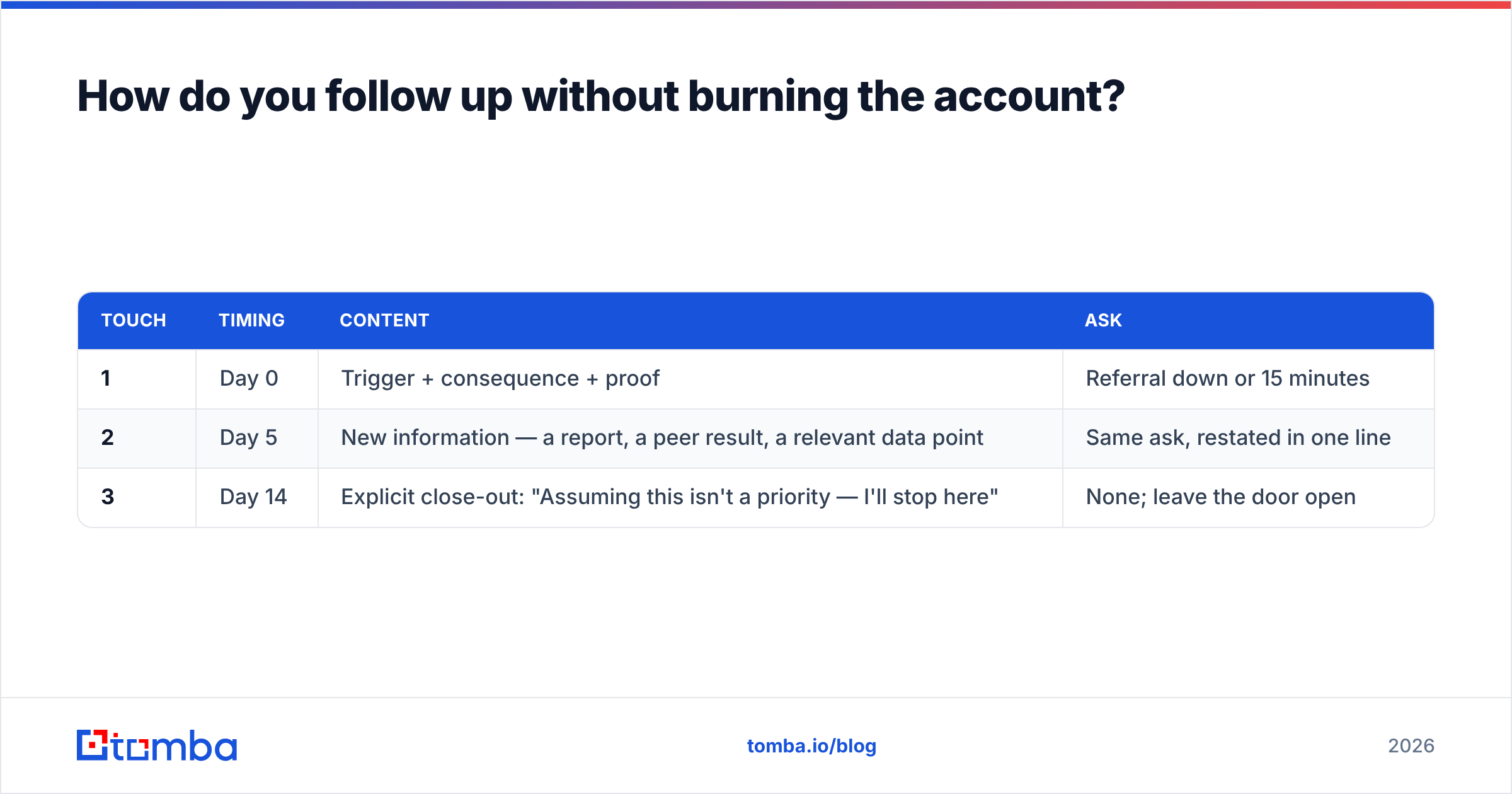
Three touches, then stop. The cadence that respects an executive calendar:
| Touch | Timing | Content | Ask |
|---|---|---|---|
| 1 | Day 0 | Trigger + consequence + proof | Referral down or 15 minutes |
| 2 | Day 5 | New information — a report, a peer result, a relevant data point | Same ask, restated in one line |
| 3 | Day 14 | Explicit close-out: "Assuming this isn't a priority — I'll stop here" | None; leave the door open |
The third email consistently produces the highest reply rate of the three, because it removes obligation. Executives respond to messages that require no commitment. Do not follow it with a fourth "just circling back" — the close-out only works if you honor it.
Track this the way HubSpot's sales research recommends tracking any sequence: reply rate and positive-reply rate as separate numbers. A campaign with a 9% reply rate that is mostly "please remove me" is a worse campaign than one at 5% with three referrals. Peer reviews on G2 are also worth reading before you trust any vendor's stated executive-data accuracy — the review detail on coverage gaps is usually more useful than the star rating.
What should you measure?#
Four numbers, reviewed weekly:
- Bounce rate — must stay under 2%. Above that, your verification step is broken, not your copy.
- Positive reply rate — replies that advance the deal, including referrals down. Target 3–5% on executive lists.
- Referral rate — how often an executive routes you to the right owner. This is the real KPI of executive email; a healthy campaign generates more referrals than meetings.
- Domain-level burn — how many companies you have exhausted. If you have emailed four people at an account with no response, that account is done for two quarters.
If your bounce rate is the number that is off, the fix is upstream of copy. Clean the list, re-verify, and check whether your provider is returning pattern guesses labeled as confirmed addresses. On catch-all domains — which are common in enterprise — a catch-all finder tells you whether a mailbox genuinely exists rather than whether the server accepts everything.
Where should you start?#
Start with one account list of 40 executives, not 400. Confirm each company's email pattern, resolve each name, verify every address, and write four genuinely different first lines by hand. That exercise teaches you more about what your ICP responds to than any volume test, and it costs you a week.
When you are ready to scale that process, the sourcing step is the part worth automating first. The Tomba Email Finder resolves executive addresses by name and domain with source attribution and confidence scoring, verification runs in the same workflow, and the free tier gives you 25 searches to test it against contacts you can already validate. Build the list correctly, and the copy problem becomes a copy problem — not a deliverability one.
Related guides#
// get started
Find, verify and enrich your first contacts today
Start on the free plan with 25 searches a month, then scale when your team is ready.
Free plan · No credit card required · GDPR & CCPA
// about the author