Executive Introduction Email: Templates and Rules That Work
Executives read differently: 6 seconds, on mobile, between meetings. Here is how to structure an executive introduction email, six templates that land, and the mistakes that kill your reply rate.
TL;DR
- An executive introduction email is not a shorter cold email. It is a different genre: outcome first, one ask, zero setup.
- The reading window is roughly 6 seconds on a phone. Anything above the fold that is not relevance or outcome is wasted.
- Warm intros convert 3–5x better than cold, but only when you write the forwardable blurb for the person making the intro.
- The single most common failure is not the copy — it is sending to a guessed address that bounces, which damages your domain before anyone reads a word.
- Six templates below cover cold-to-exec, warm intro request, forwardable blurb, internal new-hire intro, post-event follow-up, and the board-adjacent ask.
What is an executive introduction email?#
An executive introduction email is a short message whose job is to establish who you are, why you are relevant to a senior decision-maker's current problem, and what specific next step you want — usually in under 120 words.
Think of it like passing a note to someone in the middle of a meeting. You do not get a paragraph. You get one line they can scan, decide on, and act on without leaving the note. Everything else you might want to say belongs in the meeting you are trying to earn, not in the note.
Three distinct situations share the name, and they have different rules:
- Cold executive outreach — you have no relationship. Relevance must be earned in the first sentence, and the ask must be small enough to say yes to without consulting anyone.
- Warm introduction request — you ask a mutual connection to make the introduction. Your real audience is the connector, not the executive; you are writing something they can forward without editing.
- Internal or contextual introduction — a new hire, a new account owner, a new agency lead. Here credibility is assumed, so the job is orientation: who you are, what changes for them, what they need to do (usually nothing).
The genre confusion is why so much executive outreach fails. People write a cold email with warm-intro length, or a warm-intro request with cold-email hedging. Pick one shape and commit.
Why do most executive emails get ignored?#
Because they are optimized for the sender's comfort, not the reader's decision speed. A VP of Engineering gets somewhere between 100 and 300 emails a day. Most are triaged from a phone lock screen, where the visible surface is roughly: sender name, subject line, and about 90 characters of preview text.
Here is what actually breaks, in rough order of damage:
- The email never arrives. Guessed addresses bounce. A bounce rate above 3% starts affecting your sender reputation at Gmail and Microsoft, which quietly suppresses your future sends. This is the failure nobody sees, because you never get a "your email was filtered" notification.
- The first line is about you. "I'm reaching out because I'm the founder of…" tells the reader nothing they can act on. Executives filter on relevance to their current quarter.
- The ask is expensive. "Do you have 30 minutes next week?" asks for a calendar decision. "Is this a priority this quarter, yes or no?" asks for a one-word reply.
- It reads as automated. Merge-tag artifacts, generic flattery about "your impressive growth," and a signature block with four social icons all trigger the same instinct: delete.
- Length. Above roughly 150 words, reply rates fall off sharply. On mobile, anything requiring a scroll before the ask is functionally invisible.

What structure works for an executive introduction email?#
Five parts, in this order. The order matters more than the wording.
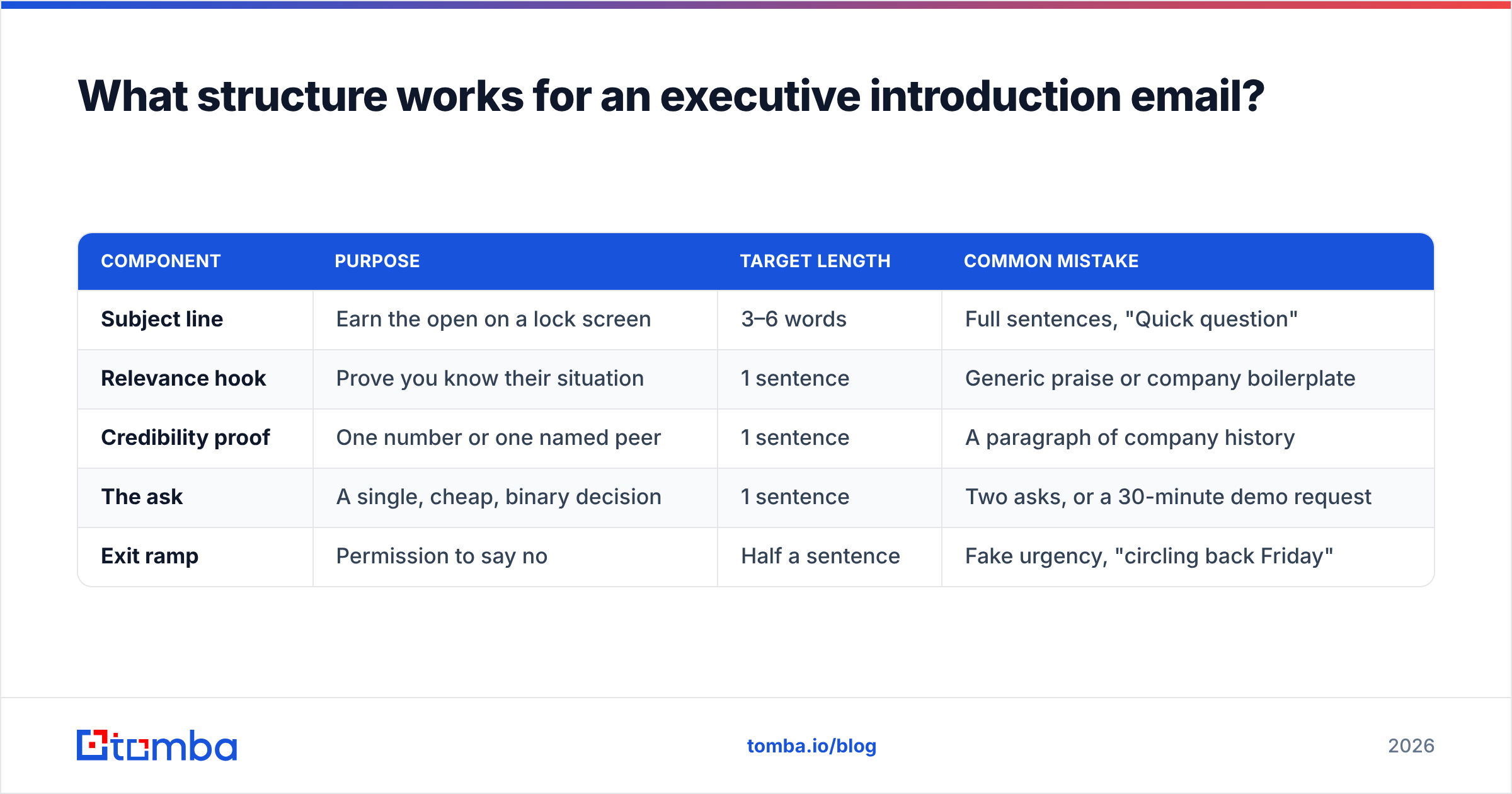
| Component | Purpose | Target length | Common mistake |
|---|---|---|---|
| Subject line | Earn the open on a lock screen | 3–6 words | Full sentences, "Quick question" |
| Relevance hook | Prove you know their situation | 1 sentence | Generic praise or company boilerplate |
| Credibility proof | One number or one named peer | 1 sentence | A paragraph of company history |
| The ask | A single, cheap, binary decision | 1 sentence | Two asks, or a 30-minute demo request |
| Exit ramp | Permission to say no | Half a sentence | Fake urgency, "circling back Friday" |
Subject lines that survive triage are specific and lowercase-friendly: "warehouse costs, Q3", "intro from Dana Reyes", "your API rate limits". Avoid "Quick question" — it is now so overused it functions as a spam signal to experienced readers.
The relevance hook should reference something dated and verifiable: a hiring pattern, a product launch, a regulatory change affecting their sector, a quote from their earnings call. Not "I saw you're growing fast."
Credibility proof works best as one comparable name plus one number. "We cut onboarding time 40% for two Series B fintechs with your stack" beats three sentences of positioning.
The ask is where most drafts collapse. Rank asks by cost to the reader: a yes/no reply (cheapest), a forward to the right person (cheap), a 10-minute call (moderate), a 30-minute demo (expensive), a trial signup (very expensive). Start at the cheap end. You can escalate in reply two.
The exit ramp is counterintuitive but measurable: "If this isn't a priority, no need to reply — I'll assume timing's off." It removes the social cost of ignoring you, which paradoxically increases replies because it signals you are not going to nag.
Cold vs warm: which introduction path should you use?#
Both work. They fail differently, and they cost differently.
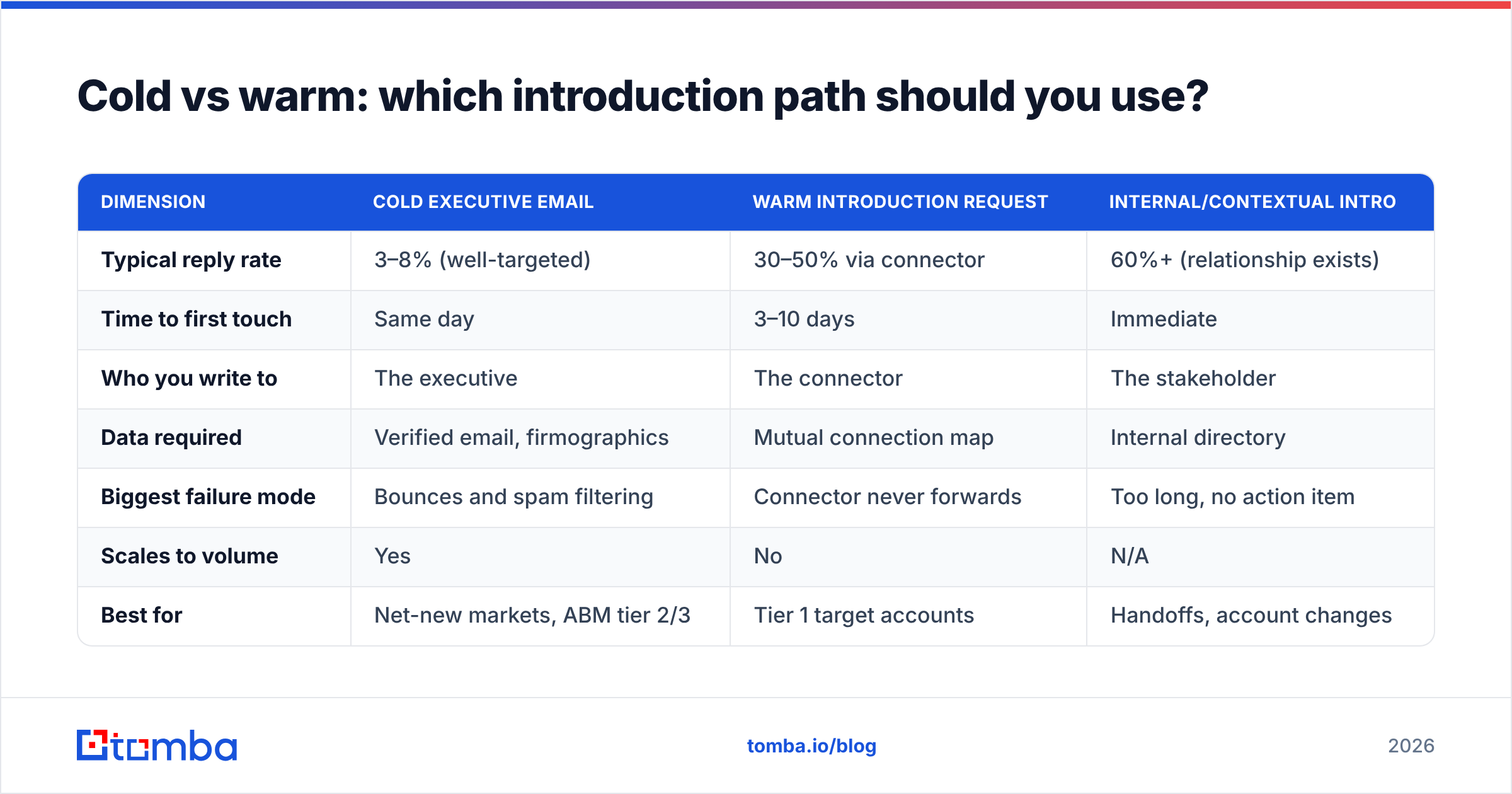
| Dimension | Cold executive email | Warm introduction request | Internal/contextual intro |
|---|---|---|---|
| Typical reply rate | 3–8% (well-targeted) | 30–50% via connector | 60%+ (relationship exists) |
| Time to first touch | Same day | 3–10 days | Immediate |
| Who you write to | The executive | The connector | The stakeholder |
| Data required | Verified email, firmographics | Mutual connection map | Internal directory |
| Biggest failure mode | Bounces and spam filtering | Connector never forwards | Too long, no action item |
| Scales to volume | Yes | No | N/A |
| Best for | Net-new markets, ABM tier 2/3 | Tier 1 target accounts | Handoffs, account changes |
The practical answer for most teams: run warm paths for your top 20–30 accounts where a connector genuinely exists, and cold for everything else. Do not fake warmth — "I noticed we're both connected to Dana" without asking Dana first is transparent and it burns Dana.
Research from G2 buyer behavior studies and HubSpot's sales benchmarks consistently shows referral-sourced pipeline closing at materially higher rates than cold-sourced. The tradeoff is throughput: warm paths do not scale past your network's edge.
Which templates actually get replies?#
Six templates. Adapt the specifics; keep the skeleton.
1. Cold to executive (under 90 words)
Subject: fulfillment costs, Q3
Hi Marcus —
Saw you opened the Reno DC in April. Most ops leaders we work with hit a 6–9 week window after a new DC where per-order costs spike before they normalize.
We shortened that window to under 3 weeks for Bolt Supply and Verano.
Worth a 10-minute call to see if your numbers look similar? If it's not a Q3 priority, no need to reply.
— Priya
2. Warm introduction request (to the connector)
Subject: intro to Marcus at Northline?
Hi Dana —
You mentioned you worked with Marcus Hale at Northline. Would you be open to introducing us?
Context: they opened a DC in April and we've done post-DC cost normalization for two companies your size. Happy to be told no if the timing's awkward for you.
I've written a short blurb below you can forward as-is or rewrite entirely.
3. The forwardable blurb (paste under template 2)
This is the piece almost everyone skips, and it is the piece that determines whether the intro actually happens. Your connector is busy. If they have to compose the email, they will postpone it forever.
Marcus — Priya runs ops consulting at Sightline. She's done post-DC cost work at Bolt Supply and Verano, both roughly your scale. Thought of you after the Reno opening. Worth 10 minutes? Connecting you two.
4. Internal new-hire introduction
Subject: your new account lead — Priya Nandal
Hi Marcus —
Taking over from Jonah as your account lead starting Monday. I've read through your last two QBRs, so you shouldn't need to re-explain anything.
Nothing needed from you. If you'd rather do a 15-minute intro call, here's my calendar. Otherwise I'll see you at the November review.
5. Post-event follow-up
Subject: your question about catch-all domains
Hi Marcus —
You asked at the LogiCon panel how we handle verification on catch-all domains. Short answer: SMTP handshake plus pattern confidence scoring, which gets us to ~92% on domains that accept everything.
Wrote it up in more detail if useful — want me to send it over?
6. The board-adjacent ask
Subject: Northline board deck — one slide
Hi Marcus —
Your board meets in six weeks. If cost-per-order is on that deck, we have benchmark data for three comparable regional DCs that might be useful context — yours or not.
Want me to send the benchmark? No pitch attached.
Notice what none of them do: no "hope this finds you well," no attachments, no calendar link in the first email except in the internal template, no more than one question mark.
How do you find and verify the executive's email address?#
You cannot write your way past a bounce. Before any of the templates above matter, the address has to be real and the mailbox has to be active.
The workflow that holds up at volume:
- Identify the pattern first. Most companies use one of six formats (
first.last@,flast@,first@,firstl@,f.last@,lastf@). Run a company email pattern check on the domain before you guess anything. - Search by domain, not by person. A domain search returns the addresses a company actually publishes, which is more reliable than permutation guessing and gives you the pattern for free.
- Resolve the specific person. With the pattern known, an email finder resolves a named executive to a specific address with a confidence score attached.
- Verify before sending. Run the result through an email verifier. Anything below your confidence threshold goes to a suppression list, not to your sequence.
- Handle catch-all domains separately. Large enterprises frequently accept all mail at the SMTP layer, which means standard verification returns "unknown." A dedicated catch-all verifier applies pattern confidence on top of the handshake instead of shrugging.
Executive addresses are harder than individual-contributor addresses for a structural reason: senior people are more likely to have assistants filtering, aliases forwarding, and legacy addresses still routing. A "valid" result on a C-level address sometimes means valid-but-monitored-by-someone-else. Write accordingly — the assistant is a real reader, and a clear one-line ask survives that filter better than a pitch.
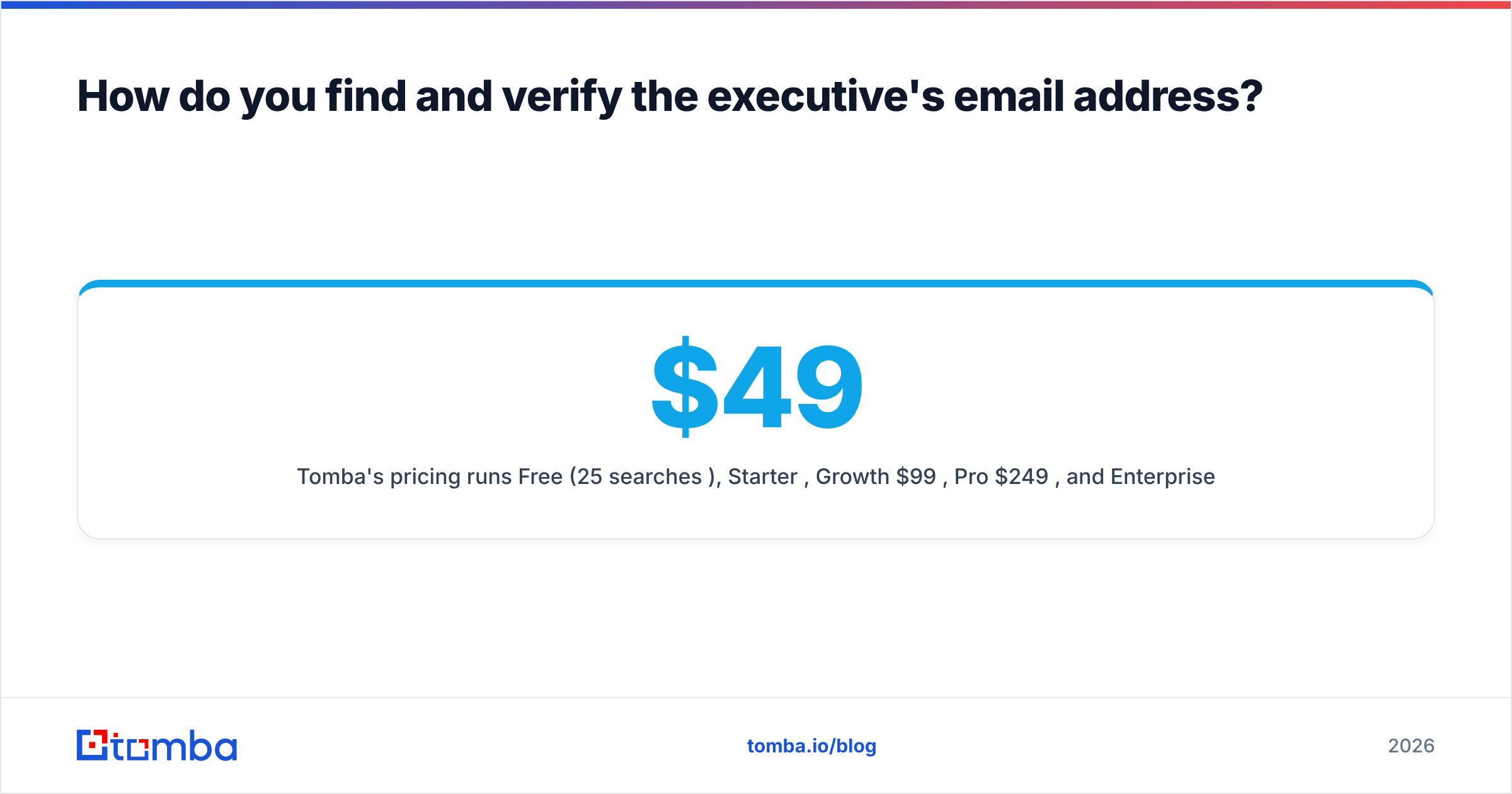
Tomba's pricing runs Free (25 searches/month), Starter $49/mo, Growth $99/mo, Pro $249/mo, and Enterprise custom, so a team testing executive outreach on 20–30 tier-1 accounts can validate the workflow on the free tier before committing. Full Tomba pricing is public.
For teams working larger lists, BookYourData is a solid option when you want pre-built, verified contact lists rather than resolving addresses one account at a time — it is a different purchase shape (buy a list vs. query an API) and it suits ABM programs that start from a defined account universe.
What mistakes quietly kill executive reply rates?#
- Sending Monday 8am. Executive inboxes are at their worst then. Tuesday–Thursday, mid-morning in their timezone, performs measurably better across most published benchmarks.
- Two asks in one email. "Can we talk, and also could you point me to whoever owns procurement?" splits the decision and gets neither.
- Name-dropping without permission. If you say a mutual contact suggested you reach out, that must be literally true. Executives check.
- A wall of signature. Four links, a logo image, a legal disclaimer, and a "book time with me" banner all signal mass send. Name, title, company, one link.
- Following up more than three times. Beyond three, you are training them to associate your name with irritation. Space them 4, 7, and 11 days out, then stop and re-approach in a quarter with new information.
- Ignoring email deliverability hygiene. SPF, DKIM, and DMARC misconfiguration sends good copy to spam. Check your records before blaming your templates.
- Writing for desktop. Draft on a phone, or at least preview on one. If the ask is below the fold, rewrite.
One more, and it is the subtle one: treating the executive as the buyer when they are the sponsor. Most senior executives do not evaluate tools. They redirect. Your best realistic outcome from a cold executive email is often a forward to a director with an implicit endorsement attached — which is worth far more than a meeting you had to beg for. Write emails that are easy to forward: short, self-contained, no "as we discussed" references, no attachments.
How do you measure whether this is working?#
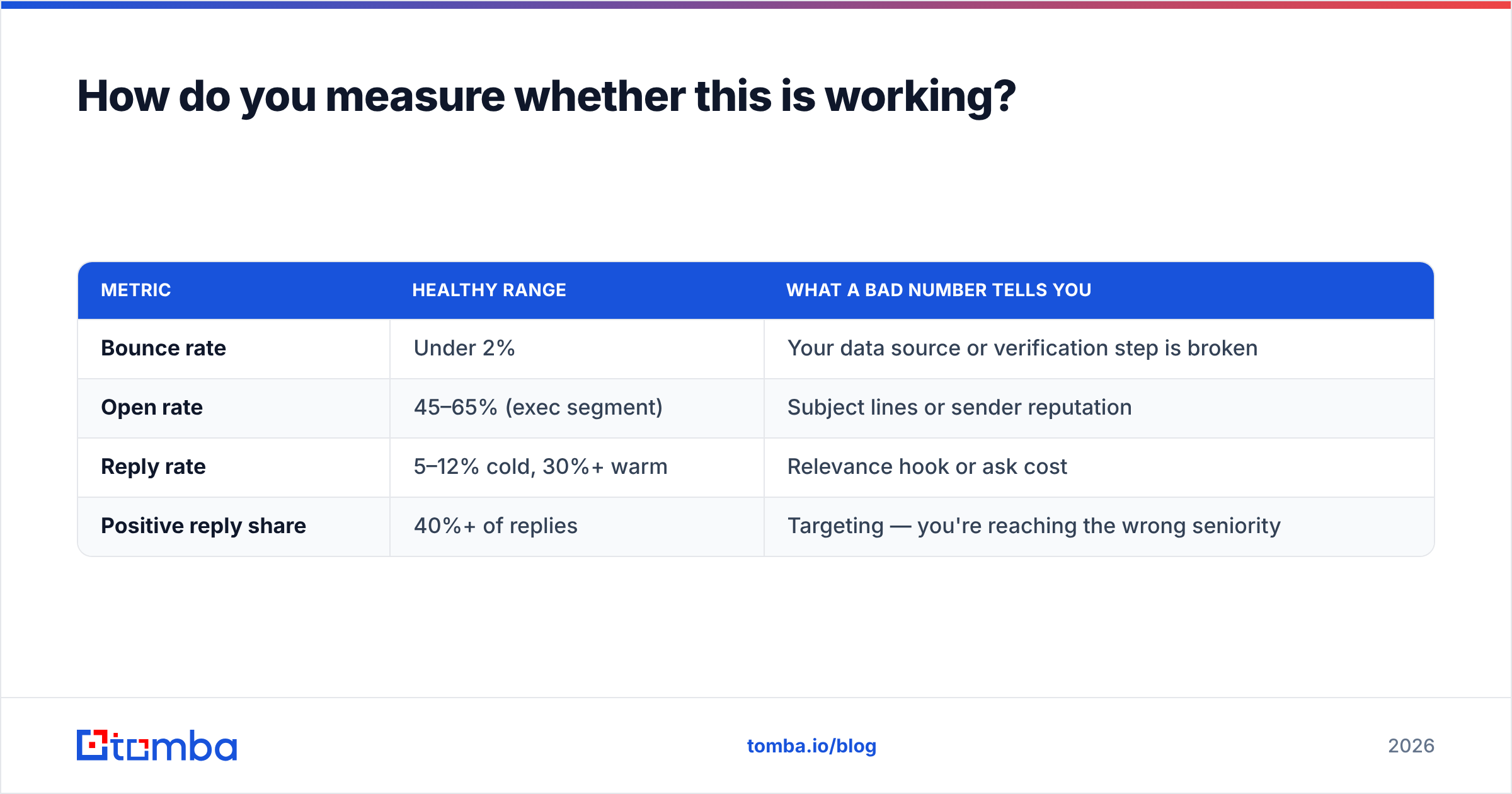
Track four numbers, not one:
| Metric | Healthy range | What a bad number tells you |
|---|---|---|
| Bounce rate | Under 2% | Your data source or verification step is broken |
| Open rate | 45–65% (exec segment) | Subject lines or sender reputation |
| Reply rate | 5–12% cold, 30%+ warm | Relevance hook or ask cost |
| Positive reply share | 40%+ of replies | Targeting — you're reaching the wrong seniority |
The last one is the one teams skip. A 15% reply rate that is mostly "please remove me" is worse than a 6% reply rate that is mostly "send me the benchmark." Segment your replies before you celebrate a volume number.
Also watch forward rate if your tooling exposes it. For executive outreach specifically, a forward is a conversion, not a consolation prize.
Where should you start?#
Pick your ten highest-value accounts. For each, decide cold or warm honestly — a real connector or no connector. Write the forwardable blurb for the warm ones before you ask anyone for anything. For the cold ones, verify every address before the first send, and hold every draft to 90 words and one question mark.
Then measure positive reply share, not open rate.
If the bottleneck is getting a correct address for a named executive in the first place, start with the Tomba Email Finder — search by name and company domain, get a confidence-scored result, and verify it in the same pass before it ever hits your sequence. The free tier covers 25 searches a month, which is enough to run this playbook across a tier-1 account list and see whether your copy or your data was the real problem.
Related guides#
Ready to find emails that actually work?
Join 150,000+ professionals who stopped guessing and started sending. Free credits on signup — no credit card required.
Get the Tomba newsletter
Practical outbound tactics and product updates — once every two weeks.
About the author