Exellius vs Leadsforge: Which B2B Lead Tool Wins in 2026?
Exellius and Leadsforge both promise AI-sourced B2B leads, but they solve different problems and bill in very different ways. Here is the honest breakdown, plus where a dedicated email finder beats both.
Exellius vs Leadsforge is a common shortlist for teams buying B2B lead data in 2026. Both promise AI-sourced contacts. Both solve different problems. And both bill in very different ways.
TL;DR
- Exellius is a done-with-you lead sourcing service. You describe your ideal customer in plain words, and it returns a built list. Strong for teams with no data ops person. Weak if you want raw API control.
- Leadsforge is a self-serve list builder you chat with. Ask for a list, get a list. Faster to a first result, but you inherit whatever the data partner gives you.
- Neither tool is a verification engine. Both lean on third-party data, so bounce risk sits with you.
- Pricing shape matters more than sticker price. Service-style tools bill per project or per seat. API-first tools like Tomba bill per credit from $49/mo, with a free tier at 25 searches/mo.
- Our pick: use either one for discovery if you like the chat workflow. Then run every address through a dedicated verifier before it touches your sending domain.
What are Exellius and Leadsforge, actually?#
Start with the honest framing. These are not the same kind of product, even though they compete for the same budget line.
Exellius (exelliussystems.com) sells AI-driven lead generation as a managed outcome. You hand over an ideal customer profile — industry, headcount, geography, trigger events. You get back a researched, contactable list. No SDR-support hire needed. It behaves more like a service than like a database you query.
Leadsforge (leadsforge.ai) is the self-serve take on the same idea. You open a chat window and describe who you want: "marketing directors at Series B fintechs in the UK." It builds the list as you talk. No filter panels. No boolean strings. The interface is the differentiator.
The overlap is discovery. The difference is control. Exellius takes the work off your plate. Leadsforge only takes away the query language, and leaves you driving.
That difference decides almost everything else: cost predictability, how fast you can change your ICP, and who answers for it when 18% of the list bounces.
Exellius vs Leadsforge: how do they compare head-to-head?#
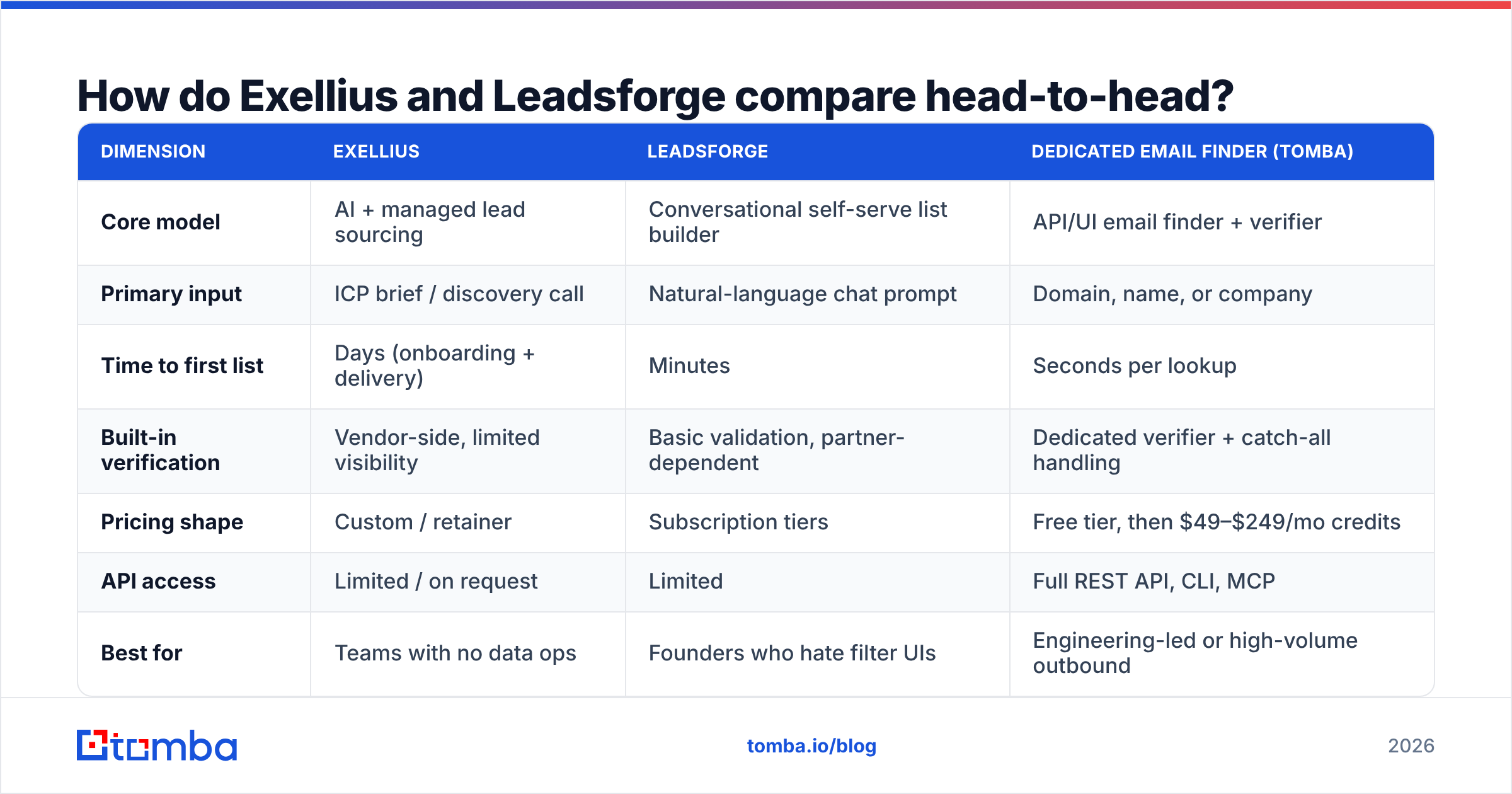
| Dimension | Exellius | Leadsforge | Dedicated email finder (Tomba) |
|---|---|---|---|
| Core model | AI + managed lead sourcing | Conversational self-serve list builder | API/UI email finder + verifier |
| Primary input | ICP brief / discovery call | Natural-language chat prompt | Domain, name, or company |
| Time to first list | Days (onboarding + delivery) | Minutes | Seconds per lookup |
| Built-in verification | Vendor-side, limited visibility | Basic validation, partner-dependent | Dedicated verifier + catch-all handling |
| Pricing shape | Custom / retainer | Subscription tiers | Free tier, then $49–$249/mo credits |
| API access | Limited / on request | Limited | Full REST API, CLI, MCP |
| Best for | Teams with no data ops | Founders who hate filter UIs | Engineering-led or high-volume outbound |
| Worst for | Rapid ICP iteration | Compliance-heavy enterprise procurement | Teams wanting done-for-you research |
Two things jump out of that table.
First, time to first list is not time to first reply. A list you get in three minutes still needs verification, deduplication, and sequencing. A list delivered in five days may arrive clean. Compare the whole path, not the first step.
Second, API access is the quiet dealbreaker. Say your motion is "enrich every inbound signup" or "refresh 4,000 CRM rows nightly." A chat window is the wrong shape for that. It is a job for an email finder API, not a conversation.
Which one has better data accuracy?#
Neither vendor publishes an audited accuracy figure. So treat every "95%+ accurate" claim — from anyone, us included — as a marketing number until you test it on your own ICP.
Here is the test that settles it. Take 200 accounts you already know well. Run them through each tool. Then measure five things.
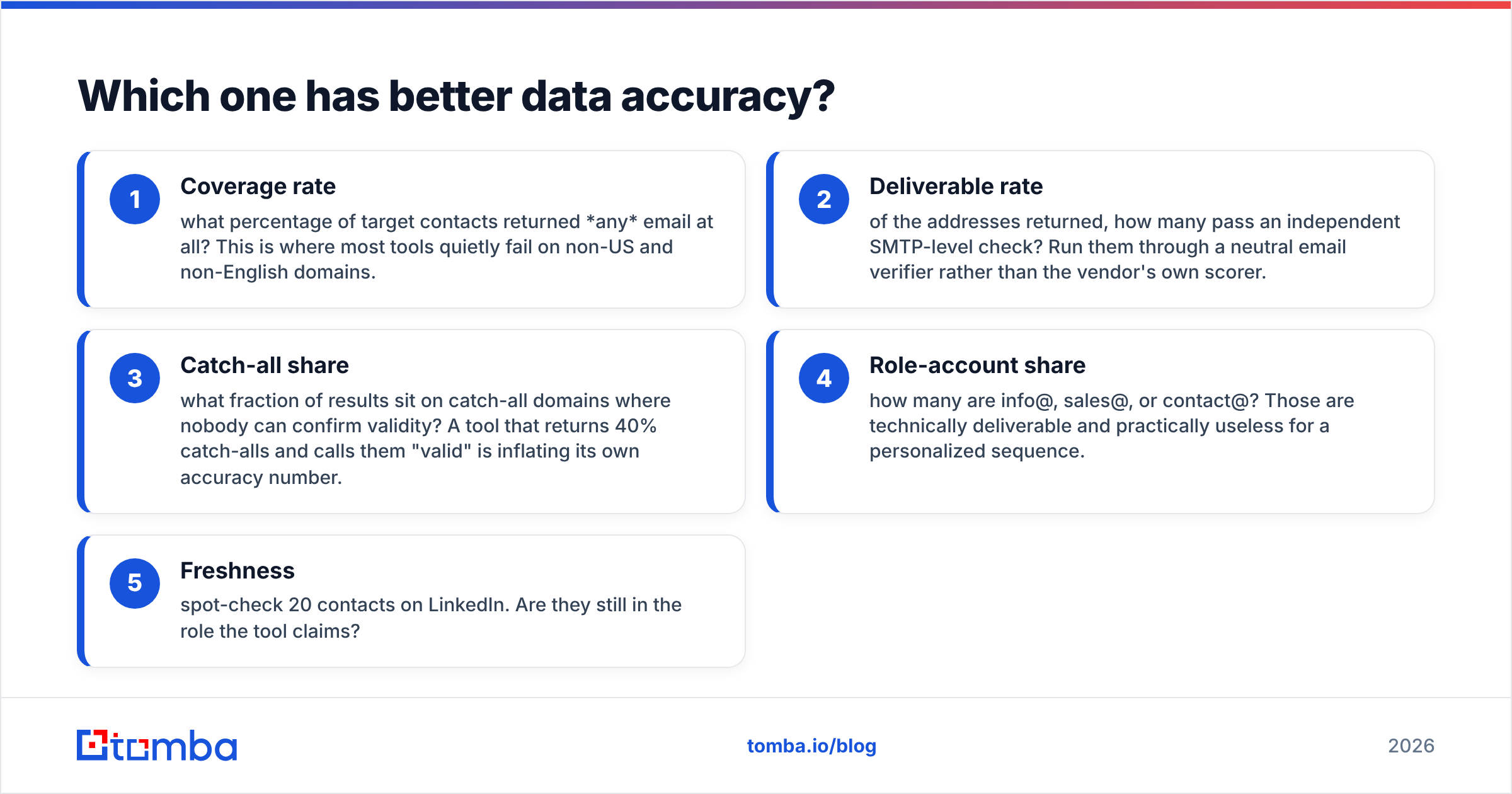
- Coverage rate — how many target contacts returned any email? Most tools quietly fail here on non-US and non-English domains.
- Deliverable rate — of the addresses returned, how many pass an independent SMTP check? Use a neutral email verifier, not the vendor's own scorer.
- Catch-all share — how many results sit on catch-all domains, where nobody can confirm validity? A tool that returns 40% catch-alls and calls them "valid" is inflating its own number.
- Role-account share — how many are info@, sales@, or contact@? Those deliver fine and convert badly.
- Freshness — spot-check 20 contacts on LinkedIn. Are they still in the role the tool claims?
Most accuracy arguments end once you separate coverage from deliverability. A tool that returns fewer emails but checks them harder often wins the campaign.
The catch-all problem deserves its own note. It is where "verified" claims stretch furthest. Roughly a fifth of business domains accept mail to any address, so a standard SMTP check tells you nothing there. Handling it well takes a purpose-built catch-all verifier, not a yes/no flag in a CSV.
Exellius vs Leadsforge: which pricing model is cheaper?#
They bill on different philosophies, which makes a direct comparison harder than it looks.
Exellius leans toward custom and retainer deals. That is normal for anything with a service component. The quote reflects scope, not a public number. Your cost per usable contact depends on how tight your brief was.
Leadsforge uses standard SaaS tiers with credit allowances. That is more predictable. But credits still burn on searches that return nothing useful, which is the hidden cost across this whole category.
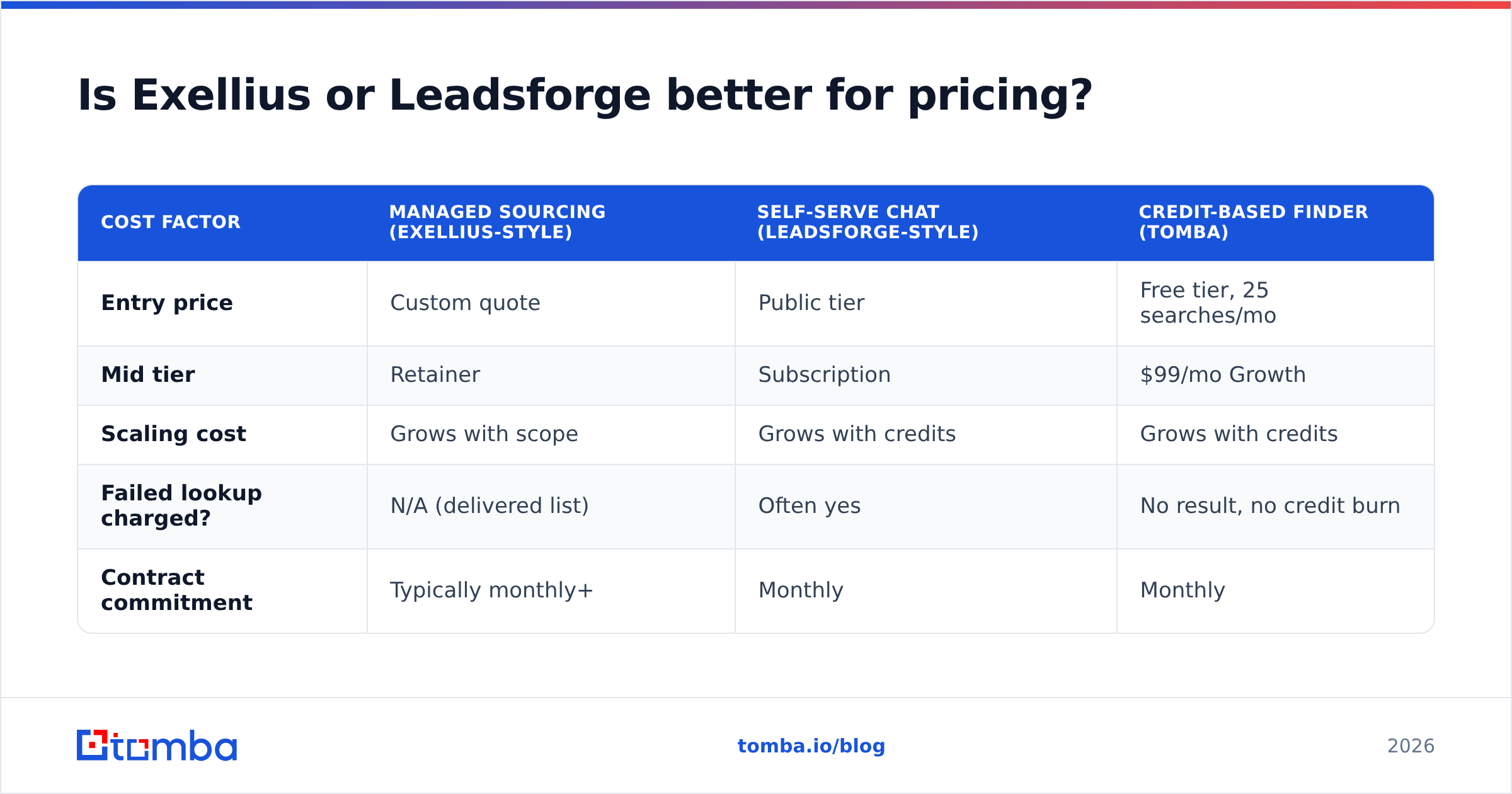
| Cost factor | Managed sourcing (Exellius-style) | Self-serve chat (Leadsforge-style) | Credit-based finder (Tomba) |
|---|---|---|---|
| Entry price | Custom quote | Public tier | Free tier, 25 searches/mo |
| Mid tier | Retainer | Subscription | $99/mo Growth |
| Scaling cost | Grows with scope | Grows with credits | Grows with credits |
| Failed lookup charged? | N/A (delivered list) | Often yes | No result, no credit burn |
| Contract commitment | Typically monthly+ | Monthly | Monthly |
The number that matters is cost per verified, deliverable, in-role contact. Not cost per credit. Not cost per month. Run that math on a 500-lead sample before you sign anything longer than 30 days. Full Tomba pricing is public if you want a baseline for the quotes you get.
One thing procurement teams miss: a managed price usually includes research labor you would otherwise pay an SDR to do. If your alternative is hiring, a retainer can be the cheaper option. If your alternative is a $99/mo tool plus 20 minutes from an analyst you already employ, it is not.
What about compliance and data sourcing?#
Buying B2B data gets uncomfortable here. Both tools deserve harder questions than their landing pages invite.
Ask any vendor these five before you buy.
- Where does the data come from? Public web crawl, opt-in partners, contributed address books, or resold databases? Each carries a different risk under GDPR and CCPA.
- What is the deletion SLA? If a contact asks to be erased, how fast does that spread? Does it reach lists you already exported?
- Is there a data processing agreement? Not a "GDPR compliant" badge in the footer. An actual DPA your legal team can read.
- Are EU contacts flagged separately? Outreach rules differ enough that one undifferentiated list becomes a liability.
- Can you audit the source of a record? The best vendors will tell you where a single email came from. Clear data sources should be table stakes, not a premium feature.
If a vendor cannot answer #1 and #3 clearly, you have your answer. It does not matter whose logo is on the invoice. The G2 category listings help too — reviewers there mention compliance friction, which never comes up in a demo.
Which tool fits which team?#
Skip the "it depends" answer. Here is the mapping.
Choose Exellius-style managed sourcing if you have budget but no data ops headcount. Your ICP should be stable and well defined. You would rather buy an outcome than run a tool.
This also fits niche targets where filters fail — deep industrial, regulated, or non-English markets, where a human researcher beats a query.
Choose Leadsforge-style conversational building if you are a founder or a small GTM team. Your ICP still moves week to week. You want to test five audience ideas before lunch. The chat interface earns its keep while the idea is still fuzzy.
Choose a dedicated finder and verifier if you already know your accounts and need the contact data in code. This is the CRM enrichment case, the signup hydration case, and the high-volume outbound case. You supply the targets. The tool supplies verified addresses at a predictable cost.
Choose a combination if you run real outbound at scale. Most teams that succeed here do discovery in one tool and verification in another. The incentives of a list seller and a list checker pull in opposite directions.
That last point is worth keeping. A vendor paid per contact delivered has no reason to shrink your list. A vendor paid to verify has no reason to pad it. Splitting the two jobs removes a conflict no vendor promise can fix.
Also worth noting: this category has more than two credible options. BookYourData is a solid pay-as-you-go pick if you want to buy a verified list outright, with no subscription. It publishes its accuracy guarantee upfront, which makes it a useful third reference point when you benchmark quotes.
How do you actually run the evaluation?#
Give yourself two weeks and a fixed protocol. Vendor demos are built to look good. Your own data is not.
Week one — coverage. Pick 200 real target accounts. Run the same request through each tool. Record the raw fill rate. Clean nothing yet.
Week two — quality. Run every returned address through an independent verifier. Sort the results into valid, catch-all, role-based, and invalid. Then work out the cost per valid, non-role contact for each vendor. That single number usually ends the debate.
The tiebreakers, ordered by how much they will matter six months in:
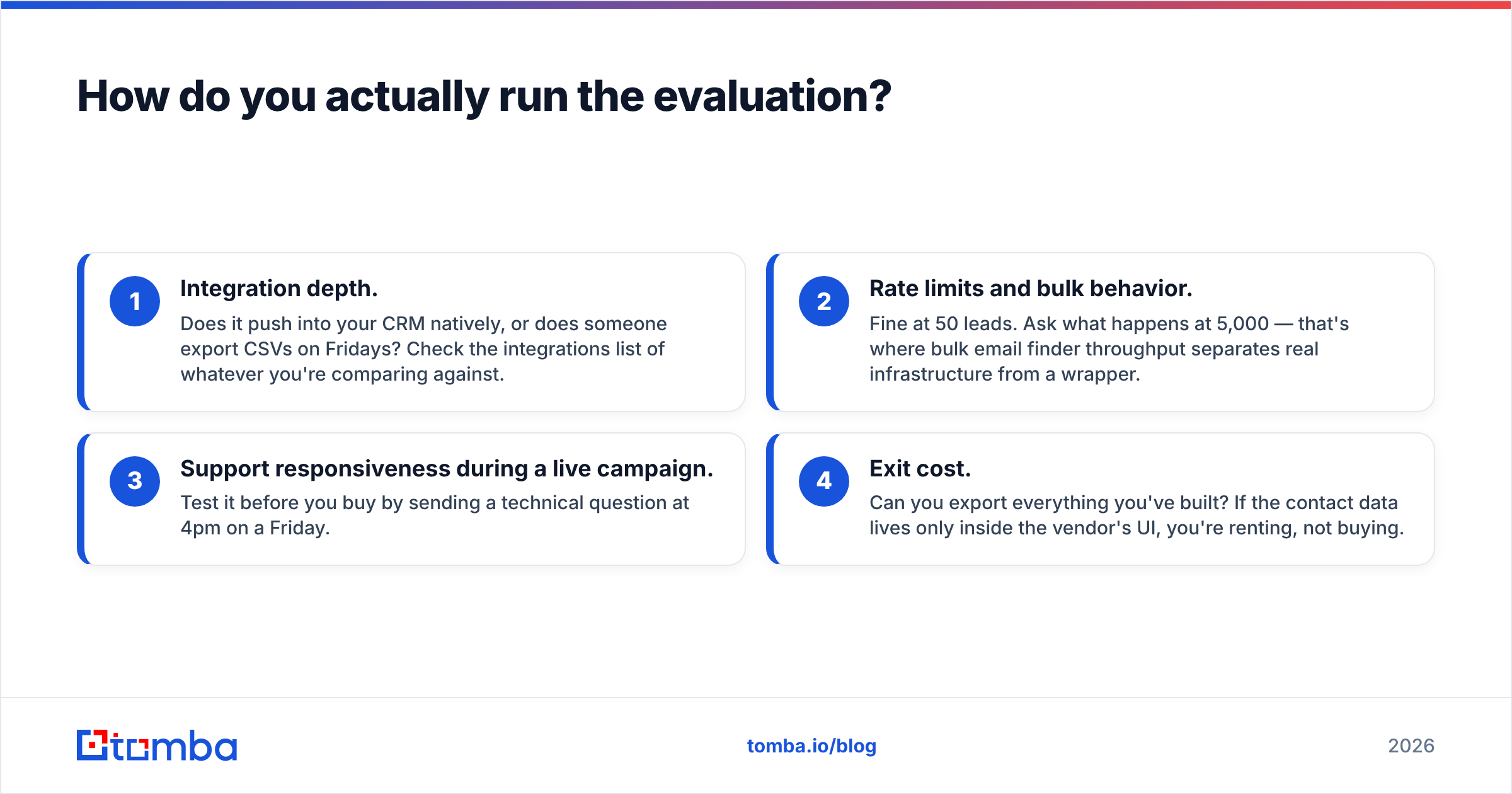
- Integration depth. Does it push into your CRM on its own, or does someone export CSVs on Fridays? Check the integrations list of every tool you compare.
- Rate limits and bulk behavior. Anything works at 50 leads. Ask what happens at 5,000. That is where bulk email finder throughput separates real infrastructure from a wrapper.
- Support during a live campaign. Test it before you buy. Send a technical question at 4pm on a Friday.
- Exit cost. Can you export everything you built? If the contact data only lives in the vendor's UI, you are renting it.
One more check: does the tool fail gracefully? Good data products tell you when they are unsure. Bad ones return a plausible guess with no confidence signal. That is how a 6% bounce rate turns into a blocked sending domain. Email deliverability damage builds slowly and clears slowly. A few bad campaigns can cost you months of sender reputation, and no lead vendor pays for that.
What's the verdict?#
Short answer: Leadsforge for exploration, Exellius for outsourced execution, and a dedicated verifier under either one.
Neither tool is bad. They solve neighboring problems. The mistake buyers make is expecting either one to also be the data-quality layer. That is a separate job with separate incentives.
So the Exellius vs Leadsforge choice matters less than the workflow you build around it. Here is the pattern that keeps working for teams doing real volume:
- Use a discovery tool to find who to contact
- Use a finder to work out how to reach them, at a predictable cost per lookup
- Use a verifier to confirm the address is deliverable before it enters a sequence
- Check bounce rate weekly and cut any source above 3%
That 3% threshold is not arbitrary. Major inbox providers tightened bulk-sender rules over the past two years. Sustained bounce rates above a few percent now trigger throttling, not just a soft warning. Google's own sender guidelines treat list hygiene as a requirement, not a courtesy.
Whichever discovery tool you pick, do not let it grade its own work. Run the addresses through the Tomba Email Finder and its verification layer before anything hits your sending domain. Start on the free tier at 25 searches a month. Benchmark it against the list you just bought, and let the bounce data decide. That argument is cheaper to settle now than after your domain reputation takes the hit.
Related guides#
Ready to find emails that actually work?
Join 150,000+ professionals who stopped guessing and started sending. Free credits on signup — no credit card required.
Get the Tomba newsletter
Practical outbound tactics and product updates — once every two weeks.
About the author