Expansion Sales: How to Grow Revenue From Existing Accounts
Most B2B growth now comes from accounts you already won — yet expansion is usually run on gut feel and QBR luck. Here's the playbook: motions, triggers, ownership models, and the metrics that prove it works.
TL;DR
- Expansion sales is revenue growth from customers you already closed — seat adds, tier upgrades, cross-sell, and usage overage — and in most mature B2B companies it outproduces new-logo sales per dollar spent.
- The single biggest failure mode is timing: teams ask at renewal instead of asking at the usage, org-change, or outcome signal that made the ask obvious.
- Net revenue retention (NRR) is the scoreboard. Anything below 100% means you're refilling a leaky bucket with expensive new logos.
- Ownership matters less than accountability. AE-owned, CSM-owned, and dedicated-expansion models all work; unowned expansion never does.
- Expansion breaks when your contact data goes stale. Champions leave, buying committees reshuffle, and new decision-makers arrive with no relationship to you.
What is expansion sales?#
Expansion sales is any revenue you generate from an existing customer beyond their original contract. That includes adding seats, moving up a pricing tier, buying a second product line, expanding into a new department or region, and paying for usage above a committed threshold.
Think of it like a restaurant. New-logo sales is filling the tables. Expansion sales is the server who notices you finished your appetizer, sees you eyeing the wine list, and asks at the right moment. Same guest, more revenue, near-zero acquisition cost. The technical framing: expansion revenue is incremental ARR from the installed base, measured separately from new ARR and offset by churn and contraction to give you net revenue retention.
The distinction that trips people up: renewal is not expansion. A renewal keeps the dollar you already had. Expansion adds a dollar you didn't. Many teams report them together, which hides the fact that they're growing flat accounts and calling it a win.
Why does expansion revenue matter more in 2026?#
Because the cost of acquiring a new logo keeps climbing while the cost of expanding an existing one does not.
Three forces are compounding:
- Acquisition costs are up and buying committees are bigger. Analyst coverage from firms like Gartner has documented B2B buying groups growing well past a single decision-maker, which stretches cycles and inflates CAC on net-new deals.
- Budget scrutiny favors incumbents. When procurement tightens, expanding a vendor already through security review and legal is dramatically faster than onboarding a new one. Your installed base is your moat.
- Product-led motions generate their own signals. Usage telemetry tells you which accounts are hitting limits, which teams are inviting new users, and which features are getting adopted — expansion intent you don't have to guess at.
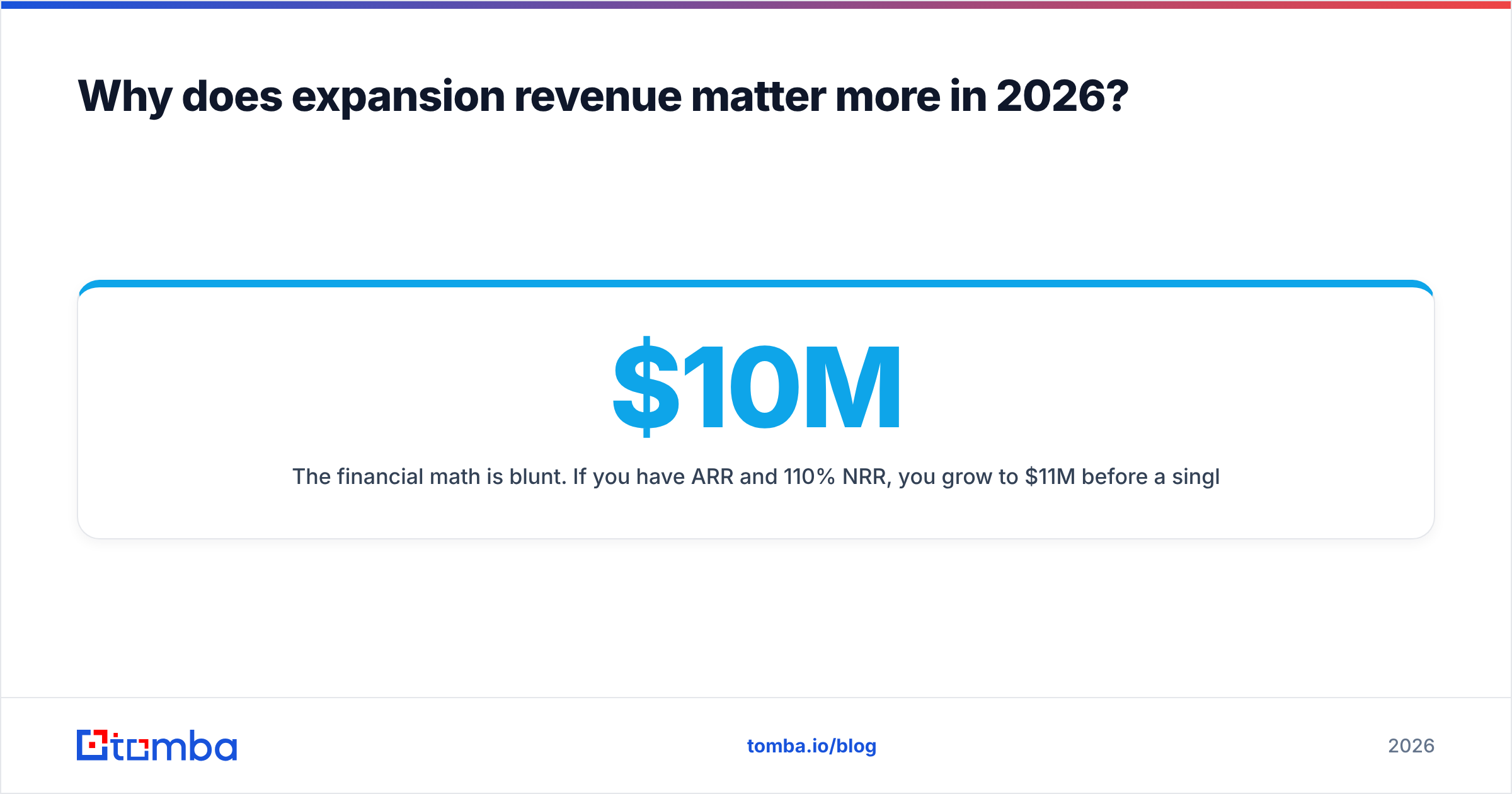
The financial math is blunt. If you have $10M ARR and 110% NRR, you grow to $11M before a single new deal closes. At 90% NRR, you need $2M in new business just to reach $11M. Same market, same product, radically different capital efficiency.
What are the main types of expansion motions?#
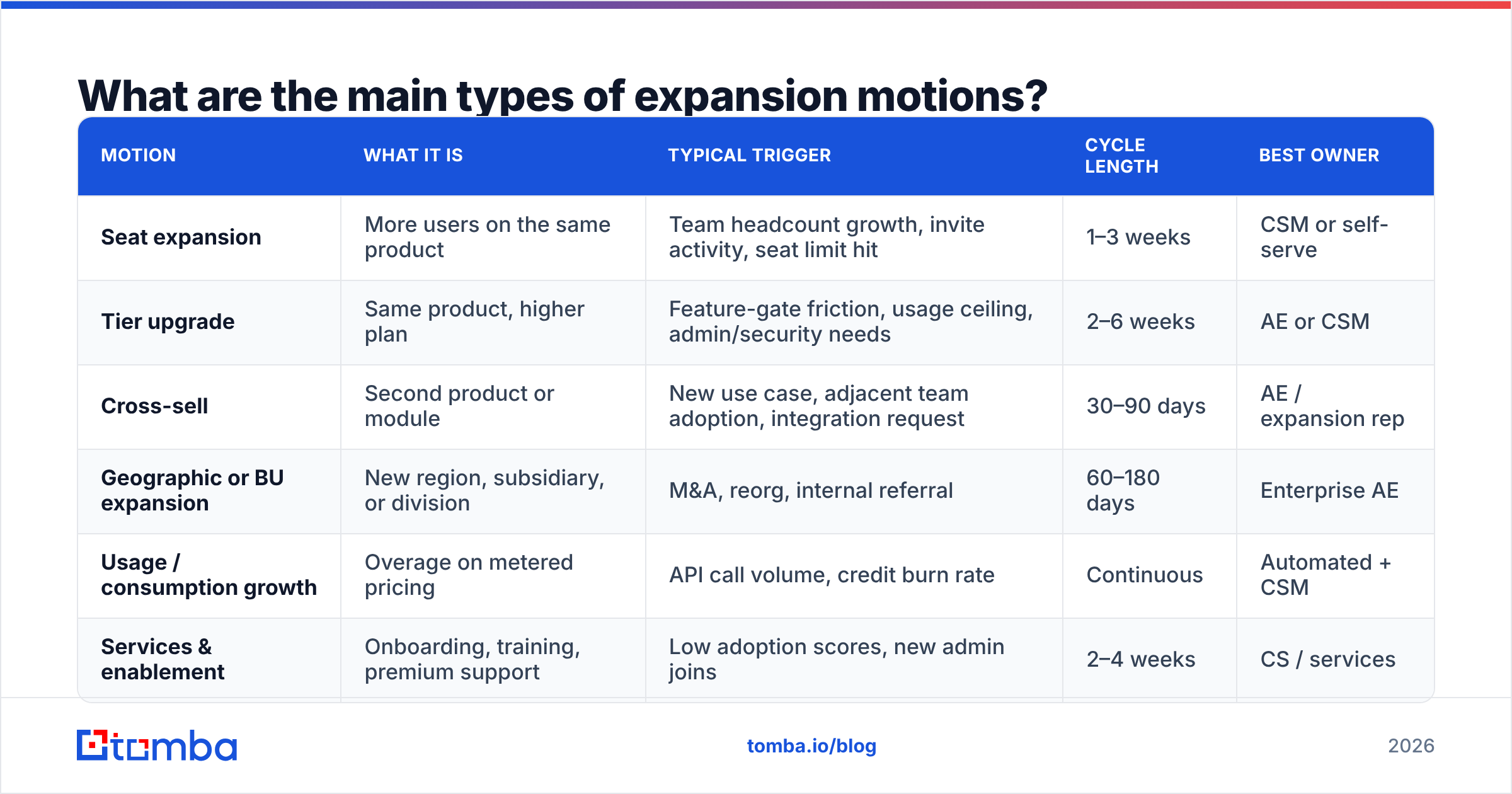
Not all expansion is the same motion, and running them identically is why most expansion programs underperform. Each has a different trigger, a different owner, and a different sales cycle.
| Motion | What it is | Typical trigger | Cycle length | Best owner |
|---|---|---|---|---|
| Seat expansion | More users on the same product | Team headcount growth, invite activity, seat limit hit | 1–3 weeks | CSM or self-serve |
| Tier upgrade | Same product, higher plan | Feature-gate friction, usage ceiling, admin/security needs | 2–6 weeks | AE or CSM |
| Cross-sell | Second product or module | New use case, adjacent team adoption, integration request | 30–90 days | AE / expansion rep |
| Geographic or BU expansion | New region, subsidiary, or division | M&A, reorg, internal referral | 60–180 days | Enterprise AE |
| Usage / consumption growth | Overage on metered pricing | API call volume, credit burn rate | Continuous | Automated + CSM |
| Services & enablement | Onboarding, training, premium support | Low adoption scores, new admin joins | 2–4 weeks | CS / services |
The practical takeaway: seat and usage expansion should be as close to frictionless self-serve as your billing system allows. Cross-sell and BU expansion are real sales cycles that deserve real discovery, real multi-threading, and real forecast entries. Treating a $60K cross-sell like a seat add is why it stalls in "waiting to hear back" for a quarter.
Who should own expansion — AEs, CSMs, or a dedicated team?#
There's no universally right answer, but there is a universally wrong one: nobody.
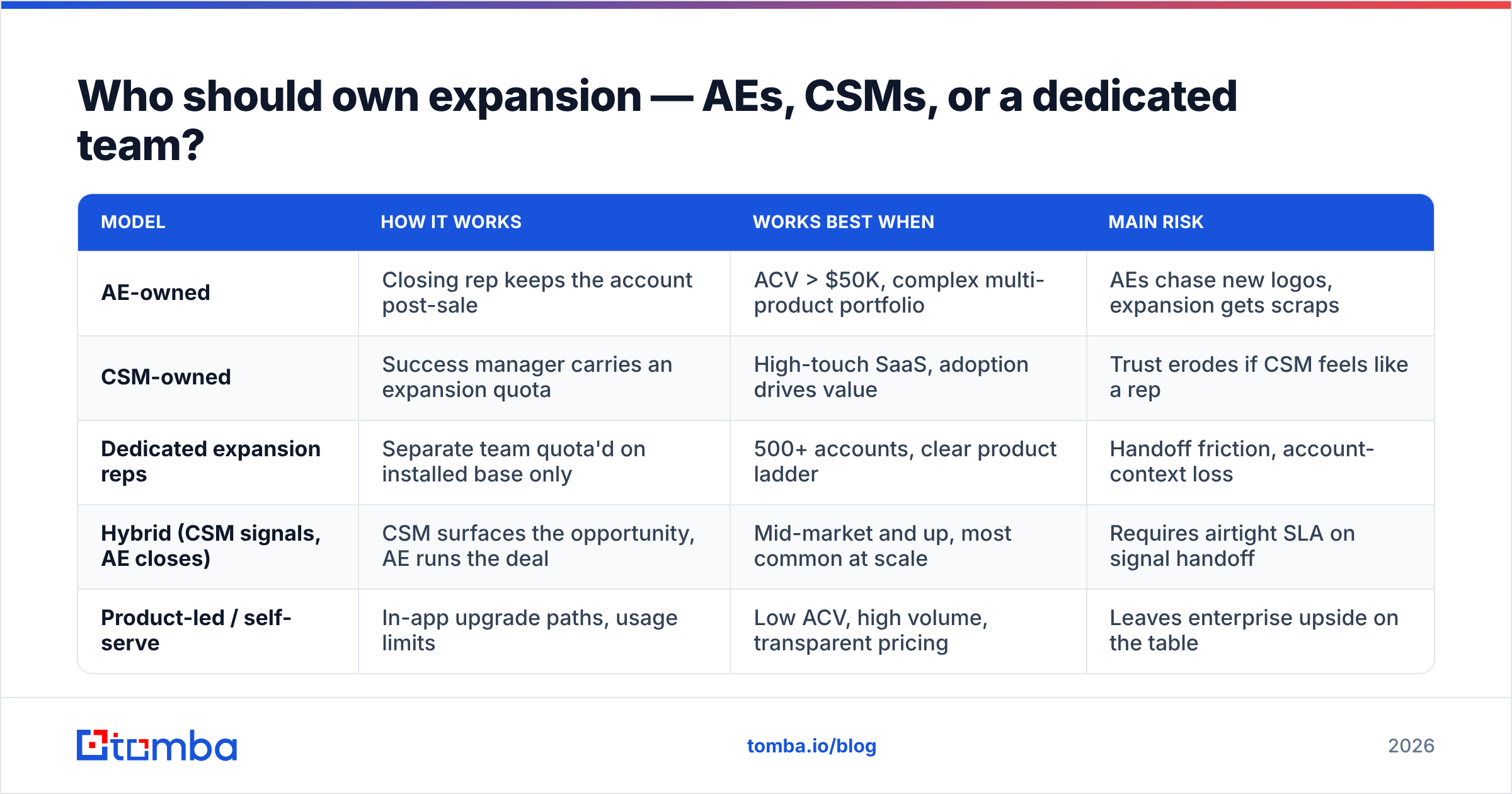
| Model | How it works | Works best when | Main risk |
|---|---|---|---|
| AE-owned | Closing rep keeps the account post-sale | ACV > $50K, complex multi-product portfolio | AEs chase new logos, expansion gets scraps |
| CSM-owned | Success manager carries an expansion quota | High-touch SaaS, adoption drives value | Trust erodes if CSM feels like a rep |
| Dedicated expansion reps | Separate team quota'd on installed base only | 500+ accounts, clear product ladder | Handoff friction, account-context loss |
| Hybrid (CSM signals, AE closes) | CSM surfaces the opportunity, AE runs the deal | Mid-market and up, most common at scale | Requires airtight SLA on signal handoff |
| Product-led / self-serve | In-app upgrade paths, usage limits | Low ACV, high volume, transparent pricing | Leaves enterprise upside on the table |
The hybrid model is what most companies converge on, and its success rests entirely on one thing: a documented SLA for what counts as a qualified expansion signal and how fast the AE must act on it. Without that, "the CSM flagged it" becomes a place where opportunities go to die.
Whichever model you pick, compensate for it explicitly. If expansion is 60% of your growth and 10% of your comp plan, you already know what your reps will do on a Tuesday afternoon.
What signals should trigger an expansion play?#
Stop running expansion off the calendar. Renewal dates are an accounting artifact; they tell you when a contract ends, not when a customer is ready to buy more. Run it off signals instead.
Here are the highest-converting triggers, ranked roughly by how reliably they predict a close:
- Hard usage ceilings. The account hit 90%+ of seats, credits, API calls, or storage. This is the cleanest signal in B2B — the customer has already demonstrated the demand.
- New department adoption. Users from a team outside the original buying group started logging in. That's an unclaimed land-and-expand beachhead sitting in your product analytics.
- Executive or champion change. A new VP joins the account. This cuts both ways — it's your biggest churn risk and your biggest expansion opening, depending on who reaches out first.
- Documented outcome. The customer hit a milestone you can attribute to your product. Expansion conversations are easy when you open with a number they already agreed to.
- Support and feature requests. Repeated asks for capability that lives in a higher tier or an adjacent product are inbound expansion leads that most teams file as tickets.
- Hiring signals. The company posted 15 roles for the team that uses your product. Headcount growth precedes seat growth by roughly one quarter.
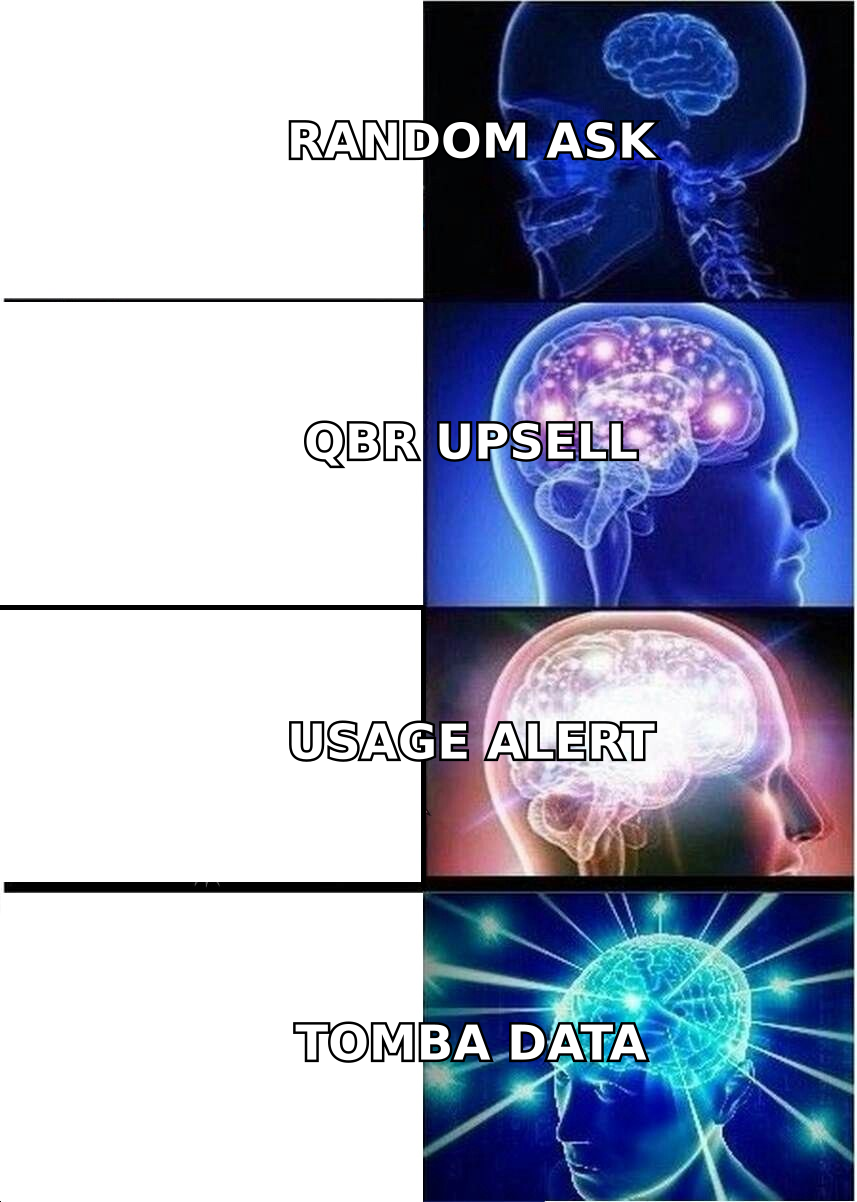
Notice how few of these show up in a CRM by default. Most live in product telemetry, support tickets, job boards, and LinkedIn — which is why expansion programs so often need a data layer before they need a playbook.
How do you build an expansion pipeline that actually forecasts?#
Treat expansion opportunities like real pipeline, with stages, exit criteria, and a forecast category. A five-step build:
Step 1 — Segment the installed base by expansion potential. Score every account on headroom (how much more they could buy), health (adoption, support sentiment, NPS), and fit (does the second product actually solve a problem they have). Accounts high on all three are your A-tier. Accounts with headroom but poor health are a CS problem, not a sales problem.
Step 2 — Instrument the triggers. Pipe usage thresholds, new-team logins, and support-request patterns into your CRM as tasks or alerts. If a signal doesn't create a record with an owner and a due date, it isn't instrumented — it's a dashboard nobody opens.
Step 3 — Map the current buying committee, not the original one. The people who signed the first contract are frequently gone or moved. Rebuild the map: who's the economic buyer today, who's the day-to-day admin, who owns the budget for the adjacent product. Use your CRM's contact records as a starting hypothesis, then verify.
Step 4 — Run discovery like it's a new deal. The fastest way to lose an expansion deal is assuming you already know the requirements because you sold them once. New department, new problem, new evaluation criteria — and often, a new competitor in the mix.
Step 5 — Forecast it separately. Expansion should be its own line in the pipeline review with its own conversion rates. Blending it into new business hides both a healthy expansion engine and a broken one. HubSpot's sales pipeline resources are a reasonable starting point if you're formalizing stage definitions for the first time.
What metrics prove your expansion motion is working?#
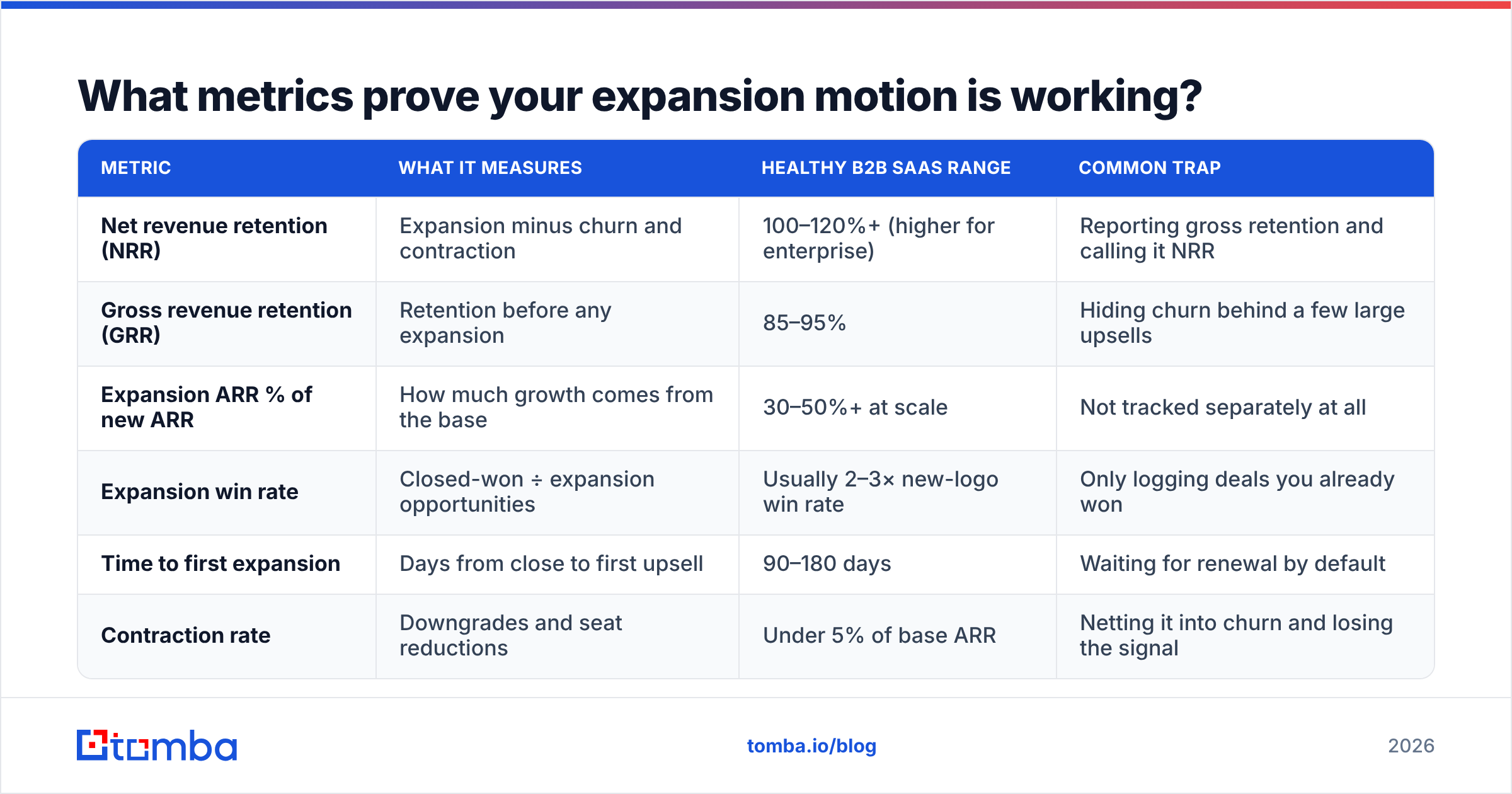
| Metric | What it measures | Healthy B2B SaaS range | Common trap |
|---|---|---|---|
| Net revenue retention (NRR) | Expansion minus churn and contraction | 100–120%+ (higher for enterprise) | Reporting gross retention and calling it NRR |
| Gross revenue retention (GRR) | Retention before any expansion | 85–95% | Hiding churn behind a few large upsells |
| Expansion ARR % of new ARR | How much growth comes from the base | 30–50%+ at scale | Not tracked separately at all |
| Expansion win rate | Closed-won ÷ expansion opportunities | Usually 2–3× new-logo win rate | Only logging deals you already won |
| Time to first expansion | Days from close to first upsell | 90–180 days | Waiting for renewal by default |
| Contraction rate | Downgrades and seat reductions | Under 5% of base ARR | Netting it into churn and losing the signal |
One caution on benchmarks: NRR is not comparable across pricing models. A consumption-priced infrastructure vendor and a flat-seat HR tool can both be excellent businesses with wildly different NRR. Compare yourself to your own trailing four quarters and to peers with the same pricing shape — public benchmark aggregates on G2 and similar review platforms are useful for directional category context, not as targets.
Why does contact data quietly kill expansion deals?#
Because expansion is a relationship business running on a dataset that decays about 25–30% a year.
Here's the pattern every rep recognizes. You've had the account for 18 months. NRR-friendly usage signals are flashing. You open your CRM to reach the VP who championed you — and the email bounces. She left eight months ago. Nobody updated the record. The new VP has never heard of you, evaluated two competitors last quarter, and your only remaining contact is an admin with no budget.
That's not a playbook failure. It's a data failure, and it's fixable:
- Re-verify the account's contacts before every expansion play. A bounced first touch on an existing customer is worse than a cold bounce — it signals you weren't paying attention. Run the list through an email verifier before the sequence goes out.
- Find the people who joined after you sold. New department heads, new RevOps leaders, new security owners. A domain search surfaces the current people at the company, not the snapshot your CRM took at contract signing.
- Multi-thread deliberately, not reactively. Enterprise expansion deals with four or more engaged contacts close materially more often than single-threaded ones. Build that map before your champion leaves, not after.
- Keep the record fresh automatically. Push updated titles, emails, and phone numbers back into your CRM with data enrichment instead of relying on reps to hand-edit fields during a busy quarter.
The same logic applies to the phone. If your expansion motion includes exec-level outreach, having a current direct dial via a phone finder beats a switchboard number attached to a person who left in 2024.
What are the most common expansion sales mistakes?#
- Asking at renewal only. You've compressed twelve months of trigger opportunities into one anxious conversation where the customer is already thinking about price.
- Pitching the product instead of the outcome. "You should also buy Module B" lands very differently than "Your ops team is manually doing what Module B automates — here's the hour count."
- Ignoring contraction. Expansion up 20% and contraction up 15% is a flat business with an expensive sales org.
- Skipping discovery because you're the incumbent. Incumbency gets you the meeting. It does not get you the requirements.
- Letting CS own a quota without the tooling. If you're going to quota your CSMs, give them pipeline visibility, contact data, and enablement — or you've just added stress without adding revenue.
- No expansion-specific enablement. The talk track for "buy more of what you already trust" is nothing like a cold pitch. Most orgs never write it down.
Where should you start if you have no expansion motion today?#
Pick one trigger and one motion. Usage-ceiling seat expansion is the usual best first move: the signal is unambiguous, the ask is small, the cycle is short, and you'll get enough closed-won volume in a quarter to justify building the rest.
Then, before you scale it, fix your contact layer. Every downstream expansion play — cross-sell, BU expansion, champion re-mapping — depends on knowing who actually works at your customers right now, not who worked there when you signed them.
That's the gap Tomba Email Finder is built to close. Point it at a customer's domain and get current, verified professional contacts for the departments you haven't sold into yet — the new VP who replaced your champion, the ops lead in the second business unit, the security owner who has to approve the upgrade. Start free with 25 searches a month, or move to the Starter plan at $49/mo when the motion sticks; full Tomba pricing runs from Starter through Growth at $99/mo and Pro at $249/mo. Your best expansion pipeline is already in your customer list — you just need to know who's in it today.
Related guides#
Ready to find emails that actually work?
Join 150,000+ professionals who stopped guessing and started sending. Free credits on signup — no credit card required.
Get the Tomba newsletter
Practical outbound tactics and product updates — once every two weeks.
About the author