Expertise AI Pricing, Reviews, Pros and Cons (2026 Guide)
A neutral look at Expertise AI pricing, what reviewers actually praise and complain about, the hidden costs quote-based tools hide, and when a flat-rate email finder is the smarter buy.
TL;DR
- Expertise AI sits in the AI sales-intelligence category: enrichment, scoring, and research automation layered on top of a contact database. Its pricing is quote-led rather than fully self-serve, so your real cost depends on negotiation, seat count, and credit volume.
- The single biggest complaint pattern across quote-based AI sales tools is not the sticker price — it's the annual commitment, the seat minimum, and credits that expire monthly.
- Reviewers consistently praise the research automation and consistently flag data freshness on smaller companies and non-US regions.
- If your actual job-to-be-done is "find and verify work emails at scale," a flat-rate tool like Tomba (Free 25 searches/mo, Starter $49/mo, Growth $99/mo, Pro $249/mo) does that piece for a fraction of an AI platform seat.
- Ask for the three numbers before you sign: cost per usable contact, credit rollover policy, and the exit clause on the annual term.
What is Expertise AI, and who is it actually for?#
Expertise AI belongs to the AI sales-technology tier — the layer that sits above a raw contact database and tries to do the thinking for you. Instead of handing you a list, this class of tool researches accounts, scores fit, drafts context-aware messaging, and pushes enriched records into your CRM.
That matters for how you read the pricing. You are not buying rows of data. You are buying seats plus compute plus a workflow, and vendors in this tier price accordingly: per user, per month, on an annual term, with credit pools attached.
The honest buyer profile looks like this:
- Mid-market and enterprise revenue teams with 5+ reps who need consistent account research rather than one-off lists.
- RevOps leaders who already run a CRM of record and want enrichment written back automatically — see how revenue operations teams typically own this budget line.
- ABM programs where the value is in prioritization signals, not raw contact volume.
- Teams with a real onboarding budget, because platform tools take weeks to configure before they return anything.
- Not solo founders, agencies, or two-person SDR teams doing 500–5,000 lookups a month. That profile overpays badly on a platform seat.
If you land in that last bucket, skip to the comparison table. The rest of this post will still be useful, but the verdict is already written.
How does Expertise AI pricing actually work?#
Here is the part vendors in this category rarely put on a page: the list price is a starting position, not a price.
Quote-led pricing in AI sales tools almost always decomposes into four multipliers:
- Seats. Priced per user, per month, usually with a floor (3–5 seats is typical). One-seat pilots often aren't offered at all, or are offered at a punitive rate.
- Credits. Enrichment, verification, and AI research each consume credits at different rates. An "AI research" call frequently costs 5–20× a plain contact reveal.
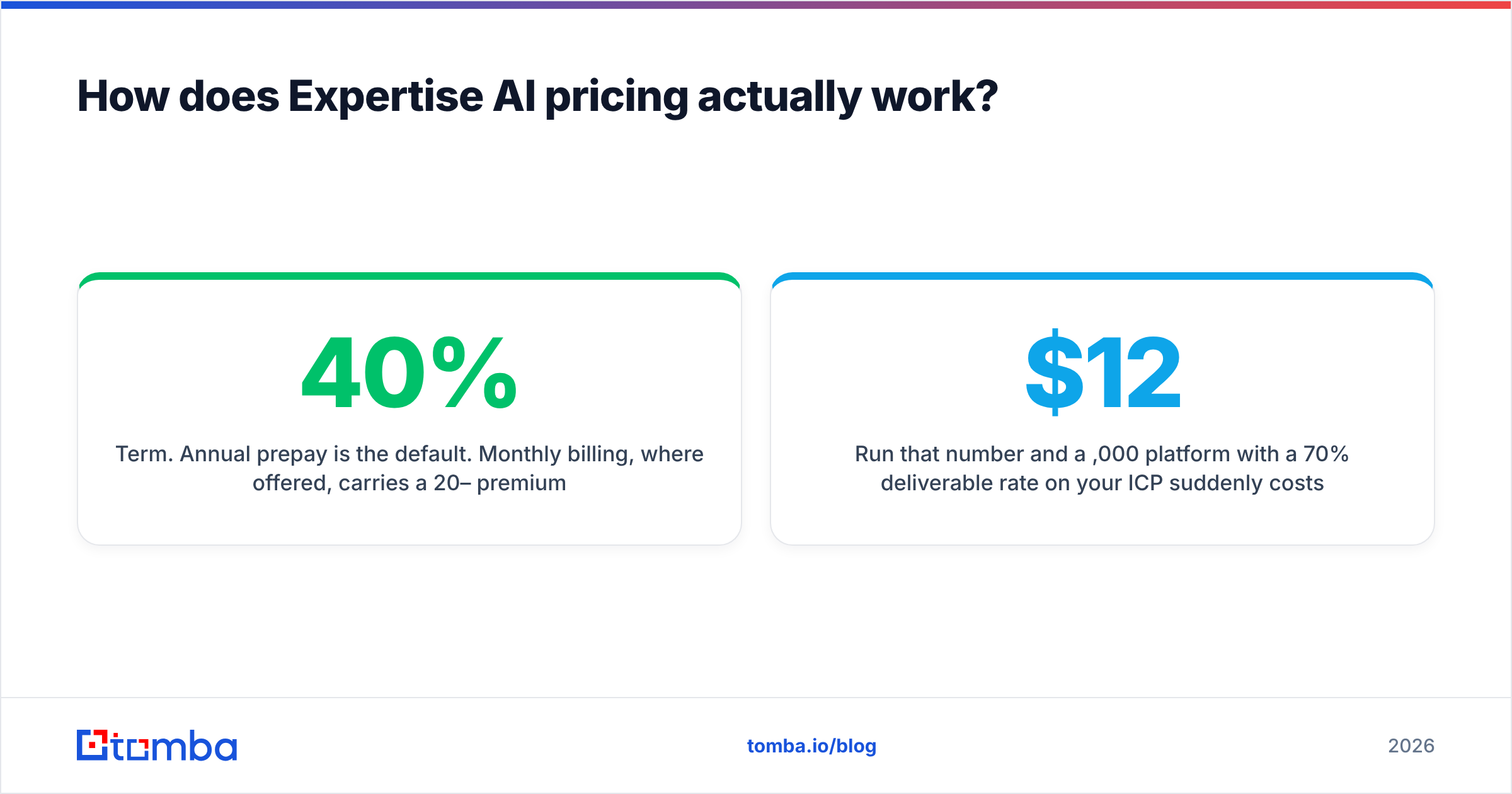
- Term. Annual prepay is the default. Monthly billing, where offered, carries a 20–40% premium across this software category.
- Add-ons. API access, CRM write-back, SSO, and admin controls are the four things most likely to be gated behind a higher tier.
Because the exact figures move with each negotiation and each renewal cycle, treat any number you read in a blog post — including this one — as directional. Get the quote in writing, then normalize it yourself. The only metric that survives contact with reality is cost per usable contact:
cost per usable contact = total annual contract ÷ (credits actually consumed × verified-deliverable rate)Run that number and a $12,000/year platform with a 70% deliverable rate on your ICP suddenly costs more per usable email than a $49/month tool with a 95% verified rate. That is not a hypothetical — it's the most common reason teams churn off platform contracts in year two.
For a broader primer on how per-seat versus consumption pricing behaves in software as a service, the underlying economics haven't changed; AI credits just added a third axis.
What do Expertise AI reviews say — the honest pros and cons?#
Public reviews for AI sales-intelligence tools cluster into a very predictable shape. Read the sales intelligence category on G2 and you'll see the same five praises and the same five complaints across nearly every vendor in the tier, Expertise AI included.
What reviewers tend to praise:
- Research speed. Account briefs that took an SDR 20 minutes now take 20 seconds. This is the real, defensible value of the category.
- Consistency. Every rep gets the same quality of prep, which lifts the floor of a team even if it doesn't raise the ceiling.
- CRM hygiene. Automatic write-back keeps fields populated that humans never fill in.
- Prioritization. Fit scoring reliably beats "alphabetical order" as a territory strategy.
- Support during onboarding. Quote-led vendors staff onboarding well, because retention depends on it.
What reviewers tend to complain about:
- Data thinning outside core markets. Coverage is strong for US mid-market and enterprise, noticeably weaker for EMEA SMBs, APAC, and sub-50-employee companies.
- Credit burn. AI features consume credits faster than teams model, and the pool empties mid-quarter.
- Contract rigidity. Annual terms with no mid-term downgrade. Seats you stop using are seats you still pay for.
- Email accuracy drift. Enriched addresses that were correct at ingestion time are not re-verified at send time, and bounces follow.
- Overlap. Teams discover they're paying twice — once inside the platform, once for the standalone finder or verifier they never turned off.
That last point is worth sitting with. The most common wasted line item in a 2026 GTM stack is duplicated data spend.
Pros and cons at a glance#
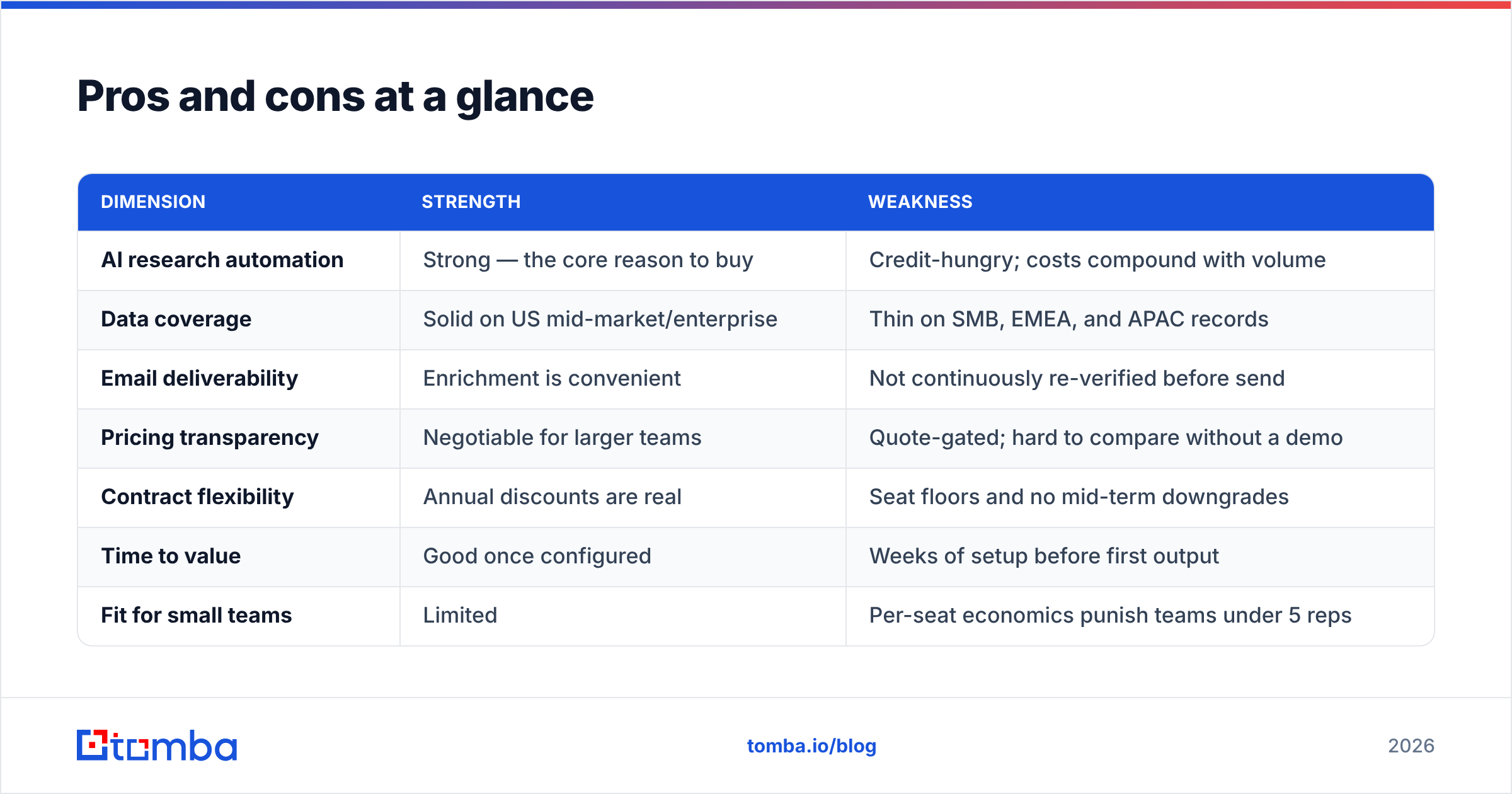
| Dimension | Strength | Weakness |
|---|---|---|
| AI research automation | Strong — the core reason to buy | Credit-hungry; costs compound with volume |
| Data coverage | Solid on US mid-market/enterprise | Thin on SMB, EMEA, and APAC records |
| Email deliverability | Enrichment is convenient | Not continuously re-verified before send |
| Pricing transparency | Negotiable for larger teams | Quote-gated; hard to compare without a demo |
| Contract flexibility | Annual discounts are real | Seat floors and no mid-term downgrades |
| Time to value | Good once configured | Weeks of setup before first output |
| Fit for small teams | Limited | Per-seat economics punish teams under 5 reps |
How does Expertise AI compare on price to other options?#
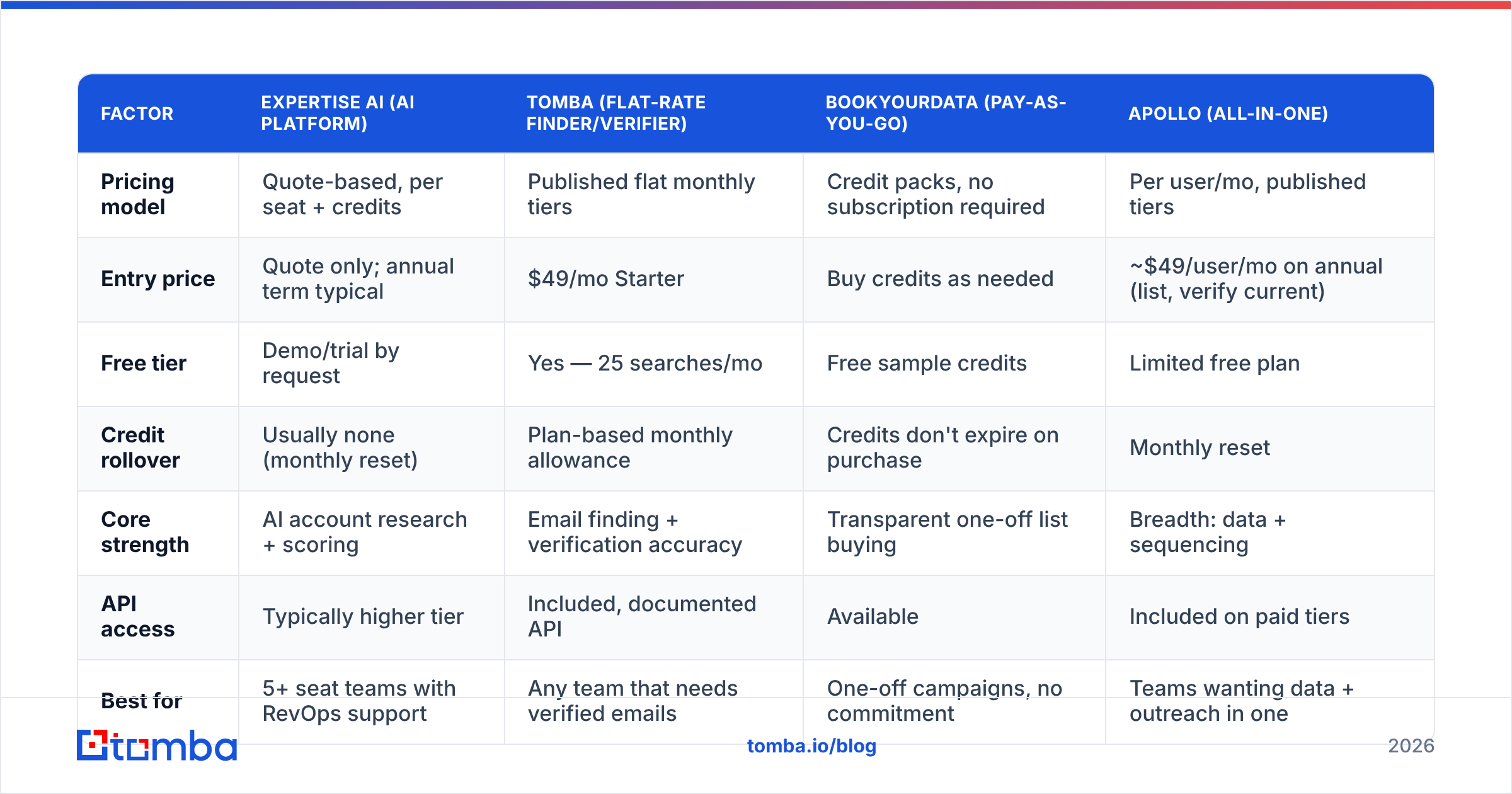
The useful comparison is not "which tool is cheapest." It's "which pricing model matches how you actually buy data." Three models dominate:
| Factor | Expertise AI (AI platform) | Tomba (flat-rate finder/verifier) | BookYourData (pay-as-you-go) | Apollo (all-in-one) |
|---|---|---|---|---|
| Pricing model | Quote-based, per seat + credits | Published flat monthly tiers | Credit packs, no subscription required | Per user/mo, published tiers |
| Entry price | Quote only; annual term typical | $49/mo Starter | Buy credits as needed | ~$49/user/mo on annual (list, verify current) |
| Free tier | Demo/trial by request | Yes — 25 searches/mo | Free sample credits | Limited free plan |
| Credit rollover | Usually none (monthly reset) | Plan-based monthly allowance | Credits don't expire on purchase | Monthly reset |
| Core strength | AI account research + scoring | Email finding + verification accuracy | Transparent one-off list buying | Breadth: data + sequencing |
| API access | Typically higher tier | Included, documented API | Available | Included on paid tiers |
| Best for | 5+ seat teams with RevOps support | Any team that needs verified emails | One-off campaigns, no commitment | Teams wanting data + outreach in one |
| Contract | Annual commitment common | Monthly, cancel anytime | None | Monthly or annual |
Two honest notes on that table. First, BookYourData's no-expiry credit model is genuinely the friendliest structure in the list for irregular buyers — if your prospecting is campaign-based rather than continuous, that's a real advantage, and it's worth pricing alongside anything else here. Second, published list prices for every vendor change; confirm on each vendor's own pricing page before you budget. Tomba's tiers are public and stable at Tomba pricing: Free (25 searches/mo), Starter $49/mo, Growth $99/mo, Pro $249/mo, Enterprise custom.
What hidden costs should you budget for?#
The quote is the smallest number in the deal. Budget for these five:
- Onboarding and configuration. Two to six weeks of RevOps time to map fields, define scoring, and wire CRM write-back. That labor is real money even when the vendor calls onboarding "free."
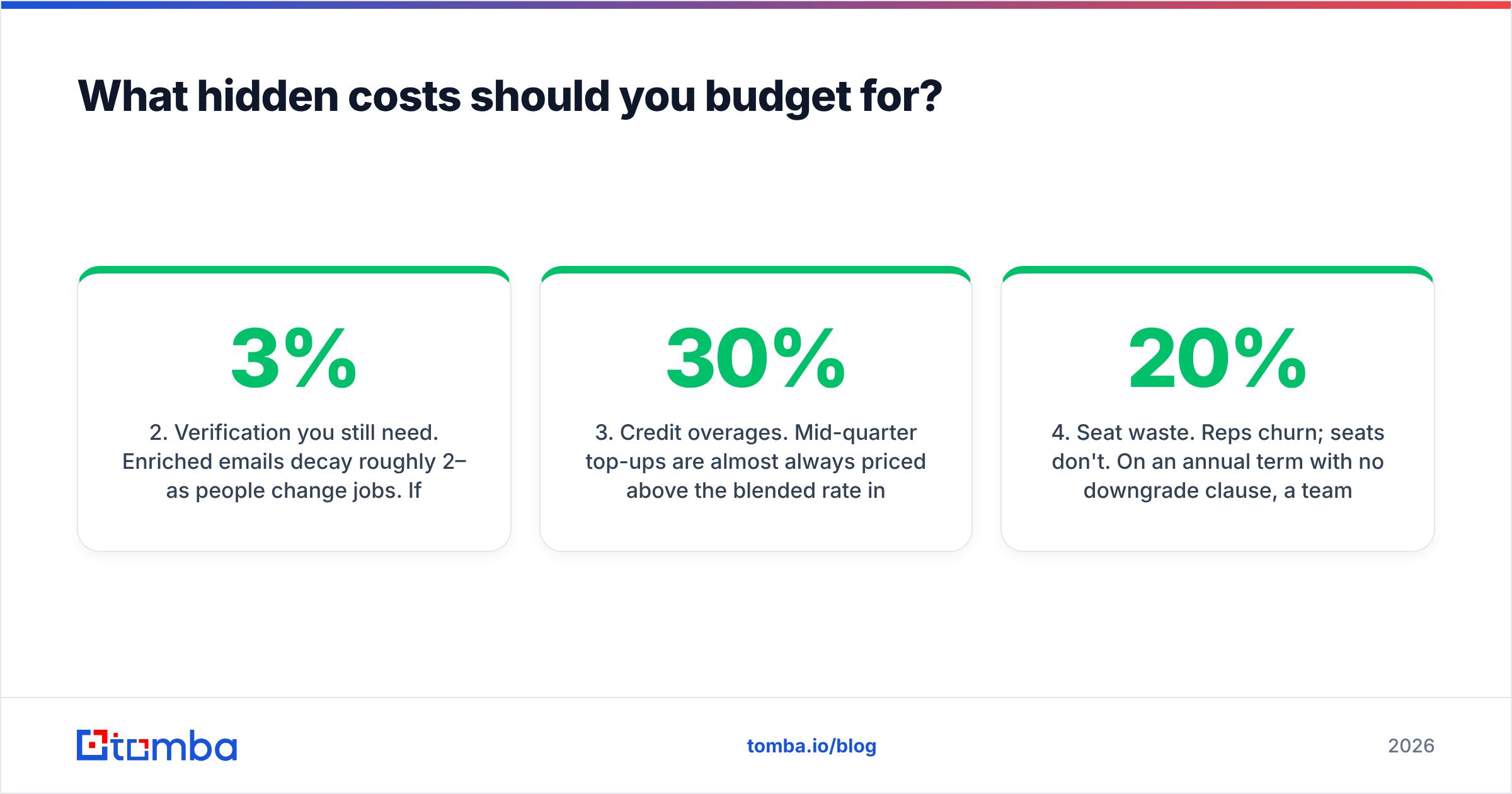
- Verification you still need. Enriched emails decay roughly 2–3% per month as people change jobs. If the platform doesn't re-verify at send time, you're funding a separate email verifier anyway — or funding bounces, which is worse.
- Credit overages. Mid-quarter top-ups are almost always priced above the blended rate in your contract. Model 30% headroom or negotiate rollover up front.
- Seat waste. Reps churn; seats don't. On an annual term with no downgrade clause, a 20% team reduction is a 20% pure loss.
- Deliverability cleanup. A bad list burns domain reputation, and reputation repair costs weeks of throttled sending. Read up on email deliverability before you scale sends off any enriched dataset.

Point 2 is the one that quietly decides ROI. HubSpot's sales research has repeatedly shown that list quality moves reply rates more than copy does — see the ongoing analysis on the HubSpot sales blog. A platform that gets you a great account brief and a stale email address has solved the interesting problem and left the expensive one.
Is Expertise AI worth it in 2026?#
Yes, if you have five or more reps, an owner for the tooling, a CRM of record, and an ICP concentrated in US mid-market or enterprise. In that shape, the research automation genuinely compounds: every rep starts every call better prepared, and the per-seat cost gets amortized across real pipeline.
No, if any of these are true:
- You have fewer than five people doing outbound.
- Your ICP skews SMB, EMEA, or APAC, where coverage in this tier thins out.
- Your actual bottleneck is "I can't get a valid work email," not "I don't understand this account."
- You can't commit to an annual term without pain.
That third bullet deserves emphasis, because teams misdiagnose it constantly. Buying an AI research platform to solve a contact-data problem is like buying a espresso machine because you're out of milk. The research layer is impressive and expensive; the data layer is boring and cheap. Fix the cheap thing first, measure, and then decide whether the expensive thing adds anything.
What are the best alternatives to consider?#
Depends entirely on which job you're hiring the tool for:
- You need verified work emails at volume. A dedicated email finder plus domain search covers this at $49–$99/mo with no seat minimum and no annual lock. Add bulk email finder runs for list-building sprints.
- You need occasional lists with zero commitment. Pay-as-you-go credit vendors, including BookYourData, are the cleaner fit — you buy what you use and stop.
- You need data plus sequencing in one seat. All-in-one platforms trade some data depth for workflow breadth; compare against an Apollo alternative before assuming breadth is worth the price.
- You need enrichment written into your stack. Data enrichment via API or native integrations gets you the CRM hygiene benefit without the platform seat.
You can also run a two-tool stack deliberately: a cheap, accurate finder/verifier for contact data, plus whatever AI research layer your team actually uses. That combination usually costs less than one platform contract and fails more gracefully — if the AI layer disappoints, your data pipeline keeps running.
How should you run the evaluation?#
Do this before the second demo call, not after:
- Build a 200-row test list from your real ICP — not the vendor's sample. Include your hardest segment.
- Ask for a trial that runs on your list. Any vendor confident in coverage will agree.
- Verify the output independently. Run every returned address through a third-party verifier and record the valid, catch-all, and invalid split. Catch-all domains are where vendors quietly inflate match rates, so check with a catch-all verifier.
- Compute cost per usable contact for each vendor using the formula earlier in this post.
- Read the contract clauses, specifically: credit rollover, mid-term seat reduction, overage rate, and data ownership on termination.
Five steps, maybe four hours of work, and it will save you from the single most common outcome in this category — a signed annual contract that the team stops opening in month five.
The bottom line#
Expertise AI pricing follows the standard AI sales-platform playbook: quote-gated, per-seat, annual, credit-metered. That model is defensible when the AI research layer is doing work your reps genuinely can't do themselves, and indefensible when you're really just paying a premium for contact data you could source directly.
Diagnose your bottleneck honestly. If it's account intelligence, negotiate hard on seat floors and credit rollover and buy the platform. If it's contact data — and for most teams under 20 reps, it is — start with the cheap, accurate layer.
Start there for free. Tomba's Email Finder gives you 25 searches a month at no cost, verified results rather than guessed patterns, and paid plans from $49/mo with no seat minimum and no annual commitment. Run it against the same 200-row test list you send to every vendor, compare cost per usable contact, and let the number decide.
Related guides#
Ready to find emails that actually work?
Join 150,000+ professionals who stopped guessing and started sending. Free credits on signup — no credit card required.
Get the Tomba newsletter
Practical outbound tactics and product updates — once every two weeks.
About the author