Explorium Pricing Reviews Pros and Cons: 2026 Buyer Guide
Explorium sells agentic B2B data, not a seat license — and the quote reflects that. Here's what Explorium actually costs, where it wins, where it hurts, and when a cheaper email-first stack does the job.
Explorium does not publish a price. That one fact shapes this whole review. Below is an honest look at Explorium pricing reviews pros and cons: real quote ranges, what buyers praise, what they complain about, and when a cheaper email tool does the job.
TL;DR
- Explorium does not publish prices. Every plan is a custom annual quote. Buyer reports cluster in the $15,000–$60,000/year range, based on record volume, enrichment attributes, and API use.
- What you buy is a data platform with an agentic layer — company graph, signals, enrichment pipelines, MCP-style agent access. It is not a per-seat prospecting tool.
- Best fit: RevOps and data teams that pipe enrichment into Snowflake, a CRM, or an internal model. Worst fit: a five-person sales team that just needs verified emails.
- Common complaints in reviews: opaque pricing, long onboarding, credit and attribute confusion, and email accuracy that trails specialist email finders.
- If your real job is to find and verify work emails at scale, a $49/mo tool covers 80% of the value at 2% of the cost.
What is Explorium and who actually buys it?#
Explorium is a B2B data platform. It sells itself as the data layer for AI agents. Instead of handing you a list to export, it links hundreds of outside data sources to your own records. It matches those records to real companies. Then it pushes the new fields into your warehouse, CRM, or agent workflow. Their own framing on explorium.ai is agent-first: MCP endpoints, APIs, and pipelines, not a search box for reps.
Think of it like the difference between buying groceries and hiring a supply chain. A prospecting tool sells you the tomatoes. Explorium sells you a system that keeps the aisle stocked, labeled, and matched to your recipes.
That split drives the whole Explorium pricing reviews pros and cons debate. Buyers who compare it to a seat-based prospecting tool almost always call it expensive. Buyers who compare it to building a data pipeline with three engineers usually call it cheap.
Typical buyer profiles:
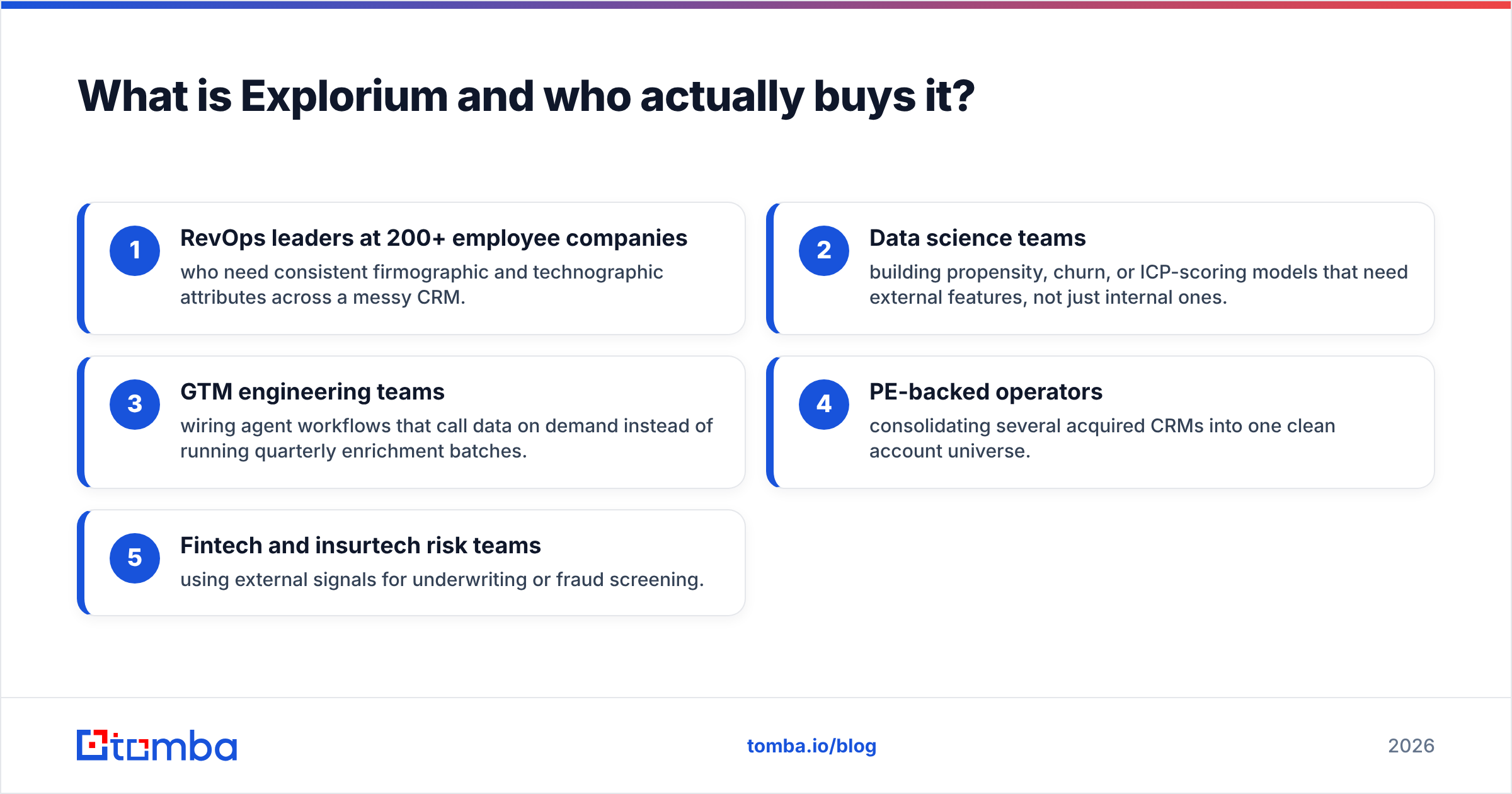
- RevOps leaders at 200+ employee companies who need clean firmographic and technographic fields across a messy CRM.
- Data science teams building propensity, churn, or ICP-scoring models that need outside features, not just internal ones.
- GTM engineering teams wiring agent workflows that call data on demand instead of running quarterly batches.
- PE-backed operators merging several acquired CRMs into one clean account universe.
- Fintech and insurtech risk teams using outside signals for underwriting or fraud screening.
If you are not in one of those five buckets, the honest answer is simple. Explorium's ceiling is higher than your need.

How much does Explorium cost in 2026?#
Explorium publishes no price list. There is no self-serve checkout, no public tier card, and no free plan. Every deal starts with a discovery call. Every quote rests on three things: how many records match, how many attributes come back, and how you take delivery — UI, API, or warehouse share.
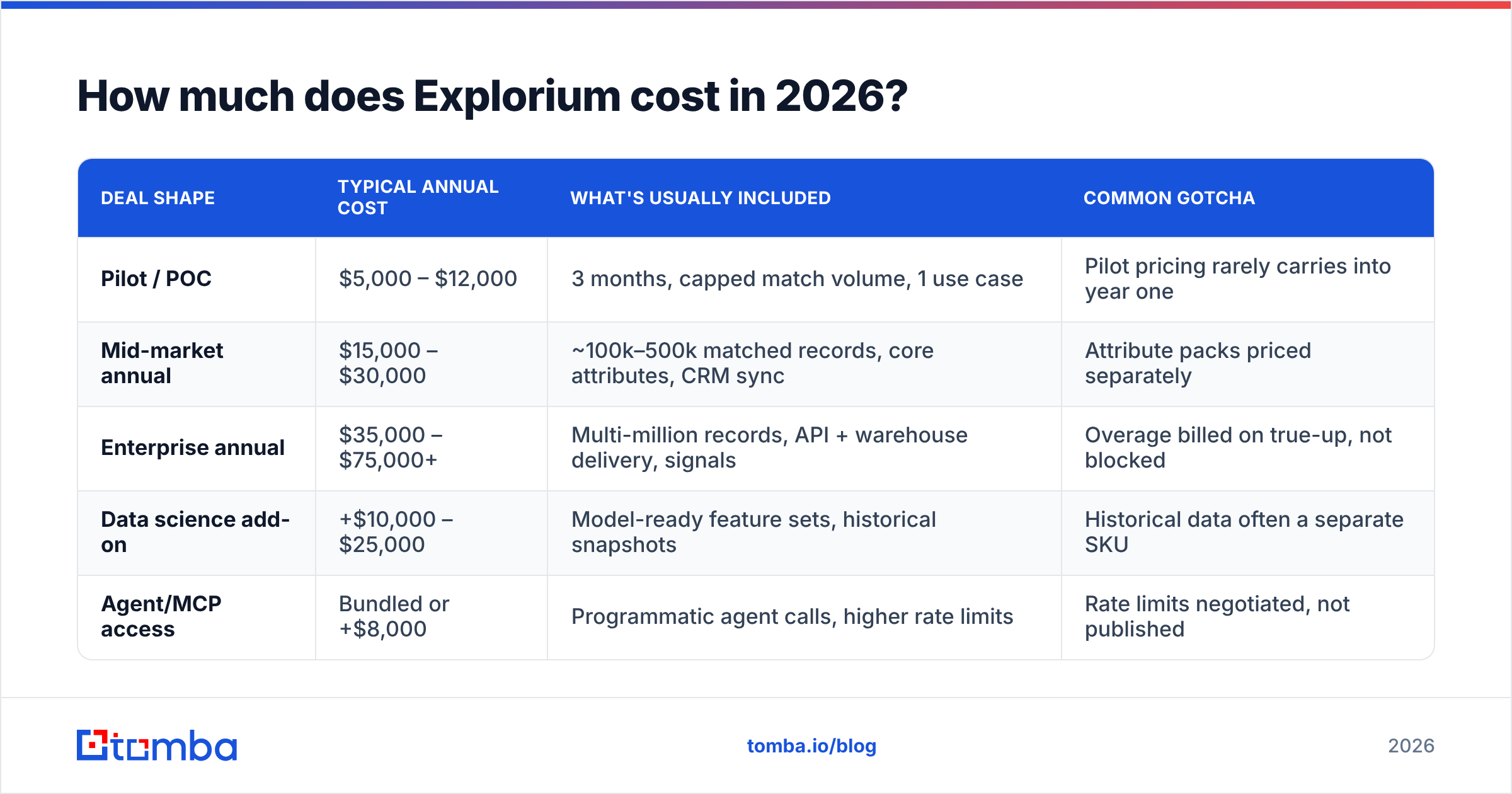
Buyer discussions on G2 and reports from RevOps communities point to this shape for a 2026 quote:
| Deal shape | Typical annual cost | What's usually included | Common gotcha |
|---|---|---|---|
| Pilot / POC | $5,000 – $12,000 | 3 months, capped match volume, 1 use case | Pilot pricing rarely carries into year one |
| Mid-market annual | $15,000 – $30,000 | ~100k–500k matched records, core attributes, CRM sync | Attribute packs priced separately |
| Enterprise annual | $35,000 – $75,000+ | Multi-million records, API + warehouse delivery, signals | Overage billed on true-up, not blocked |
| Data science add-on | +$10,000 – $25,000 | Model-ready feature sets, historical snapshots | Historical data often a separate SKU |
| Agent/MCP access | Bundled or +$8,000 | Programmatic agent calls, higher rate limits | Rate limits negotiated, not published |
Two structural things to know before the call.
First, the unit of billing is matched records, not lookups. Push 400,000 CRM rows, match 250,000, and you pay against the match volume. That sounds fair. But Explorium measures the match rate on its own definitions, and weak input data still burns budget.
Second, attributes are modular. Firmographics are cheap. Technographics, funding signals, hiring intent, and location data all stack on top. A quote that looks fine at the base tier can double once you add the three attribute families you actually wanted.
What do Explorium reviews actually say?#
Review sentiment splits along the buyer profiles above. Star ratings on G2 and Capterra sit in the strong-but-not-perfect band. The written reviews are more useful than the score.
What reviewers consistently praise:
- Match rate on companies. Matching messy account records to real companies is the most-cited strength. Some reviewers finally cleaned up duplicate accounts they had fought for years.
- Breadth of attributes. Hundreds of fields across firmographic, technographic, and signal data, pulled from a wide outside network.
- Support during onboarding. Solutions engineers come across as fast and technical, not scripted.
- Warehouse-native delivery. Snowflake and BigQuery support is first-class. That matters when your source of truth is not the CRM.
What reviewers consistently criticize:
- Pricing opacity. The most repeated complaint by far. Buyers spend weeks in procurement just to learn the starting number.
- Time to value. Two to eight weeks of setup before the first useful field lands. That is normal for data platforms. It still surprises buyers who expected a tool.
- Contact-level email accuracy. Company data is the strength. Individual work emails are the weak leg. Several reviewers add a finder or verifier on top.
- Credit and attribute accounting. Working out what ate your budget last month often needs a call with your CSM.
- Renewal leverage. Annual contracts with mid-year true-ups mean you negotiate once and live with it.
The pattern is clear. Nobody says the data is bad. People say it is hard to price, slow to start, and too big for simple jobs.
Explorium pricing reviews pros and cons: the honest ledger#
Here is the ledger without the vendor gloss.
Pros
- Real enrichment depth. Hundreds of attributes from a wide source network, refreshed all the time rather than dumped once a quarter.
- Entity matching that works. Tying dirty CRM rows to real companies is hard. This is where the money goes.
- Agent-ready architecture. MCP and API access let your agents pull fresh data on the spot instead of reading a stale table.
- Warehouse-first delivery. If your analytics stack is the center of gravity, the data lands where it belongs.
- Compliance posture. Procurement, DPAs, and regional handling are taken seriously. That is a real edge over scraped-list vendors.
Cons
- No public pricing, no free tier. You cannot test before a sales cycle. For a team of five, that alone rules it out.
- Setup cost is real. Budget engineering hours on your side, not just license dollars.
- Overkill for contact acquisition. If the job is 5,000 verified emails at German fintechs, you are paying platform prices for a lookup.
- Annual lock-in. Monthly escape hatches do not exist at the tiers that matter.
- Email accuracy needs a partner. Most buyers pair it with an email verifier to protect deliverability.

Is Explorium worth it compared to the alternatives?#
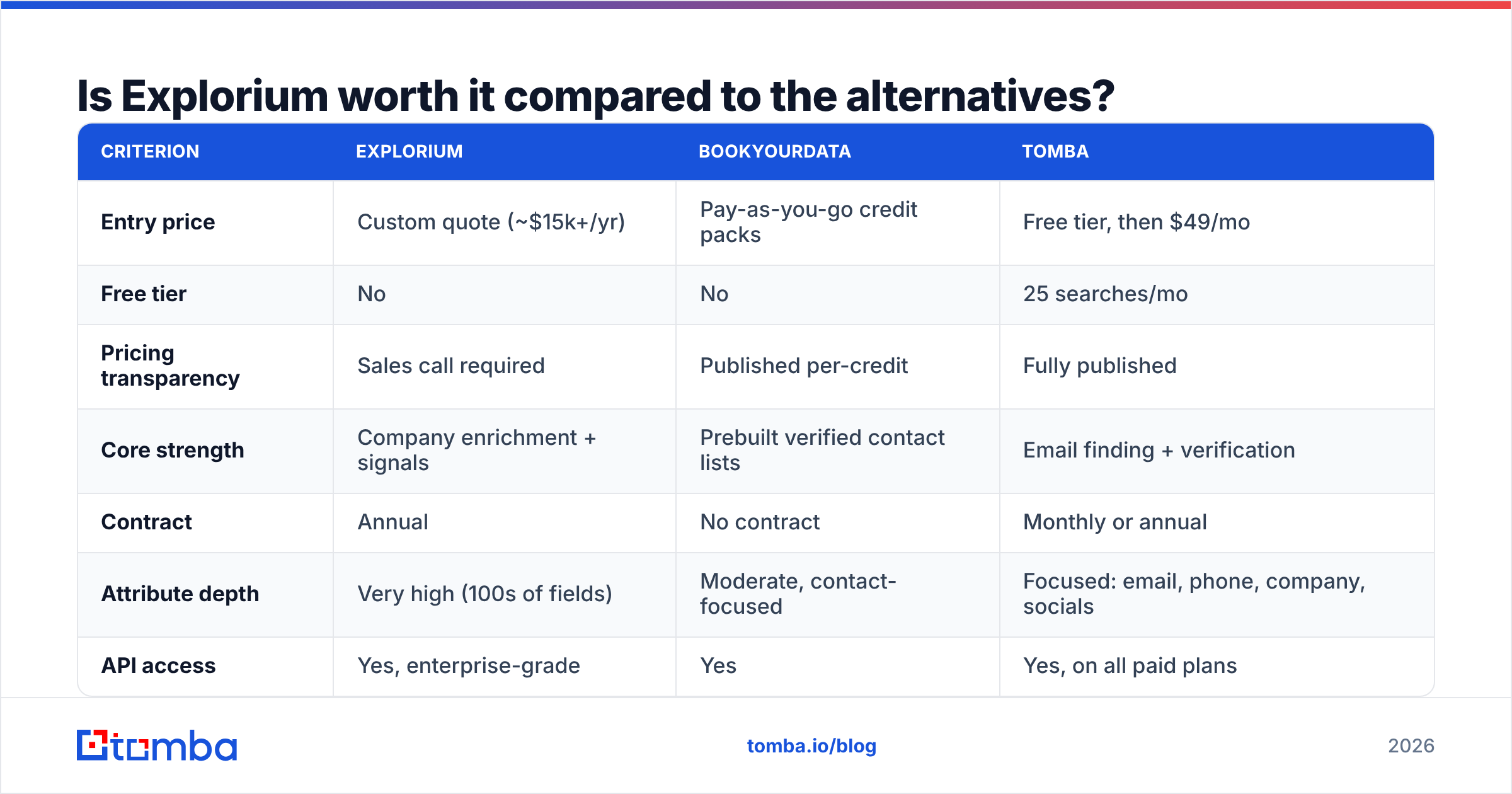
It depends on your bottleneck. Is it breadth of attributes or reach of contacts? Those are different problems with very different price tags.
| Criterion | Explorium | BookYourData | Tomba |
|---|---|---|---|
| Entry price | Custom quote (~$15k+/yr) | Pay-as-you-go credit packs | Free tier, then $49/mo |
| Free tier | No | No | 25 searches/mo |
| Pricing transparency | Sales call required | Published per-credit | Fully published |
| Core strength | Company enrichment + signals | Prebuilt verified contact lists | Email finding + verification |
| Contract | Annual | No contract | Monthly or annual |
| Attribute depth | Very high (100s of fields) | Moderate, contact-focused | Focused: email, phone, company, socials |
| API access | Yes, enterprise-grade | Yes | Yes, on all paid plans |
| Warehouse delivery | Native (Snowflake, BigQuery) | Export-based | API, CSV, Sheets, CRM sync |
| Time to first value | 2–8 weeks | Same day | Minutes |
| Best for | RevOps + data science teams | Buying targeted list volume fast | Teams that need verified emails at scale |
BookYourData is a fair peer here. Look at it if you want a targeted, verified contact list you can buy today with no procurement cycle. It solves a different problem from Explorium, and it solves it well: known-good contacts, priced per record, no annual commitment.
Tomba fills the third slot — the always-on finding and verification layer. Tomba pricing is public: Free at 25 searches/mo, Starter $49/mo, Growth $99/mo, Pro $249/mo, Enterprise custom. You can run a domain search across a target account list, verify the results, and push them into your CRM. All of that happens before an Explorium discovery call would even be booked.
Most companies that buy Explorium do not use it alone. They use it for account-level truth in the warehouse. They add a finder for contact coverage. Then a sequencer handles delivery. Each layer does one thing well.
Where does Explorium's data accuracy actually stand?#
Accuracy is not one number. Treating it as one is how buyers get burned. Split it into three questions:
- Firmographic accuracy — is the company real, sized right, and in the right industry? Explorium is strong here. This is the product.
- Signal freshness — did the hiring spike, funding round, or tech install happen recently enough to act on? Good, but it varies by signal. Funding and headcount refresh faster than technographics.
- Contact-level accuracy — will this work email actually land? Here reviewers ask for backup. Broad platforms optimize for coverage across many fields. Email specialists optimize for one field across many patterns.
So never send cold email straight from a broad platform's contact field. Verify first. Bounce rates above 3% start to hurt sender reputation. A burned domain takes months to recover. Run every list through a verification pass, whatever the source. It is cheap insurance against an expensive problem.
How should you negotiate an Explorium quote?#
If the platform fits, do not take the first number. Data vendors expect a negotiation and price the first quote for it.
- Scope the pilot narrowly and time-box it. One use case, one data set, 60 days, one written success metric. Broad pilots produce fuzzy results and a weak negotiating position.
- Ask for the match-rate definition in writing. What counts as a match? What happens to unmatched records in billing? Get it in the order form, not the slide deck.
- Unbundle attributes before you commit. Name the 15 fields you will actually use in a model or workflow. Refuse to pay for families you cannot name a use for.
Those three steps set the frame. The next three protect the budget after you sign.
- Push for a monthly or quarterly true-up cap. Uncapped overages are the most common source of budget surprises.
- Negotiate at fiscal quarter-end. Standard practice, still effective. Enterprise data reps carry quotas like everyone else.
- Benchmark against a cheap baseline first. Run 1,000 target accounts through a low-cost email finder and measure coverage. If the cheap tool covers 70% of your need, your Explorium case gets much more specific. It also gets much easier to argue down.
That last point matters more than it sounds. Most buyers walk in with no baseline. So they cannot say what extra value the platform adds. Set the floor first.
Who should skip Explorium entirely?#
Skip it if any of these describe you:
- Team under 20 people. The setup work will eat more time than the data saves.
- Your bottleneck is contacts, not attributes. You do not need 300 fields. You need a working email for a named person.
- No data engineer. Warehouse-native delivery is a feature only if someone owns the warehouse.
- Budget under $10k/year for data. You will not get a useful tier, and a pilot that expires is worse than no pilot.
- You need results this week. Two to eight weeks of onboarding is the floor.
In every one of those cases, pick a focused tool instead. Look for public pricing, a free tier to test, and an API you can call an hour after signup. Run a bulk email finder job across your target list, verify the output, and see how big your coverage gap really is. Then decide whether a platform contract closes a gap that is real.
The bottom line on Explorium pricing reviews pros and cons#
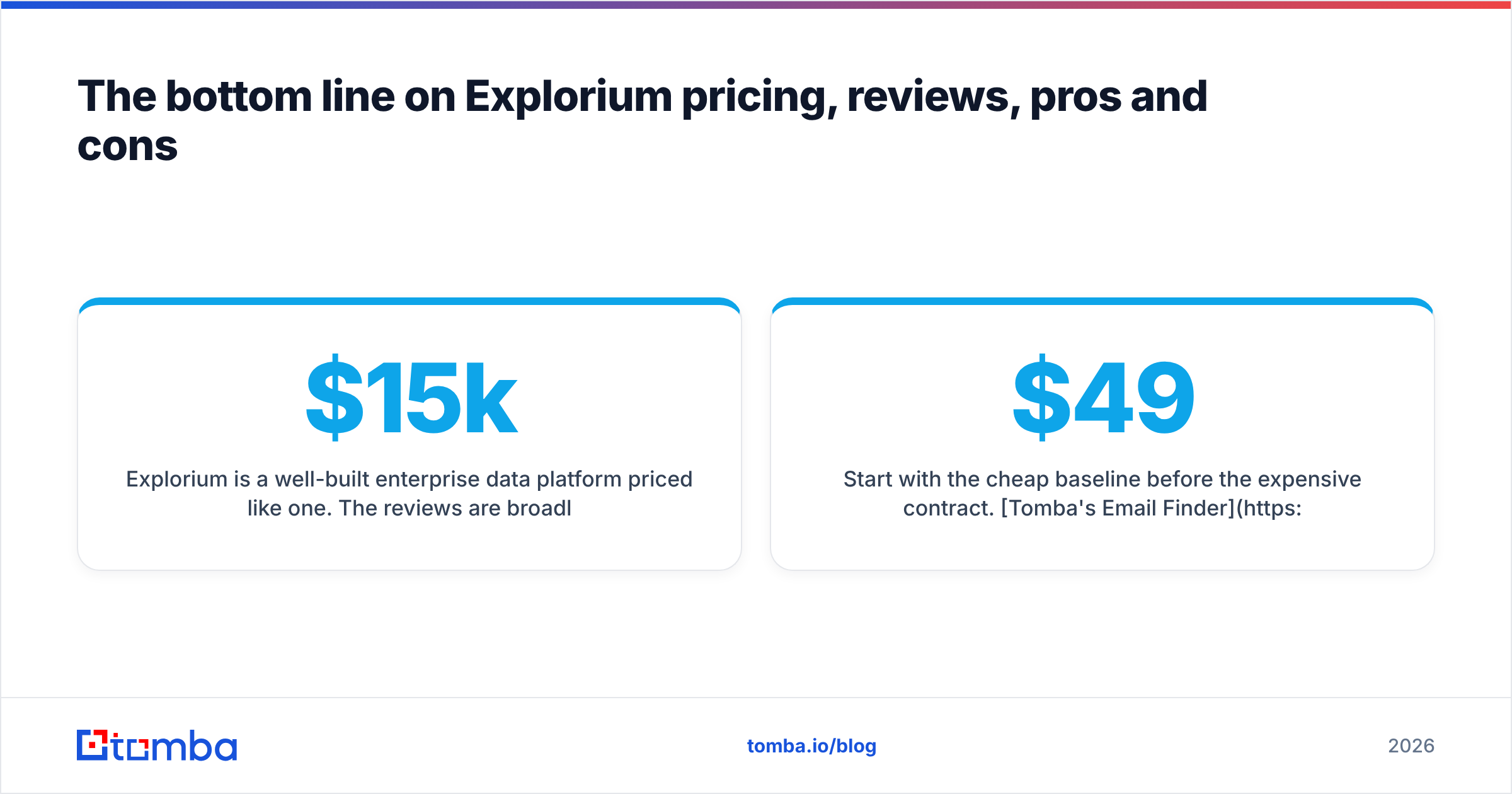
Explorium is a well-built enterprise data platform, priced like one. Reviews run warm from teams that needed a data layer. They run cold from teams that needed a lookup tool. Pricing opacity is the top friction, and the $15k–$60k band makes this a budget-line decision, not a card swipe.
The pros are real: entity matching, attribute depth, warehouse delivery, agent-ready APIs, serious compliance. The cons are just as real: no free tier, no public price, weeks to value, annual lock-in, and email accuracy that most buyers top up elsewhere.
Buy it if you are a RevOps or data team feeding models and pipelines. Skip it if you are a sales team that needs emails.
Start with the cheap baseline before the expensive contract. Tomba's Email Finder gives you 25 free searches a month with no card. It is $49/mo when you outgrow that, with an API you can call today. Run your target account list through it, verify the results, and measure your real coverage gap. If a platform contract still makes sense after that, you will negotiate it with numbers instead of hope.
Related guides#
Ready to find emails that actually work?
Join 150,000+ professionals who stopped guessing and started sending. Free credits on signup — no credit card required.
Get the Tomba newsletter
Practical outbound tactics and product updates — once every two weeks.
About the author