Extruct AI vs LeadEngineAI: Which AI Prospecting Tool Wins
Both promise AI agents that research accounts and build lists for you. They solve different halves of the problem, and neither finishes the job. Here is the honest breakdown, with pricing, accuracy and the gap you still have to fill.
TL;DR
- Extruct AI is an AI company-research agent. You define columns ("does this company run a partner program?"), it crawls the web and fills them. Best for account research and ICP scoring at depth.
- LeadEngineAI sits closer to the list-building and outreach end: pull a list, enrich it, push it into a sequence. Best for teams who want volume with fewer moving parts.
- Neither is primarily an email verification layer. Both hand you contacts that still need SMTP-level validation before you send.
- Pricing on AI-agent tools is credit-based and gets expensive fast when you re-run research. Budget for retries, not just rows.
- The cheapest reliable stack for most teams: one research agent + a dedicated finder/verifier like Tomba Email Finder at $49/mo, instead of paying agent-tier credit rates for basic contact discovery.
What are Extruct AI and LeadEngineAI?#
Both tools live in the same new category: AI agents that do the grunt work a junior researcher used to do. But they attack different parts of the funnel.
Extruct AI is built around a spreadsheet-style research surface. You give it a set of companies (or a search prompt), then define custom columns in plain English. The agent goes and finds the answer for each row, citing sources. Think "for each of these 400 companies, tell me whether they have a Shopify storefront, how many engineers they list on LinkedIn, and whether they raised in the last 18 months." That is qualitative research at scale, not a static database lookup.
LeadEngineAI positions itself further downstream. The pitch is lead generation as a loop: find accounts matching your ICP, enrich the contacts, score them, and hand them off to outreach. Less "answer arbitrary research questions," more "keep the pipeline of names topped up."
That distinction matters more than any feature checklist. If you buy Extruct expecting a contact database, you will be disappointed. If you buy LeadEngineAI expecting bespoke research columns, same.
How do Extruct AI and LeadEngineAI actually differ?#
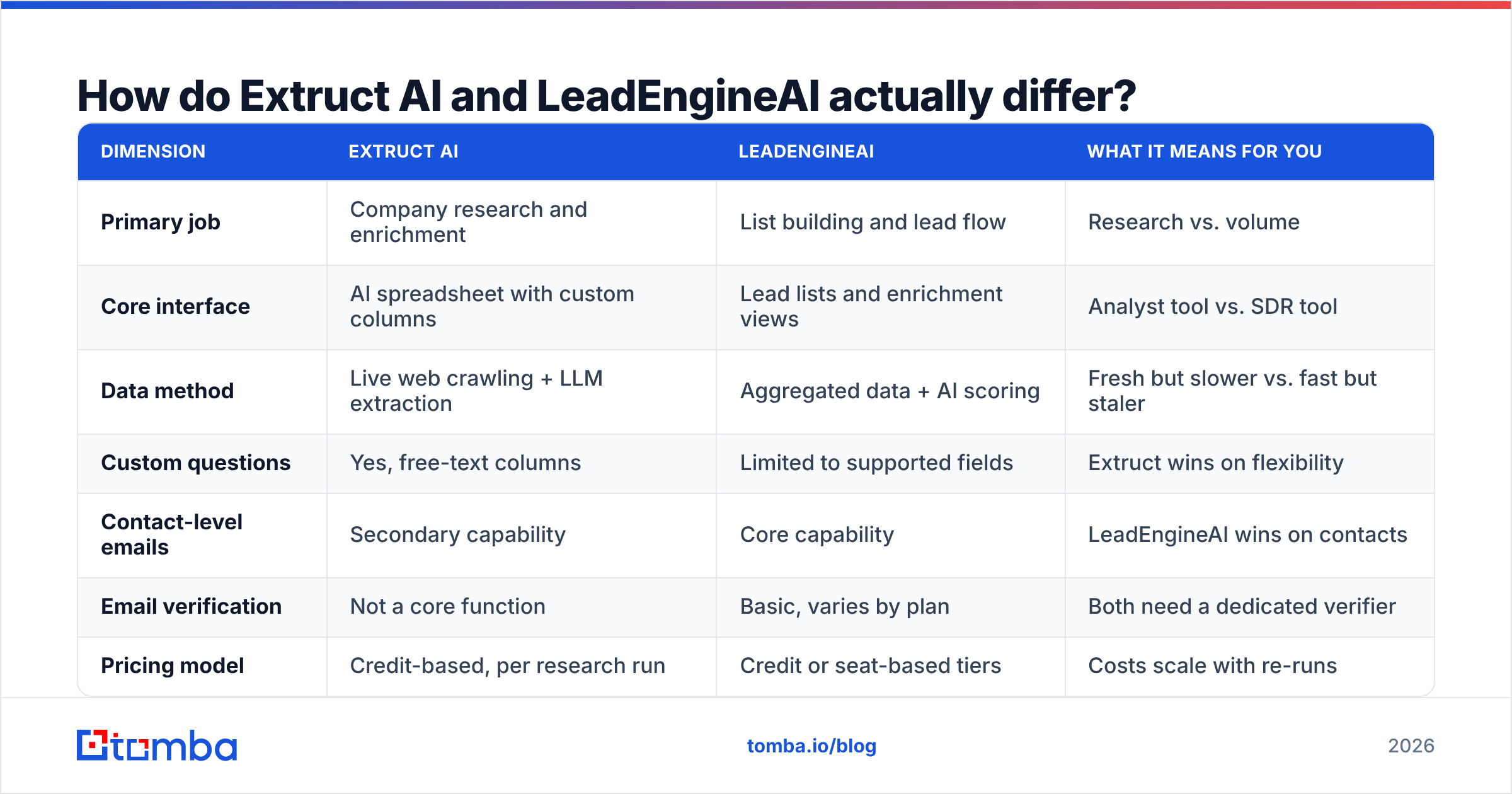
| Dimension | Extruct AI | LeadEngineAI | What it means for you |
|---|---|---|---|
| Primary job | Company research and enrichment | List building and lead flow | Research vs. volume |
| Core interface | AI spreadsheet with custom columns | Lead lists and enrichment views | Analyst tool vs. SDR tool |
| Data method | Live web crawling + LLM extraction | Aggregated data + AI scoring | Fresh but slower vs. fast but staler |
| Custom questions | Yes, free-text columns | Limited to supported fields | Extruct wins on flexibility |
| Contact-level emails | Secondary capability | Core capability | LeadEngineAI wins on contacts |
| Email verification | Not a core function | Basic, varies by plan | Both need a dedicated verifier |
| Pricing model | Credit-based, per research run | Credit or seat-based tiers | Costs scale with re-runs |
| Best fit | RevOps, ABM, investors, analysts | SDR teams, agencies, high-volume outbound | Different buyers entirely |
The row that trips people up is data method. An agent that crawls live returns fresher answers but costs more per row and can take minutes per company. An aggregated database returns instantly but inherits whatever staleness sits in the underlying source. B2B contact data decays somewhere around 25 to 30 percent per year as people change jobs, which is why Gartner and most analyst coverage of sales tech treats data freshness as a governance problem, not a vendor feature.
What does Extruct AI do best?#
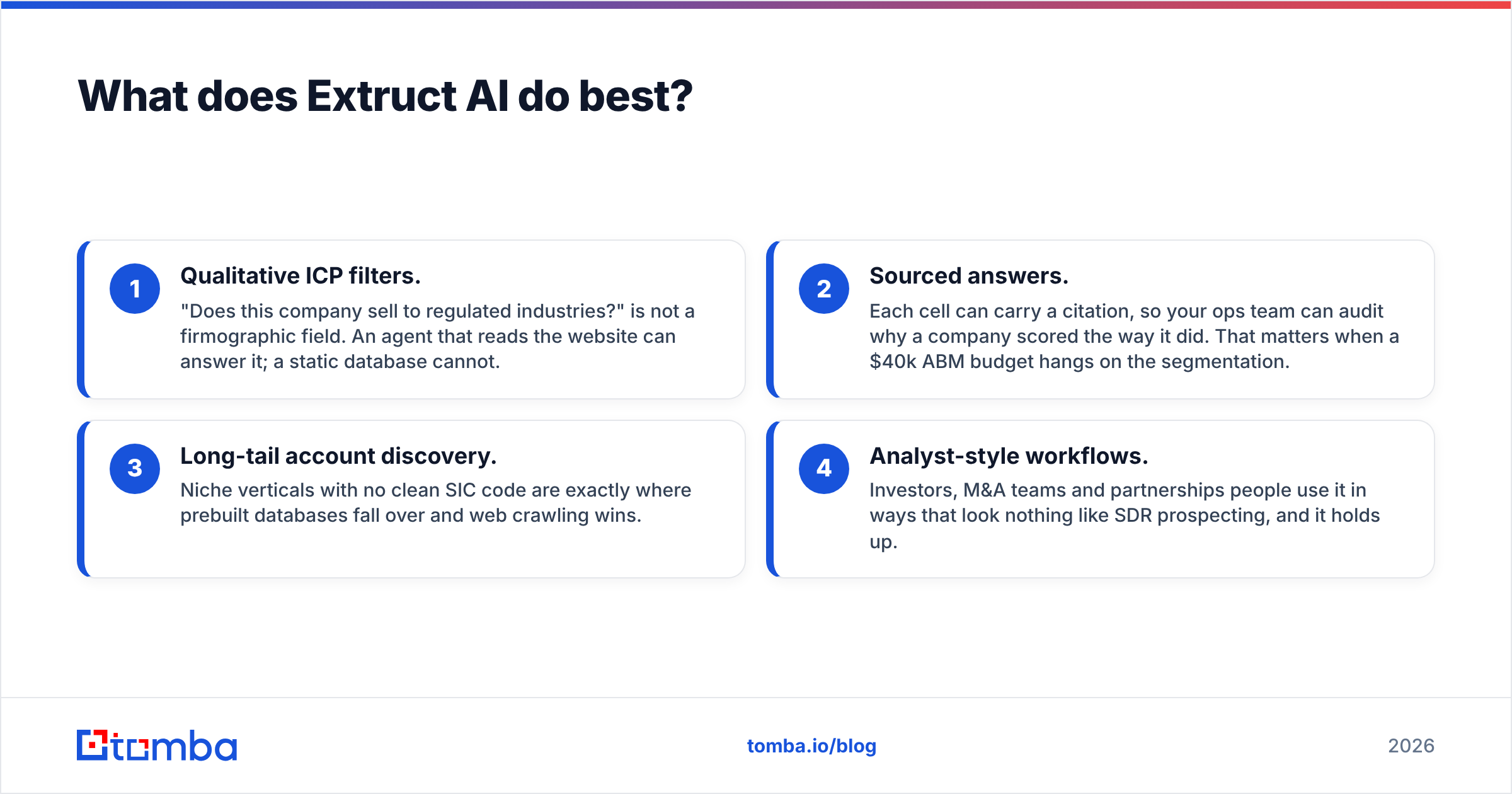
Extruct's strength is answering questions no database has a column for.
- Qualitative ICP filters. "Does this company sell to regulated industries?" is not a firmographic field. An agent that reads the website can answer it; a static database cannot.
- Sourced answers. Each cell can carry a citation, so your ops team can audit why a company scored the way it did. That matters when a $40k ABM budget hangs on the segmentation.
- Long-tail account discovery. Niche verticals with no clean SIC code are exactly where prebuilt databases fall over and web crawling wins.
- Analyst-style workflows. Investors, M&A teams and partnerships people use it in ways that look nothing like SDR prospecting, and it holds up.
Where it gets uncomfortable: cost per row when you iterate. Research agents are not deterministic. You will re-run columns after tightening a prompt, and every re-run burns credits. Teams that treat it like a spreadsheet formula get a surprise at renewal.
Wait — that renders as a plain image below:
What does LeadEngineAI do best?#
LeadEngineAI is the more conventional product, and that is a compliment for a lot of buyers.
- Time to first list. You are exporting names in minutes, not after an hour of prompt engineering.
- Fewer tools in the chain. Sourcing, enrichment and handoff in one place beats gluing four vendors together when your team is three people.
- Predictable output shape. Standard fields mean your CRM mapping does not change every time someone edits a column prompt.
- Lower skill floor. An SDR can run it. Extruct rewards someone who thinks in queries.
The trade-off is depth. When your ICP is "SaaS companies, 50 to 200 employees, US," any list tool works. When it is "SaaS companies that recently hired a Head of RevOps and use HubSpot," you need the research agent.
How accurate is the data from AI research agents?#
Here is the part vendors soft-pedal: an LLM reading a website is very good at finding facts and structurally bad at admitting it did not find one.
Three failure modes to plan for:
- Confident inference. The agent sees
firstname.lastname@on one page and applies the pattern company-wide. Sometimes right, sometimes a bounce. - Stale sources. A cached page from 2024 says a person is VP Sales. They left last spring. The agent has no way to know.
- Catch-all ambiguity. Roughly a fifth of business domains accept every address at the SMTP layer, which means "the server said yes" proves nothing. That is a distinct problem requiring a catch-all verifier, not a better prompt.
None of that is an argument against AI research. It is an argument for keeping verification as a separate, deterministic step. Reviews across G2's sales intelligence category show the same complaint pattern on nearly every AI-native tool: great coverage, inconsistent contact-level accuracy.
The practical rule: use the agent for who to contact and why, use a dedicated email verifier for whether this address will land. Mixing those responsibilities into one credit pool is how teams end up with a 12 percent bounce rate and a burned sending domain.
What do Extruct AI and LeadEngineAI cost?#
Published pricing on both moves often, so treat these as shapes rather than quotes and confirm on the vendor's own page before you commit.
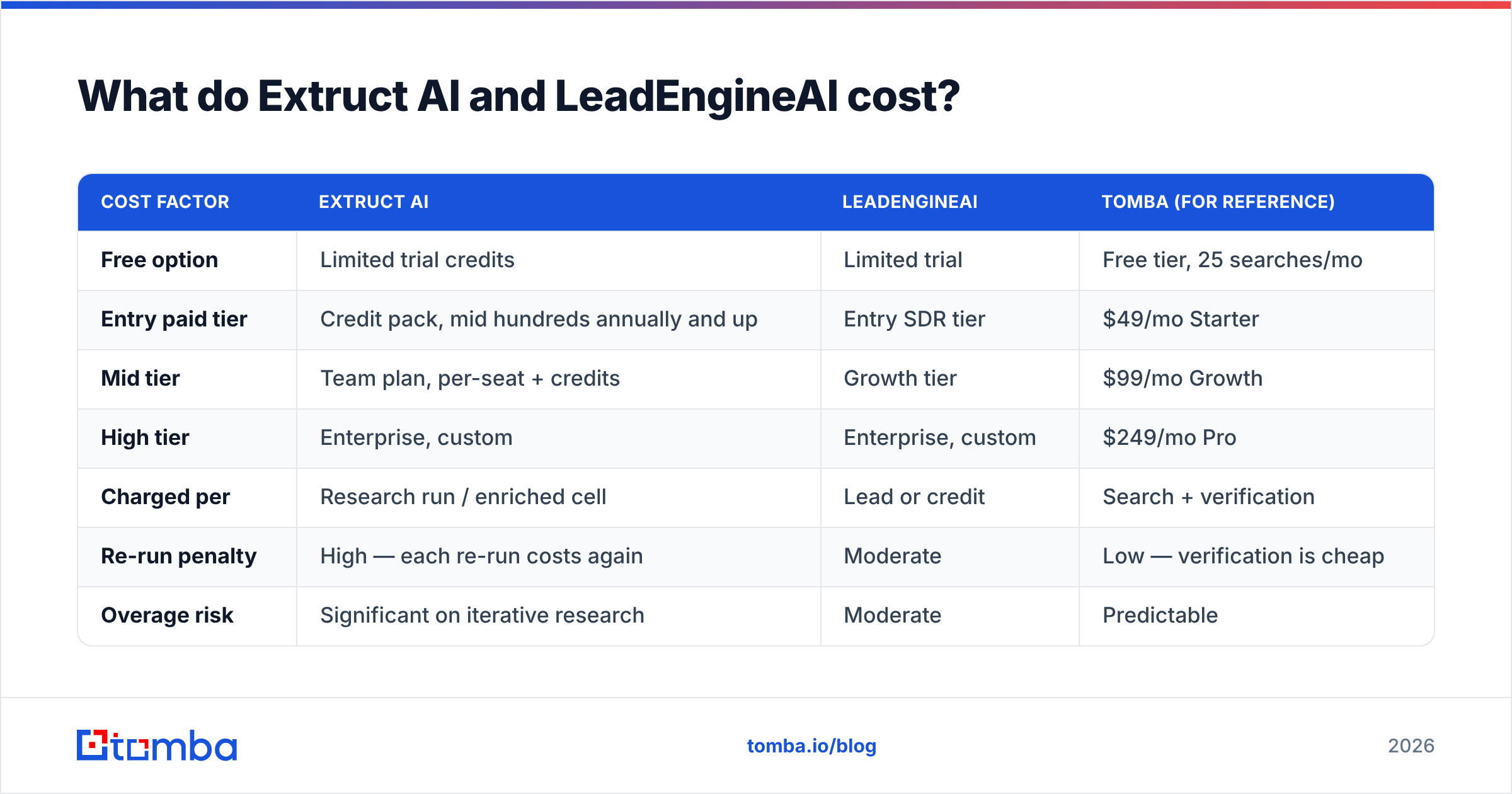
| Cost factor | Extruct AI | LeadEngineAI | Tomba (for reference) |
|---|---|---|---|
| Free option | Limited trial credits | Limited trial | Free tier, 25 searches/mo |
| Entry paid tier | Credit pack, mid hundreds annually and up | Entry SDR tier | $49/mo Starter |
| Mid tier | Team plan, per-seat + credits | Growth tier | $99/mo Growth |
| High tier | Enterprise, custom | Enterprise, custom | $249/mo Pro |
| Charged per | Research run / enriched cell | Lead or credit | Search + verification |
| Re-run penalty | High — each re-run costs again | Moderate | Low — verification is cheap |
| Overage risk | Significant on iterative research | Moderate | Predictable |
Two budgeting notes that apply to both:
- Credits are not rows. A single company row with eight custom columns can consume eight units of work. Estimate on cells, not companies.
- Enrichment you already have is wasted spend. Dedupe before you upload. A bulk email finder run against a cleaned list costs a fraction of pushing dirty data through an agent tier.
Which one should you choose?#
Pick by the job you are actually doing, not by which demo was slicker.
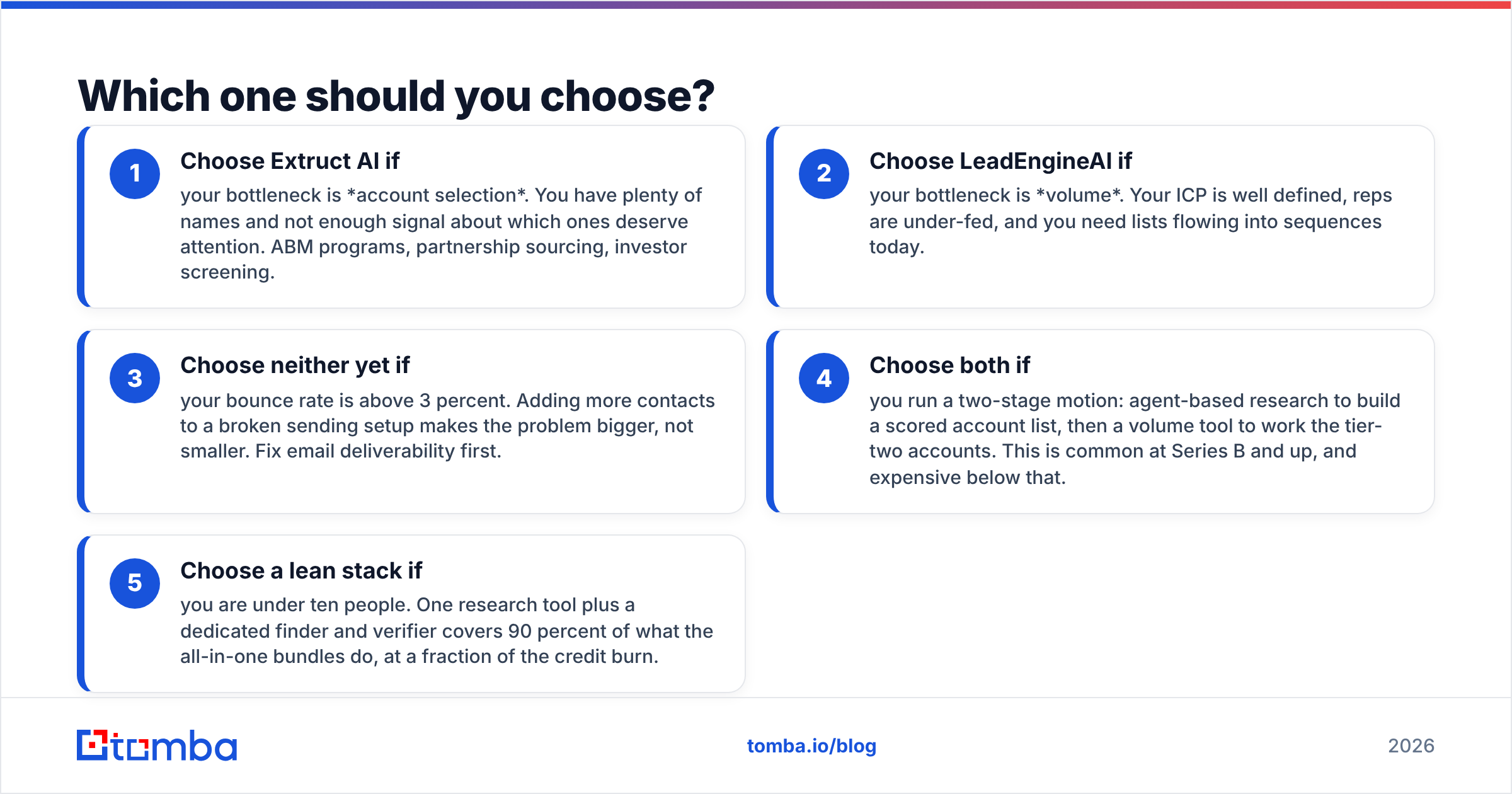
- Choose Extruct AI if your bottleneck is account selection. You have plenty of names and not enough signal about which ones deserve attention. ABM programs, partnership sourcing, investor screening.
- Choose LeadEngineAI if your bottleneck is volume. Your ICP is well defined, reps are under-fed, and you need lists flowing into sequences today.
- Choose neither yet if your bounce rate is above 3 percent. Adding more contacts to a broken sending setup makes the problem bigger, not smaller. Fix email deliverability first.
- Choose both if you run a two-stage motion: agent-based research to build a scored account list, then a volume tool to work the tier-two accounts. This is common at Series B and up, and expensive below that.
- Choose a lean stack if you are under ten people. One research tool plus a dedicated finder and verifier covers 90 percent of what the all-in-one bundles do, at a fraction of the credit burn.
What does neither tool solve?#
Both leave the same gap: the address itself.
An AI agent can tell you that Acme Corp just hired a Head of Demand Gen named Priya Raman. That is genuinely useful. It cannot reliably tell you whether p.raman@acme.com, priya@acme.com, or praman@acme.com is the live mailbox — and guessing wrong costs you a bounce, which costs you sender reputation, which costs you the next hundred sends.
This is a solved problem, just not by research agents. A purpose-built finder does three things an LLM does not:
- Pattern detection from real observed addresses, not inference. If a domain has 40 known contacts, the format is a fact, not a guess. A company email pattern check takes seconds.
- SMTP-level validation with catch-all detection flagged separately, so you know the difference between "confirmed valid" and "server accepts everything."
- Source transparency. Where the data comes from should be answerable. If a vendor cannot tell you, that is a compliance problem waiting for a GDPR request.
Running that layer separately also fixes the cost math. Verification is cheap. Research credits are not. Do not spend agent-tier pricing on a lookup that costs cents elsewhere.
How should you structure the stack?#
A workable division of labour, in order:
- Signal layer — Extruct AI or similar. Answers "which accounts, and why now."
- Contact layer — a dedicated finder. Answers "who, and at what address." Run domain search to map the org, then find specific people.
- Validation layer — verification before every send, not once at import. Addresses decay while they sit in your CRM.
- Execution layer — your sequencer of choice. Keep it dumb and separate so you can swap it.
- Feedback layer — bounce and reply data flows back to the signal layer so scoring improves.
Teams that collapse these into one vendor get a smoother UI and a worse renewal conversation. Teams that keep them separate can replace any one layer without rebuilding the whole motion. HubSpot's research on outbound performance consistently points the same direction: data hygiene, not tool count, drives reply rates.
Frequently asked questions#
Is Extruct AI better than LeadEngineAI? Neither is strictly better. Extruct wins on custom research depth and auditability. LeadEngineAI wins on speed to a usable list and lower operating skill. Pick based on whether your bottleneck is selection or volume.
Can I replace both with a cheaper stack? Often, yes — if your ICP is straightforward. A finder plus verifier plus a sequencer covers standard outbound. Research agents earn their price when your targeting criteria cannot be expressed as filters.
Do these tools verify emails? Not to the standard you need for cold outreach. Both surface addresses; neither treats catch-all detection and SMTP validation as a first-class deterministic step. Add a verification layer regardless of which you pick.
What bounce rate should I aim for? Under 2 percent. Above 3 percent, mailbox providers start treating your domain as a risk, and no amount of better copy recovers that.
Where to start#
If you are evaluating Extruct AI vs LeadEngineAI, run both trials against the same 50 accounts and score them on one metric: how many contacts survived verification and produced a reply. Not rows returned. Not "enriched." Replies.
Then close the gap neither one fills. Tomba Email Finder finds professional addresses by domain, name or company, flags catch-all domains explicitly, and returns confidence scores you can filter on before a single send. The free tier gives you 25 searches a month to test against your own known-good list, and paid plans start at $49/mo — see Tomba pricing for the full breakdown. Bring your own research agent; let the finder handle the part that determines whether any of it lands.
Related guides#
Ready to find emails that actually work?
Join 150,000+ professionals who stopped guessing and started sending. Free credits on signup — no credit card required.
Get the Tomba newsletter
Practical outbound tactics and product updates — once every two weeks.
About the author