Face to Face Meeting Request Email: Templates That Get Yes
In-person meetings still close deals faster than any Zoom link. Here's how to write a face to face meeting request email that gets accepted — with templates, timing data, and the mistakes that kill reply rates.
TL;DR
- A face to face meeting request email fails for one reason more than any other: it asks for the prospect's calendar instead of offering a specific slot, place, and reason.
- In-person asks convert best when they're anchored to a real-world trigger — you're in their city, both attending a conference, a contract renewal is 60 days out.
- Keep it under 120 words, propose exactly two time options, and name the location. Open-ended "let me know what works" requests stall.
- Verified contact data matters more than copy. A perfect email to a dead address is a 0% reply rate, so run addresses through an email verifier before you send.
- Use the templates below as skeletons, not scripts. Swap the trigger line; keep the structure.
Why does a face to face meeting request email still matter in 2026?#
Because the ask is scarcer, so it carries more weight. Most B2B outreach now defaults to a Calendly link and a 30-minute video call. When you request time in the same room, you signal that the conversation is worth travel — and buyers read that as seriousness.
There's a practical angle too. Deals with a large buying committee, high contract value, or heavy security review tend to stall in async threads. A single in-person session compresses three weeks of email ping-pong into ninety minutes. Field sales teams and enterprise AEs have known this forever; what changed is that the request itself now needs to justify why the meeting can't be a call.
That's the whole job of the email. Not to sell the product — to sell the room.
What are the components of a face to face meeting request email?#
Every request that gets a yes contains the same six parts. Miss one and the reply rate drops noticeably.
- A trigger line — the concrete reason this meeting is happening now. "I'll be in Austin Nov 12-14," "We're both at SaaStr," "Your renewal hits Q1." Without a trigger, an in-person ask reads as presumptuous.
- A one-sentence value statement — what they walk away with. Not what you'll present. "You'd leave with a written cost breakdown for the three vendors you're evaluating" beats "I'd love to show you our platform."
- Two specific time options — never one (feels like an ultimatum), never five (decision fatigue). Tuesday 2pm or Thursday 10am.
- A named location — their office, a specific café near it, booth 214. Vagueness creates work for the recipient, and work creates delay.
- A duration cap — 30 minutes or 45. Bounded asks get accepted; unbounded ones get "let me check my calendar."
- A single-click out — "If neither works, reply with a day and I'll flex." This lowers the perceived cost of engaging.
The order matters less than the presence. Most reps write three of the six and wonder why their in-person requests underperform their demo requests.
How is an in-person request different from a video call request?#
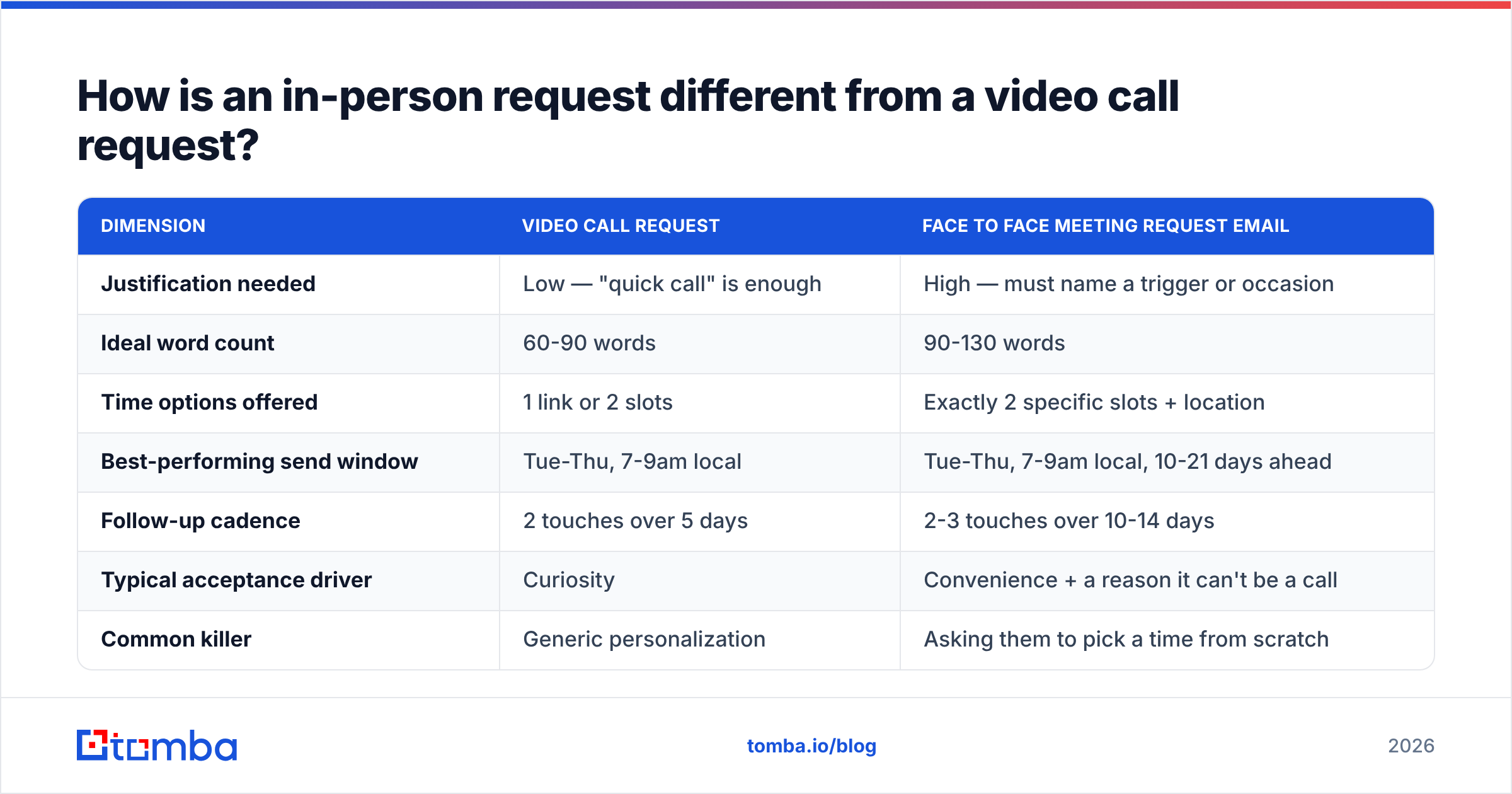
The difference is the burden you're placing on the recipient. A Zoom link costs them 30 minutes. A face-to-face costs them 30 minutes plus commute plus the mental overhead of being seen. Your email has to pay for that gap.
| Dimension | Video call request | Face to face meeting request email |
|---|---|---|
| Justification needed | Low — "quick call" is enough | High — must name a trigger or occasion |
| Ideal word count | 60-90 words | 90-130 words |
| Time options offered | 1 link or 2 slots | Exactly 2 specific slots + location |
| Best-performing send window | Tue-Thu, 7-9am local | Tue-Thu, 7-9am local, 10-21 days ahead |
| Follow-up cadence | 2 touches over 5 days | 2-3 touches over 10-14 days |
| Typical acceptance driver | Curiosity | Convenience + a reason it can't be a call |
| Common killer | Generic personalization | Asking them to pick a time from scratch |
| Ideal audience | Any stage | Late-stage, high ACV, multi-stakeholder, renewals |
The row that trips up most people is the send-ahead window. Video calls can be booked for tomorrow. In-person meetings need lead time — 10 to 21 days is the sweet spot for enterprise calendars. Ask for next Tuesday and you're competing with a calendar that was locked three weeks ago.
What does a good face to face meeting request email look like?#
Here are five skeletons. Change the trigger, keep the bones.
Template 1 — You're traveling to their city
Subject: In Denver Nov 12-14 — 30 min?
Hi Maya,
I'm in Denver Nov 12-14 meeting two other RevOps leads about the same problem you flagged on the LinkedIn thread last month — attribution breaking across self-serve and sales-led motions.
Worth 30 minutes in person? I'd bring the two workarounds I've seen work and the one that quietly failed.
Tuesday 2pm or Thursday 10am, your office or the Corvus on 16th. If neither works, name a day and I'll shape around it.
— Ben
Template 2 — Conference or event overlap
Subject: Both at SaaStr — coffee Wed?
Hi Dev,
Saw you're speaking Wednesday at 11. I'm there all three days.
I've been tracking how your team handles data hygiene at 400+ seats and I have a question I can't ask in a webinar. 20 minutes, no deck.
Wednesday 2pm or Thursday 9am, the café by Hall B. Either works for me.
— Ben
Template 3 — Renewal or expansion
Subject: Q1 renewal — 45 min at your office?
Hi Priya,
Your contract renews Feb 28. Before we get to paperwork I'd like to sit down and go through what actually got used versus what you paid for — including the two modules I think you should drop.
45 minutes at your office. Tuesday the 14th at 10am, or Thursday the 16th at 2pm.
If it's easier to do this on a call, say the word and I'll send a link instead.
— Ben
Template 4 — Warm referral
Subject: Tom Chen suggested we meet
Hi Alina,
Tom Chen mentioned you're rebuilding outbound from scratch this quarter — he thought the sequencing mistakes we made last year would save you a month.
30 minutes, your office, coffee on me. Wednesday 9am or Friday 1pm?
— Ben
Template 5 — Post-demo escalation
Subject: Bringing the security answers in person
Hi Marcus,
Your team raised four things on Tuesday's call that deserve better than a follow-up doc: SOC 2 scope, data residency, the SSO edge case, and the migration timeline.
I'd rather bring our solutions engineer and answer all four in one room. 45 minutes, your office.
Tuesday 1pm or Wednesday 11am — I'll work around whichever your security lead can join.
— Ben
Notice what none of them do: none open with "I hope this email finds you well," none explain who the company is in paragraph one, and none end with "let me know your availability."
What subject lines work for in-person meeting requests?#
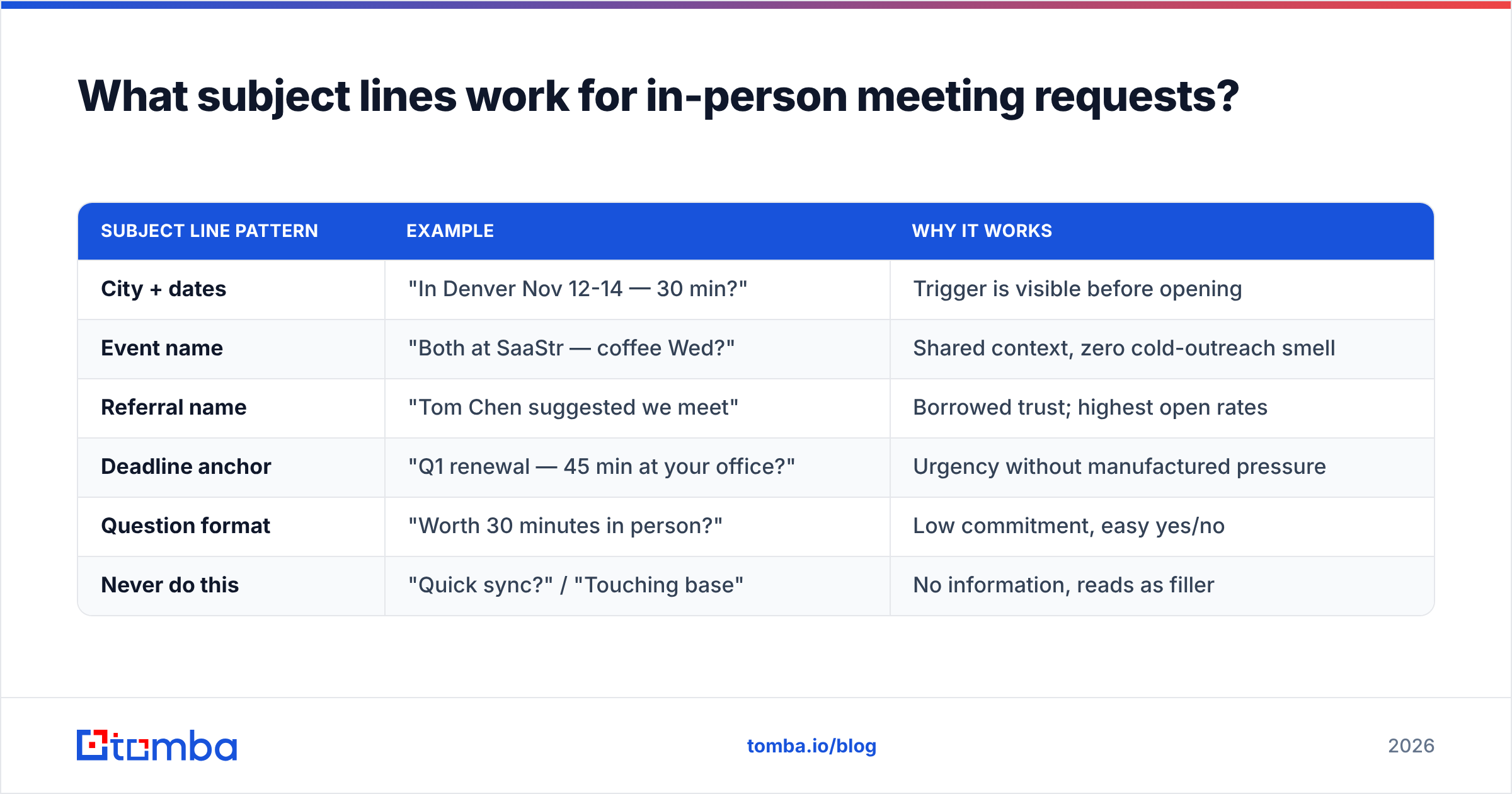
Subject lines for face-to-face asks should leak the logistics, not the pitch. The recipient decides in the preview pane whether this is a calendar item or a sales email.
| Subject line pattern | Example | Why it works |
|---|---|---|
| City + dates | "In Denver Nov 12-14 — 30 min?" | Trigger is visible before opening |
| Event name | "Both at SaaStr — coffee Wed?" | Shared context, zero cold-outreach smell |
| Referral name | "Tom Chen suggested we meet" | Borrowed trust; highest open rates |
| Deadline anchor | "Q1 renewal — 45 min at your office?" | Urgency without manufactured pressure |
| Question format | "Worth 30 minutes in person?" | Low commitment, easy yes/no |
| Never do this | "Quick sync?" / "Touching base" | No information, reads as filler |
If you want a fast way to test variations before sending, run them through a subject line tester and check for spam triggers and length truncation on mobile.
How do you follow up without being annoying?#
Two rules. First, each follow-up must add something — a new time, a new reason, or a graceful exit. Second, space follow-ups wider than you would for a call, because in-person requests need calendar runway.
A workable cadence:
- Day 0 — the initial request with two slots.
- Day 4 — a short bump that adds one new slot and one new detail. "Also happy to come to your Reston office instead."
- Day 9 — the value-add touch: send something useful, no ask attached. A relevant benchmark, a competitor teardown, a case study from their vertical.
- Day 14 — the close-the-loop email. "Sounds like this isn't the quarter for it — I'll stop nudging. If the renewal conversation heats up in January, I'm one reply away."
That last one gets more replies than any of the others, in my experience, because it removes the pressure. Plenty of prospects respond to a graceful exit with "no, wait, actually let's do the 16th."
What are the most common mistakes?#
Asking for their availability instead of proposing yours. "What does your calendar look like next week?" transfers all the work to them. Even executives who genuinely want to meet you will deprioritize an email that creates a task.
Skipping the reason it must be in person. If the meeting could obviously be a Zoom call, the recipient will counter-offer a Zoom call — and you've spent your one ask.
Sending too far in advance or too close. Under 7 days and their calendar is full. Over 30 days and it feels speculative; they'll say "circle back closer to the date," which is where deals go to die.
Ignoring travel logistics. Proposing a 9am meeting across town from where they actually work is an instant no. Check the office address on their site or LinkedIn before you name a place.
Emailing an address you never verified. This is the silent killer. If your data source hands you first.last@company.com and the actual pattern is flast@company.com, your perfectly-crafted request bounces and you never know. Use a domain search to confirm the company's real email pattern, then verify the specific address before sending. A bounced in-person request also damages your sender reputation, which quietly suppresses every future email to that domain.
Over-personalizing the wrong thing. Mentioning their kid's soccer team from a podcast is creepy. Mentioning a hiring spree, a funding round, or a product launch is relevant. Stay on the professional side of the line.
How do you find and verify contacts for in-person outreach?#
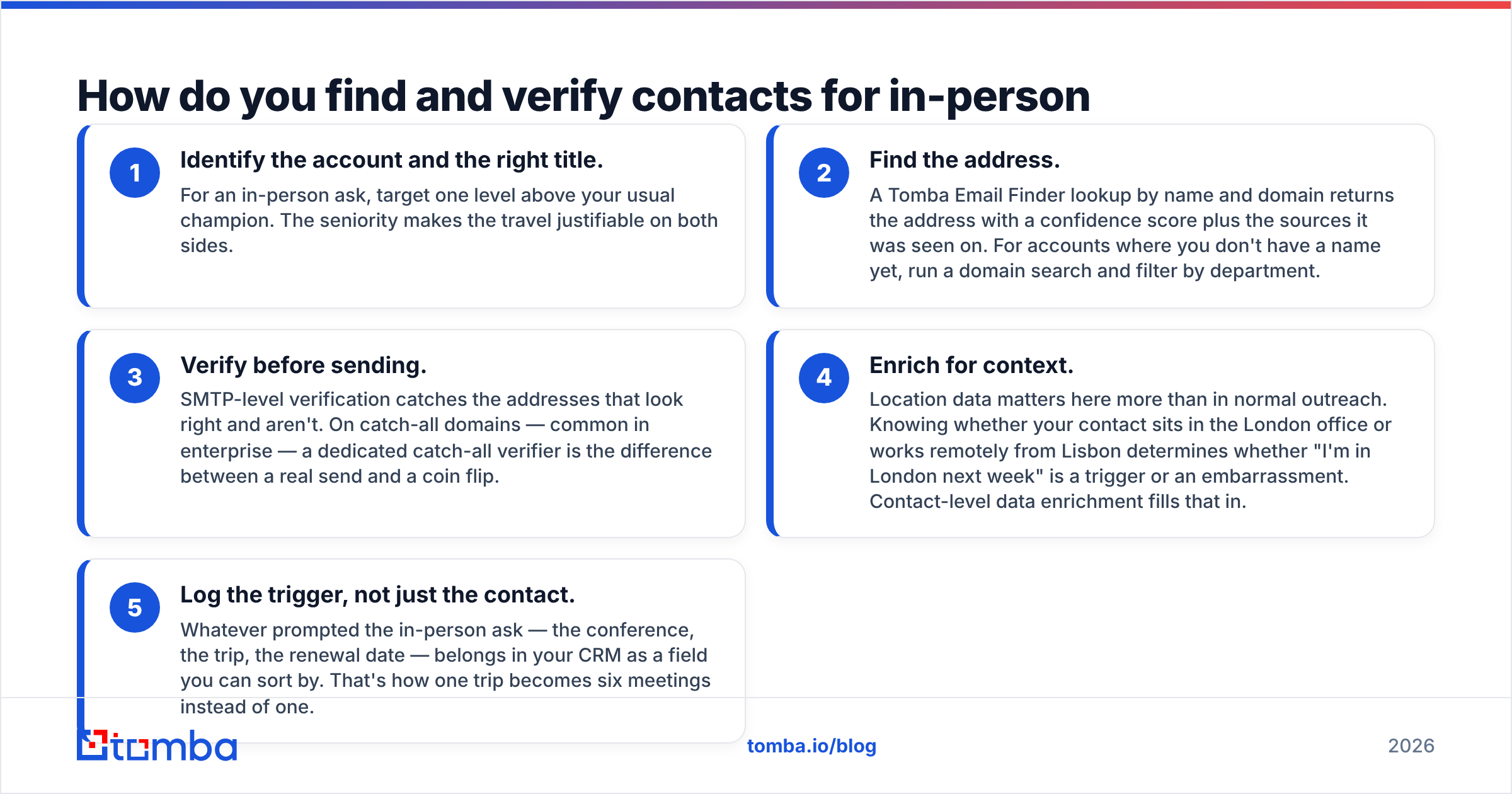
Face-to-face requests are usually aimed at senior people — VPs, directors, founders — whose addresses aren't published anywhere obvious. The workflow that holds up:
- Identify the account and the right title. For an in-person ask, target one level above your usual champion. The seniority makes the travel justifiable on both sides.
- Find the address. A Tomba Email Finder lookup by name and domain returns the address with a confidence score plus the sources it was seen on. For accounts where you don't have a name yet, run a domain search and filter by department.
- Verify before sending. SMTP-level verification catches the addresses that look right and aren't. On catch-all domains — common in enterprise — a dedicated catch-all verifier is the difference between a real send and a coin flip.
- Enrich for context. Location data matters here more than in normal outreach. Knowing whether your contact sits in the London office or works remotely from Lisbon determines whether "I'm in London next week" is a trigger or an embarrassment. Contact-level data enrichment fills that in.
- Log the trigger, not just the contact. Whatever prompted the in-person ask — the conference, the trip, the renewal date — belongs in your CRM as a field you can sort by. That's how one trip becomes six meetings instead of one.
For teams running this at scale across a target account list, comparing tooling matters. Independent review sites like G2 and Capterra carry enough recent reviews to sanity-check vendor claims about match rates, and platforms like BookYourData are a solid option when you need pre-built lists with verified addresses rather than on-demand lookups. Most teams end up using both patterns: a database for list-building, an on-demand finder for the specific senior contacts that databases miss.
Is a face to face meeting worth the cost?#
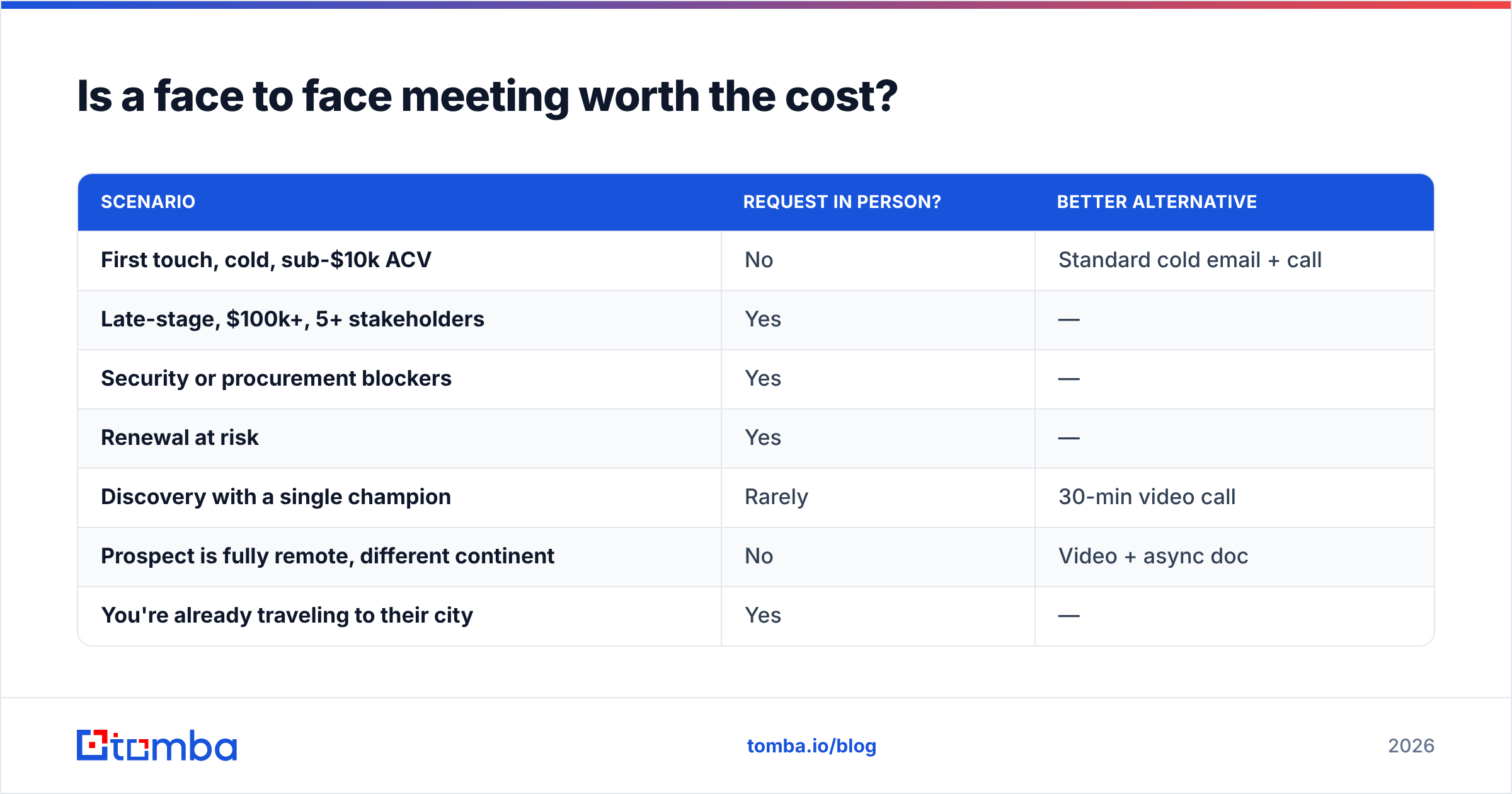
Not always — and being honest about that improves your hit rate, because you stop burning in-person asks on deals that don't need them.
| Scenario | Request in person? | Better alternative |
|---|---|---|
| First touch, cold, sub-$10k ACV | No | Standard cold email + call |
| Late-stage, $100k+, 5+ stakeholders | Yes | — |
| Security or procurement blockers | Yes | — |
| Renewal at risk | Yes | — |
| Discovery with a single champion | Rarely | 30-min video call |
| Prospect is fully remote, different continent | No | Video + async doc |
| You're already traveling to their city | Yes | — |
| Post-demo, buyer went quiet | Sometimes | Try a call first, then escalate |
The pattern: request in person when the meeting removes a specific blocker or when travel makes it nearly free. Research from analyst firms including Gartner has consistently found that larger buying groups slow deals down — and getting those groups into one room is the single most reliable way to speed them back up.
Frequently asked questions#
How long should a face to face meeting request email be? 90 to 130 words. Long enough to carry the trigger, the value, two slots, and a location. Anything past 150 words is being read on a phone and skimmed.
Should I attach a calendar invite? Not with the first email. Send the request, get the verbal yes, then send the invite with the address and duration confirmed. An unsolicited invite in a cold thread reads as presumptuous.
What if they counter with a video call? Take it, but ask for one thing in person later — "Happy to start on Zoom. If it makes sense after, I'd like to bring our SE to your office for the security piece." You keep the relationship and preserve the in-person ask for when it counts.
How far ahead should I ask? 10 to 21 days for senior contacts. Under a week rarely works for anyone with a full calendar.
Is it okay to ask for a meal instead of an office meeting? Coffee, yes — it's a low-commitment 20 minutes. Lunch or dinner as a first ask is too much intimacy for a relationship that hasn't earned it. Save meals for existing customers.
Get the contact right before you get the copy right#
A great face to face meeting request email sent to a guessed address is worth nothing. Start with Tomba Email Finder to get the verified address of the senior contact you actually want in the room, with confidence scoring and source attribution so you know what you're sending to. The free tier gives you 25 searches a month to test the workflow; paid plans start at $49/mo on Starter and $99/mo on Growth if you're running this across a full target account list — full Tomba pricing is public.
Then write the 110-word email. Name the trigger, name the place, name two times. That's the whole trick.
Related guides#
Ready to find emails that actually work?
Join 150,000+ professionals who stopped guessing and started sending. Free credits on signup — no credit card required.
Get the Tomba newsletter
Practical outbound tactics and product updates — once every two weeks.
About the author