Fake Email Checker: How to Spot Fake Emails in 2026
Most fake email checkers agree on the easy 80% of a list and disagree on the 20% that actually costs money. Here's how the checks work, where they quietly fail, and what to run before you hit send.
TL;DR
- A fake email checker is not one test. It's a stack of five checks — syntax, domain/MX, disposable-domain lookup, SMTP handshake, and pattern/risk scoring — and most cheap tools only run the first three.
- Syntax and MX checks are free and instant. They catch typos and dead domains, which is roughly 60–70% of the junk on a scraped list, and none of the expensive junk.
- The addresses that actually hurt you are catch-all domains, role accounts, spam traps, and disposable addresses registered on new throwaway domains. Those need dedicated handling.
- Free single-address checkers are fine for spot-checking one contact. For lists over ~500, you want batch processing plus an API so the check happens at capture time, not after the bounce.
- Realistic accuracy in 2026: a good verifier gets bounce rates under 2% on a normal B2B list. Any vendor claiming 99%+ on catch-all-heavy data is measuring something other than deliverability.
What is a fake email checker?#
A fake email checker is a tool that tells you whether an email address will actually accept mail before you send to it. Think of it like a bouncer checking IDs at the door: some IDs are obviously fake (wrong format), some are expired (dead domain), some are real but belong to someone who isn't on the list (role accounts), and some are technically valid but the club has a policy of letting everyone in and sorting it out later (catch-all domains).
The word "fake" covers several very different problems, and that's where most confusion starts. jhon@gmial.com is a typo. test@mailinator.com is a disposable address someone used to grab your lead magnet. info@acme.com is a real, deliverable mailbox that no human reads. sales@bankrupt-startup.io was real in 2023 and now the MX record is gone. A checker that "validates" all four the same way is not giving you useful information.
The practical definition: a fake email checker answers will this send, and should it? Deliverability is the technical half. Value is the judgment half.
What counts as a fake email address?#
Six categories, in rough order of how often they show up on real B2B lists:
- Typo / malformed addresses. Missing
@, double dots,gmial.com, trailing spaces from a bad CSV paste. Caught by regex plus a domain-similarity check. Free to detect, and some tools will suggest the correction. - Dead domains. The domain no longer resolves or has no MX record. Company shut down, rebranded, or migrated. This is the single biggest source of decay on lists older than 12 months — B2B contact data goes stale at roughly 2–3% per month as people change jobs.
- Disposable / temporary addresses. Ten-minute mail, Mailinator, Guerrilla Mail, and thousands of rotating domains. These exist specifically to get past your gate without giving you a real inbox. See the disposable email address overview for how the model works.
- Role accounts.
info@,support@,admin@,sales@,hello@. Technically deliverable, often monitored by a shared inbox or a ticketing system, and heavily weighted toward complaints. Mailbox providers treat cold mail to role accounts more harshly than mail to named individuals. - Spam traps. Recycled addresses that a provider reactivated purely to catch senders who never clean their lists, plus pristine traps that were never valid to begin with. No verifier can detect these with certainty. Good ones flag the conditions that correlate with traps: very old records, no engagement history, addresses that only appear in scraped sources.
- Catch-all (accept-all) domains. The server accepts mail for every address at the domain, so an SMTP probe returns "yes" for
ceo@company.comandasdfgh@company.comalike. Roughly 20–25% of business domains are configured this way, and this is where the real accuracy gap between tools lives.
How does a fake email checker actually work?#
Five layers, cheapest to most expensive:
Layer 1 — Syntax. RFC-compliant format parsing. Milliseconds, no network call.
Layer 2 — Domain and MX lookup. DNS query for mail exchanger records. If there's no MX, nothing can be delivered. Also flags parked domains and domains registered in the last 30 days (a strong disposable signal).
Layer 3 — Disposable and blocklist matching. The address's domain is checked against a maintained list of throwaway providers and known bad actors. This list is the product. A stale disposable-domain database is worthless because new throwaway domains spin up daily.
Layer 4 — SMTP handshake. The verifier opens a connection to the receiving mail server and asks whether the specific mailbox exists, without delivering a message. This is where deliverability is actually confirmed — and where things get slow, rate-limited, and occasionally blocked. Providers like Google and Microsoft have made this progressively less informative over the last few years.
Layer 5 — Risk scoring. Everything the handshake can't answer: is this a catch-all domain, is it a role account, does the local part look machine-generated, does the name pattern match the company's known email format, has this address appeared in breach dumps as a throwaway. Layer 5 is what separates a $5 tool from a usable one.
Most "free fake email checker" pages online run layers 1–3 only. They're genuinely useful, they're just answering a smaller question than you asked.
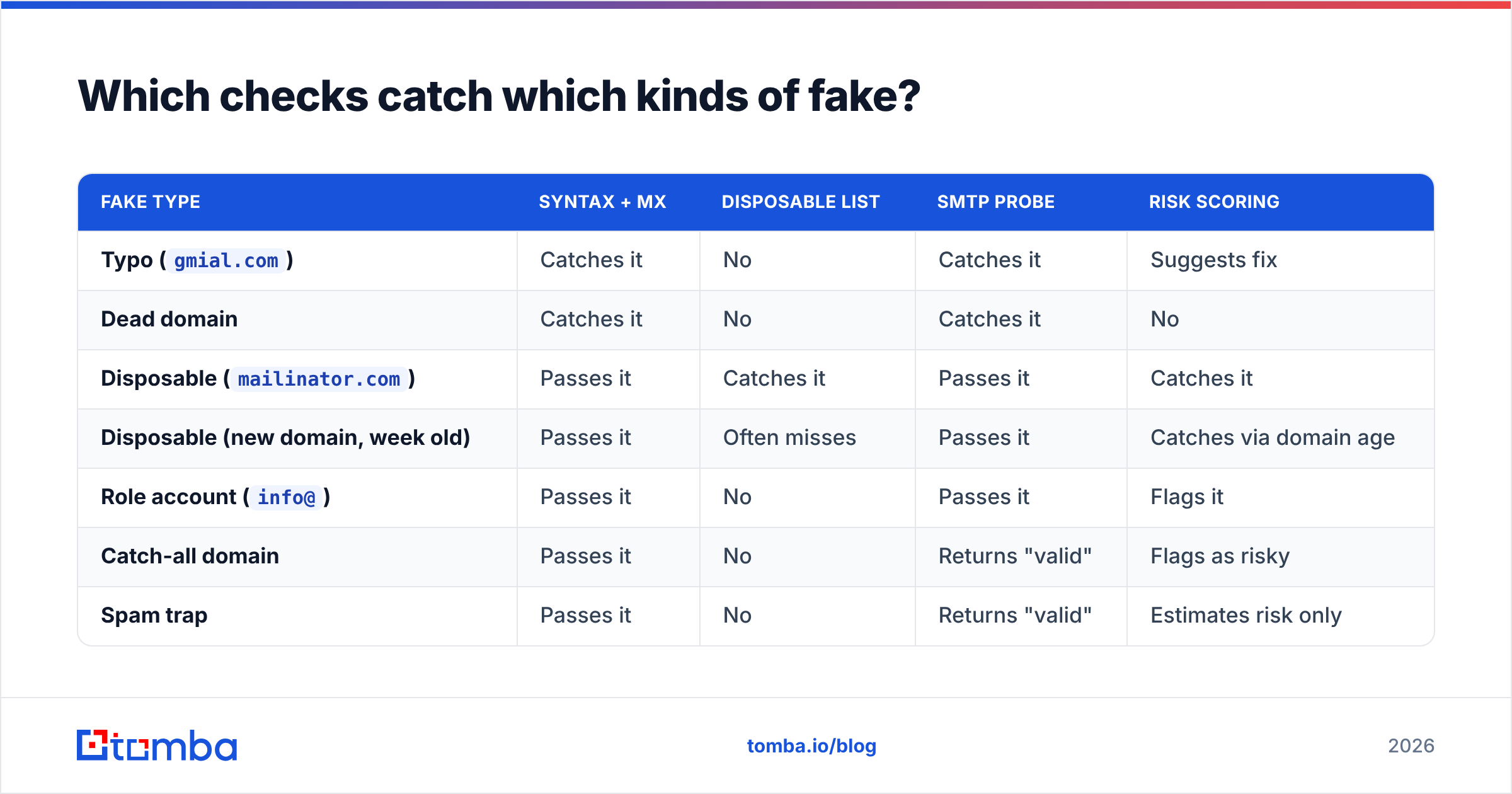
Which checks catch which kinds of fake?#
| Fake type | Syntax + MX | Disposable list | SMTP probe | Risk scoring |
|---|---|---|---|---|
Typo (gmial.com) |
Catches it | No | Catches it | Suggests fix |
| Dead domain | Catches it | No | Catches it | No |
Disposable (mailinator.com) |
Passes it | Catches it | Passes it | Catches it |
| Disposable (new domain, week old) | Passes it | Often misses | Passes it | Catches via domain age |
Role account (info@) |
Passes it | No | Passes it | Flags it |
| Catch-all domain | Passes it | No | Returns "valid" | Flags as risky |
| Spam trap | Passes it | No | Returns "valid" | Estimates risk only |
| Full mailbox / temporarily blocked | Passes it | No | Ambiguous result | Marks retry |
The row that matters: catch-all. An SMTP probe says "valid" for every address on a catch-all domain, so a verifier that only reports SMTP results will hand you a list that looks 98% clean and bounces at 9%. Any tool worth paying for labels catch-all separately instead of folding it into "valid" — that's why a dedicated catch-all verifier exists as its own step rather than a checkbox.
Are free fake email checkers good enough?#
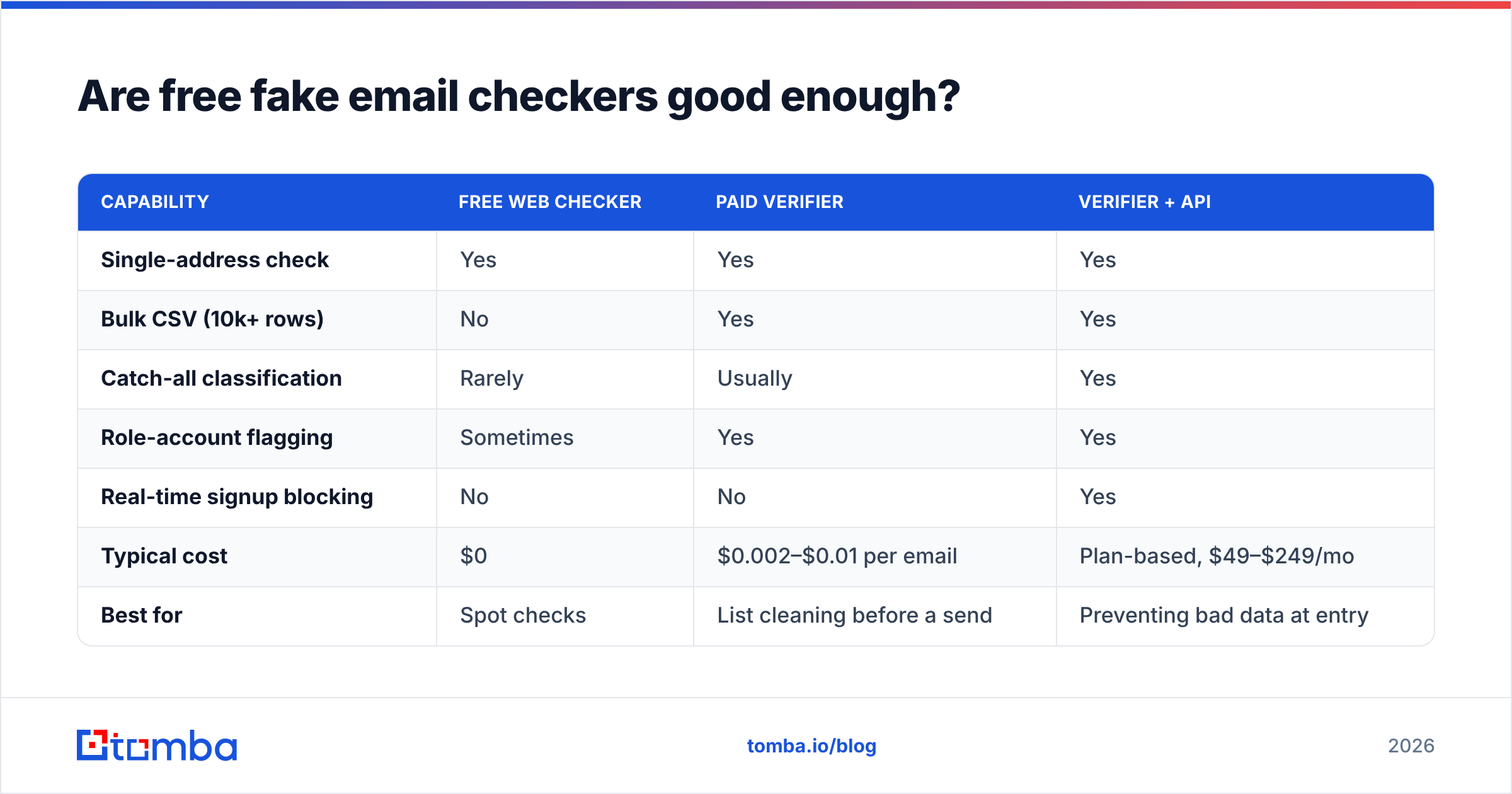
For one address, yes. Paste it into a free email checker, get syntax, domain, MX, disposable status, and role-account flag in about a second. That's the right tool for "this lead just filled out a form and something feels off."
Free breaks down at three points:
- Volume. Single-address forms don't scale past a few dozen checks. Manual pasting for a 5,000-row list is a day of work and you'll make errors.
- Catch-all handling. Free tools almost universally return "valid" or "unknown" for catch-all and leave you to figure it out.
- Integration. The check needs to run when the address enters your system — at form submit, at CRM import, at enrichment — not in a browser tab three weeks later.
| Capability | Free web checker | Paid verifier | Verifier + API |
|---|---|---|---|
| Single-address check | Yes | Yes | Yes |
| Bulk CSV (10k+ rows) | No | Yes | Yes |
| Catch-all classification | Rarely | Usually | Yes |
| Role-account flagging | Sometimes | Yes | Yes |
| Real-time signup blocking | No | No | Yes |
| Typical cost | $0 | $0.002–$0.01 per email | Plan-based, $49–$249/mo |
| Best for | Spot checks | List cleaning before a send | Preventing bad data at entry |
How accurate are fake email checkers in 2026?#
Set expectations against a benchmark you can actually measure: bounce rate on the send that follows the check. Not the vendor's marketing number.
On a normal B2B list drawn from a mix of scraping, enrichment, and inbound forms, here's what good looks like:
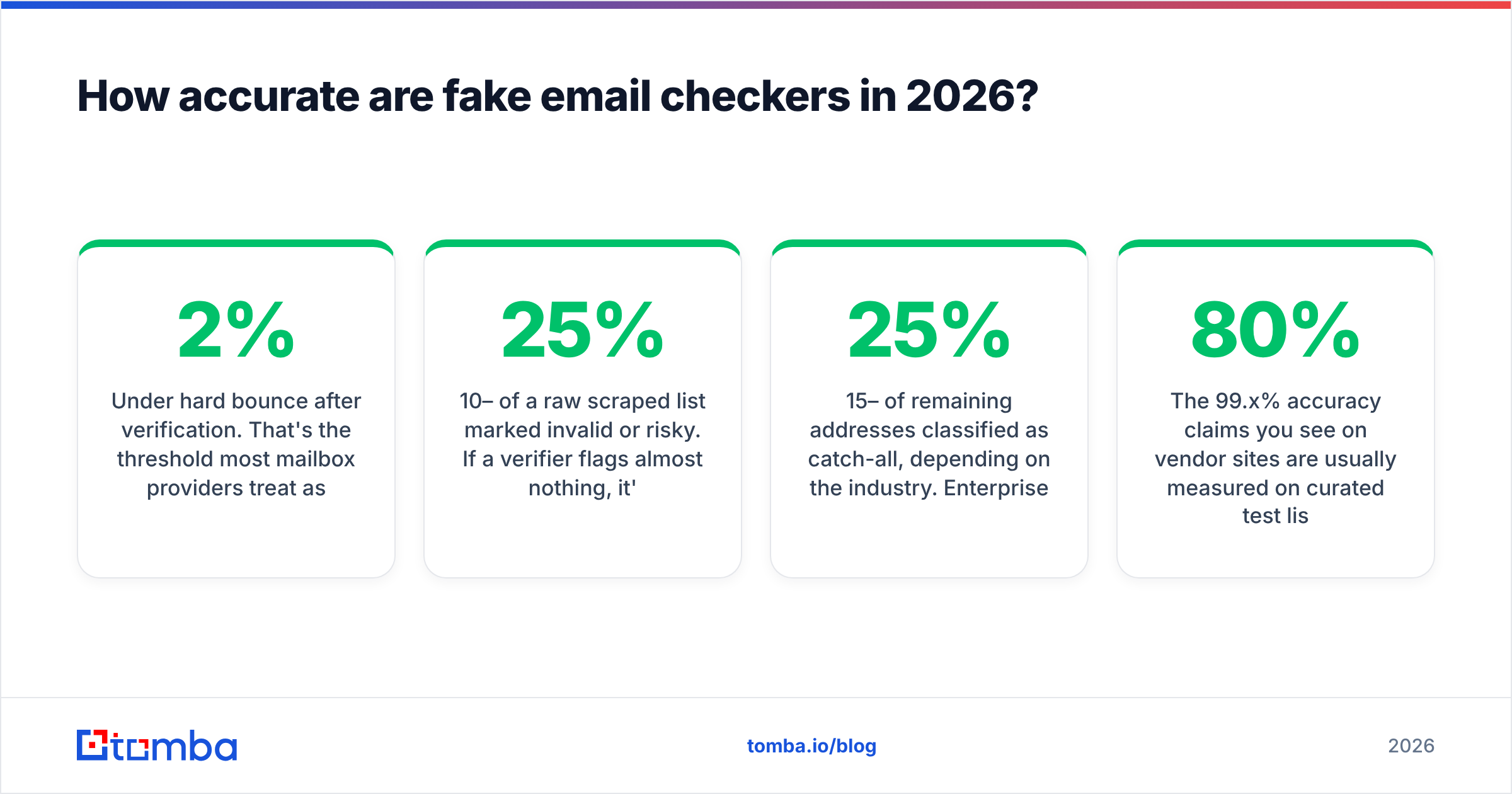
- Under 2% hard bounce after verification. That's the threshold most mailbox providers treat as acceptable. Above 3–4% and you're actively damaging sender reputation.
- 10–25% of a raw scraped list marked invalid or risky. If a verifier flags almost nothing, it's probably not running SMTP checks at all.
- 15–25% of remaining addresses classified as catch-all, depending on the industry. Enterprise and security-conscious sectors skew higher.
The 99.x% accuracy claims you see on vendor sites are usually measured on curated test lists where every address is either obviously valid or obviously dead. Nobody's real list looks like that. The honest framing: verifiers agree with each other on roughly 80% of any list, and the vendors differentiate entirely on the remaining 20% — catch-all, greylisted servers, and providers that deliberately obscure mailbox existence.
Two other accuracy notes worth internalizing:
- Verification is a snapshot. An address verified in January can be dead in June. Re-verify anything older than 90 days before a major campaign.
- "Valid" is not "wants to hear from you." Deliverability and permission are separate problems. A verifier protects your domain; it doesn't make cold mail welcome.

How do you check a suspicious email address manually?#
Sometimes you have one address and no tool. The manual sequence:
- Look at the domain. Does the company website exist? Does the domain in the address match the company's actual site, or is it a lookalike with a hyphen or a different TLD?
- Check MX records.
dig MX example.comor any web-based DNS lookup. No MX record means no mail, full stop. - Compare against the company's email pattern. If everyone at the company is
first.last@, an address formattedfirstl@is suspect. A company email pattern lookup answers this in seconds. - Search the local part. Paste the full address into a search engine and into LinkedIn. Disposable addresses and scraped junk often surface in paste dumps; real business addresses usually appear in signatures, papers, or directory listings.
- Cross-reference the person. Does a human with that name work there now? Job changes are the most common reason a perfectly formatted address stops working.
This is fine for three addresses. It's not a process.
Which fake email checker should you use?#
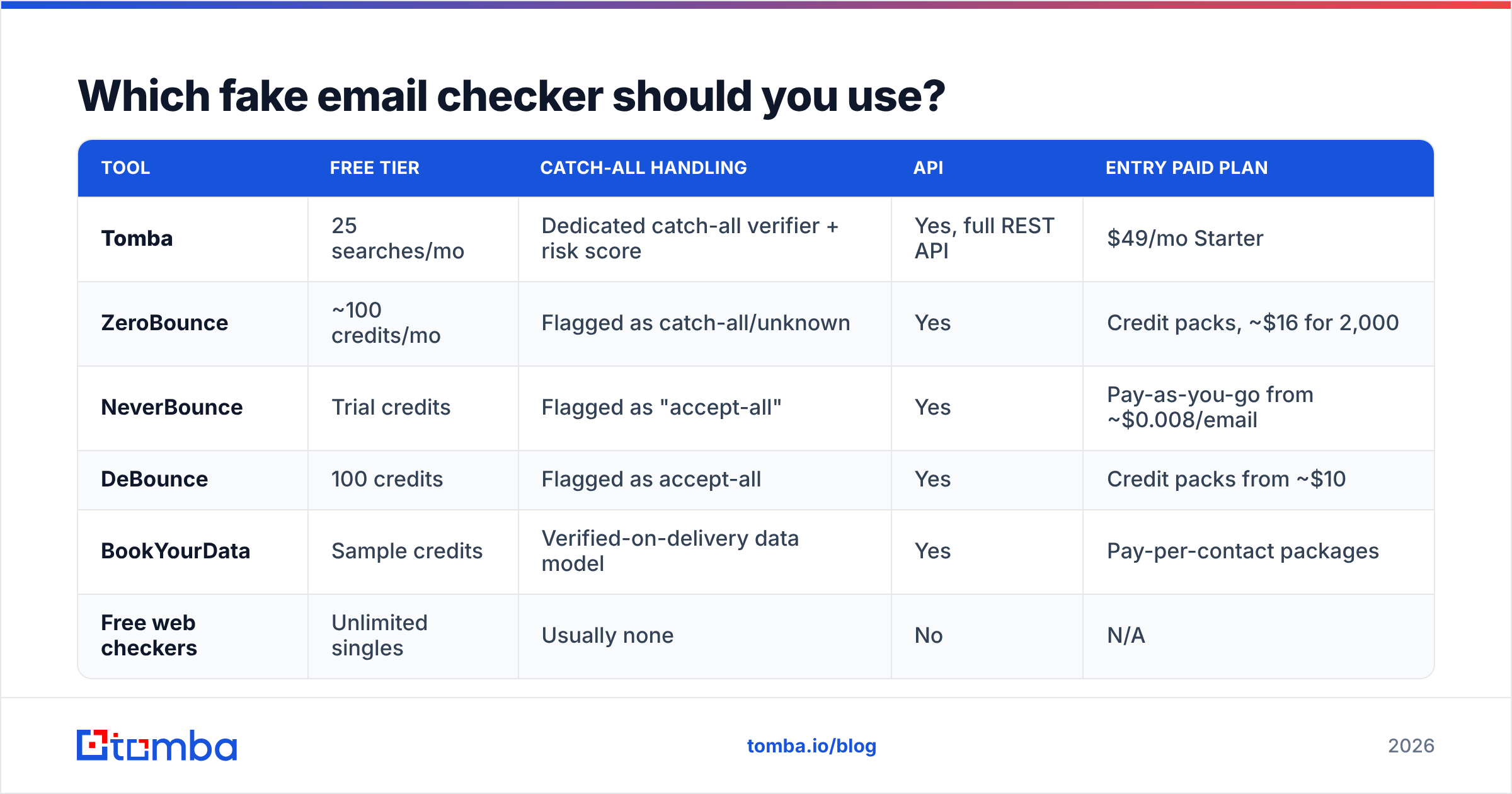
Compare on four axes: what the free tier gets you, whether catch-all is handled as its own class, whether there's a real API, and per-email cost at volume.
| Tool | Free tier | Catch-all handling | API | Entry paid plan |
|---|---|---|---|---|
| Tomba | 25 searches/mo | Dedicated catch-all verifier + risk score | Yes, full REST API | $49/mo Starter |
| ZeroBounce | ~100 credits/mo | Flagged as catch-all/unknown | Yes | Credit packs, ~$16 for 2,000 |
| NeverBounce | Trial credits | Flagged as "accept-all" | Yes | Pay-as-you-go from ~$0.008/email |
| DeBounce | 100 credits | Flagged as accept-all | Yes | Credit packs from ~$10 |
| BookYourData | Sample credits | Verified-on-delivery data model | Yes | Pay-per-contact packages |
| Free web checkers | Unlimited singles | Usually none | No | N/A |
Reading the table honestly:
- If your problem is list cleaning once a quarter, credit-pack verifiers (ZeroBounce, DeBounce, NeverBounce) are cost-efficient. You buy what you use.
- If your problem is finding and verifying in the same motion, a combined platform saves a step — you're not exporting from a finder into a separate verifier. Tomba's email verifier sits next to the finder, so an address discovered by domain search is verified in the same workflow rather than round-tripped through a second vendor.
- If you need pre-verified contacts rather than a verification step, a database-first provider like BookYourData is a different and perfectly reasonable shape of solution — you're buying data that's already been through the checks.
- If you need to block fakes at signup, the API matters more than the UI. A email verification API call on form submit stops the disposable address before it enters your CRM, which is worth more than cleaning it out later.
Check current list pricing directly — verification vendors change credit pricing frequently, and G2's email verification category is a reasonable place to sanity-check reviews against your own segment before committing.
How do you stop fake emails at the source?#
Cleaning is remediation. Prevention is cheaper. Four things to put in place:
- Verify at form submit. One API call, ~300ms, blocks disposables and typos before the record is created. Return a friendly "that looks like a temporary address" instead of a hard error, and offer the typo correction.
- Verify at CRM import. Every bulk import gets a pass. Tag the source so you can see which channels produce junk — usually one or two do, disproportionately.
- Segment catch-all instead of deleting it. Catch-all addresses aren't fake; they're unconfirmed. Send them from a secondary domain, in smaller batches, and let engagement sort them. Deleting 20% of a B2B list because it's catch-all throws away real pipeline.
- Re-verify on a schedule. Quarterly for active segments, before any campaign to a list you haven't touched in six months. A bulk verify run costs less than one damaged sending domain.
What do people get wrong about fake email checkers?#
Treating "unknown" as "invalid." Unknown usually means the receiving server refused to confirm. Some of those are your best accounts — large enterprises with hardened mail infrastructure. Route them to a lower-volume, higher-care sequence instead of deleting them.
Verifying once and never again. Contact data decays continuously. A verified list is a perishable asset.
Chasing 0% bounce. Getting from 2% to 0.5% costs far more than it returns, and the aggressive filtering that gets you there will strip out valid contacts. Under 2% is the goal.
Assuming verification fixes deliverability. It removes one failure mode. Authentication (SPF, DKIM, DMARC), warmup, sending volume, and content all still apply. A perfectly clean list sent from an unauthenticated domain still lands in spam.
Judging a verifier on one test address. Run 200 addresses you already know the outcome for — bounced, replied, dead company — through two tools and compare. That's a benchmark. A single lookup is a coin flip.
Where to start#
Pick the layer that matches your actual failure. If you're getting typo'd addresses from a form, real-time API validation solves it this week. If you inherited a 40,000-row list of unknown provenance, run a bulk verify, segment catch-all separately, and warm your way back into sending. If you're building lists from scratch, find and verify in one pass so you never accumulate the problem.
For that last case — building clean lists rather than repairing dirty ones — start with the Tomba Email Finder. It finds professional addresses by domain, name, or company, and every result comes back with a verification status attached, so the fake-email problem gets handled at discovery instead of six weeks later when your bounce rate is already telling on you. The free tier gives you 25 searches a month to test it against addresses whose outcomes you already know — which is the only benchmark that counts.
Related guides#
Ready to find emails that actually work?
Join 150,000+ professionals who stopped guessing and started sending. Free credits on signup — no credit card required.
Get the Tomba newsletter
Practical outbound tactics and product updates — once every two weeks.
About the author