Fathom Pricing Reviews Pros and Cons: 2026 Buyer's Guide
Fathom's free AI notetaker is genuinely generous — but the paid tiers hide real limits on CRM sync, team seats, and coverage. Here's the honest cost breakdown before you commit a budget.
Fathom pricing reviews pros and cons come up in every AI notetaker shortlist. Here is the short answer. The free plan is real. The paid tiers are fair. The limits are easy to miss until they bite. This guide walks through the plans, the seat math, and what users say after a year of daily calls.
TL;DR
- Fathom's free plan is the most generous in the AI-notetaker category: unlimited recording and transcription for one user, with no meeting cap. Most solo reps never need to upgrade.
- Paid tiers start around $19–$29 per user/month (Premium). Team Edition runs roughly $29–$39, and Team Edition Pro around $39–$49 per user/month billed annually. Exact numbers shift, so check the live page before budgeting.
- The real cost is not the seat price. It's what you lose on free: CRM push, unlimited AI "Ask Fathom" questions, folder-level sharing, and admin controls.
- Reviews on G2 and Capterra stay strong, at a 4.8+ average. Two complaints repeat: thin language coverage, and no in-person meeting recording on lower tiers.
- Fathom does not find contacts. It records conversations you already booked. Pairing it with an email finder is what turns a notetaker into a pipeline tool.
What is Fathom and who actually uses it?#
Fathom is an AI meeting notetaker. It joins your Zoom, Google Meet, or Microsoft Teams call. It records the call, writes the transcript, and hands back a structured summary. You get action items, timestamps, and clips you can share. Think of it as a court stenographer who also writes the executive summary before you've left the room.
The buyer profile splits cleanly into three groups:
- Solo operators and founders — using the free plan indefinitely, mostly for recall on discovery calls and investor conversations.
- Small sales teams (3–20 reps) — on Team Edition, mainly for CRM auto-fill and shared call libraries so managers can coach without sitting in.
- Customer success and consulting orgs — using Fathom as an internal knowledge base of client conversations, heavy users of the search and Ask Fathom features.
Fathom is not Gong or Chorus. It is a notetaker first. Revenue intelligence comes a distant second. Gong sells deal forecasting and conversation analytics at $1,000+ per seat per year. Fathom sells "I don't want to take notes" at a fraction of that. Confusing the two is the most common budgeting mistake.
How much does Fathom actually cost in 2026?#
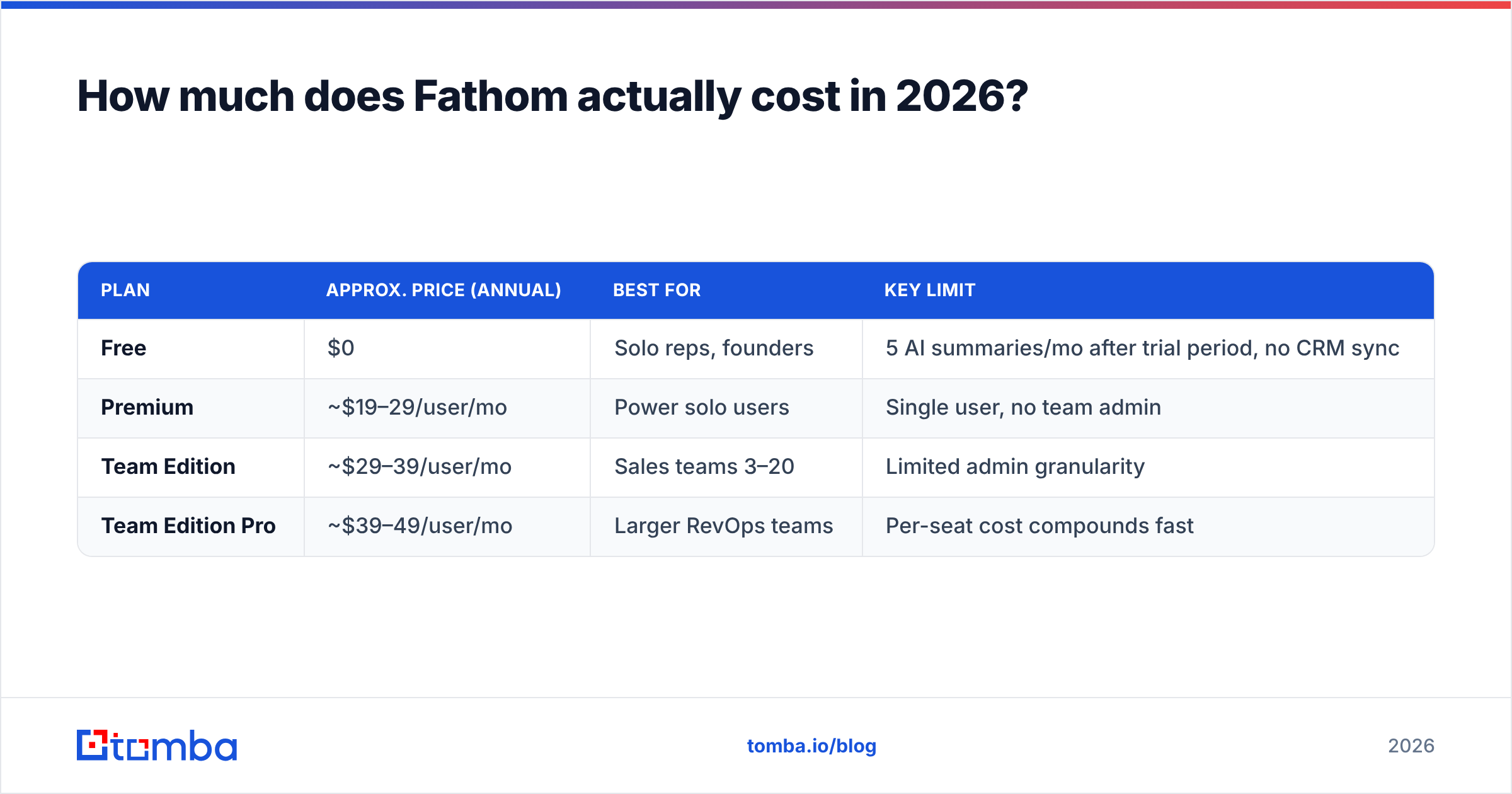
Here is the structure as published on fathom.video. Prices below reflect annual billing; monthly is typically 20–25% higher.
| Plan | Approx. price (annual) | Best for | Key limit |
|---|---|---|---|
| Free | $0 | Solo reps, founders | 5 AI summaries/mo after trial period, no CRM sync |
| Premium | ~$19–29/user/mo | Power solo users | Single user, no team admin |
| Team Edition | ~$29–39/user/mo | Sales teams 3–20 | Limited admin granularity |
| Team Edition Pro | ~$39–49/user/mo | Larger RevOps teams | Per-seat cost compounds fast |
Two things reviewers consistently get wrong about this table.
First: the free plan is genuinely unlimited on recording and transcription. You can record every call you take, forever, and read the full transcript. What's metered is the AI-generated summary and the number of Ask Fathom questions. If you're happy skimming transcripts yourself, free is not a trial — it's a product.
Second: Team Edition pricing is per seat, and it includes people who never sell. If your sales engineer, your CS lead, and your founder all sit on calls, they all need seats to get their own recordings synced. A 12-person go-to-market org at $39/seat is $5,616/year. That's real money for note-taking, and it's where the "is this worth it?" conversation usually starts.
What do Fathom reviews actually say?#
Scores on G2 and Capterra sit at 4.8–5.0 across several thousand reviews. That is both high and steady. Filter out the five-star noise and the signal breaks down like this:
What reviewers praise repeatedly:
- Speed of summary delivery. Summaries land within 30 seconds of hangup, versus minutes for several competitors. For back-to-back callers this is the single most cited benefit.
- Zero-config onboarding. Calendar connect, and it shows up. No admin project, no IT ticket.
- The free tier's honesty. Reviewers repeatedly note the free plan isn't crippled bait — it's usable indefinitely.
- Ask Fathom. Natural-language querying across your own call history ("what did the Acme CTO say about SOC 2?") is the feature that converts free users to paid.
What reviewers complain about repeatedly:
- Language coverage. Strong on English and a handful of European languages; weaker on others. If your team sells in Arabic, Hebrew, or most Asian languages, test before you buy.
- No native dialer or sequencing. Fathom records; it doesn't prospect, dial, or send.
- CRM sync depth. It pushes notes to HubSpot and Salesforce well, but custom-object mapping is thinner than what a dedicated RevOps team expects.
- In-person meetings. Historically weak. Check current status if field sales matters to you.
- Bot visibility. The recorder joins as a visible participant. Some prospects react to that; some regions require it.
The pattern: complaints are about scope, not quality. Nobody says the transcription is bad. They say it doesn't do the other job they wanted it to do.
Is Fathom's free plan actually enough?#
For most individual users, yes — and that's the honest answer even though it costs Fathom money to be true.
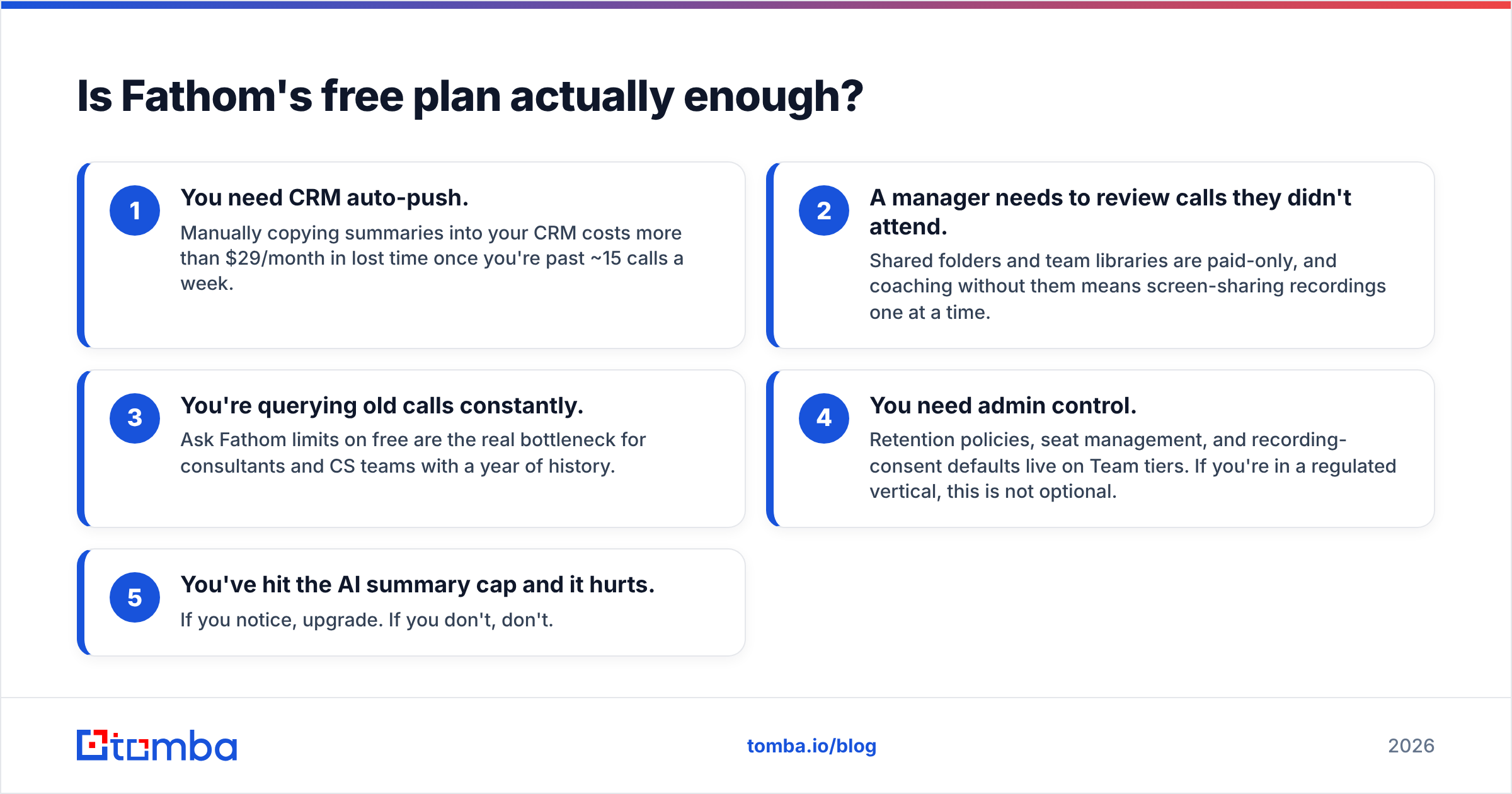
Upgrade when one of these becomes true:
- You need CRM auto-push. Past ~15 calls a week, copying summaries into your CRM by hand costs more than $29/month in lost time.
- A manager needs to review calls they didn't attend. Shared folders and team libraries are paid-only, and coaching without them means screen-sharing recordings one at a time.
- You're querying old calls constantly. Ask Fathom limits on free are the real bottleneck for consultants and CS teams with a year of history.
- You need admin control. Retention policies, seat management, and recording-consent defaults live on Team tiers. If you're in a regulated vertical, this is not optional.
- You've hit the AI summary cap and it hurts. If you notice, upgrade. If you don't, don't.
How does Fathom compare to the alternatives?#
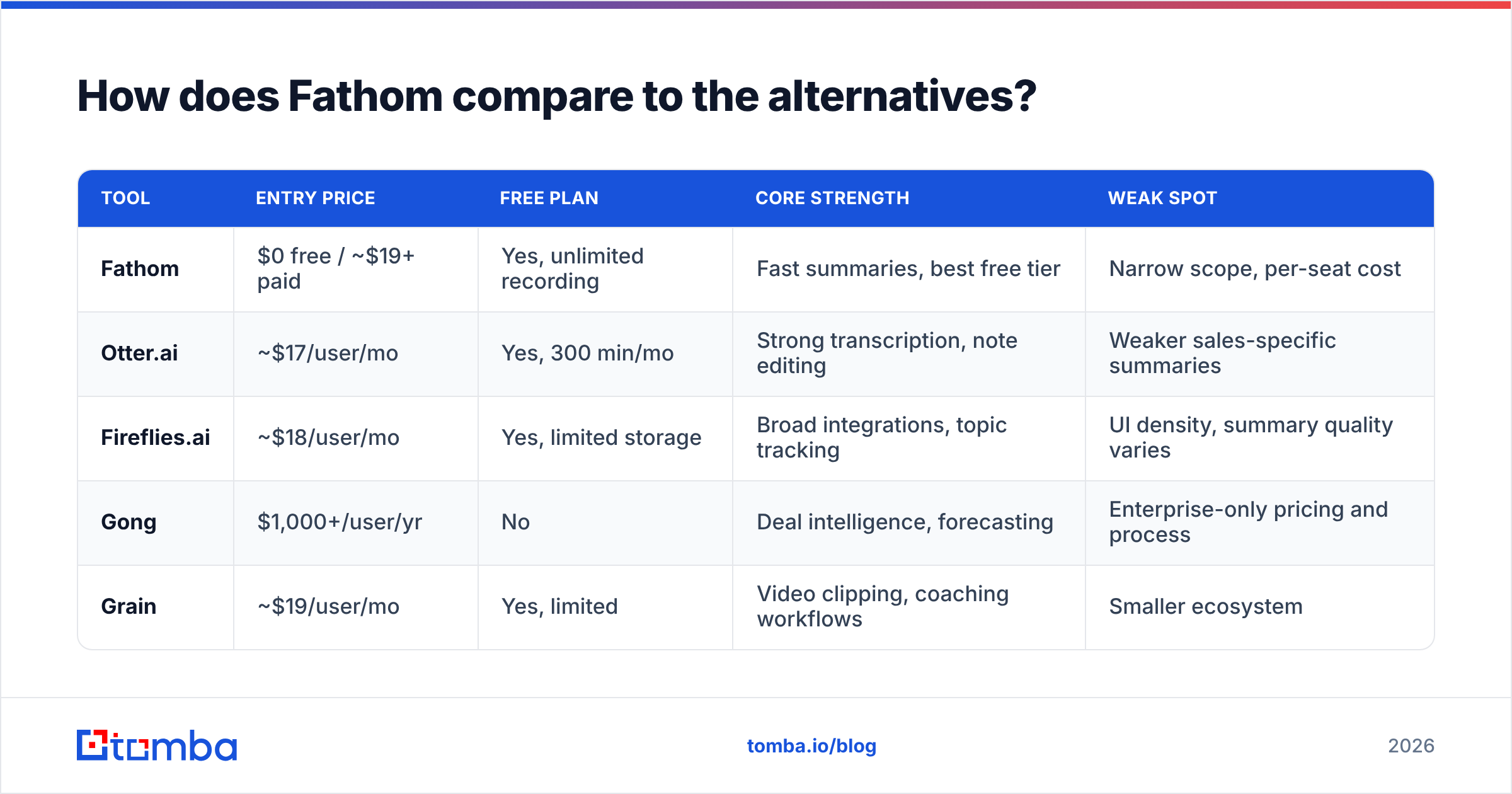
| Tool | Entry price | Free plan | Core strength | Weak spot |
|---|---|---|---|---|
| Fathom | $0 free / ~$19+ paid | Yes, unlimited recording | Fast summaries, best free tier | Narrow scope, per-seat cost |
| Otter.ai | ~$17/user/mo | Yes, 300 min/mo | Strong transcription, note editing | Weaker sales-specific summaries |
| Fireflies.ai | ~$18/user/mo | Yes, limited storage | Broad integrations, topic tracking | UI density, summary quality varies |
| Gong | $1,000+/user/yr | No | Deal intelligence, forecasting | Enterprise-only pricing and process |
| Grain | ~$19/user/mo | Yes, limited | Video clipping, coaching workflows | Smaller ecosystem |
Read that table as a scope ladder, not a quality ranking. Fathom and Otter compete for the same solo user. Gong competes for a CRO's analytics budget. Buy Gong to replace Fathom and you overpay many times over. Buy Fathom expecting forecast rollups and you will be let down by month two.
If your evaluation is really "which AI notetaker," the free tiers make this trivially testable. Run the same call through Fathom, Otter, and Fireflies in one week and compare the summaries side by side. The winner will be obvious and it will be specific to how your team talks.
Fathom pricing reviews pros and cons: the honest scorecard#
Here is the short version, split into what works and what does not.
Pros
- Best-in-class free tier. Unlimited recording and transcription without a credit card is rare and defensible.
- Sub-minute summary turnaround. Materially faster than most competitors, which matters for consecutive-meeting days.
- Clean, low-friction UX. Onboarding is minutes, not a rollout project.
- Solid HubSpot and Salesforce push. Covers 80% of standard CRM logging needs.
- Ask Fathom search. Turns your call archive into something you can actually interrogate.
Cons
- Per-seat pricing scales badly for wide GTM teams. Everyone on the call needs a seat to get value.
- It's a notetaker, not a revenue platform. No dialing, no sequencing, no forecasting, no prospecting.
- Language coverage is uneven. Verify your markets before rollout.
- Visible recording bot. A minor friction point in some sales cultures.
- Custom CRM object mapping is shallow. RevOps teams with complex schemas will hit walls.
Where does Fathom fit in a real outbound stack?#
Here's the gap nobody puts on a pricing page: Fathom only works on meetings that already exist. It is a downstream tool. If your calendar is empty, the world's best notetaker is a $39/month screensaver.
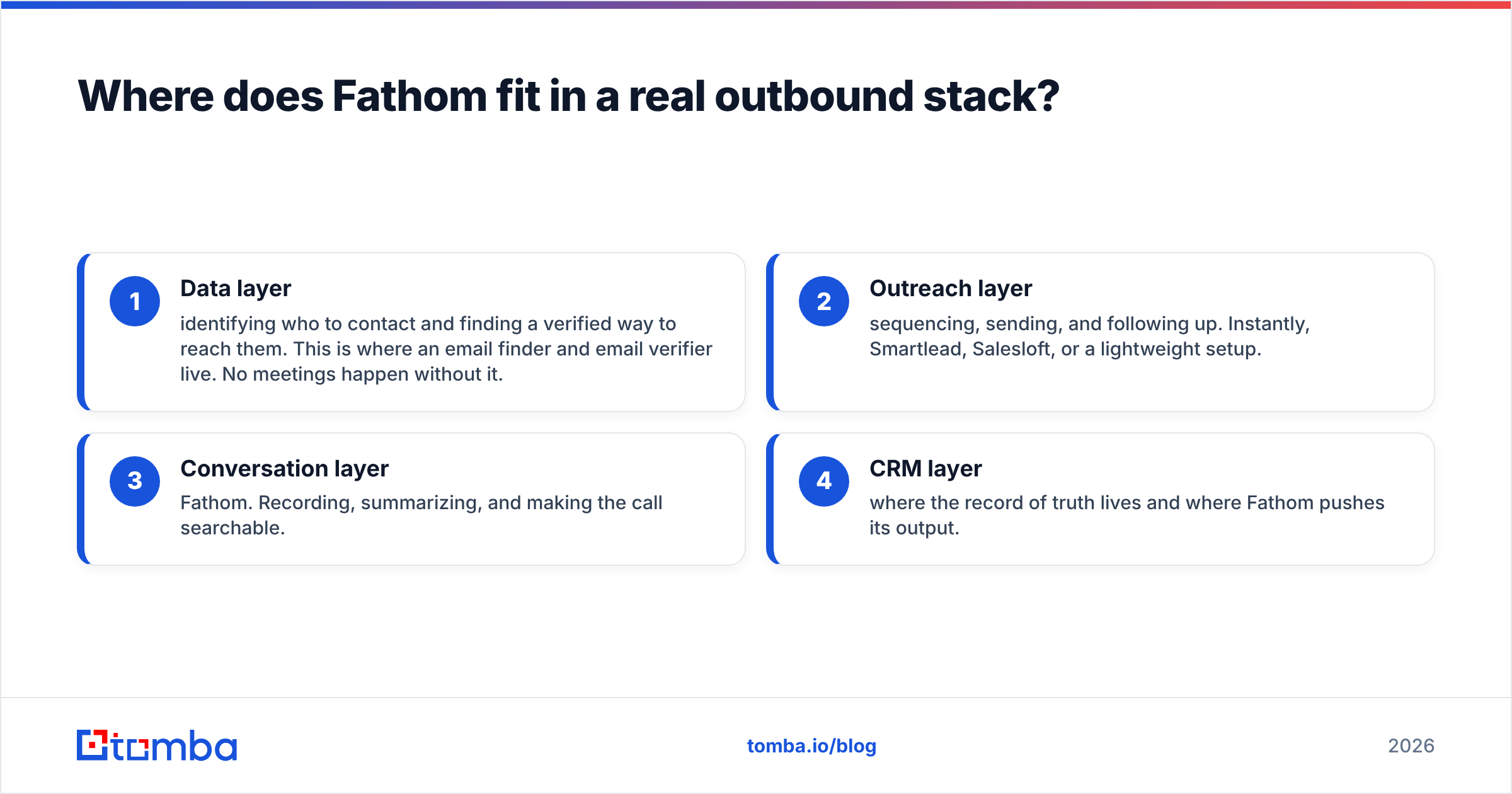
A functioning stack has four layers, and Fathom occupies exactly one:
- Data layer — identifying who to contact and finding a verified way to reach them. This is where an email finder and email verifier live. No meetings happen without it.
- Outreach layer — sequencing, sending, and following up. Instantly, Smartlead, Salesloft, or a lightweight setup.
- Conversation layer — Fathom. Recording, summarizing, and making the call searchable.
- CRM layer — where the record of truth lives and where Fathom pushes its output.
Teams that struggle with Fathom's ROI almost always have a thin layer one. Twenty calls a month with perfect notes is still twenty calls. Forty calls a month with mediocre notes builds more pipeline. Fix pipeline volume first, then buy the notetaker.
Practically, that means building your target list, running it through bulk verification so your email deliverability doesn't tank your sender reputation, and only then worrying about whether your meeting summaries auto-sync. If your bounce rate is above 3%, no amount of AI note-taking will save the quarter.
Notes get more useful when they sit next to good data. Layering data enrichment under Fathom's output does exactly that. A summary tied to a contact record — verified email, title, phone — beats a summary parked in a video library.
Should you buy Fathom?#
Buy Fathom if:
- You take 10+ external calls a week and currently take notes by hand.
- Your team is small enough that per-seat pricing stays under ~$500/month.
- You want CRM logging automated without a RevOps project.
- Your calls are in English or a well-supported European language.
Skip Fathom if:
- You need conversation analytics and forecasting — that's Gong or Clari territory, and the budget conversation is different.
- Your primary problem is not enough meetings. Solve top-of-funnel first.
- You sell primarily in languages outside its strong coverage.
- Your CRM schema is heavily customized and you need deep object mapping.
The genuinely useful move: run the free plan for 30 days, count how many times you hit a paywall, and multiply. If you hit it twice, stay free. If you hit it daily, the paid tier pays for itself in the first week.
Getting the meetings worth recording#
Fathom solves the recall problem. It does not solve the pipeline problem — and for most teams evaluating a $39/seat notetaker, pipeline is the actual constraint.
If your calendar is thinner than you'd like, start upstream. Tomba Email Finder locates verified professional email addresses by name, company, or domain, so your outreach lands in inboxes instead of bouncing. The free tier covers 25 searches a month to test the data quality on accounts you already know, and Starter runs $49/mo when you're ready to scale a real list. Build the meetings first. Then let Fathom take the notes.
Related guides#
Ready to find emails that actually work?
Join 150,000+ professionals who stopped guessing and started sending. Free credits on signup — no credit card required.
Get the Tomba newsletter
Practical outbound tactics and product updates — once every two weeks.
About the author