Fathom vs Read AI 2026: AI Meeting Notetakers Compared
Fathom and Read AI both record, transcribe, and summarize your calls — but they solve different problems. Here is an honest breakdown of pricing, accuracy, CRM sync, and which one actually helps a revenue team.
Fathom vs Read AI comes down to one question. Do you want fast, free meeting notes, or deep meeting analytics? Fathom is the cheap, quick notetaker. Read AI is the coaching and search layer. This guide compares both on price, accuracy, CRM sync, and team fit.
TL;DR
- Fathom wins on price and speed. Its free plan records, transcribes, and summarizes unlimited meetings, and the recap lands within about 30 seconds of hangup. Nothing else in this category gives away that much.
- Read AI wins on analytics and reach. Talk-time ratios, sentiment, engagement scores, and a search layer that spans meetings, email, and chat make it the better pick for managers who want patterns, not just notes.
- Both write to your CRM, but the useful automation sits behind paid tiers on either side, and neither one enriches the contacts it captures.
- Neither tool finds the people you should be meeting. A notetaker is a post-meeting system. Pipeline still comes from prospecting data.
- Pick by job: individual rep or small team who just wants clean recaps → Fathom. Sales leader or RevOps owner who wants coaching signals across 40 reps → Read AI.
Fathom vs Read AI: what is the actual difference?#
They start from the same place and end up somewhere different.
Both join your Zoom, Google Meet, and Microsoft Teams calls. Both record the call, write a transcript, and hand you an AI summary with action items. If that is your whole requirement, flip a coin. Both do it well, and both beat a human typing while pretending to listen.
The split shows up one layer down. Fathom is built as a notetaker. It is fast, unlimited, and cheap, and it suits the rep who just wants a clean recap in the CRM. Read AI is built as a meeting intelligence layer. It scores the meeting and the people in it. Then it extends that AI across your email and chat, so you can ask "what did Acme say about pricing" and get one answer from three channels.
Think of it like a dashcam versus fleet tracking. The dashcam gives you a perfect record of one drive. Fleet tracking tells you which drivers brake hard, on which routes, across the whole fleet. Different job, different price.
Fathom vs Read AI: feature-by-feature comparison#
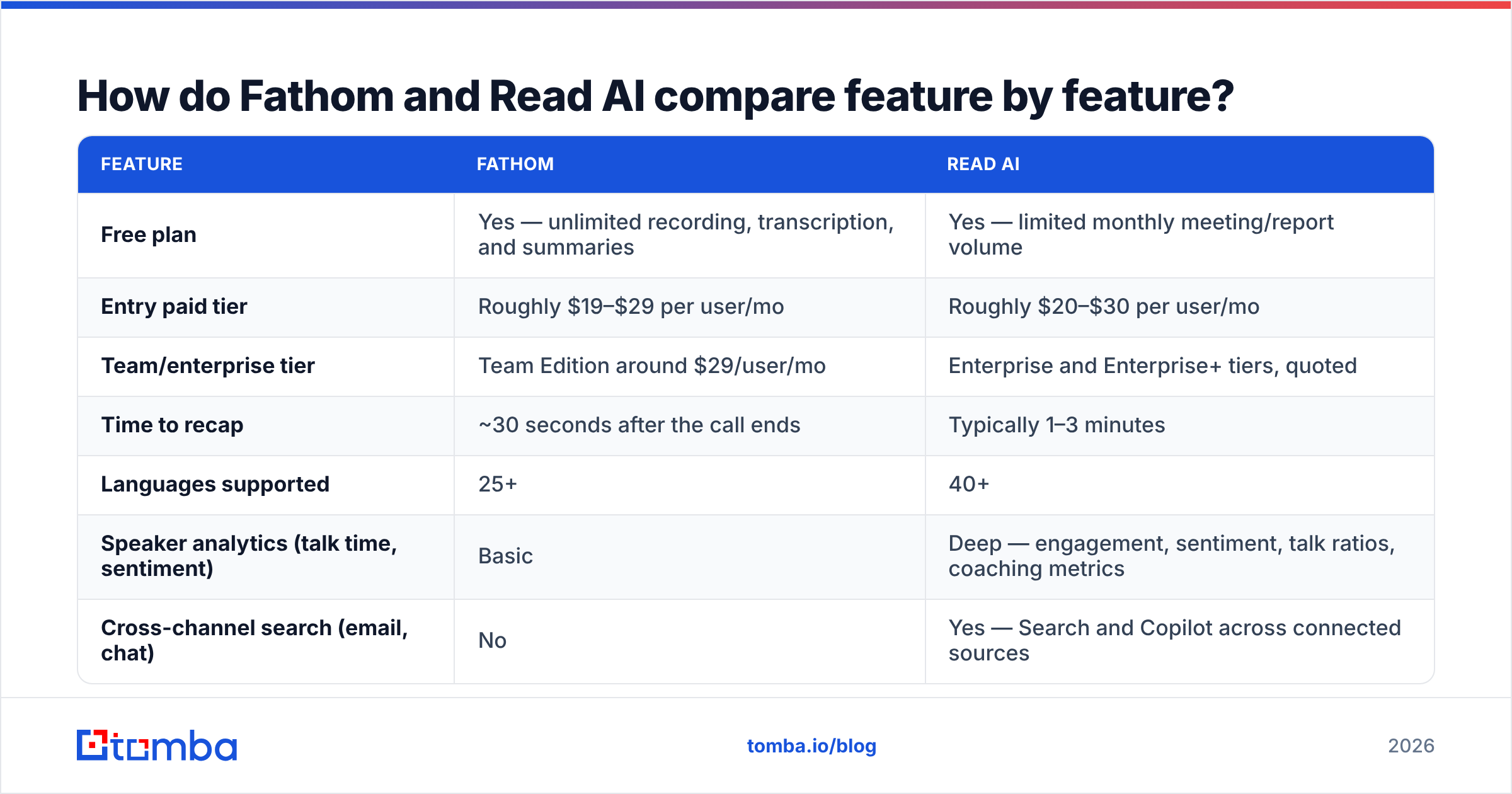
Pricing on both products has moved more than once. Treat the numbers below as list-price directionals, and confirm on the vendor pages before you buy. The capability rows are what drive the decision.
| Feature | Fathom | Read AI |
|---|---|---|
| Free plan | Yes — unlimited recording, transcription, and summaries | Yes — limited monthly meeting/report volume |
| Entry paid tier | Roughly $19–$29 per user/mo | Roughly $20–$30 per user/mo |
| Team/enterprise tier | Team Edition around $29/user/mo | Enterprise and Enterprise+ tiers, quoted |
| Time to recap | ~30 seconds after the call ends | Typically 1–3 minutes |
| Languages supported | 25+ | 40+ |
| Speaker analytics (talk time, sentiment) | Basic | Deep — engagement, sentiment, talk ratios, coaching metrics |
| Cross-channel search (email, chat) | No | Yes — Search and Copilot across connected sources |
| Native CRM sync | HubSpot, Salesforce, Close (paid tiers) | HubSpot, Salesforce, and others via integrations/Zapier |
| Ask-your-meetings AI chat | Yes | Yes, plus cross-source context |
| In-person / mobile capture | Limited | Yes, including mobile and in-person meeting capture |
| Best for | Individual reps, founders, small teams | Sales leaders, RevOps, distributed orgs |
The honest summary: Fathom gives more away for free, Read AI gives more back to a manager.
Which one produces better transcripts and summaries?#
Accuracy between the two is close. Transcript quality alone should not decide this.
Both use modern ASR models. Both land in the high-90s for word accuracy on clean English audio with a decent mic. Three differences you will actually notice:
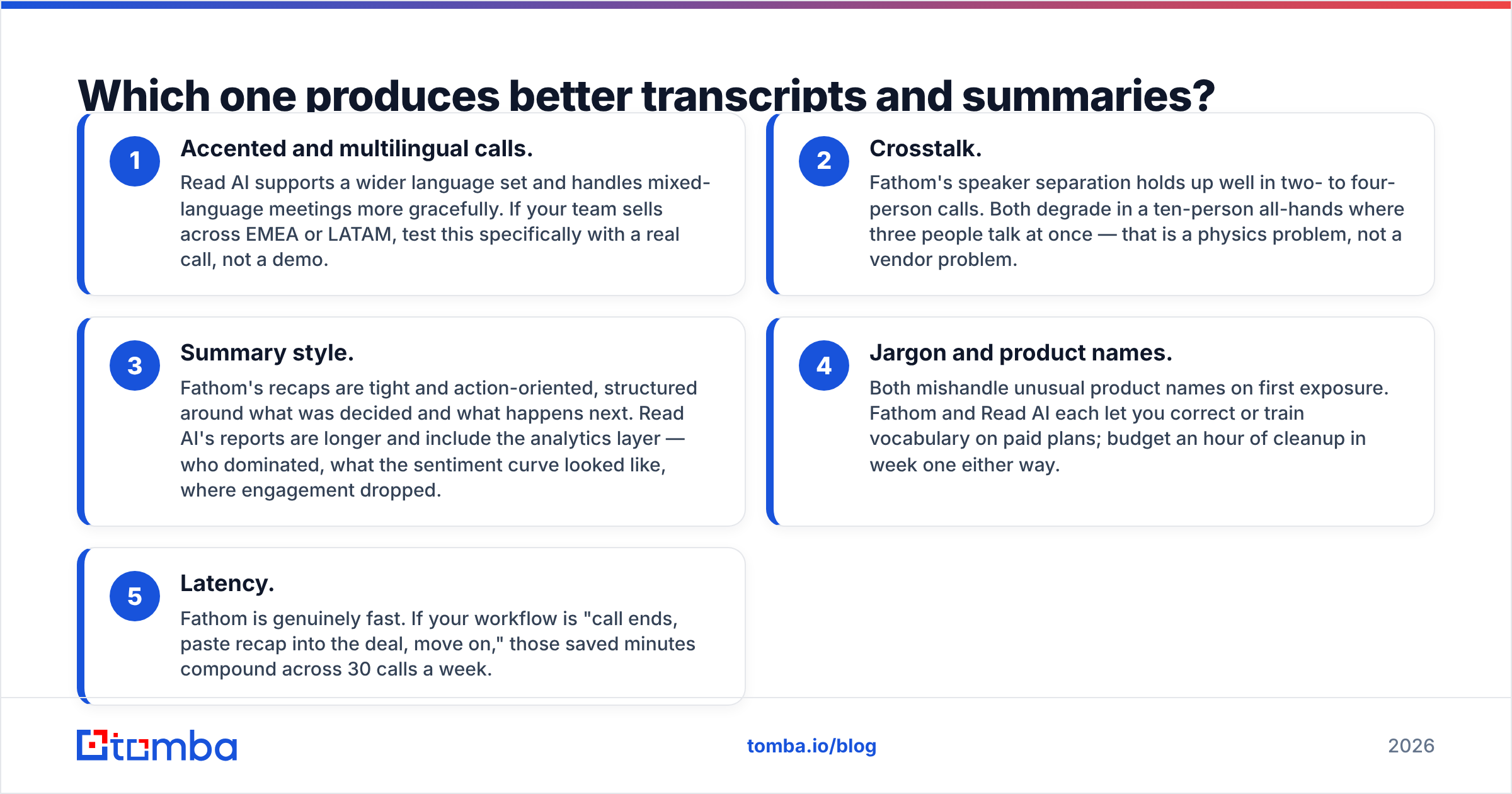
- Accented and multilingual calls. Read AI supports a wider language set and handles mixed-language meetings better. If your team sells across EMEA or LATAM, test this with a real call, not a demo.
- Crosstalk. Fathom's speaker separation holds up well in two- to four-person calls. Both degrade in a ten-person all-hands where three people talk at once. That is a physics problem, not a vendor problem.
- Summary style. Fathom's recaps are tight and action-oriented. They cover what was decided and what happens next. Read AI's reports run longer and add the analytics layer: who dominated, how sentiment moved, where engagement dropped.
Two more gaps matter less than the vendors claim:
- Jargon and product names. Both mishandle unusual product names at first. Each one lets you correct or train vocabulary on paid plans. Budget an hour of cleanup in week one either way.
- Latency. Fathom is genuinely fast. If your workflow is "call ends, paste recap into the deal, move on," those saved minutes add up across 30 calls a week.
Run both on the same five recorded calls before you commit. Vendor accuracy claims are marketing. Your own audio is the only benchmark that matters. Reviews on G2 help you spot patterns, but they cannot tell you how each tool handles your CTO's microphone.
Is Read AI worth it for sales teams?#
Yes — if you have someone whose job is to look at the data.
Read AI turns meetings into metrics. Talk-time ratio per rep, sentiment trend across a deal cycle, engagement scores per participant, meeting-efficiency reporting across the org. For a manager running weekly coaching, that is real signal. You can see that a rep talks 78% of a discovery call, then fix it, instead of guessing.
The cross-channel layer matters too. Read AI's Copilot and search span connected email and messaging. Account context is not trapped inside one recording. That is closer to a knowledge system than a notetaker.
The catch: analytics only pay off when someone acts on them. If nobody opens the dashboard, you are paying enterprise money for summaries you could have had free. Buy Read AI when you have a defined coaching cadence, not because the charts look good in the demo.
There is also the culture question. Scoring named people on engagement and sentiment feels different to a team than a plain transcript does. Say out loud what you measure and why. Check your recording-consent rules per region before you roll it out. Two-party consent states and EU jurisdictions are not optional footnotes.
Is Fathom good enough on the free plan?#
For most individual reps, yes — and that is the uncomfortable part of this comparison.
Fathom's free tier includes unlimited recording, transcription, and AI summaries. Not a 5-meeting trial. Unlimited. The paid tiers add advanced summary templates, deeper CRM automation, team-wide sharing and permissions, and AI actions like auto-drafted follow-up emails.
So the real Fathom question is not "free versus Read AI." It is "free Fathom versus paid Fathom." You should upgrade when:
- CRM push becomes mandatory. Manually pasting recaps into HubSpot or Salesforce dies at scale. Native sync is a paid feature.
- You need shared team libraries. Call review, onboarding playlists, and permissioned access are team-plan territory.
- Follow-up drafting is the bottleneck. If reps take 15 minutes per follow-up email, AI drafting pays for the seat in a week.
- You need custom summary templates. Discovery, demo, and renewal calls need different structures. Generic recaps under-serve all three.
If none of those apply, run free Fathom for a quarter and spend the budget on data instead.
What does neither tool solve?#
Both tools sit downstream of the meeting. Neither one creates the meeting.
Teams keep discovering this gap three months in. You now have gorgeous, searchable, sentiment-scored records of the 12 calls you booked. You still have no system for booking the next 40. A notetaker improves conversion on existing pipeline. It does not generate pipeline.
The upstream stack is a different category entirely:
- Targeting — deciding which accounts and roles are worth a call at all.
- Contact discovery — getting a valid work email or direct line for the person who can actually sign. That is what an email finder does, and it is the step no notetaker touches.
- Verification — confirming those addresses are deliverable before you send, so your domain reputation survives the campaign. A dedicated email verifier handles this.
- Enrichment — filling in company size, tech stack, and role data so your outreach is not generic. Contact enrichment is what makes a personalized first line possible at volume.
- Routing into the CRM — so the discovered contact, the enriched firmographics, and the meeting recap all land on the same record. A HubSpot integration closes that loop.
The clean architecture looks like this. Prospecting data creates the meeting. Fathom or Read AI captures the meeting. The CRM holds both. Teams that buy only the middle piece end up with a beautifully documented, very small pipeline.
Which should you choose?#
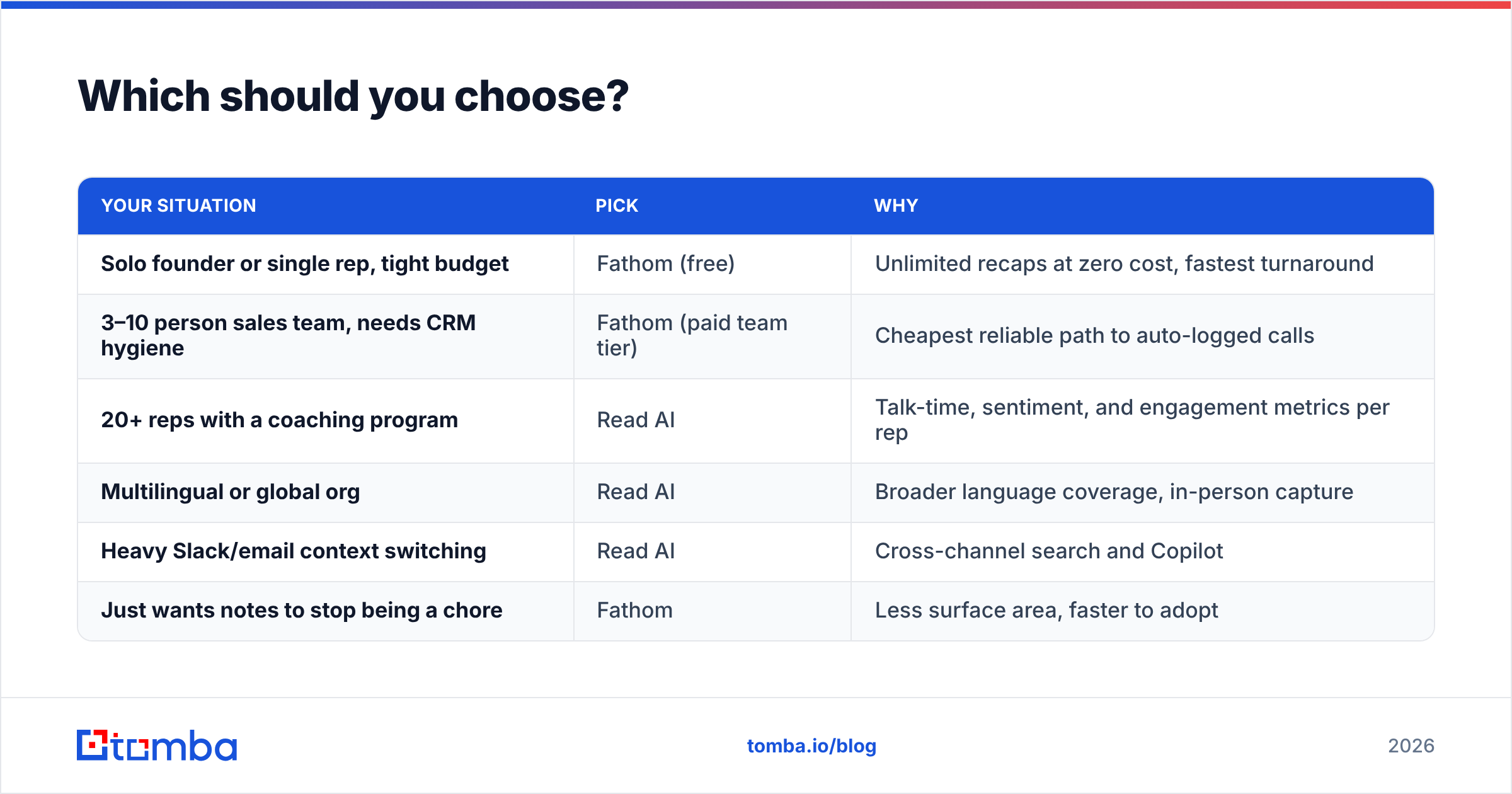
Here is the decision in plain terms.
| Your situation | Pick | Why |
|---|---|---|
| Solo founder or single rep, tight budget | Fathom (free) | Unlimited recaps at zero cost, fastest turnaround |
| 3–10 person sales team, needs CRM hygiene | Fathom (paid team tier) | Cheapest reliable path to auto-logged calls |
| 20+ reps with a coaching program | Read AI | Talk-time, sentiment, and engagement metrics per rep |
| Multilingual or global org | Read AI | Broader language coverage, in-person capture |
| Heavy Slack/email context switching | Read AI | Cross-channel search and Copilot |
| Just wants notes to stop being a chore | Fathom | Less surface area, faster to adopt |
A pattern worth stealing: run free Fathom across the whole rep team for daily recaps, and put Read AI only on the managers and account leads who genuinely use the analytics. Blended cost drops hard, and nobody loses a capability they were using.
Whichever you pick, decide the rollout details up front. Who gets recorded, how long recordings are kept, who can share them externally, and how the summary reaches the deal record. Notetakers fail on governance far more often than on accuracy.
How do you connect a notetaker to the rest of your GTM stack?#
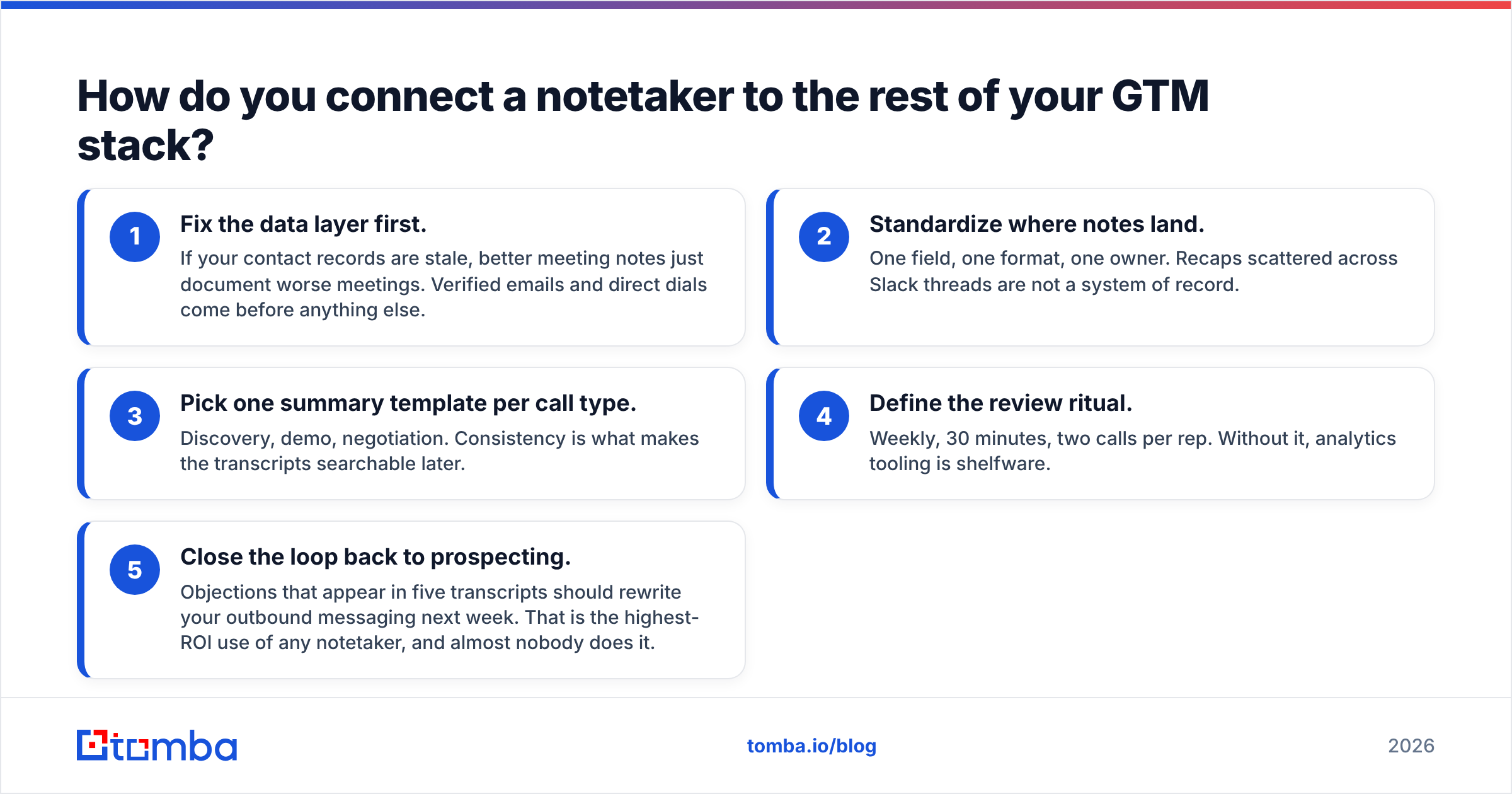
Sequence it. The order matters more than the tool choice.
- Fix the data layer first. If your contact records are stale, better meeting notes just document worse meetings. Verified emails and direct dials come before anything else.
- Standardize where notes land. One field, one format, one owner. Recaps scattered across Slack threads are not a system of record.
- Pick one summary template per call type. Discovery, demo, negotiation. Consistency is what makes the transcripts searchable later.
- Define the review ritual. Weekly, 30 minutes, two calls per rep. Without it, analytics tooling is shelfware.
- Close the loop back to prospecting. Objections that show up in five transcripts should rewrite your outbound messaging next week. That is the highest-ROI use of any notetaker, and almost nobody does it.
That last step is where meeting intelligence earns its price. Not in the summary, but in what the summary teaches your outbound engine.
Get the meetings before you optimize the recap#
Fathom vs Read AI has an honest verdict. Most teams should start with free Fathom and upgrade only when CRM sync or coaching analytics becomes a real constraint. Read AI earns its premium in orgs that will actually use the numbers.
But neither one fills your calendar. If your problem is "not enough qualified conversations" rather than "messy notes," fix the input first. The Tomba Email Finder finds verified professional email addresses by name, company, or domain. Your reps then spend the week on calls worth recording instead of hunting for contact details. Start free with 25 searches a month, or move to Starter at $49/mo when volume picks up. Full Tomba pricing is public, no demo required.
Book the meeting first. Then let the AI take the notes.
Related guides#
Ready to find emails that actually work?
Join 150,000+ professionals who stopped guessing and started sending. Free credits on signup — no credit card required.
Get the Tomba newsletter
Practical outbound tactics and product updates — once every two weeks.
About the author