Fibbler Pricing Reviews Pros and Cons: 2026 Breakdown
A neutral look at how Fibbler prices its product, what credit-based billing actually costs a working sales team, where reviewers push back, and which alternative fits if the tier math stops working.
Looking for Fibbler pricing reviews pros and cons in one place? This guide covers what the tool costs, what buyers praise, and where the credit math turns against you.
TL;DR
- Fibbler starts with a small free tier, then moves to credit-metered paid plans. The sticker price is rarely what you pay.
- Pros reviewers repeat: fast setup, a usable free tier, and a clean UI any rep can run.
- Cons reviewers repeat: credits burn fast on bulk work, unused credits rarely roll over, and tier jumps are steep.
- Price the unit cost per verified contact, not the monthly plan. That one number reorders most shortlists.
- Need business emails at a steady cost? A specialist tool at $49/mo (Tomba Starter) often beats a broad platform you barely use.
What is Fibbler and who is it actually for?#
Fibbler sits in the crowded middle of the B2B go-to-market stack: tooling that helps sales and marketing teams find, reach, and manage prospect contacts without stitching together five separate subscriptions. That positioning is the single most important thing to understand before you look at a price tag, because it determines whether you are buying a platform or a point solution.
Platforms charge for breadth. You pay a base rate that covers a bundle of capabilities, and the vendor bets you will use enough of them to justify the number. Point solutions charge for depth. You pay for one job done well, usually metered by volume.
Neither model is inherently better. The mismatch is what costs money. Teams overpay when they buy platform pricing and use one module, or when they buy three point solutions that each duplicate 40% of the others.
So the honest framing for "is Fibbler worth it" is not a yes or no. It is: does the share of Fibbler you will actually use exceed the share of the bill you are paying? Everything below is built to answer that.

How does Fibbler pricing work?#
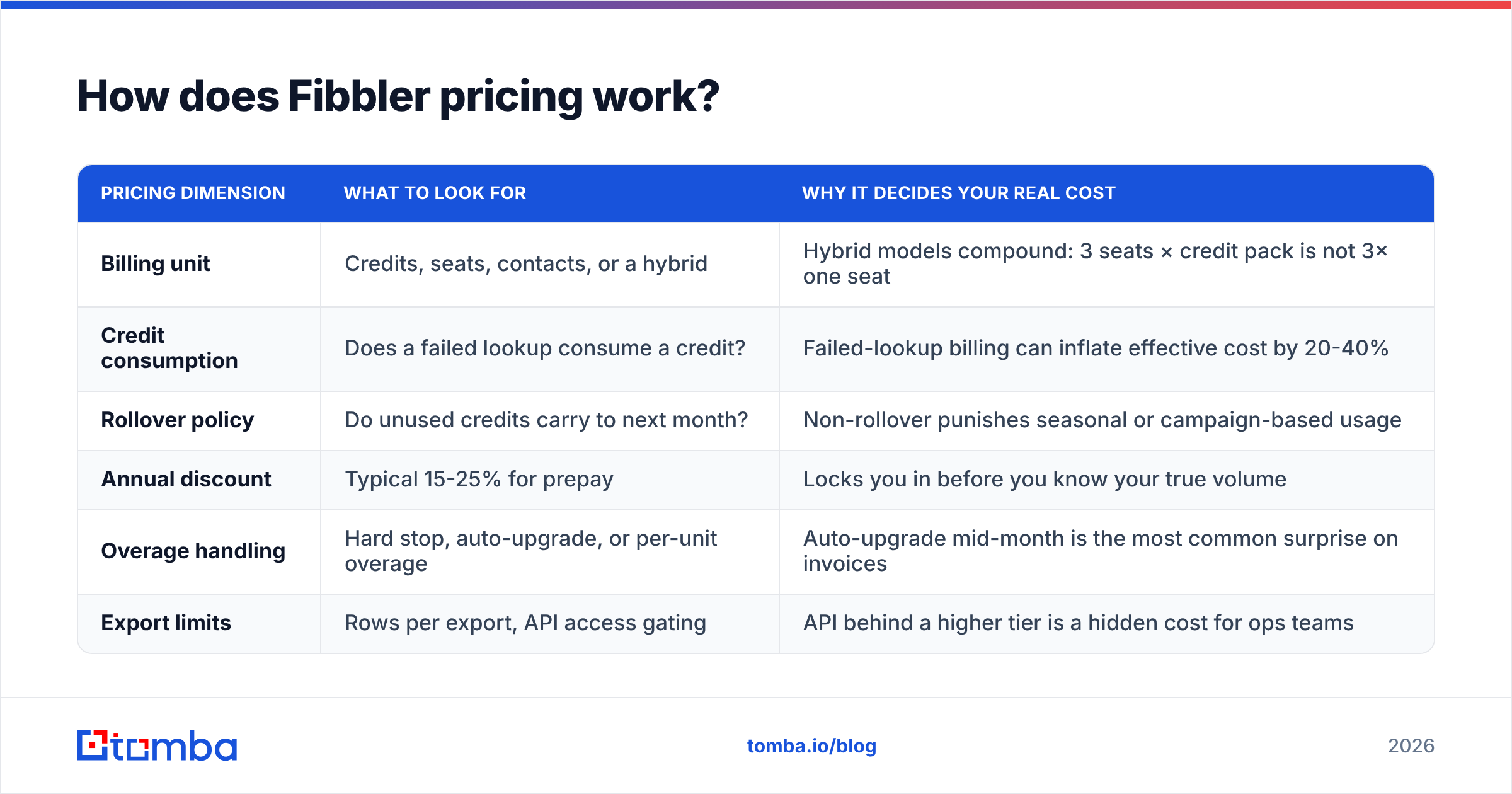
Fibbler follows the pattern almost every tool in this category has converged on since 2023: a freemium entry tier, then paid plans metered by credits, seats, or both. Published rate cards in this space change several times a year, so treat any number you read in a blog post (including this one) as directional and confirm on the vendor's live pricing page before you sign.
What matters more than the specific dollar figure is the shape of the pricing. Here is how to read it:
| Pricing dimension | What to look for | Why it decides your real cost |
|---|---|---|
| Billing unit | Credits, seats, contacts, or a hybrid | Hybrid models compound: 3 seats × credit pack is not 3× one seat |
| Credit consumption | Does a failed lookup consume a credit? | Failed-lookup billing can inflate effective cost by 20-40% |
| Rollover policy | Do unused credits carry to next month? | Non-rollover punishes seasonal or campaign-based usage |
| Annual discount | Typical 15-25% for prepay | Locks you in before you know your true volume |
| Overage handling | Hard stop, auto-upgrade, or per-unit overage | Auto-upgrade mid-month is the most common surprise on invoices |
| Export limits | Rows per export, API access gating | API behind a higher tier is a hidden cost for ops teams |
Run every vendor you are considering through those six rows. Most buyers only compare the headline monthly figure, which is the one variable the vendor controls most aggressively for optics.
The four numbers that actually matter#
- Cost per verified contact. Divide the monthly plan cost by the number of contacts you will realistically get after verification failures. This is the only number that compares cleanly across vendors.
- Seat floor. Some plans quietly require a minimum seat count on higher tiers. A "$99/mo" plan with a 3-seat minimum is a $297/mo plan.
- Time to first value. If it takes two weeks of setup before a rep sends a first email, that is two weeks of subscription burned.
- Exit cost. Can you export your data in a usable format if you leave? Vendors that gate exports behind the top tier are charging you a switching tax.
What do Fibbler reviews say — the pros?#
Pull enough reviews from G2 and Capterra across this tool category and clear patterns emerge. For Fibbler specifically, the positive signals cluster in three places.
Onboarding speed. Reviewers who came from heavyweight sales platforms consistently note that they got a first campaign or first list built the same day. That is not a trivial advantage. Most GTM tool churn happens in the first 30 days, and it is almost always a setup-friction problem rather than a capability problem.
A genuinely usable free tier. A free plan that gives you enough volume to test on real accounts, not a demo sandbox, is worth more than a discount. It lets you calculate your own cost-per-contact with your own ICP before spending anything. Tools that force a sales call before you see the product are asking you to buy blind.
Interface clarity for non-technical users. SDRs and founders who are not ops people rate Fibbler's UI well. This shows up in adoption numbers: a tool the whole team can use at 70% capability beats a more powerful tool that only one person can operate.
Consolidation value. For very small teams, having contact discovery and outreach in one login removes a real operational tax. Fewer integrations to maintain, one invoice, one support contact.
What are the cons buyers report?#
The criticisms are just as consistent, and they are almost all about economics rather than product quality.
Credits disappear on bulk work. The moment you move from picking individual prospects to processing lists, consumption changes character. A 5,000-row enrichment job is not 5,000 lookups when you factor in retries, catch-all domains, and partial matches. Teams that budget on manual-search behavior get surprised in month two.
Non-rollover credits punish uneven usage. B2B outbound is lumpy. You build a big list before a conference, then run light for six weeks. If credits expire monthly, you are paying peak-month pricing for average-month volume.
Tier jumps are steep. The gap between "this plan is not enough" and "the next plan is more than I need" is where most of the wasted spend in this category lives. Buyers describe being pushed a full tier up for one feature or a modest volume overage.
Data coverage varies by region and seniority. Every contact-data vendor has strong and weak segments. Coverage on US mid-market tends to be good across the board; EMEA SMB, non-English markets, and very senior or very junior titles are where databases diverge sharply. Test your actual ICP, not a sample the vendor picked.
Verification depth. Finding an address and confirming it will land are different jobs. If a tool returns addresses without a real email verification step, your bounce rate becomes the hidden line item, and bounces damage sender reputation in ways no refund covers.

Is Fibbler worth it compared to the alternatives?#
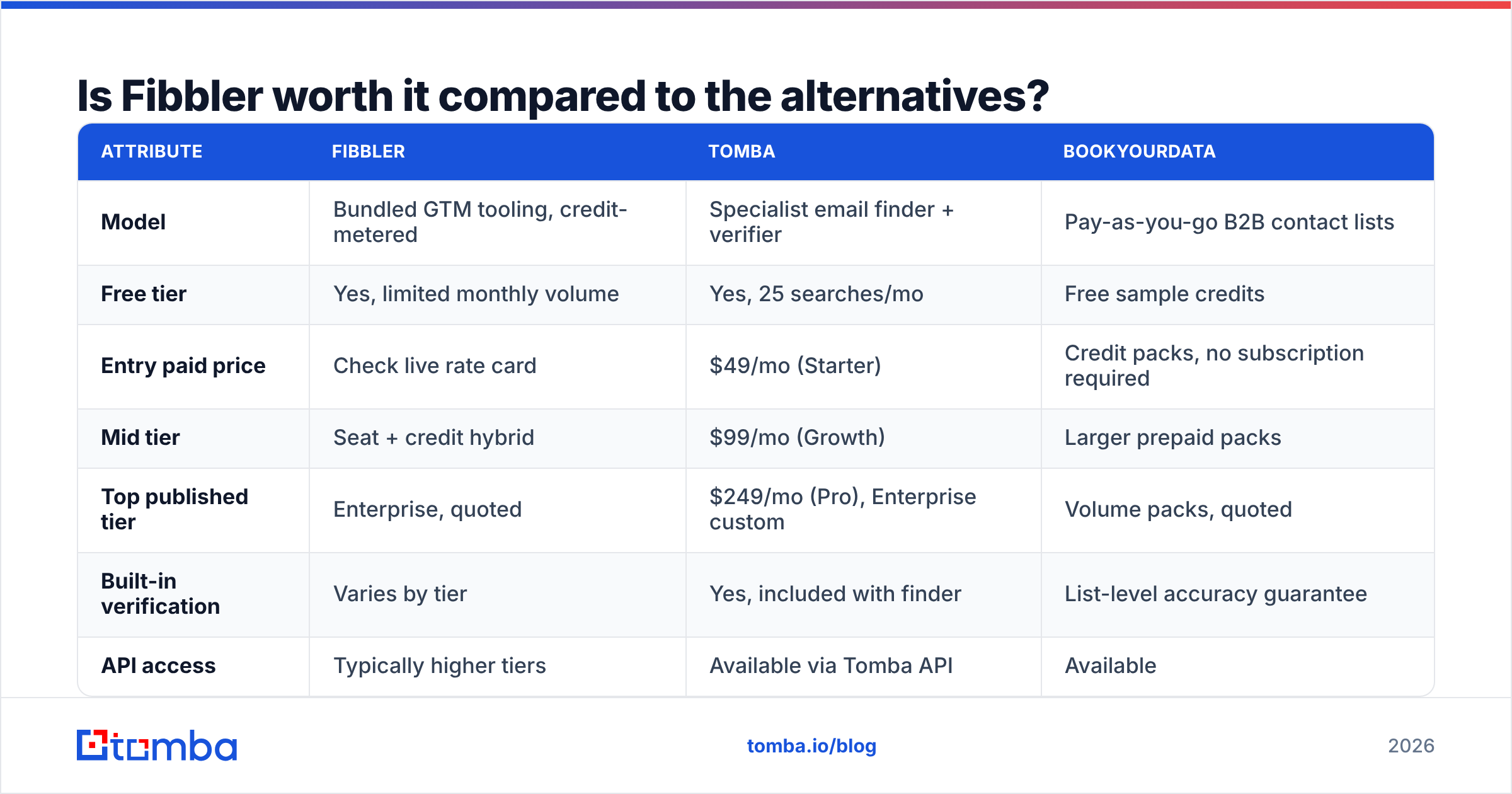
Here is where the pricing-shape analysis pays off. Most Fibbler pricing reviews pros and cons debates end on one question: bundle or specialist? Below is a like-for-like comparison across three purchase models: a bundled GTM tool, a specialist email finder, and a pay-as-you-go contact database.
| Attribute | Fibbler | Tomba | BookYourData |
|---|---|---|---|
| Model | Bundled GTM tooling, credit-metered | Specialist email finder + verifier | Pay-as-you-go B2B contact lists |
| Free tier | Yes, limited monthly volume | Yes, 25 searches/mo | Free sample credits |
| Entry paid price | Check live rate card | $49/mo (Starter) | Credit packs, no subscription required |
| Mid tier | Seat + credit hybrid | $99/mo (Growth) | Larger prepaid packs |
| Top published tier | Enterprise, quoted | $249/mo (Pro), Enterprise custom | Volume packs, quoted |
| Built-in verification | Varies by tier | Yes, included with finder | List-level accuracy guarantee |
| API access | Typically higher tiers | Available via Tomba API | Available |
| Best fit | Small teams wanting one login | Teams needing accurate emails at predictable cost | Buyers who want lists without a subscription |
Read that table as three different answers to three different questions.
If you want one login and minimal setup, a bundled tool like Fibbler is the reasonable pick, provided your volume stays inside the tier you bought.
If your bottleneck is contact accuracy, a specialist wins on unit economics. Tomba pricing runs Free (25 searches/mo), Starter $49/mo, Growth $99/mo, Pro $249/mo, and custom Enterprise. The finder and verifier work as one pipeline rather than two billed products. For a two-person team doing 2,000 lookups a month, the cost-per-verified-contact math usually favors this shape.
If you hate subscriptions entirely, BookYourData's pay-as-you-go model is a legitimately different answer. You buy a list, you own it, there is no monthly meter running while you are heads-down on delivery. For agencies and consultants with project-based demand, that structure removes the non-rollover problem completely. It is a respected option in this category for exactly that reason.
None of these three is objectively "best." They are priced for different consumption patterns, which is the entire point.
How should you actually test Fibbler before paying?#
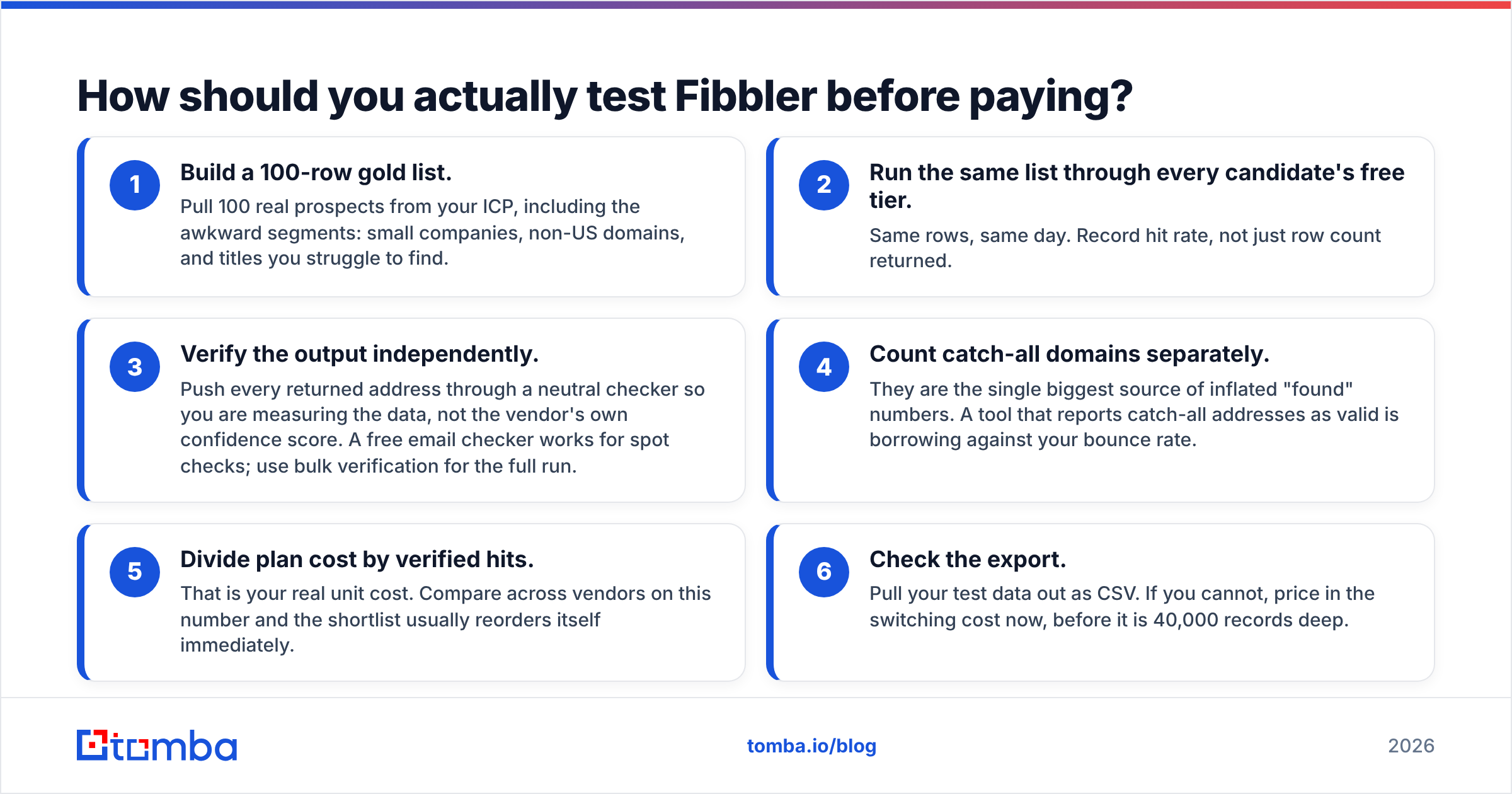
Do not evaluate on feature lists. Evaluate on a controlled bake-off. This takes about two hours and saves months of wrong-tool spend.
- Build a 100-row gold list. Pull 100 real prospects from your ICP, including the awkward segments: small companies, non-US domains, and titles you struggle to find.
- Run the same list through every candidate's free tier. Same rows, same day. Record hit rate, not just row count returned.
- Verify the output independently. Push every returned address through a neutral checker so you are measuring the data, not the vendor's own confidence score. A free email checker works for spot checks; use bulk verification for the full run.
- Count catch-all domains separately. They are the single biggest source of inflated "found" numbers. A tool that reports catch-all addresses as valid is borrowing against your bounce rate.
- Divide plan cost by verified hits. That is your real unit cost. Compare across vendors on this number and the shortlist usually reorders itself immediately.
- Check the export. Pull your test data out as CSV. If you cannot, price in the switching cost now, before it is 40,000 records deep.
Teams that run this process typically find a 2-3x spread in cost-per-verified-contact between tools whose headline monthly prices are within $20 of each other. That spread is the whole game.
Fibbler pricing reviews pros and cons: the verdict#
Fibbler is priced well for one buyer: a small team that wants one login and fast setup. It works best when your monthly volume stays inside a single tier. The free tier is honest enough to evaluate on, and the onboarding advantage is real.
It becomes a poor fit in three cases. First, lumpy usage plus monthly credit expiry means you overpay by design. Second, past a couple of seats, the seat-plus-credit math compounds faster than the value does. Third, if your real constraint is data accuracy, a specialist beats a bundle. A bundled tool spreads its engineering across many jobs. A specialist puts all of it into one.
The buying advice is dull but reliable. Define the one job that is costing you pipeline. Price that job across three vendors on a cost-per-verified-contact basis. Buy the tool that wins that number. Bundles are worth paying for when you use the bundle. They are the most expensive line in your stack when you do not.
If the job you need solved is finding and confirming real business email addresses, start with the Tomba Email Finder. The free tier gives you 25 searches a month, so you can run the bake-off above on your own list. Verification is built into the same pipeline instead of billed as a second product, and Starter is $49/mo when you are ready to scale. Run your 100-row gold list through it, calculate your unit cost, and let the number decide.
Related guides#
Ready to find emails that actually work?
Join 150,000+ professionals who stopped guessing and started sending. Free credits on signup — no credit card required.
Get the Tomba newsletter
Practical outbound tactics and product updates — once every two weeks.
About the author