FinalScout vs Finderio: Which Email Finder Wins in 2026?
FinalScout scrapes LinkedIn and writes your emails with AI. Finder.io bundles email lookup into a cheap all-apps suite. Here's which one actually returns usable addresses in 2026 — and where both fall short.
FinalScout vs Finderio is a choice between two very different bets. One tool lives inside LinkedIn. The other is a cheap app inside a large bundle. This guide compares both on match rate, credits, pricing, and risk — and shows where each one breaks down.
TL;DR
- FinalScout is a LinkedIn-first tool. Its value sits in the Chrome extension. It pulls contacts out of LinkedIn profiles, Sales Navigator lists, and group members, then drafts outreach with AI. Take LinkedIn away and there is not much product left.
- Finder.io is a suite play. It is one app inside the 500apps bundle. You get email finding, verification, and company lookup for a low per-user price. The depth matches that price.
- Neither publishes an audited accuracy figure. Both advertise high deliverability. Both stay vague about how they measure it. Run your own 100-contact test before you commit.
- FinalScout's real cost is credits, not the sticker price. Bulk LinkedIn exports burn credits fast. Rows you unlock still count, even when they are never verified.
- Need an API-first finder with catch-all handling and no per-seat tax? Neither one is the obvious pick. That is where a dedicated tool like Tomba tends to win on cost per valid email.
What are FinalScout and Finder.io?#
They solve the same problem: find a work email for a person you can name. But they come at it from opposite directions.
FinalScout is built around LinkedIn. You install the browser extension. Then you open a profile, a search page, a Sales Navigator list, a group, or an event attendee list. The tool pulls those contacts into a list with emails attached.
It also drafts AI openers from the prospect's profile, and it markets a "98% deliverability" guarantee. The pitch is speed: prospect, enrich, and write in one tab.
Finder.io comes from the 500apps stable. It is a general B2B email finder with domain search, single and bulk lookup, verification, and a company database. The draw is not the finder itself.
One low per-user subscription also unlocks dozens of other business apps — CRM, help desk, project tracking, and more. If your team already works inside that suite, adding email lookup costs almost nothing extra.
That framing explains most of the differences you will hit in practice:
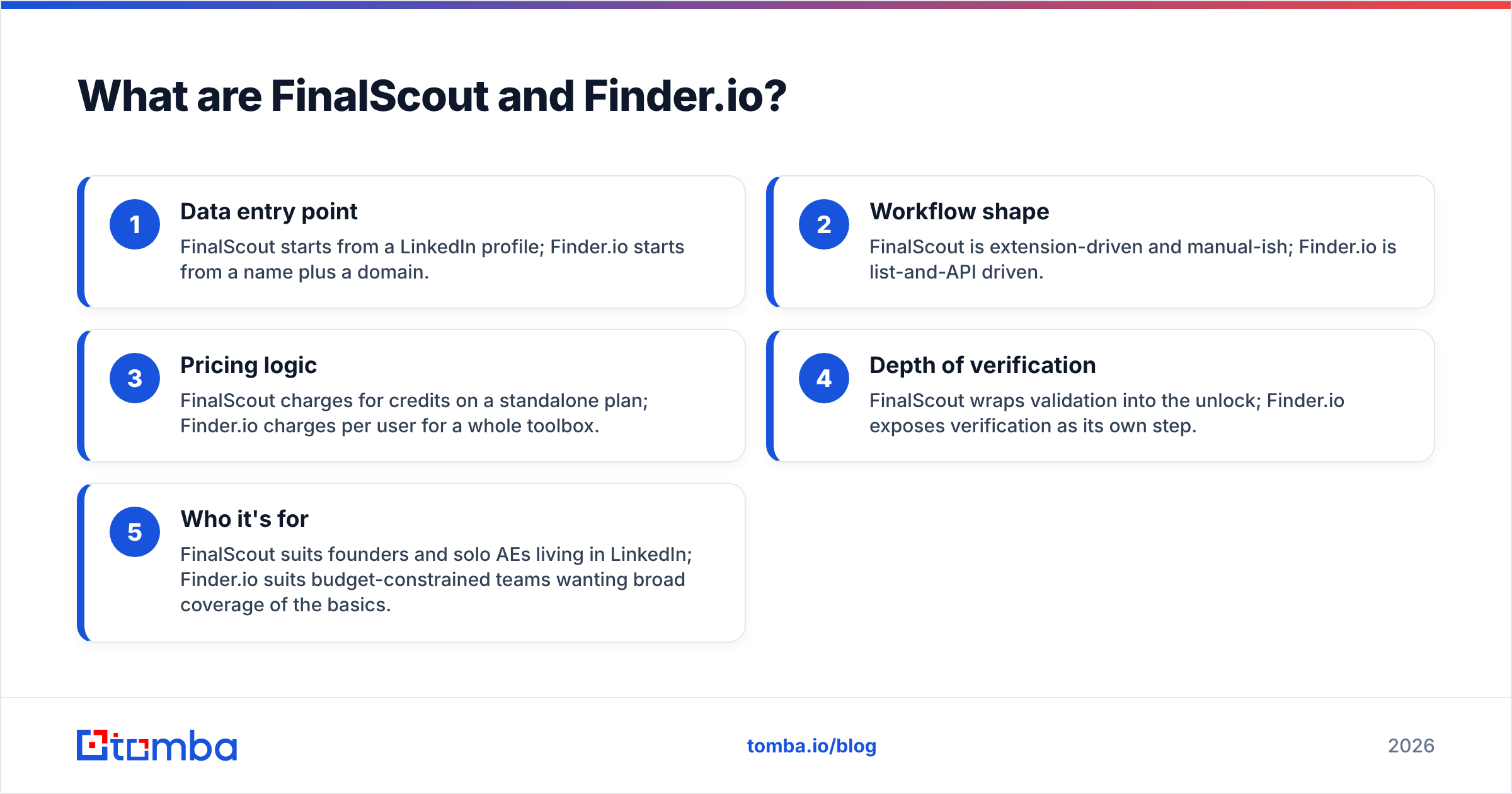
- Data entry point — FinalScout starts from a LinkedIn profile. Finder.io starts from a name plus a domain.
- Workflow shape — FinalScout is extension-driven and fairly manual. Finder.io is list-and-API driven.
- Pricing logic — FinalScout charges for credits on a standalone plan. Finder.io charges per user for a whole toolbox.
- Depth of verification — FinalScout folds validation into the unlock. Finder.io exposes verification as its own step.
- Who it's for — FinalScout suits founders and solo AEs who live in LinkedIn. Finder.io suits tight budgets that need broad coverage of the basics.
FinalScout vs Finderio: how do the features compare?#
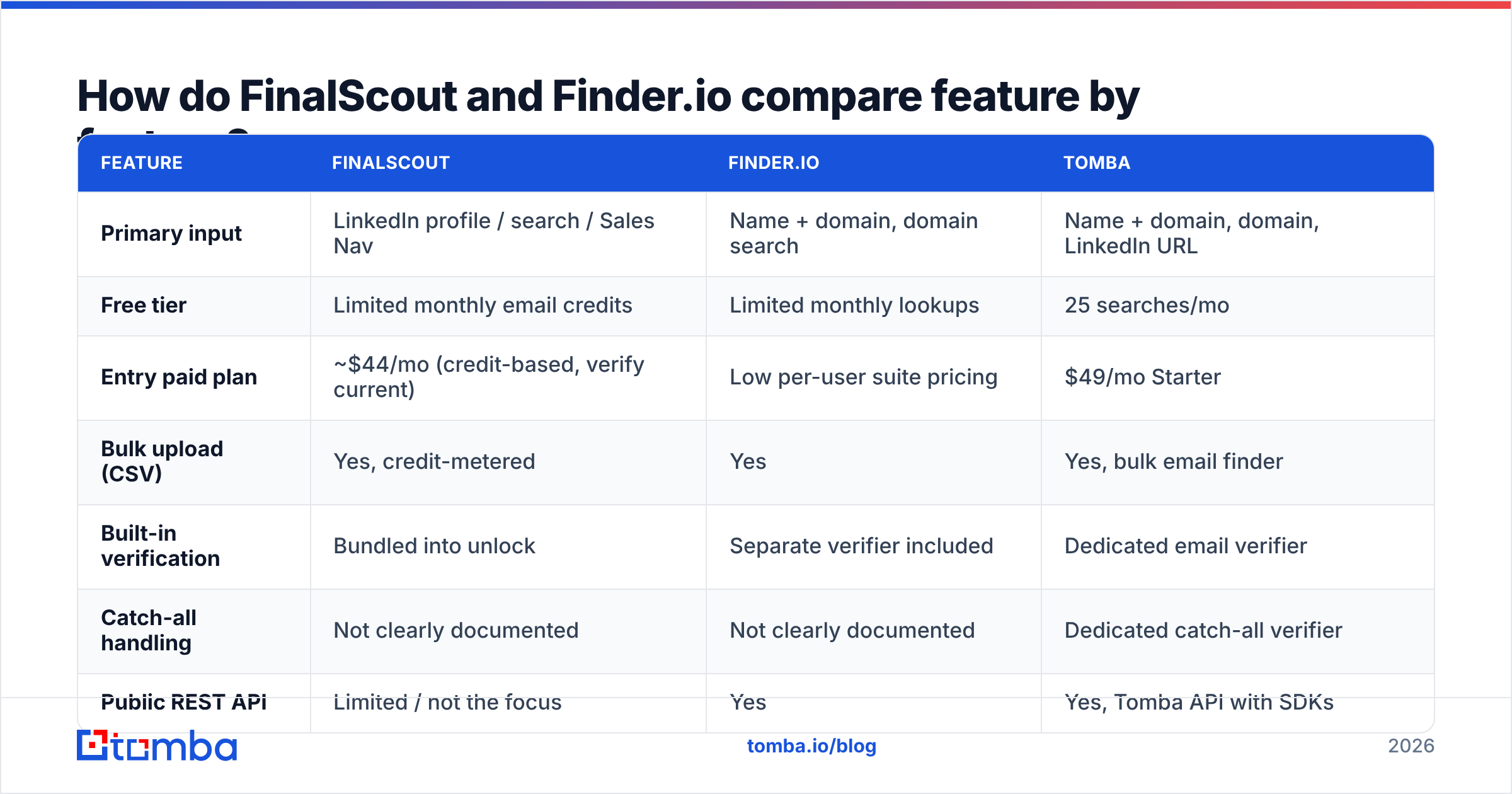
Here is the head-to-head. Treat these as list prices at the time of writing. Both vendors change tiers and credit maths often, so check their pricing pages before you buy.
| Feature | FinalScout | Finder.io | Tomba |
|---|---|---|---|
| Primary input | LinkedIn profile / search / Sales Nav | Name + domain, domain search | Name + domain, domain, LinkedIn URL |
| Free tier | Limited monthly email credits | Limited monthly lookups | 25 searches/mo |
| Entry paid plan | ~$44/mo (credit-based, verify current) | Low per-user suite pricing | $49/mo Starter |
| Bulk upload (CSV) | Yes, credit-metered | Yes | Yes, bulk email finder |
| Built-in verification | Bundled into unlock | Separate verifier included | Dedicated email verifier |
| Catch-all handling | Not clearly documented | Not clearly documented | Dedicated catch-all verifier |
| Public REST API | Limited / not the focus | Yes | Yes, Tomba API with SDKs |
| AI email writing | Yes (core selling point) | No | No (finder-focused) |
| Phone numbers | No | No | Yes, phone finder |
| Best for | LinkedIn-native prospecting | Cheap all-in-one basics | API/volume email finding |
The first row decides most evaluations. If your whole prospect list sits in Sales Navigator saved searches, FinalScout removes a real step.
If your list arrives as a spreadsheet of company domains — from a trade show, an investor database, or a scraped directory — that edge disappears. Then you are simply comparing raw match rates.
Which one actually returns valid emails?#
Short answer: nobody outside the vendors knows. The published numbers are also not comparable.
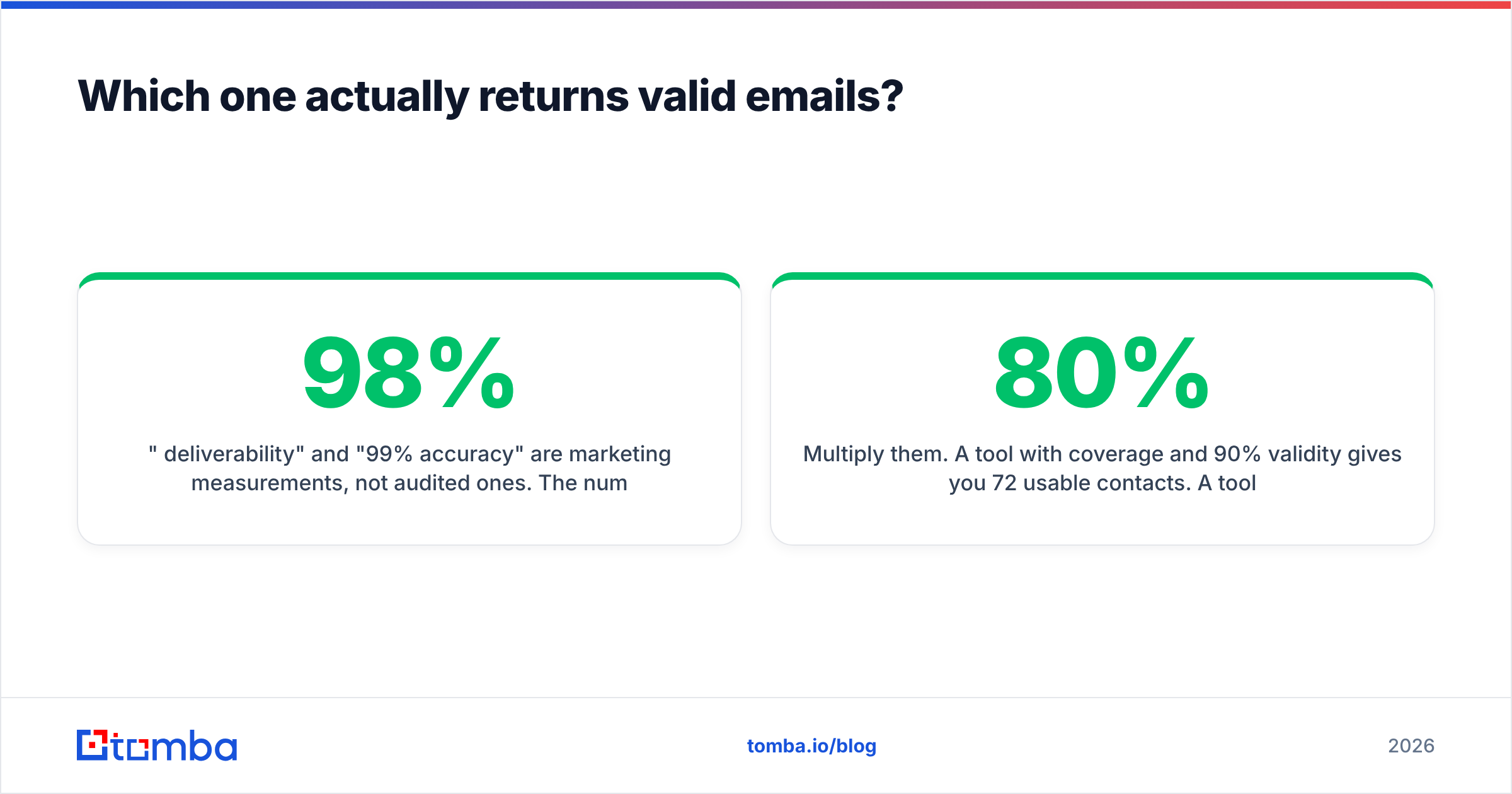
"98% deliverability" and "99% accuracy" are marketing numbers, not audited ones. The figure usually covers only the results the tool chose to return with high confidence. It is not the share of your input list that came back with a working address.
So two tools can both claim 98%. One returns addresses for 70% of your list. The other returns 35%.
Measure these two numbers yourself:
- Coverage (hit rate) — of 100 named prospects, how many come back with any email at all?
- Validity — of those emails, how many pass a third-party check and do not hard bounce?
Then multiply them. A tool with 80% coverage and 90% validity gives you 72 usable contacts. A tool with 40% coverage and 98% validity gives you 39. The second one has the better slide deck and the worse pipeline.

A few patterns are worth knowing before you test.
- FinalScout does better on people-first queries. It starts from a LinkedIn identity, so it has a name, a current employer, and a role to work from. That is a strong signal for guessing the email pattern.
- Finder.io does better on domain-first queries. Give it a company domain and it returns the pattern plus known addresses. That is what you want when you map a whole account rather than chase one person.
- Neither tool replaces a verification step. Even with bundled validation, re-check anything older than 60 days. People change jobs often enough that a three-month-old list has already gone stale.
Catch-all domains deserve their own note. Roughly a fifth of B2B domains accept all mail, so an SMTP check cannot confirm one mailbox.
Tools handle that in three ways. They return the address as "valid" (optimistic, and it risks bounces). They return it as "unknown" (honest, but it shrinks your usable list). Or they run extra signal checks. Ask which behaviour you get, because it changes your bounce rate a lot. A dedicated catch-all verifier exists because the naive answer is wrong in both directions.
Run a 100-row bake-off with contacts you can confirm yourself — people you have already emailed. That is the only benchmark that matters for your ICP.
FinalScout vs Finderio pricing in 2026#
This is where the two tools stop looking similar.
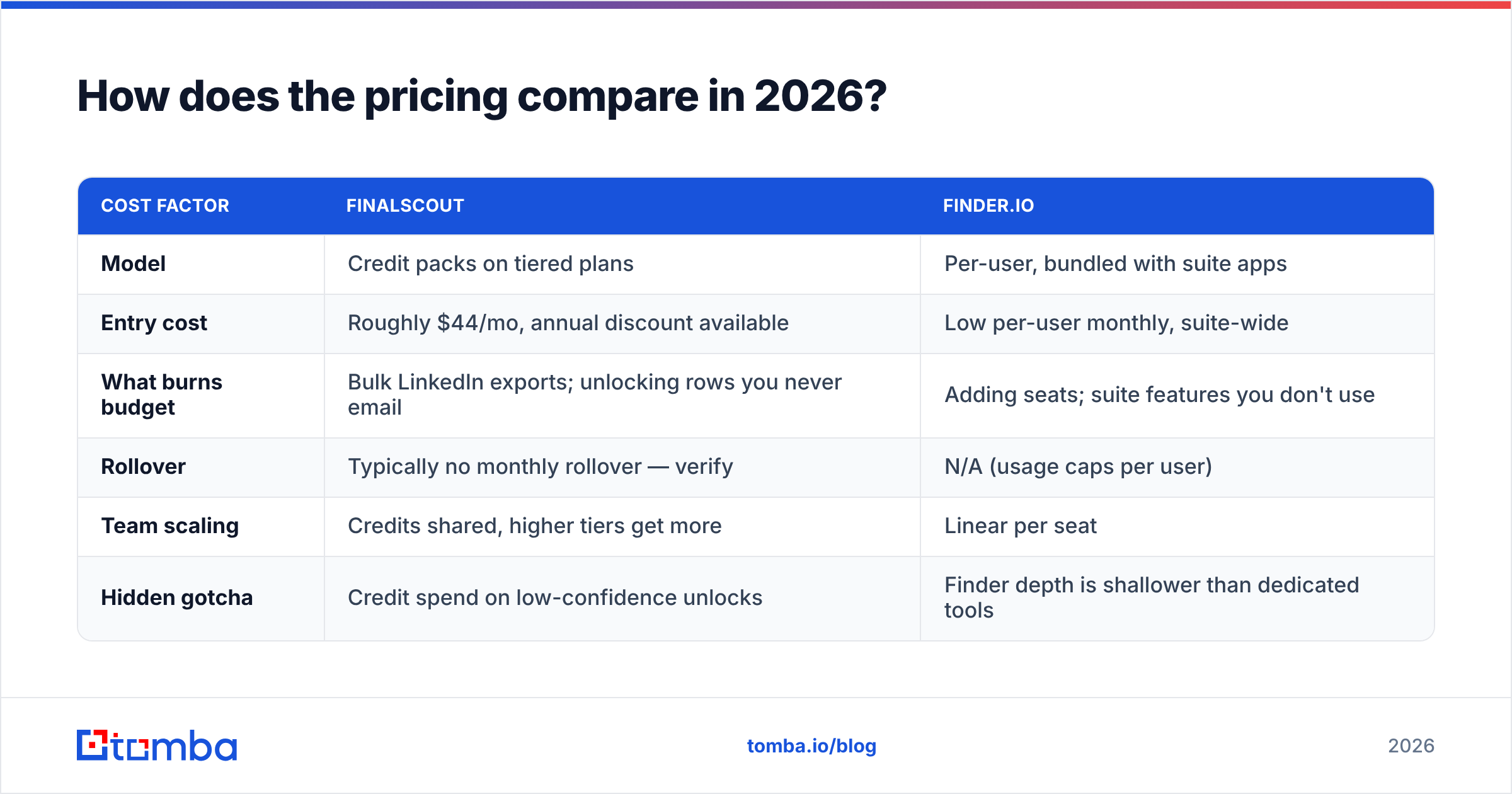
| Cost factor | FinalScout | Finder.io |
|---|---|---|
| Model | Credit packs on tiered plans | Per-user, bundled with suite apps |
| Entry cost | Roughly $44/mo, annual discount available | Low per-user monthly, suite-wide |
| What burns budget | Bulk LinkedIn exports; unlocking rows you never email | Adding seats; suite features you don't use |
| Rollover | Typically no monthly rollover — verify | N/A (usage caps per user) |
| Team scaling | Credits shared, higher tiers get more | Linear per seat |
| Hidden gotcha | Credit spend on low-confidence unlocks | Finder depth is shallower than dedicated tools |

The right comparison is not the monthly price. It is cost per verified, non-bouncing email.
Work it out like this. Take your plan cost. Divide by the number of credits. Then divide by your measured validity rate.
A $44 plan with 1,000 credits at 60% real validity costs 7.3 cents per usable contact. A $99 plan with 5,000 credits at 85% validity costs 2.3 cents. The cheap plan is three times more expensive at the level that matters.
For reference, Tomba's pricing runs a free tier at 25 searches per month, Starter at $49/mo, Growth at $99/mo, Pro at $249/mo, and custom Enterprise. API access comes with paid plans instead of an enterprise sales call. Run the same per-valid-email maths across all three before you decide.
What are the LinkedIn compliance risks with FinalScout?#
This is worth saying plainly, because it is the biggest one-sided risk in the comparison.
Any tool that pulls data from LinkedIn at scale works against LinkedIn's User Agreement. That agreement bans automated scraping and any software used to extract data from the service.
LinkedIn enforces the rule unevenly. But enforcement can mean a restricted account or a permanent ban. If your team depends on a Sales Navigator seat, an extension-driven workflow puts that seat at risk.
Here are practical steps if you still go the FinalScout route:
- Throttle volume. Exporting thousands of profiles a day from one account is the pattern most likely to trip detection.
- Don't run it on your main account. Keep the risk on an account you can afford to lose.
- Keep your own copy. Push enriched contacts into your CRM right away, so a restriction never strands your data.
Finder.io carries none of this risk. It works from domains and names instead of scraping a walled garden. That is a real structural advantage, not a marketing point.
Want LinkedIn-sourced contacts without an extension sitting in a logged-in session? A server-side LinkedIn finder turns a public profile URL into a work email, and that is a safer setup.
Where does Tomba fit against both?#
Honest framing: Tomba does not write AI emails, and it is not a 50-app bundle. If you need either one, buy FinalScout or Finder.io instead.
Tomba fits better when the data layer itself is the bottleneck:
- You need an API, not a UI. If enrichment runs inside your product, your CRM, or a nightly job, you need REST endpoints with SDKs — not a Chrome extension. The email finder API is the entry point, with CLI and MCP interfaces alongside it.
- You process lists, not profiles. Domain search and bulk lookup across a CSV of 5,000 companies is a different job than clicking through Sales Navigator.
- Catch-all domains are a big share of your ICP. Enterprise and mid-market domains skew catch-all. A verifier that classifies rather than guesses saves you the bounce.
- You want one vendor for the whole stack. Finding, verifying, catch-all checks, and enrichment under one API key beats stitching three subscriptions together.
- Per-seat pricing hurts. A shared credit pool scales better when two people run enrichment and eight people use the output.

Where Tomba loses: if you want one tool that finds the person and writes the sequence, FinalScout does both in a single flow and Tomba does not. Buy the workflow you actually need.
So which should you choose?#
Choose FinalScout if LinkedIn is your prospecting surface. It suits bursts of a few hundred contacts a month, it adds the AI drafting layer, and you have to accept the platform risk. It is the fastest path from "I found this person on LinkedIn" to "I sent them an email."
Choose Finder.io if you are price-sensitive and already use — or plan to use — the 500apps suite. It works for basic name-and-domain lookups at modest volume. Match rates will not be best in class, but they are acceptable for a fraction of a specialist tool's price.
Choose a dedicated finder like Tomba if volume, API access, catch-all accuracy, or cost per valid email is the real constraint. You will need a separate sequencer alongside it.
Before you sign anything, run this test. Take 100 real prospects from your ICP. Run them through each free tier. Verify the output with an independent checker. Then calculate coverage × validity ÷ cost.
It takes an afternoon, and it will contradict at least one vendor's homepage claim. Read recent reviews on G2 too. Pay attention to one-star reviews about credits and slow support, because those complaints predict your third month, not your first.
Ready to test the data layer yourself? Start with the Tomba Email Finder free tier — 25 searches a month, no card required. Run the same 100-contact bake-off you would run against FinalScout and Finder.io. Then pull the API key and wire it into your CRM if the numbers hold. The comparison only means something when it uses your list, your ICP, and your bounce rate.
Related guides#
Ready to find emails that actually work?
Join 150,000+ professionals who stopped guessing and started sending. Free credits on signup — no credit card required.
Get the Tomba newsletter
Practical outbound tactics and product updates — once every two weeks.
About the author