FinalScout vs Gazelle 2026: Which Tool Should You Pick?
FinalScout finds LinkedIn emails. Gazelle predicts which companies are growing. They solve different halves of the same problem — here's which one actually belongs in your stack, and when you need neither.
FinalScout vs Gazelle is the wrong fight, and that is the short answer. One tool finds a person's email. The other picks the companies worth chasing. Here is how to choose.
TL;DR
- FinalScout vs Gazelle is a category mix-up, not a duel. FinalScout turns a LinkedIn profile into an email address. Gazelle.ai tells you which companies to target first.
- Pick FinalScout if you prospect on LinkedIn. Its job is pulling a verified email out of a profile you already found.
- Pick Gazelle if picking accounts is your bottleneck. It fits teams that sell to large firms and track growth signals, foreign investment, and company data.
- Skip both if you need high-volume email discovery across many domains through an API. That is a different category. A dedicated email finder costs less per verified contact.
- Watch the export caps. Seat limits and credit limits hurt teams that want to enrich 10,000 accounts in one afternoon.
What are FinalScout and Gazelle, exactly?#
They sit at opposite ends of the outbound pipeline. Mixing them up is the most common buying mistake.
FinalScout (finalscout.com) is a Chrome extension and web app built around LinkedIn. You open a profile, a search page, a group, or a post's commenters. The tool grabs the person and tries to resolve a work email. It also ships an AI writer that drafts outreach from the profile. The promise is contact-level: here is this person's inbox.
Gazelle (gazelle.ai) is an AI company database. It serves economic development agencies, site selectors, and large sales teams. It indexes millions of companies around the world. On top of that, it adds signals: likely growth, foreign investment, parent and branch links, industry, and location. The promise is account-level: here are the 340 companies most likely to open a plant near you next year.
So the honest way to frame FinalScout vs Gazelle is not "which one is better." Ask which half of the problem costs you the most pipeline today.
How do the two tools split the outbound workflow?#
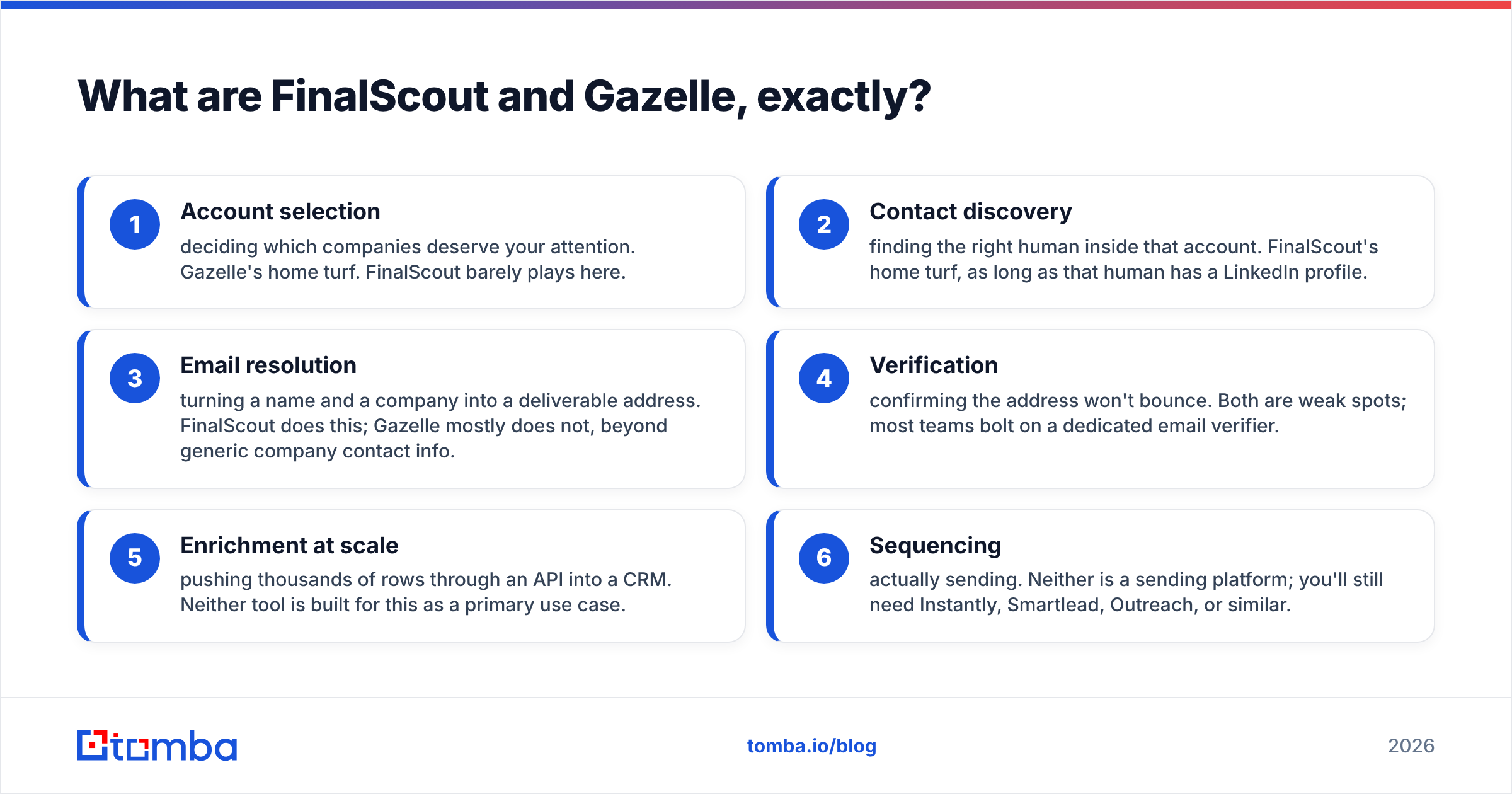
- Account selection — deciding which companies deserve your time. Gazelle owns this step. FinalScout barely plays here.
- Contact discovery — finding the right human inside that account. FinalScout owns this step, as long as the person is on LinkedIn.
- Email resolution — turning a name and a company into a real address. FinalScout does this. Gazelle mostly does not.
- Verification — making sure the address will not bounce. Both are weak here. Most teams add a separate email verifier.
- Enrichment at scale — pushing thousands of rows into a CRM through an API. Neither tool is built for that.
- Sequencing — actually sending the mail. Neither one sends. You still need Instantly, Smartlead, Outreach, or similar.
Map your own funnel against those six steps. The buying decision usually answers itself in about ninety seconds.
FinalScout vs Gazelle: how do they compare head-to-head?#
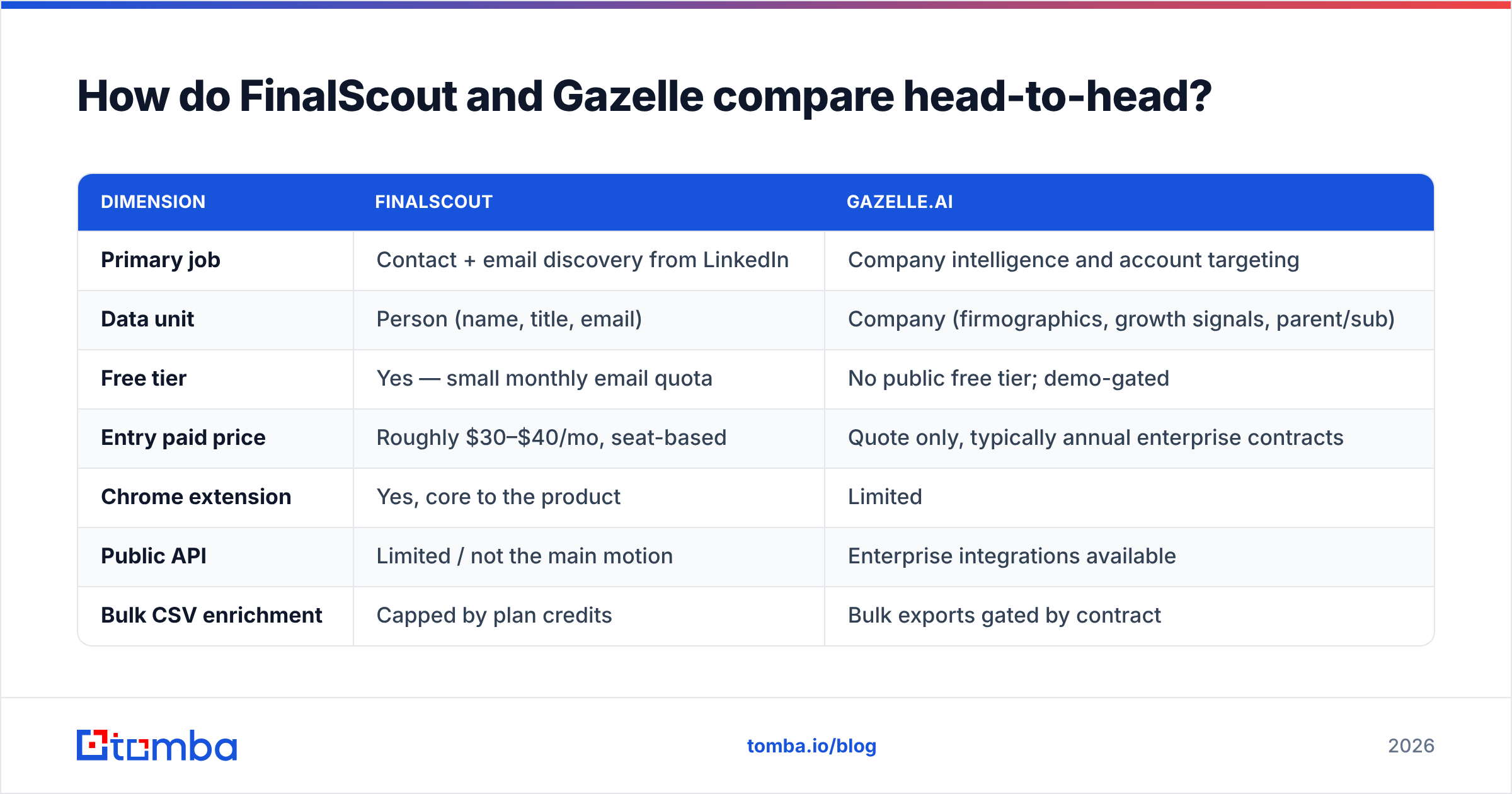
Pricing moves on both sides. Gazelle publishes almost nothing in public, because it sells by quote. Treat the numbers below as a guide. Check the vendor page before you sign.
| Dimension | FinalScout | Gazelle.ai |
|---|---|---|
| Primary job | Contact + email discovery from LinkedIn | Company intelligence and account targeting |
| Data unit | Person (name, title, email) | Company (firmographics, growth signals, parent/sub) |
| Free tier | Yes — small monthly email quota | No public free tier; demo-gated |
| Entry paid price | Roughly $30–$40/mo, seat-based | Quote only, typically annual enterprise contracts |
| Chrome extension | Yes, core to the product | Limited |
| Public API | Limited / not the main motion | Enterprise integrations available |
| Bulk CSV enrichment | Capped by plan credits | Bulk exports gated by contract |
| Email verification | Claims deliverability filtering | Not a verification product |
| Best-fit buyer | SDRs, recruiters, founders doing LinkedIn outreach | EDOs, site selectors, enterprise ABM teams |
| Weakest point | LinkedIn dependency; breaks when profiles are private | No contact-level email coverage |
Two rows decide most deals. "Data unit" tells you if the tool answers who or which company. "Public API" tells you if the tool survives a real RevOps workflow.
What does FinalScout do well — and where does it break?#
FinalScout is good at one motion. You are on LinkedIn. You have a filtered list, or a post with 400 comments. You want those people in a spreadsheet with emails attached. The extension is fast. The UI stays out of your way. The AI writer gives you a decent first draft.
Where it breaks:
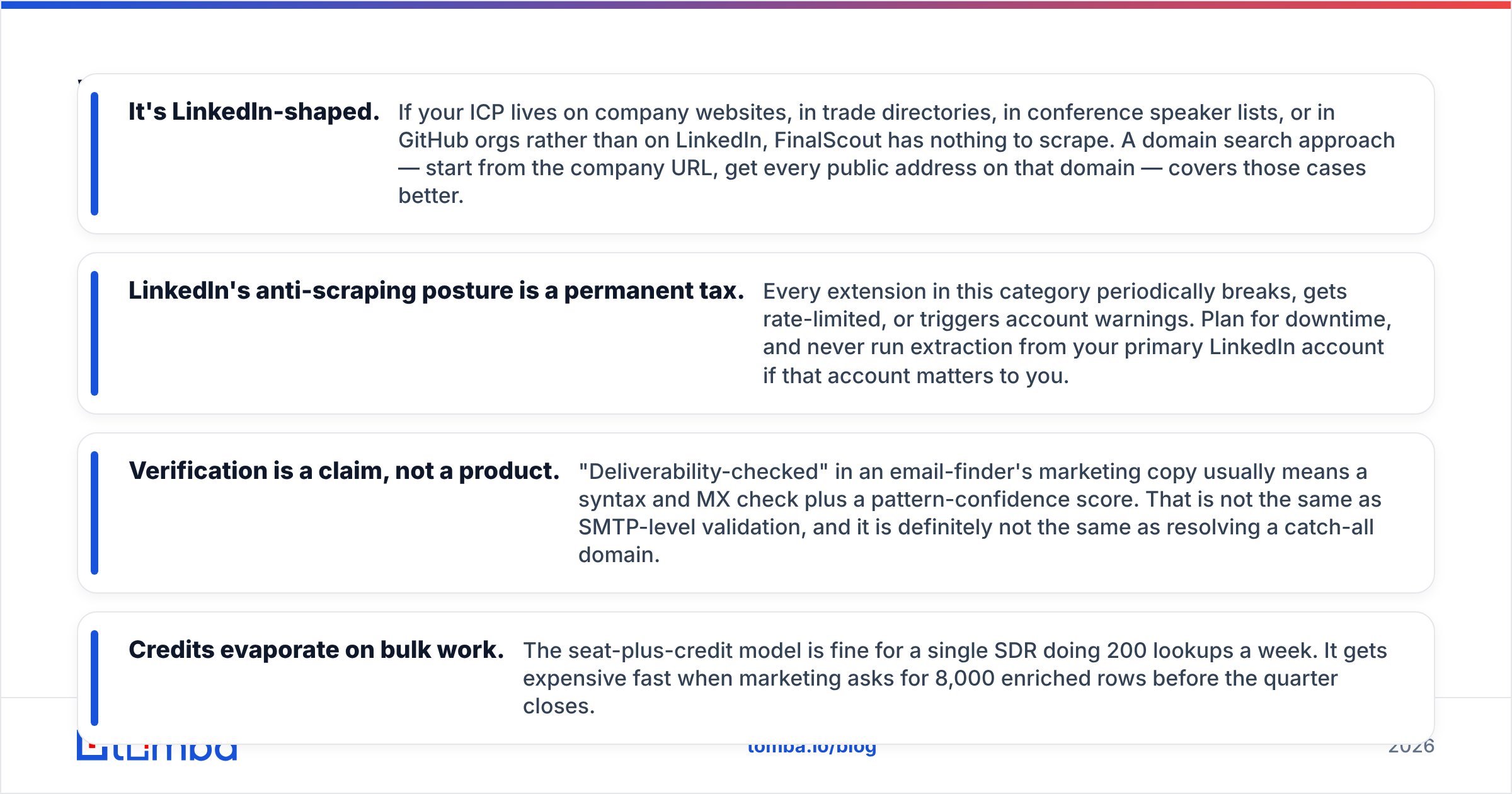
- It is LinkedIn-shaped. Some buyers live on company sites, in trade directories, in speaker lists, or in GitHub orgs. FinalScout has nothing to scrape there. A domain search works better. You start from the company URL and get every public address on that domain.
- LinkedIn fights scrapers, and that is a permanent tax. Every extension in this space breaks now and then. Some get rate-limited. Some trigger account warnings. Plan for downtime. Never run extraction from a LinkedIn account you care about.
- Verification is a claim, not a product. "Deliverability-checked" usually means a syntax check, an MX check, and a pattern score. That is not SMTP-level validation. It also does not solve a catch-all domain.
- Credits vanish on bulk work. The seat-plus-credit model is fine for one rep doing 200 lookups a week. It gets pricey when marketing asks for 8,000 rows before the quarter ends.
Solo founders and recruiters can live with all of that. A five-person team on a shared data budget cannot.
What does Gazelle do well — and where does it break?#
Gazelle answers a question most contact databases duck: which companies are about to do something big? Growth signals, foreign investment flags, ownership trees, and location data are hard to build yourself. Gazelle grew up serving economic development groups. Its map of parent and branch companies abroad is unusually strong.
Say you want to attract a factory to your region. Or you need to know that a French parent just bought a Texas branch. That is real value.
Where it breaks:
- You still have no email. Gazelle hands you an account list. Turning "Acme Manufacturing, Düsseldorf, 1,400 staff" into "hans.mueller@acme-mfg.de" is a separate job with a separate tool.
- Buying it takes a while. There is no self-serve signup and no public price. Expect a yearly deal. That is friction if you want to test an idea this month.
- Predictive scores point, they do not prove. A "likely to expand" model is a probability. Use it to rank targets, not to qualify them. Check a sample by hand before you plan a whole territory.
- Too much for SMB outbound. If you sell $200/mo software to agencies, foreign investment signals are noise.
Check buyer reviews on G2 for both tools first. Review counts on niche platforms are thin. The complaints that exist tend to be specific and useful.
FinalScout vs Gazelle: which one has better data accuracy?#
That is the wrong question. The two tools measure accuracy on different axes.
FinalScout asks: does this email bounce? Gazelle asks: is this company profile current, and is the forecast roughly right? You cannot compare a bounce rate to a headcount refresh rate.
You can, however, test each one on your own data:
- For FinalScout, take 100 contacts whose emails you already know. Run them through. Measure the exact-match rate, not the "found something" rate. A tool that returns
info@company.cominstead of a named VP has found nothing useful. - For Gazelle, take 50 accounts you know well. Check headcount, recent moves, and ownership. Count the fields that are more than 12 months stale.
- For both, check catch-all handling. About a fifth of B2B domains accept every address at the SMTP layer. "Valid" means little there without a catch-all verifier scoring the pattern.
Run the test before the trial ends. Vendors quote accuracy from their own sample. Your buyers are not their sample.

How much do FinalScout and Gazelle cost per usable contact?#
Sticker price is the wrong metric. Cost per verified, exact-match contact is the metric. The FinalScout vs Gazelle bill also splits in ways the pricing page hides.
Take a normal month. You need 2,000 verified decision-maker emails.
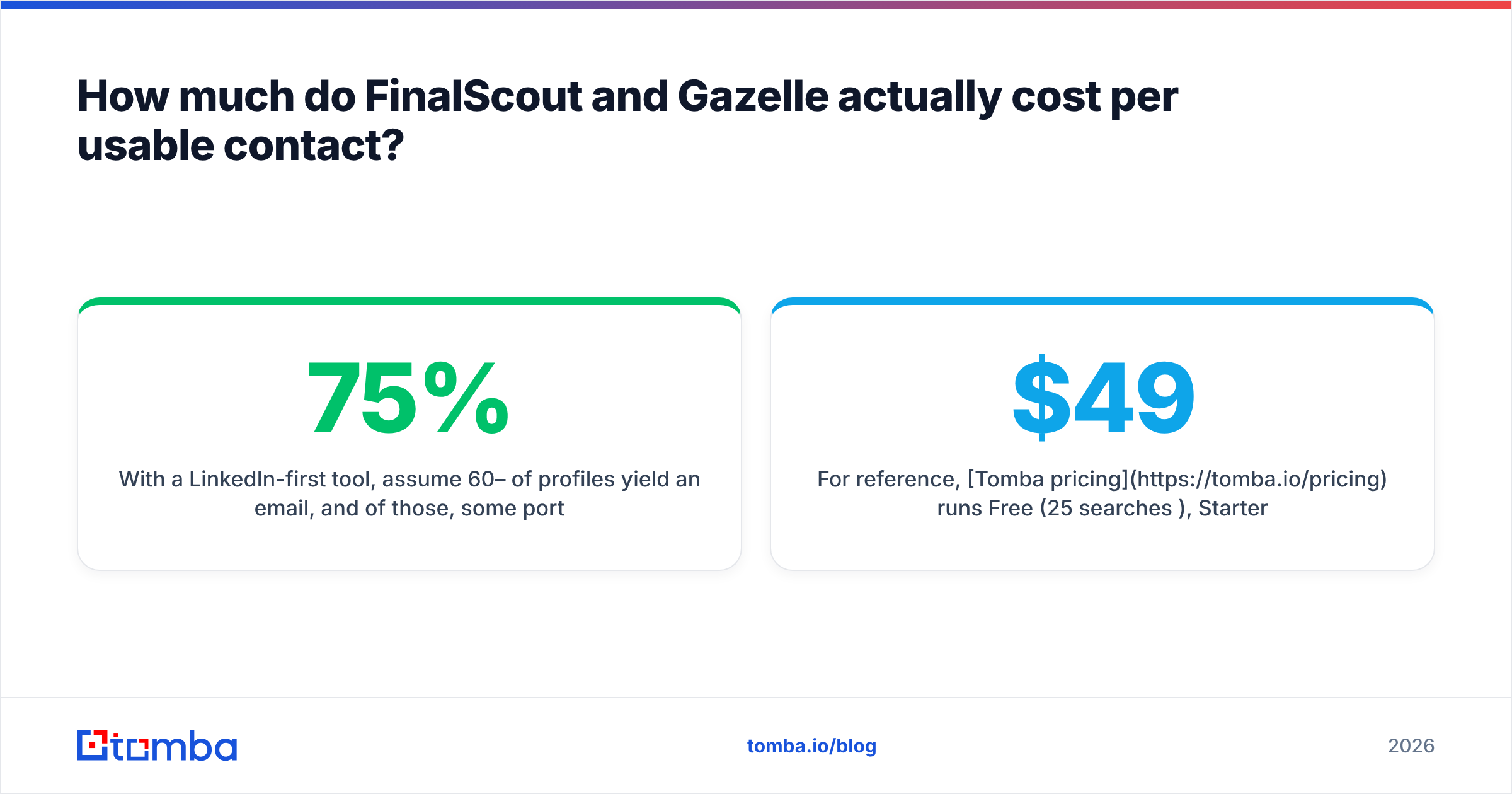
- A LinkedIn-first tool finds an email on roughly 60–75% of profiles. Some of those are role addresses or stale. So budget for about 3,000 profiles to land 2,000 usable contacts. Add a verification pass. Add seats if more than one person needs access.
- A company database gives you a strong 2,000-account list. You then pay a second vendor for the contacts.
Buyers forget that second line item. This is why most teams end up with three parts: account data, contact discovery, and verification. It is also why one-on-one tool fights rarely settle much.
For reference, Tomba pricing runs Free (25 searches a month), Starter $49/mo, Growth $99/mo, Pro $249/mo, and custom Enterprise. Finding, verification, and bulk work sit in one account instead of two contracts. Read HubSpot's outbound benchmarks next to any vendor's ROI math. It grounds reply rates in reality.
FinalScout vs Gazelle: which should you pick for your use case?#
- Solo founder or recruiter on LinkedIn → FinalScout. Low cost, fast, and it does what you do by hand today.
- Economic development, site selection, or global enterprise ABM → Gazelle. No email finder replaces its growth and ownership data.
- SDR team running outbound at volume → neither one alone. Use an API-first finder plus verification, with LinkedIn as one input.
- RevOps enriching a CRM of 50k records → neither. Both are built for click-by-click work, not batch jobs. Look at a bulk email finder or a direct API instead.
- Agency running campaigns for ten clients → check the seat model first. Per-seat pricing on shared work eats agency margin.
What if you need contacts without the LinkedIn dependency?#
Most FinalScout vs Gazelle comparisons skip this gap. LinkedIn scraping is a fine channel and a shaky base. Profiles go private. Extensions get throttled. The data is only as fresh as what someone posted about themselves in 2019.
A domain-first approach flips the order. Start from the company. Work out the email pattern. Then match names to that pattern with a confidence score. It works whether or not your prospect keeps a LinkedIn page. It also runs through an API, not through a browser tab you have to keep open.
That is the idea behind Tomba's email finder. Find by domain, name, or company. Verify in the same call. Push the result into HubSpot, Sheets, Airtable, or your own stack with the Tomba API.
Start free with 25 searches. Run the same 100-contact test you would run on any vendor. Compare the exact-match rate with what FinalScout returns on the same list. If Tomba loses on your data, you lost an afternoon. You still gain a real benchmark instead of a marketing number.
Related guides#
Ready to find emails that actually work?
Join 150,000+ professionals who stopped guessing and started sending. Free credits on signup — no credit card required.
Get the Tomba newsletter
Practical outbound tactics and product updates — once every two weeks.
About the author