FinalScout vs Lead Kahuna: Which Email Finder Wins in 2026
FinalScout scrapes LinkedIn from your browser. Lead Kahuna mines the open web from your desktop. We compare data sources, accuracy, export limits, and real cost to show which one actually belongs in your 2026 stack.
FinalScout vs Lead Kahuna looks like a head-to-head fight. It isn't one. FinalScout reads LinkedIn profiles inside your browser. Lead Kahuna mines the open web from your desktop. This guide runs the FinalScout vs Lead Kahuna decision through four lenses: data source, accuracy, price, and export limits. Pick your motion first. Pick the tool second.
TL;DR
- FinalScout is a browser-based LinkedIn extractor. You work inside LinkedIn or Sales Navigator. It pulls profiles into lists, appends emails, and drafts outreach copy with AI.
- Lead Kahuna is a desktop lead-mining app. It targets local businesses and the open web — Google Maps listings, websites, directories. It is not built for LinkedIn-first B2B personas.
- They are not really competitors. They solve different sourcing problems. Picking wrong costs you weeks, not dollars.
- Neither tool is a strong verification layer. Both leave you to control bounces before you hit send.
- Is your ICP defined by job title and company domain rather than by map pin? Then a domain-first finder with a real API and built-in verification (Tomba, Hunter, Findymail) usually beats both.
What are FinalScout and Lead Kahuna?#
The short version: FinalScout is a LinkedIn-native email extractor with AI writing baked in. Lead Kahuna is a Windows desktop scraper for local-business and open-web lead data. Same category on a G2 page. Completely different jobs in practice.
Here is the honest breakdown of what each one is:
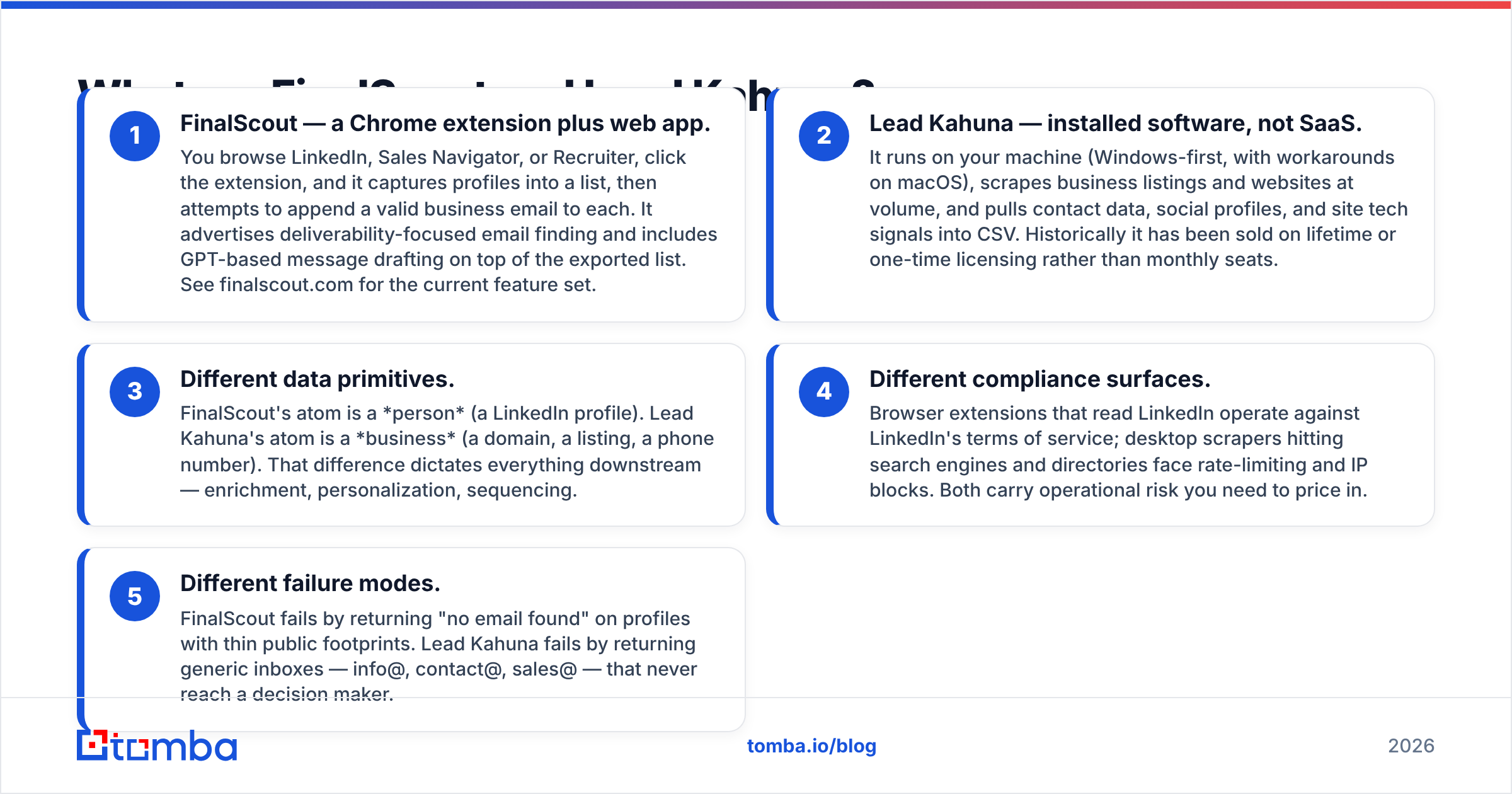
- FinalScout — a Chrome extension plus web app. You browse LinkedIn, Sales Navigator, or Recruiter and click the extension. It captures profiles into a list. Then it tries to append a valid business email to each one. It also drafts messages with GPT on top of the exported list. See finalscout.com for the current feature set.
- Lead Kahuna — installed software, not SaaS. It runs on your own machine. Windows comes first, with workarounds on macOS. It scrapes business listings and websites at volume. Contact data, social profiles, and site tech signals land in a CSV. It has usually been sold on a lifetime or one-time license instead of monthly seats.
Those two shapes pull everything downstream in different directions:
- Different data units. FinalScout starts with a person: a LinkedIn profile. Lead Kahuna starts with a business: a domain, a listing, a phone number. That gap shapes enrichment, personalization, and sequencing.
- Different compliance risk. Browser extensions that read LinkedIn run against LinkedIn's terms of service. Desktop scrapers that hit search engines and directories run into rate limits and IP blocks. Both carry risk you need to price in.
- Different failure modes. FinalScout fails by returning "no email found" on profiles with thin public footprints. Lead Kahuna fails by returning generic inboxes — info@, contact@, sales@ — that never reach a decision maker.
If you remember one thing: you choose between them by choosing your prospecting motion first. Tool second.

How does each tool actually find an email?#
FinalScout works profile-out. It reads signals from a LinkedIn page: name, current employer, sometimes a personal site. It resolves that employer to a domain. Then it predicts likely address patterns and checks them. Hit rates are respectable when the profile is rich and the company uses a standard first.last@ format. They collapse when you prospect into a three-person startup with a Squarespace site.
Lead Kahuna works domain-in. It harvests business URLs from maps and directories, then crawls each site. It lifts whatever contact data is published in public: mailto links, contact-page forms, footer phone numbers, social handles. That is excellent coverage for "every HVAC company in Phoenix." It is close to useless for "VP of Engineering at Series B fintechs."
This is the fork in the road:
- Persona-led outbound (title, seniority, department matter) → FinalScout's model fits better.
- Geo/vertical-led outbound (any owner at any business of type X in city Y) → Lead Kahuna's model fits better.
- Account-led outbound (you already have a target list of 500 domains) → honestly, neither. Use a domain search tool that takes a domain and returns the reachable emails inside it.
Which one produces more accurate data?#
Neither vendor publishes accuracy numbers that an outside party has checked. So treat every claim — including the ones on their homepages — as marketing until you test on your own list.
That said, the structural differences tell you where each one degrades:

Where FinalScout is stronger: role-specific addresses. It starts from a named human, so the output is a personal work email. That is the thing you actually want for one-to-one outreach. Pattern prediction plus SMTP-style checking works well at mid-size and enterprise employers, because their address formats are predictable.
Where FinalScout is weaker: catch-all domains and locked-down profiles. When a mail server accepts everything, a "valid" verdict means very little. Run a separate catch-all verifier or a chunk of your "verified" list is a coin flip.
Where Lead Kahuna is stronger: raw volume and non-LinkedIn businesses. Plumbers, dentists, restaurants, regional distributors — the long tail barely exists on LinkedIn, but it shows up in maps data. If your buyer is an owner-operator, published contact data is often the only data.
Where Lead Kahuna is weaker: role targeting and freshness. A footer email scraped from a site last updated in 2021 is a shot in the dark. Generic inboxes route to whoever answers the phone. Reply rates to info@ are much worse than replies to a named human.
Run the same 200-row test list through both tools. Then verify the output with a neutral third-party email verifier. Judge on verified-deliverable rate, not on "emails returned." Those two numbers are often 30 points apart.
FinalScout vs Lead Kahuna: price and export limits#
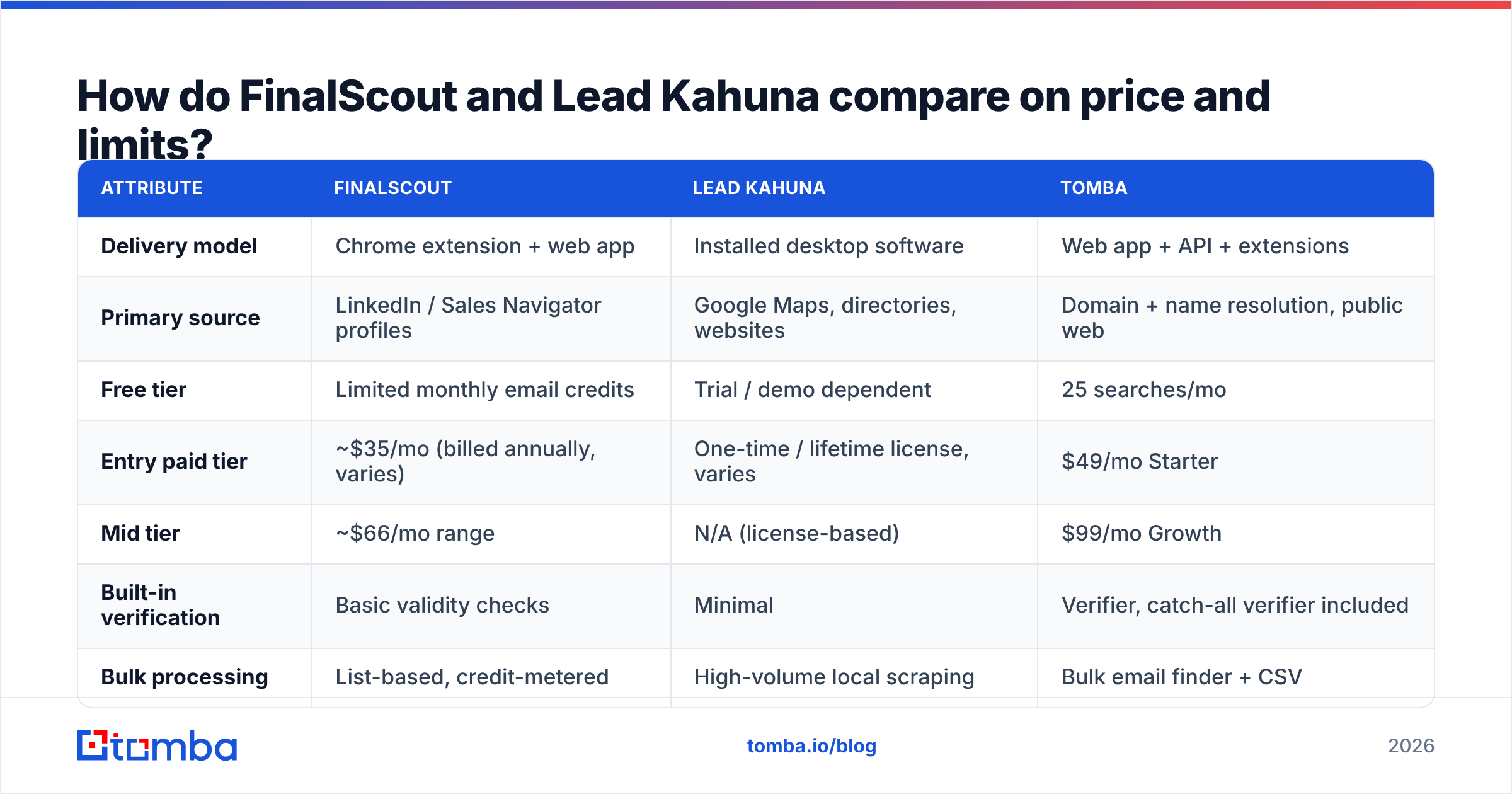
Pricing on both tools moves. Lead Kahuna in particular has been sold through one-time and lifetime deals that do not map onto monthly SaaS. Confirm current numbers on the vendor sites before you budget. The shape of the comparison, though, is stable:

| Attribute | FinalScout | Lead Kahuna | Tomba |
|---|---|---|---|
| Delivery model | Chrome extension + web app | Installed desktop software | Web app + API + extensions |
| Primary source | LinkedIn / Sales Navigator profiles | Google Maps, directories, websites | Domain + name resolution, public web |
| Free tier | Limited monthly email credits | Trial / demo dependent | 25 searches/mo |
| Entry paid tier | ~$35/mo (billed annually, varies) | One-time / lifetime license, varies | $49/mo Starter |
| Mid tier | ~$66/mo range | N/A (license-based) | $99/mo Growth |
| Built-in verification | Basic validity checks | Minimal | Verifier, catch-all verifier included |
| Bulk processing | List-based, credit-metered | High-volume local scraping | Bulk email finder + CSV |
| Public API | Limited | No | Full REST email finder API |
| Best for | LinkedIn persona prospecting | Local business lead mining | Domain-driven B2B outbound at scale |
| Weakest at | Non-LinkedIn SMBs | Named-role targeting | Map-pin/local-business sourcing |
Two budgeting notes people miss:
Credits are not emails. On extension-based tools, a search that returns nothing can still burn a credit. If your ICP skews toward companies with weak public footprints, your real cost per usable email is a multiple of the sticker price.
Lifetime licenses are not free forever. Desktop scrapers depend on the layout of the sites they scrape. When Google changes that layout or adds friction, you wait for a patch. That is a maintenance tax the "one-time $97" headline hides. Compare it honestly against transparent Tomba pricing, or against any subscription tool where the vendor absorbs the breakage.

Is FinalScout better than Lead Kahuna for B2B SaaS outbound?#
Yes. For classic B2B SaaS motions, FinalScout is the better of the two. Your buyers have LinkedIn profiles, titles that matter, and employers with domains you can resolve. That is exactly the input FinalScout expects.
But "better than Lead Kahuna" is a low bar here. The comparison hides the real question: should a browser extension be your main data pipe at all?
Extension-first sourcing has three structural problems once you are past ten reps:
- It's manual. Someone has to browse. That is a human bottleneck on a job that should run on a schedule.
- It's fragile. Your pipeline depends on one platform's tolerance for automation. That can change without notice.
- It doesn't compose. Moving data into your CRM, your sequencer, and your warehouse means shuffling CSVs, unless a real API sits behind it.
Teams that have outgrown manual sourcing settle on a simple pattern. Define target accounts. Resolve their domains. Run domain search or name-based lookups through an API. Verify the results, then push them to your CRM. No browser in the loop. Compare replies per hour of rep time, not emails per click, and the extension model loses to automation fast. G2's lead intelligence category is a reasonable place to sanity-check how buyers rank these tools.
Where do both tools leave you exposed?#
Three gaps show up in almost every audit of a FinalScout or Lead Kahuna workflow.
1. Verification depth. Finding an address and proving it will accept mail are two separate jobs. Neither tool is built as a verification product. Run every list through dedicated verification if you care about the sending domain. Treat catch-all domains as their own risk bucket. Bounce rates above 3% put your sender reputation in play, and that damage takes weeks to undo. Google's bulk sender guidelines spell out the threshold.
2. Enrichment beyond the email. A row with just name, title, email does not personalize itself. Company size, tech stack, headcount, funding, and direct dials are what make the first line of a cold email land. That means a data enrichment step or a phone finder pass. Neither tool covers this well.
3. Governance. Where did this record come from? When was it last confirmed? Can you defend it under GDPR? "Scraped from a footer" is thin provenance. Ask any vendor for a written answer on sourcing and refresh cadence. Tomba publishes its data sources, and any serious vendor should do the same.
FinalScout vs Lead Kahuna: which should you choose in 2026?#
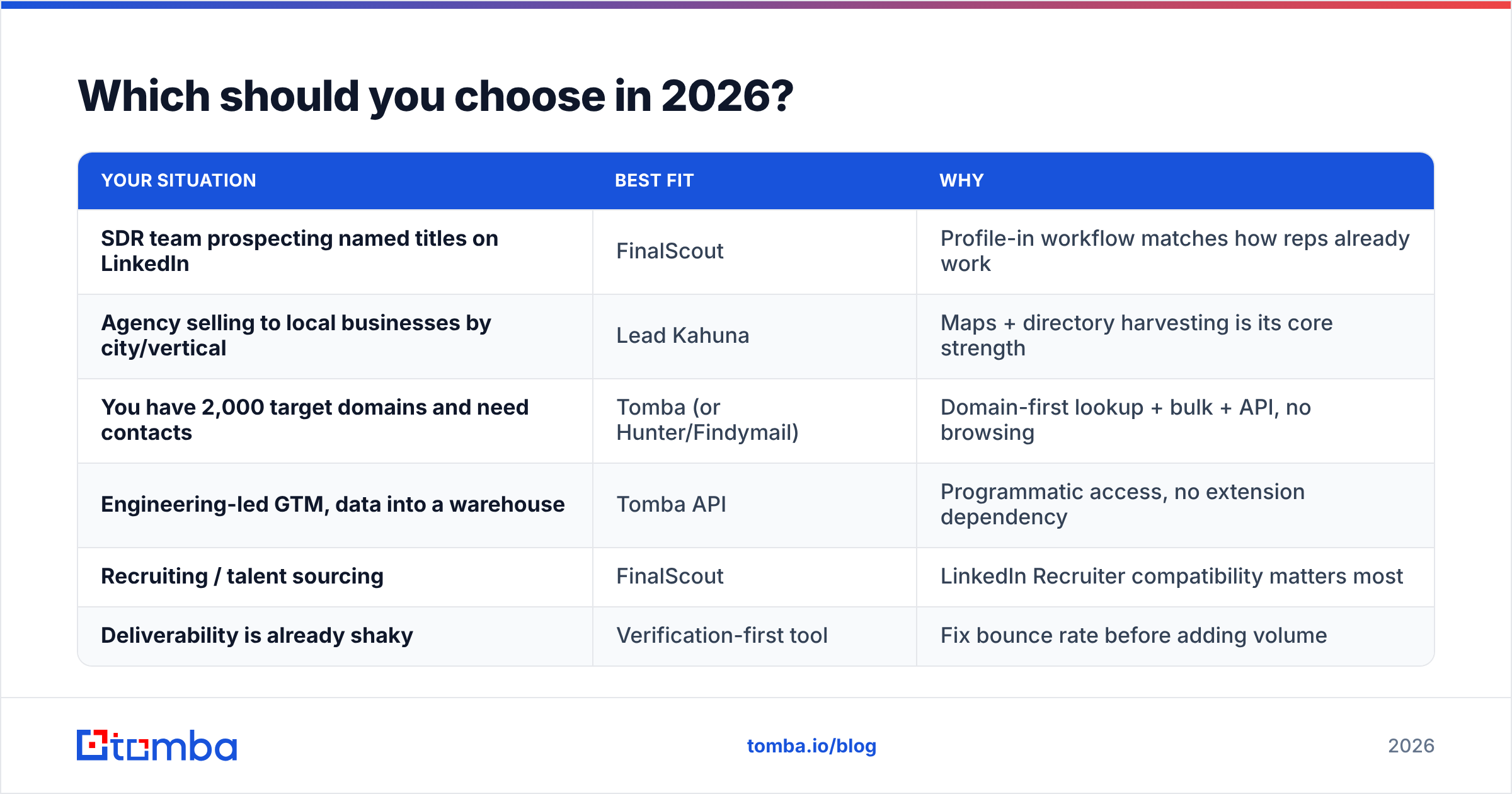
Pick by motion, not by feature list:
| Your situation | Best fit | Why |
|---|---|---|
| SDR team prospecting named titles on LinkedIn | FinalScout | Profile-in workflow matches how reps already work |
| Agency selling to local businesses by city/vertical | Lead Kahuna | Maps + directory harvesting is its core strength |
| You have 2,000 target domains and need contacts | Tomba (or Hunter/Findymail) | Domain-first lookup + bulk + API, no browsing |
| Engineering-led GTM, data into a warehouse | Tomba API | Programmatic access, no extension dependency |
| Recruiting / talent sourcing | FinalScout | LinkedIn Recruiter compatibility matters most |
| Deliverability is already shaky | Verification-first tool | Fix bounce rate before adding volume |
The most common real-world answer is a combination. Use one sourcing tool that matches your ICP. Add a separate verification and enrichment layer you trust on its own. Single-vendor purity is a nice idea that rarely survives a live pipeline.
What about the middle path?#
Is your ICP defined by company rather than by individual profile? Then both tools are the wrong shape, and you will feel it within a month. That is the case for most B2B teams. You build a target account list from company traits, then you need the right humans inside each account.
That is where a domain-first email finder earns its place. You feed it a domain and a role. You get back verified addresses with confidence scores and sources. Then you wire it into your sequencer through an API instead of a CSV. Tomba's free tier gives you 25 searches a month, so you can test hit rate on your own list before you commit. Starter is $49/mo, Growth $99/mo, and Pro $249/mo. Verification, catch-all checking, and bulk processing are included, not bolted on.
Test it the boring way. Take 100 real prospects from your ICP. Run them through FinalScout, Lead Kahuna, and Tomba. Verify all three outputs with the same neutral checker. Then compare verified-deliverable rate and cost per usable contact. The winner on your list is the only benchmark that matters.
Ready to see how a domain-first workflow compares on your own data? Start with the Tomba Email Finder — 25 free searches, no card needed. Every result comes back with a confidence score and its source, so you can audit the quality before a single email goes out.
Related guides#
Ready to find emails that actually work?
Join 150,000+ professionals who stopped guessing and started sending. Free credits on signup — no credit card required.
Get the Tomba newsletter
Practical outbound tactics and product updates — once every two weeks.
About the author