FinalScout vs LeadsForge: Which Email Finder Wins in 2026?
FinalScout scrapes LinkedIn profiles into verified emails. LeadsForge builds lists from a chat prompt. We compare accuracy, pricing, exports, and API access — and name the pick for each team size.
TL;DR
- FinalScout is a LinkedIn-first tool: you browse or search on LinkedIn, its extension pulls profiles, and it returns emails plus AI-drafted outreach copy. Best if LinkedIn is your prospecting workflow.
- LeadsForge is an AI list builder: you describe your ICP in plain language, it assembles a contact list from a database. Best if you want lists without building filters manually.
- Neither is primarily an API/data infrastructure product. If you need programmatic lookups, bulk enrichment, or verification at scale, both will feel constrained.
- Pricing on both moves; at time of writing entry paid tiers sit roughly in the $35–$60/month band, with credit caps that make heavy months expensive. Always check the vendor page before buying.
- Our pick for most outbound teams: run one of them for sourcing, but put a dedicated email verifier in front of your sending tool. Sourcing accuracy and send-safety are different problems.
What are FinalScout and LeadsForge?#
They solve the same end goal — a list of contactable people — from two opposite directions.
FinalScout (finalscout.com) starts from a person. You are on LinkedIn, viewing a profile, a search result page, a group, or an event attendee list. The extension harvests those profiles and attempts to resolve a business email for each one, then offers AI-generated first-touch copy based on the profile content. The mental model is "scrape the people I already found."
LeadsForge starts from a description. You type something close to "heads of RevOps at Series B SaaS companies in the US with 50–200 employees," and the AI translates that into database filters and returns a list. The mental model is "describe who I want, get the people."
That difference drives almost everything else — coverage, accuracy, cost per usable contact, and who on your team can actually operate the tool.
Here's the practical split:
- Sourcing input — FinalScout needs a LinkedIn surface to work from; LeadsForge needs a written ICP description. One is manual-discovery-heavy, one is query-heavy.
- Coverage ceiling — FinalScout is bounded by what you can surface in LinkedIn search (and by LinkedIn's own result limits); LeadsForge is bounded by whatever is in its underlying database.
- Freshness model — profile-scraped data reflects what the person last edited on LinkedIn; database records reflect whenever that vendor last refreshed the row.
- Verification depth — both claim validation, but neither is a standalone verification product with catch-all handling, SMTP-level checks, and role-account flags as first-class features.
- Output destination — CSV export in both cases, with integrations varying by tier. Neither is a sequencer, so you still need a sending tool.
- Team fit — FinalScout suits an SDR who lives in LinkedIn; LeadsForge suits a founder or marketer who wants a list without learning filter syntax.
How do FinalScout and LeadsForge compare feature by feature?#
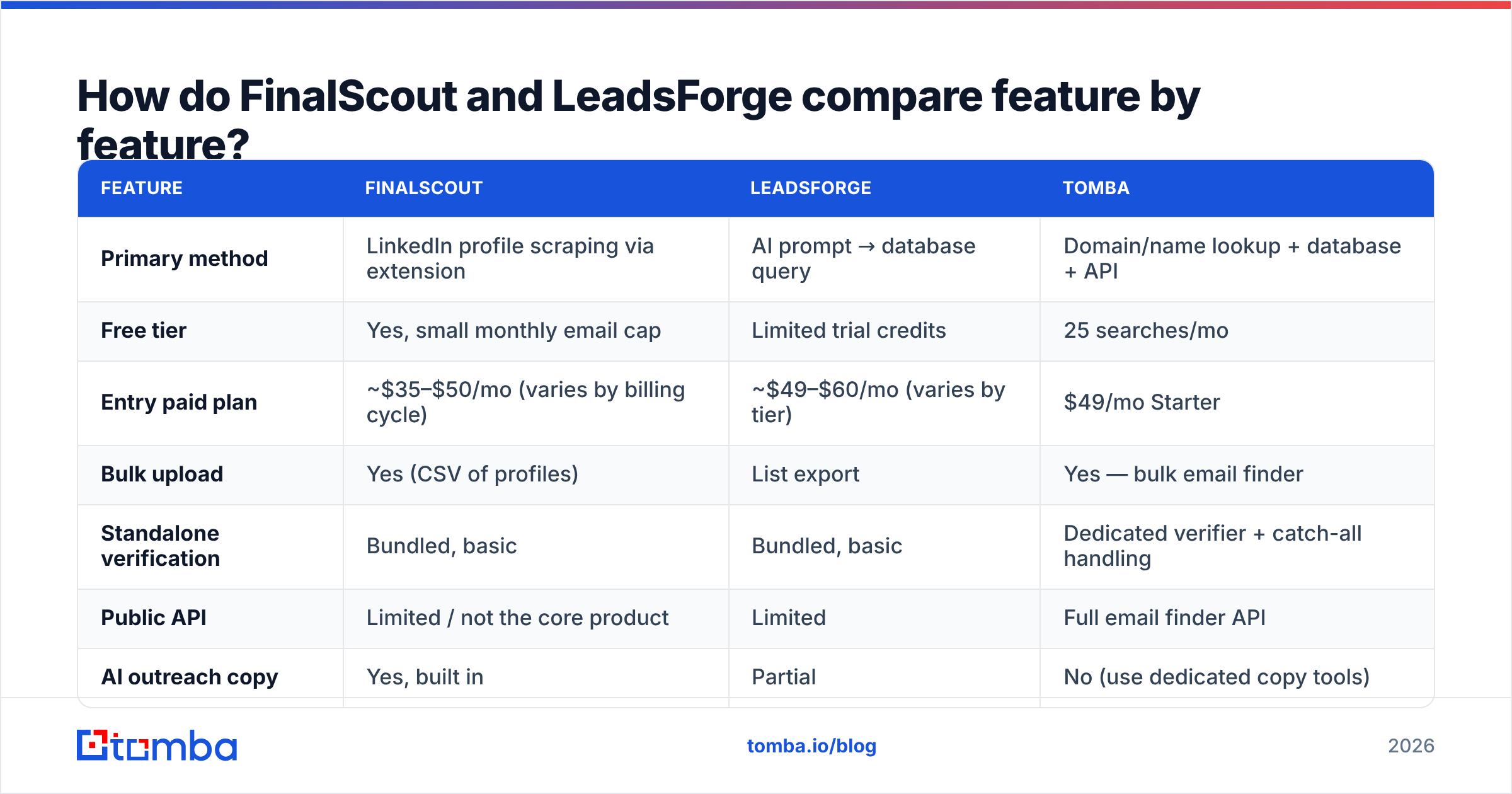
| Feature | FinalScout | LeadsForge | Tomba |
|---|---|---|---|
| Primary method | LinkedIn profile scraping via extension | AI prompt → database query | Domain/name lookup + database + API |
| Free tier | Yes, small monthly email cap | Limited trial credits | 25 searches/mo |
| Entry paid plan | ~$35–$50/mo (varies by billing cycle) | ~$49–$60/mo (varies by tier) | $49/mo Starter |
| Bulk upload | Yes (CSV of profiles) | List export | Yes — bulk email finder |
| Standalone verification | Bundled, basic | Bundled, basic | Dedicated verifier + catch-all handling |
| Public API | Limited / not the core product | Limited | Full email finder API |
| AI outreach copy | Yes, built in | Partial | No (use dedicated copy tools) |
| Chrome extension | Yes, core to the product | Secondary | Yes |
| Best for | LinkedIn-native SDRs | Fast ICP list building | Programmatic lookup + verification |
Two honest caveats about this table. First, pricing on self-serve prospecting tools changes several times a year and both vendors run annual discounts, so treat the dollar figures as a band and confirm on finalscout.com and the LeadsForge site before you commit. Second, "bundled verification" means very different things across vendors — some run a syntax and MX check and call it verified, others do full SMTP probing. Ask, or test.

Which tool actually finds more valid emails?#
Neither vendor will hand you a neutral accuracy number, so build the test yourself. Take 200 contacts you already have confirmed emails for — closed-won accounts, webinar registrants, people who have replied to you. Strip the emails, feed the names and companies into each tool, and measure two things separately:
- Hit rate — of 200 requests, how many returned any email?
- Precision — of the emails returned, how many match your known-good value?
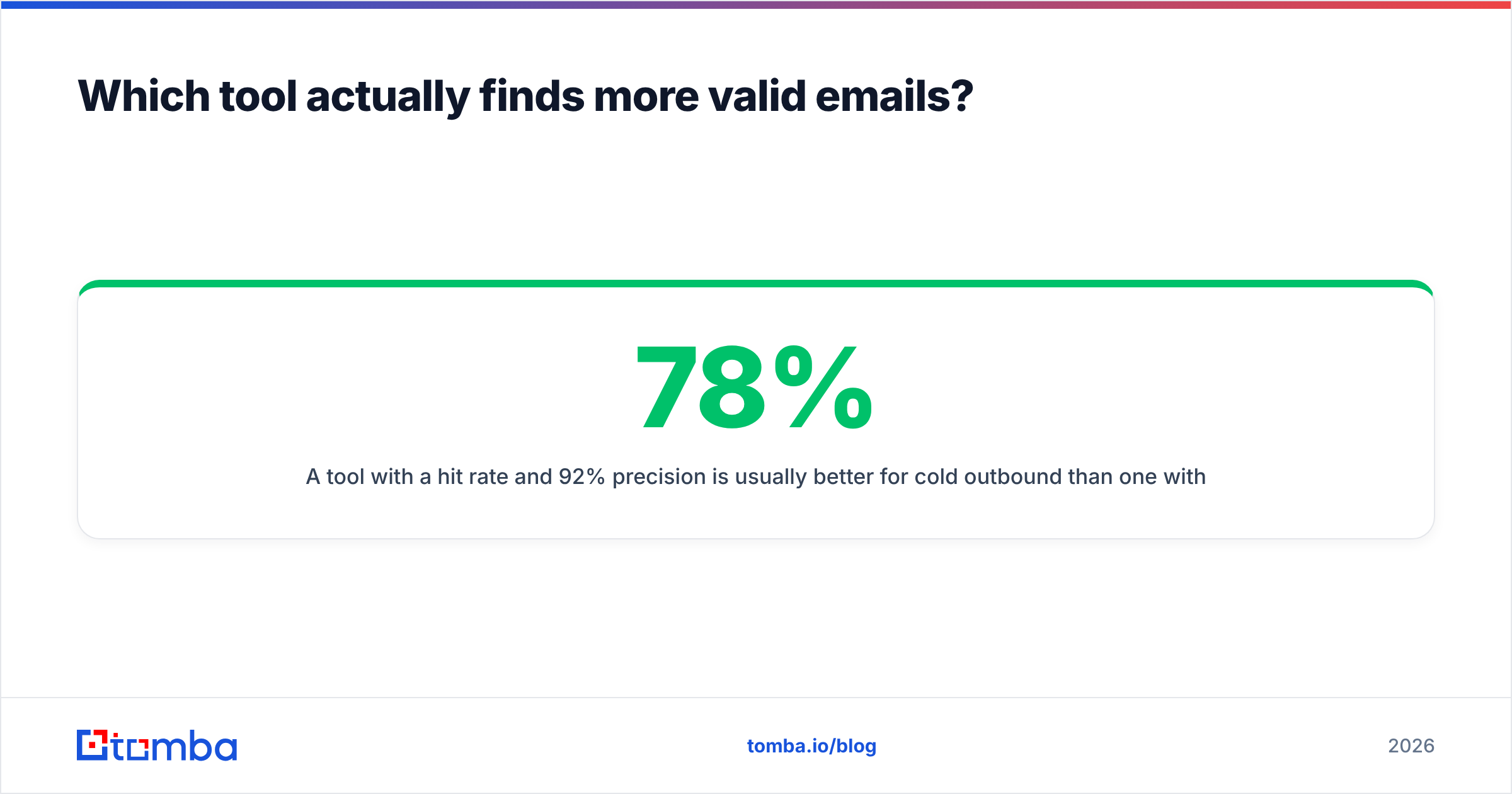
A tool with a 78% hit rate and 92% precision is usually better for cold outbound than one with a 90% hit rate and 70% precision, because the second one is quietly filling your list with bounces. Bounce rate above 3% is where inbox providers start treating you differently, and that damage compounds across every campaign you send from that domain.

Where each approach tends to break down:
FinalScout inherits LinkedIn's data quality. If someone changed jobs eight months ago and never updated their profile, you'll get a confident-looking email at a company they left. Profile-derived sourcing is excellent for niche or non-obvious roles that databases index poorly, and weak on job-change recency.
LeadsForge inherits its database's refresh cadence. Database records handle job changes better when the vendor refreshes often, but they systematically under-cover small companies, non-US markets, and roles that don't map cleanly to standard titles. Ask about coverage in your specific geography before you assume the list is complete.
Both are stronger on companies with predictable email patterns. If you want to see the pattern for a target account before you spend credits anywhere, a free company email pattern check tells you whether the domain uses first.last@, flast@, or something custom — which makes it much easier to spot a fabricated result.
What does each one actually cost per usable lead?#
Sticker price is the wrong metric. The number that matters is cost per verified, deliverable contact.
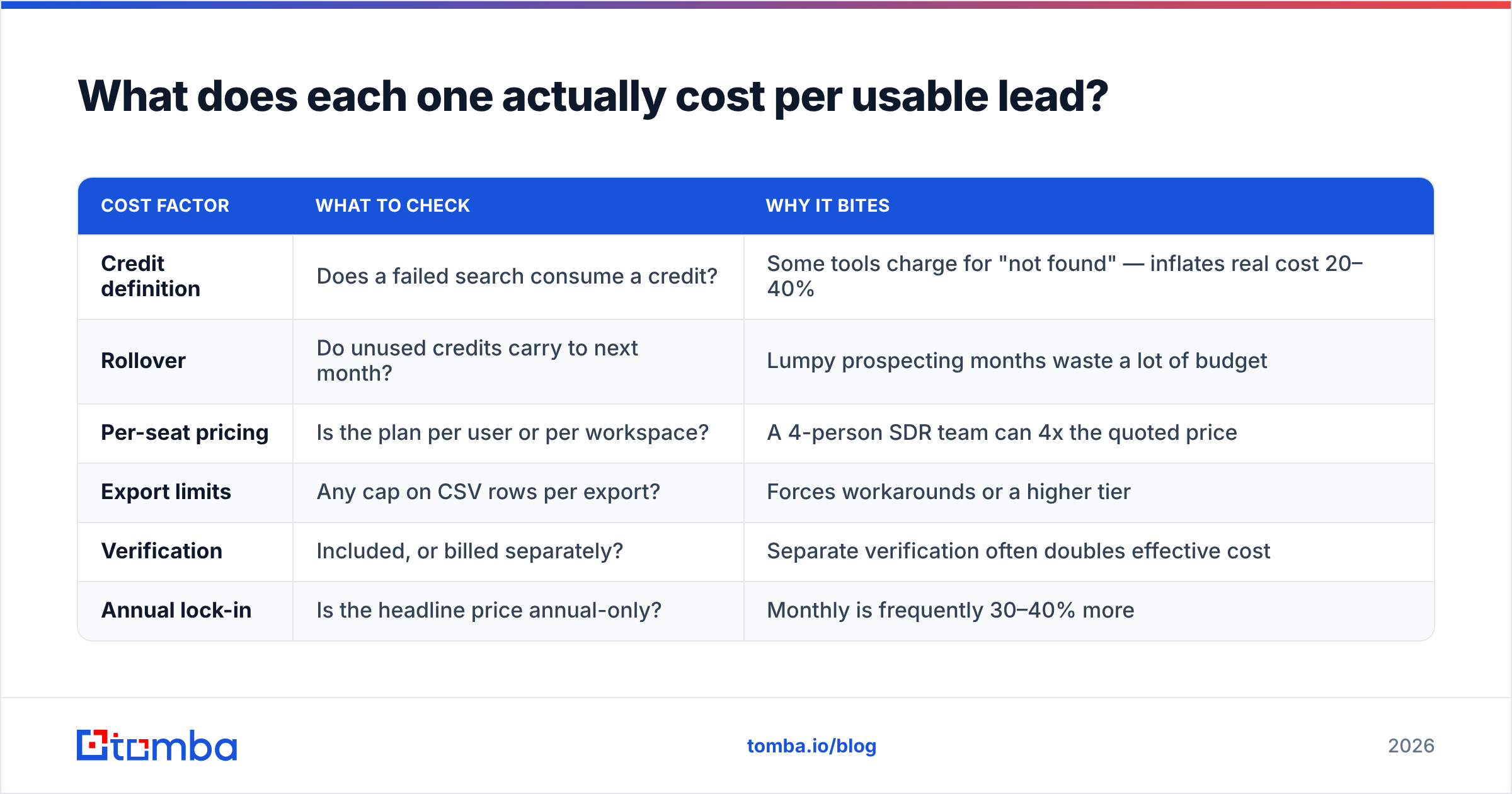
| Cost factor | What to check | Why it bites |
|---|---|---|
| Credit definition | Does a failed search consume a credit? | Some tools charge for "not found" — inflates real cost 20–40% |
| Rollover | Do unused credits carry to next month? | Lumpy prospecting months waste a lot of budget |
| Per-seat pricing | Is the plan per user or per workspace? | A 4-person SDR team can 4x the quoted price |
| Export limits | Any cap on CSV rows per export? | Forces workarounds or a higher tier |
| Verification | Included, or billed separately? | Separate verification often doubles effective cost |
| Annual lock-in | Is the headline price annual-only? | Monthly is frequently 30–40% more |
Run the arithmetic on your real volume. If you need 2,000 contacts a month and a tool's mid tier gives you 2,500 credits but burns credits on misses at a 25% miss rate, you are actually buying about 1,875 usable results — a tier short. That is how a "$49 tool" becomes a $99 tool in month two.
For reference, Tomba pricing is workspace-based rather than per-seat: Free (25 searches/mo), Starter $49/mo, Growth $99/mo, Pro $249/mo, and Enterprise custom. Whichever vendor you pick, normalize everything to cost-per-verified-contact before comparing.
Is FinalScout better than LeadsForge for LinkedIn prospecting?#
For pure LinkedIn workflows, yes — that's the whole design.
FinalScout's advantage is that it sits where you already are. You run a Sales Navigator search, filter it down by hand using signals no database captures (a post they wrote last week, a specific tool in their headline, a mutual group), and export exactly those people. The AI copy generation reads the profile, so first lines reference something real rather than a merge field.
The trade-offs are real too:
- LinkedIn's limits are your limits. Search result caps, commercial use limits, and aggressive extension detection all apply. Heavy scraping carries account risk — use a secondary account if this is central to your process.
- It doesn't scale headlessly. There's no clean way to run 10,000 lookups overnight from a script.
- Copy quality varies. AI-drafted openers off a profile are a solid starting draft, not a finished email. Every one still needs a human pass.
If LinkedIn is one channel among several — and especially if you're enriching a list that came from a form, a webinar, or a CRM export — the LinkedIn-first model becomes a bottleneck. That's where a LinkedIn finder that works from a profile URL without requiring an active browsing session, or a plain domain search across a target account, does the job with less friction.
Is LeadsForge better for building lists fast?#
For zero-to-list speed with no training, yes.
The natural-language interface genuinely removes a barrier. A founder doing their own outbound doesn't want to learn 14 filter dimensions; describing the customer in a sentence and getting 500 rows back is a legitimately good experience. It's also forgiving of vague ICPs — you can iterate on the prompt and watch the list shape change.
What to watch:
- The AI can be confidently wrong about intent. "Marketing leaders at fintech startups" might return VPs at 3,000-person banks. Always eyeball the first 50 rows before you trust the other 450.
- You inherit database coverage silently. If the underlying data is thin in your segment, you get a short list, not an error message. Short lists look like a narrow ICP rather than a data gap.
- Prompt-built lists resist auditing. A filter set is reproducible; a prompt is fuzzier. For compliance-sensitive teams that need to explain how a list was assembled, that matters.

How do they compare against a dedicated email-finding stack?#
The framing most teams get wrong: sourcing tools and data infrastructure are different categories. FinalScout and LeadsForge are sourcing tools with verification bolted on. If your outbound is a repeatable system — CRM enrichment on record creation, nightly re-verification, form-fill enrichment, a data pipeline — you want infrastructure.

Concretely, ask whether the tool gives you:
- A documented REST API with rate limits you can plan around, not just a Zapier connector.
- Catch-all handling. Roughly one in five B2B domains accepts everything at the MX layer. A tool that marks all of them "valid" is guessing; one that marks them all "risky" makes you discard good contacts. You want a catch-all verifier that scores them.
- Bulk with real throughput — upload 50,000 rows, get results without babysitting a browser tab.
- Source transparency. Where did this record come from, and when was it last confirmed? Tomba publishes its data sources; ask any vendor for the same.
- Native CRM writeback so enriched data lands in HubSpot or Salesforce without a CSV round trip.
For a broader market view of either tool, G2's review category is worth ten minutes — sort by "most recent" and read the 3-star reviews, which are consistently more informative than the 5-star or 1-star ends. HubSpot's guidance on data quality is also a good sanity check on how much dirty data actually costs downstream.
Which should you choose?#
Choose FinalScout if LinkedIn is where you find people, you prospect one segment at a time by hand, and you value AI-drafted openers built from profile context. Accept the account risk and the manual ceiling.
Choose LeadsForge if you want lists without learning a filter UI, your ICP is common enough that a general database covers it well, and speed to first list matters more than granular control. Verify the first batch aggressively before scaling spend.
Choose neither as your only tool if you're running programmatic enrichment, need reliable catch-all handling, or your bounce rate is already creeping toward 3%. In that case the right architecture is: source wherever you like, then verify centrally before anything hits your sequencer.
That last pattern is the one we'd recommend to most teams. Sourcing tools compete on coverage; your sender reputation depends on precision. Keeping them separate means you can swap sourcing vendors next year without rebuilding your safety layer.
What's the fastest way to test all three?#
Give yourself a weekend, not a quarter.
- Pick 200 known-good contacts as your ground-truth set.
- Run the same 200 through each tool's free tier or trial.
- Score hit rate and precision separately.
- Compute cost per verified contact at your real monthly volume, not at the tool's headline tier.
- Send a 50-contact test campaign from each list and compare bounce rates.
Step 5 is the one people skip, and it's the only one that tells you what your sending domain will experience.
Start with the free tiers on all three. Tomba's Email Finder gives you 25 searches a month at no cost — enough to run a meaningful slice of the ground-truth test — and every result comes back with a confidence score and source attribution so you can see why it thinks an address is right. If the numbers hold up on your data, the $49/mo Starter plan covers most solo and small-team outbound, and the API is there when you're ready to make enrichment automatic instead of manual.
Related guides#
Ready to find emails that actually work?
Join 150,000+ professionals who stopped guessing and started sending. Free credits on signup — no credit card required.
Get the Tomba newsletter
Practical outbound tactics and product updates — once every two weeks.
About the author