FinalScout vs MyEmailVerifier (2026): Which Tool Wins?
FinalScout finds LinkedIn emails. MyEmailVerifier cleans lists. They solve different halves of the same problem — here's how they compare on accuracy, pricing, and workflow fit in 2026.
FinalScout vs MyEmailVerifier is an odd matchup. One tool finds email addresses. The other checks whether those addresses still work. Here is where each one fits.
TL;DR
- FinalScout and MyEmailVerifier are not rivals. FinalScout is a LinkedIn-first email finder with an AI writer built in. MyEmailVerifier is a pure email verification engine. It is like comparing a drill to a water filter.
- Short on addresses? FinalScout is your tool. Bounce rate stuck at 9%? MyEmailVerifier is.
- Buy both and you get two bills, two dashboards, two credit pools, and a CSV shuffle in between. That overhead is the cost most teams miss.
- Every vendor here claims "98%+ accuracy." Treat that as marketing. Those numbers come from curated samples, not your list.
- A tool that finds and verifies in one step usually wins on cost and on freshness. The address is checked the moment it is found, not weeks later.
What is FinalScout and what does it do?#
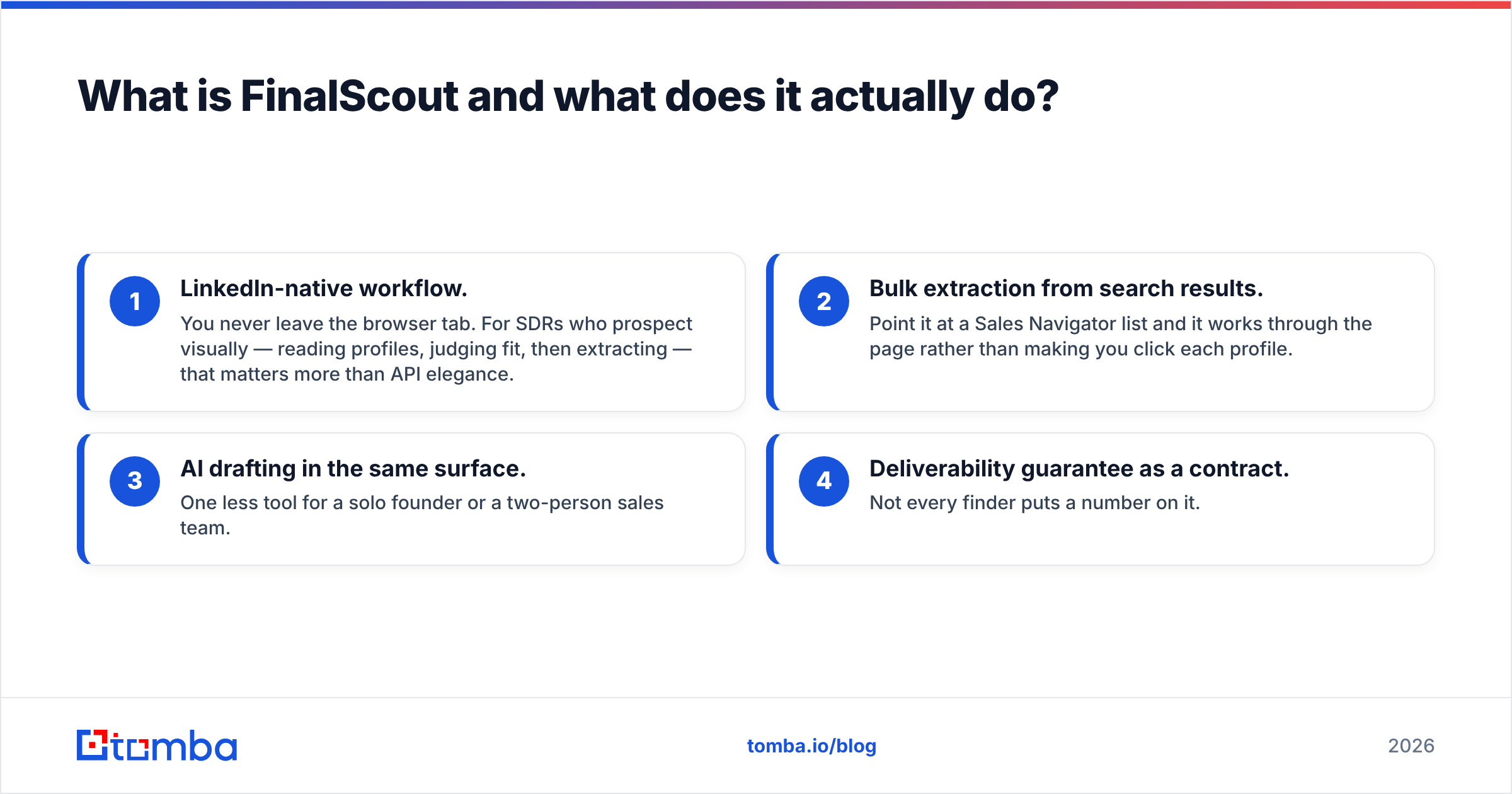
FinalScout is a Chrome extension and web app built around LinkedIn. You open a profile, a search page, a Sales Navigator list, or a group. FinalScout pulls the person's work email and drops it into a list. It also ships an AI email writer. You can draft a first message from the profile without leaving the tool.
The pitch is a "98% deliverability guarantee." In plain terms: fewer than 2 in 100 addresses should bounce. FinalScout hits that number by staying quiet when it is unsure. So coverage drops on niche lists and on markets outside the US. That trade is the right one. Just plan for it. A 400-profile search rarely returns 400 emails.
Where FinalScout is strong:
- LinkedIn-native workflow. You never leave the tab. Reps who judge fit by reading profiles care about that more than API design.
- Bulk pulls from search results. Point it at a Sales Navigator list. It works through the page for you.
- AI drafting in the same place. One less tool for a founder or a two-person sales team.
- A stated bounce guarantee. Few finders put a number on it.
Where it gets thin: it is not a list-cleaning tool. Feed it 50,000 addresses you bought elsewhere and it has nothing to say. It also does not remove LinkedIn account risk. Heavy extension use is your risk to manage, not the vendor's. The full feature set lives on finalscout.com.
What is MyEmailVerifier and where does it fit?#
MyEmailVerifier does one job. You hand it a list of addresses. It tells you which ones will land. It runs syntax checks, MX lookups, and SMTP handshakes. It spots role accounts like info@ and sales@. It flags throwaway domains and catch-all domains. Each address lands in one of four buckets: valid, invalid, catch-all, or unknown.
There is no discovery layer. It will never hand you a new contact. What it will do is read your 12,000-row event export, or a two-year-old CRM segment, and tell you 3,100 rows are dead. Better to know that before you burn your sending domain.
Pricing is the main draw. You buy credits as you go, and they never expire. The price per email drops sharply at volume. Agencies clean client lists in bursts, so that beats a monthly plan that wipes unused credits. Rates are published at myemailverifier.com and shift now and then. Check the live page before you budget.
FinalScout vs MyEmailVerifier: a feature-by-feature comparison#
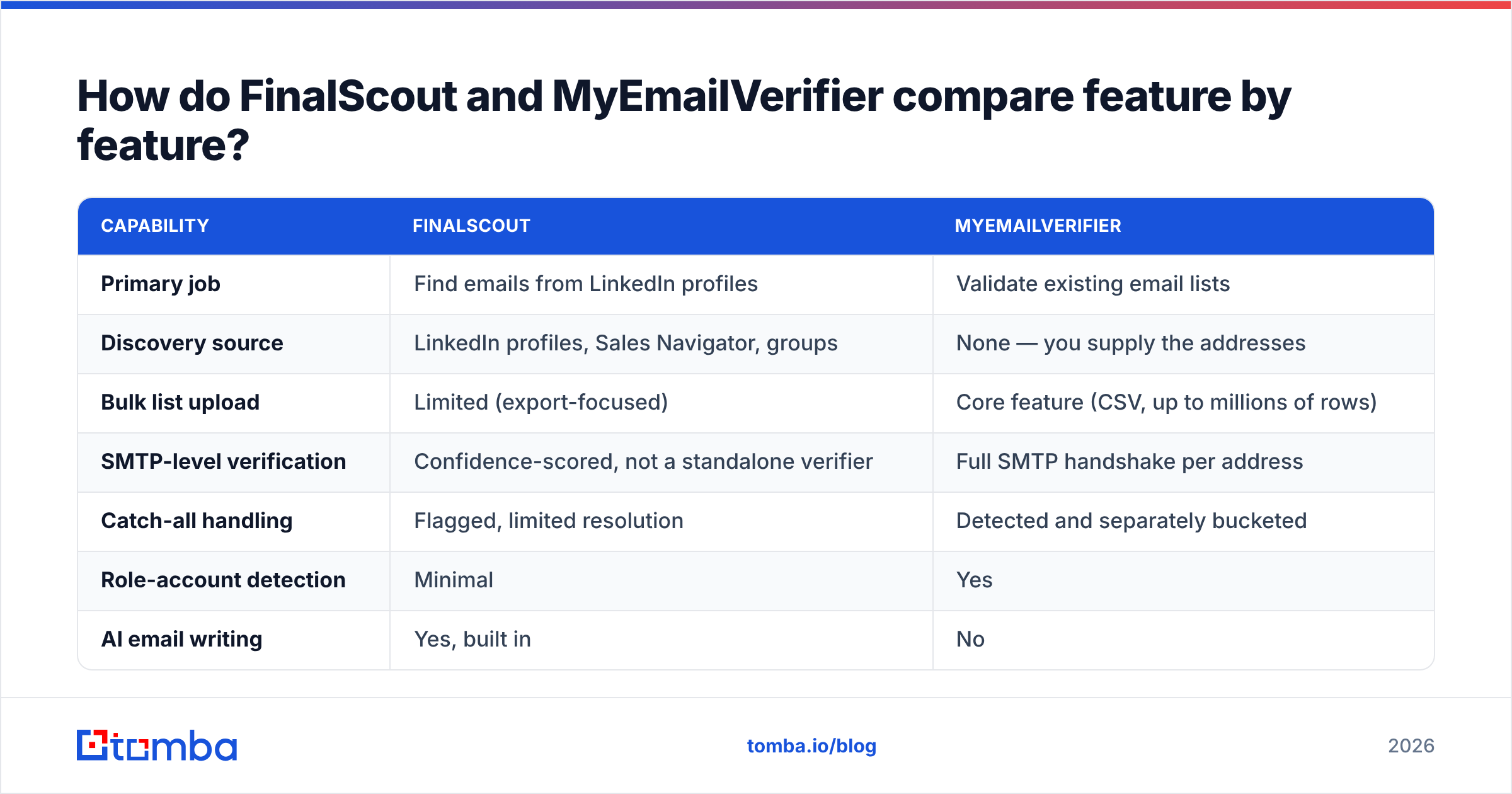
The honest question is not which tool is better. It is which half of the pipeline you are buying. Here is the split:
| Capability | FinalScout | MyEmailVerifier |
|---|---|---|
| Primary job | Find emails from LinkedIn profiles | Validate existing email lists |
| Discovery source | LinkedIn profiles, Sales Navigator, groups | None — you supply the addresses |
| Bulk list upload | Limited (export-focused) | Core feature (CSV, up to millions of rows) |
| SMTP-level verification | Confidence-scored, not a standalone verifier | Full SMTP handshake per address |
| Catch-all handling | Flagged, limited resolution | Detected and separately bucketed |
| Role-account detection | Minimal | Yes |
| AI email writing | Yes, built in | No |
| Chrome extension | Yes, central to the product | No |
| API access | Limited on lower tiers | Yes, real-time single + bulk |
| Typical buyer | SDR, founder, recruiter | RevOps, agency, email marketer |
| Credit expiry | Monthly reset on subscriptions | Pay-as-you-go credits do not expire |
The pattern is clear. There is almost no overlap. Buy only FinalScout and you will mail stale addresses six weeks later. Buy only MyEmailVerifier and you have nothing to check until someone else sources the data.

Which one is more accurate?#
The two scores do not compare. FinalScout is judged on the profiles where it returns an address. Of those, how many are right? MyEmailVerifier is judged on the addresses you submit. Of those, how many does it label right?
You can still run a fair test. Do it before you spend money.
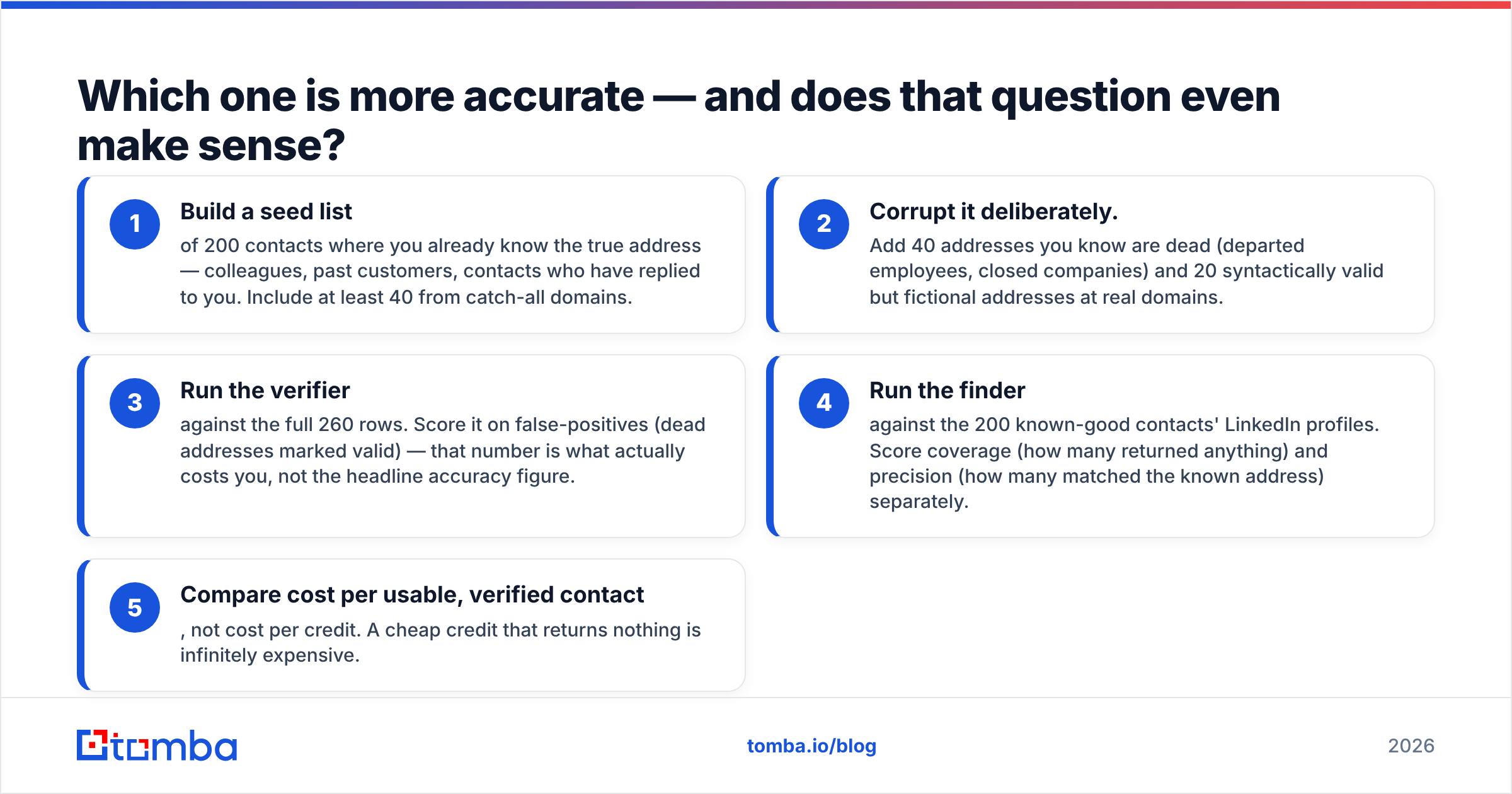
The 200-row control test — build the list:
- Start with 200 known contacts. Use colleagues, past buyers, and people who have replied to you. Include at least 40 on catch-all domains.
- Break the list on purpose. Add 40 dead addresses, such as staff who left or firms that closed. Then add 20 fake addresses at real domains.
Then score both tools:
- Run the verifier on all 260 rows. Count false positives: dead addresses marked valid. That number is what costs you money.
- Run the finder on the 200 known profiles. Score coverage and precision on their own. Coverage is how often it returns anything. Precision is how often it matches the true address.
- Compare cost per usable contact, not cost per credit. A cheap credit that returns nothing is not cheap.

We have run that test across many tools. On verification, good vendors sit close together. False-positive rates differ by a few points at most. On discovery, the gap is huge. The best and worst tool can sit 30 points apart on the same list. Spend your test time there. For a wider sanity check, the G2 category pages for email verification help. They show patterns across hundreds of reviews instead of one loud opinion.
What do FinalScout and MyEmailVerifier cost in 2026?#
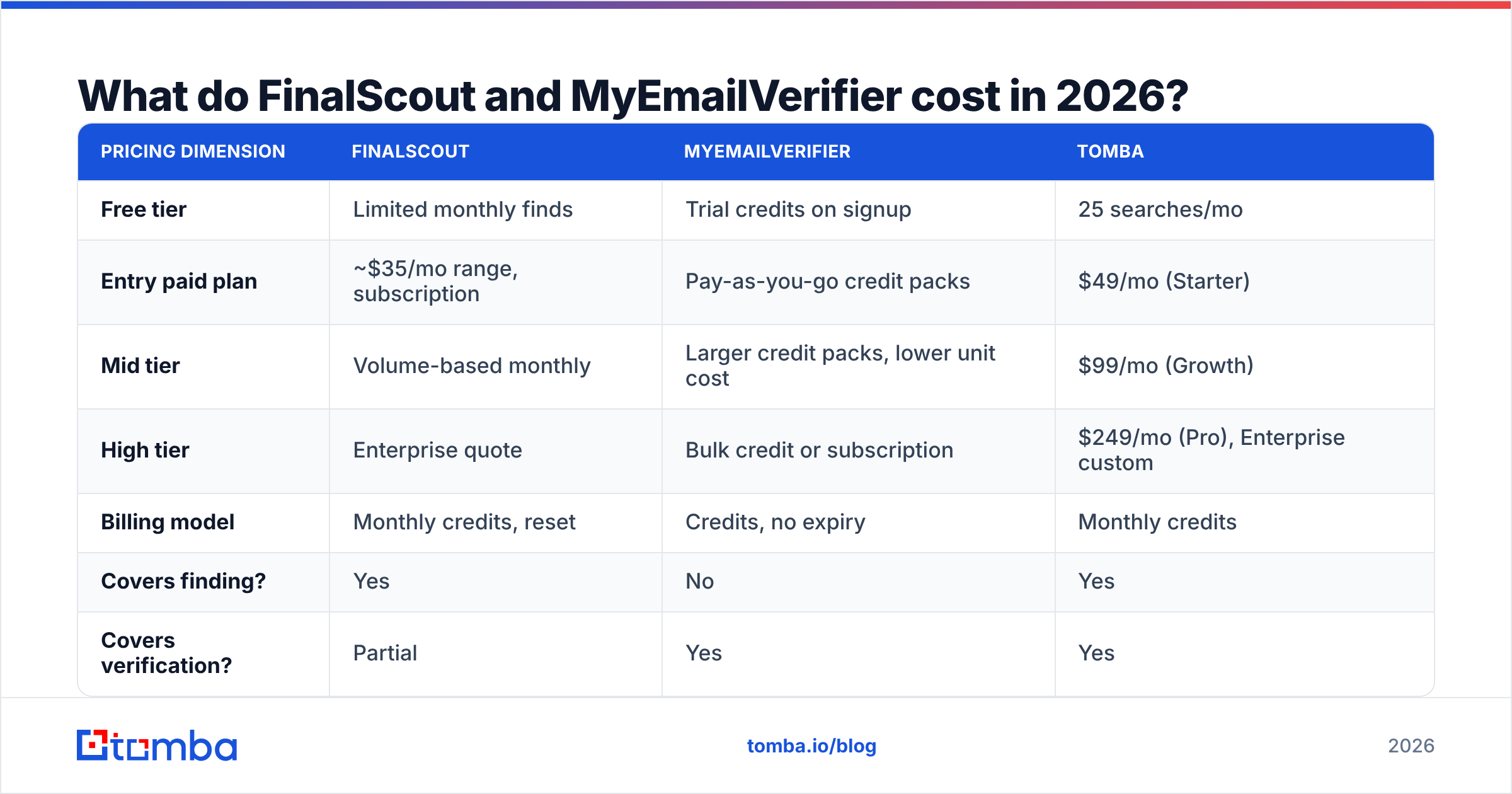
Both vendors change prices often. Treat these as directional and confirm on the live pages. The billing model matters more than the exact number.
| Pricing dimension | FinalScout | MyEmailVerifier | Tomba |
|---|---|---|---|
| Free tier | Limited monthly finds | Trial credits on signup | 25 searches/mo |
| Entry paid plan | ~$35/mo range, subscription | Pay-as-you-go credit packs | $49/mo (Starter) |
| Mid tier | Volume-based monthly | Larger credit packs, lower unit cost | $99/mo (Growth) |
| High tier | Enterprise quote | Bulk credit or subscription | $249/mo (Pro), Enterprise custom |
| Billing model | Monthly credits, reset | Credits, no expiry | Monthly credits |
| Covers finding? | Yes | No | Yes |
| Covers verification? | Partial | Yes | Yes |
| API included | Higher tiers | Yes | All paid tiers |
The stack math surprises people. Run both tools at modest volume and you land near $60–90 a month. That is before you send a single email. You also keep a manual export and import step. Tomba pricing starts at $49 a month and covers both jobs from one credit pool. That is the usual reason teams merge tools. It is rarely about accuracy.
One more case is worth naming. Maybe your problem is not finding or checking. Maybe you want to buy a ready-made list. Then neither tool fits. Vendors like BookYourData sell verified records outright. That is a different purchase. You pay for reach into a segment you cannot source yourself. Some teams pair a database for market coverage with a finder for daily gaps. That combination works well.
Do you actually need both tools?#
Only if you have two separate data problems. Find yourself here:
- You prospect on LinkedIn in small batches, under 500 a month. FinalScout alone is fine. Its own filter does enough at that size.
- You inherit lists from events, webinars, partners, or an old CRM. MyEmailVerifier alone is fine. Nothing needs finding. Everything needs cleaning.
- You do both at real volume. Two bills plus a CSV shuffle adds friction every week. Merge the tools.
- You need enrichment inside a product or a workflow. Neither tool is built API-first. Look at platforms where the email finder API and the verify endpoint are the main interface.
The CSV shuffle deserves a warning. Every export and import adds a delay between finding and checking. Contact data goes stale at roughly 2–3% a month as people change jobs. So an address found in January and checked in March only proves an old snapshot. Checking at the moment of discovery is not a convenience. It is a data quality feature.

How do catch-all domains break both tools?#
A catch-all domain accepts every address, whether the mailbox exists or not. Roughly 15–20% of B2B domains work this way. Most of them sit in enterprise, often on certain Microsoft 365 setups.
For a verifier, SMTP alone cannot answer the question. The server says yes to everything. MyEmailVerifier puts these in their own bucket instead of guessing. That is the honest call. Some vendors mark them "valid" to lift their pass rate. Still, an honest "unknown" leaves you to decide.
For a finder, catch-all domains fake success. The tool guesses a pattern address. The SMTP check passes, because everything passes. You get a confident result that may be a guess. This is the biggest hidden source of bounces in cold outreach.
Fixing it takes a different method. You need pattern data from many known-good addresses at the same domain, plus signals from other sources. A dedicated catch-all verifier clears a real share of that bucket instead of handing it back to you. If much of your market sits on enterprise domains, score catch-all handling as a main criterion.
Which should you choose in 2026?#
| Your situation | Best fit |
|---|---|
| LinkedIn-only prospecting, low volume, want AI drafting | FinalScout |
| Cleaning purchased or inherited lists, sporadic volume | MyEmailVerifier |
| Agency verifying many client lists, no discovery need | MyEmailVerifier (credits don't expire) |
| Finding + verifying weekly, want one bill | Consolidated platform |
| Building enrichment into a product or automation | API-first platform |
| Heavy enterprise/catch-all ICP | Platform with dedicated catch-all resolution |
Here is the neutral verdict on FinalScout vs MyEmailVerifier. Neither tool is wrong for the job it was built for. Neither one replaces the other. FinalScout is a solid LinkedIn workflow with a real bounce promise behind it. MyEmailVerifier is a fair-priced verify engine, and the no-expiry credits suit uneven usage. The mistake is buying both and calling it a stack. That is two tools, two invoices, and a manual step that quietly ages your data.
Run the 200-row control test on your own segment first. Vendor claims all look alike. Results on your list will not.
Ready to skip the two-tool shuffle?#
Maybe you found this page while exporting from a finder and importing into a verifier every week. That workflow is the thing to fix. The vendor choice is secondary. Tomba's Email Finder looks up addresses by name, domain, or company. It verifies them in the same call. So the address you get back is already checked against SMTP, catch-all logic, and role-account rules before it reaches your sequence.
The free tier gives you 25 searches a month. That is enough to run the control test above on your own known-good list, with no credit card. Start there. Score the results yourself. Let the numbers pick your stack.
Related guides#
Ready to find emails that actually work?
Join 150,000+ professionals who stopped guessing and started sending. Free credits on signup — no credit card required.
Get the Tomba newsletter
Practical outbound tactics and product updates — once every two weeks.
About the author