FinalScout vs OneMoreLead: Which Email Finder Wins in 2026
FinalScout scrapes LinkedIn profiles for emails. OneMoreLead sells you a pre-built B2B list. They solve different problems badly if you pick wrong — here's the honest breakdown, with pricing, accuracy and the workflows each one actually fits.
FinalScout vs OneMoreLead comes down to one question: do you need to find people, or find their emails? FinalScout reads a LinkedIn profile and returns a work address. OneMoreLead hands you a ready-made list of US B2B contacts. Both sell "more leads," but they get there in opposite ways. Pick the wrong one and you waste a quarter of outbound. Here is the short version first.
TL;DR
- FinalScout is a LinkedIn-first email finder. You browse or scrape profiles, and it resolves the work email from the profile. Best when your prospect list already lives in Sales Navigator.
- OneMoreLead is a pre-built B2B contact database. You filter a static index — mostly US, tens of millions of rows — and export a list. Best when you want volume fast.
- They are not substitutes. One turns a person you already found into an email. The other finds the people. Buying the wrong one is the classic mistake with this pair.
Three more points decide most FinalScout vs OneMoreLead calls:
- Accuracy decays in different ways. Profile finders slip when someone changes jobs. Static databases age on a refresh schedule you don't control. Verify before you send, either way.
- Volume and precision pull apart. Per-profile lookups are slow but sharp. List exports are fast but blunt.
- A split stack often beats both. Pair a domain search tool with a separate verifier (Tomba, Hunter, Findymail class). It usually costs less per usable contact.
What are FinalScout and OneMoreLead?#
FinalScout is a Chrome extension built around LinkedIn. You open a profile, a search page, a group, or a Sales Navigator list. The extension pulls the contacts and tries to resolve each person's work email. It also drafts a first line with AI. The pitch: find the person, get the address, write the opener, export.
OneMoreLead is the opposite build. It is a searchable B2B contact database. You filter by industry, job title, company size, location, and tech stack, then export the rows. There is no browsing step, and you never touch LinkedIn. You define a segment and receive records.
That split explains nearly every other difference between them: cost model, accuracy profile, refresh behavior, compliance posture, and which team should buy which.
How do FinalScout and OneMoreLead source data differently?#
This is the section that decides your purchase, so here it is in plain terms.
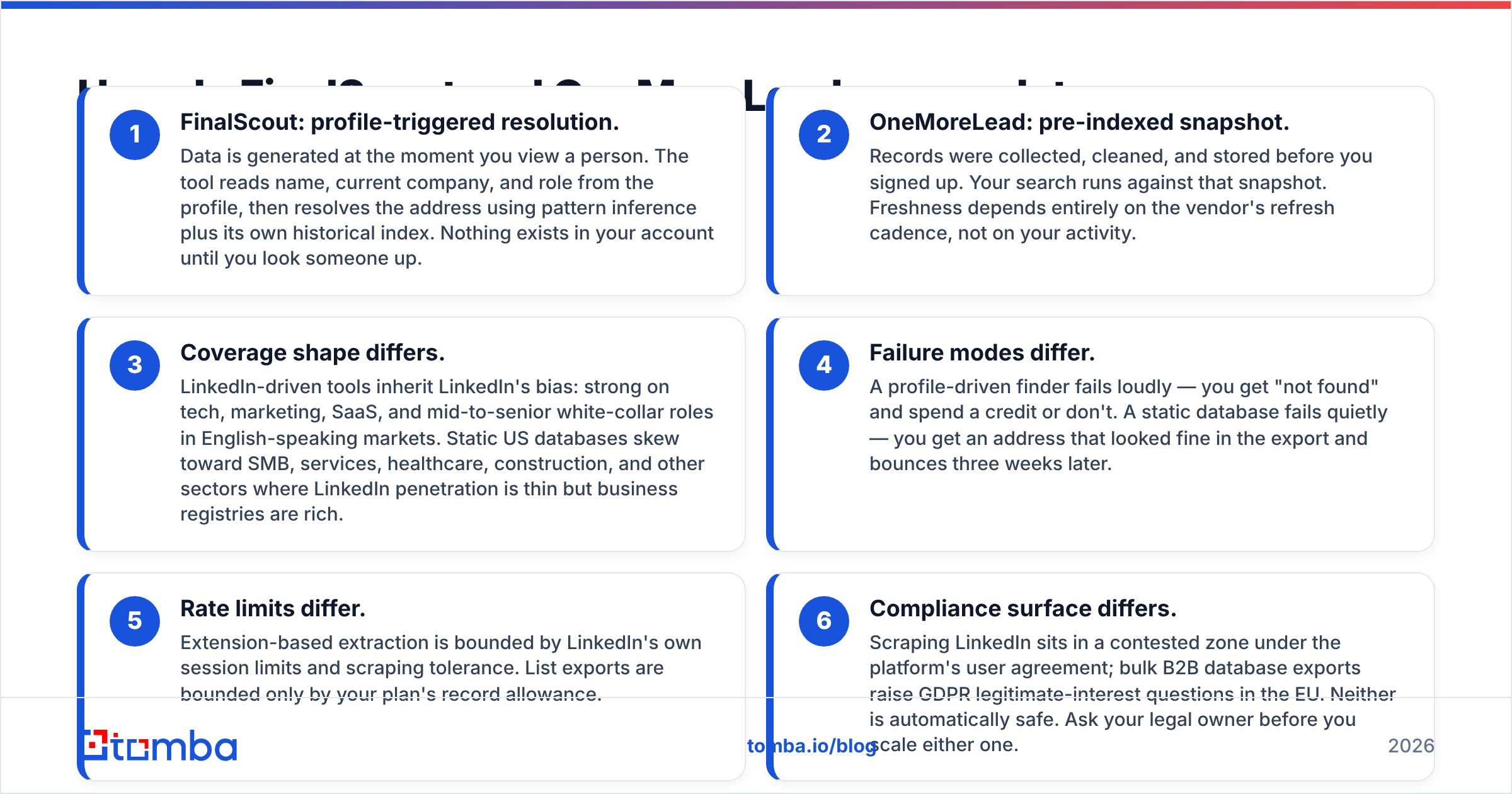
- FinalScout: profile-triggered resolution. Data appears the moment you view a person. The tool reads the name, company, and role, then resolves the address from pattern inference and its own index. Nothing sits in your account until you look someone up.
- OneMoreLead: pre-indexed snapshot. Records were collected and cleaned before you signed up. Your search runs against that snapshot. Freshness depends on the vendor's refresh cadence, not on your activity.
- Coverage leans in different directions. LinkedIn tools inherit LinkedIn's bias: tech, marketing, SaaS, and senior white-collar roles in English-speaking markets. US databases lean toward SMB, services, healthcare, and construction, where LinkedIn is thin but business registries are rich.
The other half of the FinalScout vs OneMoreLead data question is what happens when a lookup goes wrong.
- Failure modes differ. A profile finder fails loudly. You get "not found" and either spend a credit or don't. A database fails quietly. The address looks fine in the export and bounces three weeks later.
- Limits differ. Extension scraping is capped by LinkedIn's own session limits. List exports are capped only by your plan's record allowance.
- Compliance risk differs. Scraping LinkedIn sits in a contested zone under the platform's user agreement. Bulk B2B exports raise GDPR legitimate-interest questions in the EU. Neither is automatically safe. Ask your legal owner before you scale either one.

Which is more accurate for cold outreach?#
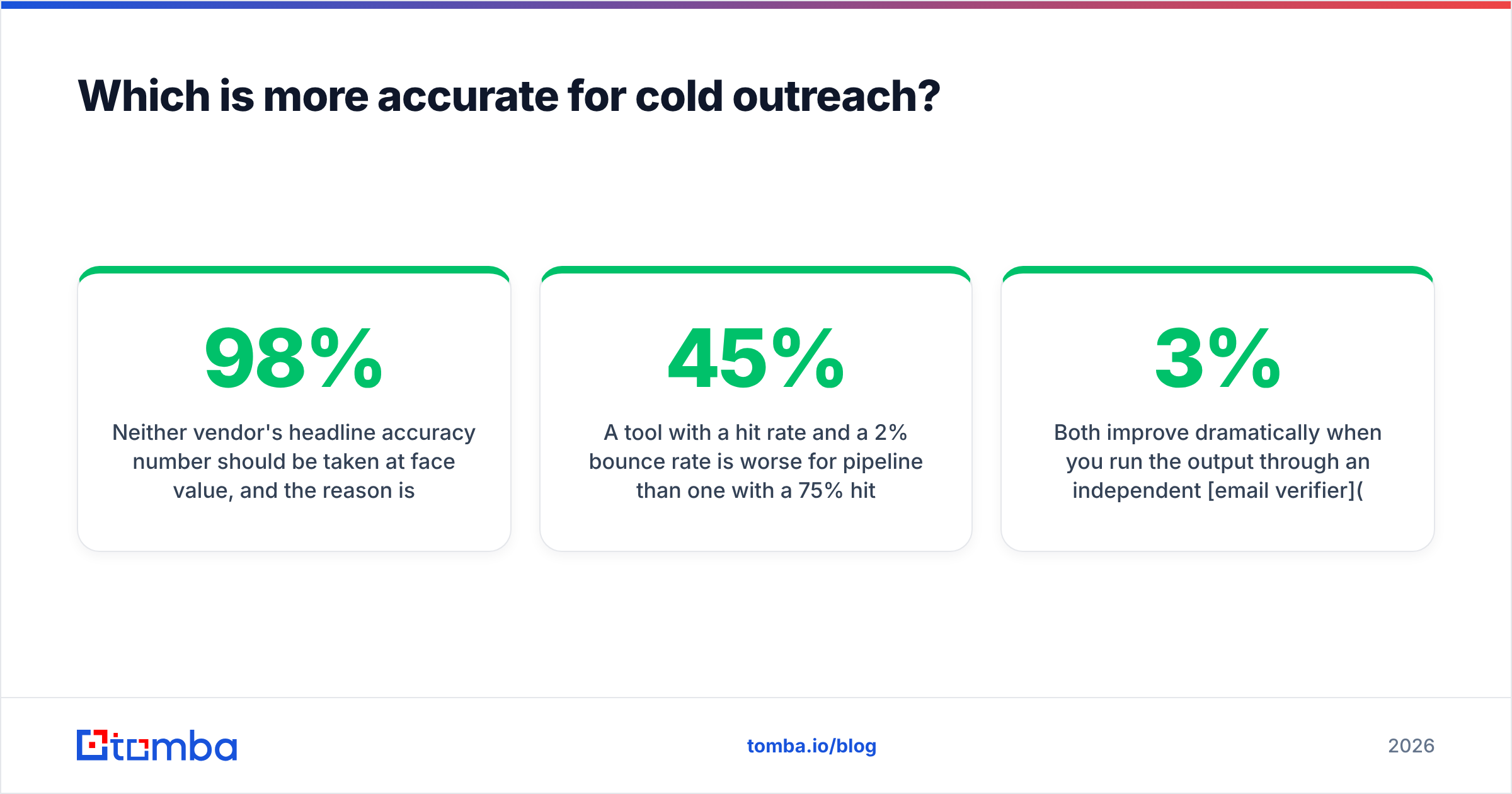
Take no headline accuracy number at face value. The problem is method, not honesty. "98% deliverability" usually means one thing: of the emails the tool returned as valid, 98% did not hard bounce in an internal test. It says nothing about the people the tool skipped. That gap is where most of your list leaks.
Use two separate numbers instead:
- Hit rate — of 100 real prospects you asked about, how many addresses came back at all?
- Bounce rate — of the addresses returned, how many failed at send time?
A tool with a 45% hit rate and a 2% bounce rate builds less pipeline than one at 75% and 5%. The first looks better on a landing page. It performs worse.

Here is the pattern we see when teams benchmark FinalScout vs OneMoreLead style tools side by side:
- LinkedIn finders do well on senior roles at companies with predictable email patterns. They do poorly on anyone who changed jobs in the last 90 days. The profile updates faster than the email index.
- Static databases do well on volume and on long-tail SMB coverage. They do poorly on role accuracy. The title in the row is the title from the last refresh, not today's.
- Both improve a lot when you run the output through an independent email verifier before import. If your ESP rejects more than 3% of a list, you are hurting sender reputation faster than the extra contacts can pay you back.
Run your own 200-contact test on your real ICP before you sign an annual deal. Vendor benchmarks use vendor-friendly samples.
How do FinalScout and OneMoreLead compare on pricing and features?#
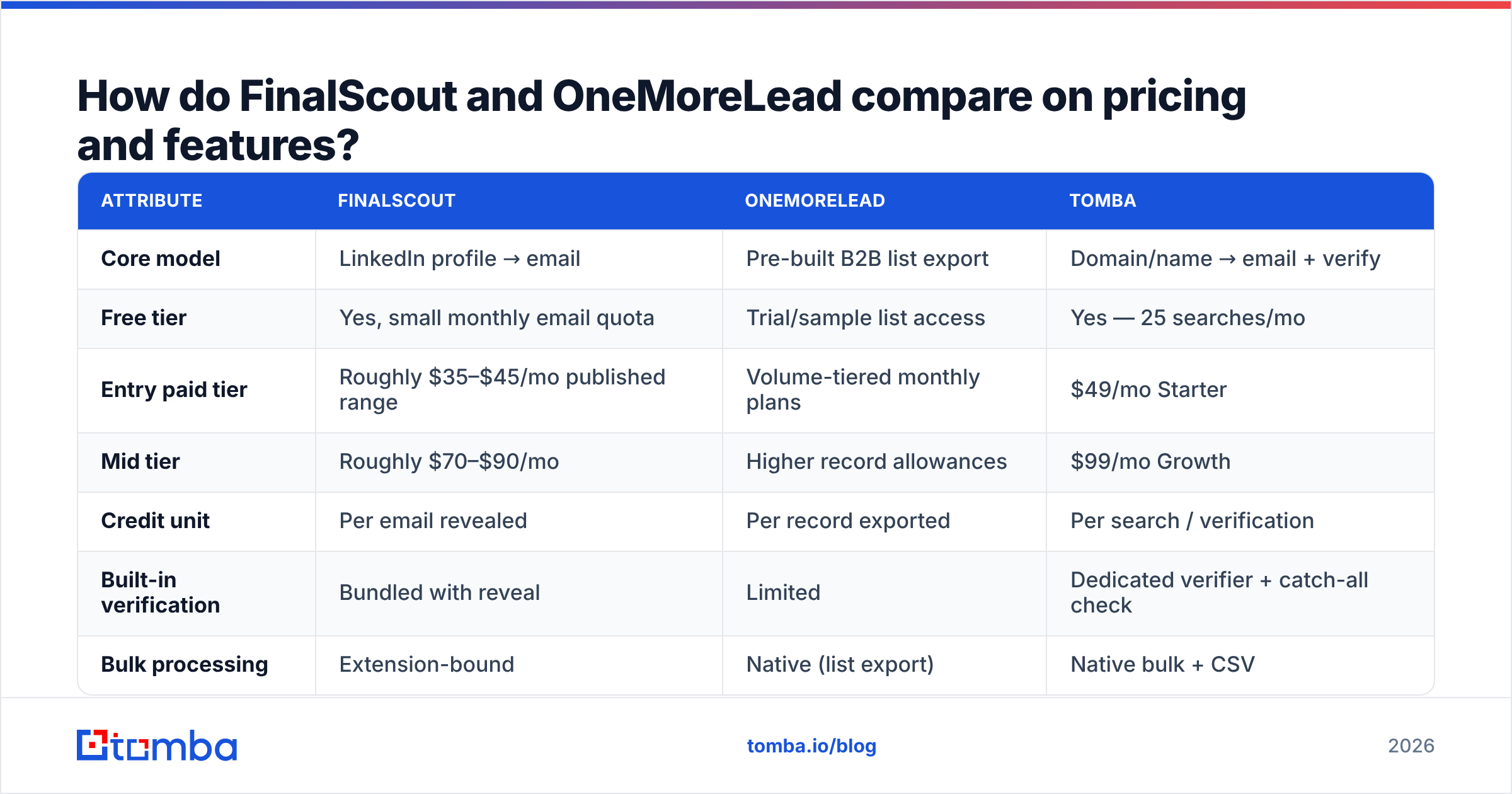
Both vendors change plans often. Treat the table as the published shape of each offer at the time of writing, and confirm on the vendor page before you buy.
| Attribute | FinalScout | OneMoreLead | Tomba |
|---|---|---|---|
| Core model | LinkedIn profile → email | Pre-built B2B list export | Domain/name → email + verify |
| Free tier | Yes, small monthly email quota | Trial/sample list access | Yes — 25 searches/mo |
| Entry paid tier | Roughly $35–$45/mo published range | Volume-tiered monthly plans | $49/mo Starter |
| Mid tier | Roughly $70–$90/mo | Higher record allowances | $99/mo Growth |
| Credit unit | Per email revealed | Per record exported | Per search / verification |
| Built-in verification | Bundled with reveal | Limited | Dedicated verifier + catch-all check |
| Bulk processing | Extension-bound | Native (list export) | Native bulk + CSV |
| API access | Limited | Limited | Full REST API |
| Chrome extension | Yes (core product) | No | Yes |
| Geographic strength | Global, LinkedIn-weighted | Heavily US | Global |
| Best for | SDRs living in Sales Navigator | High-volume US list building | Teams needing find + verify + API |

Most people get the FinalScout vs OneMoreLead cost math wrong. Price per usable contact, not per credit. A $0.03 record that bounces costs more than a $0.10 record that lands. Bounces compound: they hurt domain reputation, which lowers inbox placement for the good addresses in the same batch. Price the whole funnel. Check the published Tomba pricing tiers the same way. Credits are only cheap if they convert.
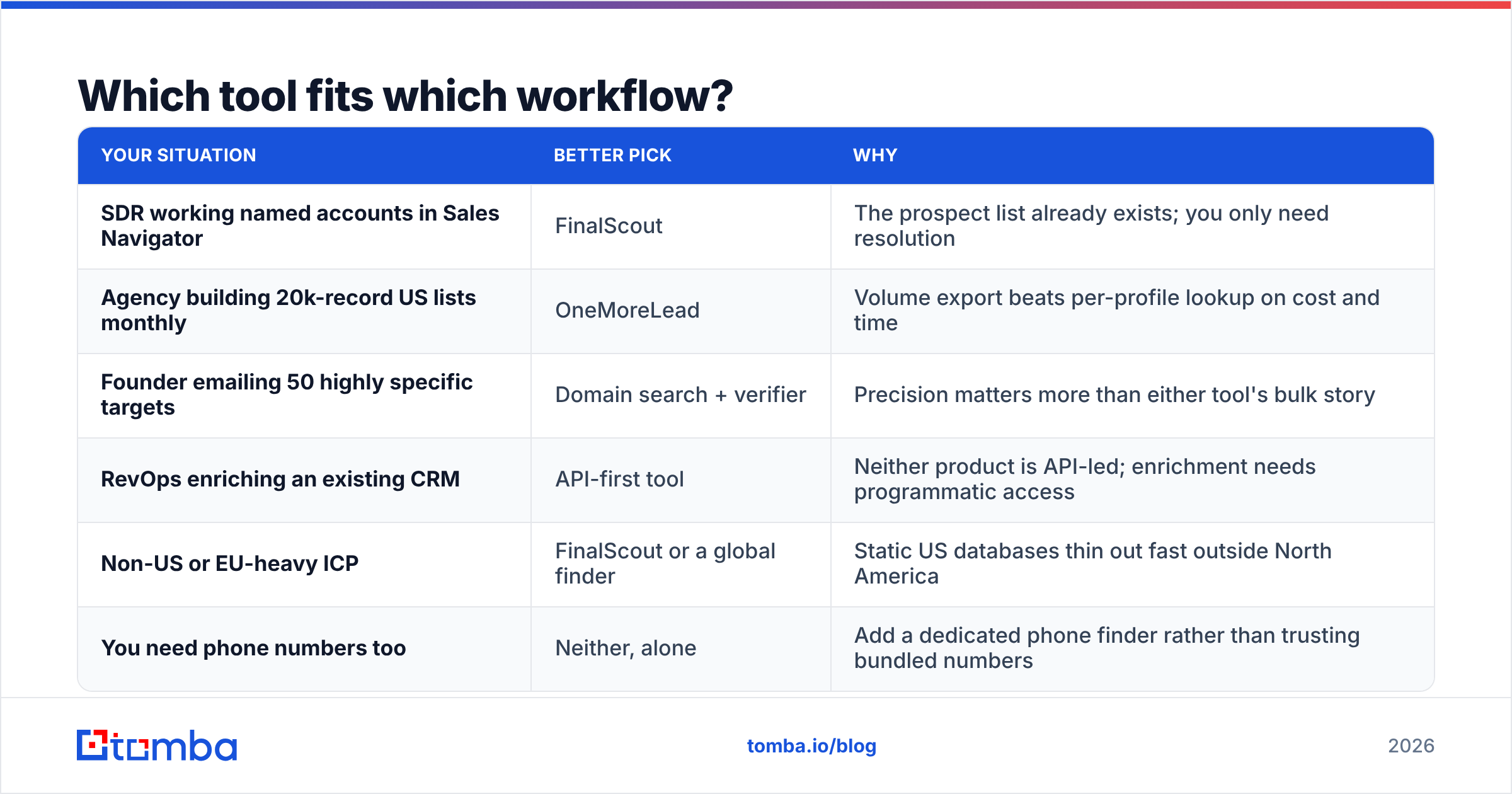
Which tool fits which workflow?#
| Your situation | Better pick | Why |
|---|---|---|
| SDR working named accounts in Sales Navigator | FinalScout | The prospect list already exists; you only need resolution |
| Agency building 20k-record US lists monthly | OneMoreLead | Volume export beats per-profile lookup on cost and time |
| Founder emailing 50 highly specific targets | Domain search + verifier | Precision matters more than either tool's bulk story |
| RevOps enriching an existing CRM | API-first tool | Neither product is API-led; enrichment needs programmatic access |
| Non-US or EU-heavy ICP | FinalScout or a global finder | Static US databases thin out fast outside North America |
| You need phone numbers too | Neither, alone | Add a dedicated phone finder rather than trusting bundled numbers |
One habit is worth stealing whatever you buy. Use one tool to discover and a different, independent tool to verify. When a single vendor finds and validates the same address, it is grading its own homework. Splitting the two catches errors neither would flag alone. It also costs less than the bounced sends it prevents.
What do real users complain about?#
Read reviews on G2 with the date filter on. Anything older than 18 months describes a product that no longer exists. In the FinalScout vs OneMoreLead threads, the same themes repeat.
On LinkedIn-based finders (FinalScout's category):
- Credit burn on failed lookups, or on a personal Gmail returned when you wanted a work address.
- Extension breakage after LinkedIn UI changes. That is a real risk when your pipeline depends on it.
- Job-change lag. The profile shows the new company; the email resolves to the old one.
- Sales Navigator dependency, a second subscription most teams forget to budget.
On static B2B databases (OneMoreLead's category):
- Freshness. Records from 12+ months ago carry stale titles and departed staff.
- Thin segments outside core US SMB verticals.
- Export-then-discover. You pay for the list before you can measure it. Per-lookup pricing lets you abandon bad results cheaply.
- Duplicates across exports. Run a remove duplicates pass on anything you buy in bulk.

Is there a better option than either one?#
Often, yes. The real question is not "which of these two." It is "what does my outbound motion actually need?"
If your prospecting starts from companies rather than individuals, neither tool fits well. Use domain search: give it a company domain, get back the people, their roles, and the company's email pattern. That flips the workflow. You build account by account, with a full view of who exists.
If your prospecting starts from LinkedIn, a dedicated LinkedIn finder covers FinalScout's core job. Pair it with a separate verifier for the second opinion bundled tools can't give you.
If your bottleneck is scale, use a bulk pipeline: CSV in, verified contacts out. It beats an extension (rate-limited by the platform) and a static export (quality unknown until after purchase). With engineering time, an API-first vendor drops the manual step entirely.
Three questions settle it faster than any feature matrix:
- Where does your list start? LinkedIn profiles, company domains, or a filter query? That answer alone rules out one of these two tools.
- What bounce rate can you accept? Under 2% means you need standalone verification, whatever you buy.
- Do you need this in code? If yes, both FinalScout and OneMoreLead are the wrong shape.
What is the verdict on FinalScout vs OneMoreLead?#
Pick FinalScout if you live in LinkedIn, work a named account list, and want one extension that turns profiles into sendable contacts. It is the better tool for precision work at moderate volume.
Pick OneMoreLead if you need thousands of US B2B records this week, your ICP is SMB or services, and verification is already handled downstream. It is the better tool for volume at low unit cost, as long as you budget for cleaning.
Pick neither if you need API access, coverage outside LinkedIn's strong markets, or one system that finds and independently validates addresses. That is a third-category problem. Buying either of these to solve it will cost you a quarter of wasted outbound.
Whatever you choose, verify before you send. The cheapest contact in your CRM is the one that doesn't burn your domain.
Ready to test a different approach? Try the Tomba Email Finder. Search by domain, name, or company, and get confidence-scored results with built-in verification. The free tier gives you 25 searches a month before you decide between $49/mo Starter and $99/mo Growth. Run the same 200-contact benchmark you would run on FinalScout vs OneMoreLead, then compare hit rate and bounce rate side by side. That test costs nothing and settles the argument with your own data.
Related guides#
Ready to find emails that actually work?
Join 150,000+ professionals who stopped guessing and started sending. Free credits on signup — no credit card required.
Get the Tomba newsletter
Practical outbound tactics and product updates — once every two weeks.
About the author