FinalScout vs RemoveBounce: Which Email Tool Wins in 2026?
One scrapes LinkedIn profiles into emails. The other only cleans lists you already have. Here's how FinalScout and RemoveBounce actually compare on accuracy, cost, and coverage in 2026 — and when you need neither.
TL;DR
- FinalScout and RemoveBounce are not really competitors. FinalScout finds emails from LinkedIn profiles; RemoveBounce verifies lists you already own. Comparing them head-to-head only makes sense once you know which half of the problem you have.
- If your entire prospecting motion lives inside LinkedIn Sales Navigator, FinalScout is the more useful of the two. If you buy or inherit lists and just need bounce protection, RemoveBounce is the cheaper line item.
- Neither tool covers the full loop. Buying both means two subscriptions, two credit systems, and two support queues for what a single find-plus-verify platform does in one API call.
- Verification quality matters more than the marketing number on the homepage. A "98% deliverability" claim means nothing if the tool marks every catch-all domain as "unknown" and hands the risk back to you.
- For most B2B teams in 2026, the right answer is a combined finder + verifier with a real API and transparent per-credit pricing — which is where Tomba pricing tends to undercut the two-tool stack.
What is FinalScout, and what does it actually do?#
FinalScout is a LinkedIn-first email finder. You install a Chrome extension, browse LinkedIn or Sales Navigator, select profiles or a whole search result page, and it exports names plus business email addresses into a list. It also bolts on an AI email writer that drafts outreach copy from the scraped profile.
The pitch on finalscout.com leans on two claims: high deliverability on the emails it returns, and GDPR/CCPA compliance on the data it collects. In practice, the tool is best understood as a LinkedIn scraper with an email-resolution layer on top.
What it does well:
- LinkedIn-native workflow. You never leave the tab you're already prospecting in. For SDRs who live in Sales Navigator, that's real time saved.
- Bulk export from search results. Point it at a filtered Sales Navigator search and pull hundreds of contacts at once instead of clicking profiles one by one.
- AI drafting. The built-in writer produces a first-pass email from the profile's headline and experience. Useful as a starting point, not as a finished sequence.
- Free entry tier. A small monthly credit allowance lets you test match rates on your own ICP before paying.
What it does not do: find emails outside LinkedIn, search by company domain, verify a list you imported from a CRM export, or return phone numbers.
What is RemoveBounce, and where does it fit?#
RemoveBounce sits on the opposite end of the pipeline. It is an email list cleaning and verification service: you upload a CSV, it runs syntax checks, MX record lookups, SMTP handshakes, disposable-domain detection, role-account flagging, and spam-trap screening, then hands back a segmented file.
It does not find anything. Feed it zero addresses and it returns zero addresses. Its job is to take a list of 40,000 addresses of unknown quality and tell you which 32,000 are safe to send to.
The core checks any credible verifier — RemoveBounce included — should run:
- Syntax and formatting — malformed addresses, typos in the local part, illegal characters.
- Domain and MX validation — does the domain resolve, and does it accept mail at all?
- SMTP mailbox check — does the specific inbox exist on that server?
- Disposable and role detection — 10-minute inboxes, plus
info@,sales@,support@addresses that skew reply metrics. - Catch-all identification — domains that accept everything, where a plain SMTP ping proves nothing.
- Known complainer and trap screening — the addresses that damage sender reputation fastest.
Step 5 is the one that separates good verifiers from mediocre ones, and it's where most vendors — including RemoveBounce — quietly return "unknown" and let you decide. A catch-all verifier that actually resolves those domains is worth more than a percentage point on the marketing page.

Is FinalScout better than RemoveBounce?#
Wrong question, and it's the question most comparison pages get lazy about. These tools solve different problems. The honest framing is: which problem do you have right now?
- You have a target account list and no contacts → you need a finder. RemoveBounce is useless here.
- You have 50,000 addresses from a trade show, an old CRM, or a purchased list → you need a verifier. FinalScout is useless here.
- You have both problems, which is the normal state for any outbound team → you need both capabilities, and buying them separately is the expensive way to get there.
Here is the feature-level breakdown.
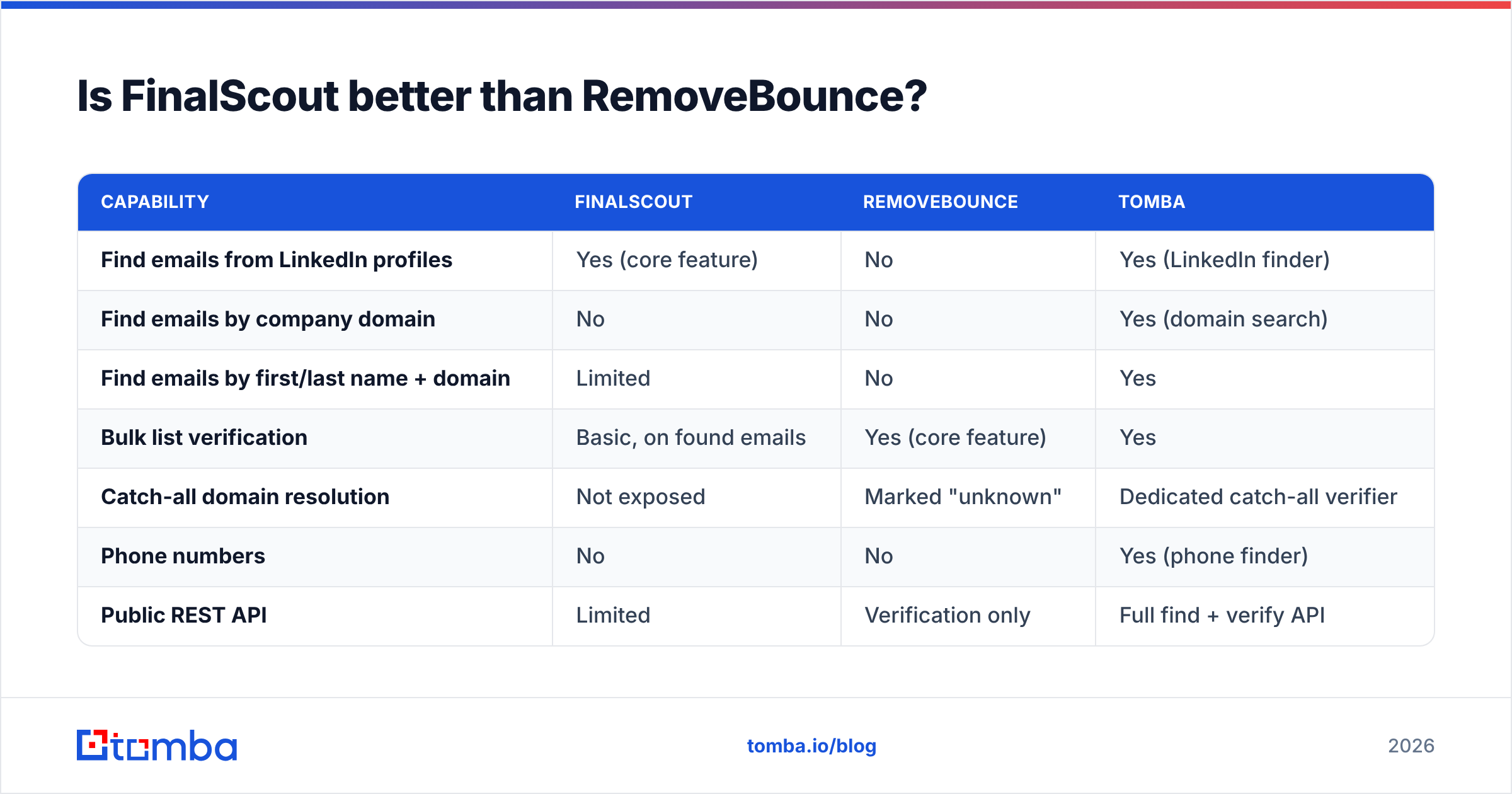
| Capability | FinalScout | RemoveBounce | Tomba |
|---|---|---|---|
| Find emails from LinkedIn profiles | Yes (core feature) | No | Yes (LinkedIn finder) |
| Find emails by company domain | No | No | Yes (domain search) |
| Find emails by first/last name + domain | Limited | No | Yes |
| Bulk list verification | Basic, on found emails | Yes (core feature) | Yes |
| Catch-all domain resolution | Not exposed | Marked "unknown" | Dedicated catch-all verifier |
| Phone numbers | No | No | Yes (phone finder) |
| Public REST API | Limited | Verification only | Full find + verify API |
| Chrome extension | Yes | No | Yes |
| Google Sheets / Excel add-in | No | No | Yes |
| Free tier | ~20 credits/mo | Trial credits | 25 searches/mo |
| AI email drafting | Yes | No | Via free tools |

Which one gives you more valid emails?#
Only one of them gives you emails at all, so the fair version of this question is: how many usable, deliverable contacts does each tool contribute to the end of your pipeline?
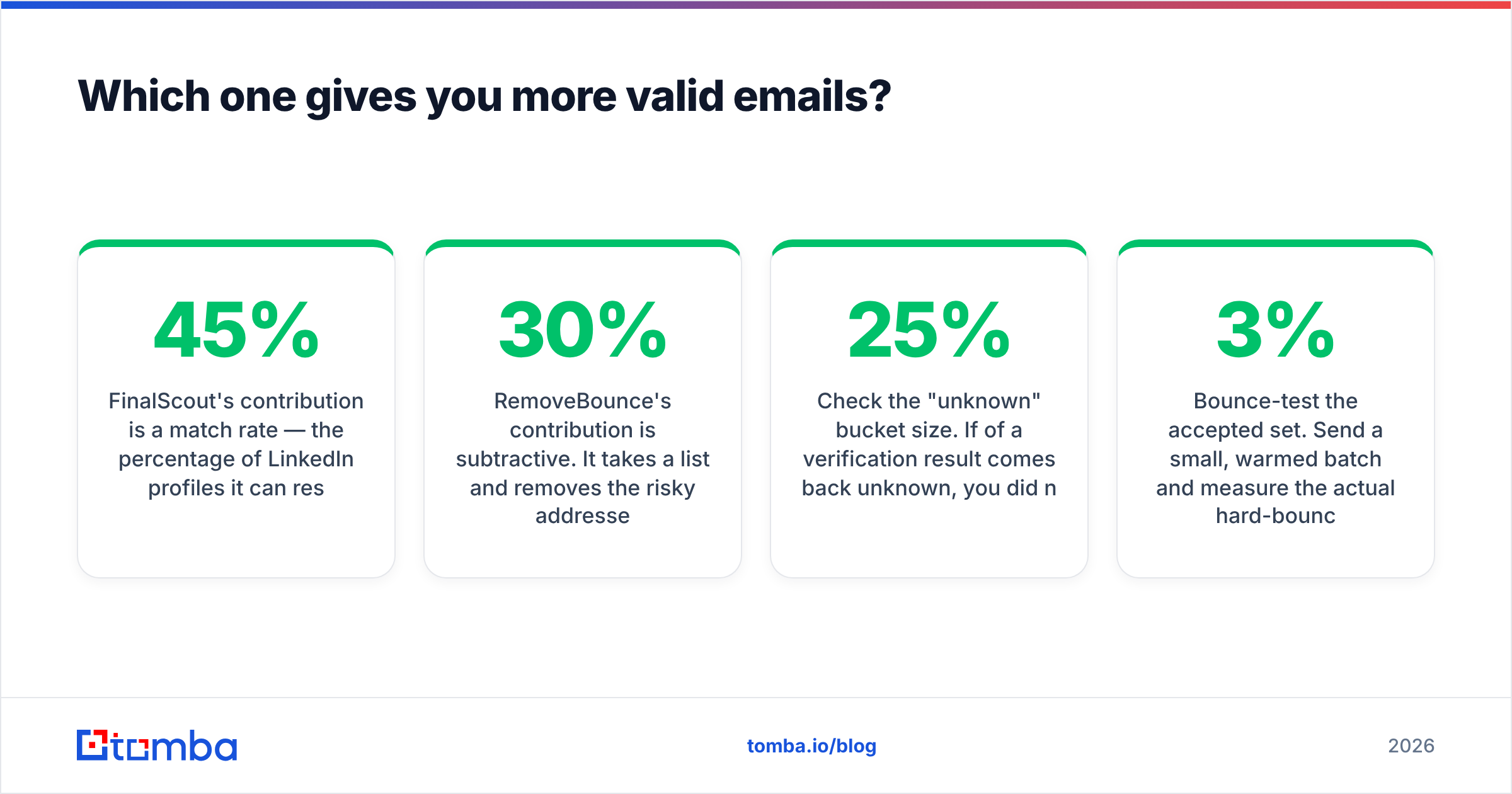
FinalScout's contribution is a match rate — the percentage of LinkedIn profiles it can resolve to a business email. Real-world match rates on LinkedIn-sourced data across the category typically land somewhere between 45% and 70%, depending heavily on the segment. Enterprise tech in North America resolves well. Mid-market manufacturing in Southern Europe does not. Any vendor quoting a single global match rate is quoting a best case.
RemoveBounce's contribution is subtractive. It takes a list and removes the risky addresses. A good verifier on a stale list will typically strip 15–30% of it. That feels like a loss and is actually a gain: those addresses were going to bounce and drag your domain reputation down with them.
Three things to test before you trust either number:
- Run your own sample. Take 200 contacts you already know are valid (customers, colleagues, past deals) and run them through. Match rate on a vendor's demo list is marketing; match rate on your ICP is data.
- Check the "unknown" bucket size. If 25% of a verification result comes back unknown, you did not buy verification — you bought a partial answer and kept the risk.
- Bounce-test the accepted set. Send a small, warmed batch and measure the actual hard-bounce rate. Anything above 3% means the verifier under-delivered, regardless of what the dashboard said. If you need a quick sanity check on a single address, a free email checker is enough.
Accuracy claims are also worth cross-referencing against user reviews on G2 rather than vendor landing pages. Review volume and recency tell you more about a tool's current state than a static "99.9%" badge that has been on the homepage since 2021.
What do FinalScout and RemoveBounce cost in 2026?#
Pricing on both tools moves, and both use credit systems that make sticker comparison awkward. Verify current numbers on the vendor pages before you commit — the shape of the pricing matters more than the exact figure.
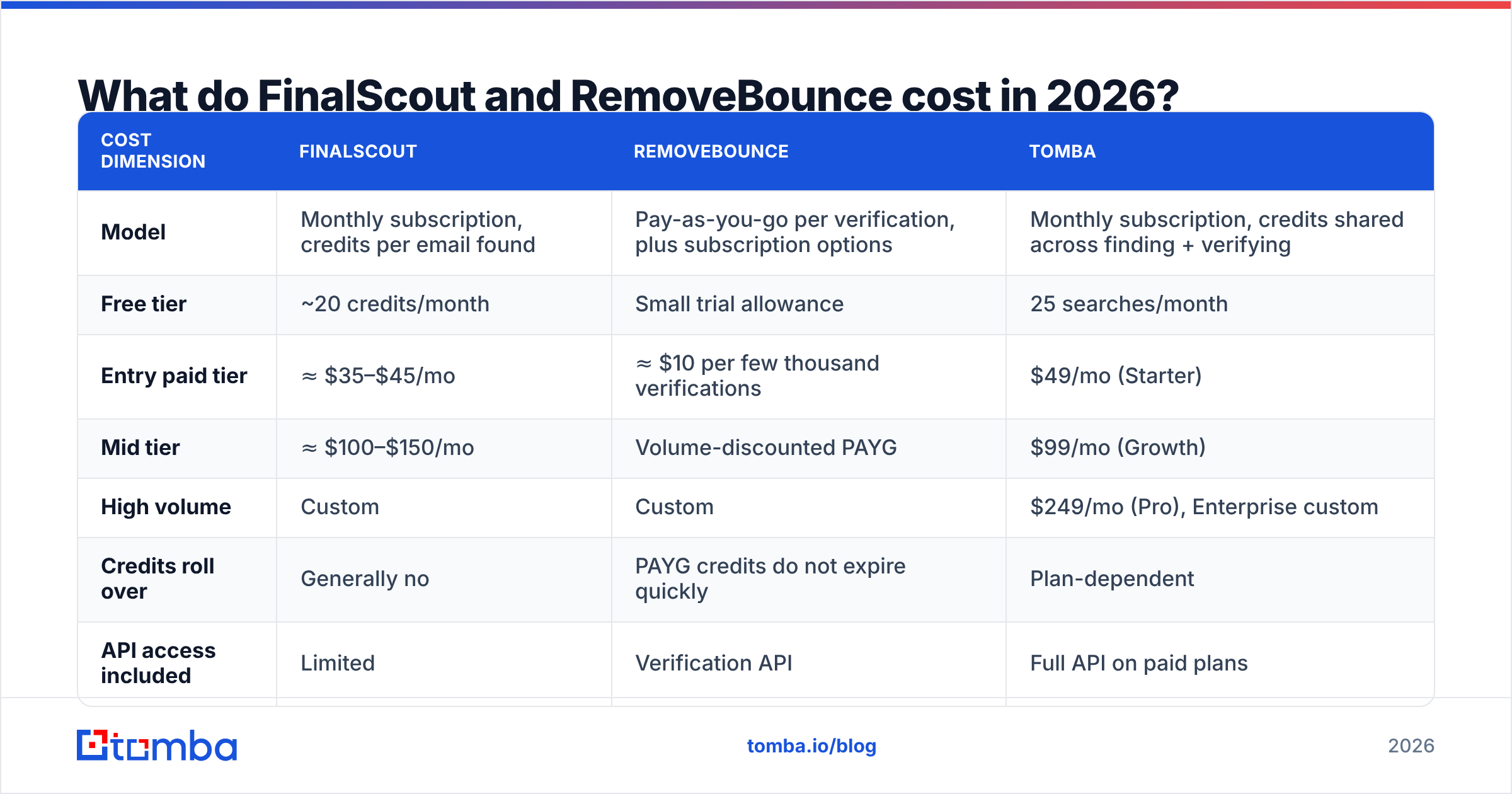
| Cost dimension | FinalScout | RemoveBounce | Tomba |
|---|---|---|---|
| Model | Monthly subscription, credits per email found | Pay-as-you-go per verification, plus subscription options | Monthly subscription, credits shared across finding + verifying |
| Free tier | ~20 credits/month | Small trial allowance | 25 searches/month |
| Entry paid tier | ≈ $35–$45/mo | ≈ $10 per few thousand verifications | $49/mo (Starter) |
| Mid tier | ≈ $100–$150/mo | Volume-discounted PAYG | $99/mo (Growth) |
| High volume | Custom | Custom | $249/mo (Pro), Enterprise custom |
| Credits roll over | Generally no | PAYG credits do not expire quickly | Plan-dependent |
| API access included | Limited | Verification API | Full API on paid plans |
The real cost is not the line item. It's the stack. A team running FinalScout for sourcing plus RemoveBounce for hygiene is paying two vendors, reconciling two credit balances, and moving CSVs between them by hand. Add a third tool for phone numbers and you're maintaining an integration project instead of running outbound.

That's the argument for consolidation, and it's the same argument HubSpot has been making about fragmented sales stacks for years — every extra tool adds a handoff where data quality degrades. Their own sales tooling research is worth reading on this point, even if you have no intention of buying their platform.
Where does each tool break down?#
FinalScout's limits
- LinkedIn dependency is a single point of failure. If your account gets rate-limited, restricted, or you simply run out of Sales Navigator seats, your sourcing stops. Scraping-based tools inherit LinkedIn's enforcement posture, and that posture has tightened every year since 2023.
- No domain-first workflow. When marketing hands you 300 target accounts as a list of company URLs, LinkedIn-first tooling is the wrong shape. You want a domain search that returns everyone at
acme.comwith role and confidence attached. - Verification is a side feature. It exists to make the found emails look good, not to clean an external list of 80,000 records.
- AI drafting is generic. Profile-derived copy reads like profile-derived copy. It clears the blank-page problem and nothing else.
RemoveBounce's limits
- It is not a growth tool. It reduces risk; it does not add pipeline. Budget owners who expect a verifier to increase meetings booked will be disappointed.
- Catch-all ambiguity. Roughly one in five B2B domains is catch-all. If those come back "unknown," you're guessing on a fifth of your list.
- Batch-oriented. CSV in, CSV out is fine for quarterly cleanups and painful for real-time enrichment at form-submit time.
- No enrichment. You get a valid/invalid verdict, not a job title, company size, or phone number.

Which should you choose — and is there a third option?#
Decision rules, in order of how often they apply:
- You prospect exclusively on LinkedIn and never touch bought lists. FinalScout is a reasonable single purchase. Test the match rate on your segment first.
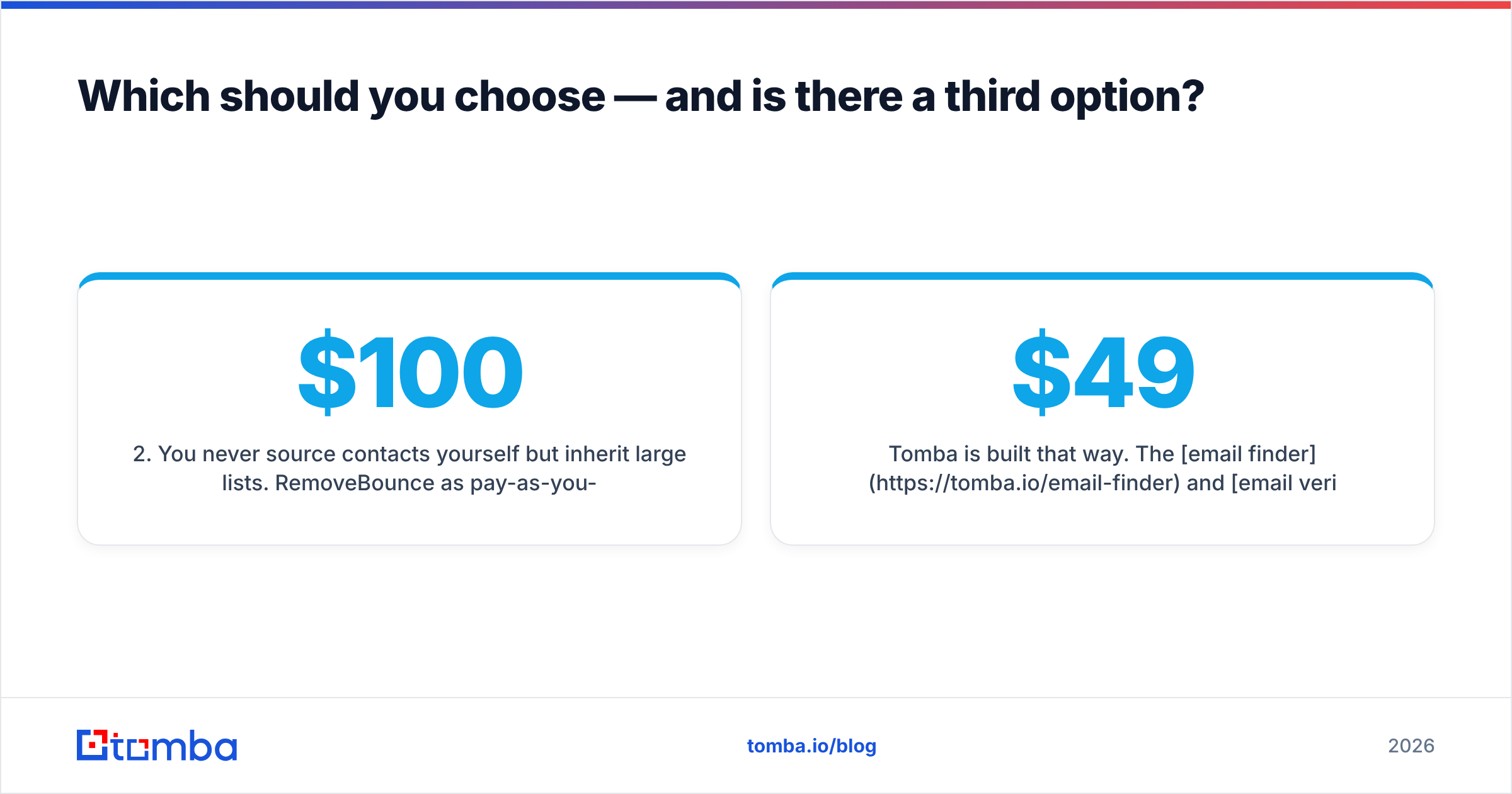
- You never source contacts yourself but inherit large lists. RemoveBounce as pay-as-you-go is the cheapest sensible answer. You'll spend under $100 most months.
- You do both — which is most B2B teams. Buying both tools works, but you're paying twice for overlapping infrastructure and doing the integration by hand.
- You need contacts inside a product or workflow. Neither tool has the API depth for programmatic enrichment at scale. This is where a platform with a documented email finder API stops being a nice-to-have.
- You need phones as well as emails. Neither covers it. Plan for a third vendor or a platform that includes it.
Option three is the consolidated stack, and it's worth being specific about what "consolidated" means. It should cover: find by domain, find by name, find from a LinkedIn URL, verify a single address in real time, bulk verify a list of 100,000, resolve catch-all domains rather than shrugging at them, and expose all of it through one API key and one credit pool.
Tomba is built that way. The email finder and email verifier share the same credits, the same dashboard, and the same API surface. Starter is $49/mo, Growth is $99/mo, Pro is $249/mo, and there's a free tier with 25 searches per month to test match rates before you spend anything. Data sourcing and refresh methodology are published rather than hand-waved — which matters more than a homepage accuracy badge when procurement asks where the data came from.
To be fair to both tools reviewed here: FinalScout's LinkedIn extension is genuinely fast for a rep who works one profile at a time, and RemoveBounce's pay-as-you-go pricing is hard to beat if verification is all you need, once a quarter, forever. Neither is a bad product. They're just each half of a job.
Frequently asked questions#
Can I use FinalScout and RemoveBounce together? Yes, and plenty of teams do. Export from FinalScout, upload to RemoveBounce, re-import the cleaned file into your sequencer. It works. It's also three manual steps that a single platform does in one.
Is scraping LinkedIn for emails legal? It depends on jurisdiction and how the data is processed afterward. Under GDPR you need a lawful basis for processing, and legitimate interest for B2B outreach is defensible but not automatic. Vendors claiming blanket compliance are simplifying. Check with your own counsel and read the guidance on Wikipedia's GDPR overview as a starting point, not an authority.
How often should I re-verify a list? Every 60–90 days for active outbound lists. B2B email decays at roughly 22–30% per year through job changes alone, and it decays faster in high-churn segments like tech sales.
Does verification guarantee my emails land in the inbox? No. Verification prevents bounces. Inbox placement also depends on authentication, domain warmup, content, and volume ramp. Verified lists are necessary but not sufficient for good email deliverability.
The bottom line#
FinalScout versus RemoveBounce is a comparison between a sourcing tool and a hygiene tool, and treating them as alternatives leads to buying the wrong one. Pick FinalScout if LinkedIn is your only channel. Pick RemoveBounce if list cleaning is your only need. Pick a consolidated platform if you're running actual outbound at any scale, because you will eventually need both halves and you'll pay a premium for stitching them together yourself.
If you want to test the consolidated version before committing budget, start with the Tomba Email Finder free tier: 25 searches a month, no card, find and verify from the same credit pool. Run it against 200 contacts you already know are valid, compare the match rate to whatever you're using now, and let the numbers decide instead of the landing pages.
Related guides#
Ready to find emails that actually work?
Join 150,000+ professionals who stopped guessing and started sending. Free credits on signup — no credit card required.
Get the Tomba newsletter
Practical outbound tactics and product updates — once every two weeks.
About the author