FinalScout vs SphereScout: Which LinkedIn Email Finder Wins?
FinalScout and SphereScout both promise verified emails from LinkedIn profiles. We compared coverage, verification depth, pricing models, export limits and compliance risk to see which one actually deserves your budget in 2026.
FinalScout vs SphereScout looks like a simple choice. Both tools pull work emails from LinkedIn profiles. Both say the address is verified. The gap shows up later, in hit rate, price and risk to your sending domain.
TL;DR
- FinalScout is the older of the two. It is a Chrome extension for LinkedIn, with AI email drafting bolted on, a small free tier, and self-serve monthly plans.
- SphereScout is the smaller, thinner-documented entrant. Its public footprint is small and pricing is often quote-gated. Treat any coverage claim as unproven until you test it yourself.
- Both tools share one weakness. They are LinkedIn-shaped. If your prospect is not on LinkedIn, or your work lives in a CRM or an API, you hit a wall fast.
- On a 500-contact test, the numbers that matter are verified hit rate and cost per valid email. Not the raw "emails found" count in the dashboard.
- Need domain-wide coverage, real verification and an API instead of a browser plugin? A general-purpose email finder at $49/mo usually wins on cost per usable contact.
What are FinalScout and SphereScout?#
Both tools sell the same promise. Turn a LinkedIn profile or search result into a business email that lands.
FinalScout (finalscout.com) is the better-known product. It runs as a Chrome extension on top of LinkedIn, Sales Navigator and Recruiter. You open a profile or a search page and click the extension. It pulls the contacts into a list you can export.
Its selling point is the AI writing layer. Once it finds the address, it drafts a personalised email from the profile data. That suits recruiters and small sales teams who work one profile at a time, rather than in bulk.
SphereScout sits in the same lane. It sells LinkedIn-sourced contact data with verification attached. It is the newer of the two and far less documented. There is no large review corpus on G2's lead intelligence category, pricing is not always published in full, and feature claims are hard to confirm.
That does not make it bad. It makes it unproven. And an unproven data vendor deserves a paid trial on your own list before you sign anything longer.
Here is the honest framing. FinalScout has enough public track record to judge on its documented behaviour. SphereScout does not. So the useful question in any FinalScout vs SphereScout comparison is not which brand is better in the abstract. It is which one clears your bar on a 300-contact test, and whether either one fits your workflow at all.
FinalScout vs SphereScout: how do the features compare?#
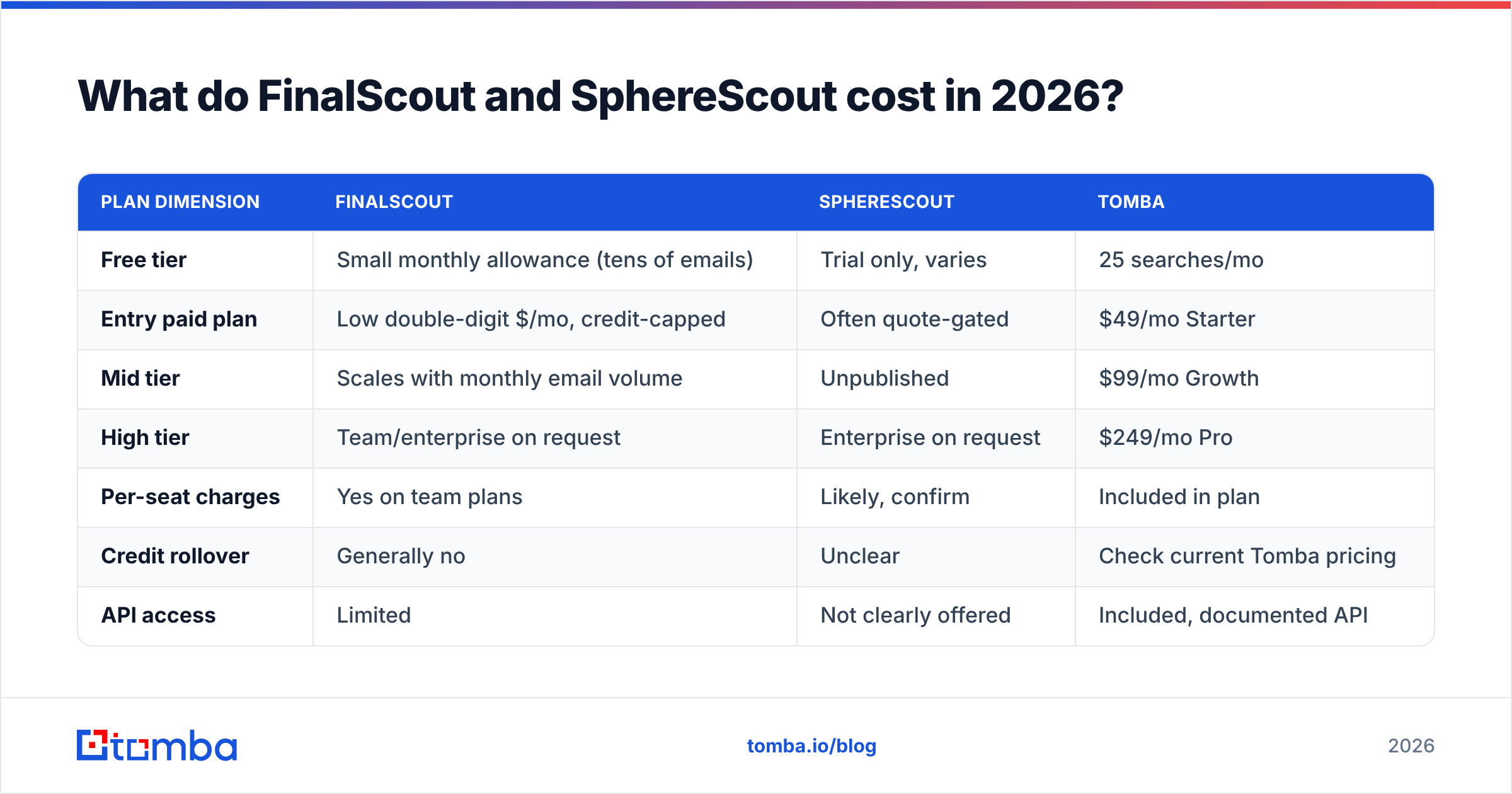
| Feature | FinalScout | SphereScout | What it means for you |
|---|---|---|---|
| Primary interface | Chrome extension over LinkedIn | Web app + extension (varies by plan) | Extensions break when LinkedIn ships UI changes |
| LinkedIn / Sales Navigator support | Yes, core use case | Yes, marketed as core | Both depend on your LinkedIn account being in good standing |
| Domain-wide search (all emails at a company) | Limited | Limited / unclear | Neither replaces a proper domain search |
| Bulk CSV enrichment | Yes, plan-gated | Plan-gated, confirm before buying | Bulk limits are where cheap plans get expensive |
| Built-in verification | Yes, "verified" tier claimed | Claimed, methodology undocumented | Ask what "verified" means: syntax, MX, or SMTP |
| Catch-all handling | Basic | Undocumented | Catch-all domains are where hit-rate claims inflate |
| Public API | Limited / not the focus | Not clearly documented | Blocks any automated pipeline |
| AI email drafting | Yes, headline feature | Partial | Nice-to-have, not a data differentiator |
| Free tier | Small monthly allowance | Trial-based, varies | Enough to smoke-test, not to benchmark |
| Best fit | Recruiters, solo AEs, profile-by-profile work | Teams already committed to a LinkedIn-only motion | Neither is an infrastructure play |
Read that table with one row in mind. How each tool verifies an address is what decides your ROI. It is also the row both vendors describe most vaguely.

What actually determines an email finder's accuracy?#
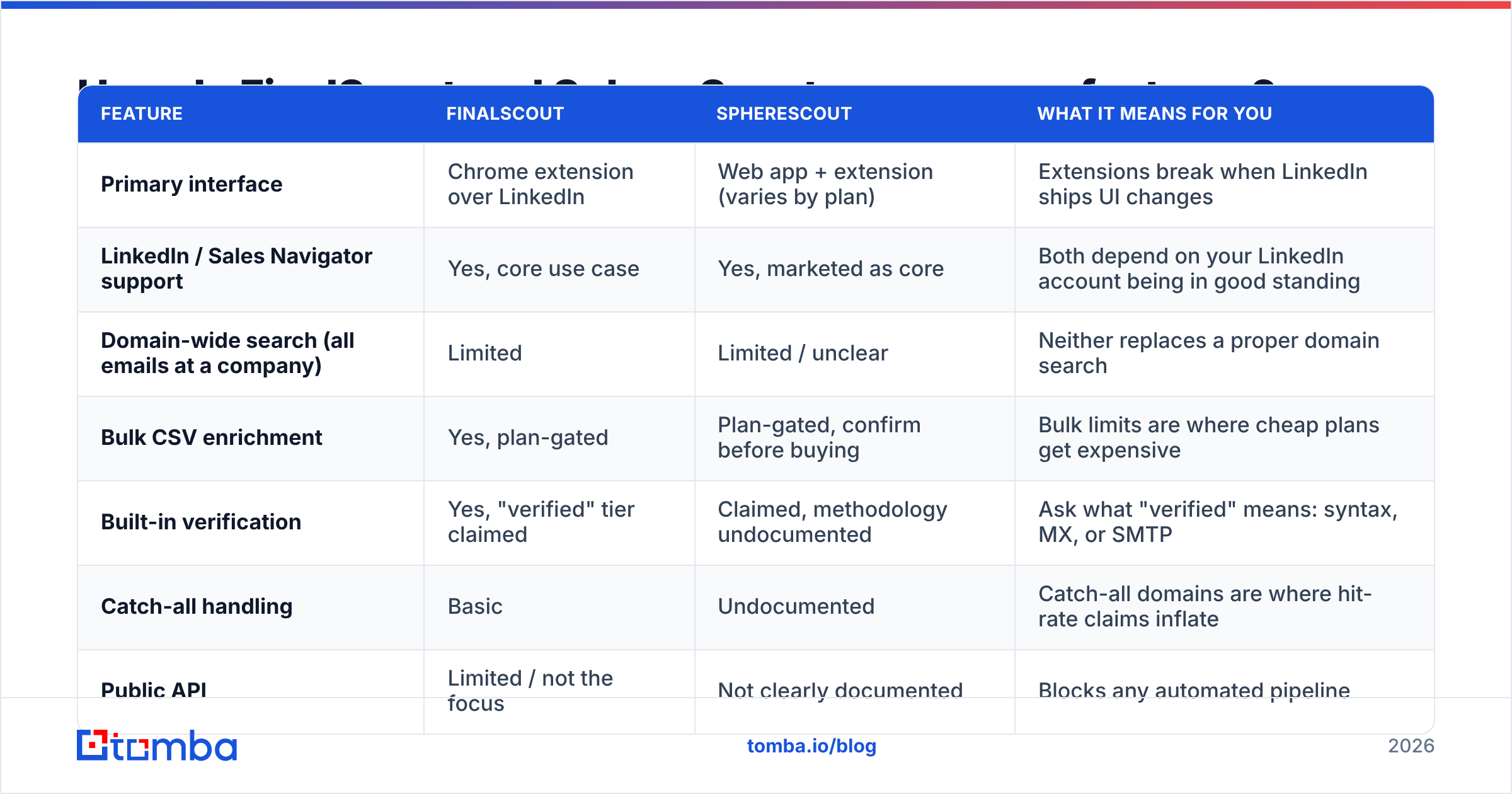
Every vendor in this category quotes a hit rate. Almost none of them define it the same way. Before you weigh FinalScout vs SphereScout on any published number, look at the five things that move real-world accuracy.
Source freshness. A contact scraped 14 months ago may have changed jobs since. B2B email data decays by 2 to 3 percent a month from role changes alone. A tool that never re-crawls is selling you a fossil.
Guessed versus seen addresses. Guessing
first.last@company.comfrom a known company pattern is cheap, and often right. But it is still a guess. Addresses the tool has actually seen before are far better. The mix of the two is what separates a 60 percent hit rate from a 90 percent one.SMTP-level checks. Real verification opens a conversation with the receiving mail server and asks whether the mailbox exists, without sending anything (see SMTP). Syntax and MX checks only catch typos, not dead mailboxes. If a vendor will not say which layer it runs, assume the cheap one.
Catch-all handling. On a catch-all domain the server accepts every address. Naive verifiers then mark every guess "valid." This is the single biggest source of inflated accuracy claims. A serious tool flags catch-alls on their own and runs a catch-all verifier instead of pretending the address is confirmed.
Bounce accountability. Ask whether dead results are refunded or re-credited. A vendor that charges you for bounced addresses has no reason to be careful.

Run that checklist against both tools. FinalScout answers some of it in its docs. SphereScout, at the time of writing, answers less. That gap is itself a data point.
FinalScout vs SphereScout pricing: what do they cost in 2026?#
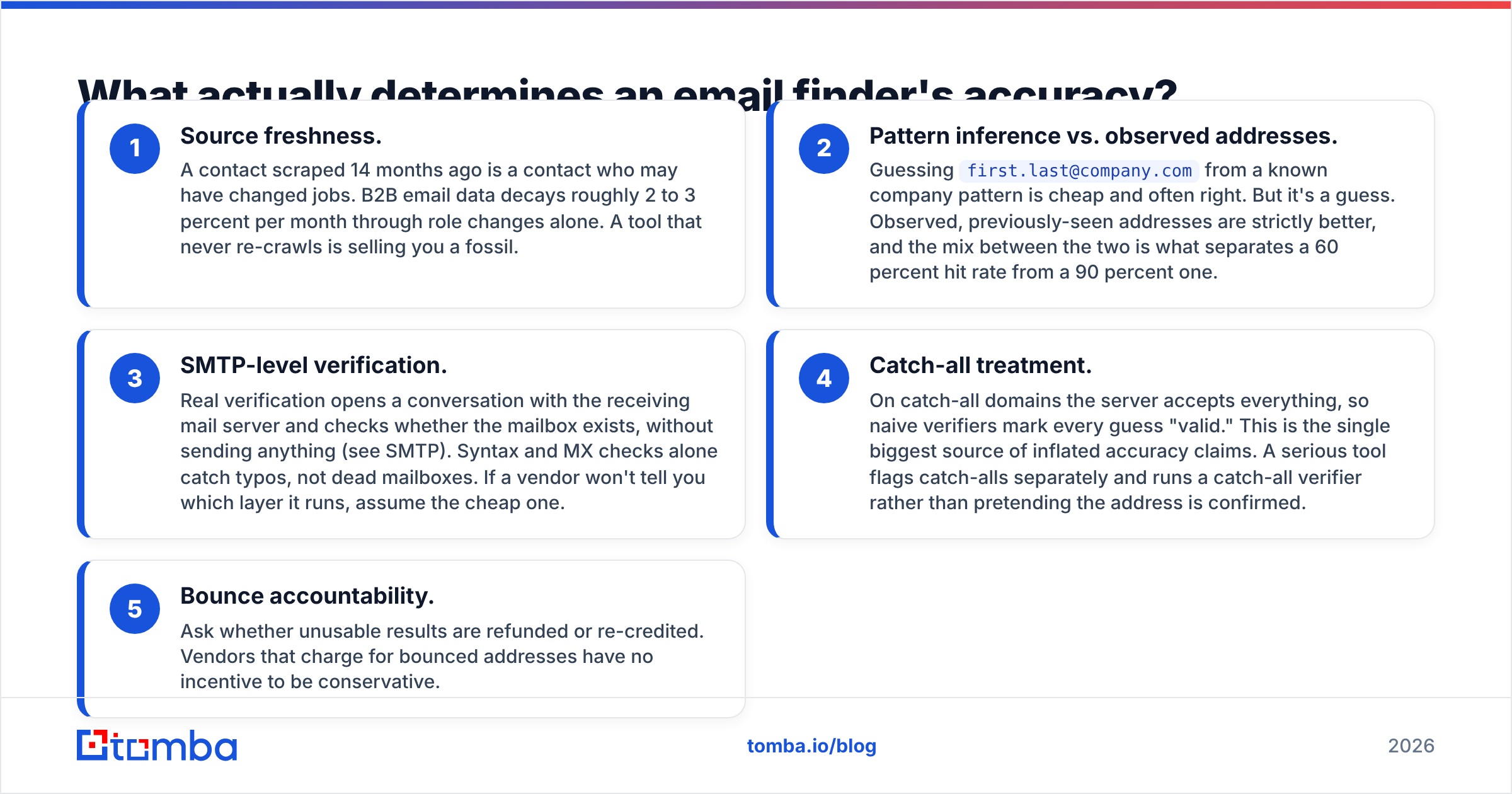
Pricing here moves constantly. Both vendors have revised plans more than once. Treat the figures below as a shape, not a quote, and check each vendor's own pricing page before you buy.
| Plan dimension | FinalScout | SphereScout | Tomba |
|---|---|---|---|
| Free tier | Small monthly allowance (tens of emails) | Trial only, varies | 25 searches/mo |
| Entry paid plan | Low double-digit $/mo, credit-capped | Often quote-gated | $49/mo Starter |
| Mid tier | Scales with monthly email volume | Unpublished | $99/mo Growth |
| High tier | Team/enterprise on request | Enterprise on request | $249/mo Pro |
| Per-seat charges | Yes on team plans | Likely, confirm | Included in plan |
| Credit rollover | Generally no | Unclear | Check current Tomba pricing |
| API access | Limited | Not clearly offered | Included, documented API |
Two pricing traps are worth naming.
Credits burn on failures. Some tools take a credit for a search that returns nothing. Others charge for a risky address you would never send to. On a 5,000-contact month at a 65 percent hit rate, you pay for 1,750 non-results. Always work out cost per verified email, not cost per credit.
Seats multiply. A $30/mo tool across a six-person SDR team is $180/mo. Extension-based tools charge per seat, because every rep needs the plugin. Plan-level pricing that covers the whole team changes the maths fast at five users or more.
Is FinalScout better than SphereScout for LinkedIn prospecting?#
Short answer: yes, on current evidence, mostly by default. FinalScout has the longer history, a clearer feature list, real reviews you can read, and a free tier you can test in ten minutes. SphereScout may well be fine. But "may well be fine" is not a buying standard when you are about to point a cold email programme at its output.
Where FinalScout earns its place:
- Recruiter workflows. If you live inside LinkedIn Recruiter and work one profile at a time, an in-page extension beats a separate web app.
- Personalisation at low volume. The AI drafting layer saves real minutes when you send 20 tailored emails a day, not 2,000 templated ones.
- Low commitment. The free tier and low entry price make it a cheap experiment.
Where it does not:
- Volume. Extension-driven extraction is capped by LinkedIn itself, and by your own account safety. Heavy scraping puts your personal account at risk under the LinkedIn User Agreement. Nobody puts that cost on a pricing page.
- Automation. Without a solid API, the tool cannot sit inside a pipeline. Every lookup stays manual.
- Non-LinkedIn prospects. Plenty of buyers in manufacturing, logistics, local services and government have thin or no LinkedIn presence. A LinkedIn-only tool sees none of them.
Where do both tools fall short?#
Both products share a ceiling that has nothing to do with which one you pick.
They are single-source. LinkedIn is one input. A contact database that also reads company websites, public filings, press pages, author bylines and previously-seen addresses simply finds more people. That is why a general domain search often returns contacts a LinkedIn extension never sees, including role-based addresses for teams with no personal profiles.
They depend on your session. Extensions borrow your LinkedIn login. Rate limits, account warnings and UI changes all become your problem. A server-side API does not care what your browser is doing.
Verification is a bolt-on. In both cases it is a feature attached to the finder, not a product with its own method. At real volume you want a dedicated email verifier that reports catch-all, risky and unknown as separate states. Then you can treat each group differently instead of dumping them all into one campaign.
Neither replaces a data layer. Enrichment, phone numbers, company firmographics and de-duplication all sit outside both tools. You will stitch those in from elsewhere either way.

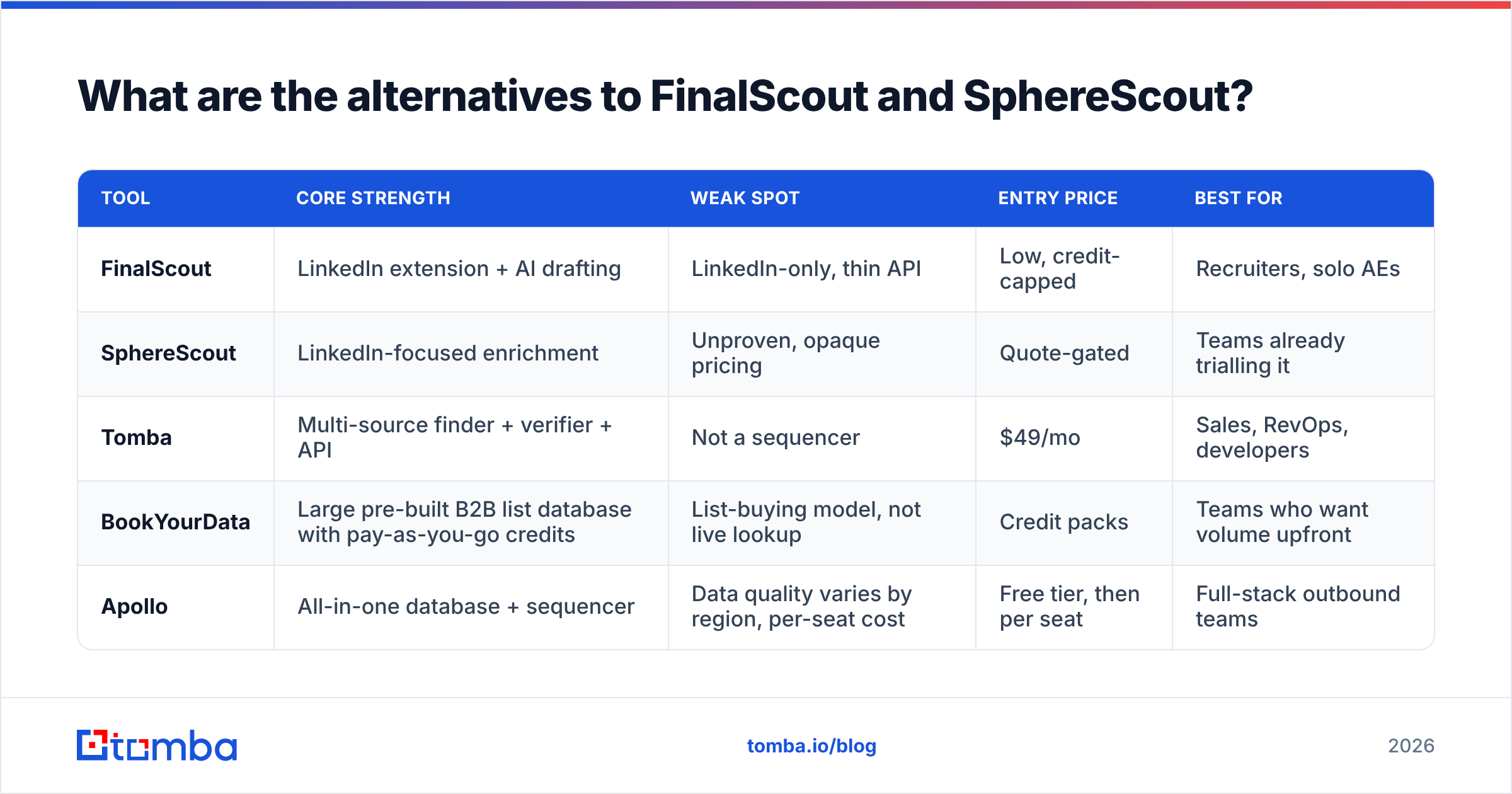
What are the alternatives to FinalScout and SphereScout?#
If the head-to-head leaves you unconvinced, widen the field. Here is how the shape of each option differs.
| Tool | Core strength | Weak spot | Entry price | Best for |
|---|---|---|---|---|
| FinalScout | LinkedIn extension + AI drafting | LinkedIn-only, thin API | Low, credit-capped | Recruiters, solo AEs |
| SphereScout | LinkedIn-focused enrichment | Unproven, opaque pricing | Quote-gated | Teams already trialling it |
| Tomba | Multi-source finder + verifier + API | Not a sequencer | $49/mo | Sales, RevOps, developers |
| BookYourData | Large pre-built B2B list database with pay-as-you-go credits | List-buying model, not live lookup | Credit packs | Teams who want volume upfront |
| Apollo | All-in-one database + sequencer | Data quality varies by region, per-seat cost | Free tier, then per seat | Full-stack outbound teams |

BookYourData works on a different model. Instead of looking contacts up one at a time, you buy filtered lists in bulk with credits that do not expire. If your motion is "give me 5,000 CFOs in DACH manufacturing," that fits better than clicking through profiles. If your motion is "enrich the 40 accounts my SDR just qualified," live lookup wins.
For live lookup, the gain from a platform is that finding, verifying and enriching all draw on one credit pool. You can run a bulk email finder over a CSV, push the results into HubSpot or Salesforce through the integrations, and call the same endpoints from a script when you outgrow the UI. No need to buy three products.
How should you actually choose between them?#
Run this in an afternoon. It costs almost nothing and beats any review, this one included.
Build a 200-row truth set. Take contacts whose emails you already know are good. Strip the email column. That is your answer key.
Run both tools over it. Use free tiers, or the cheapest month. Record found, not-found, and the label each tool gave the result.
Score against the key. Work out the true hit rate (correct addresses ÷ 200) and the false-confidence rate (addresses marked valid that are wrong). The second number matters more, because it is the one that burns your domain.
Send a 100-address test. Take the addresses you cannot confirm on your own and send one real, low-stakes campaign. Track hard bounces. Under 2 percent is fine. Over 5 percent means the "verification" is not real.
Divide by cost. Monthly price ÷ verified, deliverable emails = your true cost per contact. Compare that, not the sticker price.
Check the exit. Can you export everything you paid for as CSV, with no downgrade penalty? If not, you are renting your own data.
Teams that run this test almost always change their mind about at least one vendor. It is also the fastest way to learn whether a LinkedIn-only tool covers your ICP, or whether half your market is invisible to it.
Frequently asked questions#
Is FinalScout free? It has a small free monthly allowance. That is enough to judge the interface, not enough to benchmark accuracy. Plan on paying for one month of a real tier to test it properly.
Does SphereScout publish pricing? Not consistently. Where pricing is quote-gated, ask for per-credit cost, seat cost, overage rate, and whether failed lookups eat credits. Ask before you sign.
Are LinkedIn email extractors compliant? Pulling contact data from LinkedIn runs against the platform's own terms. In the EU and UK you also need a lawful basis under GDPR for B2B outreach. Legitimate interest can apply for genuine B2B contact, but you need a suppression list and a clear opt-out. Ask your own counsel, not a vendor's marketing page.
Can I use one tool for finding and another for verifying? Yes, and many careful teams do. Find with whatever gives the widest coverage. Then run everything through one verifier, so your quality bar stays the same whatever the source.
What hit rate is realistic? For clean, English-language, mid-market ICPs with a strong LinkedIn presence, 70 to 90 percent is doable. For SMB, non-English or low-digital segments, 40 to 60 percent is normal. Any vendor quoting 98 percent across all segments is measuring something other than deliverability.
The bottom line#
On FinalScout vs SphereScout, FinalScout is the safer pick today. That is mostly because it is the one whose claims you can actually check. SphereScout deserves a paid trial before anything longer.
The more useful conclusion is that both are narrow tools for a narrow motion: one rep, inside LinkedIn, working profiles by hand. If your outbound has outgrown that, you want infrastructure instead of a plugin. That applies whether you send 5,000 contacts a month, need a CRM enriched on write, or have an engineer who would rather call an endpoint than click an extension.
Start with the Tomba Email Finder. The free tier gives you 25 searches a month, enough to run the truth-set test above. Starter is $49/mo when you are ready to scale. Finding, verifying and catch-all handling all draw on the same plan, so you are not stitching three vendors together to answer one question: is this address real?
Related guides#
Ready to find emails that actually work?
Join 150,000+ professionals who stopped guessing and started sending. Free credits on signup — no credit card required.
Get the Tomba newsletter
Practical outbound tactics and product updates — once every two weeks.
About the author