FinalScout vs Tami AI: Which Email Finder Wins in 2026?
FinalScout leans on LinkedIn scraping and AI writing. Tami AI sells an autonomous prospecting agent. We compare accuracy, credits, export limits, and total cost — and name the cheaper option most teams overlook.
FinalScout vs Tami AI comes down to one question: do you want to hunt for contacts yourself, or hand the job to an agent? FinalScout lives in your browser and works off LinkedIn. Tami AI takes a prompt and builds the list for you. Here is how the two compare on accuracy, credits, cost, and what each one quietly leaves out.
TL;DR
- FinalScout is a LinkedIn-first email finder. You browse profiles or Sales Navigator lists, it extracts contacts and drafts AI outreach copy. Strong for one-person prospecting, weak once you need volume or an API.
- Tami AI sells the "AI prospecting agent" model. Describe your ICP in plain language and it builds and enriches the list for you. Faster to a first list, harder to audit line by line.
- Neither tool is primarily a verification engine. Both give you addresses. You still need an independent check before you send.
- If your workflow is spreadsheet- or API-driven rather than browser-driven, a data-layer tool like Tomba covers finding and verification for $49/mo. That beats stacking a finder plus a separate verifier.
- Pick FinalScout for LinkedIn-native manual prospecting, Tami AI for hands-off list building, and a dedicated finder/verifier stack for anything that touches a CRM at scale.
What are FinalScout and Tami AI, actually?#
They solve the same headline problem — get me contact details for people who match my ICP. They just start from opposite ends.
FinalScout is a Chrome extension paired with a web app, built around LinkedIn. You install the extension, then open a profile, a search result page, or a Sales Navigator list. FinalScout pulls names, titles, companies, and email addresses into a list you can export. Its second pitch is AI outreach: it drafts personalized emails from the profile data it just scraped. The company promises high deliverability on the emails it returns. In practice that means it holds back addresses it cannot confirm, rather than handing you every guess.
Tami AI takes the agent approach. You do not drive a browser. You describe the segment — "Series A fintech companies in the UK, heads of engineering, 50–200 employees" — and the system builds the list, enriches it, and hands back contacts. The pitch is time saved. No manual scrolling. No per-profile clicking. The trade-off is transparency. Run a LinkedIn search by hand and you know exactly what pool you pulled from. Let an agent read your prompt and the sourcing logic is a black box. List quality then depends on how well your ICP maps to whatever databases it queries.
One caveat before we go further. Both vendors have changed packaging and pricing more than once. Treat every number below as directional, and check the vendor's own page before you put a card down.
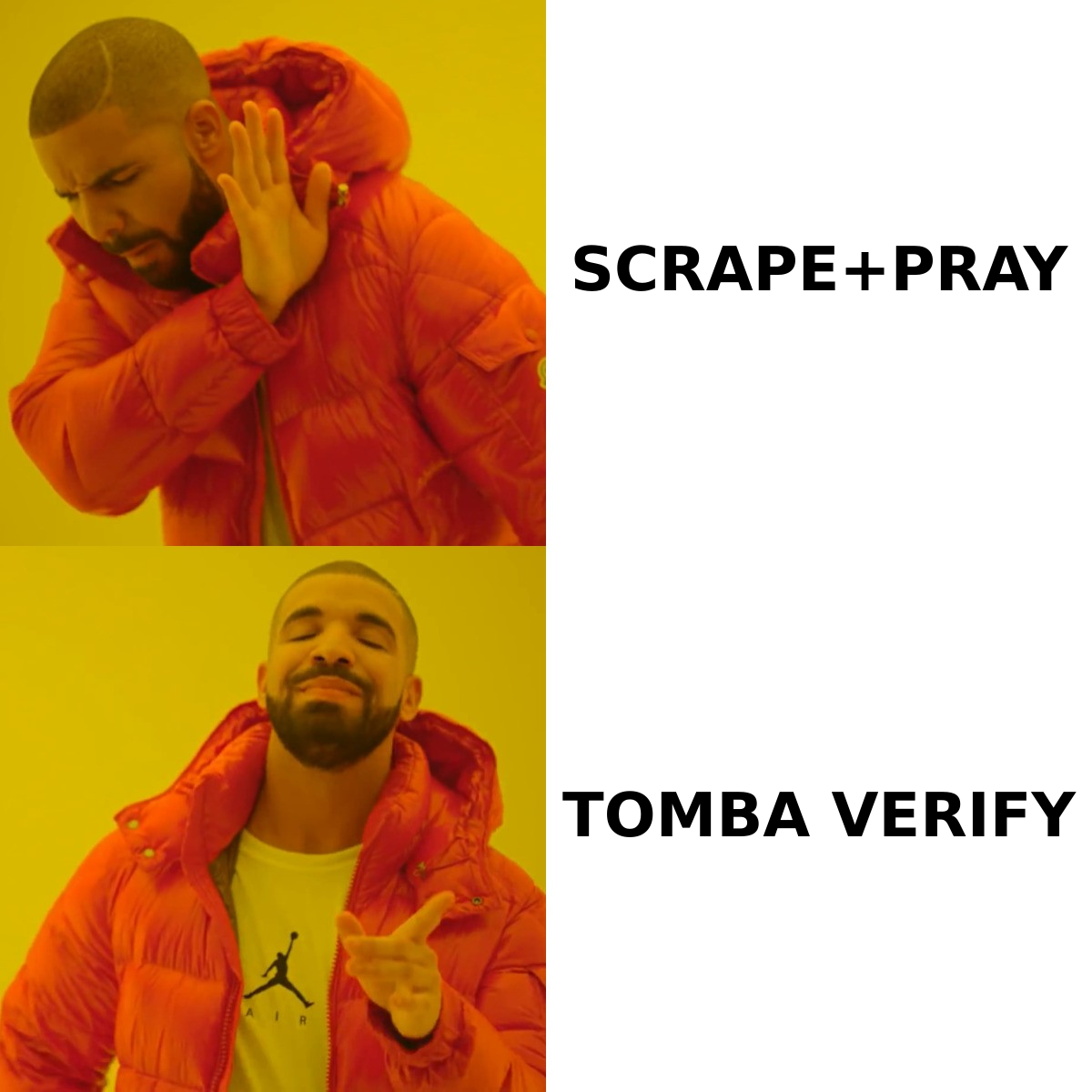
FinalScout vs Tami AI: how do they compare head to head?#
| Factor | FinalScout | Tami AI | Tomba |
|---|---|---|---|
| Primary interface | Chrome extension + web app | Prompt-driven web agent | Web app, API, Sheets/Excel, CLI |
| Sourcing model | LinkedIn profiles & Sales Navigator | AI-assembled lists from internal data | Domain + name matching, public web crawl |
| Free tier | Yes (small monthly email quota) | Trial credits, varies by promo | 25 searches/mo, no card |
| Entry paid plan | ~$34–45/mo range | Varies; verify current page | $49/mo Starter |
| Built-in verification | Confidence filter on returned emails | Enrichment-level checks | Dedicated email verifier + catch-all handling |
| Public API | Limited / not the core product | Limited | Full REST Tomba API with SDKs |
| Bulk workflow | CSV export from lists | Agent-generated exports | Bulk finder + bulk verify, CSV in/out |
| AI copywriting | Yes, built in | Yes, part of agent flow | No — data layer only |
| Best fit | Solo LinkedIn prospecting | Fast list building without manual search | Engineering-backed, high-volume enrichment |
The table hides the real decision, which is where your prospecting happens. If your reps live inside LinkedIn all day, a browser-native tool removes friction that an API never will. If your list already exists — in HubSpot, in a scraped CSV, in a product signup table — a browser extension is the wrong shape. You want a tool that takes a domain plus a name and returns an address programmatically.
Is FinalScout accurate enough for cold outreach?#
FinalScout's accuracy story is built on filtering, not volume. It advertises a high deliverability rate on returned emails. It gets there by declining to return low-confidence guesses. That is a defensible design. A short list of good addresses beats a long list that torches your domain reputation.
The practical consequence is coverage gaps. Hit rates are solid on LinkedIn profiles at large enterprises with common naming patterns. They drop on smaller companies, non-US domains, and roles where the person has no public footprint outside LinkedIn. Expect plenty of "no email found." That is not a defect — every finder has this curve. But your list shrinks unpredictably, which makes campaign planning harder.

There is a second issue specific to LinkedIn-native tools: platform risk. Scraping LinkedIn at volume runs against the LinkedIn User Agreement, and accounts that pull hard through extensions do get restricted. Build your whole pipeline on a LinkedIn extension and you are one enforcement wave away from a dead workflow. Sourcing from company domains instead of profiles avoids that dependency. That is the argument for pairing any LinkedIn tool with a domain search fallback rather than betting everything on one channel.
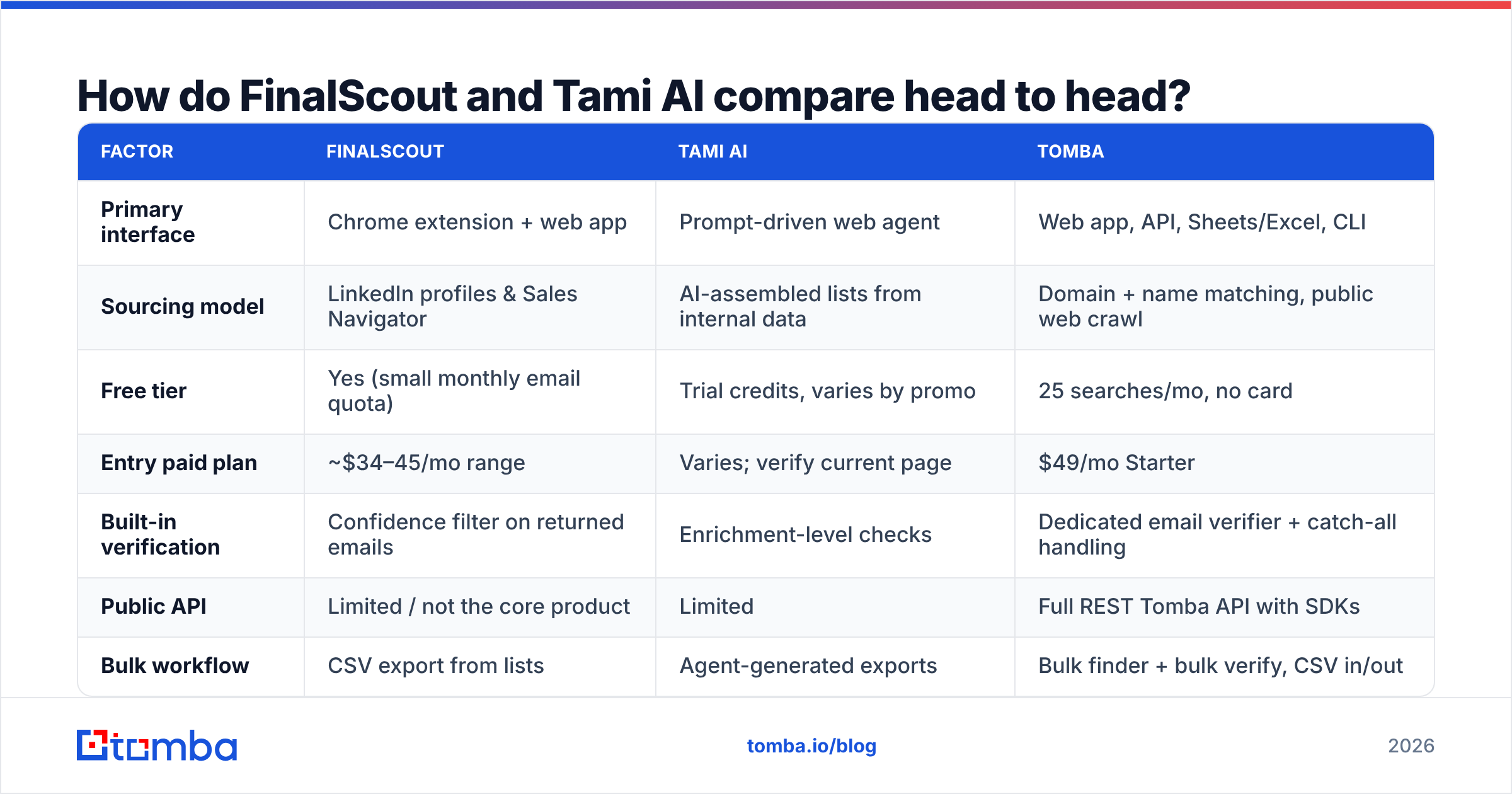
What "accuracy" should mean when you evaluate either tool:
- Syntax and MX validity — does the domain accept mail at all? Table stakes. Every vendor passes.
- SMTP-level confirmation — does the mailbox itself exist? Vendors diverge here, because many providers now block or throttle verification probes.
- Catch-all handling — roughly one in five B2B domains accepts everything. A vendor that marks catch-alls "valid" is inflating its own score. A catch-all verifier treats them as a separate risk class instead.
- Role-account flagging — info@, sales@, and support@ are technically deliverable and commercially useless for 1:1 outreach.
- Freshness — a correct address from 18 months ago is a bounce today. Ask when the record was last confirmed, not just whether it is "verified."
Most vendor accuracy claims collapse the first two steps and skip the third. Insist on the breakdown when you run a bake-off.
Is Tami AI's agent approach better than manual prospecting?#
It depends on whether your ICP is easy to describe in words.
Agent-driven prospecting shines when your criteria are structural: industry, headcount, geography, funding stage, job title. Those map cleanly onto database fields. A natural-language prompt is then just a friendlier query builder, and Tami AI gets you a list in minutes instead of an afternoon of Sales Navigator filtering.
It struggles when your ICP is behavioral — "companies that just posted a job for a Salesforce admin," "SaaS firms whose pricing page mentions SOC 2," "founders who spoke at a specific conference." Those signals live in unstructured places. An agent will still return a list, confidently. The list will be plausible rather than correct. That is the failure mode to watch: not empty results, but reasonable-looking results that miss the intent you actually had.
The audit problem compounds it. Prospect by hand and you can point at why each account is on the list. With an agent, "why is this company here?" often has no traceable answer. For a two-person startup testing messages, that is fine. For a team where marketing and sales argue about lead quality every quarter, it is a governance headache. It shows up later as disputes over what counts as a marketing qualified lead.
Neutral read: the agent model is the right direction for the category, and it genuinely saves hours. Still, treat agent output as a draft list. Sample-verify 50 rows before you commit. Keep a deterministic sourcing path for the segments where precision matters most.
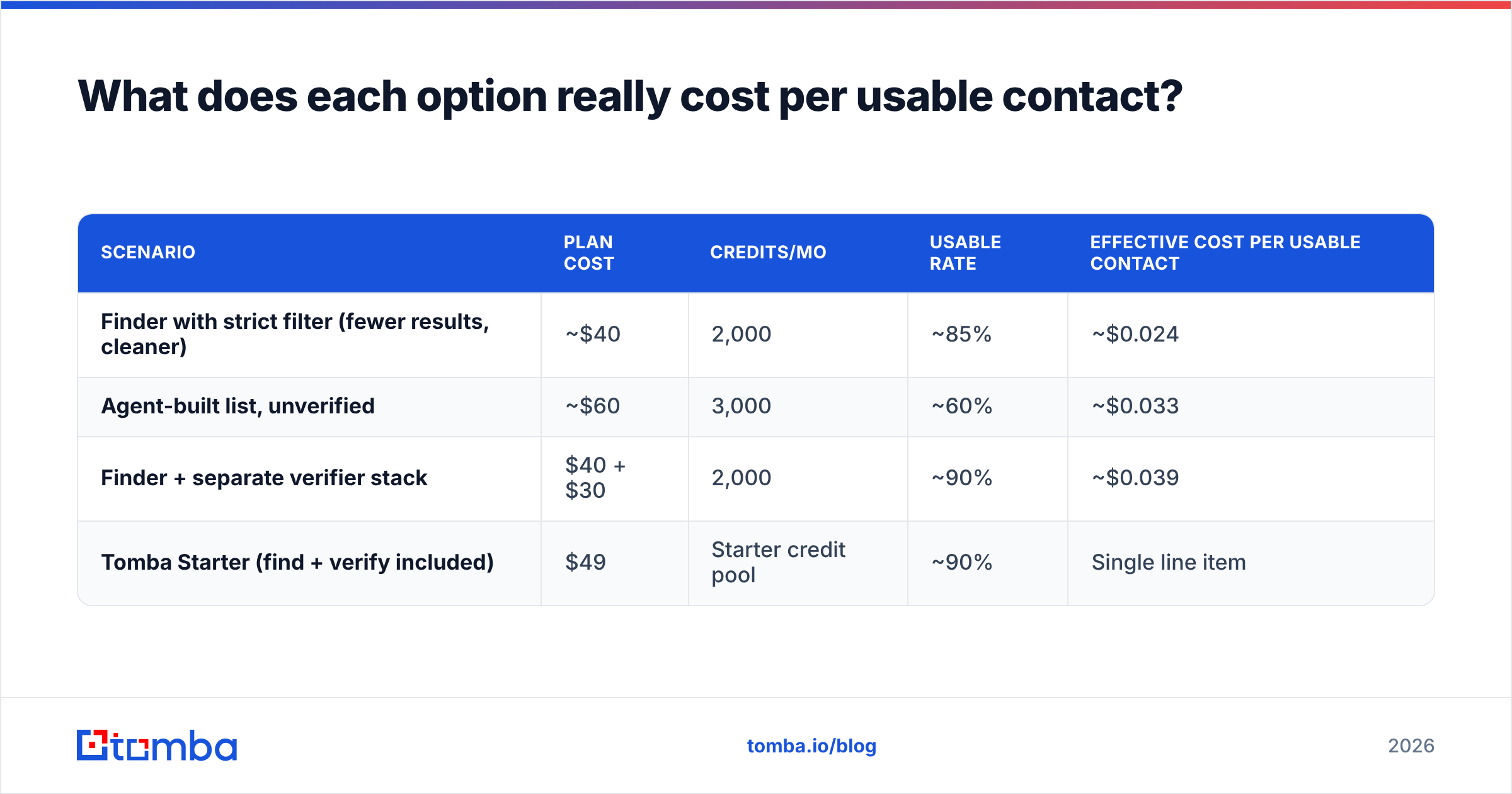
What does each option really cost per usable contact?#
Sticker price is the wrong metric. What matters is the cost per usable, verified contact that reaches an inbox.
Run the math with three inputs: plan cost, credits included, and the share of returned records you can send to after verification and role-account stripping.
| Scenario | Plan cost | Credits/mo | Usable rate | Effective cost per usable contact |
|---|---|---|---|---|
| Finder with strict filter (fewer results, cleaner) | ~$40 | 2,000 | ~85% | ~$0.024 |
| Agent-built list, unverified | ~$60 | 3,000 | ~60% | ~$0.033 |
| Finder + separate verifier stack | $40 + $30 | 2,000 | ~90% | ~$0.039 |
| Tomba Starter (find + verify included) | $49 | Starter credit pool | ~90% | Single line item |
Two things fall out of that table. First, a cheap tool with a 60% usable rate is not cheaper than a mid-priced tool at 90%. It costs more per sent email, before you count the deliverability damage from the extra bounces. Second, the finder-plus-verifier stack is a real cost most comparisons ignore. The finder's marketing implies verification is included, and it usually is not at any useful depth.
That is the structural reason to look at a consolidated data layer. Tomba pricing runs Free (25 searches/mo), Starter $49/mo, Growth $99/mo, Pro $249/mo, and custom Enterprise. Finding, verification, catch-all checks, and enrichment share one credit pool instead of splitting across two vendors and two invoices.


Which one should you actually pick?#
Choose FinalScout if:
- Your prospecting genuinely happens on LinkedIn, profile by profile
- You are one to five people and per-seat browser tooling is fine
- You want AI-drafted first-touch copy in the same window as the contact data
- Your volume is a few hundred contacts a month, not tens of thousands
Choose Tami AI if:
- You would rather describe a segment than build a search query
- Your ICP is structural (industry, size, geo, stage) and easy to express
- Speed to a first list matters more than auditable sourcing logic
- You are willing to sample-verify output before it hits a sequence
Choose a data-layer tool like Tomba if:
- Your list already exists and you need to enrich it, not discover it
- You want an email finder API behind your own product, CRM sync, or internal tooling
- You need bulk email finder and bulk verification on the same credits
- LinkedIn platform risk is unacceptable as a single point of failure
- You want catch-all domains labeled honestly instead of counted as wins
There is also a legitimate combined setup. Use a LinkedIn-native tool for the accounts your reps hand-pick. Use an API-driven finder for everything that arrives through inbound forms, webinar lists, or partner data. Those are different jobs, and forcing one tool to do both is where most teams overspend.
How should you run the bake-off before you buy?#
Do not trust anyone's published accuracy number, including ours. Settle FinalScout vs Tami AI with your own data in a single afternoon:
- Build a 200-row truth set. Take contacts whose addresses you have already confirmed — past customers, leads that replied — and strip the emails out.
- Feed the same 200 rows to each tool. Same names, same domains, same order. Nothing else.
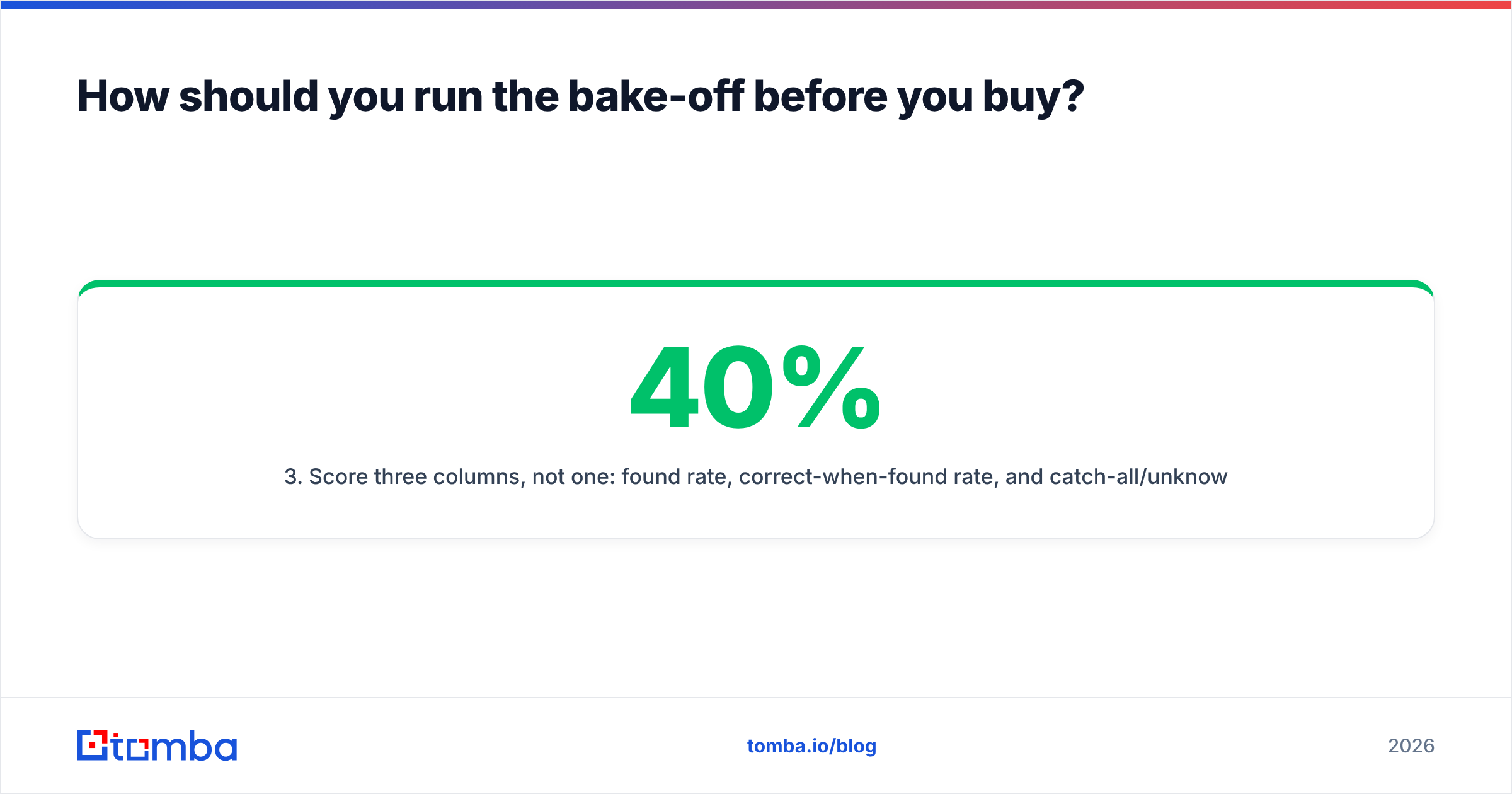
- Score three columns, not one: found rate, correct-when-found rate, and catch-all/unknown rate. A tool with 40% found and 98% correct beats one with 80% found and 55% correct for most cold outbound.
- Send a real 100-address test through your actual sending domain and record hard bounces. Vendor "valid" labels mean nothing until an MTA agrees.
- Price the winner per usable contact, using the formula in the table above — not per credit.
Most teams skip step 4. They pay for the mistake in sender reputation rather than in dollars, which is the more expensive currency. Want a broader field to test against? The lead intelligence category on G2 is a reasonable place to shortlist three or four candidates, and HubSpot's prospecting guidance is a decent sanity check on how the list feeds your sales motion.
The bottom line#
FinalScout vs Tami AI does not have one winner. Each is a defensible pick for the workflow it was designed around. FinalScout suits reps who live inside LinkedIn. Tami AI suits teams who would rather delegate list building than run searches. Neither is a verification engine. Neither is built to sit behind an API in your own stack.
If your bottleneck is finding and confirming addresses at volume rather than browsing profiles, start with the layer underneath the outreach tools. The Tomba Email Finder returns addresses by domain, name, or company. It verifies them in the same pass and flags catch-all domains honestly instead of counting them as hits. You can reach all of it through an API, Sheets, Excel, or plain CSV. The free tier is 25 searches a month with no card — enough to run the 200-row bake-off above against whatever tool you pay for today, and to settle the argument with your own data instead of someone's landing page.
Related guides#
Ready to find emails that actually work?
Join 150,000+ professionals who stopped guessing and started sending. Free credits on signup — no credit card required.
Get the Tomba newsletter
Practical outbound tactics and product updates — once every two weeks.
About the author