FinalScout vs Webbula: Which Email Data Tool Wins in 2026?
FinalScout finds new B2B emails from LinkedIn. Webbula cleans and enriches lists you already own. They solve opposite problems — here is how to tell which one your pipeline actually needs in 2026.
FinalScout vs Webbula is a strange matchup. One tool finds new email addresses. The other cleans the list you already own. This guide shows you which job your pipeline actually needs done first.
TL;DR
- FinalScout and Webbula are not really competitors. FinalScout finds email addresses (mostly from LinkedIn profiles); Webbula cleans, validates, and enriches lists you already have.
- Pick FinalScout if your bottleneck is "I don't have enough contacts." Pick Webbula if your bottleneck is "my list is old and my bounce rate is scary."
- FinalScout is self-serve, credit-based, and cheap to start. Webbula is enterprise-flavoured: quote-based pricing, volume minimums, and a sales conversation before you see a number.
- Neither one gives you a full find-and-verify loop in a single subscription. That's the gap most teams end up filling with a second tool.
- If you want discovery and verification under one API and one bill, a platform like Tomba covers both from $49/mo.
What is FinalScout?#
FinalScout is a LinkedIn-first prospecting tool. You install the Chrome extension, browse a LinkedIn profile, a Sales Navigator search, or a group member list, and it pulls out professional email addresses for the people you're looking at. It also bolts on AI email drafting, so you can generate a personalised first-touch message from the profile data it just scraped.
Its main marketing claim is a deliverability guarantee — the company advertises validated emails with a very high deliverability rate on its official site. In practice, that number applies to the addresses it returns. It says nothing about how many profiles it can find an address for at all. Those are two very different metrics. The second one decides whether your list ever gets built.
What FinalScout is good at:
- LinkedIn-native workflow. You work where your prospects live. No CSV round trip.
- Bulk export from search results. Scrape a Sales Navigator list into a contact file in a few clicks.
- AI-generated first drafts. Useful if you're personalising 200 emails and hate writing.
- Low entry cost. A free tier plus affordable paid plans, credit-metered.
What it is not good at: bulk hygiene on a list you already own, suppression of known complainers and spam traps, or feeding a data warehouse through an API. It's a front-of-funnel tool.
What is Webbula?#
Webbula sits at the opposite end of the same pipeline. It's a data quality and audience company: email hygiene, multi-method validation, demographic and behavioural appends, and identity resolution. You send Webbula a file you already have — a CRM export, a newsletter list, a lead-gen form dump — and it comes back scored, deduped, and flagged.
Its differentiator is depth of hygiene. Standard verifiers check syntax, MX records, and SMTP acceptance. Webbula layers on threat detection: known spam traps, honeypots, chronic complainers, bots, and disposable domains. Those are the categories that torch your sender reputation. They don't just bounce quietly. You can read more about their approach on the Webbula site and see how buyers rate it on G2.
What Webbula is good at:
- Deep hygiene beyond bounce prediction. Trap and complainer detection is the headline feature.
- Data appends. Add demographics, firmographics, and postal data to thin records.
- Enterprise compliance posture. Built for teams sending millions of emails a month with legal review attached.
- File-based batch processing. Send a list, get a scored list back.
What it is not: a prospecting tool. Webbula will not hand you 500 new CMOs in the fintech space. It has no opinion on people who aren't already in your database.

FinalScout vs Webbula: how do they compare head to head?#
The honest framing: this is a comparison of a shovel and a sieve. Both are useful, they're just used at different moments.
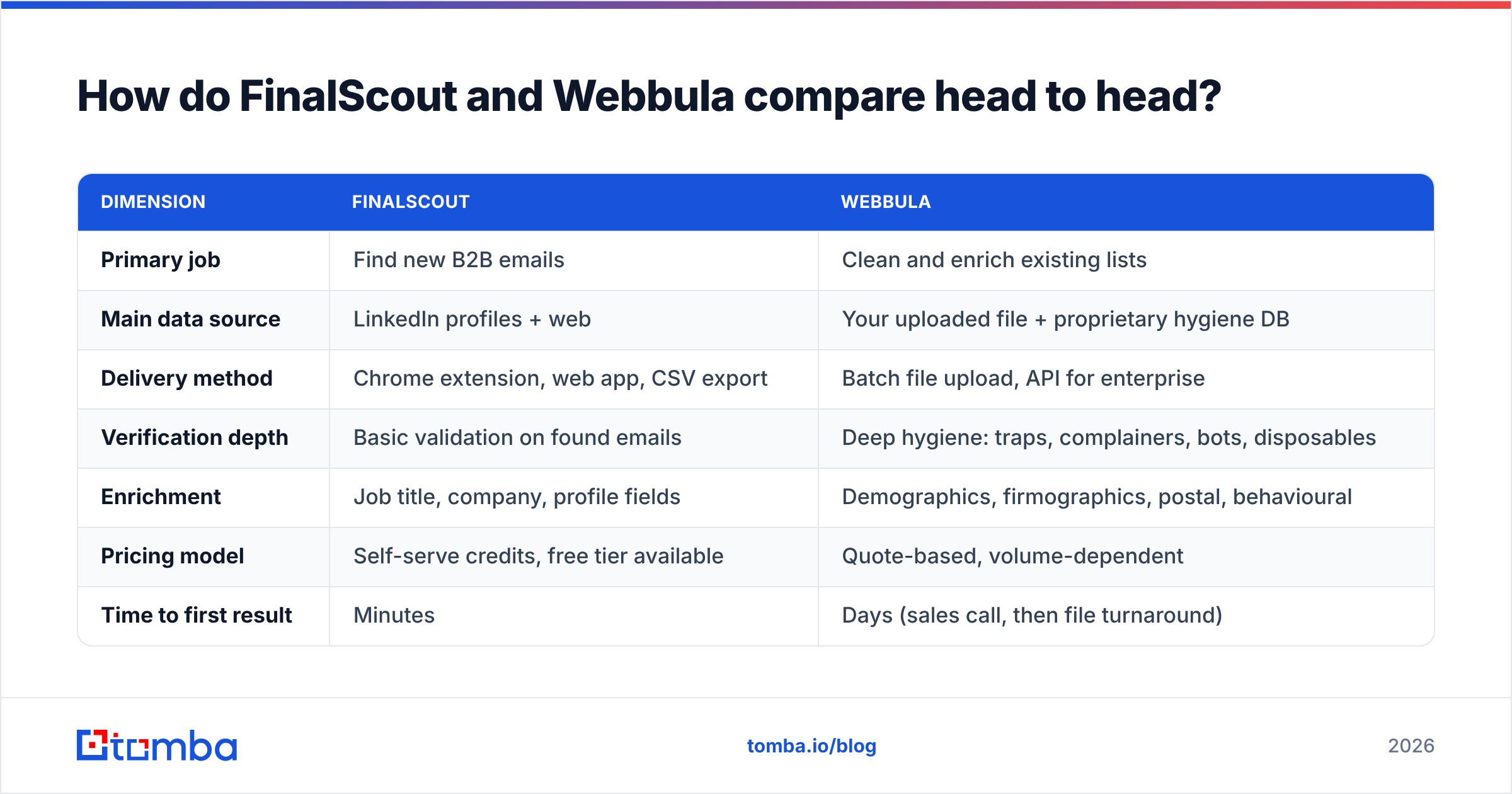
| Dimension | FinalScout | Webbula |
|---|---|---|
| Primary job | Find new B2B emails | Clean and enrich existing lists |
| Main data source | LinkedIn profiles + web | Your uploaded file + proprietary hygiene DB |
| Delivery method | Chrome extension, web app, CSV export | Batch file upload, API for enterprise |
| Verification depth | Basic validation on found emails | Deep hygiene: traps, complainers, bots, disposables |
| Enrichment | Job title, company, profile fields | Demographics, firmographics, postal, behavioural |
| Pricing model | Self-serve credits, free tier available | Quote-based, volume-dependent |
| Time to first result | Minutes | Days (sales call, then file turnaround) |
| Best for | SDRs, founders, agencies building lists | ESP marketers, enterprise CRM owners |
| Weak spot | No deep hygiene, LinkedIn-dependent | No discovery, no self-serve entry |
If you only take one thing from that table: using both is a valid answer, and using only one is usually a mistake in one direction or the other. A team with FinalScout alone builds a list fast and then wonders why its domain got throttled in week three. A team with Webbula alone has a pristine list of 4,000 contacts and no way to make it 8,000.
Which one is more accurate?#
Accuracy means different things here, and vendors exploit that ambiguity constantly.
For a finder like FinalScout, there are two numbers that matter:
- Hit rate — of 1,000 target people, how many addresses does it return at all?
- Precision — of the addresses it returns, how many actually deliver?
Most tools optimise the second number by simply refusing to guess. That produces a beautiful "98% valid" headline and a mediocre 45% hit rate. You paid for a list half the size you needed. When you benchmark, always measure both together, on the same seed list, at the same time.

For a hygiene provider like Webbula, accuracy means catch rate on things that don't bounce. A recycled spam trap accepts your mail. A chronic complainer accepts your mail and then hits "report spam." Neither shows up in a bounce-rate spreadsheet, and both do more damage than a hard bounce. That's the specific problem Webbula is built for, and it's genuinely harder than the SMTP ping most verifiers stop at.
The practical test, for either vendor: take 200 contacts you already know the truth about — current customers, people who replied last quarter — strip the emails, and run them through. Count what comes back right, what comes back wrong, and what comes back empty. It takes an afternoon and it beats every case study on both websites.
How do the pricing models differ?#
This is where the two tools feel most different in day-to-day life. The FinalScout vs Webbula pricing gap is really a buying-process gap.
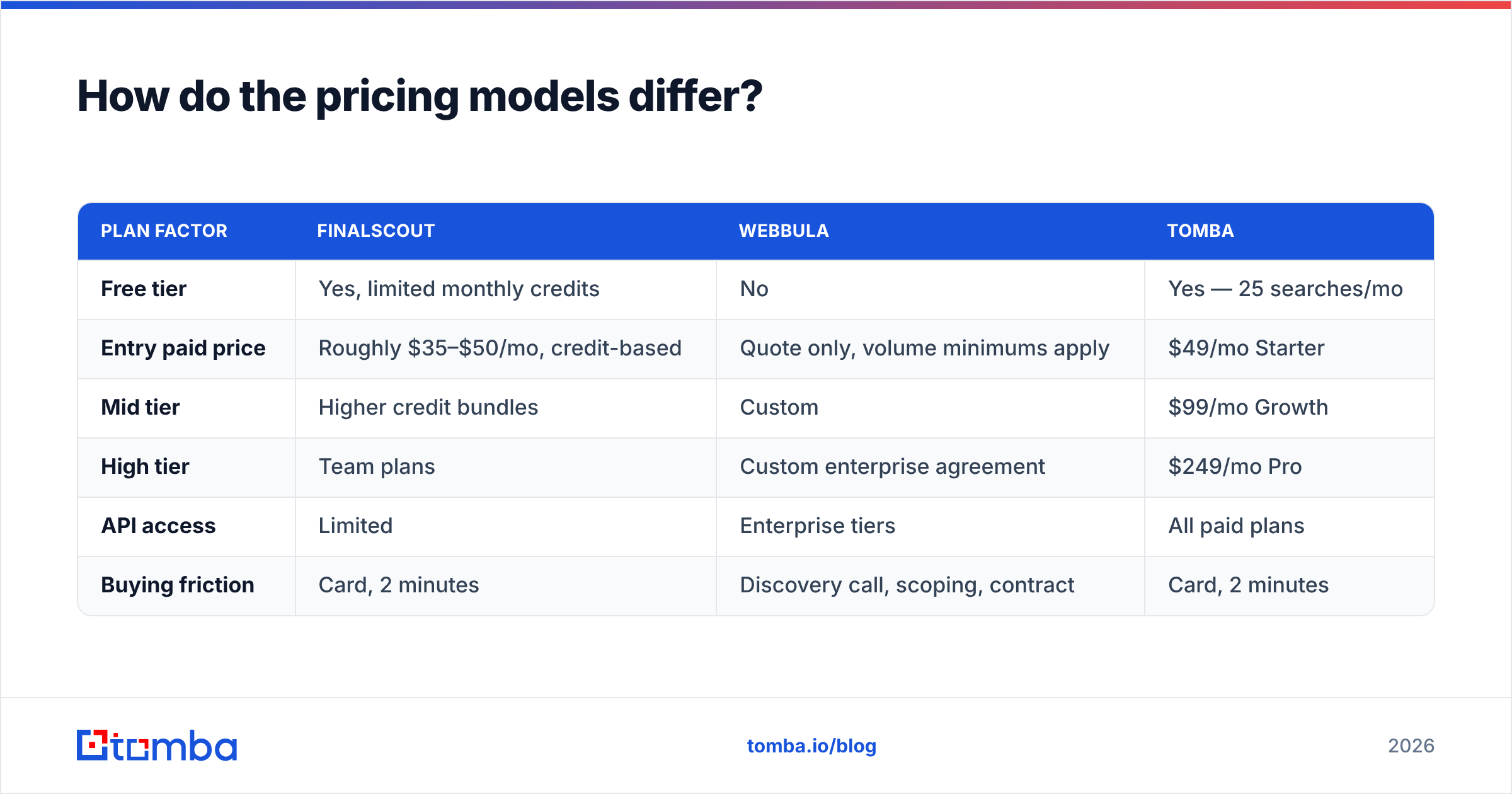
| Plan factor | FinalScout | Webbula | Tomba |
|---|---|---|---|
| Free tier | Yes, limited monthly credits | No | Yes — 25 searches/mo |
| Entry paid price | Roughly $35–$50/mo, credit-based | Quote only, volume minimums apply | $49/mo Starter |
| Mid tier | Higher credit bundles | Custom | $99/mo Growth |
| High tier | Team plans | Custom enterprise agreement | $249/mo Pro |
| API access | Limited | Enterprise tiers | All paid plans |
| Buying friction | Card, 2 minutes | Discovery call, scoping, contract | Card, 2 minutes |
Two caveats. First, FinalScout's published prices move — check the current page before you budget. Second, Webbula's quote-based model is not a red flag. It's normal for hygiene vendors, whose costs scale with file size and match depth. It just means you cannot pilot it on a Tuesday afternoon with a company card. That matters far more to a five-person startup than to a 50-person demand gen team.
Compare that with Tomba pricing, which is flat, published, and includes both finding and verification credits in the same plan — the reason a lot of teams stop running two subscriptions.
Which should you choose for your use case?#
Match the tool to the actual constraint, not to the louder marketing.
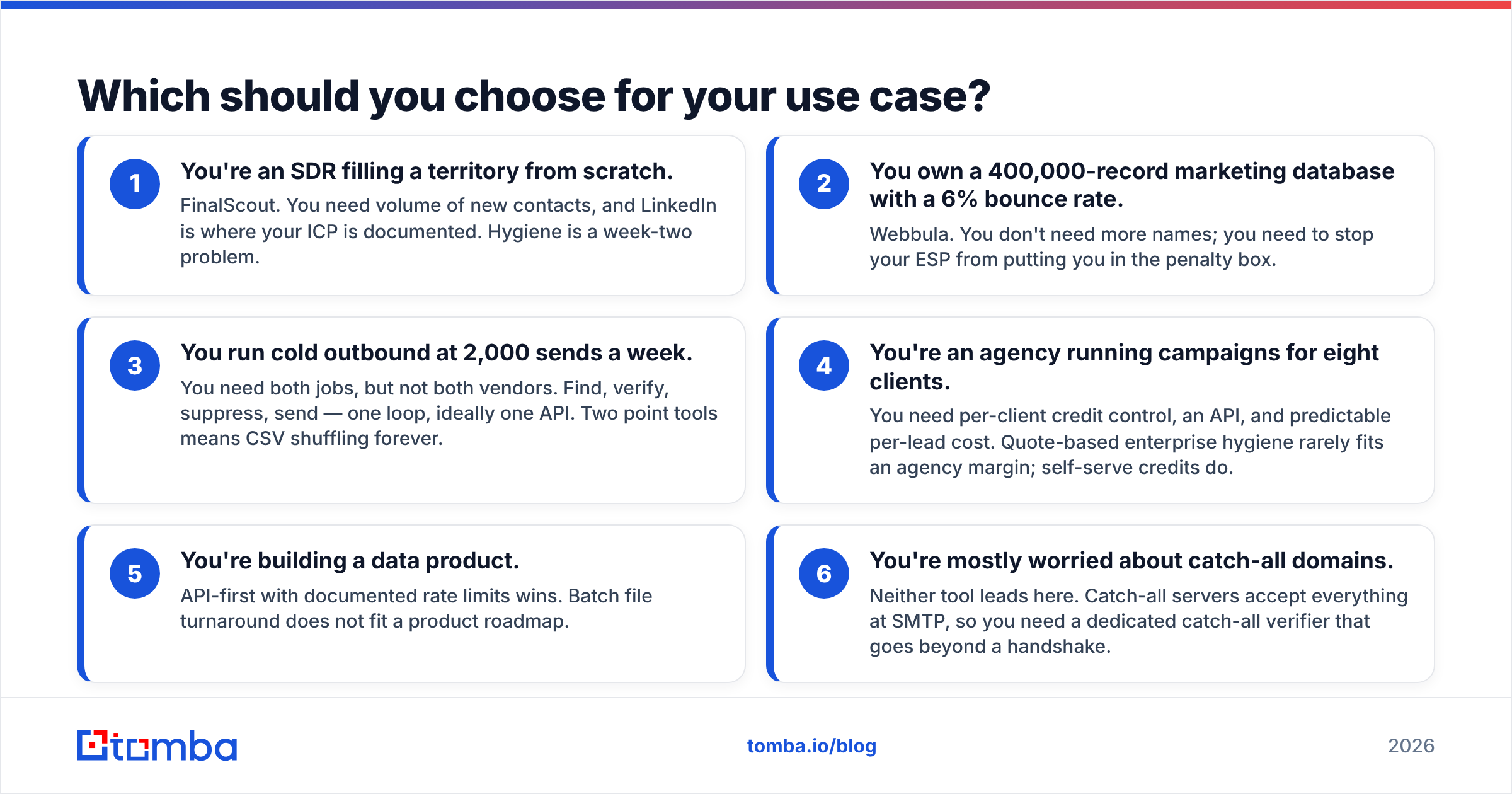
- You're an SDR filling a territory from scratch. FinalScout. You need volume of new contacts, and LinkedIn is where your ICP is documented. Hygiene is a week-two problem.
- You own a 400,000-record marketing database with a 6% bounce rate. Webbula. You don't need more names; you need to stop your ESP from putting you in the penalty box.
- You run cold outbound at 2,000 sends a week. You need both jobs, but not both vendors. Find, verify, suppress, send — one loop, ideally one API. Two point tools means CSV shuffling forever.
The next three cases are the ones teams get wrong most often.
- You're an agency running campaigns for eight clients. You need per-client credit control, an API, and predictable per-lead cost. Quote-based enterprise hygiene rarely fits an agency margin; self-serve credits do.
- You're building a data product. API-first with documented rate limits wins. Batch file turnaround does not fit a product roadmap.
- You're mostly worried about catch-all domains. Neither tool leads here. Catch-all servers accept everything at SMTP, so you need a dedicated catch-all verifier that goes beyond a handshake.

What are the honest limitations of each?#
FinalScout's limitations. It's tethered to LinkedIn. If your ICP has thin LinkedIn presence — trades, local services, manufacturing in non-English markets — hit rates collapse. Scraping-adjacent workflows also carry account risk. LinkedIn's terms of service are not friendly to automated extraction, and enforcement is patchy but real. Finally, "verified" in a finder's UI usually means an SMTP check, which does not detect traps or complainers.
Webbula's limitations. Zero discovery. No free trial to speak of. For most buyers, turnaround is file-based rather than real-time. That breaks any workflow where you need an answer at form-submit time. The minimum viable spend also rules it out below the mid-market line.
The shared limitation. Neither closes the loop. FinalScout finds without deep hygiene; Webbula cleans without finding. If you buy both, you're paying two vendors, reconciling two schemas, and writing glue code between them. That's fine at enterprise scale where the budget absorbs it. It's painful at 10 seats.
Where does Tomba fit in this comparison?#
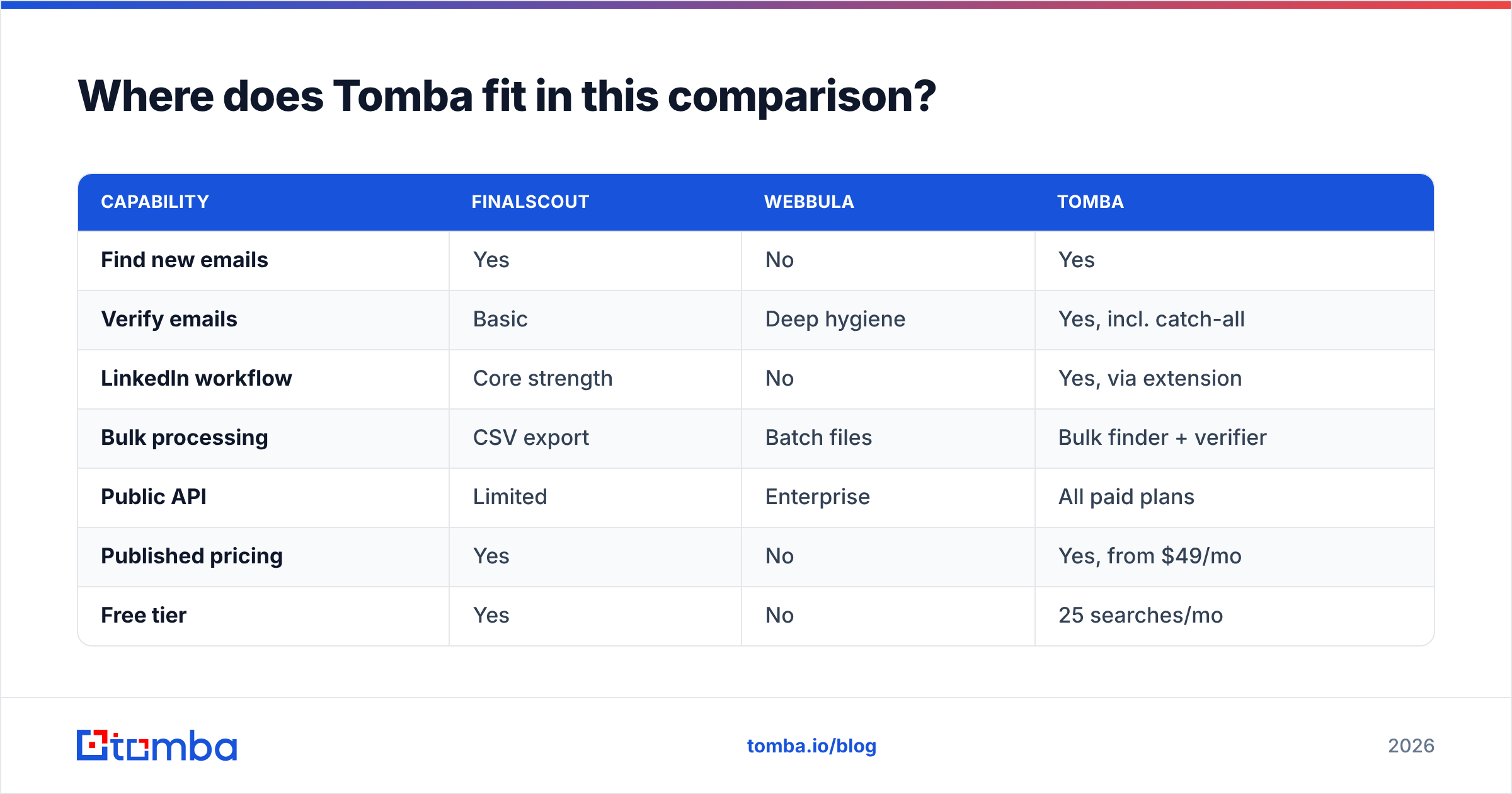
Tomba deliberately sits across the seam. Its core product is the email finder: search by name, domain, or company. The email verifier runs on the same account, the same credits, and the same API key. Around those sit domain search, catch-all verification, phone finder, and enrichment.
| Capability | FinalScout | Webbula | Tomba |
|---|---|---|---|
| Find new emails | Yes | No | Yes |
| Verify emails | Basic | Deep hygiene | Yes, incl. catch-all |
| LinkedIn workflow | Core strength | No | Yes, via extension |
| Bulk processing | CSV export | Batch files | Bulk finder + verifier |
| Public API | Limited | Enterprise | All paid plans |
| Published pricing | Yes | No | Yes, from $49/mo |
| Free tier | Yes | No | 25 searches/mo |

Where Tomba does not beat Webbula: enterprise-grade trap and complainer detection on eight-figure consumer lists, plus demographic appends for postal campaigns. If that's your job, Webbula is the specialist and you should treat it as such. Where Tomba does win against FinalScout: verification depth, bulk processing, and an API that's available on every paid plan rather than gated behind a sales conversation.
How should you actually run the evaluation?#
Don't read comparison posts — including this one — as the final word. Run your own FinalScout vs Webbula bake-off in 90 minutes:
- Build a 200-row truth set. Real contacts you can verify independently: customers, past repliers, colleagues at other companies.
- Strip the emails. Keep name, company, domain, LinkedIn URL.
- Run each tool. Same list, same day. Record hit rate, precision, cost per verified contact, and time spent.
- Send a 50-contact test campaign on a secondary domain. Measure real bounce and complaint rates, not predicted ones.
- Score the workflow, not just the data. How many CSV exports did it take? Could you have done it via API in a cron job?
That fifth step is the one people skip and regret. A tool that's 4% more accurate but requires a manual export every Monday will lose you more hours than it saves in bounces.
FAQ#
Is FinalScout better than Webbula? For prospecting, yes — Webbula doesn't do prospecting. For list hygiene at scale, no. They're complements, not substitutes.
Can I use both? Yes, and large teams do: FinalScout (or another finder) at the top, Webbula on the resulting database quarterly. Just budget for the integration work.
Do I need deep hygiene if I only send 1,000 cold emails a month? Probably not Webbula-grade. A solid verifier with catch-all handling covers most of the risk at that volume.
What about LinkedIn account safety? Any extension that reads profile data at scale carries some risk. Throttle your usage, avoid Sales Navigator marathon sessions, and never run scraping from your primary account.
Ready to close the loop instead of stitching two vendors together? Tomba Email Finder gives you discovery and verification on the same account. Search by domain or name, verify before you send, and hit the same API from your CRM or a cron job. Start on the free tier with 25 searches a month. Move to Starter at $49/mo when your list outgrows it. No sales call required to see a price.
Related guides#
Ready to find emails that actually work?
Join 150,000+ professionals who stopped guessing and started sending. Free credits on signup — no credit card required.
Get the Tomba newsletter
Practical outbound tactics and product updates — once every two weeks.
About the author