How to Find B2B Leads in 2026: A Practical 7-Step Guide
Most B2B lead lists rot before the first send. Here is a repeatable 7-step system for finding, enriching, and verifying leads in 2026 — with the math on how many you actually need.
TL;DR
- Finding B2B leads is three separate jobs: define the account, find the person, and get a contact point that still works. Most teams collapse them into one and end up with a spreadsheet of noise.
- Bought lists are the fastest way to burn a sending domain. Sourcing from live signals (job posts, tech stacks, funding, site visitors) and enriching on demand beats a static CSV every time.
- Verification is not optional. A 3% bounce rate is the ceiling before Google and Microsoft start throttling you — one unverified batch can undo six months of reputation work.
- You need far fewer leads than you think. At a 5% reply rate and a 25% meeting-to-opportunity rate, 400 well-researched contacts beats 10,000 scraped ones.
- Budget reality: a solo founder can run this for $0–$49/mo. A 5-rep team lands around $99–$249/mo for data, plus sequencing.
What does it actually mean to find B2B leads in 2026?#
A lead is not an email address. A lead is a person, at a company that has the problem you solve, whom you can reach and who has a plausible reason to answer this quarter.
Think of it like fishing. Buying a list is dumping a net in a random lake. Modern lead sourcing is checking which lake stocked fish last week, what those fish eat, and then casting once. Same effort, wildly different yield.
That breaks into three jobs most teams blur together:
- Account selection — which companies match your ideal customer profile (ICP) and show a timing signal right now.
- Contact selection — which humans at that account own the problem, the budget, or the pain.
- Contact resolution — getting a work email or phone number that is real, deliverable, and current.
Job three is where tools live. Jobs one and two are where deals are won or lost, and they cost you nothing but thought. If you skip them, no amount of data spend rescues the campaign — it just makes your bad targeting more expensive.
Which lead sources still work?#
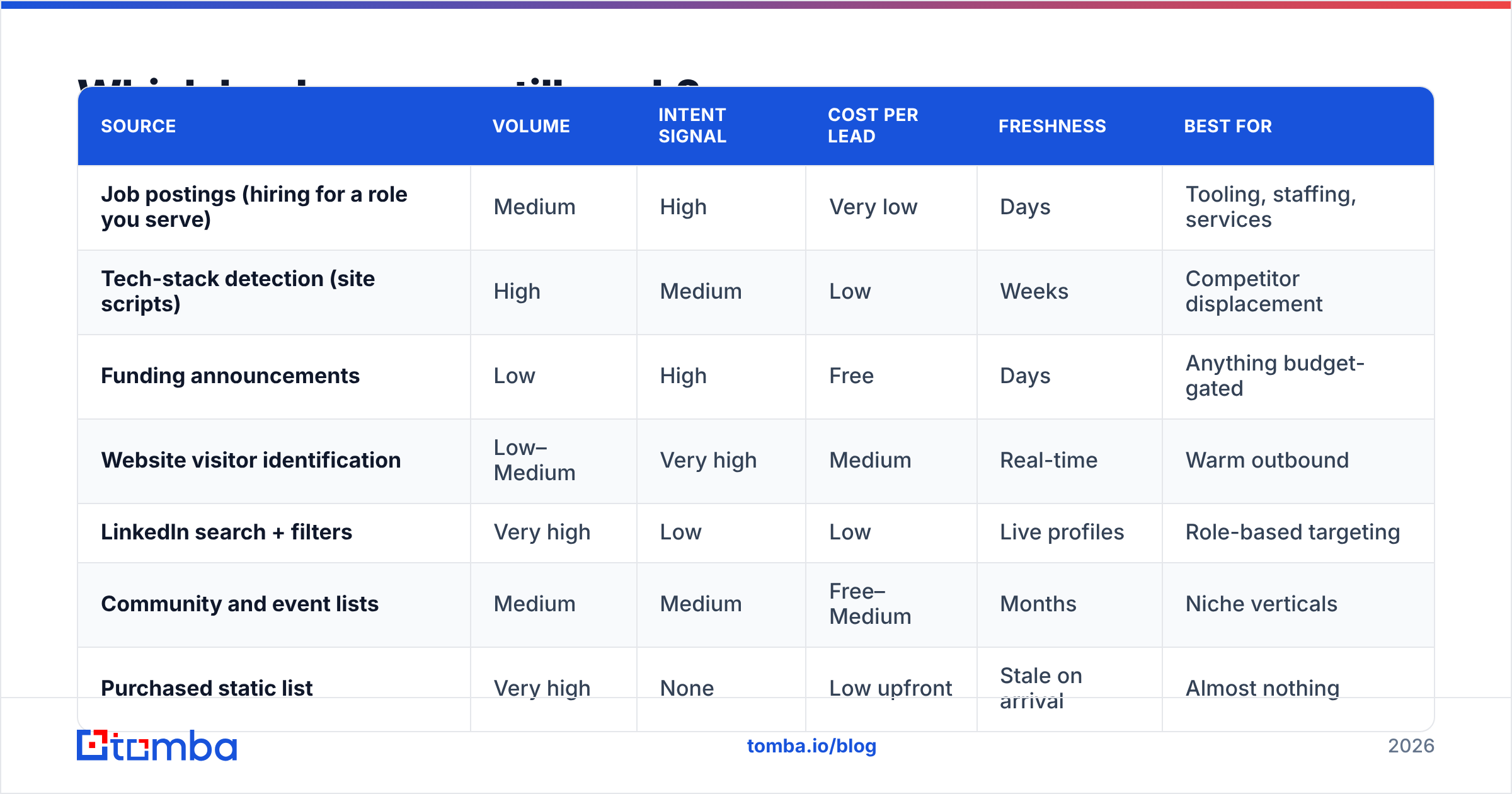
Not all sources are equal. Some produce high-intent, low-volume leads. Others produce volume you will regret. Here is how the main channels compare on the metrics that matter.
| Source | Volume | Intent signal | Cost per lead | Freshness | Best for |
|---|---|---|---|---|---|
| Job postings (hiring for a role you serve) | Medium | High | Very low | Days | Tooling, staffing, services |
| Tech-stack detection (site scripts) | High | Medium | Low | Weeks | Competitor displacement |
| Funding announcements | Low | High | Free | Days | Anything budget-gated |
| Website visitor identification | Low–Medium | Very high | Medium | Real-time | Warm outbound |
| LinkedIn search + filters | Very high | Low | Low | Live profiles | Role-based targeting |
| Community and event lists | Medium | Medium | Free–Medium | Months | Niche verticals |
| Purchased static list | Very high | None | Low upfront | Stale on arrival | Almost nothing |
| Curated B2B database (e.g. BookYourData, Tomba database) | High | Low–Medium | Low | Continuously refreshed | Scale + coverage |
The pattern: signal beats size. A list of 60 companies that posted a "Head of RevOps" role in the last 14 days will outperform 6,000 companies matched only on headcount and SIC code. Curated databases like BookYourData or the Tomba database sit in a useful middle ground — they give you coverage when signal-based sourcing runs dry, and unlike a one-time CSV purchase they are refreshed rather than frozen.
How do you build an ICP that filters out noise?#
Your ICP is a filter, not a wish list. Write it so that any teammate could look at a company and answer yes or no in under 30 seconds.
- Firmographics — headcount band, revenue band, geography, industry. Keep the bands narrow enough to exclude at least 80% of the market. If your ICP includes half of LinkedIn, it is not an ICP.
- Technographics — what must already be in their stack for you to be useful? "Uses HubSpot" or "runs Shopify Plus" is a hard qualifier and a conversation opener.
- Trigger events — the reason now. New funding round, new VP in the buying function, a hiring spree in the department you serve, a public migration, an expansion into a new market.
- Buying-committee map — the champion (feels the pain), the economic buyer (signs), and the blocker (security, legal, IT). You need contact data for at least the first two.
- Disqualifiers — write these down explicitly. Company sizes you cannot support, regions you cannot invoice, competitors' portfolio companies. Disqualifiers save more time than qualifiers.
- Reachability — can you actually get a deliverable email or a direct line? An ICP you cannot contact is a market study, not a pipeline.
Run your last 20 closed-won deals through this and see how many pass. If fewer than 12 do, your ICP describes an aspiration rather than your business.

Where do you actually get contact data?#
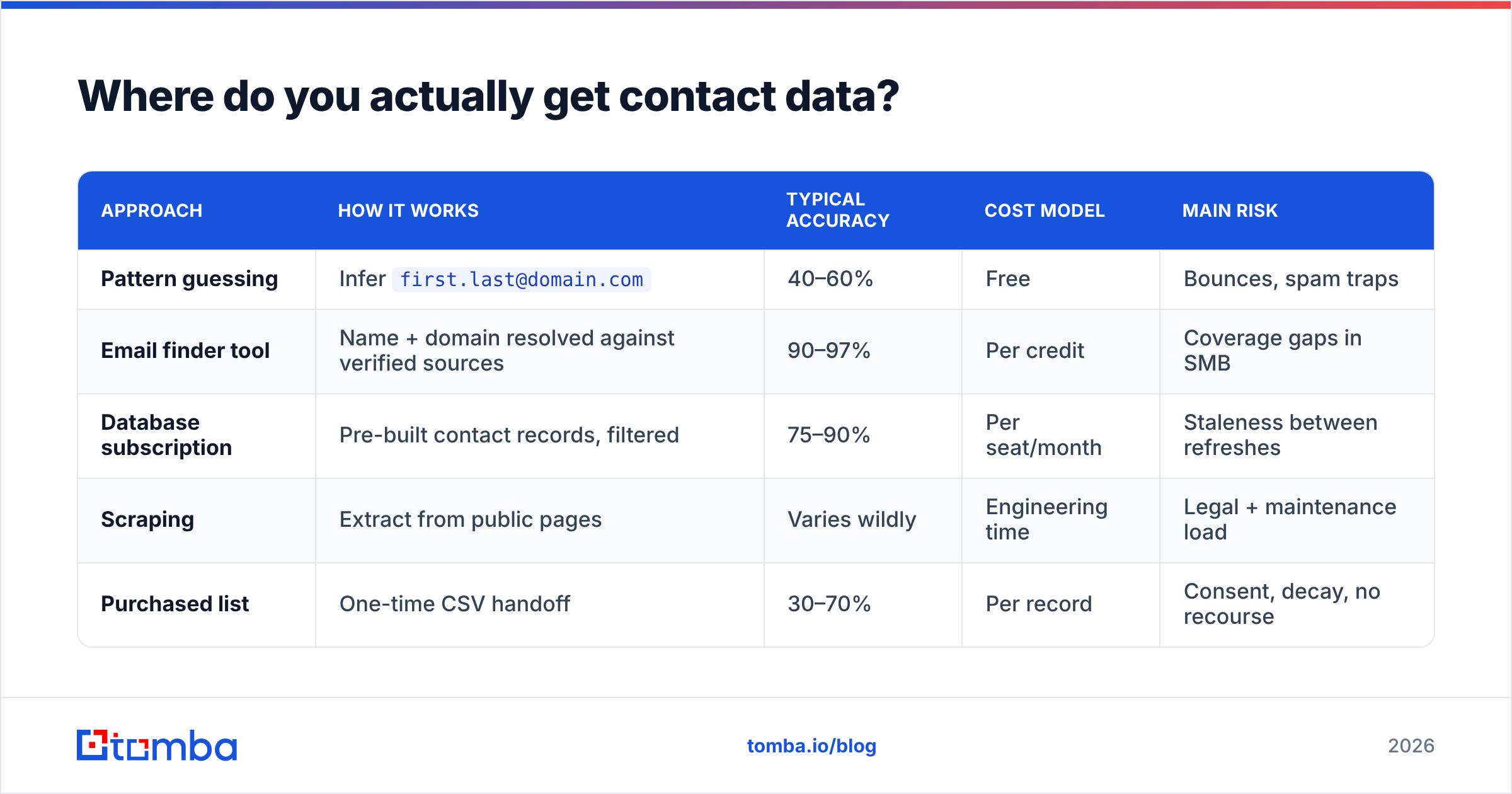
Once you know who you want, you need a way to turn "Sarah Chen, VP Marketing, Acme Corp" into something you can send to. Five approaches dominate, and they have very different failure modes.
| Approach | How it works | Typical accuracy | Cost model | Main risk |
|---|---|---|---|---|
| Pattern guessing | Infer first.last@domain.com |
40–60% | Free | Bounces, spam traps |
| Email finder tool | Name + domain resolved against verified sources | 90–97% | Per credit | Coverage gaps in SMB |
| Database subscription | Pre-built contact records, filtered | 75–90% | Per seat/month | Staleness between refreshes |
| Scraping | Extract from public pages | Varies wildly | Engineering time | Legal + maintenance load |
| Purchased list | One-time CSV handoff | 30–70% | Per record | Consent, decay, no recourse |
For most teams the practical answer is a hybrid: use a database or LinkedIn to build the target list, then resolve contacts on demand with an email finder so you are paying for the records you actually use rather than a warehouse of records you never touch.
If you are working account-by-account rather than person-by-person, domain search flips the direction — you give it a company domain and get back the named contacts and the company's email pattern in one call. That is usually the fastest way to map a buying committee at a mid-market account.
Two practical notes on pattern guessing, since it is the tempting shortcut:
- Patterns are per-company, not per-industry. Acme might use
first@, its subsidiaryfirstlast@. Guessing across a list guarantees a bounce spike. - Catch-all domains accept everything and confirm nothing. If your list is more than 20% catch-all, you need a catch-all verifier or you are flying blind.
Why does verification matter more than volume?#
Because inbox providers now judge you on the aggregate, not the individual message.
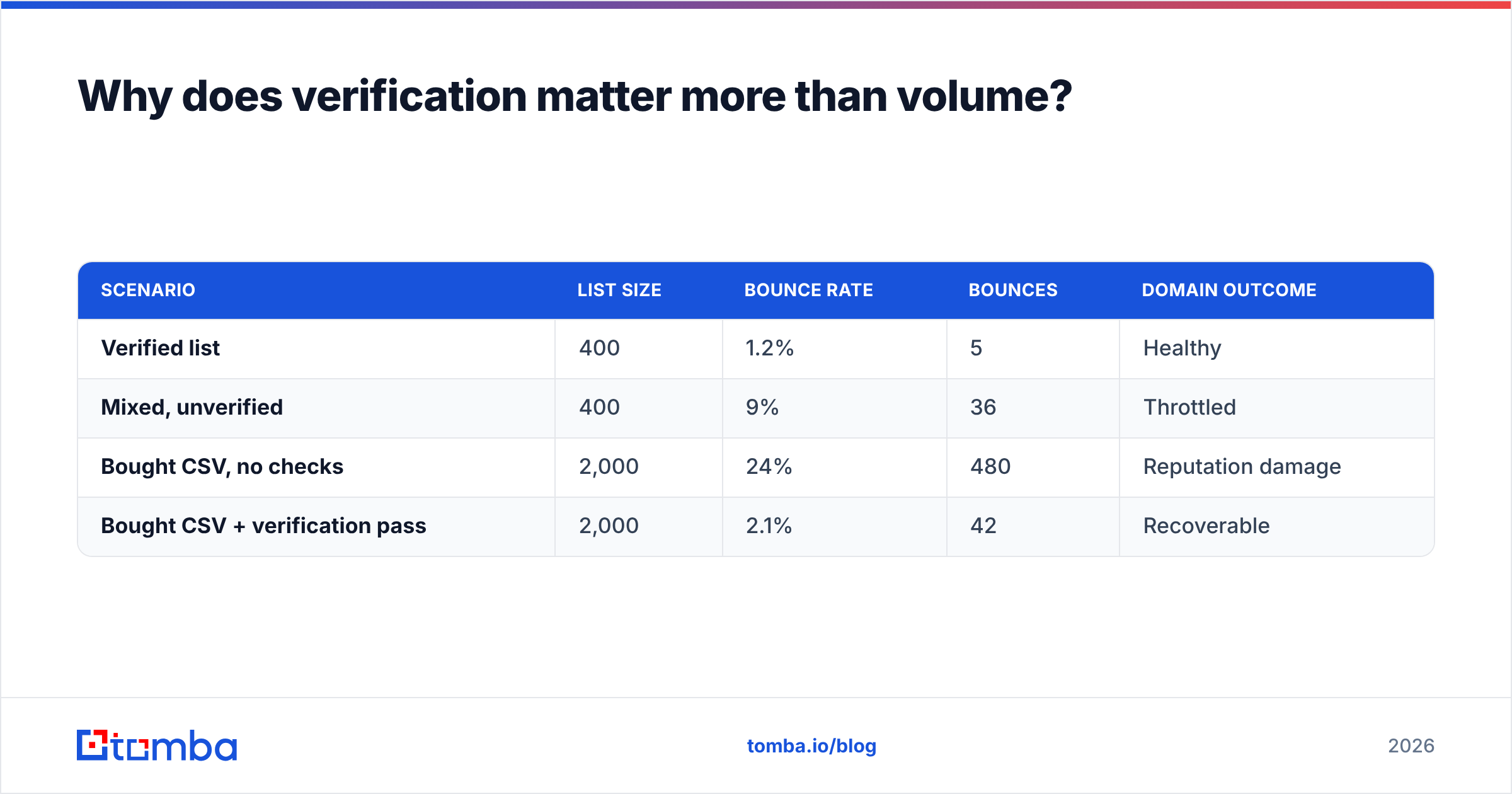
Since Google and Yahoo tightened bulk-sender requirements, the practical bounce ceiling for cold outbound is about 3%. Cross it and throttling starts; cross it repeatedly and your domain stops landing anywhere. Microsoft's filtering behaves similarly. That means a single unverified 2,000-record import can cost you the sending domain you spent months warming.
The math is brutal and worth internalizing:
| Scenario | List size | Bounce rate | Bounces | Domain outcome |
|---|---|---|---|---|
| Verified list | 400 | 1.2% | 5 | Healthy |
| Mixed, unverified | 400 | 9% | 36 | Throttled |
| Bought CSV, no checks | 2,000 | 24% | 480 | Reputation damage |
| Bought CSV + verification pass | 2,000 | 2.1% | 42 | Recoverable |
Notice the last row. Even a weak source becomes usable if you run it through an email verifier before it touches a sequence. Verification is the cheapest insurance in outbound — typically a fraction of a cent per record against a domain that is functionally irreplaceable.
For ongoing hygiene, re-verify anything older than 90 days. B2B contact data decays at roughly 2–3% per month as people change jobs, which means a list you built in January is meaningfully wrong by April.

What does a 7-step workflow look like?#
Here is the loop that works at small and mid scale without a data team.
Step 1 — Define the segment. Pick one ICP slice and one trigger. Not three. "Series A–B SaaS companies, 50–200 employees, that posted a demand-gen role in the last 21 days."
Step 2 — Build the account list. Job boards, funding feeds, database filters, or your own site traffic. Target 50–150 accounts per segment per cycle. Anything more and your research quality collapses.
Step 3 — Map the committee. For each account, identify 2–3 named people. Champion plus economic buyer at minimum. Skip accounts where you cannot name a human — they are a research task, not a lead.
Step 4 — Resolve contact data. Run the names and domains through an email finder. Use bulk email finder for anything over 50 records so you are not doing this by hand, or hit the Tomba API if you want it inside your own pipeline.
Step 5 — Verify and segment by confidence. Split into three buckets: valid (send), catch-all (send carefully, from a secondary domain), invalid (drop). Never merge the buckets back together to hit a volume target.
Step 6 — Enrich for personalization. Job title alone is not personalization. Pull the trigger event, a recent post, headcount growth, or tech stack. Data enrichment at this stage is what separates a 2% reply rate from an 8% one.
Step 7 — Measure and prune. Track reply rate by segment, not by campaign. If a segment underperforms twice, kill it and reallocate. The point of the loop is that step 7 rewrites step 1.
How many B2B leads do you actually need?#
Work backwards from the number of deals you need, not forwards from the size of the list you can buy.
| Metric | Conservative | Realistic | Strong |
|---|---|---|---|
| Deliverable contacts | 400 | 400 | 400 |
| Reply rate | 2% | 5% | 9% |
| Replies | 8 | 20 | 36 |
| Positive reply share | 25% | 30% | 35% |
| Meetings booked | 2 | 6 | 12 |
| Meeting-to-opportunity | 40% | 50% | 60% |
| Opportunities | 1 | 3 | 7 |
Four hundred contacts. Not forty thousand. If your close rate on opportunities is 25% and your average contract value is $12,000, that realistic column is $9,000 in closed-won per cycle from a list you can research properly in a week.
This is the argument against volume-first prospecting in one table. Doubling the list halves your research time per contact, which usually cuts the reply rate by more than half. The math goes backwards. HubSpot's sales research has made the same point for years: personalized outbound consistently outperforms volume once you account for deliverability drag.
What mistakes kill B2B lead generation?#
- Buying a list and sending immediately. No verification pass, no warm-up, no segmentation. This is the single most common cause of a dead sending domain.
- Targeting titles instead of problems. "VP of Sales" is not a segment. "VP of Sales at a company that just hired 5 SDRs" is.
- One-and-done sourcing. Lead lists are perishable. If you are not rebuilding monthly, you are working a decaying asset.
- Ignoring the accounts already on your site. Anonymous traffic from ICP-fit companies is the highest-intent source you own. Website visitor reveal turns that into named accounts before a competitor gets the inbound.
- No disqualification discipline. Reps chase anything with a pulse when the pipeline looks thin. Written disqualifiers prevent this.
- Confusing enrichment with personalization. Merging
{{company}}into a template is not research. Referencing why you are writing this quarter is.
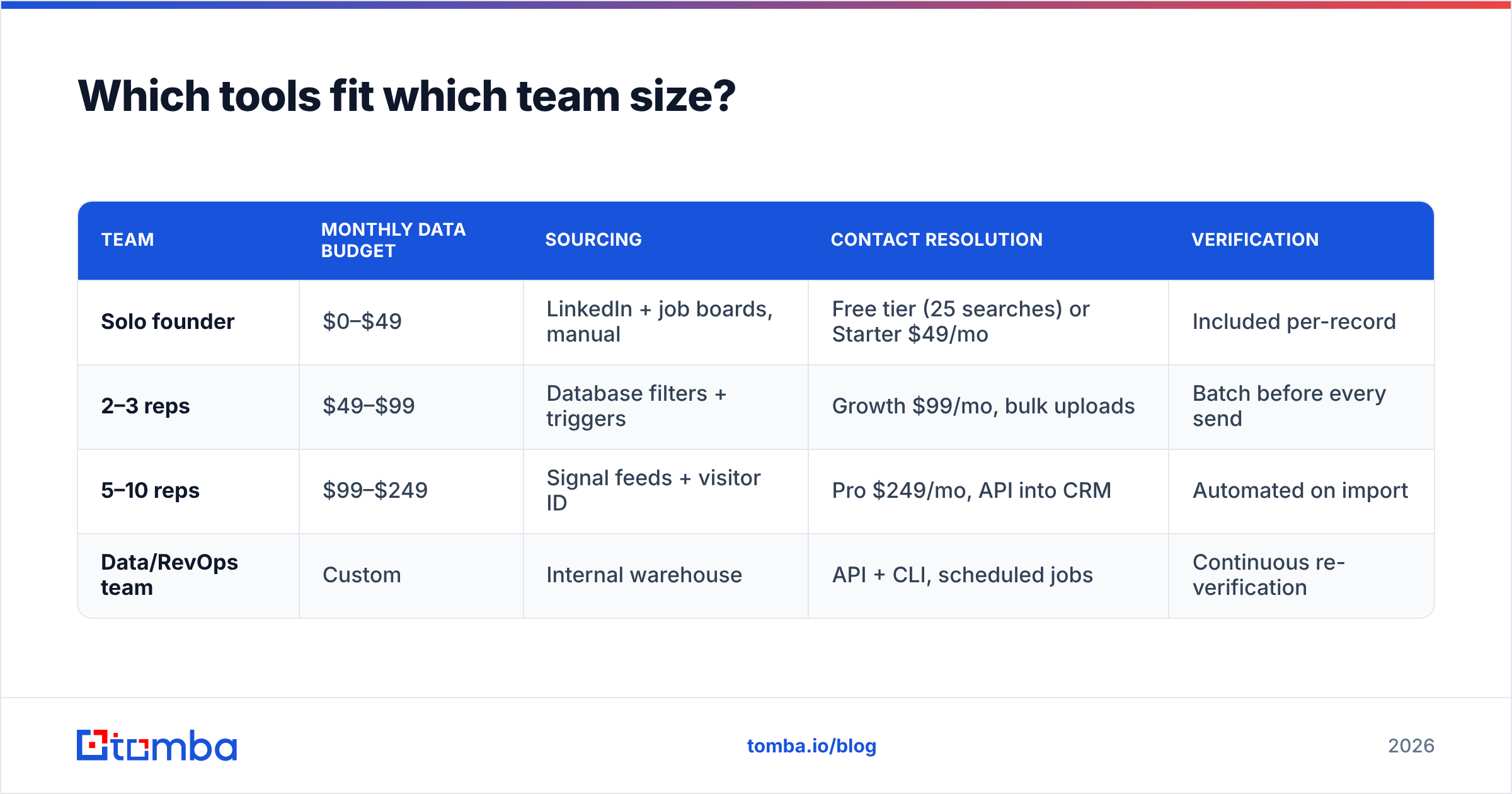
Which tools fit which team size?#
| Team | Monthly data budget | Sourcing | Contact resolution | Verification |
|---|---|---|---|---|
| Solo founder | $0–$49 | LinkedIn + job boards, manual | Free tier (25 searches) or Starter $49/mo | Included per-record |
| 2–3 reps | $49–$99 | Database filters + triggers | Growth $99/mo, bulk uploads | Batch before every send |
| 5–10 reps | $99–$249 | Signal feeds + visitor ID | Pro $249/mo, API into CRM | Automated on import |
| Data/RevOps team | Custom | Internal warehouse | API + CLI, scheduled jobs | Continuous re-verification |
For Tomba pricing, the free tier covers 25 searches per month — genuinely enough to test whether a segment is reachable before you commit budget. Starter is $49/mo, Growth $99/mo, and Pro $249/mo, with Enterprise custom. Compare the category broadly on G2's sales intelligence listings before you commit to an annual contract; per-credit economics vary more than the headline prices suggest.
If you want the conceptual grounding rather than the tooling, the lead generation overview on Wikipedia is a reasonable neutral primer on how the discipline evolved from list brokerage to signal-based sourcing.
Where should you start this week?#
Pick one segment. Build 100 accounts against a single trigger. Map two contacts per account. Resolve and verify. Send 200 well-researched emails instead of 2,000 generic ones, and measure reply rate by segment.
That single cycle will teach you more about your market than any purchased database, and it costs less than a week of a rep's time.
When you are ready to resolve those contacts, start with the Tomba Email Finder. Give it a name and a company domain and it returns a verified work email with a confidence score — no CSV brokers, no stale records, and a free tier that covers your first 25 searches so you can validate the segment before you spend anything.
Related guides#
Ready to find emails that actually work?
Join 150,000+ professionals who stopped guessing and started sending. Free credits on signup — no credit card required.
Get the Tomba newsletter
Practical outbound tactics and product updates — once every two weeks.
About the author