How to Find CEO Contact Information: A 2026 Playbook
CEO inboxes are the hardest B2B targets to reach and the easiest to burn. Here's the research stack, verification workflow, and outreach rules that actually get executive replies in 2026.

TL;DR
- CEO contact data decays faster than any other B2B segment — executive turnover, alias-only inboxes, and gatekeeper routing mean a 6-month-old list is mostly dead weight.
- The reliable stack is three layers: pattern discovery (what does this company's email format look like), person resolution (is this the right CEO right now), and verification (does the mailbox actually accept mail).
- Guessing formats and blasting is the fastest way to torch a sending domain. Bounce rates above 3% start damaging deliverability within a single campaign.
- Smaller companies (under ~200 employees) have genuinely reachable CEO inboxes. Enterprise CEOs almost never do — target the chief of staff, EA, or a VP one layer down instead.
- Combine a domain-level sweep with a verifier and a phone fallback. Email-only executive outreach caps out around a 2-4% reply rate; multi-channel roughly doubles it.
Why is CEO contact information so hard to find?#
Because CEOs are the most-targeted and least-exposed people in any company's org chart.
Think of a company's contact surface like a hotel. The front desk (info@, sales@, support@) is public and staffed. Individual guest rooms — the direct mailboxes of ICs and mid-level managers — are findable if you know the numbering system. The penthouse has its own elevator, a separate key, and someone screening who gets in. That's the CEO.
Three structural forces make executive data uniquely difficult:
1. Turnover. CEO tenure keeps compressing. Executive search data consistently puts median CEO tenure in the five-to-seven-year range, and in venture-backed startups it's far shorter. Any list you bought last year has a meaningful share of stale titles.
2. Alias routing. Many CEOs at companies past Series B route external mail through an alias handled by an EA or chief of staff. The address ceo@company.com or firstname@company.com may resolve technically but never reach a human decision-maker directly.
3. Catch-all domains. A large share of company domains accept mail at any address, which means naive SMTP verification returns "valid" for asdfgh@company.com. If your tool doesn't distinguish catch-all from confirmed-deliverable, your "verified" list is fiction.
That third point is where most prospecting workflows silently fail. You get a green checkmark, you send, and the mail lands in a black hole — no bounce, no reply, no signal that anything went wrong.

What are the actual sources for CEO contact data?#
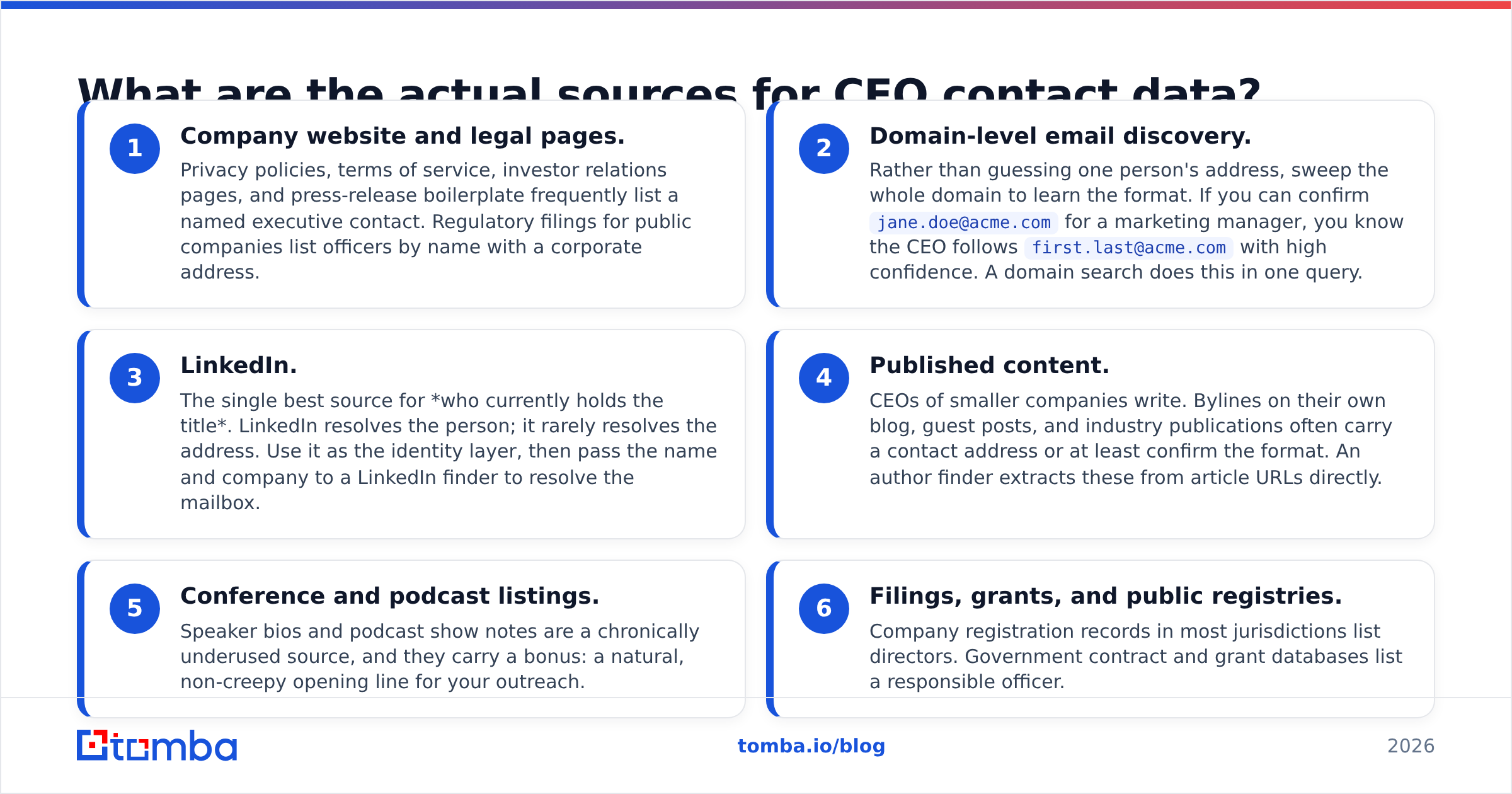
There are six sources worth your time. Everything else is noise.
- Company website and legal pages. Privacy policies, terms of service, investor relations pages, and press-release boilerplate frequently list a named executive contact. Regulatory filings for public companies list officers by name with a corporate address.
- Domain-level email discovery. Rather than guessing one person's address, sweep the whole domain to learn the format. If you can confirm
jane.doe@acme.comfor a marketing manager, you know the CEO followsfirst.last@acme.comwith high confidence. A domain search does this in one query. - LinkedIn. The single best source for who currently holds the title. LinkedIn resolves the person; it rarely resolves the address. Use it as the identity layer, then pass the name and company to a LinkedIn finder to resolve the mailbox.
- Published content. CEOs of smaller companies write. Bylines on their own blog, guest posts, and industry publications often carry a contact address or at least confirm the format. An author finder extracts these from article URLs directly.
- Conference and podcast listings. Speaker bios and podcast show notes are a chronically underused source, and they carry a bonus: a natural, non-creepy opening line for your outreach.
- Filings, grants, and public registries. Company registration records in most jurisdictions list directors. Government contract and grant databases list a responsible officer.
Notice what isn't on this list: scraped mega-lists of "500,000 verified CEO emails." Those exist, they're cheap, and they're mostly recycled 2019 exports.
How do the main approaches to finding CEO emails compare?#
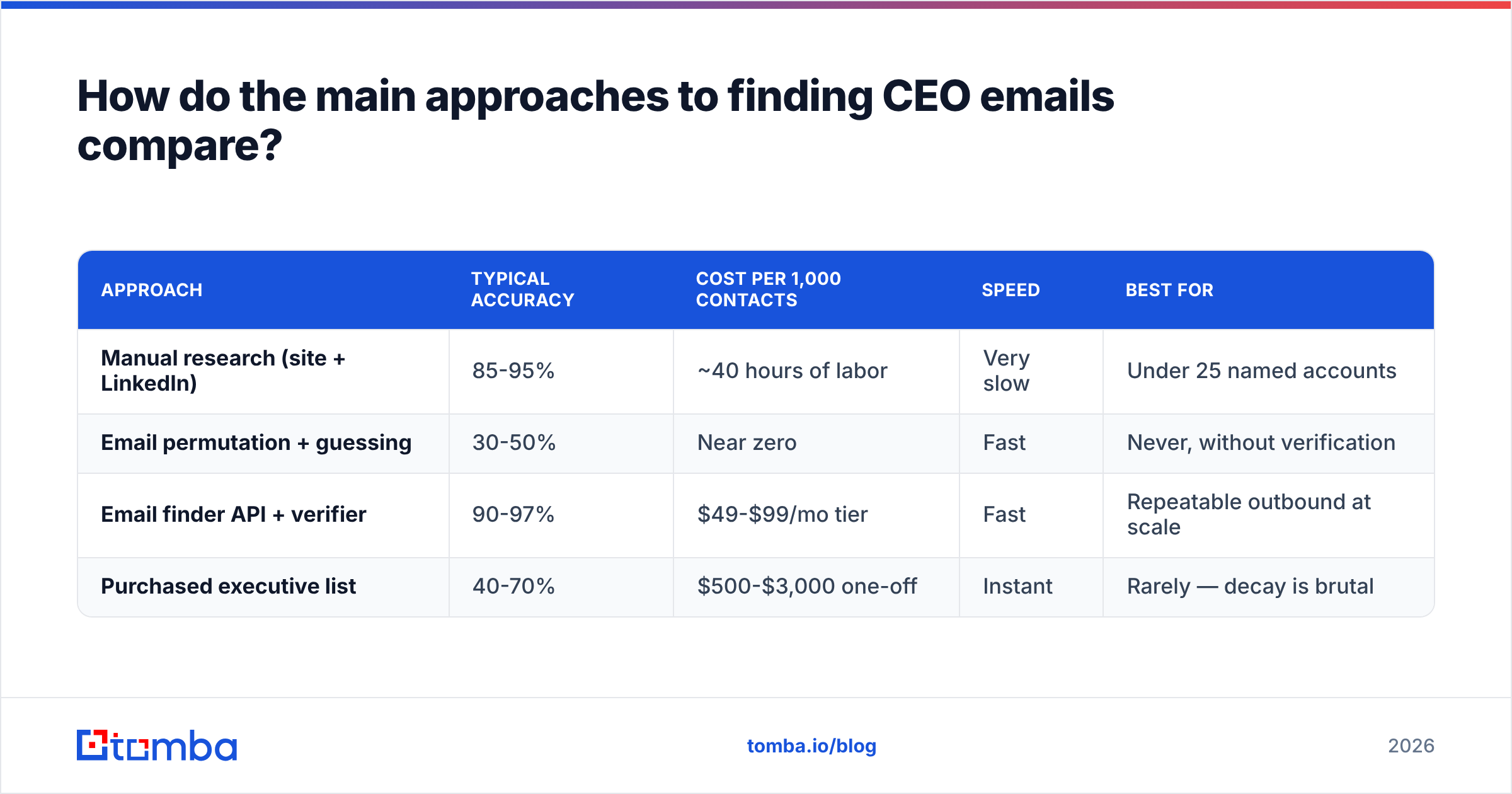
Here's the honest trade-off across the four methods people actually use.
| Approach | Typical accuracy | Cost per 1,000 contacts | Speed | Best for |
|---|---|---|---|---|
| Manual research (site + LinkedIn) | 85-95% | ~40 hours of labor | Very slow | Under 25 named accounts |
| Email permutation + guessing | 30-50% | Near zero | Fast | Never, without verification |
| Email finder API + verifier | 90-97% | $49-$99/mo tier | Fast | Repeatable outbound at scale |
| Purchased executive list | 40-70% | $500-$3,000 one-off | Instant | Rarely — decay is brutal |
The middle two rows explain most failed executive campaigns. Permutation tools generate the 12 plausible formats for "Jane Doe at Acme" and hand you all of them. If you send to all twelve, eleven bounce, your domain reputation takes the hit, and the twelfth lands in spam because your reputation already dropped.
The correct use of permutation is as input to verification, never as output to a sequence. Generate candidates with an email permutator, then run every candidate through an email verifier and only keep the confirmed one.

Accuracy claims in this category deserve scrutiny. A vendor claiming "99% accuracy" is usually measuring syntax validity and MX-record existence, not actual mailbox acceptance. Ask any vendor two questions: how do you handle catch-all domains, and what's your definition of a "valid" result. The answers separate the serious tools from the marketing.
What does a reliable CEO-finding workflow look like?#
Five steps. Skip any one and your bounce rate climbs.
Step 1 — Resolve the person. Confirm who currently holds the CEO title using LinkedIn plus a second source (the company's own about page, a recent press release, or a news mention). Two independent confirmations, both dated within the last six months.
Step 2 — Learn the domain format. Run a domain sweep to pull known addresses at that company. You're not looking for the CEO here — you're looking for any confirmed address that reveals the pattern. Three confirmed addresses in the same format is a strong signal.
Step 3 — Resolve the address. Feed name plus domain into an email finder. A good finder returns a confidence score alongside the address. Treat anything below 90% as a candidate, not a contact.
Step 4 — Verify the mailbox. Run SMTP-level verification. Critically, check whether the domain is catch-all. If it is, the standard verification result is meaningless and you need a dedicated catch-all verifier that uses behavioral signals rather than SMTP handshakes alone.
Step 5 — Add a fallback channel. Executive email reply rates are low by design. Pair each verified email with a mobile or switchboard number via a phone finder, and a LinkedIn profile URL. One channel is a coin flip; three is a campaign.
Run these in order. The most common failure I see is teams doing step 3 and skipping steps 2 and 4 — finder output goes straight into the sequencer, and the bounce report shows up a week later.

Should you even be emailing the CEO?#
Often, no. This is the strategic question most prospecting guides dodge.
Use company size as your rule of thumb:
- Under 50 employees: the CEO reads their own email and is frequently the actual buyer. Go direct.
- 50-200 employees: the CEO reads email but delegates purchasing. Go direct for strategic partnerships, go to the department head for tooling.
- 200-1,000 employees: the CEO's inbox is filtered. Target the VP or C-level function owner. A CEO referral downward carries weight, but only if your pitch would survive on its own.
- 1,000+ employees: direct CEO email is a near-zero-yield channel. Target the chief of staff, the EA, or a director who owns the budget line.
The exception across all sizes: if your product materially changes a metric the CEO personally reports to the board — revenue, burn, headcount efficiency, regulatory risk — a tight, specific email can land at any company size. "Specific" is doing heavy lifting there. Executives forgive brevity and never forgive vagueness.
Gartner's B2B buying research has documented for years that enterprise purchases involve buying groups of six to ten stakeholders. Emailing only the CEO means ignoring the eight people who will actually evaluate you. Treat executive contact as the entry point to a multithreaded account, not the whole play. You can read more on how buying groups behave in Gartner's B2B buying journey research.
Which tools should you use for executive contact data?#
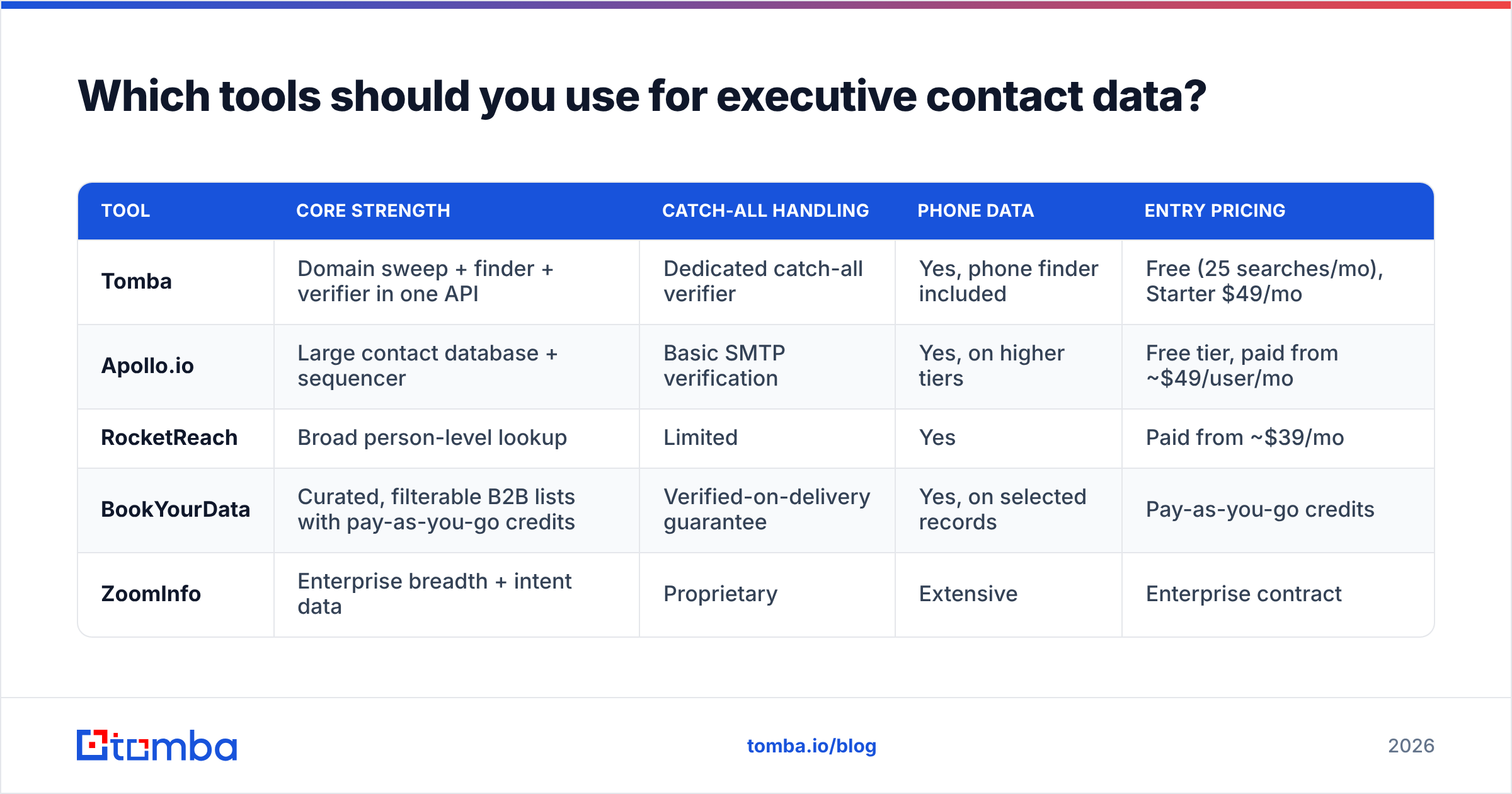
Different tools solve different layers. Here's how the well-known options stack up for CEO-level work specifically.
| Tool | Core strength | Catch-all handling | Phone data | Entry pricing |
|---|---|---|---|---|
| Tomba | Domain sweep + finder + verifier in one API | Dedicated catch-all verifier | Yes, phone finder included | Free (25 searches/mo), Starter $49/mo |
| Apollo.io | Large contact database + sequencer | Basic SMTP verification | Yes, on higher tiers | Free tier, paid from ~$49/user/mo |
| RocketReach | Broad person-level lookup | Limited | Yes | Paid from ~$39/mo |
| BookYourData | Curated, filterable B2B lists with pay-as-you-go credits | Verified-on-delivery guarantee | Yes, on selected records | Pay-as-you-go credits |
| ZoomInfo | Enterprise breadth + intent data | Proprietary | Extensive | Enterprise contract |
A few honest notes on that table. BookYourData is a genuinely good fit if you want a curated list handed to you rather than an API to build against — its pay-as-you-go model avoids subscription lock-in, which matters if executive prospecting is a quarterly project rather than a daily motion. Apollo bundles sequencing, which is convenient but means you're buying an outbound platform, not a data tool. ZoomInfo has the deepest enterprise coverage and the pricing to match; if you're under 20 seats it's usually overkill.
Tomba's angle is the API-first stack: domain search, finder, verifier, catch-all verification, and phone lookup behind one key, so you can build the five-step workflow above as code rather than as a series of CSV exports. Full Tomba pricing runs Free, Starter $49/mo, Growth $99/mo, Pro $249/mo, and Enterprise.

Whatever you pick, check the vendor's stated data sourcing. Reputable providers publish where their data comes from and how often it's refreshed. If you can't find that page on a vendor's site, that's information too. Cross-referencing user reviews on G2 is a reasonable sanity check on accuracy claims that vendors make about themselves.
How do you protect deliverability while doing executive outreach?#
Executive prospecting is high-risk for your sending domain because the target list is small, the addresses are hard, and the temptation to guess is high.
Four rules that keep you safe:
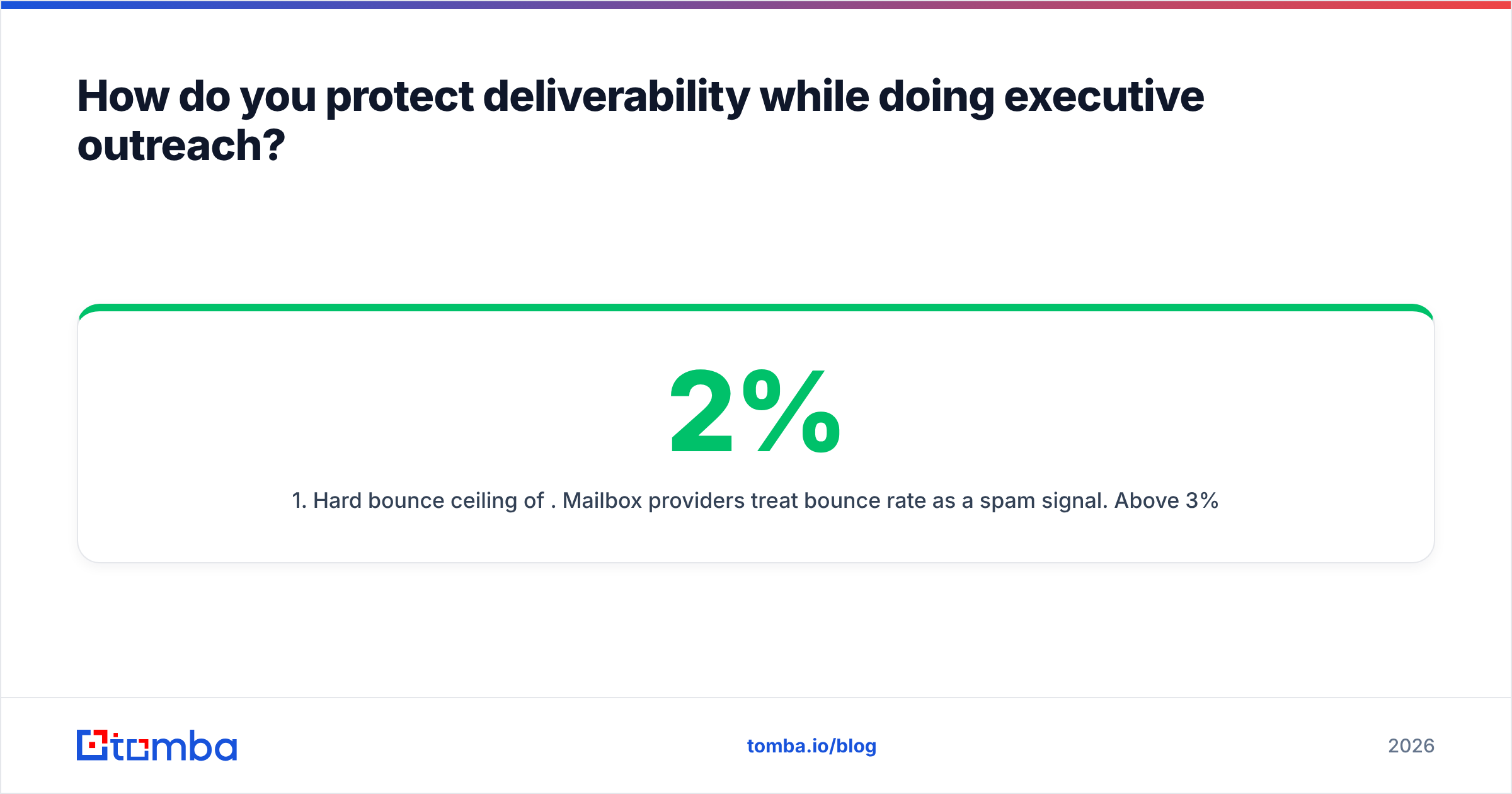
- Hard bounce ceiling of 2%. Mailbox providers treat bounce rate as a spam signal. Above 3% you're actively damaging sender reputation; above 5% you can get a sending domain throttled. Verify before every send, not once at list-build time.
- Never send to unverified permutations. If a finder returns three candidates and you can't verify which is correct, send to zero of them. Use LinkedIn or the phone instead.
- Warm the sending domain properly. New domains need 3-6 weeks of gradual volume ramp before carrying cold executive outreach. A warmup calculator gives you a realistic ramp schedule.
- Separate your executive sends. Run CEO-tier outreach from a different subdomain than your bulk sequences. If a volume campaign damages reputation, your high-value executive sends stay clean.
Also worth checking: your authentication records. Missing or misconfigured SPF, DKIM, and DMARC will land executive mail in spam regardless of how accurate your contact data is. Both Google and Microsoft tightened bulk-sender authentication requirements, and Google's sender guidelines are the authoritative reference for what's now mandatory rather than optional.
What should a CEO cold email actually say?#
Short answer: three sentences, one specific observation, one ask.
The structure that works at executive level:
- Line 1 — proof you did the work. Reference something specific and recent: a funding round, a hiring pattern, a product launch, something they said on a podcast. Not "I love what you're building at Acme."
- Line 2 — the relevance bridge. Connect that observation to a problem you solve, in the CEO's own vocabulary. CEOs think in revenue, margin, risk, and speed. They do not think in "streamlined workflows."
- Line 3 — a low-friction ask. Not a 30-minute demo. Ask for a redirect ("Is this something your VP of Rev Ops owns?") or a yes/no reaction. Redirects convert at several times the rate of meeting requests, and a redirect from the CEO carries internal authority.
Keep the total under 90 words. Executive inboxes are read on phones between meetings; anything requiring a scroll gets archived. Skip attachments and images entirely — they trigger filters and signal mass send.
Follow up twice, spaced roughly four and ten days out, then stop. Executive non-response is usually genuine bandwidth, not rejection. A polite "closing the loop" final message recovers a surprising number of replies.
Putting it together#
Finding CEO contact information reliably is less about a single magic tool and more about refusing to skip steps. Resolve the person from two sources. Learn the domain's format before you guess an individual. Verify every address, and treat catch-all domains as a separate problem requiring a separate tool. Add a phone and a LinkedIn touch so you're not betting the account on one channel. And be honest about whether the CEO is even the right target for the company size you're working.
If you want that workflow as one stack rather than five browser tabs, start with the Tomba Email Finder. Give it a name and a domain and it returns the address with a confidence score, backed by domain search for pattern discovery, a verifier and catch-all verifier for deliverability, and phone lookup for your fallback channel. The free tier gives you 25 searches a month to test accuracy against accounts you already know the answers for — which is exactly how you should evaluate any data vendor before you trust it with your sending domain.
Related guides#
Ready to find emails that actually work?
Join 150,000+ professionals who stopped guessing and started sending. Free credits on signup — no credit card required.
Get the Tomba newsletter
Practical outbound tactics and product updates — once every two weeks.
About the author