How to Find Company Details Fast: The 2026 Data Guide
Company registries, LinkedIn, tech-stack scanners, and enrichment APIs all return different versions of the truth. Here is where each source is accurate, where it quietly rots, and how to build a company research workflow you can trust.
TL;DR
- "Company details" is not one dataset. It is five: legal/registry facts, firmographics, technographics, contact data, and intent signals. Each has a different best source and a different decay rate.
- Free sources (company registries, the company's own site, LinkedIn) are accurate for legal identity and messaging, and unreliable for headcount, revenue, and who actually owns a budget.
- Paid databases are fast but stale in the places that matter most — job titles and email addresses churn hardest.
- The workflow that actually scales: resolve the domain first, enrich the company second, find and verify people last. Skip step one and everything downstream inherits the wrong entity.
- Verification is not optional. A 20% bad-data rate in a 500-contact list is 100 bounces, and bounces cost you sender reputation before they cost you meetings.
What Counts as "Company Details" in B2B?#
Ask five people on a revenue team to "find company details" and you get five different deliverables. Before you pick a tool, name the layer you actually need.
- Legal and registry facts — registered name, incorporation date, jurisdiction, company number, directors, filed accounts. Authoritative, slow-moving, and free from government registries.
- Firmographics — industry, employee count, revenue band, HQ location, funding stage, parent/subsidiary structure. This is what most sales teams mean, and it is the layer with the widest quality gap between vendors.
- Technographics — CRM, marketing automation, cloud provider, payment processor, analytics. Detectable from the public site, cheap to collect, and highly predictive for anyone selling software.
- Contact data — named humans, their roles, work emails, direct dials, LinkedIn profiles. Highest value, fastest decay, hardest to get right.
- Intent and activity signals — hiring posts, product launches, funding rounds, tech migrations, site visits. Perishable within weeks; useless once cold.
- Digital footprint — domain, subdomains, social handles, review profiles, app store listings. Cheap glue that connects the other five layers to one entity.
The mistake that wastes the most time is treating layer 4 as if it behaves like layer 1. Registry data is stable for years. A VP of Marketing's email address has roughly a two-year half-life, and their title has a shorter one.
Where Do You Actually Find Company Details?#
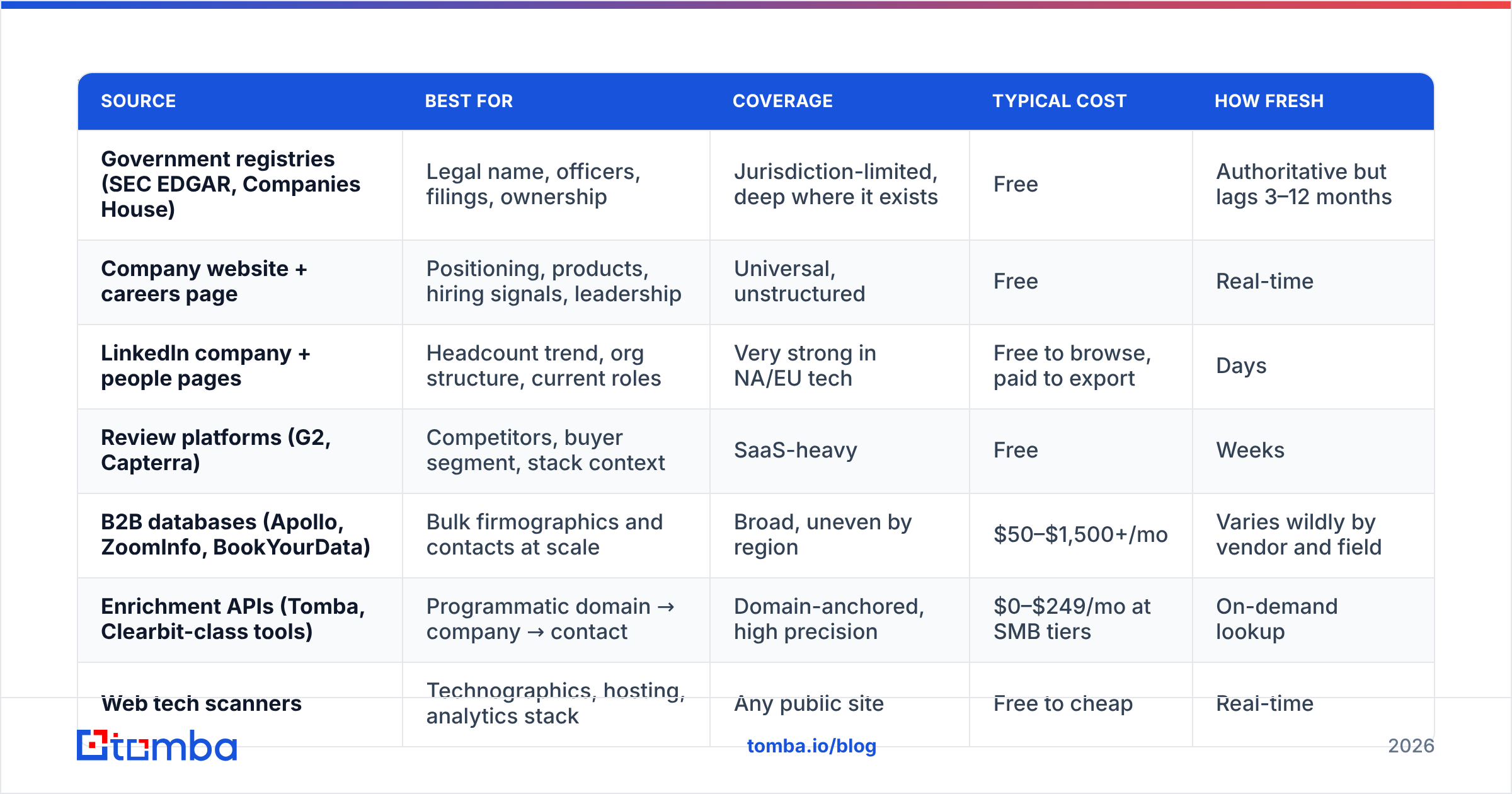
Every source is excellent at something and quietly terrible at something else. This is the honest version of the map:
| Source | Best for | Coverage | Typical cost | How fresh |
|---|---|---|---|---|
| Government registries (SEC EDGAR, Companies House) | Legal name, officers, filings, ownership | Jurisdiction-limited, deep where it exists | Free | Authoritative but lags 3–12 months |
| Company website + careers page | Positioning, products, hiring signals, leadership | Universal, unstructured | Free | Real-time |
| LinkedIn company + people pages | Headcount trend, org structure, current roles | Very strong in NA/EU tech | Free to browse, paid to export | Days |
| Review platforms (G2, Capterra) | Competitors, buyer segment, stack context | SaaS-heavy | Free | Weeks |
| B2B databases (Apollo, ZoomInfo, BookYourData) | Bulk firmographics and contacts at scale | Broad, uneven by region | $50–$1,500+/mo | Varies wildly by vendor and field |
| Enrichment APIs (Tomba, Clearbit-class tools) | Programmatic domain → company → contact | Domain-anchored, high precision | $0–$249/mo at SMB tiers | On-demand lookup |
| Web tech scanners | Technographics, hosting, analytics stack | Any public site | Free to cheap | Real-time |
Read that table as a stack, not a shortlist. Serious research uses three or four rows at once: the registry for identity, LinkedIn for structure, an API for contacts, and the website for the story you will actually reference in your first line.

Which Free Sources Are Worth Your Time?#
Free sources are worth exactly as much as the time they take to query, which is why they belong at the start of research and never at scale.
Government registries are the ground truth for legal identity. SEC EDGAR gives you full filings for US public companies — 10-Ks contain segment revenue, headcount, risk factors, and named executives that no database resells accurately. The UK, Australia, and most of the EU have equivalents. If you are writing an enterprise proposal or checking whether "Acme Ltd" and "Acme Holdings Inc" are the same buyer, start here.
The company's own site is underrated because it is not structured. The careers page tells you which teams are expanding, which is a better growth signal than a stale employee-count field. The customers page tells you segment. The pricing page tells you deal size. Ten minutes here beats an hour of database filtering.
LinkedIn gives you the only headcount number that updates continuously, plus org shape — how many SDRs, whether there is a RevOps function, who reports where. It is also where titles are most current, which matters because the title in your CRM is probably 14 months old.
Review sites like G2's sales intelligence category show you which tools a company's peers buy and, in the reviews themselves, who at the company wrote them — often with title and company size attached.
Where free breaks: it does not scale past about 30 accounts a week per person, it does not give you verified emails, and it forces a human to resolve entity ambiguity every single time. That is the exact job an API should do.
How Do Paid Databases and Enrichment APIs Compare?#
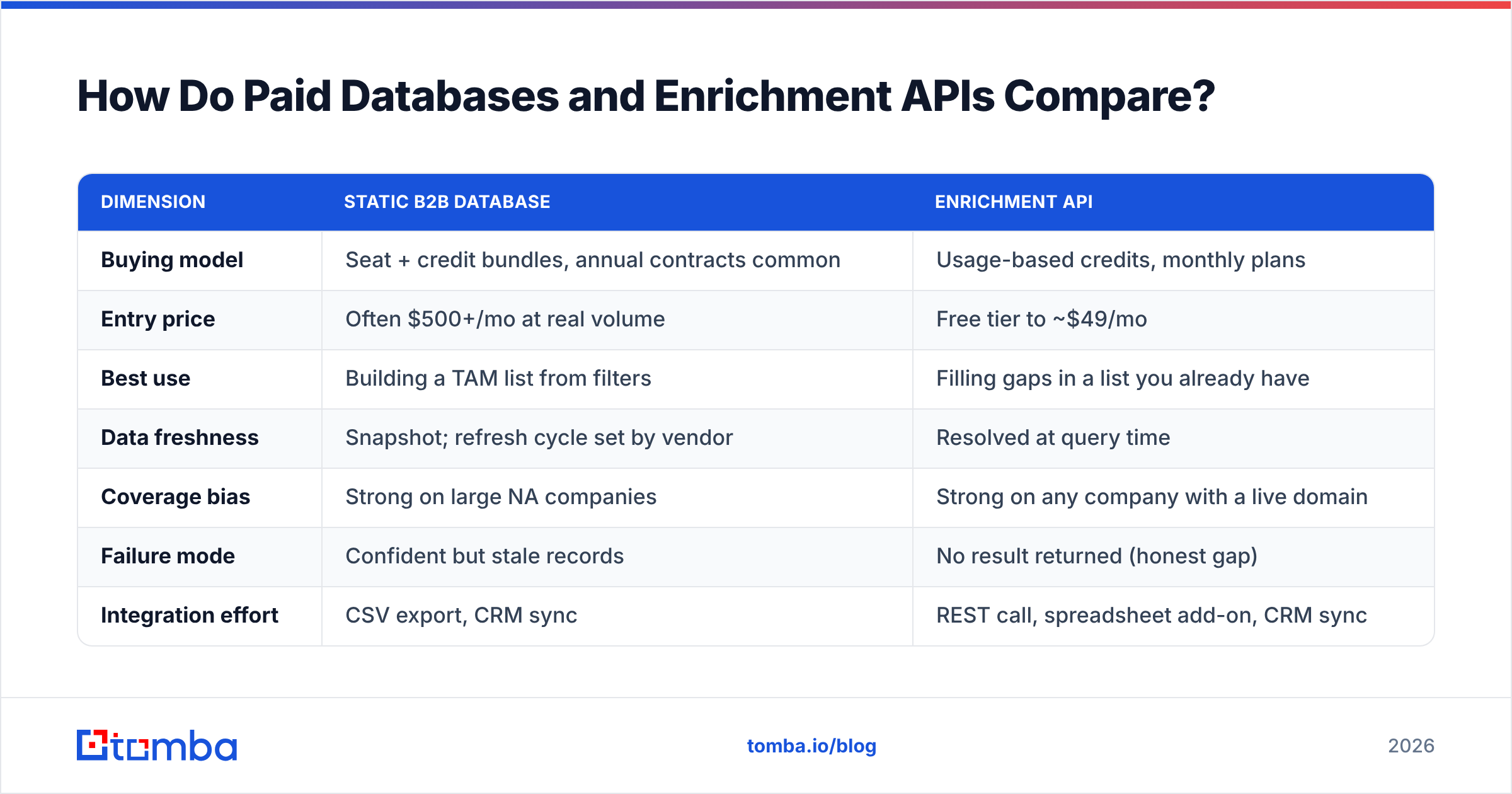
There are two philosophies. Databases sell you a snapshot: millions of prebuilt records you filter and export. Enrichment APIs sell you a lookup: you supply a domain or a name, they return current data for that specific entity. Understanding what is domain search is the difference between the two models in one concept.
| Dimension | Static B2B database | Enrichment API |
|---|---|---|
| Buying model | Seat + credit bundles, annual contracts common | Usage-based credits, monthly plans |
| Entry price | Often $500+/mo at real volume | Free tier to ~$49/mo |
| Best use | Building a TAM list from filters | Filling gaps in a list you already have |
| Data freshness | Snapshot; refresh cycle set by vendor | Resolved at query time |
| Coverage bias | Strong on large NA companies | Strong on any company with a live domain |
| Failure mode | Confident but stale records | No result returned (honest gap) |
| Integration effort | CSV export, CRM sync | REST call, spreadsheet add-on, CRM sync |
The failure modes are the important row. A stale database returns a record that looks perfect and bounces. A well-built API returns nothing and tells you it found nothing. The second is far cheaper to manage, because you can route unknowns to a manual queue instead of discovering them in your bounce report.
For reference on the API side, Tomba pricing runs a free tier at 25 searches per month, Starter at $49/mo, Growth at $99/mo, and Pro at $249/mo, with enterprise pricing on request. That is roughly the shape of the category at SMB scale — you are paying tens of dollars for hundreds to thousands of resolved lookups, not thousands of dollars for a seat license.
Among database-style vendors, BookYourData is a reasonable option when you want a pay-as-you-go list with per-record pricing rather than an annual commitment, and it plays well alongside an API you use for verification. The two models genuinely complement each other: buy breadth, verify depth.
How Do You Find the People Behind the Company?#
Company details without a named human is trivia. The reliable sequence is domain-first, and it goes like this.
Step 1 — Resolve the entity to one canonical domain. Not the parent brand, not the marketing microsite, not the regional variant. Everything downstream keys off this. If you only have a company name, a company website finder closes the gap in one step.
Step 2 — Pull the company's people from the domain. A domain search returns known email addresses on that domain along with names, roles, and detected pattern. This is the single highest-leverage query in company research, because it hands you the org's email format at the same time as the people.
Step 3 — Confirm the email pattern. Most companies use one of about six formats: first.last@, flast@, first@, firstl@, f.last@, lastf@. Once you know the pattern, you can construct addresses for anyone whose name you found on LinkedIn but who never appeared in a public source.
Step 4 — Verify before you send. Constructed addresses are hypotheses. Run them through an email verifier so you know which are deliverable, which are risky, and which sit on catch-all domains that need a different handling rule.
Step 5 — Enrich the record with context. Title, seniority, location, LinkedIn URL, sometimes a direct dial. This is where data enrichment turns a contact row into something a rep can personalize against without another research pass.
Step 6 — Write the record back to the CRM with a source and timestamp. Undated data is unmaintainable data. Six months from now, the timestamp is what tells you which records to re-verify.
How Do You Verify Company Details Before You Trust Them?#
Treat every field as a claim with a confidence level attached. A quick triage that costs almost nothing:
- Cross-check two independent sources for any field that drives targeting. If employee count decides whether an account is in-segment, confirm the database number against LinkedIn before you route it. Databases disagree with each other by 2x on headcount more often than most teams realize.
- Trust registry data over vendor data for legal facts, always. Vendors buy, merge, and re-license each other's data. Registries file it.
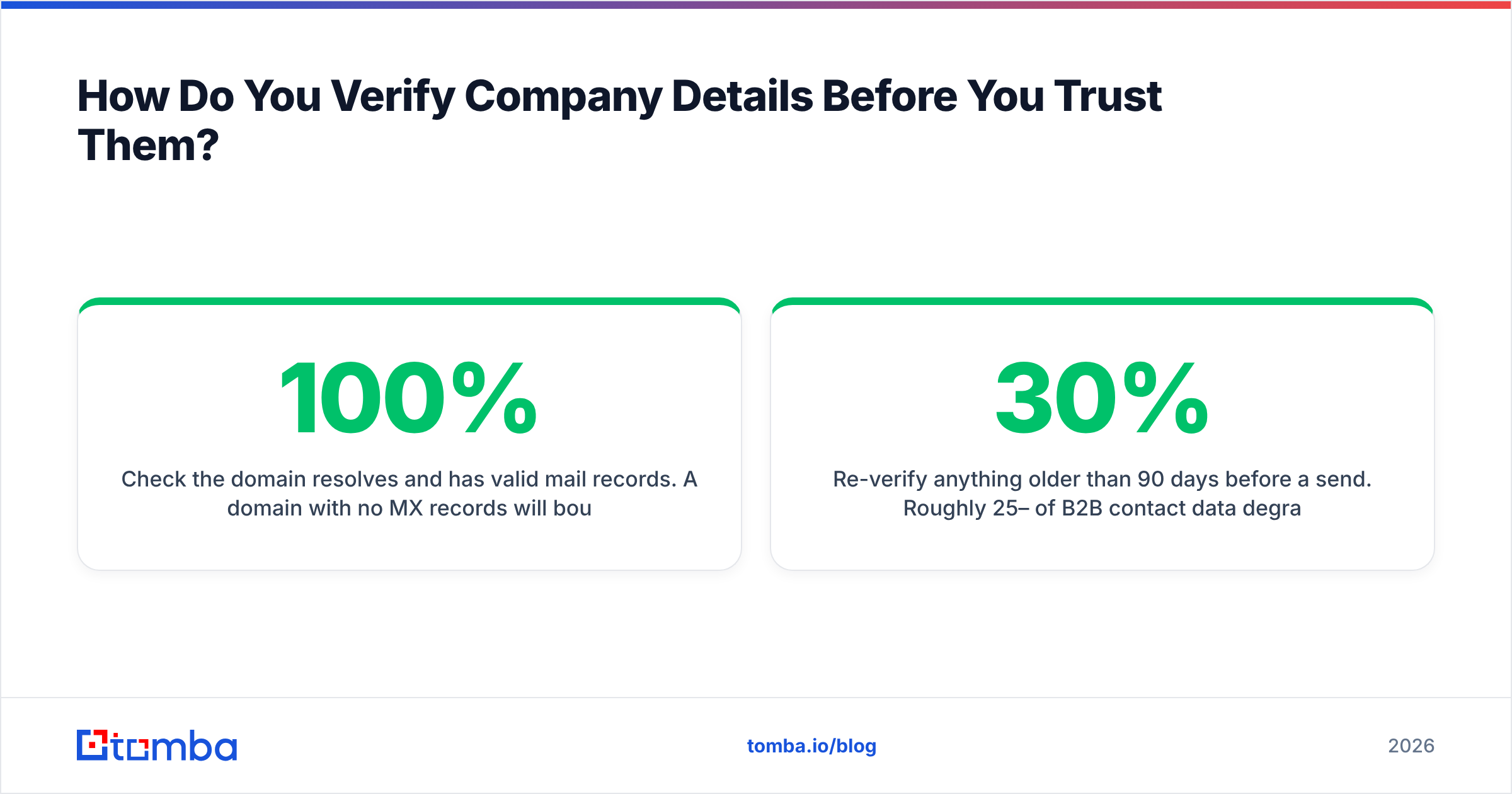
- Check the domain resolves and has valid mail records. A domain with no MX records will bounce 100% of the time regardless of how confident your source was. An SPF checker plus a basic DNS look is a 20-second sanity test.
- Treat catch-all domains as a separate bucket. They accept everything at the SMTP layer, which means standard verification returns "valid" for addresses that do not exist. Route them through a catch-all verifier or hold them out of your main sequence.
- Re-verify anything older than 90 days before a send. Roughly 25–30% of B2B contact data degrades annually. On a two-year-old list, half your records are wrong.
- Sample manually. Pull 20 random rows from any purchased list and check them by hand. If three or more are wrong, the whole file is wrong and you should renegotiate before you import it.
That last one is the cheapest quality control in B2B data and almost nobody does it.
What Does a Repeatable Company Research Workflow Look Like?#
Here is the version that survives contact with a real quarter, at three different scales.
Under 25 accounts (enterprise ABM). Manual, deep, and worth it. Registry filing for structure, 10-K or annual report for strategy, LinkedIn for the buying committee, the careers page for what they are building, then a domain search to get emails for the five people you actually mapped. Budget 45 minutes per account and expect it to pay back on message quality alone.
25–500 accounts (mid-market outbound). Build the account list from firmographic filters, then enrich in bulk. Push the domain list through a bulk email finder rather than one lookup at a time, verify the output, and only hand-research the accounts that clear a scoring threshold. The research effort follows the score, not the alphabet.
500+ accounts (programmatic). This should be code, not clicks. Wire the Tomba API into whatever creates records — form fills, CRM inserts, scraped lists — so enrichment happens at write time and nothing enters the database unresolved. Pair it with a HubSpot integration or an equivalent CRM sync so reps never see an un-enriched row.
If you live in spreadsheets, the middle path is a Google Sheets add-on: paste domains in column A, get company and contact details back in columns B through H, no engineering ticket required.
Whichever scale you are at, log two extra fields on every record: source and verified_at. They cost nothing to write and they are the only thing that makes a data audit possible later.
How Often Do Company Details Go Stale?#
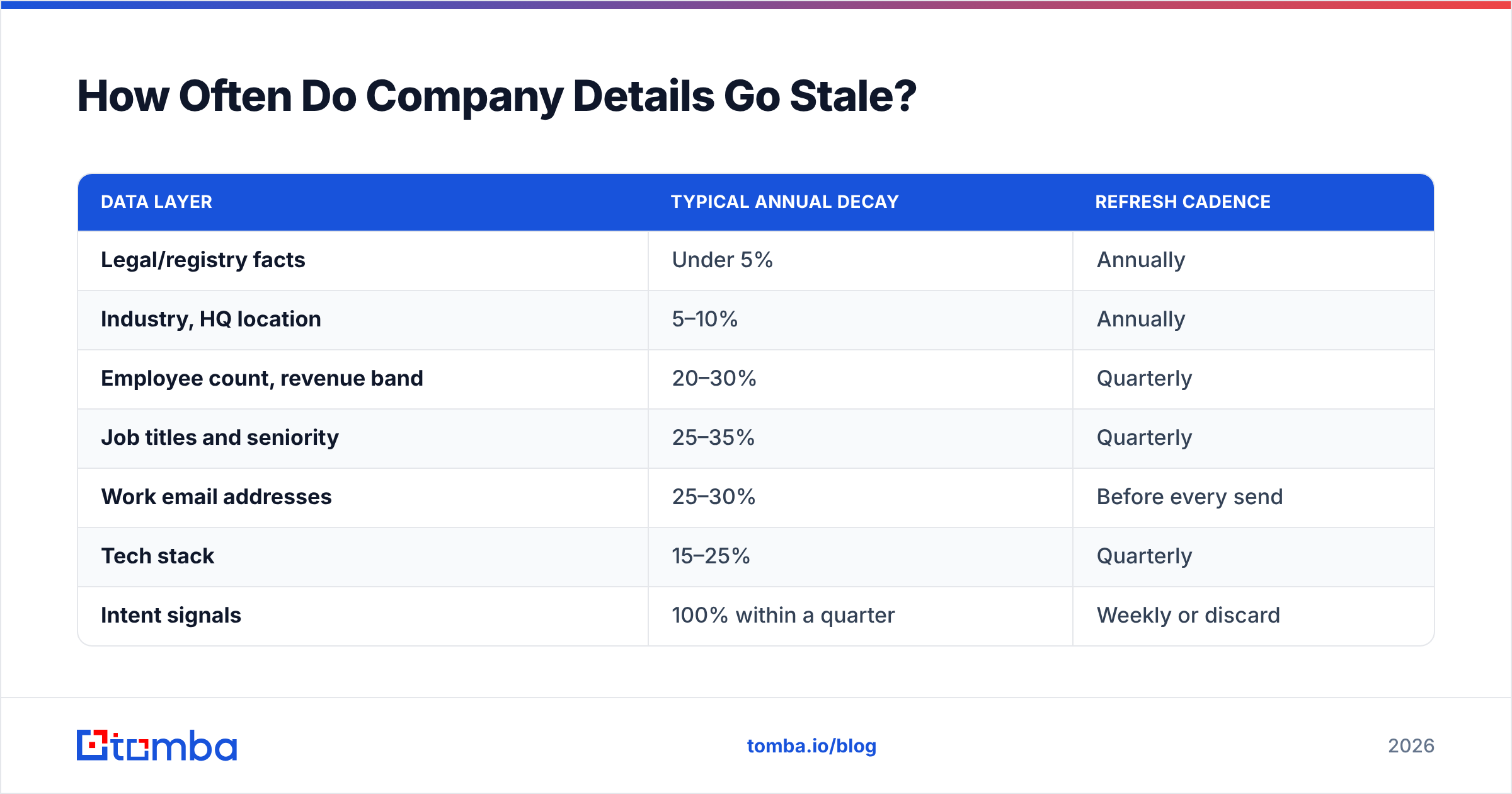
Different layers rot at very different speeds, and your refresh policy should match:
| Data layer | Typical annual decay | Refresh cadence |
|---|---|---|
| Legal/registry facts | Under 5% | Annually |
| Industry, HQ location | 5–10% | Annually |
| Employee count, revenue band | 20–30% | Quarterly |
| Job titles and seniority | 25–35% | Quarterly |
| Work email addresses | 25–30% | Before every send |
| Tech stack | 15–25% | Quarterly |
| Intent signals | 100% within a quarter | Weekly or discard |
The practical rule: never send to an address you have not verified in the current quarter, and never trust a title you have not seen confirmed on LinkedIn in the last six months. Everything else can wait for a scheduled refresh.
One more thing worth internalizing — the cost of bad company data is not the wasted lookup. It is the email deliverability damage. Mailbox providers read bounce rates as a spam signal. A single 500-record send with 15% invalid addresses can suppress inbox placement for the good addresses on your domain for weeks afterward. That is why verification sits at the end of every workflow above, not as an optional step but as the gate.
Where Should You Start?#
If you are researching a handful of strategic accounts, start free: registry filing, website, LinkedIn, in that order. You will get better material than any database export.
If you are working a list, start with the domain. Resolve it, search it, verify what comes back, enrich what survives. That sequence turns "find company details" from an open-ended browsing session into a four-step pipeline you can hand to a junior rep or a cron job.
When you are ready to make it repeatable, the Tomba Email Finder is built for exactly that first mile — give it a domain or a name plus a company, get back verified professional email addresses with confidence scores and sources, through the web app, a spreadsheet add-on, a browser extension, or the API. The free tier covers 25 searches a month if you want to test accuracy against accounts you already know before you pay for anything, and Starter at $49/mo covers most single-rep prospecting. Verify what you find, timestamp what you keep, and your company data stops being a liability.
Related guides#
Ready to find emails that actually work?
Join 150,000+ professionals who stopped guessing and started sending. Free credits on signup — no credit card required.
Get the Tomba newsletter
Practical outbound tactics and product updates — once every two weeks.
About the author